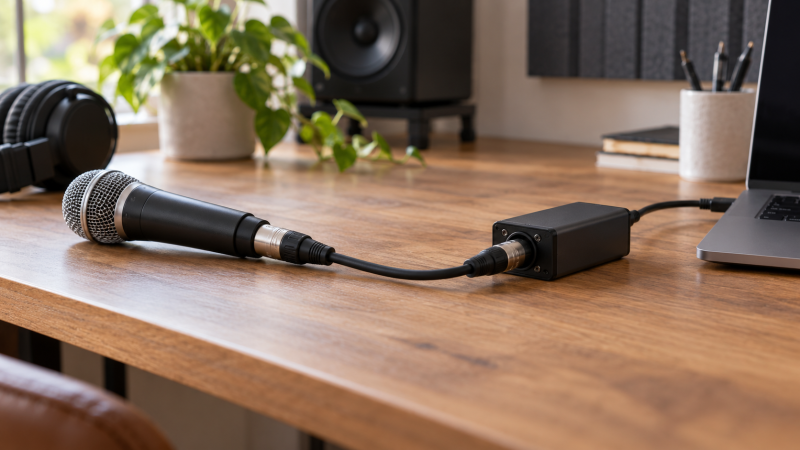
An XLR-to-USB adapter adds analog-to-digital conversion between one microphone and a computer. For a simple dynamic-microphone setup, that can remove the need for a multi-input desktop interface. The tradeoff is limited expansion. These adapters generally serve one microphone, offer fewer gain and monitoring controls, and cannot turn a laptop into a multi-guest recording system.
The seven choices here range from compact control boxes with headphone mixing, one of which lists 24-bit/96 kHz conversion, to straightforward converter cables. USB-A and USB-C are both represented, with lengths from 3.3 to 10 feet. Match the plug to the computer, confirm the operating-system support, and choose enough input gain for the microphone rather than assuming every digital cable records quiet dynamics equally well.
The Pyle PDUSBPP10.6 is the best overall adapter because it combines 24-bit/96 kHz conversion, adjustable volume and mix controls, monitoring, and optional 48V power. The HUALEU 3.3-Foot Cable is the clearest dynamic-microphone value through its stated 21 dB gain, while the CERRXIAN 6.5-Foot Cable is the direct USB-C pick.- Best overall adapter: Pyle PDUSBPP10.6 lists 24-bit/96 kHz audio, 100 dB dynamic range, monitoring controls, and a 5.9-foot USB cable.
- Best simple dynamic-mic cable: HUALEU 3.3-Foot Cable adds a stated 21 dB of gain through a short USB-A converter cable.
- Best USB-C cable: CERRXIAN 6.5-Foot USB-C Cable connects directly to compatible laptops, tablets, and phones at 44.1 or 48 kHz.
XLR-to-USB Adapter Comparison
| Image | Product | Details | Check Price |
|---|---|---|---|
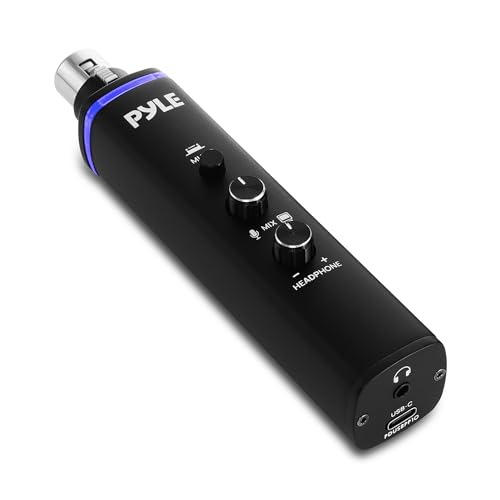 | Pyle PDUSBPP10.6 XLR-to-USB Interface | Computer Connection: USB; exact plug not stated Cable Length: 5.9 ft Digital Format: Up to 24-bit / 96 kHz Gain: Adjustable volume; range not stated Monitoring: Headphone volume and mix control | Check Price on Amazon |
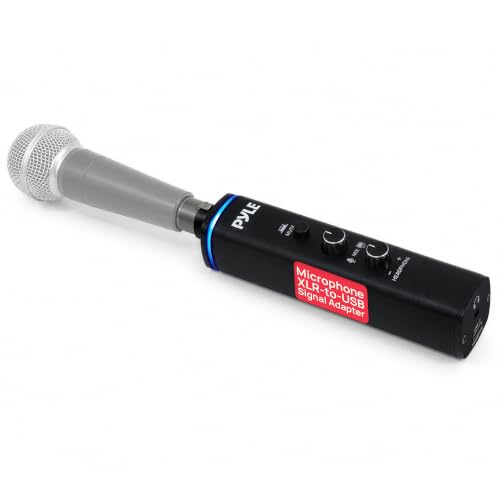 | Pyle PDUSBPP10 XLR-to-USB Adapter | Computer Connection: USB; cable included Cable Length: Not stated Digital Format: Not stated Gain: Control present; range not stated Monitoring: Headphone volume and mix control | Check Price on Amazon |
 | ULBRE 10-Foot XLR-to-USB Cable | Computer Connection: USB-A male Cable Length: 10 ft Digital Format: Not stated Gain: Not stated Construction: Oxygen-free copper, shielding, 6 mm PVC jacket | Check Price on Amazon |
 | HUALEU 3.3-Foot XLR-to-USB Cable | Computer Connection: USB-A Cable Length: 3.3 ft Digital Format: Not stated Gain: +21 dB stated Construction: 24 AWG double-shielded cable | Check Price on Amazon |
 | Yumiwoow 3.3-Foot XLR-to-USB-A Cable | Computer Connection: USB-A Cable Length: 3.3 ft Digital Format: 16-bit / 48 kHz Gain: Not stated Construction: 22 AWG 4N oxygen-free copper; foil and braid shield | Check Price on Amazon |
 | CERRXIAN 6.5-Foot USB-C-to-XLR Cable | Computer Connection: USB-C Cable Length: 6.5 ft Digital Format: 44.1 or 48 kHz; bit depth not stated Gain: Not stated Direction: XLR microphone input to USB-C only | Check Price on Amazon |
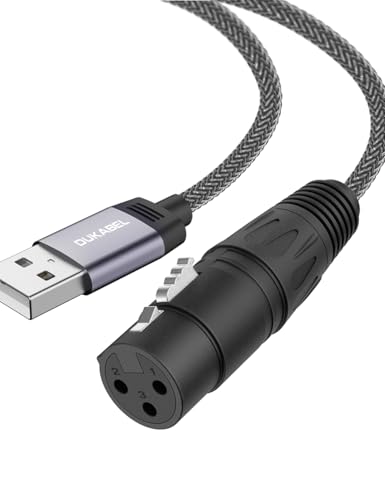 | DUKABEL 6-Foot XLR-to-USB Adapter | Computer Connection: USB; exact plug not stated Cable Length: 6 ft / 1.8 m Digital Format: Not stated Gain: Not stated Direction: Microphone to USB only | Check Price on Amazon |
1. Pyle PDUSBPP10.6 — Best Overall XLR-to-USB Adapter
The Pyle PDUSBPP10.6 is the most fully specified single-microphone adapter in this group. It converts at up to 24-bit/96 kHz and lists a 100 dB dynamic range, which is more published digital detail than the converter cables give. Adjustable volume and mix controls allow real-time monitoring and a blend of microphone and computer playback. Monitoring this way is useful when recording speech without relying on delayed software monitoring.
An XLR input accepts the microphone, while the integrated USB cable is rated at 5.9 feet and reaches a PC, Mac, or Linux computer. Pyle describes the interface as plug and play with no software required. Pyle specifies an aluminum-alloy housing that is compact enough for a mobile kit, but the listing does not state the physical size, weight, connector type at the computer end, headphone jack size, gain range, equivalent input noise, or maximum input level.
Pyle includes 48V phantom power to support compatible condenser microphones, although a dynamic microphone does not need that voltage. Confirm the microphone’s own guidance before enabling it. The active-new offer was marked scarce, so availability may affect the decision. For a dynamic-mic laptop setup, the monitoring controls and published conversion figures make this adapter the best overall choice.
[accentbox color=”blue”]Best for one XLR microphone when you want direct monitoring, mix control, and published 24-bit/96 kHz conversion.[/accentbox]- Up to 24-bit/96 kHz conversion
- Volume, monitor, and mix controls
- 48V phantom power for compatible condenser microphones
- Gain range and input-noise figures are not stated
- Active-new availability was listed as scarce
2. Pyle PDUSBPP10 — Best Control-Equipped Alternative
The Pyle PDUSBPP10 is the same style of control box for a single XLR microphone. It includes adjustable headphone volume and a mix control for balancing microphone input with computer playback. Hardware monitoring is a major advantage over converter cables, which list no headphone connection and leave monitoring to the laptop.
The adapter works with Windows, macOS, and Linux and connects through the included USB cable. Pyle notes that a microphone is not included. The aluminum-alloy enclosure is intended for desk and portable use. The listing does not provide bit depth, sample rate, dynamic range, gain range, noise, headphone connector size, or the USB plug format, so its digital performance cannot be compared directly with the newer PDUSBPP10.6.
Built-in 48V phantom power also supports compatible condensers, though a dynamic microphone does not need it. The PDUSBPP10 is a one-mic mini interface, not a replacement for a two-input unit. Choose it when monitor and mix controls are more important to you than documented high-resolution figures, especially if the PDUSBPP10.6 is unavailable.
[accentbox color=”blue”]Best for a single-microphone desk that needs headphone volume and a mix between microphone and playback, without detailed 24-bit specs.[/accentbox]- Adjustable headphone volume
- Microphone and playback mix control
- 48V phantom power and included USB cable
- Bit depth and sample rate are not stated
- Microphone is not included
3. ULBRE 10-Foot USB Cable — Best for Long USB-A Reach
If the microphone has to sit well away from the laptop, the ULBRE is the longest adapter in this group. It combines a female XLR microphone connector, built-in digital conversion, and a USB-A plug across a 10-foot cable. The extra reach can place a standing microphone, instrument output, or vocal position farther from the laptop without adding a separate analog XLR lead.
ULBRE specifies a construction that includes oxygen-free copper, shielding, a thick copper braid, cotton-yarn wrap, a 6 mm outer diameter, flexible PVC jacket, and metal-alloy connector. Those details describe the cable well, but the listing omits the converter’s bit depth, sample rate, input gain, dynamic range, latency, and microphone-power support. Its operating-system list stops at Windows 8 and Mac OS X, so compatibility with newer systems is less clearly documented than on newer products.
The listing says it can accept microphones, guitars, instruments, or other devices with male XLR output. Input level and wiring still need to match, because an XLR connector alone does not make mic and instrument sources electrically identical. The ULBRE suits a simple dynamic-microphone setup where physical reach is the priority and you can verify that a modern operating system recognizes it.
[accentbox color=”blue”]Best for a dynamic microphone positioned well away from a USB-A laptop when a single 10-foot converter cable is preferred.[/accentbox]- Longest adapter here at 10 feet
- Oxygen-free copper and shielding
- 6 mm flexible PVC cable
- Bit depth, sample rate, and gain are not stated
- Published Windows support stops at Windows 8
4. HUALEU 3.3-Foot Cable — Best Simple Dynamic-Mic Value
A quiet dynamic microphone needs enough gain, and the HUALEU is the only converter cable in this list with a stated 21 dB gain. A stated figure makes it easier to screen for a low-sensitivity dynamic microphone than cables that reveal no gain at all. The 3.3-foot length suits a microphone placed beside a laptop, a compact voice-over desk, or a short route from a receiver to a computer.
The manufacturer specifies 24 AWG double-shielded conductors, a zinc-alloy shell, and gold-plated copper connectors. The listing rates it for bus power from 2.7V to 5V for dynamic-microphone operation, requiring no external supply in that use. The listing says a condenser requires an external 48V phantom source, which is not included. Do not enable external phantom power unless the full adapter and microphone path explicitly supports that arrangement.
Compatibility includes Windows 7 through 11, macOS, Linux, and ChromeOS. The listing does not state bit depth, sample rate, dynamic range, latency, output level, or whether the 21 dB gain is fixed. Even so, its clear gain value, modern OS list, and short direct cable make it the best basic dynamic-mic choice when you don’t need monitoring controls.
[accentbox color=”blue”]Best for a microphone placed close to a USB-A laptop that needs a documented 21 dB digital input boost.[/accentbox]- Stated 21 dB gain
- 24 AWG double-shielded cable
- Current Windows, macOS, Linux, and ChromeOS support listed
- Only 3.3 feet long
- Bit depth and sample rate are not stated
5. Yumiwoow 3.3-Foot Cable — Best Specified USB-A Converter Cable
The Yumiwoow is a 3.3-foot cable with a female XLR connector and a USB-A plug, and it publishes a 16-bit/48 kHz conversion format. The format is lower than the Pyle PDUSBPP10.6’s 24-bit/96 kHz claim, but it is more transparent than cables that do not state their digital format. It supports Windows, macOS, and Linux and names common recording applications such as Audacity, GarageBand, and OBS Studio.
The cable uses 22 AWG 4N oxygen-free copper, foil and metal-braid shielding, gold-plated connectors, and reinforced PVC. Its bend durability is listed above 20,000 cycles, and the listing states lifetime warranty coverage. Those physical specifications make it one of the better-documented cable options. The listing gives no input gain, dynamic range, latency, maximum level, cable diameter, or monitoring output.
Dynamic microphones can connect directly, while a condenser is described as working optimally with an external 48V supply. The adapter itself is not stated to provide phantom power. For a USB-A laptop and nearby dynamic microphone, the Yumiwoow is a strong pick when knowing the conversion format and cable construction is more important than hardware monitoring.
[accentbox color=”blue”]Best for a short USB-A setup where a stated 16-bit/48 kHz format and detailed conductor construction are the priority.[/accentbox]- 16-bit/48 kHz digital format stated
- 22 AWG oxygen-free-copper conductor
- Foil-plus-braid shielding and lifetime warranty
- Input gain is not stated
- Short 3.3-foot reach
6. CERRXIAN 6.5-Foot USB-C Cable — Best Direct USB-C Option
If your laptop has only USB-C, the CERRXIAN connects a female XLR microphone output directly to a USB-C device without an A-to-C adapter. Its 6.5-foot length is long enough for a desk boom arm or nearby standing mic and avoids the surplus length of a 10-foot cable. The listing names phones, tablets, laptops, USB 2.0, and USB 1.1 hosts, subject to device support for USB audio input.
The built-in converter supports 44.1 and 48 kHz sample rates, but no bit depth, gain, dynamic range, latency, or maximum input level is stated. The listed construction is a shielded braided cable and a zinc-alloy plug. The operating-system examples include Mac OS X and older Windows releases through Vista, so compatibility with newer Windows releases is not documented as clearly as on the HUALEU.
CERRXIAN says the XLR end is microphone input only and cannot act as an audio output. It lists dynamic, active, and condenser microphone compatibility, with an external 48V source required for a condenser. The clearest use is a one-way dynamic-mic input into a USB-C laptop. Check phone and tablet app support separately, because a matching port does not guarantee that the app can select the cable as a recording input.
[accentbox color=”blue”]Best for a dynamic microphone connecting directly to a USB-C laptop over a moderate 6.5-foot run.[/accentbox]- Direct USB-C connection
- 6.5-foot length
- 44.1 and 48 kHz sample rates
- Bit depth and gain are not stated
- Current Windows support is not explicitly listed
7. DUKABEL 6-Foot USB Adapter — Best Braided USB-A Cable
The DUKABEL offers a 6-foot female-XLR-to-USB cable for dynamic microphones connecting to a PC, Mac, or compatible tablet. Its nylon-braided cord, metal connectors, and reinforced casing are aimed at frequent handling and mobile use. The one-way signal direction is clearly stated. Microphone audio goes to the USB device, and the adapter does not send USB playback out through XLR.
The listing mentions a built-in DAC, but recording from a microphone to USB needs analog-to-digital conversion. It does not clarify whether DAC is loose terminology or whether the chip contains more than one conversion function. It also omits bit depth, sample rate, input gain, dynamic range, noise, latency, and the exact USB plug style, although the title and model presentation indicate a standard USB adapter rather than USB-C.
Dynamic microphones work directly, while condenser microphones require an additional phantom power source. The cable is explicitly excluded from PlayStation, Wii, Xbox, and Rocksmith use. For laptop recording, choose the DUKABEL for its braided six-foot construction and clear signal direction, not for published digital performance, because those figures are missing.
[accentbox color=”blue”]Best for a USB-A laptop setup that wants a six-foot braided adapter and does not need hardware monitoring controls.[/accentbox]- Six-foot nylon-braided cable
- Metal connectors and reinforced casing
- One-way microphone-to-USB direction clearly stated
- Bit depth, sample rate, and gain are not stated
- DAC wording is unclear for a recording adapter
Buying Guide: Choosing an XLR-to-USB Adapter
Confirm that one microphone is enough
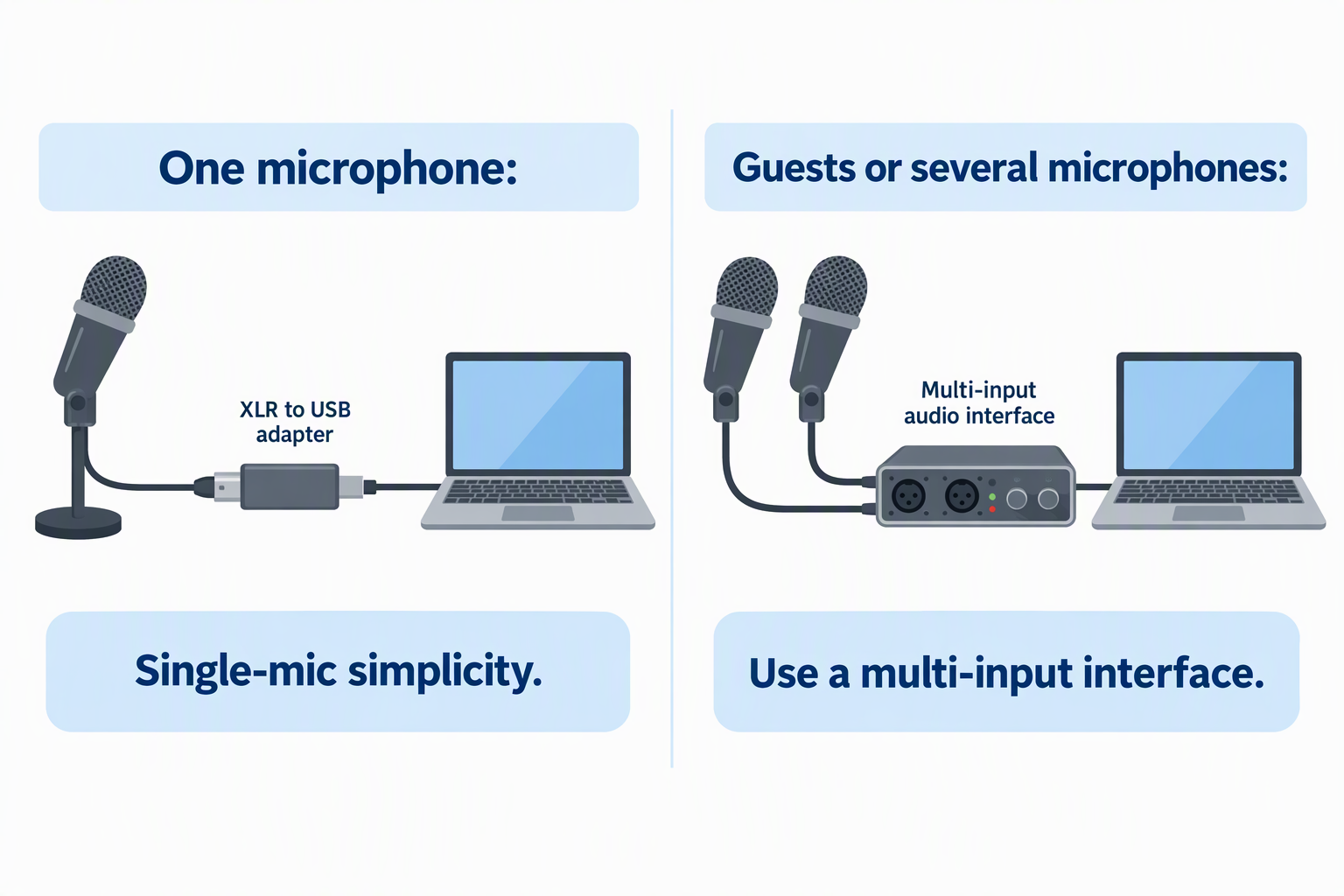
These adapters are built around a single XLR input. They fit voice-over work, solo podcasting, video calls, streaming, and simple instrument recording. A second live microphone requires another supported input path, and recording two independent USB audio devices together can be more complicated than using one two-channel interface.
Plan for the session you will actually record rather than the first test. If guests, stereo microphones, hardware monitoring for two people, or multiple instruments are likely, a conventional multi-input interface may be the better long-term choice. Single-mic simplicity is the reason to buy this category, not a feature to work around later.
Match USB-A or USB-C to the recording device
ULBRE, HUALEU, Yumiwoow, and the Pyle products use or imply conventional USB computer connections, while CERRXIAN directly names USB-C. Confirm DUKABEL’s exact plug style on its listing before you buy. A physical port match avoids an extra adapter, but it does not by itself guarantee operating-system or app recognition.
Check whether the laptop can select the adapter as an audio input and whether the recording software permits the required sample rate. Phones and tablets may need host-mode support or permission settings. Test device recognition before a live session, especially when using a mobile operating system.
Do not confuse cable length with microphone placement freedom
The adapter length must cover the complete route from microphone to computer while leaving relaxed bends at both ends. HUALEU and Yumiwoow are only 3.3 feet, CERRXIAN and DUKABEL are around 6 feet, and ULBRE reaches 10 feet. Measure along the boom arm and desk path, not through open air.
A very long USB converter cable can be convenient, but it also places the electronics and connector strain at fixed points. Keep the cable away from chair wheels and sharp desk edges. Secure the run without hanging its weight from the laptop port.
Compare gain before resolution headlines
Bit depth and sample rate are important, but a quiet dynamic microphone also needs enough low-noise input gain. HUALEU is the only simple cable here to publish a 21 dB gain value. The Pyle models offer controls, but their numeric gain range is not stated. An underpowered input can produce a quiet recording even at a high sample rate.
Microphone sensitivity, speaking distance, voice level, and software level all affect results. Record the actual source at the intended position and leave peak headroom. If high digital gain is needed after recording, background and converter noise may rise with it. Useful gain is more important than an impressive format alone.
Decide whether direct monitoring is required
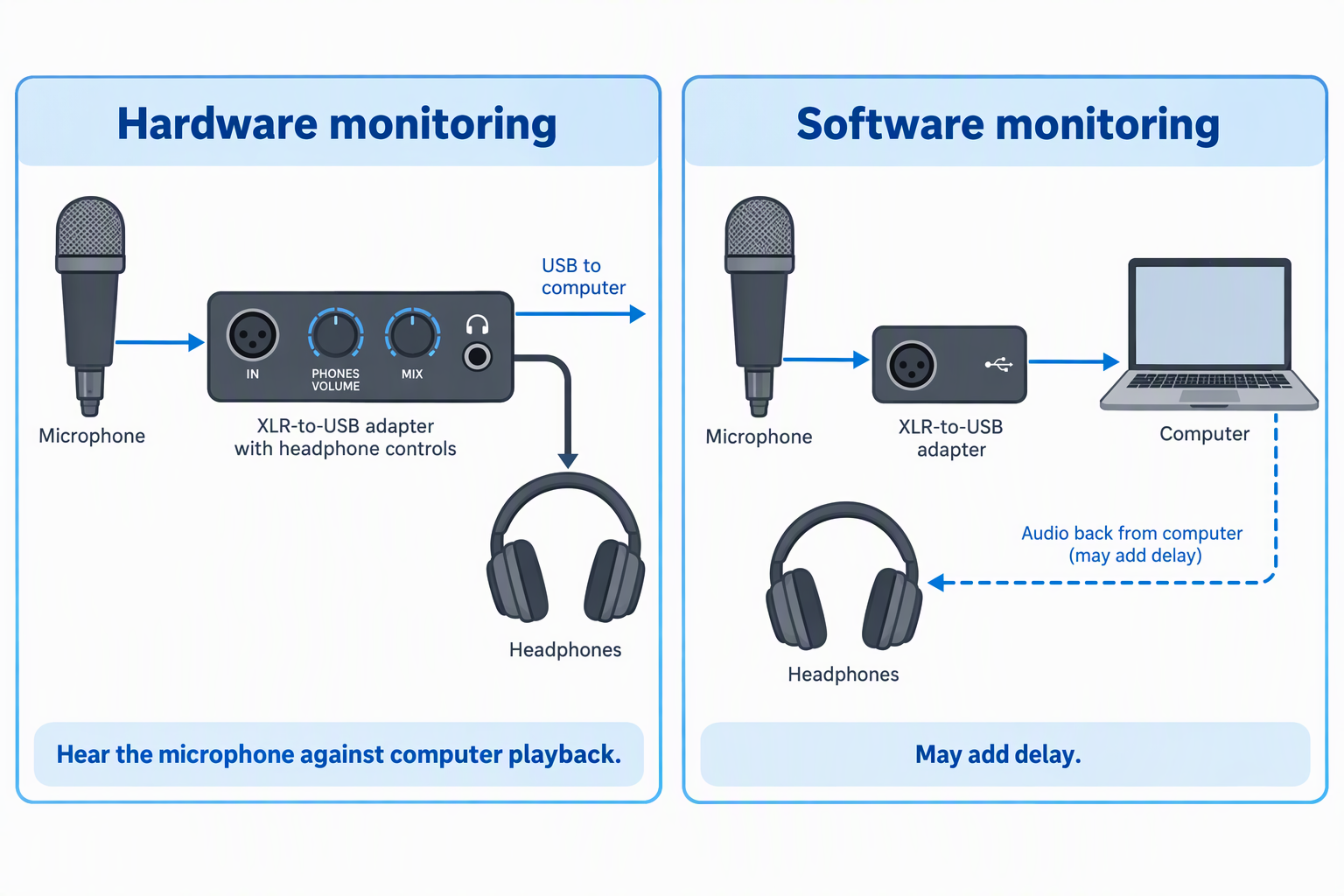
The Pyle adapters include headphone volume and mix controls, so you can hear the microphone input against computer playback. Basic converter cables do not list a headphone output. Monitoring through recording software may add delay depending on the laptop, driver, buffer, and application. Hardware monitoring is valuable for spoken-word performance and overdubbing.
For simple voice notes or calls, software monitoring may be unnecessary. For a podcast or vocal recording, hearing the signal can reveal clipping, cable noise, or poor placement before the take ends. Choose the monitoring method before choosing an adapter.
Treat condenser support as a separate requirement
Dynamic microphones normally do not need phantom power. The Pyle models include 48V for compatible condensers, while HUALEU, Yumiwoow, CERRXIAN, and DUKABEL say an external source is needed for condenser use. An external phantom supply adds another box and two analog connections to what was supposed to be a simple cable setup.
Check the exact microphone specification before enabling any power. A cable that works directly with a dynamic mic does not automatically power a condenser. If regular condenser use is expected, a proper interface with switchable phantom power and documented gain may be cleaner than stacking adapters. Buy for the microphone actually used.
Verify the published digital format and OS support
Pyle PDUSBPP10.6 lists 24-bit/96 kHz and 100 dB dynamic range. Yumiwoow states 16-bit/48 kHz, and CERRXIAN states 44.1 and 48 kHz without bit depth. The remaining listings omit core format details. Unstated specifications should not be guessed from USB branding.
Operating-system lists also vary in age. HUALEU explicitly names modern Windows, while ULBRE and CERRXIAN cite older releases. Class-compliant devices may still work on newer systems, but support on a newer system is not proven by an old list. Confirm recognition on the target laptop during the return window.
Related Laptop Recording Guides
- Top standalone microphone preamps for laptop recording
- Best XLR phantom power supplies for condenser microphones
- XLR microphone cable snakes for podcast desks
- Best HDMI capture dongles for laptop streaming
- HDMI loop-out capture cards for camera monitoring
- Best LED video light panels for small creator studios
- Overhead camera mounts for desk tutorials
- Light stands for portable creator video kits
Frequently Asked Questions
Is an XLR-to-USB cable the same as an audio interface?
Not quite. An XLR-to-USB cable contains at least the conversion needed to turn one analog microphone signal into USB audio, so it performs a narrow interface role. It usually lacks the multiple inputs, detailed gain metering, outputs, and control range of a desktop unit. Treat it as a converter for one microphone.
The Pyle products add monitoring and mix controls, so they are closer to mini interfaces than basic cables. They still present one XLR input. Choose a full interface when the recording setup needs room to grow.
Will these adapters power a dynamic microphone?
No, a conventional passive dynamic microphone generates its signal without phantom power. HUALEU, DUKABEL, and the other direct adapters are intended to work from USB power for their own conversion electronics. Do not enable 48V merely because the option exists.
Some active or specialty microphones have different requirements. Read the exact microphone documentation and the adapter instructions. Power needs come from the microphone design, not the XLR connector alone.
Can I use a condenser microphone later?
Yes, with the Pyle PDUSBPP10.6 and PDUSBPP10, which include built-in 48V phantom power for compatible condensers. Several cables say a condenser can work only with an external phantom source. That external supply adds cabling and compatibility decisions.
If condenser use will be frequent, compare the total chain against a conventional interface with documented phantom current and gain. A simple cable may stop being simple once extra power hardware is inserted. Plan around the main microphone rather than an occasional possibility.
Why is my dynamic microphone recording too quietly?
Possible causes include low microphone sensitivity, excessive speaking distance, insufficient adapter gain, low software input level, or incorrect device selection. HUALEU states 21 dB gain, while most cable products do not publish a value. A USB connection does not guarantee enough gain for every dynamic microphone.
Move to the intended working distance, select the correct input, and set levels with the actual voice. If the signal stays too low, a higher-gain interface or suitable preamp may be necessary. Avoid solving level only with extreme post-recording amplification.
Can I hear the microphone without delay?
Yes, with the Pyle adapters, which list real-time monitoring with headphone volume and a mix control for microphone and playback. The converter cables do not state direct-monitor outputs. Software monitoring through the laptop can introduce latency depending on the application and buffer. Hardware monitoring is the clearer low-delay path when it is provided.
If live monitoring is unnecessary, a simple cable can still record successfully. For podcasting, singing, or overdubbing, check the headphone route before purchase. The adapter must have a monitor output to give you direct monitoring.
Bottom Line
The Pyle PDUSBPP10.6 is the best single-microphone choice when conversion specs and direct monitoring are the priority. The HUALEU 3.3-Foot Cable is the most informative basic value through its stated 21 dB gain, while the Yumiwoow Cable publishes a 16-bit/48 kHz format and detailed conductor build. For a laptop with only USB-C, the CERRXIAN 6.5-Foot Cable avoids an extra plug adapter.