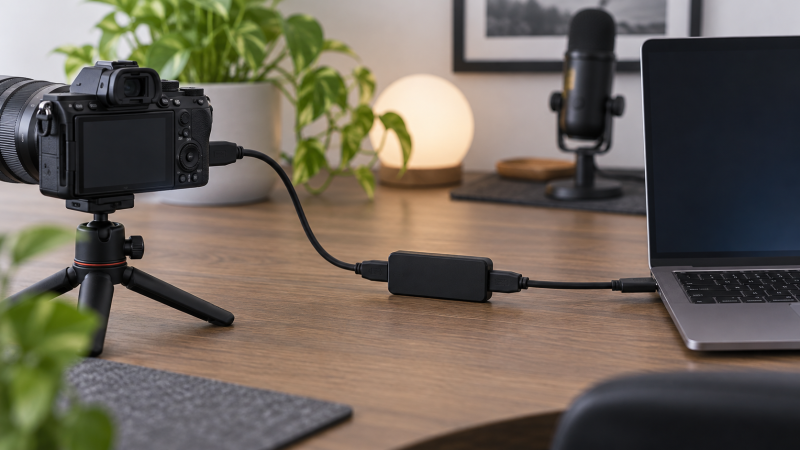
An HDMI capture dongle brings video and audio from a camera, console, or other HDMI source into a laptop for streaming, recording, teaching, or conferencing. Input resolution and capture resolution are different specifications. A dongle may accept a 4K signal while sending only 1080p video to OBS or another application.
The eight products below range from compact USB-C dongles to capture devices with HDMI loop-out and microphone inputs. Before buying, decide between 1080p60 motion and 2K30 detail, whether you need a direct gaming display through loop-out, whether the laptop needs USB-A or USB-C, and whether the laptop’s operating system and capture software are supported.
Choose by captured output and workflow connections, not the HDMI input headline: a 4K input does not mean the laptop records in 4K.Best HDMI Capture Dongles for Laptop Streaming Compared
| Image | Product | Details | Check Price |
|---|---|---|---|
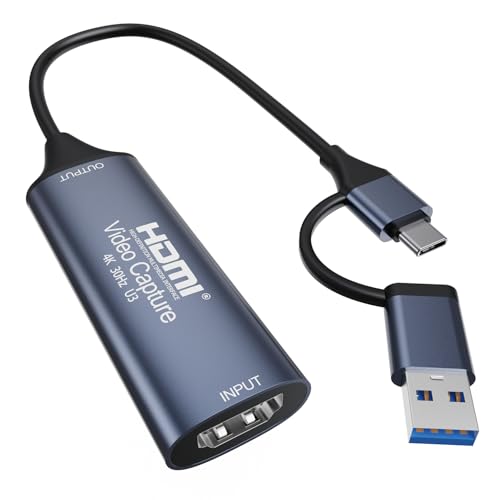 | Clariviews USB-C Capture Card | HDMI input: Up to 4K30 Capture: Up to 1080p60 Host: USB-C with tethered USB-A adapter Standards: USB 3.0, UVC, UAC | Check Price on Amazon |
 | Papeaso PAP-001 | HDMI input: Up to 4K30 Capture: 1080p60 conservative Host: USB-A and USB-C Software: OBS, VLC, AMCap stated | Check Price on Amazon |
 | UGREEN 15389 | HDMI input: Up to 4K30 Capture: 2K30 or 1080p60 Host: USB-A and USB-C Interface: 5 Gbps USB 3.0 | Check Price on Amazon |
 | Acer OCB5A0 | HDMI input: Up to 4K30 Capture: 2K30 or 1080p60 conservative Host: USB-A and USB-C Case: Aluminum | Check Price on Amazon |
 | VIXLW V316B-FR | HDMI input: 4K30 or 4K60 stated Capture: Up to 2K30; 1080p60 highlighted Passthrough: HDMI loop-out Audio: 3.5 mm TRS microphone input | Check Price on Amazon |
 | Audio Express AXHDCAP | HDMI input: Up to 4K30 conservative Capture: Up to 1080p30 Host: USB 2.0 Systems: Windows, macOS, Linux | Check Price on Amazon |
 | KuWFi HDMI03 | Capture: Up to 1080p60 Host: USB 3.0; USB 2.0 compatible Video: UVC, YUV 4:2:2 Audio: UAC, 48 kHz PCM stereo | Check Price on Amazon |
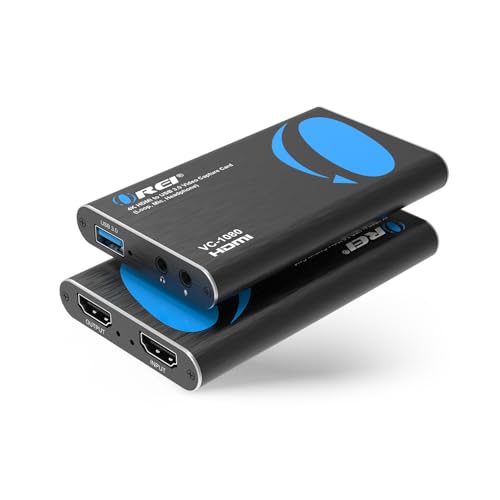 | OREI VC-1080 | HDMI input: 4K30 or 4K60 4:2:0 stated Capture: 1080p60 Passthrough: HDMI loop-out Audio: Mic input and headphone output | Check Price on Amazon |
1. Clariviews USB-C Capture Card — Best Compact Dual-Connector Pick
The Clariviews dongle is a compact option for a laptop bag. Clariviews states it accepts HDMI input up to 4K at 30Hz and captures up to 1920 x 1080 at 60 frames per second through USB 3.0. That combination suits camera feeds, console gameplay, lessons, and meetings where smooth Full HD output is more useful than recording the original 4K signal.
A built-in USB-C plug connects to modern laptops and compatible Android devices. The tethered USB-A adapter remains attached, so it is less likely to disappear between setups. The attached adapter suits someone who moves between a modern USB-C notebook, an older USB-A workstation, and occasional mobile capture.
The manufacturer specifies support for UVC and UAC, YUY2 and MJPEG video formats, and L-PCM audio. Actual resolution and frame-rate options vary with the video format, USB port, computer, and capture application. It requires OBS Studio, VLC, AMCap, or another compatible program and does not record by itself.
Signal direction is HDMI source to USB host only. It cannot add HDMI output to a laptop, and HDCP-protected content may not capture. No external power or extra driver is stated, so it is a direct choice for a compact setup built around capture software.
Choose Clariviews when you want 1080p60 capture and a USB-C plug with an attached USB-A adapter that cannot be left behind. Our TakeBuy the Clariviews capture card for a portable laptop stream built around 1080p60 and standard UVC software. Its tethered USB-A adapter makes it easy to move between host ports, while the compact body needs no external power. It has no stated HDMI loop-out, so console players who need a direct gaming display should choose OREI or VIXLW.
- Captures up to 1080p at 60 fps over USB 3.0.
- USB-C plug with tethered USB-A adapter.
- UVC, UAC, YUY2, MJPEG, and L-PCM support stated.
- No HDMI loop-out is stated.
- HDCP-protected signals may not capture.
2. Papeaso PAP-001 Capture Card — Best Simple USB-A and USB-C Dongle
The Papeaso PAP-001 is another compact dual-interface capture device. Its detailed bullet states HDMI input up to 3840 x 2160 at 30Hz and USB output up to 1920 x 1080 at 60Hz. The product title mentions 2K30 capture, but the supplied technical bullet gives 1080p60 as the maximum output, so that is the conservative planning specification.
Both USB-A and USB-C host connections are built into the design. Papeaso lists compatibility with Windows, macOS, Android, laptops, tablets, and phones, plus HDMI sources such as DSLR cameras, camcorders, action cameras, PS4 and PS5, Switch, and Xbox. The signal path is one-way from HDMI to USB.
Streaming and recording require capture software such as OBS, VLC, or AMCap. Papeaso specifically notes that OBS should be restarted after audio setup when no sound is present. The listing claims low-latency preview, but no HDMI loop-out is named, so a competitive console player would still view through the software preview unless the setup uses another split path.
Use 1080p60 as the conservative output target because the title mentions 2K30 while the detailed specification names 1920 x 1080 at 60Hz maximum output. Our TakeBuy the Papeaso PAP-001 for a straightforward USB-A or USB-C laptop capture workflow at 1080p60. It supports a broad source list and common capture applications without adding a separate host adapter. The conflicting 2K30 title means buyers needing resolution above 1080p should choose UGREEN, whose 2K30 output is stated consistently.
- Detailed bullet states 4K30 input and 1080p60 output.
- USB-A and USB-C host interfaces.
- Works with common camera and console sources.
- Listing conflicts on 2K30 versus 1080p60 output.
- No HDMI loop-out is stated.
3. UGREEN 15389 Capture Card — Best Overall for Laptop Streaming
UGREEN provides the clearest combination of output options in this group. The 15389 accepts a 4K30 HDMI input and captures either 2K at 30 frames per second or 1080p at 60 frames per second. The two modes let a creator choose more spatial detail for a mostly static camera feed or smoother motion for gameplay and live demonstrations.
The USB 3.0 connection is rated at 5 Gbps and is backward compatible with USB 2.0, though the highest modes require the faster path. Both USB-A and USB-C host interfaces are included. The built-in cable uses tinned copper conductors, while an aluminum-alloy case helps dissipate heat and shield against interference during longer sessions.
UGREEN lists Windows, macOS, Linux, phones, tablets, and iPadOS devices. USB-C iPads require iPadOS 17 or later. Supported applications include OBS Studio, XSplit, PotPlayer, and QuickTime Player. Console sources include Switch, Switch 2, PlayStation, Xbox, and Quest devices, with HDCP disabled where the source requires that change for capture.
Like the compact dongles above, signal flow is HDMI input to USB output. There is no stated HDMI loop-out or microphone input. UGREEN is the strongest general laptop pick for creators who value a well-defined 2K30 and 1080p60 choice more than direct console passthrough.
Buy the UGREEN 15389 for the best balance of capture modes, host connections, operating-system support, and physical construction. Choose 1080p60 for motion-heavy streams or 2K30 when you want added detail more than frame rate. Console players who need a separate lag-free display should use a loop-out model instead.
- Captures 2K30 or 1080p60 from a 4K30 input.
- USB-A and USB-C with 5 Gbps USB 3.0.
- Windows, macOS, Linux, mobile, and iPadOS support stated.
- No HDMI loop-out or microphone input is stated.
- USB-C iPads require iPadOS 17 or later.
4. Acer OCB5A0 Capture Card — Best Aluminum Dual-Interface Alternative
The Acer OCB5A0 accepts HDMI input up to 4K30 and uses a 5 Gbps USB 3.0 host link. The listing title and first heading advertise 1080p60 and 2K30, while the body text unexpectedly says 2K60. Because those statements conflict, 2K30 is the safer planning target, with 1080p60 for smooth streaming.
A two-in-one USB-A and USB-C interface covers current and older laptop ports. The compact aluminum housing is intended to dissipate heat during prolonged capture. Acer recommends a USB 3.0 port for best performance, even though the device connects physically to a broader device set.
The stated operating systems include Windows 7 through 10, macOS, Linux, Android, and iPadOS 17 or later. It works with OBS Studio, QuickTime Player, TikTok, Twitch, and YouTube, and names consoles, cameras, TV boxes, and Quest 2 or 3 among its sources.
Transmission is one-way from HDMI to USB, with no stated loop-out. The Acer is a close UGREEN alternative for someone who wants an aluminum dual-interface dongle but can accept a less consistent 2K specification.
Plan around 2K30 or 1080p60 because the Acer listing conflicts between a 2K30 heading and a 2K60 sentence. Our TakeBuy the Acer OCB5A0 when its compact aluminum body and USB-A or USB-C connection suit a portable 1080p60 stream. Treat 2K30 as the conservative higher-resolution target until the current exact offer confirms otherwise. UGREEN remains the clearer choice when you need unambiguous output specifications.
- States 4K30 input and 1080p60 capture.
- USB-A and USB-C host interfaces.
- Aluminum case for heat dissipation.
- Listing conflicts on 2K30 versus 2K60.
- No HDMI loop-out is stated.
5. VIXLW V316B-FR Capture Card — Best Loop-Out Value Pick
The VIXLW V316B-FR adds the connections missing from the compact dongles. It has HDMI loop-out for a direct TV or monitor feed while the USB link captures on the laptop. This arrangement is useful for console streaming because the player can use the direct display instead of relying on a software preview.
The supplied record says HDMI input supports 4K30 or 4K60 and 1080p120 or 144Hz, while excluding 4K120 and 4K144. USB output is stated up to 2K30, and the product title highlights 1080p60. Input refresh and captured output are separate, so a fast console input does not mean the laptop records that same high-refresh signal.
A 3.5 mm TRS microphone input allows live commentary. The device is recognized as a webcam without a separate driver or power supply and supports Windows, macOS, OBS, PotPlayer, VLC, and major streaming platforms. The supplied bullet unexpectedly refers to a Rybozen capture card, so verify the current exact offer and included hardware before ordering.
Choose VIXLW when direct HDMI loop-out and a 3.5 mm TRS microphone input are more important than the smallest dongle body. Our TakeBuy the VIXLW V316B-FR for console streaming that needs HDMI loop-out and a direct commentary microphone input. It offers a more complete streaming signal path than a one-way dongle. Confirm the exact model and capture modes because the supplied listing mixes branding and several input and output figures.
- HDMI loop-out for a direct gaming display.
- 3.5 mm TRS microphone input.
- Output stated up to 2K30 with 1080p60 highlighted.
- Listing mixes VIXLW and Rybozen branding.
- Input refresh claims do not equal capture output.
6. Audio Express AXHDCAP — Best Basic USB 2.0 Pick
The Audio Express AXHDCAP is the low-demand option for meetings, teaching, basic camera capture, and streams that only need 1080p30. Although an early bullet mentions 4K60 input and 1080p output, the detailed note limits the device to 4K30 HDMI input and 1920 x 1080 at 30 fps output. Those lower figures are the safe specifications to use.
This device is explicitly USB 2.0 only and is not compatible with USB 3.0 recording speeds or higher-resolution capture beyond 1080p30. That limitation makes it a poor fit for fluid 60 fps gameplay but acceptable for talking-head video, presentations, older laptops, and lower-motion sources.
No driver or external power supply is stated. It supports Windows, macOS, Linux, OBS, Zoom, PotPlayer, VLC, Twitch, and YouTube. Audio Express also clearly warns that the dongle does not add HDMI output to a laptop. It captures an HDMI source into USB and requires software to record.
The AXHDCAP is limited to USB 2.0 and 1080p30 capture, so it is for lower-motion streams rather than 60 fps gameplay. Our TakeBuy the Audio Express AXHDCAP only when 1080p30 is enough and the laptop workflow specifically benefits from a basic USB 2.0 capture device. It can suit classes, meetings, and static camera feeds. Every USB 3.0 option above is a better starting point for 1080p60 motion.
- Clear conservative limit of 4K30 input and 1080p30 output.
- No external power or separate driver stated.
- Works with Windows, macOS, Linux, and common software.
- USB 2.0 only.
- Limited to 1080p30 capture.
7. KuWFi HDMI03 Capture Dongle — Best Windows 7 Option
The KuWFi HDMI03 captures up to 1920 x 1080 at 60Hz through USB 3.0. It supports UVC video, UAC audio, YUV 4:2:2 output, and 48 kHz PCM stereo. The capture hardware automatically detects the input format and converts it to the selected output size and frame rate.
KuWFi states USB 3.0 throughput of 300 to 350 MB per second and backward compatibility with USB 2.0. Use USB 3.0 for the stated 1080p60 target. Processing is handled by the grabber according to the listing, which says it does not occupy the CPU, though the capture application and encoding workflow will still use laptop resources.
The unusual fit here is legacy Windows support. Windows 7 needs a driver, while Windows 8, 8.1, Windows 10 or later, Linux, and macOS are described as plug and play. No USB-C connector, HDMI loop-out, microphone input, or 4K input mode is stated in the supplied record.
Buy the KuWFi HDMI03 when a Windows 7 capture laptop needs a documented driver path or when 1080p60 UVC and 48 kHz PCM cover the stream. Its connection set is less flexible than USB-A and USB-C dongles. Confirm driver availability before relying on it for a legacy system.
- Captures up to 1080p60 over USB 3.0.
- UVC, UAC, YUV 4:2:2, and 48 kHz PCM stated.
- Explicit Windows 7 driver support.
- No USB-C interface or HDMI loop-out is stated.
- Windows 7 requires a separate driver.
8. OREI VC-1080 Capture Card — Best for Loop-Out and Commentary
The OREI VC-1080 is the most complete console-streaming device in this selection. It captures Full HD 1080p at 60Hz through USB-A while providing HDMI loop-out to a television or monitor. The direct display path avoids depending on the OBS preview for gameplay.
Its HDMI input accepts 4K30 or a stated 4K60 signal using 4:2:0 chroma. Captured output remains 1080p60. UVC and UAC support, automatic format detection, and 48 kHz PCM audio are named in the product title, while the listing describes automatic webcam recognition and no external power requirement.
A 3.5 mm TRS microphone input mixes commentary into the workflow, and a 3.5 mm stereo headphone output provides monitoring. The device works with Windows, macOS, and Linux and names OBS, Twitch, YouTube Live, Facebook Live, PotPlayer, and VLC. The included host cable is USB-A.
OREI says the loop-out is zero delay, which refers to the direct viewing path rather than the USB software preview or stream latency. The laptop still needs enough performance for the selected encoding and broadcasting settings.
OREI combines 1080p60 capture, HDMI loop-out, microphone input, and headphone output, making it the best complete console-to-laptop streaming path here. Our TakeBuy the OREI VC-1080 when console gameplay needs a direct monitor path plus 1080p60 capture and live commentary. Its loop-out, microphone input, headphone output, and broad software support reduce the number of separate boxes around the laptop. Choose a compact UGREEN or Clariviews dongle when passthrough and audio jacks are unnecessary.
- Captures 1080p60 over USB 3.0.
- HDMI loop-out for direct display viewing.
- 3.5 mm microphone input and headphone output.
- Host connection is stated as USB-A.
- 4K input is downscaled to 1080p capture.
Buying Guide
1. Separate input resolution from captured output
An HDMI input figure describes the signal the dongle can accept, not necessarily what reaches the laptop. Most products here accept 4K but capture at 1080p60, 2K30, or 1080p30. That down-conversion can still be useful because the camera or console does not need to switch to a lower output mode.
Choose based on the file or stream you need to produce. UGREEN states 2K30 and 1080p60 output, while Audio Express stops at 1080p30. For a sharper source monitor outside the capture path, see our 4K monitors for content creators.
2. Choose 60 fps for motion or 30 fps for detail
Fast gameplay, demonstrations, and camera movement benefit from 1080p60. Clariviews, Papeaso, UGREEN, Acer, KuWFi, and OREI all state a 1080p60 path. VIXLW highlights 1080p60 and also states output up to 2K30.
Static presentations, teaching, and talking-head video may work at 30 fps. UGREEN’s 2K30 option trades frame rate for more captured pixels, while Audio Express provides only 1080p30. Match OBS canvas and output settings to the mode the dongle actually exposes.
3. Decide whether console play needs HDMI loop-out
A software preview passes through the capture device, USB, the application, and the laptop display. HDMI loop-out gives the player a separate direct display path while the laptop records or streams. VIXLW and OREI are the two products here with stated loop-out.
A compact dongle without passthrough is simpler for cameras and presentations. Do not assume a low-latency software preview equals a zero-delay gaming display. For more console input management, an HDMI switch is a different device and does not replace capture.
4. Match USB-A, USB-C, and USB speed
Clariviews, Papeaso, UGREEN, and Acer provide both USB-A and USB-C host options. Connector shape and USB speed are separate details, so a USB-C port is not automatically the fastest available port on every laptop. Use the specified USB 3.0 path for 1080p60 or 2K modes.
Audio Express is explicitly limited to USB 2.0 and 1080p30. Backward-compatible USB 3.0 dongles may also reduce available modes when connected through USB 2.0. Our USB-C hub guide can help when the laptop lacks enough direct ports, though direct connection is the cleaner troubleshooting path.
5. Check UVC, software, and operating-system support
UVC devices normally appear to compatible software as camera sources. Clariviews, KuWFi, and OREI explicitly state UVC support, while several others describe driver-free webcam recognition. The software still needs correct video, audio, canvas, and encoder settings.
Operating-system details vary. UGREEN covers current desktop platforms and iPadOS 17 or later, while KuWFi documents a Windows 7 driver requirement. Confirm the exact OS and application version before building a mobile or legacy workflow. Our laptops for live streaming guide covers host hardware considerations.
6. Plan audio before going live
Most dongles carry embedded HDMI audio into the capture application. VIXLW and OREI add a stated 3.5 mm TRS microphone input, while OREI also provides headphone output. Decide whether commentary enters through the capture device, a USB microphone, or a separate audio interface.
Monitor a private test recording before streaming. Papeaso says OBS may need a restart after audio setup when sound is missing. For a separate voice path, compare USB microphones and compact audio interfaces.
7. Account for HDCP and protected sources
Capture devices may not accept protected HDMI content. Clariviews states that HDCP-protected signals may not capture, and UGREEN instructs users to disable HDCP on supported consoles. Do not treat a blank preview as proof that the dongle is defective before checking the source setting.
Only capture content and signals you are authorized to use. A capture dongle is not an HDCP bypass tool. Cameras and gameplay sources with capture allowed are the intended fit for these products.
FAQ
Can an HDMI capture dongle record 4K on a laptop?
No, not with these products at their stated captured-output limits. Most accept a 4K HDMI input but send 1080p60, 2K30, or 1080p30 to the laptop.
Input acceptance helps connect a 4K source without changing its main output format. It does not turn a 1080p capture path into 4K recording.
Is 1080p60 better than 2K30 for streaming?
It is usually better for fast motion, while 2K30 can preserve more spatial detail in slower material. Choose according to the content and platform rather than treating either mode as universally better.
Gameplay often favors 60 fps. Presentations, teaching, and fixed-camera work may be comfortable at 30 fps.
Do I need HDMI loop-out for console streaming?
You need it when you want a direct television or monitor view while the laptop captures. OREI and VIXLW provide stated HDMI loop-out paths.
It is optional for camera capture and noninteractive sources. A software preview can be enough when reaction time is not a concern.
Will a capture dongle add HDMI output to my laptop?
No, these devices convert an HDMI source into a USB capture input. They do not make the laptop send video to an HDMI display.
For display output, use the laptop’s supported graphics port and a suitable adapter or dock. Audio Express and Clariviews explicitly warn against confusing these directions.
Why is my capture card showing a black screen?
Common causes include HDCP, an unsupported input mode, wrong software source, a slow USB port, a bad HDMI cable, or another application holding the device. Start with an allowed 1080p source and a direct USB 3.0 connection.
Then check the source’s HDCP setting, the HDMI cable, and OBS format choices. Change one variable at a time so the failing part remains identifiable.
Can I use a camera as a webcam through a capture dongle?
Yes, when the camera provides a compatible HDMI output and can remain powered for the session. Clariviews, Papeaso, UGREEN, Acer, Audio Express, and OREI all name camera capture use cases.
Set the camera to a clean HDMI feed if it supports one. Otherwise focus boxes, menus, or status icons may appear in the captured image. Our camera capture card guide covers that workflow in more depth.
Bottom Line
UGREEN 15389 is the best overall laptop capture dongle because it clearly supports 2K30 or 1080p60, USB-A and USB-C, and a broad software and OS set.
Choose Clariviews for the most convenient tethered adapter, Papeaso for a simple dual-interface alternative, Acer for an aluminum portable body, VIXLW for loop-out value, Audio Express for basic 1080p30 USB 2.0 capture, KuWFi for documented Windows 7 support, or OREI for the most complete loop-out and commentary setup.