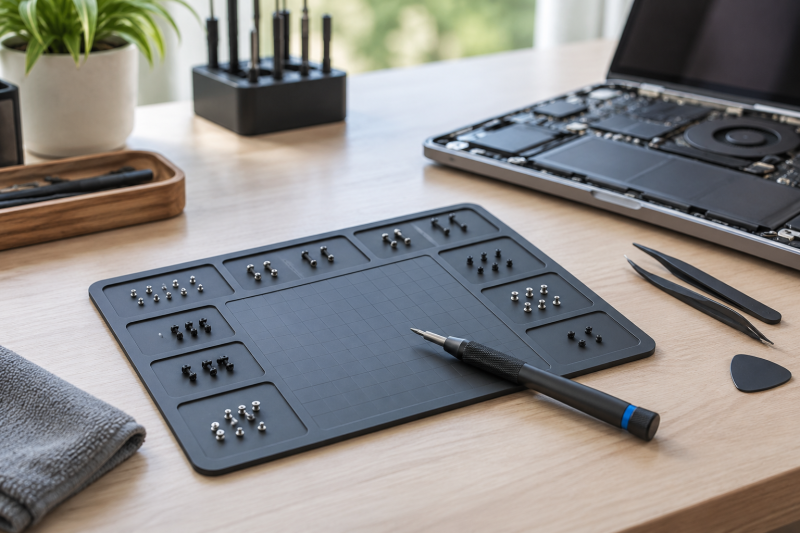
Opening a laptop is usually straightforward. Putting every tiny screw back in its original location is the part that creates risk. A magnetic project mat holds each fastener in a parked position while the keyboard, battery, heat sink, display, and bottom cover come off.
The five picks here are Amazon US project mats marketed for electronics repair. Choose first between a simple writable magnetic surface and a more structured organizer. Both keep parts together, but only the latter can make a repeated repair sequence easier to map. Pair the screw workflow with an electric screwdriver for precision work and a USB microscope for close inspection.
A screw mat is a bench organizer, not an anti-static work surface. Keep the laptop on the right protective surface and use the mat to map removed fasteners.Laptop Repair Screw Mats Compared
| Image | Product | Details | Check Price |
|---|---|---|---|
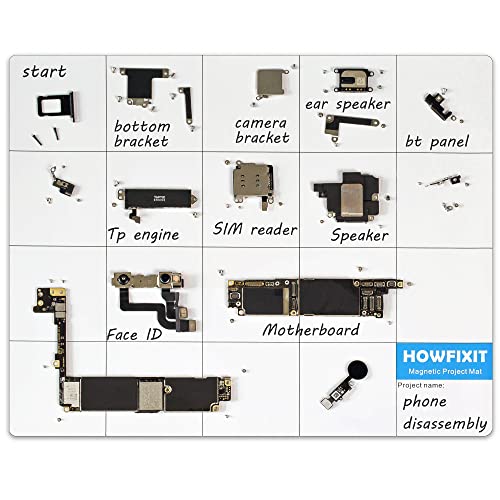 | HowFixit Magnetic Project Mat | Best fit: General laptop repairs Use: Electronics repair Surface: Magnetic project mat Devices: Laptop and small electronics | Check Price on Amazon |
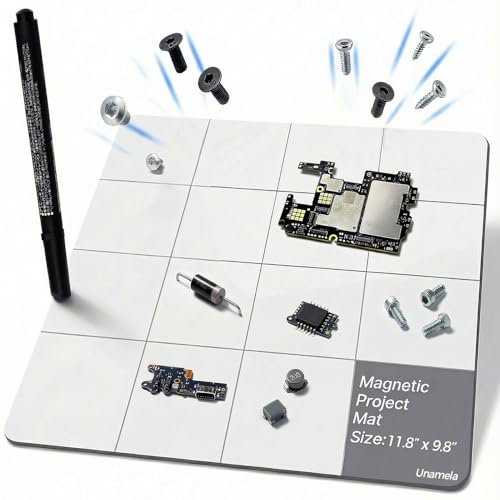 | UnaMela Magnetic Project Mat | Best fit: Waterproof writable surface Surface: Waterproof Writing: Dry erase pen Use: Magnetic project mat | Check Price on Amazon |
 | iFixit Magnetic Project Mat | Best fit: Simple rewritable mat Surface: Rewritable Use: Electronics repair Format: Magnetic project mat | Check Price on Amazon |
 | SHOWPIN Professional Magnetic Project Mat | Best fit: Non-slip bench option Backing: Non-slip Writing: Dry erase pen Use: Magnetic project mat | Check Price on Amazon |
 | iFixit FixMat | Best fit: Structured repair bench Use: Electronics repair Format: Dedicated organizer Brand: iFixit | Check Price on Amazon |
1. HowFixit Magnetic Project Mat and Screw Organizer Pad for Electronics Repair — Best for General Laptop Repairs
A bench that repairs several kinds of device wants one mat that suits the whole bench. HowFixit calls this a magnetic project mat and screw organizer pad for electronics repair, then names phones, laptops, tablets, game consoles, cameras, and drones in the same listing. The broad range of named devices makes it the natural first pick for a bench that does not serve a single laptop model.
Its listing frames the surface as a small-parts holder and work surface, so use it to park screws by the section you just removed. Keep a written map beside the parts if your repair needs an exact board-level sequence, because the product title does not establish a printed laptop-specific grid.
Our Take Buy HowFixit when a shared repair bench handles both laptop and small-electronics work. The listing directly names a magnetic organizer pad, its device categories, and an included dry-erase marker and eraser.
- The listing explicitly names laptops, tablets, cameras, drones, and game consoles alongside electronics repair.
- A magnetic project mat and small-parts holder keeps removed screws together during a multi-stage laptop teardown.
- Its broad listed device coverage suits a bench that does not serve one repair category alone.
- The organizer-pad wording makes the intended job clear before you buy a general work surface.
- An included dry-erase marker and eraser support a written repair map beside the screws.
- The listing title does not establish a printed screw map for a particular laptop layout.
- A general electronics mat may need handwritten labels for a repair with many similar screws.
- HowFixit lists a 9.84 by 7.87-inch mat size, which may be smaller than a bench needs for a large teardown.
- The product is an organizer pad, not evidence of an anti-static work surface for components.
- Magnetic holding does not identify where each screw belongs after several laptop layers are removed.
2. UnaMela Magnetic Project Mat — Best Waterproof Writable Surface
A repairer who draws arrows, writes screw counts, or marks the order in which brackets came off wants a mat that takes notes. UnaMela lists a waterproof surface and dry erase pen, which suit that job. The magnetic mat keeps those notes beside the fasteners instead of on a separate scrap of paper.
Use it when the laptop has different screw lengths around a battery, hinge, or bottom cover and you want a quick written map instead of guesswork. The listing describes a 5-by-4 grid with 20 magnetic zones, so use the writing surface and the zones together to map the repair.
Our Take Buy UnaMela when a dry erase pen and waterproof surface count for more than a brand name. It is a simple place to write the repair map beside the screws.
- The included dry erase pen supports a written screw map beside the parts you remove.
- A waterproof surface is listed for a bench where cleaning and repeated notes are useful.
- Its magnetic project-mat format combines fastener parking with a visible repair reminder.
- Written labels can distinguish hinge screws from bottom-cover screws during a laptop teardown.
- The simple project-mat approach is easy to reuse for another device after clearing the notes.
- The listing title does not name a printed laptop-specific magnetic grid or numbered compartments.
- Dry erase notes still require you to record the order before moving the first screw.
- A waterproof surface does not make the mat a substitute for careful liquid handling near electronics.
- Its listed 11.8 by 9.8-inch size may take more room beside a compact laptop bench.
- A plain writable layout can take longer to set up than a repairer’s existing documented process.
3. iFixit Magnetic Project Mat — Best Simple Rewritable Mat
A repair that calls for a straightforward diagram suits a rewritable mat with 20 provided areas. iFixit describes this one as a rewritable surface for electronics repair. Use the provided areas to mark the laptop outline and park each screw where it belongs rather than relying on memory.
The product is a project mat rather than a device-specific tray. It works best for a careful repairer who wants a familiar, uncomplicated board for mapping a sequence. A repairer who needs a fixed set of labeled bins should choose a different kind of mat.
Our Take Buy the iFixit Magnetic Project Mat when you want a simple rewritable repair map. It suits a repairer who would rather draw the layout than follow a pre-arranged organizer.
- The listing specifically calls this a rewritable surface for electronics repair rather than a generic desk mat.
- Twenty provided areas help separate screw groups while you draw the actual laptop layout.
- The project-mat format keeps handwritten labels and the corresponding screws in the same visible workspace.
- iFixit’s electronics-repair focus makes the mat easier to place beside other repair tools on a bench.
- A simple writable surface can be cleared and remapped for a different laptop afterward.
- The 20 areas are not a laptop-specific printed guide for each model’s screw layout.
- A rewritable map still asks you to label the areas carefully before fasteners accumulate.
- Its magnetic project-mat role does not replace an anti-static surface for sensitive laptop components.
- Rewritable notes help organization only when you preserve the screw sequence throughout the repair.
4. SHOWPIN Professional Magnetic Project Mat — Best Non-Slip Bench Option
A mat that shares a bench with a screwdriver, parts tray, and an open laptop should stay where you place it while you work. SHOWPIN lists a professional magnetic project mat with a non-slip backing and dry erase pen for that kind of bench.
Use it when you want both a writable screw map and a steadier bench surface. Its listing does not establish a laptop-specific grid, so write the labels before the fasteners start accumulating.
Our Take Buy SHOWPIN when non-slip backing is part of the bench decision. You write labels and map screws as you would on other writable mats, and the backing is the extra detail.
- The listing names non-slip backing for a mat that needs to remain placed during careful repairs.
- An included dry erase pen supports written labels for groups of laptop screws.
- The magnetic project-mat format gives small fasteners a visible place beside the open device.
- Its professional project-mat wording fits a repair bench rather than a loose household tray.
- Writable labels can connect each fastener group with the cover, bracket, or hinge it came from.
- The listing title does not establish a preprinted laptop grid or compartments for specific screw groups.
- Non-slip backing does not prevent screws from being mixed if they are parked without labels.
- Its listed 9.8 by 7.9-inch size may be compact for a large laptop teardown and tool set.
- A dry erase pen still needs a written system for complex repairs with several screw lengths.
- The listed project-mat role does not substitute for anti-static handling of exposed electronics.
5. iFixit FixMat — Best for a More Structured Repair Bench
A repair bench that benefits from an organizer made specifically for electronics work is where the iFixit FixMat belongs. It is the newer iFixit option in this comparison, while the older Magnetic Project Mat is the simpler rewritable choice above.
Choose it when you prefer iFixit’s line of repair tools and want a separate mat for fasteners instead of placing them on the anti-static work surface. The listing names integrated sorting bins, a strong sheet magnet, an included pen, and an 11.81-by-9.80-inch mat.
Our Take Buy FixMat when you want an iFixit electronics-repair organizer and prefer a newer dedicated option. Check the listing’s layout before making it your standard bench map.
- The iFixit FixMat is presented as a dedicated option for an electronics-repair organization workflow.
- Its listed ESD-safe specification supports use around exposed laptop components and static-sensitive work.
- Integrated sorting bins and a strong sheet magnet organize ferrous parts on the 11.81-by-9.80-inch mat.
- The newer iFixit option gives buyers a choice beyond the brand’s simpler Magnetic Project Mat.
- An included pen supports marking a repair map beside the sorted screw groups.
- A dedicated organizer does not eliminate the need to label screws as each laptop layer comes off.
- Its repair-focused role can be more than a simple writable mat requires for short jobs.
- The title alone does not explain which layout best matches a particular laptop repair sequence.
- Its 11.81-by-9.80-inch size can take more bench room than smaller project-mat options.
- Sorting bins still need a clear repair sequence to preserve where each screw belongs.
Buying Guide: Choosing a Laptop Repair Screw Mat
Decide whether you need a writable map or a fixed layout
Start with the repair itself. A laptop bottom cover may use only a small group of screws, while a screen, heat sink, and battery job can create several lengths and locations that look nearly identical after an hour. The listings for UnaMela, SHOWPIN, and the iFixit Magnetic Project Mat all name writable or dry erase features, so they fit a workflow where you draw the map as the device comes apart.
A fixed organizer can be useful when you repeat the same repair patterns, but do not assume one from a product name. The listings for these picks describe magnetic project mats and repair organization. They do not prove a laptop-specific printed map. Write the label before removing the first fastener, then put each screw beside the label rather than collecting a pile to sort later.
Separate screw organization from anti-static protection
A magnetic screw mat keeps track of where fasteners go. It does not replace the protective surface, grounding practice, or handling method appropriate for a laptop with exposed boards and connectors. HowFixit, iFixit, SHOWPIN, and UnaMela are described as project mats or organizers, so fastener organization is the supported job.
Set the screw mat beside the main work area and use it as a map. It is no proof that any component can safely rest there. Keep the screw layout intact until reassembly is complete, even if the laptop and parts leave the main work surface.
Match the mat to the repair’s number of fastener groups
For a quick bottom-cover replacement, a simple magnetic area may be enough. For a longer repair, divide the mat into named zones such as bottom cover, battery, fan, heat sink, hinge, and display. The HowFixit listing explicitly names laptops and other electronics, so its broad organizer role fits that kind of mixed bench work.
The most useful map records both position and length. Put a short screw beside its location instead of merely writing “short,” because reassembly depends on which hole it came from. Each repair needs its own fresh map, even when the same mat handles a phone, tablet, or laptop.
Check surface details that affect your bench workflow
Surface details change how the mat behaves during a repair. The UnaMela listing names a waterproof surface and dry erase pen, while the SHOWPIN listing names non-slip backing and a dry erase pen. Those details count when your map has to stay legible through a long session or the mat shares a crowded table.
Do not turn a feature name into an unsupported durability claim. Check the Amazon listing for current dimensions and included accessories before choosing between the mats, especially if you want one to fit next to an open laptop rather than underneath it.
Build a repeatable screw-mapping routine
Use the same sequence every time: label a zone, remove its screws, park them immediately, and take a quick photo before moving to the next layer. With the iFixit Magnetic Project Mat’s rewritable surface or the dry erase pens listed by UnaMela and SHOWPIN, the routine needs no separate notebook.
At reassembly, reverse the zones instead of choosing screws by appearance. Keep your labels and screw positions intact from the first screw to the last. The habit counts for more than a brand name or a particular color.
FAQ
Do magnetic screw mats work for laptop repairs?
Yes. A mat is useful because it keeps each screw group with the position it came from. The HowFixit listing explicitly names laptops and electronics repair, while the other picks are marketed as magnetic project mats or repair organizers.
Start a new zone for each layer of the laptop. Park the screws immediately, add a clear label, and take a photo before the next layer comes off. The mat holds the screws in the order you park them, but only the repairer can record the location accurately.
Is a screw mat the same as an anti-static work mat?
No. A screw mat is an organization tool for fasteners. The listings here describe magnetic project mats, writable surfaces, small-parts holders, and repair organizers, but not one of them is a complete anti-static handling system for an exposed laptop board.
Use the surface intended for component protection where appropriate, and keep the screw mat beside it so the screw layout stays untouched while you move the laptop or its internal parts.
Why should I label laptop screws as I remove them?
Laptop screws can differ by length, head shape, or thread even when they look almost identical at a glance. A label connects each group to the cover, hinge, battery, fan, or bracket it belongs to, so reassembly depends less on memory.
The listings for UnaMela and SHOWPIN list dry erase pens, and iFixit calls its Magnetic Project Mat rewritable. Draw the laptop outline or use simple named zones. Either method works, as long as you create the map before the screws begin to mix.
Should I choose a dry erase mat or a fixed grid?
Choose a writable mat when each job has a different layout. The dry erase pen listed with UnaMela and SHOWPIN lets you adapt the labels to the exact laptop on the bench instead of making a generic grid fit every repair.
A fixed layout can feel faster for repeated work, but verify that it matches your intended use. The listings for these products do not establish a particular printed laptop grid, so do not buy on the assumption that every mat has one.
Can one magnetic mat handle phone and laptop repair?
It can when the bench workflow is flexible. The HowFixit listing names phones, laptops, tablets, game consoles, cameras, and drones, which makes it the clearest option for several device types in this group.
Reset the map completely between devices. A laptop repair usually uses larger groups and more locations than a phone repair, so start with a blank surface and make the new labels visible before you remove any parts.
Bottom Line
Pick the mat that makes the next screw easy to identify when the laptop goes back together. Buy HowFixit for broad electronics repair, UnaMela or SHOWPIN for writable-surface details, and one of the two iFixit options to stay inside a familiar line of repair tools.