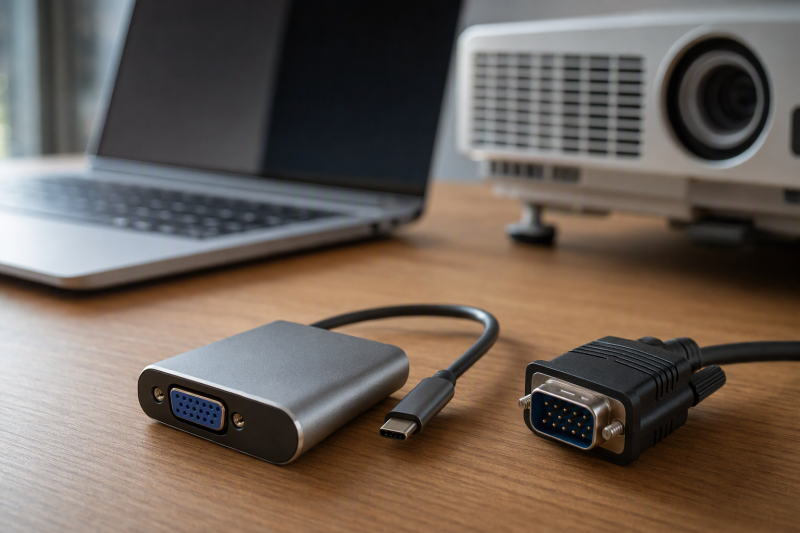
A meeting room can still have a perfectly usable projector whose only convenient input is a fifteen-pin VGA cable. A modern USB-C laptop can reach it through an adapter, but USB-C must provide a video signal, usually DisplayPort Alt Mode. A charging-only or data-only USB-C port will not become a display output just because a VGA dongle fits.
This six-adapter selection includes video-only choices, two with charging input, and one with USB-A data. Projector output, laptop compatibility, and cable signal quality were not independently tested for this guide. Check the laptop’s display-output specification and the projector’s native resolution before the presentation, then carry the right VGA cable.
For a one-port laptop, decide whether VGA alone is enough or you also need USB-C charging. VGA carries picture, not presentation audio. Plan a separate sound connection if the room needs it.USB-C VGA Adapters Compared
Manufacturer Specifications: The table reports maker- or seller-rated resolution, lead length, and charging support, not independently tested projector results.
| Image | Product | Details | Check Price |
|---|---|---|---|
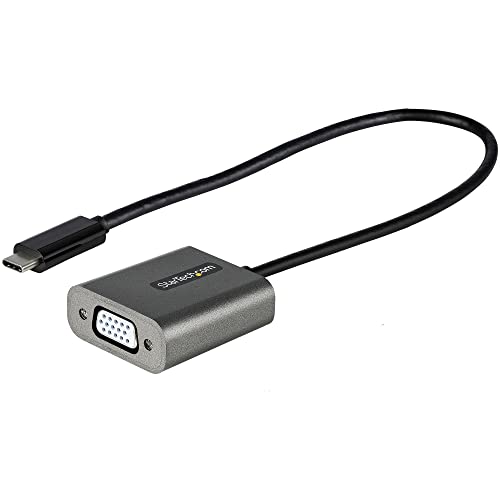 | StarTech CDP2VGAEC | VGA ceiling: 1920 × 1200 Lead: 12 in Extras: Video only Best fit: Laptop stand | Check Price on Amazon |
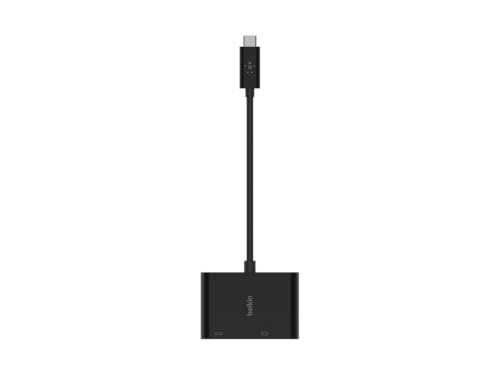 | Belkin VGA + Charge | VGA ceiling: 1920 × 1200 Lead: Tethered Extras: 60 W PD input Best fit: One-port laptop | Check Price on Amazon |
 | Apple VGA Multiport | VGA ceiling: 1920 × 1080 Lead: Tethered Extras: USB-A + charging Best fit: Mac/iPad ports | Check Price on Amazon |
 | BENFEI VGA | VGA ceiling: 1920 × 1200 Lead: Compact Extras: Video only Best fit: Basic spare | Check Price on Amazon |
 | Amazon Basics VGA | VGA ceiling: 1920 × 1200 Lead: Compact Extras: Video only Best fit: Metal-bodied spare | Check Price on Amazon |
| BELIN LINK BL-CVG01 | VGA ceiling: 1920 × 1080 Lead: 0.2 m Extras: Video only Best fit: Short-lead backup | Check Price on Amazon |
1. StarTech CDP2VGAEC — Best Longer Lead for Laptop Stands
StarTech’s CDP2VGAEC uses DisplayPort Alt Mode over USB-C to feed a female VGA port. With its roughly 12-inch attached lead, the adapter body sits farther from a raised laptop or crowded side connector than a tiny direct plug does. The maker lists one display up to 1920 × 1200 or 1920 × 1080, subject to the host and projector. Those two resolutions are different aspect ratios. Choose the one the projector can actually accept.
The CDP2VGAEC is a video-only adapter, with no charging or USB-A passthrough described. It is useful when the laptop has another power port or enough battery for the session. The longer lead means less strain on the port, but you need the room’s VGA cable as well. StarTech’s product page provides the DP Alt Mode requirement and single-display scope. Check the laptop’s USB-C output before relying on the dongle.
Our Take Buy StarTech when the laptop sits on a stand and the adapter needs a longer lead. Its specific video-input requirement is more useful than a broad device list.
- 12-inch attached lead eases port strain.
- DP Alt Mode and single-display scope documented.
- 1920 × 1200 ceiling listed.
- No charging or USB-A path.
- VGA cable still required.
2. Belkin VGA + Charge — Best Simple Power and Picture
Belkin’s AVC001 family combines female VGA output and a USB-C PD charging input. Its maker lists passthrough up to 60 W and VGA output up to 1920 × 1200 at 60 Hz on a compatible laptop or tablet. The pairing is practical for a one-port ultrabook during a long presentation. It does not add a USB-A device port. If a clicker needs USB-A, Apple offers a different arrangement.
The 60 W is a maximum supported passthrough figure, not a guarantee that every laptop charges at 60 W. Use an appropriate charger and check the host’s actual power needs. VGA remains an analog video connection with no embedded audio in the connector, so use room speakers or the laptop’s audio path separately. Belkin says to consult the device’s display specifications.
Our Take Buy Belkin when a one-port laptop needs picture and power together. Its 60 W ceiling may not be enough for a larger laptop under a heavy workload.
- VGA plus USB-C PD input.
- 1920 × 1200 at 60 Hz stated.
- Official maker page defines 60 W ceiling.
- No USB-A data port.
- 60 W may be low for some laptops.
3. Apple VGA Multiport — Best Mac and iPad Port Expansion
Apple’s multiport adapter combines VGA, USB-A data and USB-C charging for supported USB-C Macs and iPads. Apple’s support article says all three ports can operate simultaneously. Simultaneous use is useful if a presenter needs a flash drive, USB-A clicker or other accessory while the laptop charges and displays slides. The adapter has more ports than a single VGA dongle, but only for a host that Apple actually supports.
The official VGA video ceiling is 1920 × 1080 at 60 Hz, not 1920 × 1200. A VGA cable is sold separately. Do not assume the USB-C charging port is a second general-purpose data port. Apple’s description assigns it to charging. Also check the exact Mac or iPad model against Apple’s current compatibility guidance before packing it for an unfamiliar device.
Our Take Buy Apple for a Mac or iPad that needs USB-A, charging and VGA all at once. Its 1080p limit is lower than the limit of several 1200-line adapters.
- VGA, USB-A and USB-C charging.
- Apple documents simultaneous use.
- 1080p VGA ceiling.
- Host compatibility is Apple-focused.
- VGA cable not included.
4. BENFEI VGA — Best Basic 1920×1200 Adapter
BENFEI’s small USB-C-to-VGA adapter lists DisplayPort Alt Mode as a host requirement and up to 1920 × 1200 at 60 Hz. Its seller also mentions 1080p, 720p, 1600 × 1200 and 1280 × 1024 modes. That range of modes covers several older projector input timings, though the projector’s native resolution and the laptop’s negotiated output still determine what actually appears on screen.
This model does not charge the laptop, and the listing says a separate VGA cable is required. Its compact body is easy to leave in a presentation bag, but a direct lightweight dongle can hang from a crowded side port. The long compatibility paragraph in the listing is not a test of every modern phone’s video-output mode. Confirm the specific host’s USB-C display capability.
Our Take Buy BENFEI as a basic video-only spare with an explicit DP Alt Mode caveat. Keep a VGA cable and a separate power plan.
- DP Alt Mode requirement stated.
- 1920 × 1200 at 60 Hz listed.
- Compact for a presentation kit.
- No power passthrough.
- VGA cable sold separately.
5. Amazon Basics VGA — Best Minimal Metal-Bodied Spare
Amazon Basics lists a compact aluminum-shell adapter with female VGA output and a 1920 × 1200 or 1080p video ceiling. It says no extra driver or external power adapter is needed for operation, and it includes a one-year limited warranty. The adapter is enough for a simple spare in a laptop bag if the computer’s USB-C port supports video. The VGA cable itself is not included.
The listing loosely says it works with USB-C or Thunderbolt 3 ports, but connector shape by itself does not prove display output. Confirm the host’s DP Alt Mode or supported USB-C video capability. It has no USB-C charging socket or other data expansion. Test it with the intended laptop and projector before the meeting.
Our Take Buy Amazon Basics as a minimal video-only spare. Its aluminum body and warranty do not remove the need to check the host’s video output and the VGA cable.
- Compact aluminum shell.
- 1920 × 1200/1080p listed.
- No charging or extra data port.
- VGA cable not included.
6. BELIN LINK BL-CVG01 — Best Short-Lead 1080p Backup
BELIN LINK’s BL-CVG01 is a short roughly 0.2 m USB-C-to-VGA adapter with a stated 1920 × 1080 maximum. The maximum covers a common Full HD projector mode without claiming the 1920 × 1200 option listed by StarTech, BENFEI and others. The seller calls it a simple plug-and-play converter and explicitly says it is not for HDMI output. Use the projector’s VGA socket or a proper VGA cable, not an HDMI input that happens to be nearby.
The listing broadly names laptops, tablets and phones, but gives less specific guidance on host video than BENFEI or StarTech. Check the host’s USB-C display mode first. The adapter is also video-only, and no power or audio path is specified. For an occasional school or meeting-room visit, a short lead may be enough, but test the exact cable length and connector clearance in advance.
Our Take Buy BELIN LINK as a plain 1080p backup. Its limited technical detail means you should test it with your own laptop and projector first.
- Short attached lead.
- 1080p ceiling stated.
- No 1920 × 1200 claim.
- No charging or audio.
- Host-video requirement not detailed.
Buying Guide: Make the Old Projector Predictable
Confirm USB-C video support before packing
A USB-C port is only a connector shape. The DisplayPort-over-USB-C explanation says DP Alt Mode can feed VGA through a suitable converter, but the source device must implement that video mode. A USB-C port used only for charging or data is not sufficient. Look up the exact laptop or tablet specification, not a broad compatibility claim for a whole brand family.
Check the adapter direction. These products take video from a USB-C source and output it to a VGA projector. They are not VGA-to-USB-C capture devices and they cannot turn an HDMI port into VGA by themselves. Try the source and projector together before a live presentation. If the laptop has several USB-C sockets, use the one the maker marks for display output.
Match resolution, cable and audio
The projector sets the useful resolution ceiling. Apple’s and BELIN LINK’s product specifications state 1080p output. StarTech, BENFEI, Belkin and Amazon Basics rate their separate adapters for up to 1920 × 1200 on compatible hosts. A 1024 × 768 projector will not become a 1200-line display. Select a mode the projector accepts and check slide text from the back of the room, not only the laptop screen. A long or damaged analog VGA cable can also soften or destabilize the image.
VGA does not carry the presentation’s audio. Route sound through the laptop’s audio jack, Bluetooth or a separate room system if the slides include video or narration. Apple, BENFEI and Amazon Basics expressly leave the VGA cable to the buyer. Our USB-C hub guide covers broader port expansion, but a generic hub may not have a VGA output. Carry the cable that matches the room’s projector socket.
Decide whether the same port must charge the laptop
Belkin and Apple solve a different job from video-only dongles. Belkin states that its adapter provides VGA plus a USB-C PD input rated up to 60 W. Apple lists USB-A and USB-C charging for supported Macs and iPads. Check the laptop’s charger needs and whether the USB-C charging socket is actually for power rather than another data device. A 60 W ceiling may be insufficient under load for a larger notebook.
A separate power plan makes a presentation resilient. On a two-port laptop, a video-only adapter can coexist with a normal charger. On a one-port laptop, a charging-capable VGA adapter or a fully charged battery may be necessary. Our USB-C docking station guide is useful for a fixed desk, but carrying a small known-good VGA setup is often simpler for an old meeting room.
Frequently Asked Questions
Why is the projector blank even though the adapter fits the USB-C port?
The most common first check is whether the specific USB-C port outputs video. A data-only or charging-only port cannot feed a normal DP Alt Mode-to-VGA converter. Also confirm the projector is on its VGA input, the cable is intact, and the laptop detects an external display. A connector fit is not a signal test.
If the display is detected but shows nothing useful, choose a lower supported resolution or refresh rate and check mirror or extend settings. Try the adapter directly in the laptop instead of through another hub. Use a known-good VGA cable and projector input before blaming the converter.
Do I need a special VGA cable, and will it carry audio?
Most selected adapters end in a female VGA socket, so a suitable VGA cable is needed to reach the projector. Apple, BENFEI and Amazon Basics explicitly say the cable is separate. Check the room cable’s gender and length. Do not assume an HDMI lead will work in the VGA output.
VGA carries analog picture, not an embedded audio stream. Plan speakers separately if the presentation has sound. A USB-C charging port on Belkin or Apple also does not add an audio output by itself. Test the full room setup with a sample slide and sound clip.
Is 1920×1200 support better for an older 1024×768 projector?
Not inherently, because the projector’s supported input and native panel resolution set the useful result. A 1920 × 1200-capable adapter can still output a lower mode, but it will not add detail to a 1024 × 768 projector. The 1080p ceilings in Apple’s and BELIN LINK’s separate product specifications may already be more than that room needs.
Select the projector’s preferred timing in the laptop display settings, then inspect text and geometry on the projected screen. The analog cable and the projector’s own scaling can affect legibility more than the adapter’s highest advertised number.
Bottom Line
StarTech CDP2VGAEC offers the clearest long-lead video-only setup, and Belkin VGA + Charge keeps a one-port laptop powered within its 60 W ceiling. Apple VGA Multiport adds USB-A for supported Macs and iPads. Confirm the host’s USB-C video mode, bring the right VGA cable and plan separate audio before presenting.