The Short Version
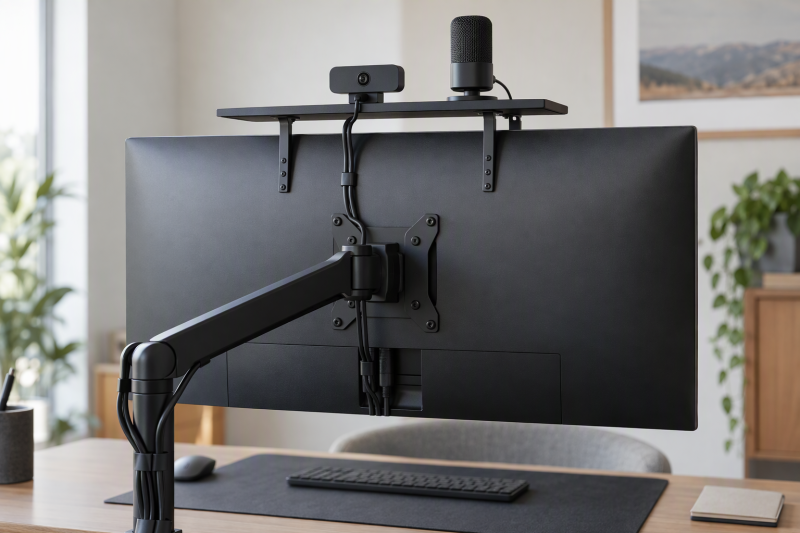
A VESA shelf can put a camera, webcam, microphone, or small light above the monitor without adding a tripod to an already crowded desk. The right choice begins with the bolt pattern behind the screen, then narrows to shelf width, stated capacity, and whether your device needs a 1/4-20 screw rather than an open slot.
The VIVO MOUNT-LS16A is a compact choice for a 100 mm VESA monitor, while the HumanCentric Extra Large DSLR Monitor Mount provides a 27.16-inch shelf. Pick the Linone Over-Under VESA Shelf for stated 75, 100, or 200 mm support. Measure rear hardware and ports first.
Quick Picks
- Best compact 100 mm pick: VIVO MOUNT-LS16A for a 15.7 by 3.4 inch shelf with a stated 6.6 lb capacity.
- Best heavy 75 or 100 mm shelf: ErgoFocus VESA Device Shelf for its stated 11 lb capacity and cable clips.
- Best simple 100 mm streaming shelf: WORLDLIFT 16-inch VESA Shelf for a height-adjustable, slotted steel platform.
- Best compact screw-mounted camera shelf: HumanCentric Small DSLR Monitor Mount for included 1/4-20 accessory screws.
- Best wide accessory shelf: HumanCentric Extra Large DSLR Monitor Mount for its 27.16 by 3.38 inch platform.
- Best broad VESA compatibility: Linone Over-Under VESA Shelf for 75, 100, and 200 mm patterns.
- Best organizer-style shelf: Mount Plus MDS12-3 for forward or backward orientation and a stated 27.2-inch option.
How We Picked
Every product here is a stated VESA shelf or device shelf rather than a clamp-on webcam arm. The picks range from compact 4.92-inch platforms to wide 27-inch platforms, and they cover 75, 100, or 200 mm patterns. Pair the shelf with a camera monitor arm, USB webcam, USB microphone, or desk cable clips, and check how far your display moves.
Comparison Table
| Image | Product | Details | Check Price |
|---|---|---|---|
 | VIVO MOUNT-LS16A | Best fit: Compact 100 mm camera shelf VESA: 100 mm Shelf: 15.7 by 3.4 inches Capacity: 6.6 lb | Check Price on Amazon |
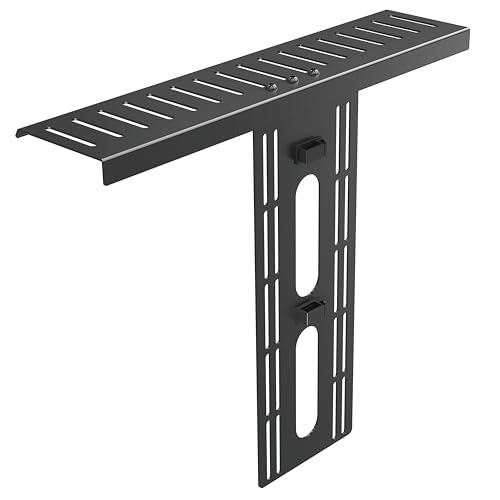 | ErgoFocus VESA Device Shelf | Best fit: 75 or 100 mm heavy shelf VESA: 75 or 100 mm Shelf: 15.7 by 3.4 inches Capacity: 11 lb | Check Price on Amazon |
 | WORLDLIFT 16-inch VESA Shelf | Best fit: 100 mm streaming accessories VESA: 100 by 100 mm Shelf: 15.7 by 3.4 inches Capacity: 11 lb | Check Price on Amazon |
 | HumanCentric Small DSLR Monitor Mount | Best fit: Small camera shelf with 1/4-20 VESA: 100 by 100 mm Shelf: 4.92 by 3.04 inches Mounting: 1/4-20 accessory screws | Check Price on Amazon |
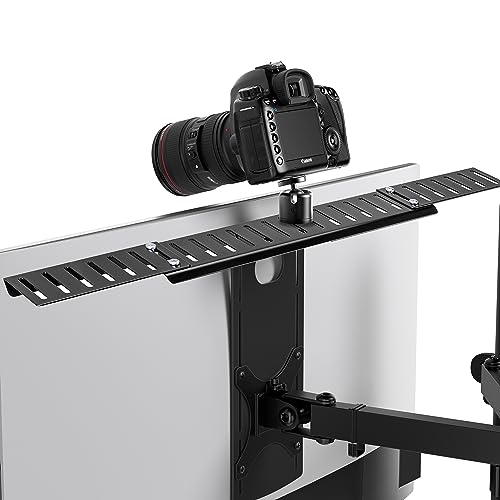 | HumanCentric Extra Large DSLR Monitor Mount | Best fit: Wide camera and microphone shelf VESA: 100 by 100 mm Shelf: 27.16 by 3.38 inches Mounting: 1/4-20 accessory screws | Check Price on Amazon |
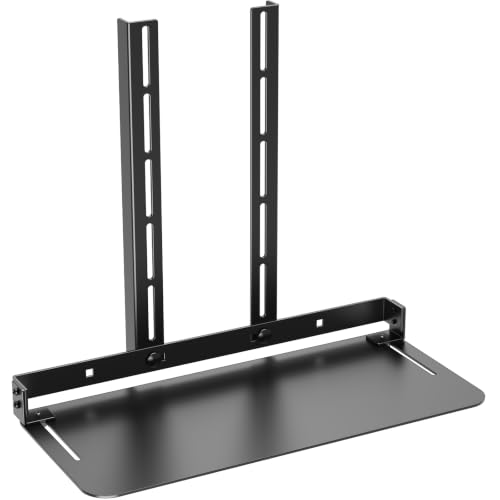 | Linone Over-Under VESA Shelf | Best fit: 75, 100, or 200 mm displays VESA: 75, 100, or 200 mm Shelf: 13 inches Placement: Above or below screen | Check Price on Amazon |
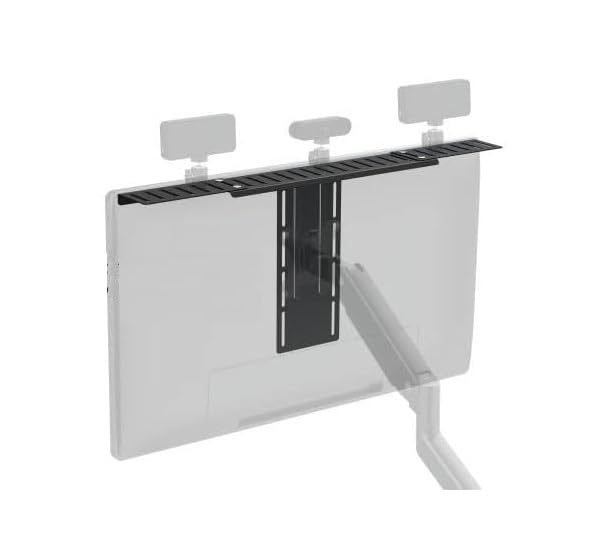 | Mount Plus MDS12-3 | Best fit: Wide all-in-one organizer shelf Shelf: 27.2 or 15.7 inches Height: Adjustable Placement: Forward or backward | Check Price on Amazon |
1. VIVO MOUNT-LS16A — Best Compact 100 mm Pick
The VIVO MOUNT-LS16A suits a monitor with a 100 mm VESA pattern and a modest camera, webcam, microphone, or light setup. VIVO lists the powder-coated steel shelf at 15.7 by 3.4 inches, providing a long, shallow place for small gear without turning the screen into a large equipment rack. VIVO specifies multiple 2.2-inch slots for small accessories, and above-or-behind placement can keep them near the screen.
Pros
- The 15.7 by 3.4 inch shelf keeps several small accessories near the screen without consuming desk depth.
- A stated 6.6 lb limit gives light camera and webcam setups a clear loading boundary.
- Its 2.2-inch slots help position camera, microphone, or lighting hardware rather than leaving a smooth platform.
- Above-or-behind placement can preserve the camera’s eye-line position while reclaiming space below the display.
Cons
- It fits 100 mm VESA patterns, so buyers with 75 or 200 mm spacing need another shelf.
- The listing warns that the bracket can block monitor ports, making rear-panel clearance a purchase check.
2. ErgoFocus VESA Device Shelf — Best for 11 lb 75 or 100 mm Loads
ErgoFocus specifies that this shelf suits a monitor with either 75 or 100 mm VESA spacing when you still want the familiar 15.7 by 3.4 inch shape. Its steel platform has a stated 11 lb limit, well above the VIVO figure, and the listing describes a T-shaped support structure. It can mount above, behind, or under the screen and includes cable clips, but its 2.2-inch slots are not a universal screw mount.
Pros
- The stated 11 lb capacity gives heavier multi-accessory setups more listed headroom than the VIVO shelf.
- Support for 75 and 100 mm patterns makes it practical across many common monitor mounting layouts.
- The 15.7 by 3.4 inch platform leaves room for several small devices without becoming a 27-inch rack.
- Included cable clips can keep power and USB leads from draping across the monitor’s front edge.
- Above, behind, or under-screen placement lets the shelf follow the device rather than a single fixed position.
Cons
- Its listed 2.2-inch slots suit slotted accessories, not every device that needs a dedicated 1/4-20 screw.
- The shallow 3.4-inch shelf depth calls for careful measurement of deeper media devices or camera bases.
3. WORLDLIFT 16-inch VESA Shelf — Best for Adjustable 100 mm Streaming Setups
WORLDLIFT’s 16-inch VESA shelf is for a 100 by 100 mm monitor when you want a plain steel platform, height adjustment, and a stated 11 lb capacity. The listed platform size is 15.7 by 3.4 inches, despite the product’s 16-inch description, so use the listed size when checking your available width. Its multiple slots are intended for cameras, webcams, microphones, and lighting, and forward or backward mounting can clear an arm.
Pros
- The stated 11 lb capacity supports a more substantial streaming arrangement than a lightly loaded webcam shelf.
- A 100 by 100 mm VESA fit gives buyers a specific compatibility target before ordering.
- Forward or backward orientation offers a useful choice when monitor-arm hardware occupies the obvious position.
- Height adjustment helps align a camera or light with the display rather than accepting one fixed elevation.
Cons
- It is limited to 100 by 100 mm VESA, excluding common 75 mm and broader 200 mm patterns.
- Its 3.4-inch shelf depth is compact, so deeper devices need footprint checks before installation.
- The slotted shelf does not state included 1/4-20 accessory screws for camera-specific attachment.
4. HumanCentric Small DSLR Monitor Mount — Best for Small 1/4-20 Mounted Gear
The HumanCentric Small DSLR Monitor Mount is the choice when the accessory is meant to attach with a 1/4-20 screw rather than rest on a broad shelf. HumanCentric specifies a 100 by 100 mm VESA pattern, M4 VESA hardware, spacers, washers, accessory screws, and aluminum construction. Its 4.92 by 3.04 inch shelf is a compact footprint, while the manufacturer-provided 11.67-inch bracket raises one centered capture device above the screen.
Pros
- Included 1/4-20 accessory screws directly serve camera and microphone gear built around that mounting standard.
- The compact 4.92 by 3.04 inch shelf avoids turning a single-camera setup into a conspicuous top rack.
- Its 11.67-inch bracket height can lift capture hardware above the monitor for a centered presentation angle.
Cons
- Compatibility is specifically 100 by 100 mm VESA, not the 75 or 200 mm patterns the Linone supports.
- The 4.92-inch shelf width is unsuitable for a row of accessories or a wide media device.
- The listing excludes tripod heads, so existing gear must supply any needed head or adapter.
5. HumanCentric Extra Large DSLR Monitor Mount — Best Wide Accessory Shelf
The Extra Large HumanCentric shelf is the one to pick when several devices share the space above the screen. HumanCentric specifies a 27.16 by 3.38 inch shelf for multiple pieces of gear, plus a 100 by 100 mm VESA connection and included 1/4-20 accessory screws. The manufacturer provides aluminum construction, M4 hardware, and an 11.67-inch bracket.
Pros
- A 27.16 by 3.38 inch platform gives a multi-device creator rig much more horizontal room than compact shelves.
- Included 1/4-20 screws support camera, webcam, microphone, and light accessories using that common mount.
- The 11.67-inch bracket can position capture equipment above the screen without a separate desk tripod.
- Aluminum construction and supplied M4 hardware simplify matching the shelf to a 100 mm monitor mount.
- Its 3.38-inch depth stays relatively shallow despite the wide accessory span, preserving desk space below.
Cons
- The 27.16-inch width needs clear space around the monitor and can overwhelm a narrow display setup.
- It supports 100 by 100 mm VESA only, so 75 mm and 200 mm buyers should look elsewhere.
- The listing does not include a tripod head, despite providing 1/4-20 accessory screws.
6. Linone Over-Under VESA Shelf — Best for 75, 100, or 200 mm VESA
Linone’s 13-inch shelf suits a display whose mounting holes do not match the common 100 mm creator-shelf format, because it states support for 75, 100, and 200 mm VESA patterns. The steel shelf can install above or below the display, so it can hold a webcam above the screen or a router, speaker, media device, or smaller accessory below it. The listing has no stated capacity figure, so choose it for its pattern range and position, not for an assumed load rating.
Pros
- Stated 75, 100, and 200 mm support covers more monitor patterns than the 100 mm-only shelves.
- Above-or-below placement lets buyers separate a webcam position from storage for routers or media devices.
- The 13-inch shelf offers a moderate platform for a compact accessory without extending to 27 inches.
- A steel shelf and direct VESA mounting create a tidy alternative to a desk-standing accessory platform.
Cons
- No stated weight capacity means buyers need to keep load decisions conservative rather than assume a number.
- The 13-inch platform gives less multi-device room than the 15.7-inch and 27.16-inch alternatives.
7. Mount Plus MDS12-3 — Best for a Wide Adjustable Organizer
The Mount Plus MDS12-3 is the organizer-style option when you want a wide shelf, multiple slots, and control over orientation. The manufacturer listing gives a 27.2 by 3.4 by 11.9 inch size or a 15.7 by 3.4 by 11.9 inch size, so confirm which configuration you are buying before matching it to the monitor. Forward or backward orientation and height adjustment can resolve conflicts with a tall monitor stand, an arm, or a camera that needs a clearer line above the display.
Pros
- A stated 27.2-inch option creates a broad shared platform for several creator accessories at once.
- Forward or backward orientation can avoid monitor-arm and wall-clearance conflicts without moving the display.
- Height adjustment helps align a webcam, camera, or light with the screen rather than a fixed bracket position.
- Multiple slots give cameras, microphones, and lighting more placement options than a plain flat shelf.
Cons
- The listing gives no numeric VESA pattern, so monitor-hole compatibility needs confirmation before purchase.
- No stated capacity figure means the 27.2-inch width should not be treated as a heavy-load guarantee.
- The larger 27.2 by 3.4 inch configuration can be excessive for a single compact webcam.
Buying Guide: How to Choose a VESA Camera and Accessory Shelf
Start With the VESA Pattern, Not the Shelf Width
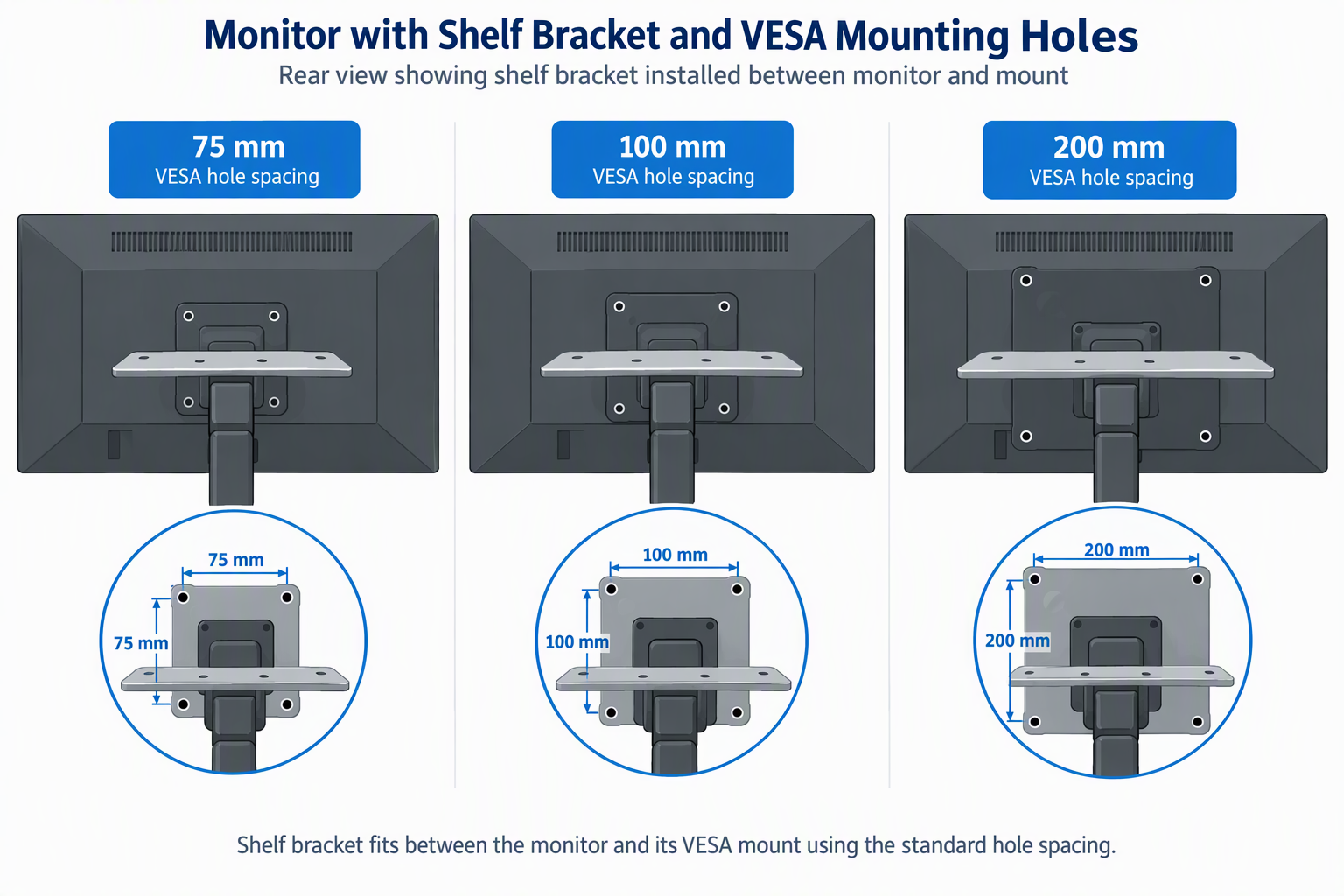
The monitor’s mounting pattern is the first hard constraint because the listed shelves do not all share it. The Linone Over-Under VESA Shelf names 75, 100, and 200 mm patterns, while the ErgoFocus VESA Device Shelf covers 75 or 100 mm. VIVO, WORLDLIFT, and both HumanCentric options name 100 mm compatibility. Check the spacing of the four threaded holes in the display or arm documentation before comparing shelf dimensions.
Do not assume an existing monitor arm makes every shelf compatible. A shelf can attach through the display’s holes or an existing VESA plate, but the plate size, screw length, spacers, and arm geometry still determine whether the assembly clears. The HumanCentric models include M4 screws, spacers, and washers, while other listings describe mounting hardware without that same bundle. Match the listed hardware to the monitor’s requirement instead of forcing a near fit.
Match the Platform to the Actual Device Footprint
Shelf width helps only when the depth also fits. The compact HumanCentric Small DSLR Monitor Mount measures 4.92 by 3.04 inches, which suits one screw-mounted camera or light. The VIVO, ErgoFocus, and WORLDLIFT platforms are around 15.7 by 3.4 inches, which adds room for several small accessories but stays shallow. A device that projects far beyond the 3.4-inch depth needs a different mounting plan.
Wide shelves are for a different job. The HumanCentric Extra Large DSLR Monitor Mount measures 27.16 by 3.38 inches, and the Mount Plus MDS12-3 lists a 27.2-inch option. Both widths suit a deliberately shared shelf, not a single webcam. Leave enough clearance for the monitor’s swivel, a wall behind it, and any portrait rotation the arm permits.
Use Stated Capacity as a Boundary, Not an Estimate
Three listings give a capacity number. VIVO states 6.6 lb, while ErgoFocus and WORLDLIFT state 11 lb. The three figures help separate a lightweight webcam arrangement from a more substantial multi-accessory layout, but they do not give a rating for the HumanCentric, Linone, or Mount Plus shelves, whose available listing information does not supply one. Never transfer the 11-pound figure from one shelf to a similarly shaped model.
The load also travels through the display or monitor arm, not just the shelf. A heavier camera can sit high above the screen and create a more awkward arrangement than a speaker placed below it, even when the shelf’s stated figure seems adequate. Respect the monitor or arm maker’s own limit, keep the heaviest device close to the bracket where practical, and do not turn an unspecified-capacity platform into a storage shelf.
Choose Slots or 1/4-20 Screws for the Attachment You Actually Have
Slotted platforms and screw-mounted shelves serve different gear. VIVO and ErgoFocus call out 2.2-inch slots, and WORLDLIFT lists multiple slots for cameras, webcams, microphones, and lighting. Slots are flexible when an accessory has its own base or clamp. They are less direct when a small camera, mic mount, or light expects a standard tripod screw.
For gear that expects a tripod screw, both HumanCentric Small DSLR Monitor Mount and HumanCentric Extra Large DSLR Monitor Mount include 1/4-20 accessory screws. Both listings say tripod heads are not included, so identify whether your gear attaches directly or requires a head you already own. Matching the attachment method early is more useful than adding adapters after the shelf is mounted.
Plan Position, Rear Ports, and Cables Before Installation
An above-screen shelf can bring a camera near eye level, while below-screen placement can hold a router, speaker, or media device outside the frame. Choose the orientation that clears ports and preserves arm movement. ErgoFocus explicitly allows above, behind, or under-screen placement, Linone explicitly allows above or below, and WORLDLIFT and Mount Plus offer forward or backward orientation.
VIVO warns that its bracket may block monitor ports, and the same caution applies to every rear-mounted shelf. Trace where HDMI, USB, power, and Ethernet cables exit before placing a steel bracket across the back panel. Cable clips on the ErgoFocus can help manage the cable run, but they cannot create clearance where a connector needs a straight path. Dry-fit the bracket with every cable connected before fastening it, which prevents an otherwise tidy shelf from becoming an access problem.
Frequently Asked Questions
Will a VESA shelf work with my monitor arm?
A VESA shelf may work with an arm when its listed pattern and mounting geometry match the display or the arm’s existing VESA plate. The ErgoFocus VESA Device Shelf names 75 or 100 mm, and the Linone Over-Under VESA Shelf adds 200 mm support. The listed pattern is the starting point, not a guarantee that every plate and spacer arrangement will clear.
Check screw length, plate overlap, monitor-arm capacity, and whether the added bracket blocks ports before installation. The HumanCentric shelves include M4 hardware and spacers, which helps with their stated 100 mm setup, but the monitor’s own manual remains decisive. A shelf should not prevent normal arm movement or put a cable under tension.
How much weight can a monitor-mounted shelf hold?
Use only the capacity stated for the exact shelf. VIVO lists 6.6 lb, while ErgoFocus and WORLDLIFT list 11 lb. Each figure belongs to the shelf it is stated for, so do not apply them to the Linone, Mount Plus, or HumanCentric shelves, whose available listing information gives no capacity number.
Also keep the monitor and arm limits in view. A camera, light, and microphone together can affect the mount differently than the same total weight placed closer to the display. Select the shelf with sufficient stated margin where a number is given, then follow the display and arm documentation for the complete assembly.
Is a slotted shelf better than a 1/4-20 camera mount?
A slotted shelf is better when the accessory has a stable base, clamp, or feet and needs positioning freedom. The VIVO and ErgoFocus shelves describe 2.2-inch slots, while the WORLDLIFT uses multiple slots for creator equipment. Slots can support several small devices in a way a single threaded screw cannot.
Choose a 1/4-20 approach when the device is designed for that standard camera connection. The two HumanCentric models include 1/4-20 accessory screws, but not tripod heads. The decision therefore depends on the device’s mounting interface, not on an assumed quality difference between a wide platform and a compact camera shelf.
Can I put the shelf below the monitor instead of above it?
Yes, when the exact shelf supports that orientation and the monitor’s holes permit it. ErgoFocus says its shelf can sit above, behind, or under the screen, and Linone explicitly supports above-or-below installation. Under-screen placement can move a small speaker, router, or media device lower while a webcam stays above the display.
Placement also changes access and balance. The Linone’s 13-inch platform is a compact option for below-screen use, whereas a wide 27.2-inch Mount Plus shelf may need more surrounding clearance. Verify that cables can still reach ports and that the chosen position does not interfere with the monitor arm.
Do these shelves replace a desk tripod?
They can replace a desk tripod when the monitor’s VESA pattern, shelf attachment, and the camera’s mounting needs all line up. The HumanCentric Small DSLR Monitor Mount is explicitly intended as a compact alternative with 1/4-20 accessory screws, while VIVO and WORLDLIFT use broader slotted platforms for several kinds of equipment.
The tradeoff is that the shelf position follows the monitor, while a tripod can move independently. Buyers who need one stable camera position directly over the screen may prefer the VESA shelf’s cleaner desk footprint. Buyers who must place a camera far to one side or at a very different height should confirm the shelf’s listed orientation and height adjustment before replacing an existing stand.
Bottom Line
Choose the VIVO MOUNT-LS16A for a compact 100 mm VESA setup with a stated 6.6 lb boundary, or the ErgoFocus VESA Device Shelf when you need 75 or 100 mm compatibility and a stated 11 lb capacity. The HumanCentric Extra Large DSLR Monitor Mount is the wide shelf for 1/4-20 accessories, and the Linone Over-Under VESA Shelf fits the broadest range of stated VESA patterns. Measure the holes, rear ports, shelf footprint, and your actual attachment method before deciding.