The right laptop for a child is usually an operating-system and screen decision before it is a brand decision. Windows offers the broadest choice of desktop software. ChromeOS is built around browser-based work, and macOS fits families already using Apple services. The six listings here cover those three paths without treating one as the automatic answer.
Neither Amazon nor the makers cited here give an age range for these laptops, so the picks are matched on screen size, weight, ports, and operating system, the facts a parent can compare. A memory or storage figure that appears only in an Amazon title or size field is labeled that way.
Six Laptops for Kids Compared
| Image | Product | Details | Check Price |
|---|---|---|---|
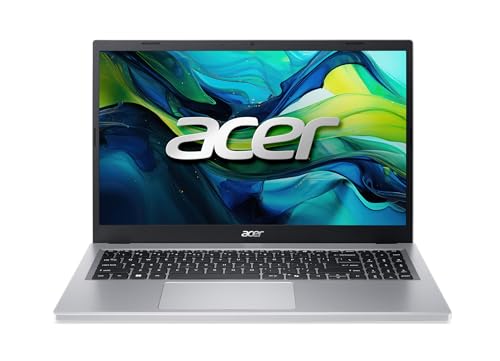 | Acer Aspire Go 15 | Best fit: A Windows laptop with a full-size screen and named ports Operating system: Windows 11 Home Screen: 15.6-inch 1920 x 1080 IPS Processor: AMD Ryzen 3 30 Ports: 2 USB-C 3.2 Gen 2, USB 3.2 Gen 1, USB 2.0, HDMI 2.1 | Check Price on Amazon |
 | ASUS Vivobook Go 15 | Best fit: A Windows laptop that opens flat for sharing the screen Operating system: Windows 11 Home Screen: 15.6-inch 1920 x 1080, 60Hz Processor: AMD Athlon Silver 10 Ports: USB-C 3.2 Gen 1, 2 USB-A, HDMI 1.4 | Check Price on Amazon |
 | HP 14 | Best fit: A 14-inch Windows laptop with two microphones Operating system: Windows 11 Home Screen: 14-inch HD micro-edge Processor: Intel N150 Ports: Not stated in the listing bullets | Check Price on Amazon |
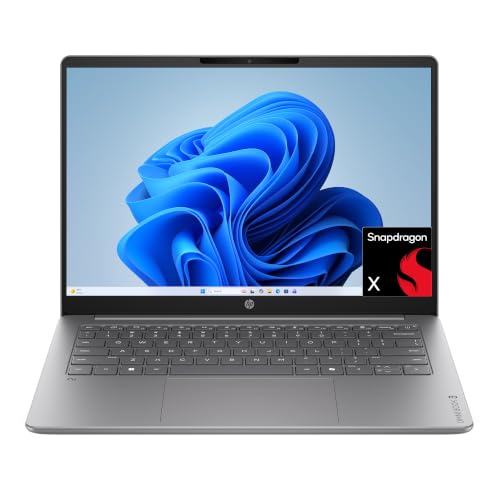 | HP OmniBook 3 14 | Best fit: A sharper 14-inch Windows screen Operating system: Windows 11 Home Screen: 14-inch 1920 x 1200 OLED, up to 300 nits Processor: Snapdragon X X1-26-100 Ports: Not stated in the listing bullets | Check Price on Amazon |
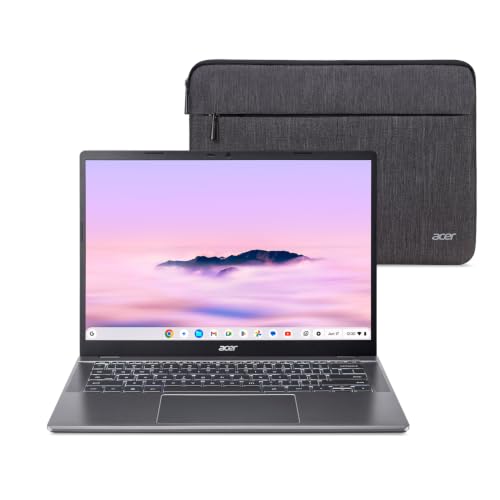 | Acer Chromebook Plus 514 | Best fit: A touch Chromebook with room for accessories Operating system: ChromeOS Screen: 14-inch 1920 x 1200 matte touch IPS Processor: Intel Core i3-1315U Ports: 2 USB-C, 2 USB-A, HDMI 1.4 | Check Price on Amazon |
 | Apple MacBook Neo | Best fit: A macOS laptop for a household already using Apple Operating system: macOS Screen: 13-inch display Processor: Apple A18 Pro Ports: USB-C (USB 3), USB-C (USB 2), headphone jack | Check Price on Amazon |
1. Acer Aspire Go 15 — Best Windows Pick for Ports and a Full-Size Screen
Amazon’s Aspire Go 15 listing, model AG15-21P-R42Z, states an AMD Ryzen 3 30 processor, 8GB of LPDDR5 memory, and a 128GB PCIe SSD with Windows 11 Home. Its 15.6-inch IPS screen is listed at 1920 x 1080, and the bullet says Acer BluelightShield lowers blue light levels.
The listing is specific about connections: two USB-C ports at up to 10Gbps, each with DisplayPort and charging up to 45W, plus a USB 3.2 Gen 1 port, a USB 2.0 port, HDMI 2.1, a headphone jack, and a 720p camera. The named HDMI and USB ports show where a wired display or accessory would connect.
Amazon’s bullets do not state touch input. Its 128GB SSD matches the Vivobook Go 15 and HP 14 figures, while the OmniBook 3 14 and Chromebook Plus 514 list 256GB.
Our Take Choose the Aspire Go 15 for a child who needs Windows, a full-size screen, and named USB-C, USB, and HDMI connections. It is a better fit when a touch screen is not required.
- Amazon’s bullets list two 10Gbps USB-C ports with DisplayPort and charging up to 45W, plus HDMI 2.1 and two more USB ports.
- The Aspire Go 15 bullets name 8GB LPDDR5 memory and a 128GB PCIe SSD.
- Amazon lists a 15.6-inch 1920 x 1080 IPS display, larger than the screens on the 14-inch Windows models.
- The Aspire Go 15 bullets do not state touch input, so it is a weaker fit when a touch screen is required.
- Amazon lists its item weight at 3.81 pounds, the highest of the six laptops on this page.
2. ASUS Vivobook Go 15 — Best Windows Pick for Sharing the Screen
Amazon lists the ASUS Vivobook Go 15 E1504FA-PS04-B with a 15.6-inch 1920 x 1080 60Hz screen, Windows 11 Home, an AMD Athlon Silver 10 processor, and 128GB of storage. ASUS’s bullet names a 180-degree lay-flat hinge that it describes as opening wide for easy sharing, and a weight of 3.59 pounds.
The listed ports are one USB-C 3.2 Gen 1 port, one USB 3.2 Gen 1 Type-A, one USB 2.0 Type-A, HDMI 1.4, DC-in, and a 3.5mm audio jack. The listing also names a 720p camera with a privacy shutter and says fast charging can take a low battery to 60% in as little as 49 minutes. The bullets do not say whether the USB-C port carries video output or charging.
The title and Amazon’s size field give 4GB RAM, less than the 8GB listed for the Aspire Go 15, OmniBook 3 14, and Chromebook Plus 514. The bullets name LPDDR5 memory without a capacity.
Our Take Choose this Vivobook Go 15 when a shared Windows computer needs a large full-HD display, a camera shutter, and a hinge that opens flat. Confirm its memory configuration and do not assume more USB-C functions than the listing names.
- Amazon lists a 15.6-inch 1920 x 1080 display, and ASUS describes the 180-degree hinge as opening wide for easy sharing.
- Amazon lists the Vivobook with a 720p camera and a privacy shutter.
- Amazon names the Vivobook’s connectors, including one USB-C port, two USB-A ports, HDMI 1.4, and a 3.5mm audio jack.
- ASUS’s bullet says fast charging can take a low battery to 60% in as little as 49 minutes.
- The Vivobook’s 4GB memory figure comes from the title and Amazon’s size field, and the bullets give no capacity.
- Amazon does not state video output or charging support for this Vivobook Go 15’s USB-C port.
3. HP 14 — Windows Laptop With Two Microphones for Class Calls
Amazon’s HP 14 listing, model 14-dq6199nr, states an Intel N150 processor, 4GB RAM, and 128GB UFS with Windows 11 Home. It is one of two 14-inch Windows models here, with a micro-edge HD display. The listing describes a wide viewing area but gives no pixel dimensions, so do not compare it as though it were a stated full-HD panel.
The HP bullets name an HD camera, two microphones, and noise reduction for video chats. They also name a Copilot key and HP Fast Charge, which HP says goes from 0 to 50% in approximately 45 minutes. Amazon lists the item weight at 3.24 pounds. The listing does not identify any physical port, so check the connector layout before buying a wired accessory, e.g., a mouse.
The HP 14 lists 4GB RAM and 128GB UFS, not an SSD, so compare its memory with the 8GB models before choosing.
Our Take Choose the HP 14 for a 14-inch Windows laptop when the camera and microphone details come first. Its listing leaves screen resolution and ports open, so confirm both before buying accessories.
- Amazon lists the HP 14 at 3.24 pounds, lighter than the two 15.6-inch Windows models.
- Amazon states an HD camera, two microphones, and noise reduction for video chats.
- HP’s bullet says HP Fast Charge goes from 0 to 50% in approximately 45 minutes.
- The HP 14 bullets call the panel HD but do not state its pixel dimensions or whether it supports touch input.
- No physical port is named in the listing bullets, so confirm connectors before buying accessories.
- It lists 4GB RAM, while the Aspire Go 15, OmniBook 3 14, and Chromebook Plus 514 list 8GB.
4. HP OmniBook 3 14 — Best Windows Pick for a Sharper Screen
Amazon’s OmniBook 3 14 listing identifies the 14-hz0188nr configuration with a 1920 x 1200 OLED display at up to 300 nits, a Snapdragon X X1-26-100 processor, 8GB LPDDR5x, and a 256GB PCIe Gen4 NVMe M.2 SSD. HP’s product page for the model lists the 14-inch display, Snapdragon X, 8GB, and 256GB, and describes a 16:10 screen. The OmniBook listing’s screen and storage figures are higher than the HP 14 listing’s.
Amazon also states Wi-Fi 6E, an FHD camera with HDR auto-switch, Qualcomm Adreno graphics, Windows 11 Home, and HP Eye Ease, which its bullet says reduces blue light. The listing states battery life of up to 41 hours and 45 minutes, and Amazon lists the item weight at 3.13 pounds. HP’s page says only that multiple ports are included and the Amazon bullets name none, so neither source supports a promise about a dock or display connection.
Neither the listing nor HP’s page states touch input. Pick the Chromebook Plus 514 for stated touch or the Aspire Go 15 for named HDMI and USB ports.
Our Take Choose the OmniBook 3 14 for a 14-inch Windows laptop whose listing states a 1920 x 1200 OLED screen, 8GB memory, and 256GB SSD. Look elsewhere when you already know the child needs a named port or touch input.
- Amazon states a 1920 x 1200 OLED display at up to 300 nits, a sharper published specification than the HP 14’s HD description.
- The listing gives 8GB LPDDR5x and a 256GB PCIe Gen4 NVMe M.2 SSD in a bullet.
- Amazon names Wi-Fi 6E, an FHD camera with HDR auto-switch, and HP Eye Ease, which it says reduces blue light.
- HP’s page also lists the 14-inch display, Snapdragon X, 8GB, and 256GB.
- The Amazon bullets name no physical port, and HP’s page says only that multiple ports are included.
- Neither Amazon nor HP states touch input for this 14-inch OLED configuration.
5. Acer Chromebook Plus 514 — Best Pick for ChromeOS and a Touch Screen
The Acer Chromebook Plus 514 is the ChromeOS option in this group. Amazon lists an Intel Core i3-1315U, 8GB LPDDR5, and a 256GB PCIe Gen4 SSD, plus a 14-inch 1920 x 1200 300-nit matte touch IPS display. Acer’s page for the CB514-5HT-33RD lists a touchscreen, 1920 x 1200, 8GB, 256GB, and 3.11 pounds. Amazon states a 16:10 aspect ratio, taller than the 16:9 ASUS states for the Vivobook Go 15.
Amazon’s bullets name two USB-C 3.2 Gen 2 ports with DisplayPort and charging up to 65W, two USB-A ports, HDMI 1.4, Wi-Fi 7, an FHD camera with a privacy shutter, and a protective sleeve.
ChromeOS is a deliberate software choice. The detailed bullet and Acer’s page state 1920 x 1200, while the title says 1920 x 1080.
Our Take Choose the Chromebook Plus 514 for ChromeOS, a matte touch screen, and named USB-C, USB-A, and HDMI ports. Confirm the child’s required programs run on ChromeOS first.
- Amazon states a 14-inch 1920 x 1200 matte touch IPS display with 300-nit brightness, and Acer’s page lists a touchscreen.
- Amazon lists two 10Gbps USB-C ports with DisplayPort and up to 65W charging, two USB-A ports, and HDMI 1.4.
- The listing names 8GB LPDDR5, a 256GB PCIe Gen4 SSD, Wi-Fi 7, and an FHD privacy-shutter camera.
- ChromeOS is a different software environment from Windows and macOS, so confirm the child’s required programs first.
- The Amazon title and detailed bullet disagree on vertical resolution, and the detailed bullet and Acer’s page state 1920 x 1200.
6. Apple MacBook Neo — Best Pick for macOS
Apple’s MacBook Neo page identifies a 13-inch MacBook with the A18 Pro chip, a 13-inch Liquid Retina display, and macOS. It is the only model here on Apple’s operating system, which can make sense when the family already uses Apple services. The choice is about the operating system and does not make the laptop better for every child.
Apple’s comparison lists one USB 3 USB-C port, one USB 2 USB-C port, and a 3.5mm headphone jack. Amazon’s title lists 8GB unified memory and a 256GB SSD, and its size field lists 256GB. Amazon lists the item weight at 2.71 pounds, the lowest of the six, and the 13-inch screen is also the smallest stated size in this group.
Neither Apple’s page nor the Amazon bullets state USB-A, HDMI, or touch support. Match its two USB-C ports to the accessories already owned.
Our Take Choose the MacBook Neo when a child needs macOS and the household’s accessories fit two USB-C ports. Look elsewhere if a larger screen or built-in USB-A is essential.
- Apple states the A18 Pro chip and macOS for the 13-inch MacBook Neo.
- Apple’s page lists two USB-C ports and a headphone jack.
- Amazon lists the item weight at 2.71 pounds, the lowest of the six.
- It is the only pick here built around macOS rather than Windows or ChromeOS.
- Apple lists one of its two USB-C ports as USB 2, so check which port an accessory needs.
- Its 13-inch display is smaller than the 14-inch and 15.6-inch screens named for the other models.
- Neither Apple’s page nor the Amazon bullets state built-in USB-A, HDMI, or touch input for this configuration.
Buying Guide
Choose the operating system before choosing the screen
Windows, ChromeOS, and macOS are separate choices. The Aspire Go 15, Vivobook Go 15, HP 14, and OmniBook 3 14 list Windows 11 Home. The Chromebook Plus 514 lists ChromeOS, while the MacBook Neo runs macOS. Choose the system that supports the child’s school portal, household software, and adult help available at home.
The Chromebook Plus 514 is not a smaller Windows computer, and the MacBook Neo is not a Windows model with different ports. A specific Windows desktop program calls for one of the four Windows listings.
Match the screen to reading space and touch input
Screen size ranges from 13 to 15.6 inches in these listings. The MacBook Neo is 13 inches, the HP 14, OmniBook 3 14, and Chromebook Plus 514 are 14 inches, and the Aspire Go 15 and Vivobook Go 15 are 15.6 inches at 1920 x 1080. Larger panels give more room for side-by-side documents. Smaller models take up less desk space.
Amazon’s item weights run from 2.71 pounds to 3.81 pounds. The MacBook Neo is lightest, then the Chromebook Plus 514 at 3.11, the OmniBook 3 14 at 3.13, the HP 14 at 3.24, the Vivobook Go 15 at 3.59, and the Aspire Go 15 at 3.81.
Amazon and Acer state touch for the Acer Chromebook Plus 514, and no Amazon listing or maker page cited here states it for the other five. If the child needs the display itself as an input method, the Chromebook’s matte 1920 x 1200 touch panel is the only one here that states touch.
Check memory and storage where the source actually states it
The Aspire Go 15, OmniBook 3 14, and Chromebook Plus 514 state 8GB. The HP 14 states 4GB in a bullet. The Vivobook title and size field give 4GB while its bullets name no capacity.
Storage descriptions also differ. The Aspire Go 15 states a 128GB PCIe SSD, the HP 14 states 128GB UFS, and the OmniBook 3 14 and Chromebook Plus 514 state 256GB SSDs. The MacBook Neo’s 256GB comes from Amazon’s title and size field. UFS and SSD are different storage types, so compare the words in each listing instead of the capacity alone.
Buy the ports the child will actually use
The Aspire Go 15 and Chromebook Plus 514 are the two that state DisplayPort and charging over USB-C. Both state two USB-C ports with DisplayPort and charging, two further USB ports, and HDMI. The Chromebook lists up to 65W charging and the Aspire up to 45W. Named ports help when a child already owns a wired accessory, e.g., a mouse.
The Vivobook Go 15 names USB-C, two USB-A ports, and HDMI 1.4, but does not state its USB-C video or charging modes. The HP 14 and OmniBook 3 14 name no physical ports in the Amazon bullets, and Apple lists the MacBook Neo with one USB 3 and one USB 2 USB-C port plus a headphone jack. Do not treat USB-C as a single promise when the exact function is not stated.
Use the stated cameras and privacy features as tie-breakers
Camera details are uneven across the page. The Aspire Go 15 names a 720p camera, the Vivobook Go 15 a 720p camera with a privacy shutter, the HP 14 an HD camera with two microphones and noise reduction, the OmniBook 3 14 an FHD camera with HDR auto-switch, the Chromebook Plus 514 an FHD privacy-shutter camera, and the MacBook Neo a 1080p FaceTime HD camera with dual microphones.
The Vivobook and Chromebook name a privacy shutter. A camera specification does not say everything about call quality, but it gives a parent something stated to compare.
FAQ
Is a Chromebook or Windows laptop better for a child?
Neither operating system wins for every child. The Acer Chromebook Plus 514 is the ChromeOS choice, with a 14-inch touch display and a USB-C, USB-A, and HDMI list. The Acer Aspire Go 15, ASUS Vivobook Go 15, HP 14, and HP OmniBook 3 14 all list Windows 11 Home.
Choose by required programs and support at home. Pick Windows when a school or household program specifically needs it.
What is the best screen size for a school-age child?
The 15.6-inch Aspire Go 15 and Vivobook Go 15 give the most stated screen area. The 14-inch models take up less space. The MacBook Neo is 13 inches. No listing or maker page ties a screen size to an age.
Touch is a separate question from screen size. Only the Chromebook Plus 514 states touch input. The OmniBook’s 1920 x 1200 OLED specification is sharper than the HP 14’s published HD description.
Which picks have enough stated storage for school files?
The Aspire Go 15, Vivobook Go 15, and HP 14 list 128GB storage, although the HP describes it as UFS while Acer calls its drive a PCIe SSD. The OmniBook 3 14 and Chromebook Plus 514 list 256GB SSDs. The listings do not say how much space a particular child’s files will need.
The MacBook Neo lists 256GB in Amazon’s title and size field. Compare the words in each listing, not only the number.
Which model has the clearest ports for a monitor or wired mouse?
The Acer Aspire Go 15 lists two USB-C ports with DisplayPort and charging, a USB 3.2 Gen 1 port, a USB 2.0 port, and HDMI 2.1. The Acer Chromebook Plus 514 lists two USB-C ports with DisplayPort and charging, two USB-A ports, and HDMI 1.4. They are the two listings that state DisplayPort and charging over USB-C.
Apple lists the MacBook Neo with one USB 3 and one USB 2 USB-C port plus a headphone jack. Check the exact connection named by the laptop and accessory.
Is the MacBook Neo the right choice for every child?
No. The MacBook Neo is the macOS option, with an Apple A18 Pro chip and two USB-C ports, one USB 3 and one USB 2. It suits families that deliberately want macOS.
Its 13-inch display is smaller than every other screen here. A first MacBook is a software and connector choice.
Bottom Line
Start with the system the child needs, then choose the screen and ports. The Acer Aspire Go 15 is the Windows choice that states DisplayPort and charging over USB-C, the Acer Chromebook Plus 514 is the touch Chromebook choice, and the Apple MacBook Neo is the macOS choice. For related picks, see the school laptop guide, the Chromebook guide, and the MacBook guide.