Amazon lists six laptops here, one each from Lenovo, HP, Dell, ASUS, Acer, and Apple, and the listings differ in ports, screens, graphics, and operating system. None of them says one brand is better than another, so this guide compares what each listing states.
Read the ports and the operating system first, because they decide which accessories and software work. Memory and storage sizes that appear only in a title are marked as possibly a seller configuration.
The listings show different strengths, so choose the laptop whose listing states what you need.Six Laptops From Six Brands Compared
| Image | Product | Details | Check Price |
|---|---|---|---|
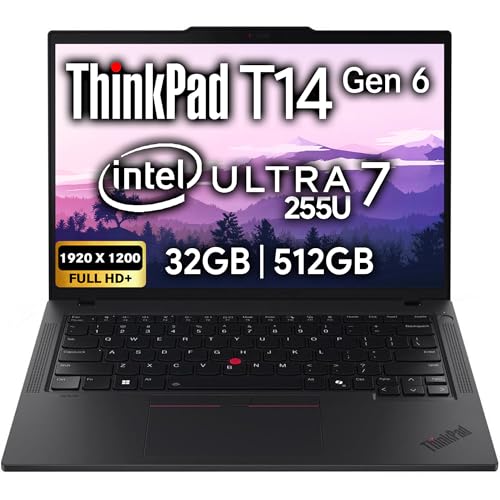 | Lenovo ThinkPad T14 Gen 6 | Best fit: Ethernet and Windows 11 Pro Screen: 14-inch 1920 x 1200 IPS, non-touch Processor: Intel Core Ultra 7 255U Ports: 2 Thunderbolt 4, 2 USB-A, HDMI, RJ-45 Ethernet Memory and storage: 32GB and 512GB, possibly a seller upgrade | Check Price on Amazon |
 | HP OmniBook 5 16-Inch | Best fit: Largest screen Screen: 16-inch 1920 x 1200 IPS touchscreen Processor: AMD Ryzen AI 7 350 Ports: USB-C, HDMI 2.1, USB (Thunderbolt not stated) Memory and storage: 16GB and 1TB, in the title only | Check Price on Amazon |
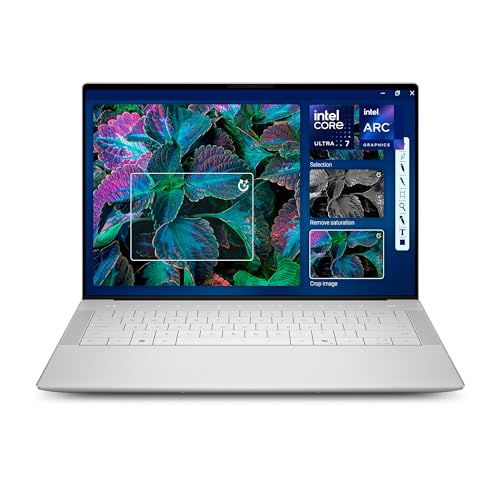 | Dell XPS 14 | Best fit: 3.2K OLED touchscreen Screen: 14.5-inch 3.2K OLED touch, up to 120Hz Processor: Intel Core Ultra 7 255H Ports: Not stated in the bullets Memory and storage: 32GB and 1TB, in the title only | Check Price on Amazon |
 | ASUS Vivobook S14 | Best fit: Longest stated battery life Screen: 14-inch WUXGA 16:10 OLED Processor: Intel Core Ultra 7 355 Ports: 2 USB-C 3.2 Gen 1, 2 USB-A, HDMI 2.1 Memory and storage: 32GB and 1TB, stated in a bullet | Check Price on Amazon |
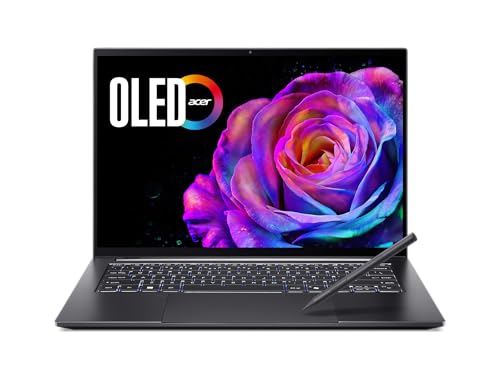 | Acer Swift X 14 | Best fit: Separate RTX 5050 graphics Screen: 14.5-inch 3K OLED touch, 120Hz Processor: Intel Core Ultra 7 255H Ports: 2 USB-C with Thunderbolt 4, 2 USB-A, HDMI 2.1 Memory and storage: 16GB LPDDR5X and 1TB, stated in a bullet | Check Price on Amazon |
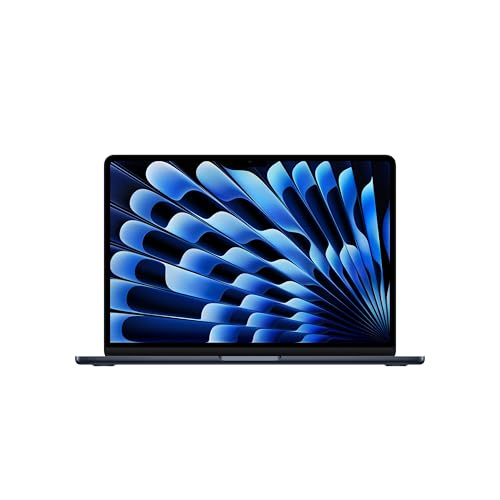 | Apple MacBook Air 13-Inch M5 | Best fit: macOS and Thunderbolt 4 Screen: 13.6-inch Liquid Retina Processor: Apple M5 Ports: 2 Thunderbolt 4, MagSafe, headphone jack Memory and storage: 16GB and 512GB, in the title only | Check Price on Amazon |
1. Lenovo ThinkPad T14 Gen 6 — Best for Ethernet and Windows 11 Pro
Amazon lists two Thunderbolt 4 ports, two USB-A 3.2 Gen 1 ports with one always on, HDMI, and RJ-45 Ethernet for the ThinkPad T14 Gen 6, plus Wi-Fi 6E and Bluetooth 5.3. The Intel Arc graphics are listed with support for up to three external monitors through HDMI and Thunderbolt 4, at up to 4K and 60Hz.
The screen is a 14-inch 1920 x 1200 IPS panel, anti-glare and non-touch, driven by an Intel Core Ultra 7 255U. The listing names MIL-STD 810H certification, a fingerprint reader, a backlit keyboard, a 5MP webcam with a privacy shutter, and Windows 11 Pro.
The bullets state 32GB of DDR5 and a 512GB NVMe SSD. The warranty bullet gives one year from the manufacturer and a separate one-year memory and hard drive limited warranty, next to the words “Memory & Hard Drive Upgrade.” OEMGENUINE sells the New offer, so the 32GB and 512GB may be the seller’s upgrade and not Lenovo’s own configuration.
Our Take Choose the ThinkPad T14 Gen 6 for wired Ethernet, Thunderbolt 4, and a non-touch 14-inch screen. Ask OEMGENUINE to confirm the memory and storage before ordering.
- Amazon’s ThinkPad T14 Gen 6 listing states an RJ-45 Ethernet port next to two Thunderbolt 4 ports and HDMI, and it lists support for up to three external monitors.
- Amazon’s ThinkPad T14 Gen 6 listing names MIL-STD 810H certification, a fingerprint reader, and a 5MP webcam with a privacy shutter.
- The ThinkPad T14 Gen 6 listing states the Windows 11 Pro edition, not only Windows.
- The ThinkPad T14 Gen 6 warranty bullet mentions a memory and hard drive upgrade, so OEMGENUINE may have set the 32GB and 512GB.
- The ThinkPad T14 Gen 6 listing states 512GB of storage, half of the 1TB named in the HP, Dell, ASUS, and Acer listings.
2. HP OmniBook 5 16-Inch — Best for the Largest Screen
The OmniBook 5 has the largest display of the six. Amazon lists a 16-inch 1920 x 1200 IPS touchscreen with anti-glare treatment and AMD FreeSync. The title calls it 2K, and the bullet gives the 1920 x 1200 resolution.
Inside, the listing names an AMD Ryzen AI 7 350 with up to 50 TOPS of NPU performance and Radeon 860M integrated graphics. It lists Wi-Fi 6, Bluetooth 5.4, USB-C, HDMI 2.1, and several USB ports, along with a full-size backlit keyboard with a numeric keypad and a 1080p IR webcam with a privacy shutter. The battery figure is up to 14 hours and 45 minutes of mixed usage, and the operating system is Windows 11.
The 16GB of DDR5 and the 1TB PCIe SSD appear in the title only, and no bullet states either size. Oydisen Computer sells the New offer, so the sizes are possibly that seller’s configuration.
The OmniBook 5 bullets name USB-C and HDMI 2.1 but not Thunderbolt or USB4, so read the port label before buying a dock.Our Take Choose the OmniBook 5 for a 16-inch touchscreen with a numeric keypad. Confirm the memory and storage in the cart, since only the title names them.
- Amazon’s OmniBook 5 listing states a 16-inch 1920 x 1200 IPS touchscreen, the largest of the six screens.
- The OmniBook 5 listing states up to 14 hours and 45 minutes of mixed-usage battery life.
- Amazon lists a full-size backlit keyboard with a numeric keypad for the OmniBook 5.
- The OmniBook 5 title names 16GB and 1TB, and no bullet does, so they are possibly Oydisen Computer’s configuration.
- The OmniBook 5 bullets list USB-C but do not state Thunderbolt or USB4.
3. Dell XPS 14 — Best for a 3.2K OLED Touchscreen
The XPS 14 listing puts most of its specifications in the title: a 14.5-inch touch 3.2K OLED display at 48 to 120Hz, an Intel Core Ultra 7 255H, Intel Arc graphics, 32GB of memory, a 1TB SSD, and a backlit keyboard with a fingerprint reader. The bullets add that the refresh rate varies up to 120Hz, which the listing says also improves battery life on static images and web pages.
The bullets also describe machined aluminum with Gorilla Glass 3 and Copilot in Windows. They name no port, no battery figure, and no Windows edition.
The 32GB and 1TB are named in the title and in Amazon’s size field, and no bullet states them, so they are possibly a seller configuration. Amazon.com sells the New offer.
The XPS 14 page also shows a Used offer from Amazon Resale, separate from the New offer sold by Amazon.com, so check the condition in the cart.Our Take Choose the XPS 14 for the 3.2K OLED touchscreen, and confirm the memory, storage, and ports in the cart. The listing text leaves all three open.
- Amazon’s XPS 14 title names a 14.5-inch touch 3.2K OLED display at 48 to 120Hz, the specification the listing leads with.
- The XPS 14 bullets state a variable refresh rate of up to 120Hz, and the listing says it also improves battery life on static images and web pages.
- Amazon’s XPS 14 bullets describe machined aluminum with Gorilla Glass 3.
- The XPS 14 title and size field name 32GB and 1TB, and no bullet does, so they are possibly a seller configuration.
- The XPS 14 bullets list no ports, including Thunderbolt or USB4.
4. ASUS Vivobook S14 — Best for the Longest Stated Battery Life
ASUS’s Vivobook S14 listing, model S3407AA-DS77, gives a battery figure of up to 29 hours from a 70Wh battery, measured in a 1080p video playback scenario under controlled conditions, with a fast charge to 60 percent in 49 minutes. The listing adds that actual results may vary.
The body is listed at 3.09 pounds and 0.7 inch thick, with a 14-inch WUXGA 16:10 OLED screen and an Intel Core Ultra 7 355 that the listing credits with up to 49 NPU TOPS. The bullets state 1TB of storage and 32GB of memory, and the operating system is Windows 11 Home.
The ports are two USB 3.2 Gen 1 Type-C, two USB 3.2 Gen 1 Type-A, HDMI 2.1 TMDS, and a 3.5 mm audio jack, with Wi-Fi 6 and Bluetooth 5.4. The listing also names an IR FHD camera with a privacy shutter and Dolby Atmos speakers. Amazon.com sells the New offer.
Our Take Choose the Vivobook S14 for the longest battery figure and a 3.09-pound OLED body with 32GB and 1TB stated in the bullets. Look at the ThinkPad, Swift X 14, or MacBook Air when you need Thunderbolt 4.
- ASUS’s Vivobook S14 listing states up to 29 hours of battery life from a 70Wh battery, measured in video playback, and adds that actual results may vary.
- The Vivobook S14 listing gives a weight of 3.09 pounds and a thickness of 0.7 inch.
- Amazon’s Vivobook S14 bullets state 32GB of memory and 1TB of storage.
- The Vivobook S14 listing names two USB 3.2 Gen 1 Type-C ports and does not state Thunderbolt or USB4.
- Wi-Fi 6 is the version the Vivobook S14 listing states, below the Wi-Fi 6E on the ThinkPad and the Wi-Fi 7 on the MacBook Air.
5. Acer Swift X 14 — Best for a Separate RTX 5050 Graphics Chip
The Swift X 14, model SFX14-73G-71XL, is the only listing with a separate graphics chip. Amazon names an NVIDIA GeForce RTX 5050 laptop GPU next to an Intel Core Ultra 7 255H, while the other five listings name no separate graphics chip.
The display is a 14.5-inch 16:10 OLED at 3K and 120Hz with a Gorilla Glass cover, and the title calls it a touch display. The bullets cite Certified True Black HDR500 and Calman Verified color accuracy. Amazon lists 16GB of onboard LPDDR5X and a 1TB PCIe Gen 4 SSD, with two M.2 slots and one available.
Both USB-C ports are listed as USB 3.2 Gen 2 with DisplayPort, Thunderbolt 4, and charging up to 100W. The listing adds two USB 3.2 Gen 2 ports, one with power-off charging, HDMI 2.1, and a battery figure of up to 12.5 hours. The listing says an Acer Active Stylus is included. Amazon.com sells the New offer.
Our Take Choose the Swift X 14 for the RTX 5050, a 3K OLED screen, and Thunderbolt 4 ports with 100W charging. Look at the Vivobook S14 or the MacBook Air when a longer battery figure decides the purchase.
- Amazon’s Swift X 14 listing names an NVIDIA GeForce RTX 5050 laptop GPU, the only separate graphics chip named among the six listings.
- The Swift X 14 listing states two USB-C ports with Thunderbolt 4, DisplayPort, and charging up to 100W.
- Amazon lists 16GB of LPDDR5X and a 1TB PCIe Gen 4 SSD with one free M.2 slot for the Swift X 14.
- The Swift X 14 stylus bullet limits MPP 2.5 support to the touchpad, and the title calls the display touch.
- The Swift X 14 listing states up to 12.5 hours of battery life, the lowest of the four battery figures Amazon gives for the six laptops.
6. Apple MacBook Air 13-Inch M5 — Best for macOS and Two Thunderbolt 4 Ports
Amazon lists the MacBook Air 13-inch with the M5 chip, model MDHE4LL/A, in Midnight with a 13.6-inch Liquid Retina display. It is the only one of the six that runs macOS, since the other five name Windows or Copilot in Windows.
The ports are two Thunderbolt 4, a MagSafe charging port, and a headphone jack, and the listing says the laptop supports up to two external displays. The bullets give Wi-Fi 7 and Bluetooth 6 through the Apple N1 wireless chip, a 12MP Center Stage camera, a three-mic array, and a four-speaker system with Spatial Audio and Dolby Atmos support. The listing states a battery figure of up to 18 hours.
The 16GB of unified memory and the 512GB SSD are named in the title and in Amazon’s size field, and no bullet states them. They are possibly a seller configuration, and Amazon.com sells the New offer.
The MacBook Air listing states up to two external displays.Our Take Choose the MacBook Air for macOS, Thunderbolt 4, and a 13.6-inch display. Confirm the memory and storage in the cart.
- The MacBook Air listing is the only one of the six that runs macOS.
- Amazon lists two Thunderbolt 4 ports and a MagSafe charging port for the MacBook Air.
- The MacBook Air listing states a battery figure of up to 18 hours.
- Amazon’s MacBook Air listing names no HDMI or USB-A port.
- The MacBook Air listing gives a 13.6-inch display.
Buying Guide
Start with the ports you plug into
Three of the six listings state Thunderbolt 4: the ThinkPad, the Swift X 14, and the MacBook Air. The ThinkPad and the MacBook Air list two Thunderbolt 4 ports each, and the Swift X 14 lists two USB-C ports that carry Thunderbolt 4 and DisplayPort.
The HP, Dell, and ASUS listings do not state Thunderbolt or USB4. The OmniBook 5 names USB-C and HDMI 2.1, the Vivobook S14 names two USB 3.2 Gen 1 Type-C ports, and the XPS 14 bullets name no ports. Check the port label before pairing a dock, and see the Thunderbolt 4 dock guide for what to look for.
Compare screens by size, panel, and touch
Amazon’s listings span 13.6 to 16 inches. They give 13.6 for the MacBook Air, 14 for the ThinkPad and Vivobook S14, 14.5 for the XPS 14 and Swift X 14, and 16 for the OmniBook 5.
The XPS 14, Vivobook S14, and Swift X 14 listings name OLED panels, and the ThinkPad and OmniBook 5 listings name IPS. The MacBook Air listing says Liquid Retina and names no panel type. The OmniBook 5 states touch in a bullet, the XPS 14 and Swift X 14 in the title, and the ThinkPad bullet says non-touch. The Vivobook S14 and MacBook Air listings do not state it.
Treat memory and storage named only in a title with care
The ThinkPad, Vivobook S14, and Swift X 14 bullets state memory and storage sizes. The OmniBook 5, XPS 14, and MacBook Air name theirs in the title or size field only.
A size named only in a title is possibly a seller configuration, and the ThinkPad’s upgrade wording is another reason to confirm before buying. Compare the configuration in the cart with the product section above before ordering.
Check the seller and the condition
Amazon.com sells the New offer for the XPS 14, Vivobook S14, Swift X 14, and MacBook Air. OEMGENUINE sells the ThinkPad’s New offer and Oydisen Computer sells the OmniBook 5’s, both third-party sellers.
The XPS 14 and MacBook Air pages also show Used offers from Amazon Resale with condition notes. Used offers are separate from the New offer this guide describes, so confirm the condition in the cart.
FAQ
Which laptop brand is best?
The listings do not say one brand is better than another, and this page makes no such claim. They differ in what they state. Lenovo lists Ethernet, Acer lists a separate RTX 5050 graphics chip, Apple runs macOS, HP has the 16-inch screen, ASUS states the longest battery figure, and Dell’s title gives a 3.2K OLED touch display.
Reliability and support quality need their own source, such as a maker’s support page, because the listings contain no reliability comparison. The Thunderbolt laptop list covers more models by port type.
Which of these laptops state Thunderbolt 4?
The ThinkPad T14 Gen 6, Swift X 14, and MacBook Air state Thunderbolt 4. The OmniBook 5, XPS 14, and Vivobook S14 listings do not state Thunderbolt or USB4.
A USB-C connector alone does not settle dock or display support. The business laptop guide lists more laptops that state Thunderbolt 4.
Which of these run macOS, and which run Windows?
Amazon’s MacBook Air listing is the one that names macOS. The ThinkPad listing names Windows 11 Pro, the Vivobook S14 listing names Windows 11 Home, and the OmniBook 5 listing names Windows 11.
The XPS 14 and Swift X 14 mention Copilot in Windows without naming an edition. For Mac choices, the MacBook for college guide compares the Air and Pro models.
Bottom Line
Pick the laptop whose listing states the feature you need, and treat the brand name as the starting point for a closer look. The ThinkPad lists Ethernet and Thunderbolt 4, the Swift X 14 lists a separate RTX 5050, and the MacBook Air runs macOS. The OmniBook 5 has the 16-inch screen, the Vivobook S14 has the longest battery figure, and the XPS 14 has the 3.2K OLED touchscreen.
Each maker has its own guide: HP, Dell, ASUS, Acer, and Lenovo. Lightweight models are in the lightweight laptop guide.