ASUS sells these monitors under TUF Gaming, ROG Strix and ROG Swift names, and the specifications differ more than the badges do. ASUS specifies the ROG Swift OLED PG32UCDM3 at 4K, 240Hz and USB-C with 90W Power Delivery, while the Amazon listing for the TUF VG279QM5A states 1080p at 240Hz. Panel, resolution, refresh ceiling and ports decide the fit, not the badge.
For OLED screens from other brands, see our OLED gaming monitors with USB-C guide. ASUS also sells monitors built around a laptop desk, covered in our ASUS monitors for laptops guide, which includes the ROG Strix XG27ACS.
ASUS TUF Gaming and ROG Strix Monitor Comparison
| Image | Product | Details | Check Price |
|---|---|---|---|
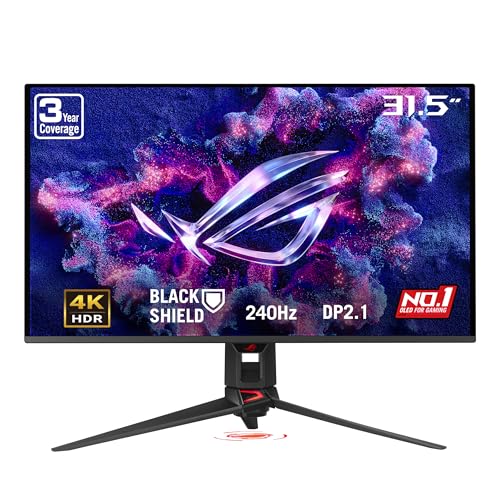 | ASUS ROG Swift OLED PG32UCDM3 | Best fit: 4K 240Hz OLED and 90W USB-C Panel: 32-inch Tandem QD-OLED Resolution: 3840 x 2160 Refresh: 240Hz Connections: DP 2.1, HDMI 2.1, USB-C 90W | Check Price on Amazon |
 | ASUS TUF Gaming VG27AQL5A | Best fit: 210Hz QHD through DisplayPort Panel: 27-inch Fast IPS Resolution: 2560 x 1440 Refresh: 210Hz Connections: DP 1.4, 2x HDMI 2.0, USB-C service port | Check Price on Amazon |
 | ASUS ROG Strix XG27ACS | Best fit: QHD USB-C DP Alt Mode input Panel: 27-inch Fast IPS Resolution: 2560 x 1440 Refresh: 180Hz Connections: DP 1.4, HDMI 2.0, USB-C DP Alt Mode | Check Price on Amazon |
 | ASUS TUF Gaming VG27VQ3B | Best fit: Curved 180Hz Full HD Panel: 27-inch 1500R curved Resolution: 1920 x 1080 Refresh: 180Hz Connections: Full port matrix not stated | Check Price on Amazon |
 | ASUS TUF Gaming VG27AQ3A | Best fit: 180Hz QHD with built-in speakers Panel: 27-inch Fast IPS Resolution: 2560 x 1440 Refresh: 180Hz Connections: Full port matrix not stated | Check Price on Amazon |
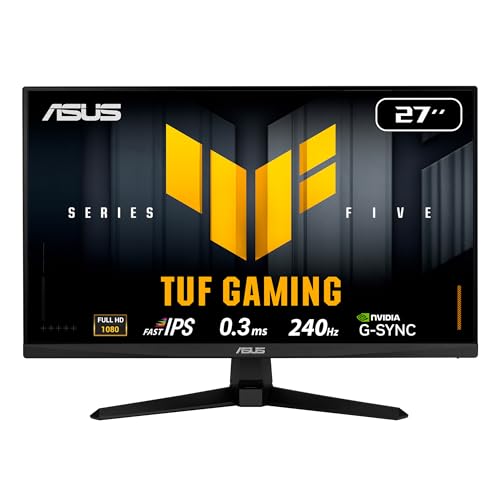 | ASUS TUF Gaming VG279QM5A | Best fit: 240Hz Full HD gaming Panel: 27-inch Fast IPS Resolution: 1920 x 1080 Refresh: 240Hz Connections: HDMI and DisplayPort | Check Price on Amazon |
 | ASUS TUF Gaming VG277Q1A | Best fit: 165Hz Full HD with both cables Panel: 27-inch Full HD Resolution: 1920 x 1080 Refresh: 165Hz Connections: HDMI and DisplayPort | Check Price on Amazon |
1. ASUS ROG Swift OLED PG32UCDM3 — Best 4K 240Hz OLED Pick
ASUS specifies a 32-inch 3840 x 2160 Tandem QD-OLED panel at 240Hz and 0.03ms for the PG32UCDM3, along with DisplayHDR 500 True Black, true 10-bit color and a Neo Proximity Sensor that switches to a black screen when it detects the user has moved away. ASUS lists 99% DCI-P3 coverage, while the Amazon listing says 99.5%. ASUS’s own product page says OLED technology can be susceptible to burn-in with prolonged static images, and describes its OLED Care Pro features, including the Neo Proximity Sensor, as the way it mitigates that risk.
ASUS lists DisplayPort 2.1 UHBR20 with 80Gbps full bandwidth, HDMI 2.1 and USB-C with 90W Power Delivery. It is the only monitor on this page with a 90W figure. ASUS lists 7.5W for the XG27ACS, and neither ASUS nor Amazon gives a USB-C power figure for the other five. The panel is 32 inches, while every other monitor here is 27 inches. ASUS’s product page also lists a 3-year warranty.
ASUS lists 90W USB-C Power Delivery on the PG32UCDM3 and 7.5W on the XG27ACS, the only other USB-C power figure on this page.Our Take Choose the PG32UCDM3 when you want 4K OLED with ASUS’s 240Hz ceiling and your laptop can take power over USB-C at up to 90W. Choose one of the 27-inch models when you want a smaller screen.
- ASUS specifies the PG32UCDM3 with a 3840 x 2160 Tandem QD-OLED panel and a 240Hz refresh rate.
- ASUS lists DisplayPort 2.1 UHBR20, HDMI 2.1 and USB-C with 90W Power Delivery, a USB-C power figure no other monitor on this page matches.
- ASUS lists DisplayHDR 500 True Black, 99% DCI-P3 and true 10-bit color.
- ASUS describes the Neo Proximity Sensor, which switches the screen to black when the user moves away, as part of its OLED Care Pro burn-in mitigation.
- ASUS lists the PG32UCDM3 as a 32-inch panel, while the other six monitors on this page are 27 inches.
- ASUS’s product page says OLED technology can be susceptible to burn-in with prolonged static images.
2. ASUS TUF Gaming VG27AQL5A — Best 210Hz QHD Pick
ASUS specifies the VG27AQL5A as a 27-inch 2560 x 1440 Fast IPS display with a 210Hz maximum refresh rate, with 1ms GTG and 0.3ms minimum response times, 130% sRGB, DisplayHDR 400 and 2W x 2 speakers. The Amazon bullet writes the refresh rate as 210Hz(OC), while ASUS’s spec page lists 210Hz as the maximum. ASUS also lists a 0 to 130mm height range and a 90-degree pivot.
ASUS lists one DisplayPort 1.4 input, two HDMI 2.0 inputs, an earphone jack and a USB 3.2 Gen 1 Type-C service port. ASUS’s signal table gives HDMI up to 144Hz and DisplayPort up to 210Hz, so the 210Hz maximum applies to the DisplayPort input.
ASUS lists 210Hz through DisplayPort and 144Hz through HDMI for this QHD Fast IPS monitor.Our Take Choose the VG27AQL5A for QHD with ASUS’s 210Hz DisplayPort ceiling, two HDMI inputs and built-in speakers. Choose the XG27ACS instead when you need the USB-C video input ASUS lists for it.
- ASUS specifies the VG27AQL5A as a 2560 x 1440 Fast IPS display with a 210Hz maximum refresh rate.
- ASUS lists two HDMI 2.0 inputs and one DisplayPort 1.4 input, and the top refresh rate applies to the DisplayPort input.
- ASUS lists the VG27AQL5A with 2W x 2 speakers and a 0 to 130mm height range.
- ASUS lists HDMI input up to 144Hz, below the 210Hz DisplayPort maximum.
- ASUS lists the VG27AQL5A’s USB 3.2 Gen 1 Type-C connector as a service port and does not list a video or power delivery function for it.
3. ASUS ROG Strix XG27ACS — Best USB-C Connection Pick
ASUS specifies the XG27ACS as a 27-inch 2560 x 1440 Fast IPS panel with a 180Hz maximum refresh rate and 1ms GTG response. ASUS lists 133% sRGB, 97% DCI-P3, DisplayHDR 400, ELMB Sync, G-SYNC Compatible certification and a 0 to 120mm height range.
ASUS lists DisplayPort 1.4, HDMI 2.0 and one USB-C port with DP Alt Mode, plus an earphone jack. ASUS gives USB-C Power Delivery as only 7.5W, far below the 90W it lists for the PG32UCDM3. ASUS also lists HDMI up to 144Hz against 180Hz over USB-C or DisplayPort. The Amazon listing adds that the USB Type-C port carries video as a DisplayPort signal and can serve as a USB hub for wired peripherals, while ASUS’s spec page lists no hub function.
ASUS lists USB-C DP Alt Mode at up to 180Hz with 7.5W of power delivery, and the Amazon listing also describes a USB hub function.Our Take Pick the XG27ACS for QHD at 180Hz when you need a USB-C video input, since ASUS lists DP Alt Mode for it. Pick the VG27AQL5A for ASUS’s 210Hz DisplayPort ceiling and two HDMI inputs.
- ASUS lists a USB-C port with DP Alt Mode on the XG27ACS next to DisplayPort 1.4 and HDMI 2.0.
- ASUS lists 180Hz over both USB-C and DisplayPort on the XG27ACS’s 2560 x 1440 Fast IPS panel.
- ASUS lists 133% sRGB, 97% DCI-P3 and DisplayHDR 400 for the XG27ACS.
- ASUS lists the XG27ACS with a 0 to 120mm height range and an earphone jack.
- ASUS gives the XG27ACS only 7.5W of USB-C Power Delivery, far below the 90W it lists for the PG32UCDM3.
- ASUS lists HDMI on the XG27ACS up to 144Hz, below the 180Hz it lists over USB-C and DisplayPort.
4. ASUS TUF Gaming VG27VQ3B — Best Curved 1080p Pick
The Amazon listing describes the VG27VQ3B as a 27-inch 1920 x 1080, 1500R curved gaming monitor at 180Hz with 1ms GTG response, ELMB SYNC, FreeSync, Shadow Boost and 90% DCI-P3. The listing title adds HDR, FreeSync Premium and built-in speakers, and the bullets add flicker-free technology and low blue light filters.
The Amazon listing names a DisplayPort cable in the box and gives no input list, USB-C or HDMI included. For a specific laptop input or a given refresh rate over a given cable, the XG27ACS and VG27AQL5A are the two models here with port details from ASUS.
The Amazon listing pairs a 1500R curve with 180Hz at 1920 x 1080 and names built-in speakers, but gives no input list.Our Take Pick the VG27VQ3B for a curved 27-inch Full HD screen at 180Hz. Look at the XG27ACS first if you need a USB-C video input.
- The Amazon listing states that the VG27VQ3B is a 27-inch 1500R curved Full HD screen at 180Hz.
- The Amazon title for the VG27VQ3B names built-in speakers and HDR.
- The Amazon listing states 1ms GTG response, ELMB SYNC and Shadow Boost, plus 90% DCI-P3 and flicker-free technology.
- The Amazon listing gives the VG27VQ3B’s resolution as 1920 x 1080, lower than the 2560 x 1440 that ASUS lists for the VG27AQL5A and XG27ACS and the Amazon listing gives for the VG27AQ3A.
- The Amazon listing gives no input list and names no USB-C video input.
5. ASUS TUF Gaming VG27AQ3A — Best 180Hz QHD Pick With Built-In Speakers
The Amazon listing describes the VG27AQ3A as a 27-inch 2560 x 1440 Fast IPS monitor at 180Hz with 1ms response and 130% sRGB. It names HDR10, ELMB Sync, FreeSync Premium, G-SYNC compatibility and AdaptiveSync, and its bullets say integrated speakers provide audio without external speakers.
The package list names a DisplayPort cable, power adapter and power cord, and the listing gives no input list or USB-C detail. Two other monitors here also state speakers, the VG27AQL5A (2W x 2 from ASUS) and the VG27VQ3B (Amazon title), so speakers alone do not set this model apart. Of the two 180Hz QHD monitors here, the VG27AQ3A is the one whose listing names speakers, because ASUS’s XG27ACS page lists none.
The Amazon listing names integrated speakers on a 180Hz QHD Fast IPS panel, and ASUS lists none for the XG27ACS, the other 180Hz QHD model here.Our Take Choose the VG27AQ3A for 180Hz QHD with built-in speakers. Choose the VG27AQL5A for a 210Hz ceiling, or the XG27ACS when you need a USB-C video input.
- The Amazon listing states that the VG27AQ3A has a 2560 x 1440 Fast IPS panel at 180Hz with 1ms response.
- The Amazon listing says integrated speakers provide audio without external speakers, and ASUS lists none for the XG27ACS.
- The Amazon listing names HDR10, 130% sRGB, ELMB Sync, FreeSync Premium and AdaptiveSync.
- The Amazon package list names a DisplayPort cable, power adapter and power cord.
- The Amazon listing gives no input list and names no USB-C video input, so look at the XG27ACS for USB-C video.
- The VG27AQ3A’s 180Hz maximum is 30Hz below the 210Hz ASUS lists for the VG27AQL5A.
6. ASUS TUF Gaming VG279QM5A — Best 240Hz 1080p Pick
The Amazon listing describes the VG279QM5A as a 27-inch 1920 x 1080 Fast IPS monitor at 240Hz, with a 0.3ms minimum response time and 99% sRGB. It names FreeSync Premium, G-SYNC compatibility and ELMB Sync, and the title adds Variable Overdrive. The bullets also list TUF Gaming A.I. features and DisplayWidget Center software.
The Amazon title names HDMI and DisplayPort, and the package list names a DisplayPort cable, power cord and quick start guide. The listing does not state USB-C, speakers or a power-delivery figure.
The Amazon listing combines 1080p Fast IPS with 240Hz, the highest Full HD refresh rate on this page, and names HDMI and DisplayPort but not USB-C.Our Take Pick the VG279QM5A when 240Hz at 1080p is the priority and your source has HDMI or DisplayPort. Pick a QHD model when you want more resolution than refresh rate.
- The Amazon listing states that the VG279QM5A is a 27-inch Full HD Fast IPS panel at 240Hz, the highest Full HD refresh rate on this page.
- The Amazon listing names FreeSync Premium, G-SYNC compatibility and ELMB Sync.
- The Amazon listing gives the VG279QM5A a 0.3ms minimum response time and 99% sRGB coverage.
- The Amazon listing gives the VG279QM5A’s resolution as 1920 x 1080, lower than the 2560 x 1440 that ASUS lists for the VG27AQL5A and XG27ACS and the Amazon listing gives for the VG27AQ3A.
- The Amazon listing for the VG279QM5A names HDMI and DisplayPort but does not state USB-C, speakers or a power-delivery figure.
7. ASUS TUF Gaming VG277Q1A — Best 165Hz Full HD Pick
The Amazon listing describes the VG277Q1A as a 27-inch Full HD monitor at 165Hz, and its title reads “165Hz (Supports 144Hz)”. It states 1ms MPRT with ELMB and Adaptive-Sync, FreeSync Premium and Shadow Boost, and says the monitor works with NVIDIA GeForce GTX 10-series, GTX 16-series, RTX 20-series and newer graphics cards. The title adds Eye Care and a tilt-adjustable stand.
The Amazon listing names HDMI and DisplayPort, and its box list includes an HDMI cable and a DisplayPort cable. It gives no USB-C, HDR or speaker feature. Its 165Hz maximum is below the 180Hz of the VG27VQ3B and the 240Hz of the VG279QM5A.
The Amazon listing gives 165Hz, HDMI and DisplayPort, and both cables in the box, with no USB-C, HDR or speaker feature.Our Take Choose the VG277Q1A for 165Hz Full HD over HDMI or DisplayPort, with both cables supplied. Move to the VG279QM5A for 240Hz, or the VG27VQ3B for a curved panel at 180Hz.
- The Amazon listing states that the VG277Q1A is a 27-inch Full HD panel at 165Hz.
- The Amazon listing names HDMI and DisplayPort and lists both an HDMI cable and a DisplayPort cable in the box.
- The Amazon listing names FreeSync Premium, Adaptive-Sync, ELMB and Shadow Boost.
- The Amazon listing says the VG277Q1A works with NVIDIA GeForce graphics cards from the GTX 10-series onward.
- The VG277Q1A’s 165Hz maximum is the lowest refresh rate among the seven monitors here.
- The Amazon listing for the VG277Q1A names no USB-C, HDR or speaker feature.
Buying Guide
1. Start with resolution and screen size
ASUS lists the PG32UCDM3 as the only 32-inch 3840 x 2160 model here. ASUS lists the VG27AQL5A and XG27ACS, and the Amazon listing the VG27AQ3A, as 27-inch 2560 x 1440 screens. The Amazon listings give the other three as 27-inch 1920 x 1080 displays. Resolution splits the seven monitors into three groups before refresh rate comes into it.
QHD gives more desktop pixels than Full HD at the same 27-inch size, and the PG32UCDM3 adds 4K on a 32-inch panel. Choose 4K, QHD or Full HD before choosing a model number, because panel size and resolution set how much workspace you see.
2. Match the refresh ceiling to the connection
The refresh ceilings the sources give are 240Hz, 210Hz, 180Hz and 165Hz. ASUS’s tables list HDMI at 144Hz and DisplayPort at 210Hz for the VG27AQL5A, and HDMI at 144Hz against 180Hz over USB-C or DisplayPort for the XG27ACS. The Amazon listings for the other models give no per-connector limits.
Use DisplayPort, or USB-C DP Alt Mode on the XG27ACS, to reach the top refresh rate ASUS lists for those two models. For the others, check ASUS’s page for your exact model before assuming one cable reaches the listed maximum.
3. Treat USB-C video and USB-C charging as separate facts
ASUS lists the XG27ACS with a USB-C DP Alt Mode input and 7.5W of USB-C Power Delivery. ASUS lists the PG32UCDM3 with USB-C and 90W Power Delivery next to DisplayPort 2.1 and HDMI 2.1. The two lists describe different one-cable setups.
ASUS calls the VG27AQL5A’s Type-C connector a service port, and the Amazon listings for the four other models do not state USB-C. Check both the video mode and the wattage a source gives before assuming a USB-C connector carries video or charges a laptop.
4. Choose OLED or Fast IPS from the stated panel type
ASUS lists the PG32UCDM3 as a Tandem QD-OLED with DisplayHDR 500 True Black and 99% DCI-P3. ASUS lists the VG27AQL5A and XG27ACS as Fast IPS, and the Amazon listings do the same for the VG27AQ3A and VG279QM5A. The Amazon listing for the VG27VQ3B names a 1500R curve and no panel type, and the VG277Q1A listing names no panel type either.
A panel name does not rank quality by itself. Compare the color and HDR figures each source gives for the model, then confirm that resolution, refresh rate and ports fit your setup.
5. Check the stated convenience features after the core display decision
Speakers are named for three monitors: ASUS lists 2W x 2 speakers for the VG27AQL5A, and the Amazon listings name integrated speakers for the VG27AQ3A and VG27VQ3B. ASUS lists a 0 to 130mm height range for the VG27AQL5A and 0 to 120mm for the XG27ACS, an earphone jack for both, and a Neo Proximity Sensor for the PG32UCDM3.
The sources do not give the same accessory or port detail for every model. Do not carry a speaker, USB-C or stand claim from one ASUS display to another, even when the model names look similar.
FAQ
Which ASUS monitor here has the clearest one-cable laptop setup?
ASUS specifies the ROG Swift OLED PG32UCDM3 with USB-C and 90W Power Delivery plus 4K 240Hz Tandem QD-OLED, and lists DisplayPort 2.1 UHBR20 and HDMI 2.1 for other sources.
ASUS also lists USB-C DP Alt Mode on the XG27ACS, but gives only 7.5W of USB-C Power Delivery for it. The XG27ACS adds a video input, while its 7.5W is a fraction of the PG32UCDM3’s 90W.
Which model has the highest stated refresh rate?
Two monitors list 240Hz: ASUS gives it for the 4K OLED PG32UCDM3, and the Amazon listing gives it for the Full HD Fast IPS VG279QM5A. The two differ in resolution, panel type and ports.
ASUS lists 210Hz for the QHD VG27AQL5A, which the Amazon bullet writes as 210Hz(OC). The XG27ACS, VG27VQ3B and VG27AQ3A are listed at 180Hz, and the VG277Q1A at 165Hz. For 240Hz monitors with USB-C from other brands, see our 240Hz gaming monitors with USB-C guide.
Does every monitor on this page have USB-C?
No. ASUS lists USB-C DP Alt Mode for the XG27ACS and USB-C with 90W Power Delivery for the PG32UCDM3. For the VG27AQL5A, ASUS lists a Type-C service port, not a video input.
The Amazon listings for the VG27VQ3B, VG27AQ3A, VG279QM5A and VG277Q1A do not state USB-C. A TUF or ROG name alone does not establish USB-C capability.
Which QHD ASUS monitors state built-in speakers?
Two of the three QHD models do. ASUS lists 2W x 2 speakers for the VG27AQL5A, and the Amazon title names built-in speakers too. The Amazon listing for the VG27AQ3A says integrated speakers provide audio without external speakers.
ASUS’s page for the XG27ACS lists no speakers. The VG27AQ3A listing gives no input list, so if you need a confirmed USB-C video input, ASUS lists one for the XG27ACS.
Is the curved TUF model also the fastest Full HD model?
No. The Amazon listing gives the curved VG27VQ3B 180Hz at 1920 x 1080, and gives the VG279QM5A 240Hz at 1920 x 1080. The VG277Q1A is listed at 165Hz.
Choose the VG27VQ3B for the 1500R curve and 180Hz. Choose the VG279QM5A when 240Hz decides it, or the VG277Q1A for HDMI and DisplayPort with both cables in the box.
Bottom Line
ASUS specifies the ROG Swift OLED PG32UCDM3 as a 4K 240Hz OLED with the only 90W USB-C Power Delivery figure on this page. ASUS lists the TUF VG27AQL5A at 210Hz QHD, reached through DisplayPort. Pick the ROG Strix XG27ACS for the USB-C DP Alt Mode input ASUS lists. Pick the TUF VG27AQ3A for 180Hz QHD with the speakers its Amazon listing names. Pick a Full HD TUF model when the 165Hz to 240Hz refresh rates their listings give outweigh QHD or 4K detail.