An OLED gaming monitor with a USB-C display input can put laptop video and charging on one cable, but the port has to carry video and the charging rating has to suit the laptop. The five picks below are exact OLED gaming models with maker-documented USB-C video and an active New Amazon offer.
Choose screen shape before chasing the largest refresh number. A 27-inch 1440p panel, a 32-inch 4K panel, and a 34-inch ultrawide need different amounts of work from a laptop GPU. USB-C power delivery from 90W to 140W may not replace every gaming laptop power brick.
USB-C video needs DisplayPort Alt Mode or Thunderbolt support at the laptop port, plus a cable and graphics path that fit the resolution and refresh mode you want.OLED Gaming Monitors With USB-C Compared
| Image | Product | Details | Check Price |
|---|---|---|---|
 | MSI MPG 271QRX QD-OLED | Best fit: 26.5-inch 1440p laptop gaming Panel and size: 26.5-inch QD-OLED Resolution and refresh: 2560 x 1440, up to 360Hz USB-C video and power: DP Alt Mode, up to 360Hz, 90W PD Key inputs: DisplayPort 1.4a, 2x HDMI 2.1, USB-C | Check Price on Amazon |
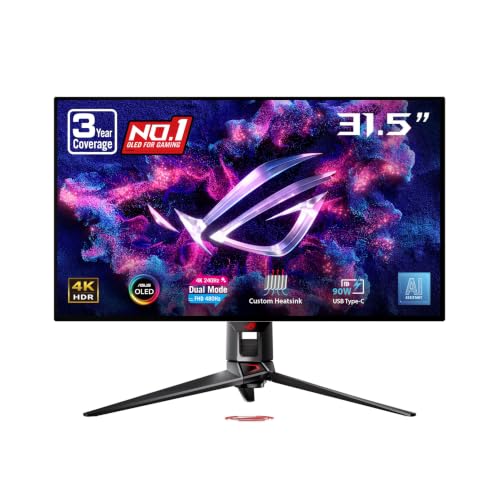 | ASUS ROG Swift OLED PG32UCDP | Best fit: 32-inch dual-mode gaming Panel and size: 31.5-inch WOLED Resolution and refresh: 4K up to 240Hz or FHD up to 480Hz USB-C video and power: DP Alt Mode, 4K up to 240Hz or FHD up to 480Hz, 90W PD Key inputs: DisplayPort 1.4 DSC, 2x HDMI 2.1, USB-C | Check Price on Amazon |
 | MSI MPG 321CURX QD-OLED | Best fit: Curved 32-inch 4K gaming Panel and size: 31.5-inch curved QD-OLED Resolution and refresh: 3840 x 2160, up to 240Hz USB-C video and power: DP Alt Mode, up to 240Hz, 98W PD Key inputs: DisplayPort 1.4a, 2x HDMI 2.1, USB-C | Check Price on Amazon |
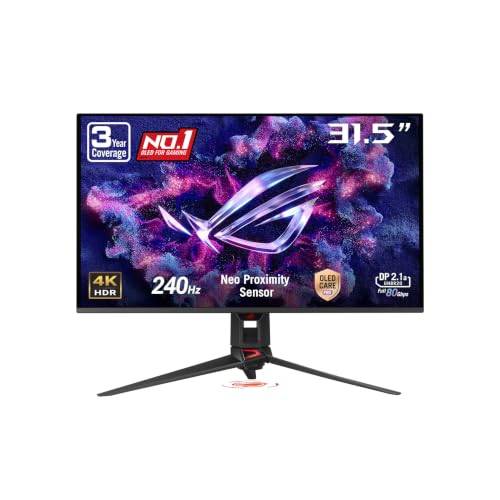 | ASUS ROG Swift OLED PG32UCDMR | Best fit: 32-inch 4K with DisplayPort 2.1a Panel and size: 31.5-inch QD-OLED Resolution and refresh: 3840 x 2160, up to 240Hz USB-C video and power: DP Alt Mode, up to 240Hz, 90W PD Key inputs: DisplayPort 2.1a UHBR20, 2x HDMI 2.1, USB-C | Check Price on Amazon |
 | Lenovo Legion Pro 34WD-10 | Best fit: 34-inch ultrawide with 140W USB-C charging Panel and size: 34-inch curved OLED, 21:9, 800R Resolution and refresh: 3440 x 1440; 240Hz stated for HDMI USB-C video and power: DP 1.4 Alt Mode, USB PD 3.1 up to 140W Key inputs: DisplayPort 1.4, 2x HDMI 2.1 FRL, USB-C | Check Price on Amazon |
1. MSI MPG 271QRX QD-OLED — Best 26.5-Inch 1440p Pick
You can favor 1440p on a 27-inch desk when you want a smaller screen without asking a laptop to render 4K. MSI specifies the MPG 271QRX with a 26.5-inch QD-OLED panel at 2560 x 1440 and 360Hz, a different size and resolution choice from the 31.5-inch 4K and 34-inch ultrawide picks below.
MSI lists one Type-C port with DP Alt Mode and 90W PD, and its mode table states Type-C can run 2560 x 1440 up to 360Hz. DisplayPort 1.4a and two HDMI 2.1 inputs are the inputs for a desktop or console, but 90W is a monitor power rating, not a promise that every gaming laptop can run at full performance without its own adapter.
Our Take Buy the MPG 271QRX if a 26.5-inch 1440p OLED is the right physical and rendering fit for your laptop desk. Choose the ASUS PG32UCDP instead if you want a 32-inch 4K mode, or the Lenovo Legion Pro 34WD-10 if 140W USB-C charging is the deciding feature.
- MSI specifies 2560 x 1440 up to 360Hz over the MPG 271QRX Type-C input.
- MSI gives the 26.5-inch QD-OLED monitor a Type-C DP Alt Mode port with 90W PD.
- MSI lists DisplayPort 1.4a and two HDMI 2.1 ports, which are the inputs for a desktop or console beside USB-C.
- MSI’s 2560 x 1440 panel has fewer pixels than the 3840 x 2160 screens in the 32-inch picks.
- MSI’s 90W USB-C rating does not establish that a high-draw gaming laptop can leave its AC adapter behind.
2. ASUS ROG Swift OLED PG32UCDP — Best Dual-Mode 32-Inch Pick
The PG32UCDP is for a buyer who wants one 32-inch screen to switch between a 4K desktop mode and a faster Full HD mode. ASUS specifies a 31.5-inch WOLED dual-mode panel at 4K up to 240Hz or Full HD up to 480Hz, a different choice from buying separate 4K and Full HD monitors for different games.
ASUS specifies USB-C with DP Alt Mode and 90W Power Delivery, then lists Type-C with 4K at 48Hz to 240Hz and Full HD at 48Hz to 480Hz. The rear also has DisplayPort 1.4 DSC, two HDMI 2.1 ports, and three USB-A hub ports, though the mode your laptop reaches depends on its GPU, port bandwidth, cable, and output setting.
ASUS specifies both dual-mode refresh ranges for Type-C, including 4K at up to 240Hz and Full HD at up to 480Hz.Our Take Buy the PG32UCDP if you want a documented USB-C path for 4K 240Hz and an FHD 480Hz alternative in the same 32-inch WOLED screen. Skip it if the Lenovo monitor’s 140W USB-C wattage is more useful than dual-mode switching.
- ASUS specifies 4K up to 240Hz and Full HD up to 480Hz from the same 31.5-inch WOLED panel.
- ASUS documents USB-C DP Alt Mode with Type-C refresh ranges for both display modes.
- ASUS lists DisplayPort 1.4 DSC, two HDMI 2.1 inputs, and three USB-A ports on the PG32UCDP for more desk connections.
- ASUS rates USB-C Power Delivery at 90W, below Lenovo’s stated 140W figure.
- The PG32UCDP’s Full HD mode trades the panel’s 4K resolution for its 480Hz ceiling.
3. MSI MPG 321CURX QD-OLED — Best Curved 32-Inch 4K Pick
The MPG 321CURX is the choice for a curved 31.5-inch 4K screen with an explicit Type-C performance mode. MSI specifies a curved QD-OLED panel at 3840 x 2160 and 240Hz, plus one Type-C DP Alt Mode port with 98W PD. Lenovo rates the 34WD-10 higher, at 140W of USB-C charging, while MSI specifies the 321CURX’s 4K Type-C mode up to 240Hz.
MSI also states that Type-C can run 3840 x 2160 up to 240Hz. The port list includes two HDMI 2.1 inputs, DisplayPort 1.4a, and two USB 2.0 Type-A ports. A 98W monitor output is below Lenovo’s 140W rating, and the laptop’s own adapter rating and charging behavior decide whether a one-cable setup covers gaming load.
MSI rates the 321CURX USB-C port at 98W, so compare it with the laptop’s own rated adapter before treating one cable as the whole power plan.Our Take Buy the MPG 321CURX if a curved 31.5-inch 4K QD-OLED screen with a stated 4K 240Hz Type-C mode fits your desk. Choose the ASUS PG32UCDMR if its DisplayPort 2.1a input is the better desktop match, or choose the ASUS PG32UCDP for an FHD 480Hz mode.
- MSI specifies a Type-C DP Alt Mode port with 98W PD.
- MSI gives Type-C a 3840 x 2160 mode up to 240Hz.
- MSI specifies the curved QD-OLED panel with 4K 240Hz, two HDMI 2.1 ports, and DisplayPort 1.4a.
- MSI’s 31.5-inch curved panel needs different desk space from Lenovo’s 34-inch 800R ultrawide.
- MSI lists DisplayPort 1.4a for this monitor, not the DisplayPort 2.1a input of the ASUS PG32UCDMR.
- MSI rates this monitor at 98W, which does not prove that every gaming laptop can game and charge from the monitor alone.
4. ASUS ROG Swift OLED PG32UCDMR — Best 32-Inch 4K With DisplayPort 2.1a
The PG32UCDMR is a 32-inch 4K alternative for a desk that also wants DisplayPort 2.1a UHBR20 on the monitor. ASUS specifies a 31.5-inch QD-OLED panel at 3840 x 2160 and 240Hz, together with DisplayPort 2.1a, two HDMI 2.1 ports, USB-C, and three USB-A hub ports. It matches the curved MSI MPG 321CURX at 4K 240Hz and has a different input list.
For laptop use, ASUS calls the USB-C port DP Alt Mode and rates its power delivery at 90W. ASUS gives DP and Type-C 48Hz to 240Hz in its signal table, so the maker connects the 240Hz ceiling to that input path. The 90W rating is below MSI’s 98W and Lenovo’s 140W, and neither number by itself describes a particular gaming laptop’s charging result.
Our Take Buy the PG32UCDMR for a 31.5-inch 4K QD-OLED monitor with maker-stated 240Hz Type-C support and DisplayPort 2.1a UHBR20. Skip it if you need the dual FHD 480Hz option of the PG32UCDP or the Lenovo monitor’s higher stated USB-C charging rating.
- ASUS specifies a 31.5-inch QD-OLED screen at 3840 x 2160 and up to 240Hz.
- ASUS documents USB-C DP Alt Mode, 90W Power Delivery, and a Type-C refresh range up to 240Hz.
- DisplayPort 2.1a UHBR20 gives this ASUS a different desktop input specification from the MSI MPG 321CURX.
- ASUS lists two HDMI 2.1 ports on the PG32UCDMR for separate HDMI sources beside the USB-C laptop connection.
- ASUS lists three USB-A hub ports on the PG32UCDMR for peripheral connections.
- ASUS rates USB-C Power Delivery at 90W, below the 98W MSI and 140W Lenovo figures.
- ASUS does not state an FHD 480Hz mode for the PG32UCDMR.
5. Lenovo Legion Pro 34WD-10 — Best 34-Inch Ultrawide With 140W USB-C Charging
The Legion Pro 34WD-10 is for a laptop desk that wants 34-inch ultrawide width rather than a 16:9 32-inch panel. Lenovo specifies a curved 34-inch OLED panel at 3440 x 1440, with a 21:9 shape and 800R curvature. Its USB-C upstream port carries DisplayPort 1.4 Alt Mode and USB PD 3.1 up to 140W, and that power rating is the largest in this comparison.
Lenovo also lists two HDMI 2.1 FRL inputs, one with eARC, DisplayPort 1.4, three USB-A ports, 2.5GbE, and a KVM switch. Lenovo states 240Hz for HDMI at 3440 x 1440, but does not assign a refresh rate to the USB-C input, so this guide does not attach 240Hz to the USB-C route. Compare the 140W monitor output with the laptop’s own adapter rating before expecting one cable to cover gaming load.
Our Take Buy the Lenovo Legion Pro 34WD-10 if a 34-inch 21:9 OLED workspace and 140W USB-C charging fit your laptop desk. Skip it if a stated USB-C refresh rate is essential, because Lenovo does not assign a refresh rate to its USB-C input.
- Lenovo specifies a 34-inch 21:9 OLED panel at 3440 x 1440 with 800R curvature.
- Lenovo gives its USB-C upstream port DisplayPort 1.4 Alt Mode and USB PD 3.1 up to 140W.
- Lenovo lists two HDMI 2.1 FRL inputs, DisplayPort 1.4, three USB-A ports, and 2.5GbE for more desk connections.
- Lenovo does not state a USB-C-specific refresh rate, so 240Hz is not presented as a Type-C result.
- Lenovo’s 3440 x 1440 ultrawide format has fewer pixels than the 3840 x 2160 32-inch screens.
- Lenovo’s 34-inch 21:9 panel is wider than the 16:9 models, which needs matching desk space.
Buying Guide
1. Start With the Laptop Port, Not the Connector Shape
A USB-C shape alone does not establish a video path. The laptop needs DisplayPort Alt Mode, Thunderbolt, or another documented display-capable route on that exact port before it can send an image directly to these monitors. The MSI MPG 271QRX, MSI MPG 321CURX, both ASUS picks, and Lenovo Legion Pro 34WD-10 explicitly name DP Alt Mode on the monitor side. The monitor input question is settled, but the capability of a particular laptop port is not.
The cable belongs in the same compatibility check as the laptop port and the monitor. A USB-C cable needs to support the video and power path being asked of it, not merely charging. The USB-C cable guide helps separate charging-only and display-capable cable claims, while the DisplayPort Alt Mode guide explains how to check the laptop side before treating a one-cable setup as guaranteed.
2. Match Resolution and Screen Shape to the GPU Budget
Higher panel specifications are ceilings, not a laptop performance promise. The 26.5-inch MSI’s 2560 x 1440 mode up to 360Hz has a different graphics workload from the 32-inch 3840 x 2160 models up to 240Hz. The ASUS PG32UCDP offers FHD up to 480Hz as another stated mode, but a laptop GPU and its video route decide which listed ceiling is available in the game and settings you use.
Screen geometry changes the buying decision as much as pixel count. Lenovo has a 34-inch 21:9 layout, while the other four picks use 16:9 formats. Pick the Lenovo when an ultrawide game view and horizontal work area are the target; pick the smaller MSI for a 26.5-inch 1440p desk; pick one of the 31.5-inch models when 4K is the priority. The OLED monitor guide provides a broader OLED category comparison.
3. Treat Monitor Charging as a Separate Decision
USB-C charging wattage is a limit, not a laptop class label. Lenovo specifies up to 140W, the MSI MPG 321CURX specifies 98W, and the MSI MPG 271QRX and both ASUS models specify 90W. The figures establish what each monitor says it can provide. They do not state how much power any particular laptop needs while its GPU is under load.
Compare the monitor rating against the supplied laptop adapter. A laptop whose own adapter calls for more than the monitor supplies may need its original charger for demanding play, even when its USB-C port carries video. Lenovo’s 140W rating is the largest documented charging figure here, while the MSI MPG 321CURX offers 98W in a curved 31.5-inch 4K format. A USB-C docking station can be a different solution when you need more ports or a different power design.
4. Check the USB-C Mode, Not Just Panel Refresh
Do not assume that a monitor’s headline refresh rate applies to every input. MSI states Type-C up to 360Hz for the MPG 271QRX and Type-C up to 240Hz for the MPG 321CURX. ASUS states Type-C ranges through 240Hz for the PG32UCDMR and provides Type-C ranges for the PG32UCDP’s 4K 240Hz and FHD 480Hz modes.
Lenovo’s USB-C refresh rate needs a closer look. Lenovo specifies 240Hz for HDMI at 3440 x 1440 and gives its USB-C upstream port DisplayPort 1.4 Alt Mode with up to 140W power delivery, but it does not state a USB-C-specific refresh rate. The exact USB-C refresh outcome needs confirmation from the laptop, cable, and connection mode rather than being assumed from the panel headline.
5. Pick the Extra Inputs You Will Actually Use
A monitor can replace some small desk accessories without replacing every dock. The ASUS PG32UCDP and PG32UCDMR each list three USB-A hub ports, while each MSI model lists two USB 2.0 Type-A ports. Lenovo lists three USB-A ports, two USB-C downstream ports, and 2.5GbE. The number and type of peripherals on the desk decide whether those ports are enough or whether a separate dock is useful.
For a console or a second computer, check the non-USB-C inputs too. The MSI MPG 271QRX and MPG 321CURX each list two HDMI 2.1 ports, the ASUS models also list two HDMI 2.1 ports, and Lenovo lists two HDMI 2.1 FRL ports plus DisplayPort 1.4. The input lists are connection options, not a promise that every connected source reaches the panel’s highest mode.
FAQ
Can a USB-C OLED monitor charge a gaming laptop while you play?
A USB-C monitor can charge a laptop within its stated USB-C power limit. The monitors here range from 90W for the ASUS and MSI MPG 271QRX models to Lenovo’s 140W, with the MSI MPG 321CURX at 98W. The rating is what the monitor can provide, not what a gaming laptop consumes in every game.
Compare the rating with the laptop’s supplied adapter before simplifying the desk. A laptop that needs more power under load may use its own adapter alongside USB-C video, even if the monitor keeps it charged during lighter work. The USB-C dock guide is useful when port expansion and power planning have to be considered together.
Does USB-C guarantee 4K 240Hz or 1440p 360Hz?
No, the monitor input, laptop GPU, laptop port, cable, and chosen mode all need to support the target. MSI specifies Type-C up to 360Hz on the MPG 271QRX and up to 240Hz on the MPG 321CURX, while ASUS gives Type-C ranges for both 32-inch models.
A headline refresh rate is not enough when the maker does not assign it to USB-C. Lenovo specifies 240Hz for its 34-inch ultrawide over HDMI but does not publish a USB-C-specific refresh rate for the Legion Pro 34WD-10. Check the laptop’s display specifications and the cable specification before building around an upper refresh mode.
Is the ASUS PG32UCDP’s 480Hz mode available over USB-C?
ASUS specifies the PG32UCDP Type-C path for Full HD at 48Hz to 480Hz. ASUS also specifies 4K over Type-C at 48Hz to 240Hz, so the two panel modes have explicit USB-C ranges rather than an unstated assumption.
The laptop connection can limit which of the two modes you get. A gaming laptop needs a graphics path, port implementation, and cable that support the requested mode. The model is a strong fit when the two documented modes are the reason for choosing it, not merely because it has a USB-C socket.
Which pick has the highest stated USB-C charging output?
The Lenovo Legion Pro 34WD-10 has the highest stated USB-C charging output here at up to 140W. Lenovo specifies DisplayPort 1.4 Alt Mode and USB PD 3.1 up to 140W for its USB-C upstream port.
The remaining power ratings are 98W for the MSI MPG 321CURX and 90W for the MSI MPG 271QRX and two ASUS picks. None of those figures should replace checking the power requirement printed for the exact laptop.
Should you choose 27-inch 1440p, 32-inch 4K, or 34-inch ultrawide?
Choose the size and resolution that fit both the desk and the laptop workload. The MSI MPG 271QRX is the 26.5-inch 1440p option, the ASUS and MSI 31.5-inch models are the 4K options, and the Lenovo monitor is the 34-inch 21:9 ultrawide option.
The panel format changes the experience before refresh rate is compared. A 34-inch ultrawide increases horizontal screen area, while 31.5-inch 4K changes pixel count and physical scale. The ASUS PG32UCDP adds a stated FHD 480Hz mode for buyers who want one screen to cover a second, faster mode.
Bottom Line
The MSI MPG 271QRX is the 26.5-inch 1440p option because MSI specifies 360Hz and 90W charging for its Type-C path. For a 31.5-inch display, the ASUS PG32UCDP is the dual-mode choice and the MSI MPG 321CURX is the curved 4K option with a stated 4K 240Hz Type-C mode. The ASUS PG32UCDMR is the choice with DisplayPort 2.1a UHBR20. The Lenovo Legion Pro 34WD-10 is the ultrawide pick when 34-inch 21:9 shape and 140W USB-C charging fit the desk.