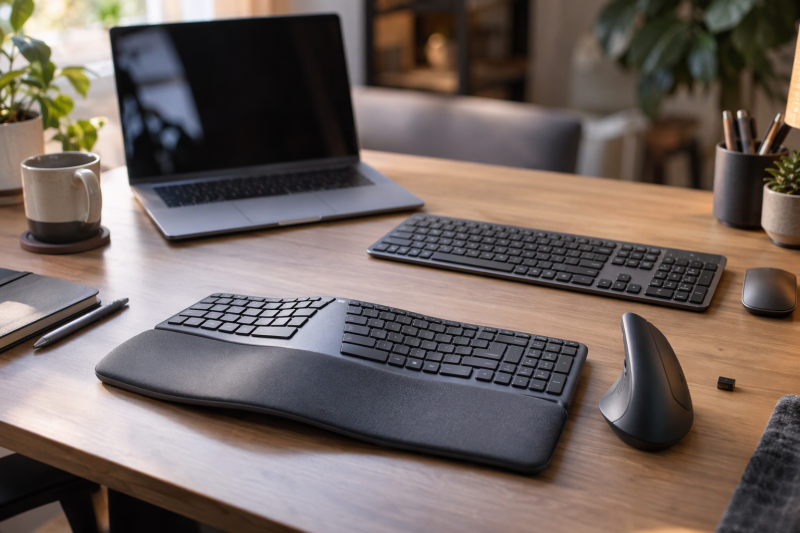
Wireless keyboard-and-mouse combos are not interchangeable bundles. Logitech’s page for the Wave Keys and Lift Combo describes a 57-degree vertical mouse and a cushioned palm rest, while Logitech’s Amazon listing for the MK270 states a 36-month keyboard battery life and one USB-A receiver. Connection method, keyboard size, mouse shape and device switching set the seven combos below apart.
For a keyboard that pairs with a laptop and a tablet, see our multi-device Bluetooth keyboards guide. For more vertical mouse options, see our vertical mice for small laptop desks guide.
Wireless Keyboard and Mouse Combo Comparison
| Image | Product | Details | Check Price |
|---|---|---|---|
 | Logitech Wave Keys and Lift Combo | Best fit: Vertical mouse and palm-rest keyboard Connection: Up to 3 devices (title); Bluetooth (Logitech page) Keyboard: Compact wavy; cushioned palm rest Mouse: 57-degree vertical; small to medium hands Battery: No figure stated | Check Price on Amazon |
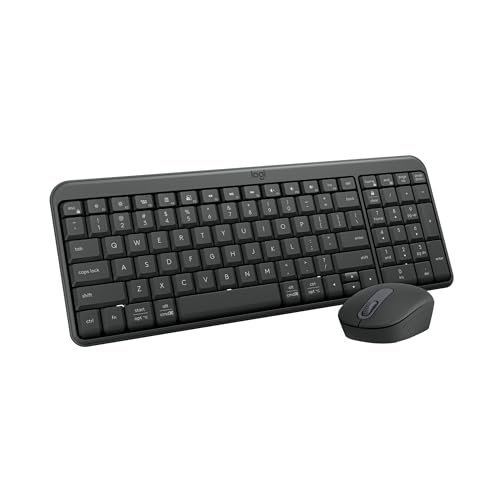 | Logitech MK250 | Best fit: Compact Bluetooth combo with number pad Connection: Bluetooth only Keyboard: Compact; number pad; tilt legs Mouse: Small ambidextrous; 3 non-customizable buttons Battery: 12-month keyboard battery life | Check Price on Amazon |
 | Logitech MK270 | Best fit: Simple full-size USB-A combo Connection: One USB-A nano receiver; up to 33 ft Keyboard: Full-size; number pad; 8 hotkeys Mouse: Compact ambidextrous Battery: 36 months keyboard; 12 months mouse | Check Price on Amazon |
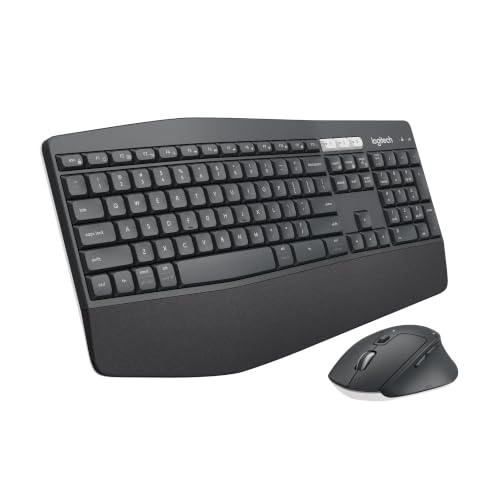 | Logitech MK850 | Best fit: Full-size wave keyboard Connection: Bluetooth or USB-A receiver Keyboard: Oversized wave shape; palm rest Mouse: Right-handed; 8 customizable buttons Battery: No figure stated | Check Price on Amazon |
 | Logitech MK955 Signature Slim Combo | Best fit: Quiet full-size combo for three devices Connection: Bluetooth or Logi Bolt Keyboard: Full-size slim K950; laptop-style Mouse: M750 L for larger hands; quiet clicks Battery: No figure stated | Check Price on Amazon |
 | Logitech MX Keys S Combo | Best fit: Backlit keys with an 8K DPI mouse Connection: Bluetooth LE or Logi Bolt receiver Keyboard: Backlit; spherically dished keys Mouse: MX Master 3S; 8K DPI; MagSpeed Battery: No figure stated | Check Price on Amazon |
 | HP 230 Wireless Combo | Best fit: Non-Logitech full-size combo Connection: One 2.4GHz connection Keyboard: Full-size; numeric keypad; 12 shortcuts Mouse: Sensitivity up to 1600 DPI Battery: 16 months keyboard; 12 months mouse | Check Price on Amazon |
1. Logitech Wave Keys and Lift Combo — Best Ergonomic Combo
Logitech’s product page describes a compact wavy keyboard with a three-layer cushioned palm rest. It pairs the keyboard with the Lift mouse, which sits at a 57-degree angle with a thumb rest and is sized for small to medium hands. The Amazon listing adds a softly textured grip. Logitech says the compact frame lets you bring the mouse closer to your body, and that it developed the pair with its Logi Ergo Lab.
Logitech’s Amazon listing also names plunger key switches, quiet clicks and a SmartWheel that adjusts scrolling speed. The Amazon title says the pair connects up to three devices, and Logitech’s page names Bluetooth and Easy-Switch. Both titles name Windows and Mac. Neither the Amazon listing nor the product page text gives a battery figure, receiver type or number pad.
Logitech’s page describes a compact wavy keyboard with a cushioned palm rest and a 57-degree Lift mouse for small to medium hands.Our Take Choose this combo when you want a vertical mouse and a compact keyboard with palm support. Choose the MK850 instead for a full-size wave keyboard and a mouse with eight customizable buttons, a count that Logitech’s Amazon title gives.
- Logitech’s page puts the Lift mouse at 57 degrees with a thumb rest, and the Amazon listing adds a softly textured grip for small to medium hands.
- Logitech says the compact wavy keyboard, with its three-layer cushioned palm rest, lets you bring the Lift mouse closer to your body.
- The Amazon title says the combo connects up to three devices, and Logitech’s page names Bluetooth and Easy-Switch.
- Logitech’s Amazon listing gives the Lift mouse quiet clicks and a SmartWheel that adjusts scrolling speed.
- Logitech sizes the Lift mouse for small to medium hands and does not state a fit for larger ones.
- Neither Logitech’s Amazon listing nor its product page text gives a battery figure, receiver type or number pad for this combo.
2. Logitech MK250 — Best Compact Bluetooth Combo
Logitech’s Amazon listing describes the MK250 as a compact keyboard that keeps a number pad, arrow keys and F-key shortcuts, with deep-profile keys, adjustable tilt legs and a spill-resistant design. The M196 mouse is small enough, the listing says, to toss in a bag, and it has an ambidextrous shape with three non-customizable buttons.
The MK250 connects by Bluetooth only, and the listing says you pair it without a dongle or USB port. The listing gives a 12-month keyboard battery life and a separate line promising 12 months of daily use before changing batteries, without saying which device that second line covers.
Logitech’s Amazon listing describes the MK250 as a compact Bluetooth-only combo that keeps a number pad.Our Take Pick the MK250 when you want a number pad on a compact keyboard and the computer pairs by Bluetooth. Pick the MK270 for a USB-A receiver, or the Wave Keys combo for a vertical mouse.
- Logitech’s Amazon listing says the MK250 pairs by Bluetooth without a dongle or USB port.
- The compact MK250 keyboard keeps a number pad, arrow keys and F-key shortcuts, according to Logitech’s listing.
- The MK250 keyboard has a 12-month battery life in Logitech’s listing.
- Logitech’s Amazon title says the MK250 offers Bluetooth only, so it suits a computer that pairs by Bluetooth.
- The M196 mouse has three buttons that Logitech’s Amazon title calls non-customizable.
3. Logitech MK270 — Best Simple USB-A Combo
Logitech’s Amazon listing describes the MK270 as a full-size set: a low-profile, quiet-key keyboard with full-size F-keys, a number pad, arrow keys, eight multimedia hotkeys, a spill-resistant design and tilt legs with adjustable height. The compact mouse is described as equally comfortable for left- and right-handed users.
One included USB-A nano receiver connects both devices, with a stated range of up to 33 feet. The listing gives a 36-month keyboard battery life, a 12-month mouse battery life and on/off switches. It does not mention Bluetooth or device switching.
Logitech’s Amazon listing describes the MK270 as a full-size keyboard and compact ambidextrous mouse on one USB-A nano receiver.Our Take Choose the MK270 for a plain receiver setup with a full keyboard and the longest keyboard battery figure on this page. Choose the MK250 if the computer has no free USB-A port and Bluetooth is the priority.
- One USB-A nano receiver connects the full-size keyboard and compact mouse, Logitech’s Amazon listing says.
- Logitech’s listing gives the MK270 a 36-month keyboard battery life and a 12-month mouse battery life.
- Logitech’s listing says the MK270 keyboard has full-size F-keys, a number pad, arrow keys and eight multimedia hotkeys.
- Logitech’s listing describes the compact MK270 mouse as equally comfortable for left- and right-handed users.
- Logitech’s Amazon listing names only a USB-A nano receiver for the MK270 and does not mention Bluetooth or device switching, so a computer with no free USB-A port points to the MK250.
4. Logitech MK850 — Best Full-Size Wave Keyboard
Logitech’s Amazon listing describes the MK850 as a full-size keyboard with an oversized wave shape and a cushioned palm rest, paired with a contoured right-handed mouse and a hyper-fast scroll wheel. The title gives the mouse eight customizable buttons, and the listing says Logitech DuoLink software links the keyboard and mouse for custom functions through the Logitech Options download.
The listing names Bluetooth or an included USB-A receiver as the two ways to connect. It calls the keyboard and mouse both multi-device and multi-OS. The listing says you can start typing on a computer and switch to a tablet, phone or second computer, and that you can pair the mouse with up to three screens.
Logitech’s Amazon listing describes the MK850 as an oversized wave-shaped keyboard with Bluetooth or USB-A receiver connections.Our Take Pick the MK850 for a full-size wave keyboard, a choice of Bluetooth or receiver, and a mouse with eight customizable buttons. Pick the Wave Keys and Lift Combo when you want the vertical mouse and compact keyboard instead.
- The MK850 keyboard has an oversized wave shape and a cushioned palm rest, according to Logitech’s Amazon listing.
- Logitech’s listing names both Bluetooth and an included USB-A receiver as connection options for the MK850.
- Logitech’s Amazon title gives the MK850’s contoured right-handed mouse eight customizable buttons.
- Logitech describes the MK850 mouse as contoured and right-handed, not ambidextrous.
- Logitech’s Amazon listing gives no battery figure for the MK850.
5. Logitech MK955 Signature Slim Combo — Best for Three Devices
Logitech’s Amazon listing describes the MK955 as a full-size K950 Signature Slim keyboard with laptop-style typing, paired with the M750 L Signature Plus mouse for larger hands. Logitech says both type and click quietly, and the mouse uses SilentTouch technology and a SmartWheel that switches between line-by-line and faster scrolling.
Logitech says the K950 switches typing between three devices with one tap, and the listing names Bluetooth or Logi Bolt for pairing. The title says Windows and Mac, while a bullet lists Windows, macOS, Chrome OS, Linux, iPadOS, iOS and Android. Customizable keys and shortcuts use the Logi Options+ app, which the listing says is available for Windows and macOS. The listing does not say a Logi Bolt receiver is in the box.
Logitech’s Amazon listing describes the MK955 as a full-size slim keyboard with a larger-hand mouse that pairs over Bluetooth or Logi Bolt.Our Take Choose the MK955 for a quiet full-size combo that switches among three devices and lists support for many operating systems. Choose the MX Keys S when you want backlit keys and a mouse whose sensor Logitech’s listing rates at 8K DPI instead.
- Logitech says the K950 keyboard in the MK955 switches typing between three devices with one tap.
- Logitech’s Amazon listing names Bluetooth or Logi Bolt for pairing the MK955.
- Logitech says the M750 L mouse is built for larger hands and uses SilentTouch quiet clicking.
- The MK955 listing names Windows, macOS, Chrome OS, Linux, iPadOS, iOS and Android.
- Logitech’s listing says the MK955’s customizable keys and shortcuts use the Logi Options+ app, and it names Windows and macOS for that app.
- Logitech’s Amazon listing does not say a Logi Bolt receiver is included with the MK955.
6. Logitech MX Keys S Combo — Best Backlit Multi-Device Combo
Logitech’s Amazon listing pairs the MX Keys S keyboard, with a laptop-like profile and spherically dished keys, with the MX Master 3S mouse. Logitech says the keys are backlit, light up as your hands approach and adapt to the environment, and the mouse has MagSpeed scrolling and an 8K DPI sensor that tracks on glass.
Logitech says the pair works with up to three devices over Bluetooth Low Energy or an included Logi Bolt USB receiver, on Windows, macOS and Linux. The listing also says Smart Actions shortcuts and more lighting customizations come through the Logi Options+ app.
Logitech’s Amazon listing pairs MX Keys S backlit keys that light up as hands approach with an MX Master 3S mouse that has an 8K DPI sensor.Our Take Pick the MX Keys S for backlit laptop-style keys, MagSpeed scrolling and the 8K DPI mouse. Pick the MK955 for a larger-hand mouse and the longer operating-system list in its Amazon listing.
- Logitech says the MX Keys S keys are backlit and light up as your hands approach.
- Logitech’s listing gives the MX Master 3S mouse MagSpeed scrolling and an 8K DPI sensor that tracks on glass.
- The listing names Bluetooth Low Energy and an included Logi Bolt receiver for up to three devices on Windows, macOS and Linux.
- Logitech’s Amazon listing says MX Keys S Smart Actions and more lighting customizations come through Logi Options+.
- Logitech’s Amazon listing gives no battery figure for the MX Keys S Combo.
7. HP 230 Wireless Combo — Best Non-Logitech Full-Size Combo
HP’s Amazon listing describes the 230 as a full-sized keyboard with a numeric keypad, low-profile chiclet keys that HP says give more accurate typing with less noise, and shortcuts to 12 popular functions on one keypress. The mouse adjusts pointer sensitivity up to 1600 DPI.
One 2.4GHz wireless connection serves both devices, and the title names Windows and Mac OS. HP’s listing gives up to 16 months of keyboard use and up to 12 months of mouse use on three AAA batteries. It does not name Bluetooth, a receiver type or device switching.
HP’s Amazon listing describes the 230 as one 2.4GHz connection for a full-size keyboard and a mouse with sensitivity up to 1600 DPI.Our Take Choose the HP 230 for a conventional full-size keyboard with a numeric keypad and a 1600 DPI mouse from a brand other than Logitech. Choose the MK270 when you want a stated USB-A receiver and its 36-month keyboard battery figure.
- HP’s Amazon listing says one 2.4GHz wireless connection serves both the keyboard and the mouse.
- The 230 keyboard has a numeric keypad, low-profile chiclet keys and 12 one-key shortcuts, according to HP’s listing.
- HP says the 230 mouse adjusts sensitivity up to 1600 DPI.
- HP’s listing gives up to 16 months of keyboard use and up to 12 months of mouse use.
- HP’s Amazon listing does not name Bluetooth, a receiver type or device switching, and its title names only Windows and Mac OS.
Buying Guide
1. Choose Bluetooth, a receiver or both
Logitech’s Amazon title says the MK250 connects by Bluetooth only, and the MK270 listing names one USB-A nano receiver. The MK850 and MX Keys S listings name Bluetooth plus an included receiver, while the MK955 listing names Bluetooth or Logi Bolt. HP’s listing names one 2.4GHz connection, and the Wave Keys listing gives device switching without naming a receiver.
Match the connection to the computer on your desk. Pick a Bluetooth combo if the computer has no free USB-A port, or a combo with a named receiver when the computer has a USB port to spare.
2. Decide whether the keyboard must have a number pad
Logitech’s listings name a number pad for the compact MK250 and the full-size MK270, and HP’s listing names a numeric keypad for the 230. The MK850, MK955 and MX Keys S listings describe full-size or laptop-style keyboards without naming a number pad, and the Wave Keys keyboard is described as compact with no keypad named.
Whether you need numeric entry is a question of layout, not ergonomics. Verify the keypad on the product page first when you enter numbers all day, then compare connection and mouse shape.
3. Match the mouse shape to the hand and task
Logitech’s page puts the Lift at a 57-degree vertical angle for small to medium hands. Logitech’s listings give the MK850 a contoured right-handed mouse with eight customizable buttons in its title, the MK955 an M750 L mouse for larger hands, and the MK270 a compact mouse described as comfortable for left- and right-handed users.
Keyboard features alone do not tell you whether the mouse fits. Compare each mouse’s stated hand size and handedness before you choose.
4. Separate one-device from multi-device work
Logitech says the MK955 keyboard and the MX Keys S pair with up to three devices, and the Wave Keys title says the pair connects up to three. The MK850 listing says the keyboard moves between a computer, tablet, phone or second computer and the mouse pairs with up to three screens. The MK270 listing and HP’s listing each describe one shared wireless connection and do not mention switching.
Multi-device features apply when you move between a computer, tablet or phone. For one computer, the MK270 and HP 230 listings describe a single shared connection, and for several devices you can compare the three-device statements above.
5. Use the battery figure each listing states
Logitech’s Amazon listing for the MK270 gives 36 months for the keyboard and 12 months for the mouse. HP’s listing gives 16 and 12 months, and Logitech’s MK250 listing gives a 12-month keyboard battery life. The Wave Keys, MK850, MK955 and MX Keys S listings give no battery figure.
Compare only the battery statement each listing makes for its own model, and do not carry the MK270’s keyboard figure over to another combo.
FAQ
Which combo is best for a vertical mouse?
Logitech’s page describes the Wave Keys and Lift Combo’s mouse at 57 degrees for small to medium hands, and no other combo on this page lists a vertical mouse. Logitech pairs the Lift with a compact wavy keyboard and a cushioned palm rest.
The MK850 has a wave-shaped full-size keyboard and a contoured right-handed mouse, but Logitech’s Amazon listing does not describe a vertical angle for that mouse.
Does the Logitech MK270 connect by Bluetooth?
Logitech’s Amazon listing does not mention Bluetooth for the MK270. It says the keyboard and compact mouse use a single included USB-A nano receiver with a stated range of up to 33 feet.
Logitech’s MK250 title says Bluetooth only. The MK850 and MX Keys S listings name Bluetooth plus an included receiver, and the MK955 listing names Bluetooth or Logi Bolt.
Which combo can switch among three devices?
Logitech says the MK955’s K950 keyboard switches typing among three devices with one tap. The MX Keys S listing says it pairs with up to three devices, the Wave Keys title says up to three devices, and the MK850 listing describes multi-device keyboard and mouse use.
The MK270 listing and HP’s listing each describe one shared wireless connection and mention no switching between devices.
Which combo has backlit keys?
Logitech’s MX Keys S Combo listing is the one on this page that states backlit keys that light up as your hands approach and adapt to the environment. The same listing gives its MX Master 3S mouse MagSpeed scrolling and an 8K DPI sensor.
None of the other Amazon listings on this page mentions keyboard backlighting. Do not assume it from Bluetooth, a slim profile or a Logitech model name.
Is the HP 230 a Bluetooth combo?
HP’s Amazon listing describes a single 2.4GHz wireless connection for the keyboard and mouse and does not mention Bluetooth. It names a numeric keypad, 12 shortcuts and mouse sensitivity up to 1600 DPI, and its title names Windows and Mac OS.
For Bluetooth, Logitech’s MK250 title says Bluetooth only. For a stated USB-A receiver, Logitech’s MK270 listing names one, while HP does not name a receiver type for the 230.
Bottom Line
Logitech’s page makes the Wave Keys and Lift Combo the choice for a 57-degree vertical mouse and a palm-rest keyboard. Logitech’s Amazon listings make the MK270 the USB-A receiver set with a 36-month keyboard battery figure and the MK250 the compact Bluetooth-only set. The same listings make the MK850 the full-size wave keyboard with Bluetooth or a receiver, the MK955 the three-device set, and the MX Keys S the backlit set with an 8K DPI mouse. HP’s listing makes the HP 230 the full-size non-Logitech set with mouse sensitivity up to 1600 DPI.