Belkin sells laptop-capable USB-C power in three shapes, and the shape comes before the wattage on the box. A desk station and a four-port wall charger share one outlet among several devices. Two 65W chargers and a 100W adapter serve one laptop each. One 20,000mAh power bank holds its own charge. The number to read is how much a single laptop port gets once other devices are plugged in.
Every figure below comes from Belkin’s product pages and the Amazon listings. A wattage is the maker’s ceiling for the charger, not a measured result for your laptop, and Belkin names laptop models on some pages and none on others. Each section says which. Check the rating printed on your laptop’s own charger last.
| Image | Product | Details | Check Price |
|---|---|---|---|
 | Belkin 140W Charging Station | Best fit: Desk with AC outlets Output: 140W total Ports: 3 USB-C, 1 USB-A, 2 AC Sharing: Diagram text lists up to 65W with 3 or 4 ports in use Format: Desk strip, 5-foot cord | Check Price on Amazon |
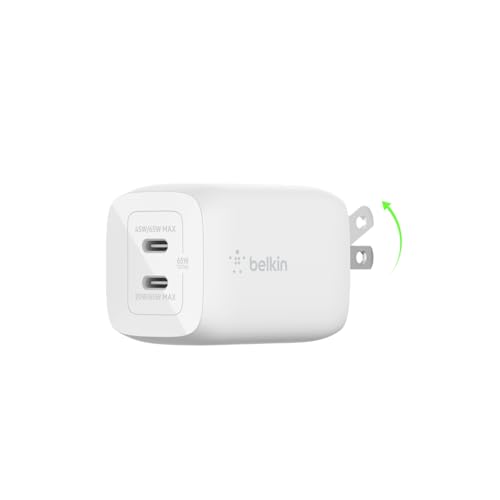 | Belkin 65W Dual GaN Charger | Best fit: One laptop and one phone Output: Up to 65W from one port Ports: 2 USB-C Sharing: 45W plus 20W with both in use Format: Wall plug, no cable | Check Price on Amazon |
 | Belkin 112W Four-Port Charger | Best fit: One laptop and several devices Output: Up to 100W from one port, 112W total Ports: 3 USB-C, 1 USB-A Sharing: 70W plus 30W, 60W/20W/20W, 60W/20W/20W/12W Format: Wall plug, foldable pins | Check Price on Amazon |
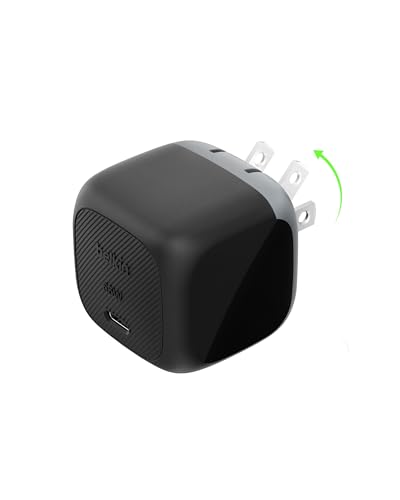 | Belkin 65W Compact Charger | Best fit: One laptop in a light bag Output: Up to 65W Ports: 1 USB-C Sharing: One port, nothing to share Format: Wall plug, foldable prongs | Check Price on Amazon |
 | Belkin Charger Core 100W | Best fit: One laptop at up to 100W Output: Up to 100W Ports: 1 attached USB-C cable, 5 feet Sharing: No second port mentioned Format: Adapter with a power cord | Check Price on Amazon |
 | Belkin 20,000mAh 65W Power Bank | Best fit: Laptop power away from an outlet Output: Up to 65W from one port Ports: 2 USB-C, 1 USB-A Sharing: Up to 65W in total with 3 ports in use Format: 20,000mAh battery, about 1 pound | Check Price on Amazon |
1. Belkin 140W Charging Station — Best desk power strip
Belkin’s 140W station is a desk power strip with USB ports built in. The Amazon listing counts two AC outlets, one USB-A port, and three USB-C ports, and Belkin’s page says the six connections can power up to six devices. Belkin says the AC outlets take monitors, speakers, lamps, and clocks, and gives the size as 5.3 by 3.9 by 0.9 inches. A 5-foot cord with a 90-degree flat plug reaches the wall, and Belkin says rubber feet prevent skidding. Amazon lists TUV certification, flame-resistant materials, and over-voltage, short-circuit, and overcurrent protection. Belkin’s box contents list only the station.
Amazon calls 140W the total output and names a MacBook Pro without a model or size, and one of Belkin’s image descriptions does the same. Belkin’s page shows output diagrams for one to four ports in use. The diagram descriptions name 140W with one port in use, up to 100W with two, and up to 65W with three or four, and the page text does not say which port gets which figure. Check a laptop that needs more than 65W before you fill every port.
The 140W station is the only Belkin here with AC outlets, and Belkin’s diagrams list a lower top figure as more of its four USB ports are used.Our Take Pick the station for a fixed desk where a laptop, a phone, and a lamp share one wall outlet. Pick the Charger Core when one laptop is the only thing to charge.
- Belkin’s page lists two AC outlets, one USB-A port, and three USB-C ports on one 5-foot cord, so a laptop, a phone, and a lamp can share one wall outlet.
- Amazon lists TUV certification and flame-resistant materials, plus over-voltage, short-circuit, and overcurrent protection.
- Belkin’s page shows output diagrams for one, two, three, and four ports in use.
- Amazon calls 140W the total, and Belkin’s diagram text names no more than 65W for three or four ports in use, so check a laptop that needs more power before you fill every port.
- Belkin’s box contents list only the station, with no USB-C cable.
- Amazon and a Belkin image description name a MacBook Pro without a model or size, so neither confirms a laptop at 140W.
2. Belkin 65W Dual GaN Charger — Best two-port travel charger
Belkin’s dual charger has two USB-C ports, no USB-A port, and no cable in the box. The Amazon listing says one port gets up to 65W when it is used alone and 45W plus 20W when both are in use. Belkin’s page for the black version, which carries the number BBC013-BK, says the same. Both sources list USB PD 3.0 and PPS, and Belkin sizes the charger at 1.5 by 1.6 by 2.7 inches.
Belkin’s compatibility list names the MacBook Air 13 and 15 inch, MacBook Pro 13, 14, and 16 inch, MacBook Neo, and Dell XPS 13. The list gives no charging speed for any of them, so a 16-inch MacBook Pro on this charger is listed as compatible and not as charging at full speed. Amazon names a MacBook and a smartphone as the pair to charge together.
Our Take Pick the dual charger when one laptop and one phone travel together and the laptop’s own charger is rated at 45W or less. Try the laptop in each port, because Belkin does not say which one gets the larger share. Pick the 112W charger when a third device needs power.
- Amazon and Belkin both state up to 65W from a single USB-C port.
- Belkin’s compatibility list names MacBook Air, MacBook Pro, and Dell XPS 13 models.
- Amazon and Belkin both list USB PD 3.0 and PPS, and Belkin sizes the charger at 1.5 by 1.6 by 2.7 inches.
- Belkin states 45W plus 20W with both ports in use and does not say which port gets which, so try the laptop in each port.
- Belkin’s page lists the charger as standalone, with no cable included.
- Belkin and Amazon list two USB-C ports and no USB-A port, so a third device needs another charger.
3. Belkin 112W Four-Port Charger — Best for one laptop and several devices
The 112W charger has three USB-C ports and one USB-A port. The Amazon listing gives a table of shares: up to 100W from one USB-C port, 70W plus 30W with two ports, 60W, 20W, and 20W with three, and 60W, 20W, 20W, and 12W with four. Belkin’s page for the same charger, numbered BBC023-WH, states 112W of total power, USB PD 3.1, and support for PD 3.0 and PPS devices. It gives no per-port table, so the shares come from Amazon alone.
Beside MacBook Air and MacBook Pro models, Belkin’s compatibility list names a Chromebook, a Pixelbook, a Dell XPS 15, a ThinkPad L380, and a Yoga 930. Belkin states a 0 to 50% charge for a 16-inch MacBook Pro as 28 minutes in the text and shows 38 minutes in an image description on the same page, so this guide quotes neither. Amazon lists foldable pins and a weight of about half a pound, and Belkin’s box contents list only the charger. Amazon’s split bullet says four USB-C ports, while its title and Belkin’s page say three USB-C and one USB-A.
Our Take Pick the 112W charger for one laptop that shares an outlet with a phone and a tablet. Pick the 140W station when the desk also needs AC outlets.
- Amazon lists up to 100W from one USB-C port, and it also lists the shares for two, three, and four ports in use.
- Belkin names Windows models such as the Dell XPS 15, ThinkPad L380, and Yoga 930 beside MacBook models.
- Amazon lists foldable pins and a weight of about half a pound.
- Amazon lists 60W as the top share with all four ports in use, so a laptop that needs more has to charge with fewer ports in use.
- Neither Belkin nor Amazon says which port gets which share.
- Belkin’s box contents list only the charger, with no cable.
4. Belkin 65W Compact Charger — Best single-port travel charger
Belkin’s compact charger has one USB-C port. The Amazon listing gives a 65W maximum for a MacBook or Chromebook, USB PD 3.1 certification with PPS, and foldable prongs. Amazon also says a Chromebook ThinkPad C13 Yoga Gen 1 charges from 0 to 50% in 41 minutes, which is the one laptop it names by model.
Belkin’s page for the charger, numbered BBC032ttBK, lists one USB-C port and no cable in the box. Its compatibility list names the 2026 MacBook Air 13 and 15 inch, MacBook Pro 14 and 16 inch, and MacBook Neo, with no charging speeds. The page’s specification table reads 20W while its title reads 65W, so this guide uses the 65W figure from the title and from Amazon.
Amazon’s 65W figure is a maximum for the one port, and the ThinkPad C13 Yoga Gen 1 is the only laptop whose charge time Amazon gives.Our Take Pick the compact charger when one laptop needs power and the foldable prongs make packing easier. Pick the dual 65W charger when a phone needs a port too.
- Amazon lists a 65W maximum for MacBook and Chromebook charging from the one USB-C port.
- Amazon lists USB PD 3.1 certification with PPS, and foldable prongs for packing.
- Amazon quotes 41 minutes to 50% for a Chromebook ThinkPad C13 Yoga Gen 1.
- Belkin’s page lists one USB-C port, so a phone needs its own charger.
- Belkin’s page lists the charger as standalone, with no cable included.
- Belkin’s specification table shows 20W beside the 65W title on the same page.
5. Belkin Charger Core 100W — Best 100W single-cable charger
The Charger Core differs from the wall chargers because its USB-C cable is attached. The cable is 5 feet or 1.5 meters long, and Amazon lists a 1-meter power cord, for 2.5 meters of cable in total. Belkin lists a silicone strap for the slack and up to 100W from that one cable, says Intelligent Power Sharing adjusts output to the device, and sizes the adapter at 4 by 2.5 by 1 inches. Belkin also lists protection against overvoltage, overload, overcurrent, over-temperature, and short circuit, and says the adapter uses fire-resistant materials.
Belkin’s page names the 2026 MacBook Air 13 and 15 inch, MacBook Pro 14 and 16 inch, MacBook Neo, and iPad Air models. It also says the adapter suits USB-C devices such as Windows laptops, Chromebooks, a Steam Deck, and a Nintendo Switch, and it names no Windows laptop model.
The Charger Core is the only Belkin here with its USB-C cable attached, listed at up to 100W.Our Take Pick the Charger Core for one laptop on a desk or in a bag that can hold an adapter on a cord. Pick the 112W charger when a phone needs power from the same outlet.
- Belkin lists up to 100W, which is 35W above the 65W Belkin chargers.
- Belkin lists a 5-foot attached USB-C cable and a silicone strap for managing it.
- Belkin names MacBook Air, MacBook Pro, MacBook Neo, and iPad Air models.
- Neither Belkin’s page nor the Amazon listing mentions a second port, so a phone needs another charger.
- Amazon lists a 1-meter power cord in addition to the 1.5-meter USB-C cable, so the adapter sits on a cord and not at the outlet.
- Belkin names no Windows laptop model on the Charger Core page.
6. Belkin 20,000mAh 65W Power Bank — Best travel backup for a laptop
The power bank is the only battery in this set. Belkin and Amazon both state power delivery up to 65W from a single USB-C port to recharge a MacBook or another compatible laptop. They list a 20,000mAh capacity, two USB-C ports, one USB-A port, and a full-color display for the remaining charge. Belkin says the bank complies with TSA carry-on requirements and puts a 23.6-inch USB-C cable rated 60W in the box. Amazon says a 14-inch MacBook Pro with the M3 chip goes from 0 to 50% in 42 minutes.
With all three ports in use the figures change. Both sources say up to 65W in total, and Amazon gives 45W from USB-C and 15W from USB-A. Neither source says what the laptop receives in that case. Belkin rates the cable in the box at 60W, below the 65W port maximum, and neither source says whether it limits the laptop’s charge. Belkin names the MacBook Air 13 inch, MacBook Air 15 inch, MacBook Pro 14 and 16 inch, MacBook Neo, Dell XPS 13, and Pixelbook, and Amazon lists a weight of 1 pound.
Our Take Pick the power bank when the laptop’s own charger is rated at 65W or less and outlets are scarce. Pick the Charger Core when an outlet is always nearby and the laptop needs up to 100W.
- Belkin states a 20,000mAh capacity with two USB-C ports and one USB-A port.
- Belkin’s page says the power bank complies with TSA carry-on requirements.
- Belkin’s box contents include a 23.6-inch USB-C cable rated 60W.
- Amazon lists 42 minutes to 50% for a 14-inch MacBook Pro with the M3 chip.
- Both sources state 65W in total with all three ports in use, and neither gives the laptop’s share.
- Belkin rates the cable in the box at 60W and does not say whether it limits the 65W port.
- Amazon lists the power bank at about 1 pound, about twice the half pound it lists for the 112W charger.
Buying Guide
1. Match the wattage to the laptop’s own charger
Read the wattage printed on the laptop’s own charger first. Belkin’s 65W dual charger, 65W compact charger, and 65W power bank suit a laptop whose own charger is rated 65W or less. The Charger Core and the 112W charger are listed at up to 100W from one port. Belkin’s pages state compatibility and not charging speed, so a named laptop is a starting point and not a promise of full-speed charging.
Belkin names Windows laptops on only some of its pages. The dual charger and the power bank name the Dell XPS 13, and the 112W charger names the Dell XPS 15, ThinkPad L380, Yoga 930, Pixelbook, and a Chromebook. The Charger Core and the compact charger name no Windows laptop. Check a Windows laptop outside those names against its own charger rating. The USB-C laptop charger guide compares chargers across brands.
2. Read the sharing figures before plugging in a second device
Every multiport number is a total divided among ports. Belkin and Amazon list the dual charger at 65W alone and 45W plus 20W with both ports in use. Amazon lists the 112W charger at 100W alone and 60W at most with four ports in use. Belkin’s diagram text for the 140W station names up to 65W for three or four ports in use.
Belkin does not say which port gets which share on any of them. Plug the laptop into each port and watch whether it reports charging. Keep the laptop alone on the charger when a long job needs the full figure. Belkin and Amazon give the power bank a total of up to 65W with all three ports in use, which can leave a laptop with less than 65W.
3. Decide between an outlet and a battery
The 20,000mAh power bank is the only product here that works away from an outlet. Belkin says it complies with TSA carry-on requirements, and Amazon lists about 1 pound. The wall products depend on an outlet but have no battery to recharge, and Amazon lists the 112W charger at about half a pound.
Belkin rates the cable in the power bank box at 60W against a 65W port. Belkin does not say whether the cable limits the laptop’s charge, so a laptop that draws close to 65W needs a test with the laptop’s own cable. The laptop power bank guide compares higher-output batteries from other brands.
4. Count the cables you need to buy
Four of the six Belkin products come without a USB-C cable. Belkin’s pages list the station, the dual charger, the compact charger, and the 112W charger as standalone or charger-only boxes. The Charger Core has its cable attached, and the power bank comes with a 23.6-inch cable.
Check each cable’s own rating against the charger’s figure. A cable rated below the charger’s maximum can cap the result, and Belkin’s pages do not say how any included or separate cable changes the laptop’s charge. Buy the cable with the laptop’s own charger rating in mind.
FAQ
Can a 65W Belkin charger run a MacBook Pro?
Belkin names 14 and 16 inch MacBook Pro models on its dual charger, compact charger, and power bank pages. None of those pages gives a charging speed for them. A MacBook Pro’s own charger rating is the number to compare with 65W.
A named laptop confirms compatibility and not full-speed charging. The Charger Core and the 112W charger are listed at up to 100W from one port for a laptop that needs more.
Which Belkin charger suits a laptop and a phone together?
Belkin and Amazon list 45W plus 20W for the dual 65W charger with both ports in use. Amazon lists 70W plus 30W for the 112W charger with two ports in use, and 60W, 20W, and 20W with three.
Choose from the share the laptop gets, not the total. Belkin does not say which port carries which share, so try the laptop in each port.
Can the 20,000mAh power bank charge a laptop and two other devices at once?
Both Belkin and Amazon say it supports a laptop and two other devices at once, through two USB-C ports and one USB-A port. They also say up to 65W in total with all three in use, and Amazon gives 45W from USB-C and 15W from USB-A.
The laptop’s share with all three ports in use is not stated. A laptop alone on a USB-C port gets up to 65W according to both sources.
Does the Charger Core have a USB-C port?
Belkin lists a 5-foot attached USB-C cable, not a port, and Amazon lists a 1-meter power cord as well. The 1.5-meter cable and the power cord add up to 2.5 meters.
An attached cable means a second device needs its own charger. Neither Belkin’s page nor the Amazon listing mentions another port on the Charger Core.
Bottom Line
The Belkin 112W Four-Port Charger is the pick for one laptop that shares an outlet with other devices, because Amazon lists a share for each number of ports in use. Choose the Charger Core 100W for one laptop alone at up to 100W, the 65W Dual or 65W Compact charger for a lighter bag, the 20,000mAh Power Bank for power away from an outlet, and the 140W Station for a desk that also needs AC outlets.