Five gaming laptops on Amazon.com are compared here, one each with RTX 5050, RTX 5060, RTX 5070, RTX 5070 Ti and RTX 5080 graphics, so you can see what each GPU name comes with in screen, memory and ports. A GPU name alone does not tell you the frame rate a game reaches, and no listing here states one.
Gaming Laptops Compared
| Image | Product | Details | Check Price |
|---|---|---|---|
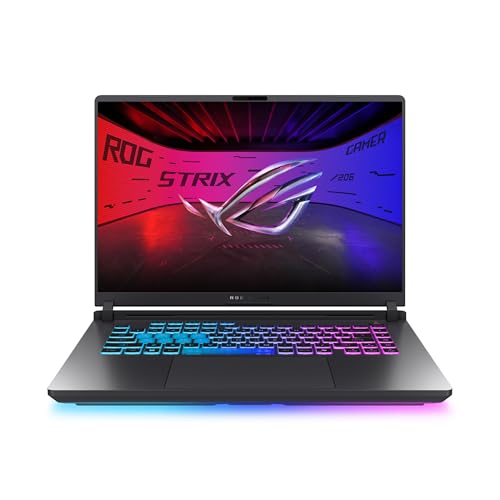 | ASUS ROG Strix G16 RTX 5050 | Best fit: RTX 5050 with 165Hz screen GPU: RTX 5050 Laptop GPU Screen: 16-inch FHD+ 165Hz Processor: Core i5-14450HX Ports: Not listed in Amazon bullets | Check Price on Amazon |
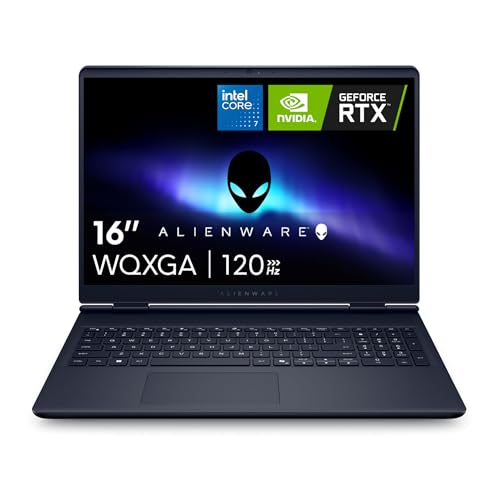 | Alienware 16 Aurora RTX 5060 | Best fit: RTX 5060 with 1600p display GPU: RTX 5060 (named in Amazon title) Screen: 16-inch 2560 x 1600, 120Hz Processor: Core 7 240H Ports: Dell lists HDMI 2.1, two USB-C, two USB-A, 1GbE RJ45 | Check Price on Amazon |
 | MSI Katana 15 HX RTX 5070 | Best fit: RTX 5070 with wired networking GPU: RTX 5070 Screen: 15.6-inch QHD, 165Hz Processor: Core i9-14900HX Ports: USB-C Gen 2, HDMI, USB-A, RJ45 | Check Price on Amazon |
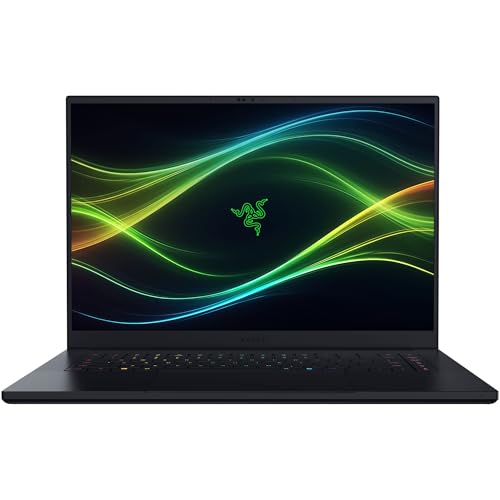 | Razer Blade 16 RTX 5070 Ti | Best fit: Thin RTX 5070 Ti with OLED GPU: RTX 5070 Ti, 12GB GDDR7, up to 140W TGP Screen: 16-inch 2560 x 1600 OLED, 240Hz Processor: Core Ultra 9 386H, 32GB memory Ports: Thunderbolt 5, HDMI 2.1, USB, SD | Check Price on Amazon |
| Razer Blade 16 RTX 5080 | Best fit: RTX 5080 with up to 165W TGP GPU: RTX 5080, 16GB GDDR7, up to 165W TGP Screen: 16-inch 2560 x 1600 OLED, 240Hz Processor: Core Ultra 9 386H, 64GB memory Ports: Thunderbolt 5, HDMI 2.1, USB, SD | Check Price on Amazon |
1. ASUS ROG Strix G16 RTX 5050 — Best for RTX 5050 With a 165Hz Screen
The ROG Strix G16 is the RTX 5050 option in this guide, with a 16-inch 16:10 FHD+ 165Hz display and an Intel Core i5-14450HX. Amazon’s listing names an NVIDIA GeForce RTX 5050 Laptop GPU, 16GB DDR5-5600 memory and a 512GB PCIe Gen 4 SSD, plus a MUX switch that routes frames directly from the discrete GPU. The bullets add that a latch on the bottom panel opens the memory, SSD and fans without a screwdriver.
For cooling, the bullets name a vapor chamber, tri-fan technology and liquid metal. The title lists Wi-Fi 7, but no bullet lists ports. ASUS’s Strix G16 page describes a different configuration, with a Core Ultra 9 275HX, RTX 5080 graphics, dual Thunderbolt 5, HDMI 2.1 and 2.5G Ethernet. The page adds that actual ports vary by model. Neither the RTX 5050 nor the Core i5-14450HX appears on ASUS’s page, so confirm the ports of model G615JHR-DS53 before planning a dock or a wired network.
Who it suits: a buyer who wants an RTX 5050 laptop with a 165Hz 16-inch screen and tool-free memory and SSD access, and who will confirm the ports separately.Our Take Start here when an RTX 5050 laptop with a 165Hz screen covers the games you play at the settings you plan to use. Compare each game’s published requirements before moving up a GPU number.
- Amazon’s listing for the Strix states a 16-inch FHD+ 165Hz display with a 3ms response time.
- Amazon names 16GB of DDR5-5600 memory and a 512GB PCIe Gen 4 SSD for the Strix.
- The Strix bullets say a latch on the bottom panel opens the memory, SSD and fans without a screwdriver.
- Amazon’s bullets list no ports for the Strix, and ASUS’s page describes a different Strix G16 configuration, so the ports of model G615JHR-DS53 need confirming.
- The Strix listing names an RTX 5050 Laptop GPU but states no result for any game or setting.
2. Alienware 16 Aurora RTX 5060 — Best for RTX 5060 With a 1600p Display
The Alienware 16 Aurora is the RTX 5060 option in this guide, with a 16-inch 2560 x 1600, 120Hz, 16:10 display in place of the Strix’s FHD+ panel. Amazon’s title names the RTX 5060, Core 7 240H, 16GB DDR5 and 1TB SSD, and the bullets add a 300-nit WQXGA panel and a Cryo-Chamber structure that focuses airflow on the core components. The bullets describe the graphics only as NVIDIA GeForce RTX 50 Series, so the RTX 5060 comes from the title.
Dell’s Alienware 16 Aurora page lists Core 7 240H versions with RTX 5050, RTX 5060 and RTX 5070 graphics, including an RTX 5060 with 16GB DDR5 and a 1TB SSD. Its specification panel, shown for an RTX 5050 version, lists two USB-A ports, two USB-C ports at 10Gbps, HDMI 2.1, an audio jack and a 1GbE RJ45 port. The Amazon bullets give no port list, so treat Dell’s ports as those of the model line and check the title’s GPU before ordering.
Screen first: the RTX 5060 pick for a 16:10 panel at 2560 x 1600 and 120Hz.Our Take Choose the Aurora when a 16:10 2560 x 1600 panel is a higher priority than the 165Hz and 240Hz refresh rates on the other listings. Confirm the GPU, memory and SSD on the order, because Dell sells this laptop in several versions.
- The Aurora’s Amazon title names an RTX 5060 with a 2560 x 1600 display at 120Hz.
- Amazon’s bullets for the Aurora state a 16:10 WQXGA panel at 300 nits.
- Dell’s page lists HDMI 2.1, two USB-C ports, two USB-A ports and a 1GbE RJ45 port for the Aurora model line, and the Amazon bullets give no port list.
- The Aurora’s Amazon bullets name only an RTX 50 Series GPU, so the RTX 5060 rests on the title.
- Dell’s page also lists RTX 5050 and RTX 5070 versions of the Aurora, so check that the order shows the RTX 5060 before buying.
3. MSI Katana 15 HX RTX 5070 — Best for RTX 5070 With Wired Networking
The Katana 15 HX is the RTX 5070 option in this guide, and the only one of the five whose Amazon bullets name an Ethernet port. The listing states a QHD 165Hz display with 100% DCI-P3, a Core i9-14900HX, and Cooler Boost 5 cooling with dual fans and a five-heat-pipe design. The listing says the RTX 5070 supports ray tracing and DLSS 4. Both are features, not game results.
The bullets name USB-C Gen 2, HDMI up to 8K, several USB-A ports, RJ45, Wi-Fi 6E and audio. MSI’s Katana 15 HX B14W page lists RJ45, HDMI, a USB 3.2 Gen 2 Type-C port with DisplayPort and Power Delivery, two USB 3.2 Gen 2 Type-A ports and an audio combo jack. The page describes the graphics as up to an RTX 5070 with 8GB GDDR7 and the panel as 15.6-inch QHD at 2560 x 1440. Amazon’s title states 32GB DDR5 and a 1TB NVMe SSD, but the bullets do not repeat them, so confirm both on the order.
Our Take Pick the Katana for a wired desk when the delivered configuration matches the title. Choose a Blade instead when OLED and a thinner body rank above a built-in RJ45 port. The Blade bullets do not name one.
- The Katana’s Amazon bullets state a QHD 165Hz display with 100% DCI-P3.
- The Katana’s bullets name RJ45 Ethernet, HDMI, USB-C Gen 2 and several USB-A ports, and no other bullet set of the five names Ethernet.
- The Katana listing names Cooler Boost 5 cooling with dual fans and five heat pipes.
- The Katana’s bullets do not repeat the title’s 32GB memory and 1TB SSD, so both need confirming on the order.
- The Katana’s 15.6-inch panel is smaller than the 16-inch screens on the other four listings.
4. Razer Blade 16 RTX 5070 Ti — Best for Thin RTX 5070 Ti With OLED
The Razer Blade 16 with an RTX 5070 Ti pairs a 16-inch 2560 x 1600 OLED at 240Hz with a 14.9mm CNC aluminum body. Amazon’s bullets list the RTX 5070 Ti with 12GB GDDR7 at up to 140W TGP, a Core Ultra 9 386H, 32GB LPDDR5X memory, a 1TB PCIe 4.0 SSD and two M.2 NVMe slots. They also name Thunderbolt 5, HDMI 2.1, USB connections, SD card support and vapor chamber cooling.
Amazon’s model number for this listing is RZ09-05817EN3-R3U1. The listing shares the Blade 16 name with the RTX 5080 listing below, so match the GPU and memory before ordering. The bullets call the memory non-upgradeable, and Razer’s Blade 16 page says its memory is soldered and not upgradeable. Razer’s page lists RTX 5080 and RTX 5090 graphics and does not list an RTX 5070 Ti, so the RTX 5070 Ti and its 140W figure come from Amazon’s bullets alone.
Thin and OLED: the RTX 5070 Ti pick, with a 240Hz OLED panel and Thunderbolt 5 named in the bullets.Our Take Pick this when a 240Hz OLED panel and a thinner 16-inch body rank alongside the GPU. The 32GB of memory cannot be upgraded, so decide on that size before ordering.
- Amazon’s bullets for this Razer Blade list a 2560 x 1600 OLED panel at 240Hz with a 0.2ms response time.
- The Blade’s bullets state an RTX 5070 Ti with 12GB GDDR7 at up to 140W TGP.
- The Blade’s bullets name Thunderbolt 5, HDMI 2.1, USB connections and SD card support.
- The Blade’s bullets call the 32GB of LPDDR5X memory non-upgradeable, so the size is a decision to make before ordering.
- Razer’s page does not list an RTX 5070 Ti, so the GPU details rest on Amazon’s bullets.
5. Razer Blade 16 RTX 5080 — Best for RTX 5080 With Stated 165W TGP
The Razer Blade 16 with an RTX 5080 uses the same 16-inch OLED body but lists RTX 5080 graphics with 16GB GDDR7 at up to 165W TGP. Amazon’s bullets also list a 2560 x 1600, 240Hz, 0.2ms OLED panel, a Core Ultra 9 386H, 64GB LPDDR5X memory, a 1TB PCIe 4.0 SSD and vapor chamber cooling. Razer’s Blade 16 page lists RTX 5080 and RTX 5090 graphics at up to 165W TGP, and Thunderbolt 5. The bullets agree on both.
Amazon’s model number for this listing is RZ09-05818EN4-R3U1. Against the RTX 5070 Ti listing above, the differences are the GPU (RTX 5080 at up to 165W TGP against RTX 5070 Ti at up to 140W), the memory (64GB against 32GB) and the model number. The display, processor, SSD, ports and body are the same in the bullets. The bullets call the 64GB of memory non-upgradeable, while the two M.2 NVMe slots can expand storage up to 8TB total.
Our Take Choose this when your games, display target and workloads call for an RTX 5080. The 64GB of memory cannot be upgraded later, so decide on it at purchase.
- Amazon’s bullets for this Razer Blade state RTX 5080 graphics with 16GB GDDR7 at up to 165W TGP.
- Razer’s page lists the same up to 165W TGP for the Blade 16 with RTX 5080 graphics, and the Amazon bullets agree.
- The Blade’s bullets name Thunderbolt 5, HDMI 2.1, USB connections and SD card support.
- The Blade’s bullets call the 64GB of LPDDR5X memory non-upgradeable, so the memory size is a purchase-time decision.
- Two Amazon listings carry the Blade 16 name, so confirm model number RZ09-05818EN4-R3U1 before ordering.
Buying Guide
1. Choose the GPU tier from the game and display target
Start with each game’s published requirements, then match a laptop to them. A GPU name is not a frame rate, and no listing in this guide states one for any game. Decide the screen first. The Strix lists FHD+, the Aurora and both Blades list 2560 x 1600, and the Katana lists QHD.
Refresh rate describes the screen, not the frame rate a game reaches. The Strix and Katana list 165Hz, the Aurora lists 120Hz and the Blades list 240Hz. More models at each GPU are in the RTX 5050, RTX 5060, RTX 5070 and RTX 5080 laptop comparisons.
2. Read cooling and ports as separate hardware facts
The Strix bullets name a vapor chamber, tri-fan technology and liquid metal. The Aurora bullets name a Cryo-Chamber structure, the Katana bullets dual fans and five heat pipes, and both Blade listings vapor chamber cooling. Each is a maker’s description of its own design, not a measured temperature or a game result.
Ports differ more. The Katana bullets name RJ45, HDMI, USB-C Gen 2 and USB-A. Dell’s page lists HDMI 2.1, two USB-C ports at 10Gbps, two USB-A ports and 1GbE RJ45 for the Aurora. The Blade bullets name Thunderbolt 5, HDMI 2.1, USB and SD card support. The Strix bullets name none. Choose the laptop’s ports before buying a dock or monitor. The gaming laptop dock guide and Thunderbolt 5 gaming laptop guide cover that separate accessory check.
3. Decide fixed memory before buying a thin machine
Both Razer listings say their LPDDR5X memory is non-upgradeable, and Razer’s Blade 16 page says the memory is soldered. The RTX 5070 Ti Blade lists 32GB and the RTX 5080 Blade lists 64GB. Installed memory is a purchase-time decision on both, not a later upgrade.
The Strix bullets say memory and SSD can be changed through a tool-free latch, while the Katana and Aurora bullets do not say whether memory can be upgraded. Amazon’s titles state the Aurora’s 16GB and 1TB and the Katana’s 32GB and 1TB. Match the delivered memory and SSD to the games you keep installed, and confirm both on the order.
FAQ
Is an RTX 5080 automatically the right gaming laptop?
No. The Razer Blade 16 with an RTX 5080 has the highest-numbered GPU in this guide, and its listing states 16GB GDDR7 at up to 165W TGP and 64GB of non-upgradeable memory. Whether that suits you depends on the games, the display resolution and any creative work you do.
Choose the GPU number that matches a stated requirement. The Strix lists an RTX 5050, the Aurora’s title an RTX 5060, the Katana an RTX 5070, and the Blades an RTX 5070 Ti and an RTX 5080. Screens, memory and ports vary across the five listings, so they are not interchangeable.
Does a higher refresh screen guarantee more frames?
No. A refresh rate describes the panel. The game, its settings, the GPU, the processor and the chosen resolution decide the frame rate, and no listing here states one. The Strix and Katana list 165Hz screens, the Aurora lists 120Hz, and the Blade listings list 240Hz OLED panels.
Read refresh rate together with the panel resolution and the GPU. A 240Hz specification is a panel rating, not a result every game will reach.
Which pick has the clearest desk connections?
The Katana’s bullets and MSI’s page both list RJ45, HDMI, USB-C and USB-A ports. Dell’s page lists a similar set for the Aurora, with 1GbE RJ45, while the Blade bullets name Thunderbolt 5, HDMI 2.1, USB and SD card support without naming an Ethernet port.
Each accessory needs its own check. A laptop port, cable, dock and monitor form one connection chain, so no list here promises a particular output arrangement.
Bottom Line
Pick the ROG Strix G16 RTX 5050 for a 165Hz screen at the RTX 5050 level, the Alienware 16 Aurora RTX 5060 for a 16:10 2560 x 1600 panel, the MSI Katana 15 HX RTX 5070 for a wired desk, the Razer Blade 16 RTX 5070 Ti for OLED in a thin body, or the Razer Blade 16 RTX 5080 when the highest-numbered GPU here fits a defined need.