Our best overall Thunderbolt 5 gaming laptop is the ASUS ROG Strix SCAR 18 G835LX-XS97. ASUS lists its exact RTX 5090 retail identity inside a family with two Thunderbolt 5 ports and an 18-inch 2560×1600 240Hz Mini LED display path. Razer lists the Blade 16 at 4.71 lb, which makes it the better portable premium choice, and the MSI Vector 16 is the deliberate step down when two TB5 ports matter more than maximum memory, storage, or panel resolution.
These are exact retail configurations, though some supporting specifications come from manufacturer family pages. We keep that line visible throughout: a family display, port, weight, or power ceiling never quietly becomes an exact-SKU fact. For a wider mix of generations, start with our Thunderbolt laptop list.
Quick picks
- ASUS ROG Strix SCAR 18: Best overall for maximum gaming hardware and two TB5 ports.
- Razer Blade 16 RTX 5080: Best portable premium pick.
- Alienware 18 Area-51: Best 300Hz 18-inch alternative.
- MSI Titan 18 HX AI: Best maximum-spec desktop replacement.
- MSI Raider 18 HX AI: Best included-storage choice.
- MSI Vector 16 HX AI: Best restrained exact configuration.
| Image | Product | Details | Check Price |
|---|---|---|---|
 | ASUS ROG Strix SCAR 18 G835LX-XS97 | GPU / role: Exact RTX 5090 retail identity; best overall TB5 ports: Two on the G835LX family specification Display: Family path: 18-inch 2560x1600 240Hz Mini LED Memory / storage: Not frozen for the exact retail configuration; verify the selected variation Listed weight: ASUS 7.28 lb; Amazon record 6.28 lb; unresolved conflict Best for: Maximum gaming hardware with a balanced dual-port TB5 layout | Check Price on Amazon |
 | Razer Blade 16 RTX 5080 RZ09-05818EN4-R3U1 | GPU / role: GeForce RTX 5080; portable premium pick TB5 ports: One TB5 plus one TB4 Display: 16-inch QHD+ 240Hz OLED Memory / storage: 64GB / 1TB Listed weight: 4.71 lb Best for: Premium gaming hardware in the lightest listed chassis here | Check Price on Amazon |
 | Dell Alienware 18 Area-51 AA18250 | GPU / role: Exact RTX 5090 retail identity; 300Hz alternative TB5 ports: Two on RTX 5070 Ti and higher AA18250 configurations Display: 18-inch 2560x1600 300Hz Memory / storage: Not frozen for this exact retail configuration Listed weight: Dell family maximum 9.56 lb; not an exact-unit weight Best for: A large 300Hz internal display with two documented TB5 ports | Check Price on Amazon |
 | MSI Titan 18 HX AI A2WJ-1258US | GPU / role: GeForce RTX 5090; maximum-spec desktop replacement TB5 ports: Two Display: 18-inch 3840x2400 240Hz Mini LED Memory / storage: 64GB / 4TB Listed weight: 7.94 lb Best for: The fullest exact hardware package for a fixed desk | Check Price on Amazon |
 | MSI Raider 18 HX AI A2XWIG-014US | GPU / role: GeForce RTX 5080; included-storage pick TB5 ports: Two on the A2XWX family specification Display: Exact panel details not retained in the frozen evidence Memory / storage: 64GB / 4TB Listed weight: Exact selected-unit value not retained Best for: High included memory and storage below the Titan's GPU tier | Check Price on Amazon |
 | MSI Vector 16 HX AI A2XWHG-212US | GPU / role: GeForce RTX 5070 Ti; restrained configuration TB5 ports: Two Display: 16-inch 1920x1200 144Hz Memory / storage: 16GB / 512GB Listed weight: 5.95 lb Best for: A lower-spec exact SKU that keeps two TB5 ports | Check Price on Amazon |
1. ASUS ROG Strix SCAR 18 G835LX-XS97 – Best overall

The SCAR 18 is for buyers who rank a large internal panel, an RTX 5090 retail configuration, and two high-bandwidth peripheral connections above low carry weight. ASUS documents two Thunderbolt 5 ports for the G835LX family, with DisplayPort and power-delivery support, and specifies an 18-inch 2560×1600 240Hz Mini LED ROG Nebula HDR display path for that same family.
The exact G835LX-XS97 retail identity controls what you receive. ASUS publishes several G835 variants on one specification surface, so we do not transfer an unverified memory or SSD capacity into this exact listing. Weight needs its own caveat: ASUS lists the chassis at 7.28 lb, while the Amazon product record lists 6.28 lb. Read that one-pound conflict as a reason to confirm the exact checkout configuration, not as a range.
Our Take
For a fixed gaming desk, the SCAR 18 is the balanced maximum-hardware pick. Its two TB5 ports and premium family display are compelling, but the unresolved weight conflict and the unconfirmed memory or storage details demand a model-code check.
- Exact RTX 5090 retail identity
- ASUS documents two Thunderbolt 5 ports
- Family specification includes an 18-inch 240Hz Mini LED path
- ASUS and Amazon weight records conflict by one pound
- Memory and storage are not confirmed for this exact listing
- Large 18-inch chassis favors desk use
2. Razer Blade 16 RTX 5080 RZ09-05818EN4-R3U1 – Best portable premium pick
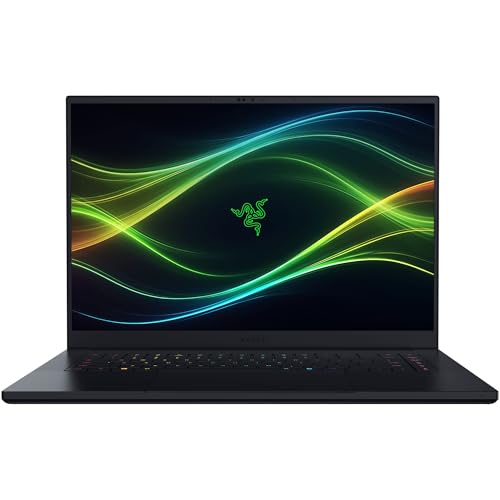
High-end graphics without stepping up to an 18-inch desktop replacement is the Blade 16’s pitch. Razer ties the exact RZ09-05818EN4-R3U1 part to a Core Ultra 9 386H, GeForce RTX 5080, 64GB of memory, and a 1TB SSD. Its 16-inch QHD+ 240Hz OLED panel is tied to that same selected part rather than borrowed from an unrelated configuration.
Razer documents one Thunderbolt 5 port and one Thunderbolt 4 port, both with DisplayPort and power-delivery support. The mixed layout is useful, but only one of those connections is the newer generation. Razer lists a 90Wh battery and a 4.71 lb weight. That lower mass makes it the mobility pick in this group, but it is still a high-power gaming system, and neither battery capacity nor a port label predicts how it behaves.
Our Take
As a premium travel compromise, the Blade 16 is the cleanest. Buy it for the exact RTX 5080, OLED, and 4.71 lb package, and not if you specifically need two Thunderbolt 5 ports.
- Exact 64GB and 1TB configuration
- Razer specifies a 16-inch 240Hz OLED panel
- Listed 4.71 lb weight is the lightest in this slate
- Only one of its two certified ports is Thunderbolt 5
- 1TB is less included storage than the Raider or Titan
- Battery capacity does not predict gaming runtime
3. Dell Alienware 18 Area-51 AA18250 – Best 300Hz 18-inch alternative

The Alienware earns its place when an 18-inch 300Hz internal display is the priority. Dell’s exact AA18250 display page specifies 2560×1600 at 300Hz. The exact retail identity selects an RTX 5090 configuration, and Dell’s port manual for this model says AA18250 systems with RTX 5070 Ti graphics or higher receive two Thunderbolt 5 ports. This RTX 5090 product sits inside that documented branch.
Dell’s broader family sheet lists Core Ultra 9 275HX and RTX 5090 options, a 96Wh battery, and a maximum configuration weight of 9.56 lb. Those are family boundaries, not proof of the selected unit’s processor, battery, adapter, or exact weight. Our sources do not establish its memory or storage capacity either. This is a display-led recommendation, and its exact retail components still need a final variation check.
Our Take
For buyers centered on a 300Hz 18-inch panel and two documented TB5 ports, the Alienware is the strongest alternative. Do not treat Dell’s family maxima as exact specs for the selected unit.
- Exact 18-inch 2560×1600 300Hz display page
- Selected RTX 5090 configuration qualifies for two TB5 ports
- Distinct high-refresh large-screen role
- Memory and storage are not confirmed
- 9.56 lb is a family maximum, not this unit’s exact weight
- Large format is poorly suited to frequent carrying
4. MSI Titan 18 HX AI A2WJ-1258US – Best maximum-spec desktop replacement
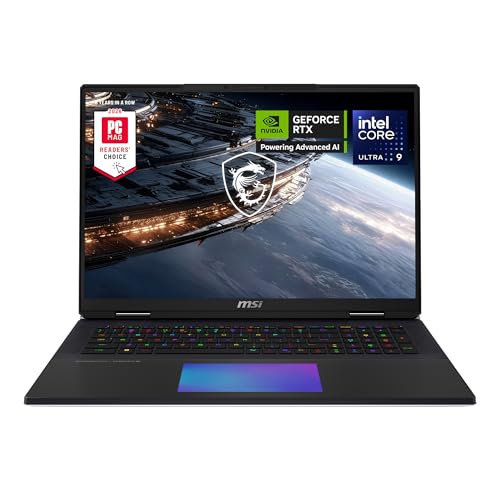
The Titan carries the highest fully documented specification set in this group. MSI lists A2WJ-1258US with a Core Ultra 9 290HX, GeForce RTX 5090, 64GB of memory, and 4TB of storage, then adds two Thunderbolt 5 ports, an 18-inch 3840×2400 240Hz Mini LED display, a 99.9Wh battery, and a 7.94 lb weight.
That combination makes the Titan easy to understand and hard to mistake for a travel laptop. The large, high-resolution internal panel and 4TB configuration reduce immediate upgrade pressure, while the two TB5 ports leave separate routes for a dock and a fast direct device. None of it is a gaming benchmark, though. These are hardware and connection capacities, not frame rates, fan behavior, or performance under a particular game.
Our Take
As the maximum-spec desk pick, the Titan also has the cleanest exact-configuration record. Its 7.94 lb weight is the decisive reason to choose another model for regular travel.
- Exact RTX 5090, 64GB, and 4TB configuration
- MSI specifies two Thunderbolt 5 ports
- 18-inch 3840×2400 240Hz Mini LED display
- MSI lists a 7.94 lb weight
- Desktop-replacement dimensions favor a fixed desk
- Hardware specifications do not establish game performance
5. MSI Raider 18 HX AI A2XWIG-014US – Best included-storage choice

The Raider suits a buyer who wants 4TB of included storage without needing the Titan’s RTX 5090. MSI’s exact store and listing bridge ties A2XWIG-014US to a Core Ultra 9 285HX, GeForce RTX 5080, 64GB of memory, and 4TB of storage. MSI’s A2XWX family specification documents two Thunderbolt 5 ports with DisplayPort and power-delivery support.
The exact store page controls the selected 18-inch display configuration, but our sources do not retain enough panel detail to compare its resolution or refresh honestly against the Titan, ASUS, or Alienware. Family power and weight figures do not become exact values for this unit either. That narrower claim set is part of the recommendation, not a gap in it: the Raider ranks for its exact memory and storage package, not for a panel or mobility comparison the evidence cannot support.
Our Take
The Raider is the practical 64GB and 4TB alternative to the Titan. Choose it for the included capacity and dual TB5, and treat the panel and weight details as checkout checks.
- Exact 64GB and 4TB retail configuration
- GeForce RTX 5080 identity is tied to A2XWIG-014US
- MSI family page documents two TB5 ports
- Exact panel details are not retained in our sources
- Family weight and power values are not exact-unit facts
- 18-inch format remains desk oriented
6. MSI Vector 16 HX AI A2XWHG-212US – Best restrained configuration

The Vector fits a buyer who needs an exact two-port TB5 gaming laptop and plans to accept or upgrade a more restrained factory configuration. MSI’s exact matrix lists A2XWHG-212US with a Core Ultra 7 255HX, GeForce RTX 5070 Ti, 16GB of DDR5-5600 memory, a 512GB NVMe SSD, and a 16-inch 1920×1200 144Hz display, plus two Thunderbolt 5 ports, a 90Wh battery, and a 5.95 lb weight.
The tradeoff is unusually clear. Its memory, storage, GPU tier, resolution, and refresh rate all sit below the premium picks here. That does not make it universally slower in every workload, because no common benchmark sits behind this ranking. It is instead the lowest specified exact retail starting point, with the same two-port TB5 count as the larger MSI systems.
Our Take
When dual TB5 is non-negotiable, the Vector is the sensible lower-spec choice. Plan around its 16GB memory, 512GB SSD, and 1920×1200 panel rather than mistaking it for a discounted Titan.
- Exact factory configuration is fully identified
- MSI specifies two Thunderbolt 5 ports
- Smaller 16-inch format than the four 18-inch picks
- 16GB memory and 512GB storage are modest for this group
- 1920×1200 144Hz panel trails the premium displays
- 5.95 lb is still substantial for travel
How to choose a Thunderbolt 5 gaming laptop
Start with the exact retail model, not the family name. ASUS, Dell, MSI, and Razer all sell related variants with different GPUs, displays, memory, and storage. A family page can prove a shared port layout or an option ceiling without proving that every listing includes every component. Match the model code and the exact listing before comparing anything else.
Next, decide whether you need one TB5 port or two. One is enough for a dock-centered desk, and the Razer adds a separate TB4 connection. Two TB5 ports let a dock and a direct high-bandwidth SSD or display route stay separate. Port count proves nothing about an external-display arrangement, charging replacement, or peripheral speed. The laptop GPU path, operating system, dock, device, firmware, and cable all remain part of the result.
Then choose the internal display and carry class. The Alienware’s documented 300Hz 2560×1600 panel favors refresh, the Titan’s 3840×2400 240Hz Mini LED path favors resolution, and the Razer combines a 240Hz OLED with the lowest listed weight here. If you are comparing mixed TB4 and TB5 gaming systems, our broader gaming-laptop guide owns that decision.
Memory and storage can be more concrete than vague performance labels. Titan and Raider include 64GB and 4TB in their exact records, and Vector starts at 16GB and 512GB. ASUS and Alienware capacities are not confirmed in our sources, so verify them rather than assuming that an RTX 5090 listing includes a particular amount.
Finally, keep power separate from docking. These high-power laptops may need their original adapters for full CPU and GPU operation even when a TB5 dock handles data and displays. Our gaming-laptop docking guide covers that desk decision. Thunderbolt 5 Bandwidth Boost is also directional: it should not be read as sustained 120Gbps in both directions.
Gaming laptop FAQ
Does Thunderbolt 5 make games run faster?
Not by itself. The internal GPU, CPU, cooling, memory, display mode, and game determine local gaming behavior. What TB5 adds is a higher-bandwidth path for compatible external devices, displays, and docks. This ranking uses documented hardware and fit, not invented game benchmarks.
Is one Thunderbolt 5 port enough?
It can be enough for one dock or one direct high-bandwidth device. Two ports are more flexible when a dock and a direct storage or display device need to stay separate. The device chain still negotiates to the capability of the host, cable, and peripheral.