Updated July 24, 2026: We rebuilt this guide around five current, exactly identified US configurations. Every pick has a current manufacturer source for its Thunderbolt ports, and every Amazon listing passed the July 23 availability gate. Older unavailable or configuration-ambiguous listings were removed. Prices are intentionally omitted because they change faster than the hardware evidence.
The ASUS ROG Strix SCAR 18 G835LX-XS97 is the best gaming laptop with Thunderbolt for most buyers choosing from this high-end group. It combines RTX 5090 graphics, a 240Hz Mini LED screen, and two Thunderbolt 5 ports in one clearly identified configuration. The Dell Alienware 18 Area-51 is the stronger alternative if an 18-inch 300Hz display and broad desk connectivity matter most. The Razer Blade 16 is the easier machine to carry. MSI’s Raider and Vector cover two different needs: large included storage at the top end, or a more restrained Thunderbolt 5 configuration.
This guide is about choosing the laptop itself, its GPU, display, and Thunderbolt generation, not the dock it plugs into. If the laptop will spend most of its time at a desk, our separate guide to docking stations for gaming laptops compares dock-specific display, charging, and peripheral tradeoffs. A Thunderbolt logo on a laptop does not guarantee that every dock will drive two 4K screens or deliver 140W. The dock, cable, displays, firmware, GPU routing, and host power limits all have a say.
Quick picks
- Best overall: ASUS ROG Strix SCAR 18 G835LX-XS97. Choose it for the strongest combination of RTX 5090 graphics, a 240Hz Mini LED panel, and two Thunderbolt 5 ports.
- Best 18-inch display and desk I/O: Dell Alienware 18 Area-51 AA18250. Its exact display page specifies 2560×1600 at 300Hz, while RTX 5070 Ti and higher configurations get two Thunderbolt 5 ports.
- Best portable premium pick: Razer Blade 16 RZ09-05818EN4-R3U1. At a listed 4.71 lb, it is much easier to move than the 18-inch systems, yet it still has RTX 5080 graphics, a 240Hz OLED panel, Thunderbolt 5, and Thunderbolt 4.
- Best storage-heavy desktop replacement: MSI Raider 18 HX AI A2XWIG-014US. The exact configuration pairs RTX 5080 graphics with 64GB of memory and 4TB of storage.
- Best lower-spec Thunderbolt 5 pick: MSI Vector 16 HX AI A2XWHG-212US. It keeps two Thunderbolt 5 ports and RTX 5070 Ti graphics, but its 16GB memory, 512GB SSD, and 1920×1200 display make the compromises plain.
Use the next selector if the list still feels too close. It points only to the five current products in this article.
Find your Thunderbolt gaming laptop
Pick the priority that will matter after the first week, not the specification that looks most impressive on paper.
Compare the five picks
| Image | Product | Details | Check Price |
|---|---|---|---|
 | ASUS ROG Strix SCAR 18 G835LX-XS97 | Verdict: Best overall Thunderbolt: 2x Thunderbolt 5 with DisplayPort and power delivery Processor / graphics: Core Ultra 9 275HX / GeForce RTX 5090 Memory / storage: Verify the selected retail configuration Display: 18-inch 2560x1600 Mini LED, 240Hz Power / weight: 90Wh / verify listed weight Main caveat: ASUS lists 7.28 lb while Amazon lists 6.28 lb; exact RAM and SSD are listing-dependent | Check Price on Amazon |
 | Dell Alienware 18 Area-51 AA18250 | Verdict: Best 18-inch display and desk I/O Thunderbolt: 2x Thunderbolt 5 up to 80Gbps with DP Alt Mode, USB4, and PD Processor / graphics: Core Ultra 9 275HX family option / selected RTX 5090 configuration Memory / storage: Verify the selected retail configuration Display: 18-inch 2560x1600, 300Hz Power / weight: 96Wh family battery / up to 9.56 lb by configuration Main caveat: Dell lists configurable options; exact adapter, memory, storage, and weight vary | Check Price on Amazon |
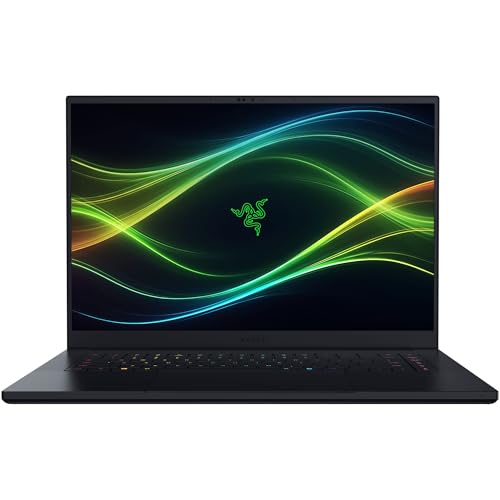 | Razer Blade 16 RZ09-05818EN4-R3U1 | Verdict: Best portable premium pick Thunderbolt: 1x Thunderbolt 5 plus 1x Thunderbolt 4, both with DP and PD Processor / graphics: Core Ultra 9 386H / GeForce RTX 5080 Memory / storage: 64GB / 1TB Display: 16-inch QHD+ OLED, 240Hz Power / weight: 90Wh, 280W adapter / 4.71 lb Main caveat: Less GPU and storage than the largest desktop replacements | Check Price on Amazon |
 | MSI Raider 18 HX AI A2XWIG-014US | Verdict: Best storage-heavy desktop replacement Thunderbolt: 2x Thunderbolt 5 with DisplayPort and power delivery Processor / graphics: Core Ultra 9 285HX / GeForce RTX 5080 Memory / storage: 64GB / 4TB Display: 18-inch exact-store configuration Power / weight: Verify exact selected configuration Main caveat: Large 18-inch system; family specs do not bind every value to this submodel | Check Price on Amazon |
 | MSI Vector 16 HX AI A2XWHG-212US | Verdict: Best lower-spec Thunderbolt 5 pick Thunderbolt: 2x Thunderbolt 5 with DisplayPort and PD 1.4 Processor / graphics: Core Ultra 7 255HX / GeForce RTX 5070 Ti 12GB Memory / storage: 16GB / 512GB Display: 16-inch 1920x1200, 144Hz Power / weight: 90Wh, 330W adapter / 5.95 lb Main caveat: Modest included memory, storage, and panel compared with the premium picks | Check Price on Amazon |
The table is intentionally short. These are not five interchangeable gaming laptops with a different badge on the lid. ASUS and Dell are the maximum-hardware 18-inch choices. Razer gives up some peak GPU and storage headroom for a much lighter 16-inch body. The MSI Raider is an 18-inch capacity-first configuration, while the MSI Vector uses a lower CPU, GPU, display, memory, and storage tier to create a more attainable Thunderbolt 5 option.
Thunderbolt generation should not make the decision by itself. Thunderbolt 4 remains a capable 40Gbps connection for docks, fast storage, capture hardware, and many eGPU workflows. Thunderbolt 5 raises the link ceiling and can allocate more display bandwidth in Bandwidth Boost mode, but connected hardware must support it. See our Thunderbolt 4 versus Thunderbolt 5 comparison if you want the protocol differences before comparing laptops.
1. ASUS ROG Strix SCAR 18 G835LX-XS97: Best overall
The ASUS ROG Strix SCAR 18 G835LX-XS97 is the strongest all-around choice in this five-product group. Its attraction is not one isolated number. The selected G835LX configuration brings together a Core Ultra 9 275HX, GeForce RTX 5090 graphics, an 18-inch 2560×1600 Mini LED screen running at 240Hz, and two Thunderbolt 5 ports. That is the right mix for a buyer who wants the laptop itself to be the main gaming machine but also expects it to anchor a serious desk.
ASUS lists both Thunderbolt 5 connections with DisplayPort and power-delivery support on the ROG Strix SCAR 18 specification page. Two ports matter more than the logo alone suggests. One can serve fast storage or a display path while the other remains available for a dock, interface, capture device, or another high-bandwidth peripheral. You still need to check each accessory’s requirements. Port capability does not make every dock, cable, or monitor combination work at its maximum advertised mode.
The 18-inch Mini LED panel is the second reason to start here. A 2560×1600 resolution is demanding enough to look sharp without pushing as many pixels as a 4K-class panel, and 240Hz is a sensible ceiling for fast games. Mini LED also gives this SCAR a different display character than Razer’s OLED or the Vector’s basic 1920×1200 panel. Buyers who want HDR impact and a large built-in screen do not have to accept the lower refresh rate often attached to high-resolution creator panels.
There are real costs to the design. ASUS lists the chassis at 7.28 lb before the power adapter, while Amazon’s exact product record lists 6.28 lb. That one-pound conflict makes weight a checkout item rather than a settled number. This is luggage, not an all-day shoulder-bag companion. Its 90Wh battery does not turn RTX 5090 hardware and a bright 18-inch Mini LED display into an unplugged gaming system. Performance settings, fan noise, and battery life will change sharply with workload. The exact retail memory and SSD selection should also be checked on the listing because ASUS presents several G835 variants on one family page.
Choose the SCAR 18 when maximum internal gaming performance, a premium large display, and two Thunderbolt 5 ports all rank above portability. Skip it if you mainly play at a fixed external monitor and would rather reduce size and weight, or if the 300Hz Dell panel is the specific feature you value most.
Best for: A high-end desk replacement that still offers flexible Thunderbolt 5 expansion.
2. Dell Alienware 18 Area-51 AA18250: Best 18-inch display and desk I/O
The Alienware 18 Area-51 AA18250 is the display-first alternative to the ASUS. The exact Dell display documentation specifies an 18-inch 2560×1600 panel at 300Hz. That extra refresh headroom will not matter in every game, and an RTX 5090 will not hold 300 frames per second in every demanding title, but it is meaningful for competitive players who also want a large built-in screen. The selected retail identity is the RTX 5090 configuration rather than a similarly named lower-GPU model.
Dell’s exact AA18250 external-port manual applies two Thunderbolt 5 ports to configurations with RTX 5070 Ti graphics and above. The RTX 5090 selection therefore falls inside the documented scope. Dell specifies up to 80Gbps, DisplayPort Alt Mode, USB4, and power delivery. This precise GPU threshold is better evidence than treating every product called Area-51 as if it shared the same ports.
The laptop makes the most sense as the center of a fixed setup. You get the built-in 300Hz screen for competitive play, native high-end graphics for games, and two modern ports for storage, capture, displays, or a dock. If you plan to attach several peripherals, check our guide to Thunderbolt 5 docks against the exact display count, resolution, refresh rate, and charging expectations of your setup. A dock can simplify cables, but it does not replace the Alienware’s main power adapter under gaming load.
Configuration variability is the main caveat. Dell’s family sheet lists Core Ultra 9 275HX and RTX 5090 among the available options, a 96Wh battery, multiple adapter choices, and a maximum configured weight of 9.56 lb. Those are family-level boundaries, not permission to assign every option to this exact store selection. Confirm RAM, SSD capacity, adapter, and final listed weight before buying. That matters when two listings share AA18250 branding but differ in installed parts.
This is also the least attractive option for frequent travel. Even before adding its adapter, a maximum-weight configuration can approach ten pounds. The case size that makes the 18-inch 300Hz display appealing becomes an airport and commuter burden. Razer is much easier to carry, while ASUS gives a somewhat clearer balance between an 18-inch Mini LED panel and listed chassis weight.
Choose the Alienware when the 300Hz 18-inch display, RTX 5090 selection, and two-port Thunderbolt 5 desk setup are worth the mass. Skip it if you want a narrow, light Thunderbolt gaming laptop or if you are unwilling to verify Dell’s configurable details at checkout.
Best for: Competitive gaming on a large built-in display with two documented Thunderbolt 5 ports.
3. Razer Blade 16 RZ09-05818EN4-R3U1: Best portable premium pick
Razer’s Blade 16 is the obvious choice when a gaming laptop must leave the desk regularly. The exact RZ09-05818EN4-R3U1 configuration weighs a listed 4.71 lb, several pounds less than the 18-inch ASUS and the heaviest Alienware configurations. It still combines a Core Ultra 9 386H, RTX 5080 graphics, 64GB of memory, a 1TB SSD, and a 16-inch QHD+ 240Hz OLED screen. That specification makes it a high-end gaming and creation machine, not a thin general-purpose laptop with a gaming label.
Its port arrangement is unique in this group. The current Razer Blade 16 product page lists one Thunderbolt 5 port and one Thunderbolt 4 port, with DisplayPort and power-delivery support on both. You do not get the pair of Thunderbolt 5 connections found on ASUS, Dell, or the two MSI systems. In return, you have two broadly capable Thunderbolt paths and can put a new TB5 device on one side while keeping a TB4 dock or accessory on the other.
The OLED display is the reason to choose Razer over a merely smaller chassis. Its combination of QHD+ resolution and 240Hz refresh is suited to both visually rich games and fast motion. OLED’s pixel-level contrast is also attractive for films and dark scenes. The tradeoffs are familiar: OLED care still matters, sustained static interface elements deserve thought, and the glossy, high-contrast experience may not suit every bright workspace. Panel preference is personal, so do not treat OLED as an automatic win over ASUS’s Mini LED screen.
Razer lists a 90Wh battery and a 280W adapter. The battery is useful for ordinary mobile work, but high-performance gaming remains an outlet-first activity. Thunderbolt power delivery can help in light use with a compatible source, yet it should not be mistaken for a replacement for the included adapter during demanding GPU workloads. The same warning applies when pairing the Blade with a dock.
The RTX 5080 is also a deliberate step below the two RTX 5090 picks. That does not make it slow, but buyers paying for the thinnest premium option should understand what they are trading. Its 1TB SSD is smaller than the Raider’s 4TB allocation, and large game libraries can consume that space quickly. Fast external storage is an option; our guide to Thunderbolt 5 SSDs explains where new drives can benefit from the faster link and where drive thermals or NAND become the limit.
Choose the Blade 16 if you want the most credible travel machine in this group and prefer OLED. Skip it if maximum internal GPU tier, two TB5 ports, or large included storage matters more than weight.
Best for: Buyers who split time between a premium mobile laptop and a Thunderbolt-equipped desk.
4. MSI Raider 18 HX AI A2XWIG-014US: Best storage-heavy desktop replacement
The MSI Raider 18 HX AI A2XWIG-014US earns its place through capacity rather than brand variety. Its exact configuration combines a Core Ultra 9 285HX, RTX 5080 graphics, 64GB of memory, and 4TB of storage. That is a practical starting point for large game libraries, video projects, local creative tools, or virtual machines. You are less likely to plan an immediate SSD or memory upgrade just to make the machine comfortable.
MSI’s Raider 18 HX AI A2XWX specification page documents two Thunderbolt 5 ports with DisplayPort and power-delivery support for the family. The exact A2XWIG-014US store identity confirms the CPU, GPU, memory, and storage. This division matters because MSI places multiple A2XWX submodels on the same technical surface. We do not transfer panel, adapter, or weight values from a neighboring submodel just because its name looks similar.
Two Thunderbolt 5 ports are useful even with 4TB already installed. They leave room for fast project storage, a high-bandwidth display path, capture hardware, or a dock without forcing every device through one connection. A buyer working with large video files can keep a dedicated SSD on one port and reserve the other for desk I/O. A gamer can use native RTX 5080 graphics while connecting displays and peripherals through Thunderbolt. Those are options, not promises that all devices will reach their maximum rate simultaneously.
The reason it ranks below ASUS and Dell is focus. The RTX 5080 is powerful, but it sits below the selected RTX 5090 configurations. The 18-inch chassis is still a desktop replacement, so the Raider does not solve the mobility problem the way Razer does. And while 4TB is genuinely useful, storage capacity should not outweigh the display, GPU, noise profile, or size if those factors are more important to you.
This is one of two MSI laptops in the guide, and that is deliberate. The Raider and Vector do not fill the same slot. Raider is the high-capacity 18-inch system with Core Ultra 9, RTX 5080, 64GB, and 4TB. Vector is a 16-inch model with Core Ultra 7, RTX 5070 Ti, 16GB, and 512GB. Dropping either one just to widen the brand list would trade a documented match for a weaker distinction.
Choose the Raider when you want a large Thunderbolt 5 machine that arrives with abundant memory and local storage. Skip it if you want RTX 5090 graphics, the lightest body, or a manufacturer page that binds every family specification to one retail submodel.
Best for: A high-capacity 18-inch workstation and gaming setup with two TB5 ports.
5. MSI Vector 16 HX AI A2XWHG-212US: Best lower-spec Thunderbolt 5 pick
The MSI Vector 16 HX AI A2XWHG-212US is the honest step-down choice. It keeps two Thunderbolt 5 ports and a discrete RTX 5070 Ti 12GB GPU, but it avoids pretending to match the other four laptops everywhere else. The exact configuration uses a Core Ultra 7 255HX, 16GB of DDR5-5600 memory, a 512GB NVMe SSD, and a 16-inch 1920×1200 144Hz panel.
Those facts come from the exact A2XWHG-212US row on MSI’s Vector 16 HX AI A2XWX specification page. The page also specifies two Thunderbolt 5 connections with DisplayPort and PD 1.4, a 90Wh battery, a 330W adapter, and a listed weight of 5.95 lb. This is the cleanest exact MSI evidence in this group because the official matrix names the selected US part directly.
The Vector is a good match for a buyer who needs current high-bandwidth ports but does not need the top internal GPU. RTX 5070 Ti graphics can handle modern games without turning an external GPU into a day-one requirement. The two TB5 ports also give the laptop a longer runway for new storage, docks, capture devices, and displays. If an eGPU is part of the plan, remember that the enclosure, GPU, game, and display route still determine the gain. Our USB4 and Thunderbolt eGPU guide covers those system-level choices.
Its limitations should shape the purchase. A 512GB SSD is small for a modern game library after the operating system and core applications take their share. Sixteen gigabytes of memory is serviceable, but it is not generous for heavy multitasking, creation work, or some simulation workloads. The 1920×1200 144Hz panel is also visibly less ambitious than the QHD+, Mini LED, OLED, and 300Hz displays above it. The Vector makes sense when you plan upgrades or use an external monitor, not when you want every premium feature built in.
At 5.95 lb, it is easier to move than the 18-inch desktop replacements but still heavier than the Blade 16. Its 330W adapter adds more travel weight. That makes “16-inch” an incomplete proxy for portability. Compare the full carry load if the machine will move every day.
Choose the Vector when Thunderbolt 5 and RTX 5070 Ti graphics are priorities and you accept near-term storage or memory planning. Skip it if the included display and capacities must feel premium on day one.
Best for: A buyer who values two exact TB5 ports and clear specifications over flagship parts.
How to choose between these gaming laptops
Start with the internal GPU
For gaming, the internal GPU is usually more important than Thunderbolt generation. The ASUS and Dell listings select RTX 5090 graphics. Razer and Raider use RTX 5080. Vector uses RTX 5070 Ti. The faster link on all five machines can expand what you connect, but it does not erase the performance hierarchy inside the laptop.
Buy enough internal GPU for the screen and games you expect to use most. An eGPU can add flexibility later, especially for a portable laptop, but it adds an enclosure, desktop graphics card, cable, power supply, and bandwidth boundary. It is not the simplest way to correct an underpowered first purchase.
Pick the built-in display you will actually use
ASUS offers an 18-inch 2560×1600 240Hz Mini LED experience. Dell raises the refresh rate to 300Hz at the same resolution. Razer shifts to a 16-inch QHD+ 240Hz OLED. Vector uses a simpler 16-inch 1920×1200 144Hz panel. The exact Raider store configuration should control your panel decision because MSI’s family page spans submodels.
If the lid will stay open beside an external monitor, panel quality still affects secondary-screen use. If the laptop will sit closed in a stand, do not pay for a panel technology you rarely see. For external-display ideas, see our guide to Thunderbolt monitors, then verify the display mode against the laptop, cable, and dock path.
Treat size and weight as a system
The Blade 16 is the lightest of these exact picks at 4.71 lb. Vector is 5.95 lb. ASUS has a 6.28-versus-7.28 lb marketplace/manufacturer discrepancy. Dell can reach 9.56 lb depending on configuration. The Raider is another 18-inch desktop replacement. The adapter and bag add to every number.
That difference changes how a machine is used. A laptop that is easy to move may travel between a home desk, office, and event. A nine-pound configuration may technically be portable but behave like a compact desktop. Do not let a handle or hinge define mobility for you.
Decide whether you need one or two TB5 ports
ASUS, Dell, Raider, and Vector each document two Thunderbolt 5 ports in the applicable configuration scope. Razer provides one TB5 and one TB4 port. A single TB5 port can be enough when it feeds one dock or SSD. Two are better when you want to separate storage from display and peripheral traffic, or preserve a free port while docked.
Port count does not mean independent maximum bandwidth for every device. Internal controllers, traffic direction, device support, and workload affect the outcome. For cable selection, use a certified cable with the generation and power rating your device requires. Our Thunderbolt 4 cable guide remains useful for TB4 equipment, while TB5 devices should use a cable that explicitly supports TB5.
Check charging expectations before building the desk
These are high-power gaming systems. Their main adapters are designed for sustained CPU and GPU loads. Power delivery through a Thunderbolt port can be convenient for light work or battery support on a compatible configuration, but it should not be assumed to replace the main adapter during gaming.
The same rule applies to docks. Some advertise high host charging, while others prioritize displays, networking, or storage. The laptop may also accept less than the dock can theoretically supply. Match the exact host input, dock output, and cable rating rather than treating the largest wattage on one box as the delivered result.
External GPUs and fast storage
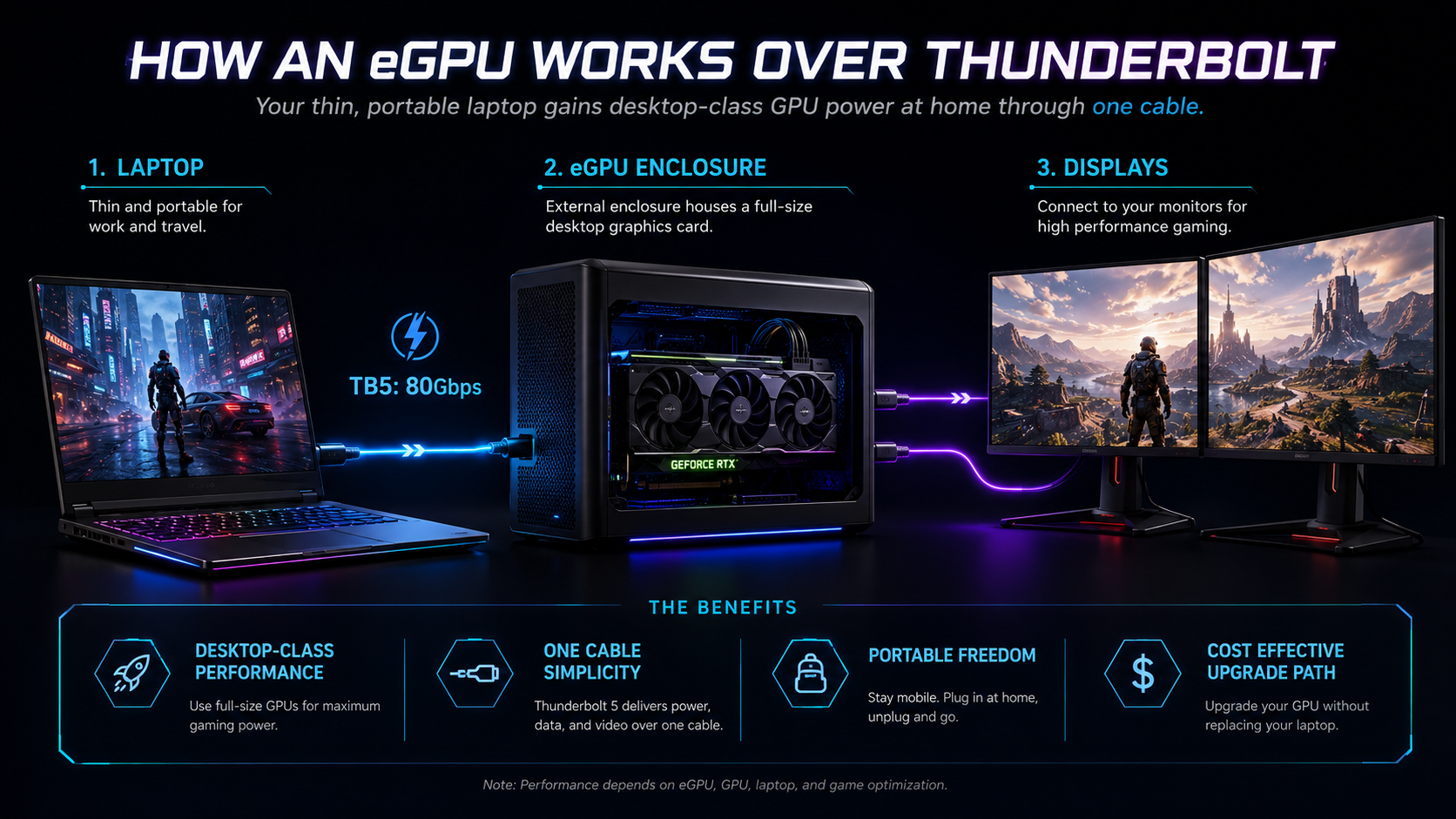
All five laptops already have capable discrete graphics. That makes an eGPU an optional workflow tool, not a rescue requirement. It may help a mobile Razer owner keep a different desktop GPU at home, or let a future Vector owner experiment with a faster card. It may also make little sense beside an RTX 5090 laptop whose internal GPU already avoids the external link.
For the cleanest eGPU path, connect an external display to the desktop graphics card rather than routing rendered frames back to the laptop screen. Expect results to vary by game, resolution, GPU, enclosure, and Thunderbolt implementation. If cost matters more than the newest protocol, compare our lower-cost eGPU enclosures before assuming TB5 hardware is required.
Fast external SSDs are a more universal use. They can hold large project files, move game libraries, or provide scratch space without opening the laptop. TB5 raises the connection ceiling, but the SSD controller, NAND, cache, cooling, and file mix often become the practical limit. Small-file work and sustained transfers can behave very differently.
Buying guide: the specifications that matter
Thunderbolt 4 versus Thunderbolt 5
Thunderbolt 4 provides a 40Gbps-class link with defined support for PCIe, displays, and USB4 interoperability. It remains suitable for many docks, external SSDs, capture devices, and eGPU enclosures. Thunderbolt 5 raises the normal bidirectional link to 80Gbps and can use Bandwidth Boost for greater display-directed bandwidth. That boost is not 120Gbps in both directions, and it does not make older devices faster by itself.
Backward compatibility is useful, but the slowest relevant component sets the mode. A TB5 laptop connected to a TB4 SSD through a TB4 cable behaves as a TB4 chain. Buying TB5 is most compelling when you expect high-bandwidth displays, storage, or future dock hardware and will keep the laptop for years.
CPU and cooling
Core Ultra 9 HX processors in ASUS, Dell’s high-end family options, and Raider target heavy sustained work. Vector’s Core Ultra 7 HX remains a performance processor. Razer’s Core Ultra 9 386H sits in a thinner system, where chassis design and cooling policy matter as much as the name.
Do not compare processor labels without the laptop around them. Power limits, fan curves, firmware, ambient temperature, and simultaneous GPU load can change sustained behavior. This guide does not claim benchmark results because we did not run a controlled five-laptop test. Manufacturer specifications establish identity and capability, not measured performance.
GPU tier and display resolution
RTX 5090, RTX 5080, and RTX 5070 Ti laptop graphics are not the same as desktop cards with similar names. Laptop GPU behavior depends on implementation and power. Compare exact laptop results from a consistent independent test source if frame rate in one game is the deciding factor.
Resolution also changes the workload. A 2560×1600 panel asks more of the GPU than 1920×1200. High refresh rates show their value most clearly when the game can produce matching frames. Upscaling and frame-generation features can help, but they should not replace a realistic view of the games and settings you use.
Memory and storage
Razer and Raider arrive with 64GB in their exact selected configurations. Vector includes 16GB. The exact ASUS and Dell retail capacities must be checked because the manufacturer family pages span configurations. More memory helps large creative projects, heavy multitasking, virtual machines, and some simulation workloads. It does not automatically increase frame rates in every game.
Storage needs are easier to underestimate. Raider’s 4TB allocation is its clearest advantage. Razer’s 1TB is workable but can fill quickly. Vector’s 512GB makes expansion planning part of the purchase. Before opening any chassis, check the service documentation, warranty conditions, slot layout, supported drive format, and whether another component blocks access.
Display outputs and dock paths
A laptop can expose DisplayPort through Thunderbolt, a native HDMI port, and sometimes other USB-C display paths. The best connection depends on the monitor’s resolution, refresh rate, adaptive-sync needs, and the devices sharing the link. For the highest-refresh primary gaming display, a direct native connection is often the simplest path. Use a dock for secondary displays and desk peripherals when its documented matrix matches the plan.
Do not assume that two Thunderbolt ports equal four unrestricted monitors. GPU limits, display stream compression, dock topology, operating system support, and bandwidth allocation still apply. Verify the exact monitor and dock matrix before purchasing several displays.
Networking and peripherals
Competitive gaming benefits from a stable network more than a theoretical peak link. If you use wired Ethernet through a dock, check whether it offers 1GbE, 2.5GbE, or faster networking and whether its controller behaves well on your operating system. Audio interfaces, capture cards, and storage can also be sensitive to hub topology or shared bandwidth.
Keep latency-critical devices on the most direct stable connection available. A dock is excellent for convenience, but it is not mandatory for every peripheral. A simple layout with direct display and power connections plus one Thunderbolt device can be easier to troubleshoot than a single chain carrying everything.
Frequently asked questions
What is the best gaming laptop with Thunderbolt 5?
The ASUS ROG Strix SCAR 18 G835LX-XS97 is our best overall pick from this exact five-product lineup. It combines RTX 5090 graphics, an 18-inch 2560×1600 240Hz Mini LED screen, and two TB5 ports. Dell is the better alternative when its 300Hz display and desk-oriented profile matter more.
Is Thunderbolt 4 still good for a gaming laptop?
Yes. Thunderbolt 4 is fast enough for many docks, SSDs, capture devices, monitors, and eGPU enclosures. Buy Thunderbolt 5 when you have a specific higher-bandwidth use or want more room for future hardware. Do not reject an otherwise better laptop solely because one port is TB4, especially when your current accessories are TB4.
Does Thunderbolt 5 improve game frame rates?
Not by itself. Games normally run on the laptop’s internal GPU, and a faster external port does not increase that GPU’s frame rate. TB5 can give some external devices more connection bandwidth. Actual eGPU gains still depend on the graphics card, enclosure, game, resolution, CPU, and whether the display connects to the external card.
Can a Thunderbolt dock power these gaming laptops?
A compatible dock may charge or support the battery during light work, but these high-power gaming systems should use their main adapters for sustained gaming. Do not assume a dock’s advertised host wattage is accepted in full by the laptop. Check both devices and the cable, then keep the main adapter connected when the GPU is working hard.
Can every Thunderbolt dock run two 4K monitors?
No. Display support varies by dock, laptop GPU path, operating system, refresh rate, compression support, cable, and other traffic. Some combinations can drive two 4K displays, while others cannot or must reduce refresh rate. Use the dock maker’s host-specific display matrix and the laptop’s display documentation.
Is one Thunderbolt 5 port enough?
It is enough for many buyers, especially when one dock consolidates desk devices. Two TB5 ports offer more flexibility for separating a fast SSD, display path, capture device, or dock. Razer’s one-TB5 plus one-TB4 arrangement is still practical because both ports support DisplayPort and power delivery.
Why are there two MSI laptops?
They serve different exact roles. Raider is an 18-inch Core Ultra 9 and RTX 5080 configuration with 64GB of memory and 4TB of storage. Vector is a 16-inch Core Ultra 7 and RTX 5070 Ti configuration with 16GB and 512GB. Keeping both is more useful than forcing brand variety with an unverified model.
Why is the Lenovo Legion Pro 5 not included?
The exact PSREF record for model 83F3000PUS specifies a WQXGA OLED display, while the selected Amazon identity described IPS. That conflict breaks the exact configuration match. We removed it rather than merging two incompatible identities or substituting an unapproved product.
Should I buy an 18-inch or 16-inch gaming laptop?
Choose 18 inches when the built-in display and sustained desk use matter more than travel weight. Choose 16 inches when the laptop moves often or must fit more bags and workspaces. Compare the full carry load, including the adapter, rather than screen size alone. Razer is the lightest exact pick here; Vector is the more modest 16-inch alternative.
What should I verify on the Amazon listing?
Match the ASIN and exact manufacturer part number first. Then confirm CPU, GPU, memory, SSD, display, keyboard region, operating system, seller, return terms, and warranty. Similar product names can hide different panels or components. Availability and configuration can change after this guide’s evidence cutoff.
How we selected these laptops
We started with the current July 23 US offer set supplied for this update, then required an exact retail identity backed by a current first-party manufacturer page. Amazon evidence was used only for ASIN identity, configuration, offer status, and image presence. ASUS, Dell, Razer, and MSI documentation controlled Thunderbolt generation and count, CPU/GPU scope, display facts, battery, adapter, and weight where the exact page proved them.
We did not invent hands-on testing, benchmark results, owner sentiment, or review summaries. A manufacturer specification can prove what a port or panel is, but it cannot prove how quiet, fast, cool, or pleasant a laptop feels in every workload. Those claims require controlled testing that is outside this update.
We then organized these picks by a clear decision role: best overall, best 18-inch display and desk I/O, best portable premium pick, best storage-heavy desktop replacement, and best lower-spec TB5 pick. Five products earned their place, and we did not add a weak sixth just to fill out a longer list.
Products we excluded
We removed five older ASINs after current evidence marked them out of stock. Two more active listings were removed because their offers did not match an exact Amazon part and configuration. Those seller-side audit details are not shopping advice, so we left them out.
Lenovo Legion Pro 5 16IAX10 model 83F3000PUS was removed for a different reason. Lenovo’s exact PSREF evidence says WQXGA OLED, while the selected Amazon identity says IPS. That is a material panel conflict, not a wording difference. We did not swap in a substitute, because the five confirmed picks already stand on their own.
Final verdict
Buy the ASUS ROG Strix SCAR 18 G835LX-XS97 if you want the best combination of internal gaming hardware, large-screen quality, and two TB5 ports. Choose the Dell Alienware 18 Area-51 for its 300Hz 18-inch display and desk-centered I/O. Pick the Razer Blade 16 when carrying weight matters. Choose the MSI Raider 18 HX AI for 64GB of memory and 4TB of included storage, or the MSI Vector 16 HX AI when a lower-spec exact configuration with two TB5 ports fits better.
The right Thunderbolt gaming laptop is the one whose internal GPU, display, size, and storage already fit your daily use. Thunderbolt should expand that foundation, not distract from a mismatch in the laptop itself.
About the author
Vlad Craciun researches Thunderbolt laptops, docks, storage, monitors, and eGPU hardware for ThunderboltLaptop.com. This update was built from exact product identities and current first-party manufacturer documentation, with configuration conflicts excluded rather than resolved by assumption.