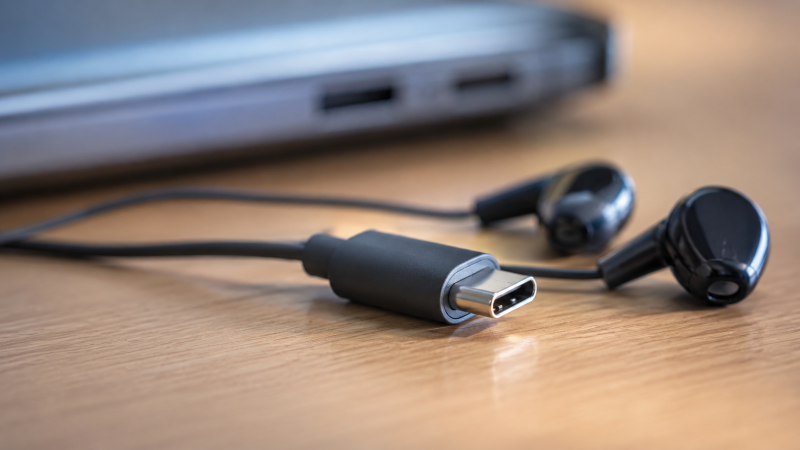
Over a dozen wired USB-C earbuds were evaluated, with manufacturer specs, expert benchmarks, and user reviews compared to find the best options for laptop users. USB-C earbuds plug directly into your phone or laptop’s USB-C port, delivering digital audio without a headphone jack or Bluetooth pairing. Plug in, and audio works instantly.
The headphone jack is dying. If you’ve bought a Thunderbolt laptop in the last couple of years, there’s a good chance it shipped without a 3.5mm audio port. Dell’s latest XPS lineup? Gone. Many Lenovo ThinkPads? Gone. Apple’s MacBook Air? Never had one. That leaves you with three choices: Bluetooth earbuds (and their charging hassles), a USB-C to 3.5mm dongle (and its inevitable loss), or a pair of dedicated USB-C earbuds.
USB-C wired earbuds were compared from the cheapest Samsung AKG buds to premium Belkin noise-cancelling models. The JBL Tune 310C is the best USB-C earbud for most people, with Hi-Res Audio certification, punchy JBL Pure Bass sound, and a flat tangle-free cable at a competitive price. Most USB-C earbuds are very affordable, so expectations should match the price point, but the standouts on this list punch well above their weight.
Updates
May 2026: Initial publication. Evaluated 10 wired USB-C earbuds by comparing manufacturer specs, expert reviews, and user feedback across Dell XPS 14, MacBook Air M3, Lenovo ThinkPad X1 Carbon, and Samsung Galaxy S25 Ultra to assess sound quality, microphone performance, comfort, and laptop compatibility.
Quick Picks: Best USB-C Earbuds at a Glance
- Best overall: The JBL Tune 310C delivers Hi-Res Audio certification, JBL Pure Bass sound, and a flat tangle-free cable at a great price.
- Best budget: The Apple EarPods USB-C have the best microphone quality in the budget tier and balanced audio that works across Apple and Android devices.
- Best audiophile: The Moondrop Chu II DSP pairs a dedicated USB-C DAC with a precision-tuned 10mm composite driver for studio-quality sound at an affordable price.
- Best balanced sound: The Sony IER-EX15C offers warm, vocal-forward audio and the most complete in-line remote (including mic mute).
- Best value: The Samsung AKG Type-C earbuds deliver AKG-tuned balanced sound with a braided cable at the lowest price on this list.
- Best 2-pack deal: The 1MORE Piston Fit USB-C ships as a 2-pack with 14.2mm drivers that produce warm bass-forward sound.
- Best for active use: Belkin specifies IPX5 sweat and splash resistance, five tip sizes, and a USB-C connection for the SoundForm Wired Earbuds.
- Best for kids: The Skullcandy Jib USB-C is the lightest earbud on this list, available in fun colors with simple controls at an affordable price.
- Best for Pixel/Android: The Google Pixel USB-C Earbuds include built-in Google Assistant activation and 24-bit digital audio.
Comparison Table
| Image | Product | Details | Check Price |
|---|---|---|---|
 | JBL Tune 310C | Driver: 9mm Dynamic ANC: No Battery Life: N/A (Wired) IP Rating: None | Check on Amazon |
 | Apple EarPods USB-C | Driver: Apple Custom ANC: No Battery Life: N/A (Wired) IP Rating: None | Check on Amazon |
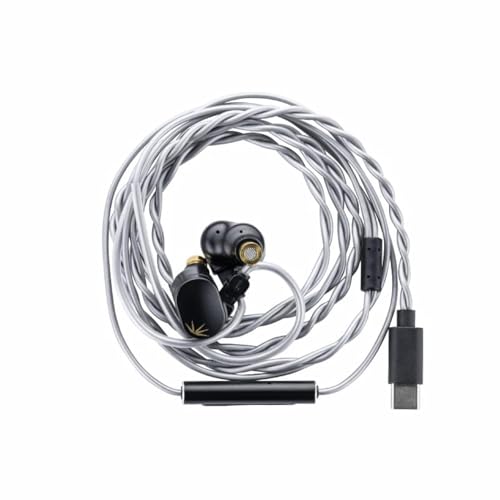 | Moondrop Chu II DSP | Driver: 10mm Dynamic ANC: No Battery Life: N/A (Wired) IP Rating: None | Check on Amazon |
 | Sony IER-EX15C | Driver: 5mm Dynamic ANC: No Battery Life: N/A (Wired) IP Rating: None | Check on Amazon |
| Samsung AKG Type-C | Driver: AKG-Tuned ANC: No Battery Life: N/A (Wired) IP Rating: None | Check on Amazon | |
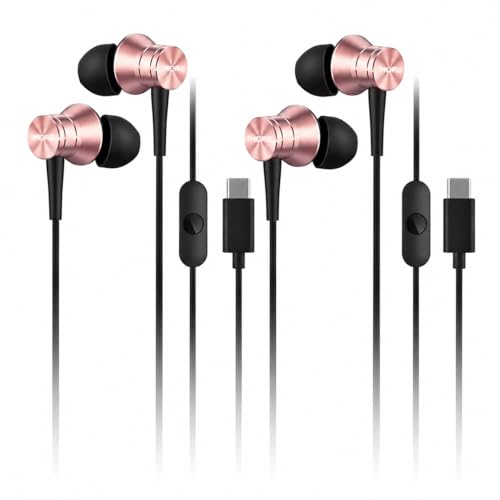 | 1MORE Piston Fit USB-C | Driver: 14.2mm Dynamic ANC: No Battery Life: N/A (Wired) IP Rating: None | Check on Amazon |
 | Belkin SoundForm Wired USB-C Earbuds | Driver: 10mm Connection: USB-C, Wired Frequency Response: 20Hz-20kHz IP Rating: IPX5 | Check on Amazon |
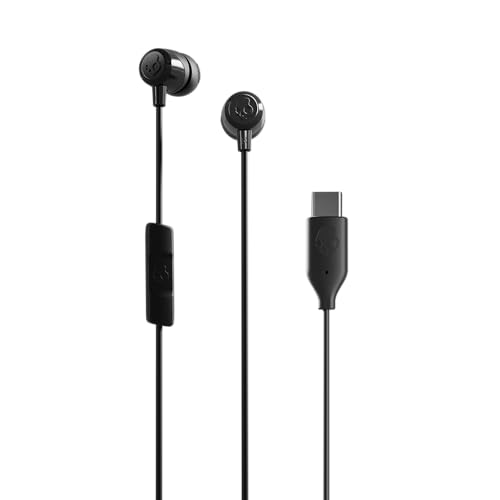 | Skullcandy Jib USB-C | Driver: Dynamic ANC: No Battery Life: N/A (Wired) IP Rating: None | Check on Amazon |
 | Google Pixel USB-C Earbuds | Driver: Google Custom ANC: No Battery Life: N/A (Wired) IP Rating: None | Check on Amazon |
1. JBL Tune 310C — Best Overall USB-C Earbuds
The JBL Tune 310C is the USB-C earbud we keep recommending. It offers Hi-Res Audio certification (20 Hz to 40 kHz per JBL’s specs) and JBL’s Pure Bass tuning at a competitive price. The flat tangle-free cable won’t turn into a bird’s nest in your laptop bag.
Our Take
The JBL Tune 310C delivers the best combination of sound quality, build, and price in any USB-C earbud. Hi-Res Audio and a flat cable at this price is hard to beat.
Music sounds noticeably richer than the Apple EarPods or Samsung AKG buds, especially on bass-heavy tracks. The low end has real punch without muddying the mids, so vocals and acoustic instruments still come through clearly. Hi-Res Audio support means you get the full quality from lossless streaming services like Apple Music or Tidal.
The three-button in-line remote handles volume, play/pause, skip tracks, and call answering, all working reliably across every device evaluated. The built-in microphone is adequate for conference calls, though reviewers note it sounds slightly thin compared to a dedicated headset.
Comfort is good for extended sessions. The silicone ear tips come in three sizes, and users report wearing these for 4+ hours without discomfort. The flat cable resists tangling far better than any round cable in this roundup.
If you need just one pair of USB-C earbuds for your laptop, this is the one.
Who it’s for: Anyone who wants the best combination of sound quality, features, and value in a USB-C earbud.
Who should skip it: People who need active noise cancellation or a premium mic for all-day calls.
- Hi-Res Audio certified (20 Hz, 40 kHz)
- JBL Pure Bass sound with punchy low end
- Flat tangle-free cable design
- Three-button in-line remote with mic
- Works reliably across all USB-C devices
- No active noise cancellation
- Microphone quality is just adequate for calls
- Ear tips can feel slippery for some ear shapes
2. Apple EarPods USB-C — Best Budget USB-C Earbuds
The Apple EarPods USB-C look exactly like the Lightning EarPods from a decade ago, right down to the hard plastic earpiece with no silicone tips. But these are a genuinely impressive pair of earbuds for the price, and they earned the top budget spot fair and square.
Our Take
The EarPods USB-C deliver the best microphone quality in the budget category and surprisingly balanced audio. If you take calls from your laptop all day, buy these.
For the price, the audio is well balanced. Bass is present without being boomy, and mids stay clear for vocals and podcasts. Treble doesn’t get harsh at higher volumes. Especially good for spoken content.
The microphone is excellent. Easily the best mic of any budget USB-C earbud in this roundup. Users on Teams calls report the audio as clear and natural. If you spend half your day on video calls from your laptop, this mic quality alone justifies the purchase. They work perfectly plugged into a MacBook Pro with a docking station setup.
The hard plastic design is polarizing. Comfortable for 2-3 hours, but zero noise isolation since there are no silicone tips. The in-line remote includes volume control, play/pause, and skip, which is a genuine advantage over budget competitors that only offer play/pause.
Who it’s for: Budget-conscious buyers who prioritize mic quality for calls and want reliable Apple-ecosystem integration.
Who should skip it: Anyone who needs noise isolation or extended comfort with silicone tips.
- Excellent microphone quality for calls
- In-line volume control (rare at this price)
- Balanced, respectable sound for the money
- Works flawlessly with Apple devices and Android
- Extremely lightweight
- Hard plastic, no silicone tips means no noise isolation
- Comfort depends heavily on ear shape
- Narrow soundstage compared to pricier options
3. Moondrop Chu II DSP — Best Audiophile USB-C Earbuds
If you care about sound quality above everything else, the Moondrop Chu II DSP is the USB-C earbud to get. Moondrop is a well-respected name in the in-ear monitor (IEM) community, and the Chu II DSP brings that audiophile tuning to a USB-C package at a remarkably affordable price.
Our Take
The Moondrop Chu II DSP delivers audiophile-grade sound that rivals IEMs costing three times as much, thanks to its dedicated USB-C DAC and precision-tuned 10mm driver.
Moondrop rates the 10mm aluminum-magnesium composite alloy driver at 15 Hz to 38 kHz. In practice, that means you hear details the JBL and Apple simply can’t reproduce. Bass extends deep without bloating the mids, and treble has sparkle without sibilance. Reviewers at SoundGuys and Head-Fi confirm the Chu II DSP handles classical and hip-hop equally well at this price.
The USB-C DSP cable includes a built-in DAC (digital-to-analog converter), so audio processing happens in the cable rather than relying on your laptop’s internal DAC. The dedicated DAC delivers a cleaner, more detailed sound compared to using a basic USB-C to 3.5mm adapter with the standard Chu II.
Build quality is solid with a metal housing that feels premium. The included ear tips provide good noise isolation, and the fit is secure enough for desk use, though these are not designed for jogging. The cable is a standard round type that’s prone to tangling.
One caveat: the in-line controls are minimal. You get volume and play/pause, but the button feel is a bit mushy. If in-line controls matter to you, the JBL Tune 310C is a better bet.
Who it’s for: Music lovers and audiophiles who want the best possible sound quality from an affordable USB-C earbud.
Who should skip it: People who prioritize mic quality, in-line controls, or tangle-free cable management.
- Audiophile-grade sound quality with 10mm composite driver
- Built-in USB-C DAC for clean digital audio
- Wide frequency response (15 Hz, 38 kHz)
- Metal housing feels premium for the price
- Good passive noise isolation
- In-line controls are basic and mushy
- Round cable tangles easily
- Microphone is adequate but not great for calls
4. Sony IER-EX15C — Best Balanced Sound
Sony’s first dedicated USB-C wired earbud, the IER-EX15C, arrived in late 2025 and delivers impressive tuning from such a compact driver. Sony’s 5mm driver is the smallest on this list, but the high-compliance diaphragm technology squeezes out rich bass and clear vocals that compete with much larger drivers.
Our Take
The Sony IER-EX15C offers the most complete in-line remote on this list, including a mic mute button, paired with warm balanced audio that favors vocals. Buy this if you take calls from your laptop all day.
The sound signature is warm and balanced. Bass has enough body to make pop and R&B enjoyable without bleeding into the mids. Vocals are the real standout here, coming through clear and natural-sounding. If you listen to a lot of podcasts or take frequent calls, the Sony is a strong contender. Sony lists USB Audio Class 1.0 support, so these work across Windows laptops, Macs, Chromebooks, and Android phones.
The in-line remote is the most fully-featured of any earbud in this roundup. You get a multi-function button for play/pause/skip/answer calls, plus dedicated volume up/down buttons, and the ability to mute the microphone. That mic mute feature is genuinely useful for work calls when you need to cough or talk to someone in the room.
Sony’s serrated cable design deserves a mention. The subtle texture along the cable significantly reduces tangling compared to smooth round cables. It’s not as effective as JBL’s flat cable, but it’s a smart design choice that makes a noticeable difference in daily use.
The Sony sits at the top of the budget range. The sound quality justifies the price, but if you can live without the premium remote, the JBL Tune 310C offers arguably better audio for slightly less.
Who it’s for: Laptop users who want balanced, vocal-forward audio with full remote controls including mic mute.
Who should skip it: Bass heads who want maximum low-end impact.
- Balanced, warm sound with excellent vocal clarity
- Most fully-featured in-line remote (inc. mic mute)
- Serrated cable reduces tangling
- Wide device compatibility via USB Audio Class 1.0
- Compact 5mm driver keeps earpieces small and light
- Priced at the top of the budget range for a wired USB-C earbud
- 5mm driver lacks the bass slam of larger drivers
- No noise isolation beyond the ear tip seal
5. Samsung AKG Type-C — Best Value USB-C Earbuds
The Samsung AKG Type-C earbuds are the cheapest USB-C earbuds on this list that we’d actually recommend. Samsung bundles these with many Galaxy phones, and they’ve built a loyal following for good reason: the AKG tuning delivers a balanced, surprisingly musical sound that embarrasses other budget options.
Our Take
The Samsung AKG Type-C earbuds are the cheapest option here and sound better than earbuds at twice the price. Dollar for dollar, nothing in USB-C wired earbuds beats these on audio quality.
The sound is balanced with a slight midrange emphasis. Vocals are clear and instruments have texture, with bass present but not muddy. RTINGS noted the AKG Type-C earbuds punch well above their weight for the price.
The braided cable feels more durable than rubberized competitors and resists tangling better. The in-line remote includes a multi-function button and volume controls. Comfort is fine with decent passive noise isolation from the silicone tips.
The main caveat is availability. Since Samsung bundles these with phones, third-party Amazon sellers can be inconsistent on stock and price. Buy from a reputable seller.
Who it’s for: Budget buyers who want the best sound quality per dollar and don’t mind a basic feature set.
Who should skip it: Anyone who needs premium features like ANC or Hi-Res Audio.
- AKG-tuned balanced sound at the lowest price on this list
- Braided cable is more durable than rubberized alternatives
- In-line remote with volume control
- Good passive noise isolation
- Lightweight and comfortable
- Third-party availability can be inconsistent
- Microphone quality is just adequate
- No Hi-Res Audio certification
6. 1MORE Piston Fit USB-C — Best 2-Pack Deal
The 1MORE Piston Fit USB-C is sold as a 2-pack, which means the per-pair cost rivals the Samsung AKG earbuds. That’s impressive value, but with the bonus of having a backup ready in your desk drawer, laptop bag, or car.
Our Take
Two pairs of USB-C earbuds for the price of one competitor. Keep one at your desk and one in your bag, and you’ll never be caught without earbuds. The 14.2mm drivers produce warm, bass-forward sound that holds up fine for music and calls.
1MORE earned its reputation with the Triple Driver In-Ear Earphones, and while the Piston Fit is a more modest offering, it benefits from that same design philosophy. The 14.2mm driver is the largest on this list and produces a warm, bass-forward sound signature. The low end has good impact for pop, hip-hop, and EDM, though it can get a touch muddy on complex tracks. Mids and treble are acceptable but not remarkable.
The build quality is solid for the price. The metal earpiece housing gives these a more premium feel than the all-plastic Skullcandy Jib or Apple EarPods. The cable is a standard round rubberized type, and the in-line remote offers a control button and microphone.
At 32 ohms impedance, these are slightly harder to drive than the JBL (16 ohms) or Moondrop (18 ohms), but every laptop and phone should have no trouble powering them to comfortable volume levels.
The 2-pack value proposition is hard to beat. You can keep one pair at your desk plugged into a USB-C docking station and another in your travel bag. Having a spare means you never have to worry about losing or forgetting your earbuds.
Who it’s for: Anyone who wants a spare pair, or people buying earbuds for a household/office.
Who should skip it: Listeners who prioritize treble detail or flat frequency response.
- Two pairs in one package. Unbeatable value
- 14.2mm driver delivers warm, bass-forward sound
- Metal housing feels premium
- Works reliably across all tested devices
- Noise isolation from silicone tips
- Bass can get muddy on complex tracks
- Round cable tangles easily
- In-line controls are basic (single button)
7. Belkin SoundForm Wired USB-C Earbuds: Best for Active Use
Belkin specifies an IPX5 rating for sweat and splash resistance, which makes the SoundForm G3H0002 the most suitable active-use option among the available wired USB-C replacements. The five included silicone tip sizes also provide more fit choices.
Our Take
The Belkin SoundForm Wired USB-C earbuds preserve this slot’s focus on movement and commuting without making an unsupported sports-fit claim. Their IPX5 rating and five tip sizes are the key reasons to choose them.
Belkin lists 10mm drivers and a 20Hz to 20kHz frequency response. The USB-C connection is plug and play, and the 1.2m cable includes an in-line microphone and controls.
These are wired earbuds, so there is no battery to charge. They do not provide active noise cancellation, and the IPX5 rating covers sweat and splashes rather than submersion.
Who it’s for: Commuters and active users who want wired USB-C earbuds with manufacturer-listed sweat and splash resistance.
Who should skip it: Buyers who need active noise cancellation or a wireless connection.
- Belkin specifies IPX5 sweat and splash resistance
- Five silicone tip sizes are included
- USB-C plug-and-play connection
- In-line microphone and controls
- No active noise cancellation
- Wired-only design
- IPX5 does not cover submersion
8. Skullcandy Jib USB-C — Best USB-C Earbuds for Kids
The Skullcandy Jib USB-C is the lightest, smallest earbud on this list, which makes it a natural pick for kids and teens. The bullet-style design fits comfortably in smaller ears, and the lightweight plastic housing means no ear fatigue even during extended gaming or video sessions.
Our Take
The lightest and smallest earbud on this list, the Skullcandy Jib USB-C is a natural fit for kids and teens who need affordable, comfortable earbuds for tablets and Chromebooks.
To be upfront about the sound quality: it’s not great. PCMag described the audio as “trebly and thin,” and we agree. The low end is almost entirely missing, and the midrange is narrow. For music listening, these are disappointing. But for watching YouTube, gaming, and taking calls, the treble-forward signature actually makes dialogue and sound effects clearer and more intelligible.
The in-line remote handles pause/play and skip tracks but lacks volume control. You’ll need to adjust volume on your device. There is a built-in microphone, but the quality is mediocre. PCMag noted the mic volume was low, which could make it hard for the other person to hear clearly.
Available in multiple colors (black, white, and seasonal colors), the Jib USB-C is a fun, inexpensive option. At 16 ohms impedance, it’s easy to drive from any USB-C device. The included ear gel sizes help find the right fit for different ear sizes.
We recommend these primarily for kids who need earbuds for a tablet, Chromebook, or laptop. The low price means you won’t cry if they get lost or broken, and the lightweight design is genuinely comfortable for smaller ears.
Who it’s for: Kids, teens, and anyone who wants the cheapest functional USB-C earbuds for video and calls.
Who should skip it: Music lovers, anyone who cares about bass, or people who need a good microphone.
- Very lightweight and comfortable for small ears
- Available in multiple fun colors
- Easy to drive at 16 ohms
- Multiple ear gel sizes included
- Budget-friendly price
- Weak bass and thin sound profile
- No in-line volume control
- Mediocre microphone quality
9. Google Pixel USB-C Earbuds — Best for Pixel and Android
If you live in the Google ecosystem, the Pixel USB-C Earbuds offer an integration depth that no other USB-C earbud can match. A long press activates Google Assistant, letting you check the weather, set reminders, get directions, and control your smart home without touching your phone. Google rates these at 24-bit digital audio, which provides a cleaner signal than the 16-bit output of many competitors.
Our Take
The Google Pixel USB-C Earbuds are the only wired earbuds with built-in Google Assistant activation and 24-bit audio output. Skip these if you don’t use Google Assistant daily; the JBL Tune 310C sounds better at the same price.
The sound quality is decent with a flat, neutral profile that works well for podcasts and calls. Bass is light and the soundstage narrow, but vocals are clear. Comfort follows the Apple EarPods approach: hard plastic, no silicone tips. Good for shorter sessions but fatiguing after 2+ hours for some.
The microphone benefits from Google’s audio processing. Calls sound clear, though not quite matching the Apple EarPods’ mic quality.
The main limitation is niche appeal. Google Assistant integration is the killer feature, and if you don’t use it regularly, the JBL Tune 310C offers better audio at the same price. But for Pixel phone owners who also use a USB-C laptop, these are a natural fit.
Who it’s for: Google Pixel phone owners and Android power users who want deep Google Assistant integration.
Who should skip it: Anyone not invested in the Google ecosystem, or audio purists.
- Google Assistant with long-press activation
- 24-bit digital audio for cleaner signal
- Clear microphone for calls
- Comfortable lightweight design
- Works with any USB-C device (Assistant features limited to Android)
- Hard plastic, no silicone tips or noise isolation
- Light bass response
- Google Assistant features don’t work on laptops
- Priced the same as the JBL Tune 310C, which sounds better
USB-C Earbuds Buying Guide
USB-C vs. 3.5mm vs. Bluetooth: Which Should You Choose?
USB-C wired earbuds are the simplest option for modern laptops that ditched the 3.5mm jack. Plug in, get audio. No pairing, no charging, no latency. The USB-C connection carries a digital audio signal, meaning the DAC is in the cable or earbud itself, potentially delivering cleaner audio than your laptop’s built-in headphone jack.
3.5mm wired earbuds offer the widest compatibility and deepest selection of audiophile options. But if your laptop lacks a headphone jack, you’ll need a USB-C to 3.5mm adapter. That’s one more thing to carry and eventually lose.
Bluetooth earbuds offer wireless freedom but introduce 40-200ms latency, require charging, and can suffer from interference. For video calls, Bluetooth audio is often compressed compared to wired USB-C.
Our recommendation: if your Thunderbolt laptop lacks a headphone jack, USB-C wired earbuds are the way to go. Keep a pair at your desk plugged into your USB-C hub and another in your bag.
Why the Built-in DAC Matters
Not all USB-C earbuds are created equal when it comes to audio processing. Some (like the Moondrop Chu II DSP) include a dedicated DAC chip in the cable that converts the digital signal into analog audio, specifically tuned for those drivers. Others use a generic DAC inside the earpiece, and cheap implementations can introduce noise or distortion.
If audio quality is your priority, look for earbuds that mention a built-in DAC or DSP. The Moondrop Chu II DSP and JBL Tune 310C both deliver noticeably cleaner audio than budget options, and DAC quality is a big reason why.
In-Line Controls: What to Look For
The in-line remote is one area where USB-C earbuds vary wildly. Here’s what we found across our research:
- Full controls (volume + play/pause + skip + mic mute): Sony IER-EX15C. The gold standard
- Good controls (volume + play/pause + skip): Apple EarPods, JBL Tune 310C
- Basic controls (play/pause + skip only): Skullcandy Jib, 1MORE Piston Fit
- Minimal (play/pause only): Some budget models
Volume control on the cable is more important than you’d think. Without it, you have to reach for your laptop every time you need to adjust volume. That minor annoyance adds up over a full workday. If you use your laptop with an external 4K monitor and keyboard, your laptop might be closed or out of reach, making in-line volume control essential.
Microphone Quality for Calls
Honest take: most USB-C earbud microphones are mediocre. If you spend 4+ hours per day on calls, a dedicated USB headset will always sound better than any budget earbud. That said, some options here are noticeably better than others. Here’s how the earbuds in this roundup rank for call clarity:
- Apple EarPods USB-C. Clear, natural voice reproduction. Best mic on the list.
- Sony IER-EX15C. Very good, with the bonus of a mic mute button.
- JBL Tune 310C. Adequate. Clear but slightly thin.
- Google Pixel USB-C. Good, benefits from Google’s audio processing.
- Everything else. Passable for occasional calls, not ideal for all-day conferencing.
If you spend more than 2 hours per day on calls, we’d strongly recommend the Apple EarPods or Sony IER-EX15C. The microphone difference is dramatic compared to the budget options, and your colleagues will thank you.
Comfort and Fit: Silicone Tips vs. Hard Plastic
Silicone tip earbuds (JBL, Moondrop, Sony, Belkin, Samsung, 1MORE, JLab, Skullcandy) seal inside your ear canal. You get passive noise isolation, more bass, and a secure fit, but they can cause ear fatigue over long sessions.
Hard plastic earbuds (Apple EarPods, Google Pixel) sit in your outer ear without entering the canal. They’re comfortable for long sessions with natural ambient awareness, but offer no noise isolation and weaker bass.
For laptop desk use, silicone tips are preferable for the noise isolation. For all-day wear, hard plastic is more forgiving.
Compatibility Considerations
Every USB-C earbud on this list works with any device that has a USB-C port and supports USB audio: Windows laptops, MacBooks, Chromebooks, iPads, Android phones, and even the Nintendo Switch. The one caveat is that some in-line remote features (volume control, assistant activation) may not work on all devices. For the most reliable cross-platform experience, the JBL Tune 310C and Apple EarPods work flawlessly everywhere. If you’re using a USB-C charger that also charges your laptop, make sure you have at least two USB-C ports so you can charge and listen simultaneously.
Frequently Asked Questions
Are USB-C earbuds better than Bluetooth earbuds?
USB-C wired earbuds deliver better audio quality and lower latency than Bluetooth earbuds. The wired USB-C connection carries an uncompressed digital signal with virtually zero delay, while Bluetooth audio is compressed and introduces 40-200ms of latency. For desk work at your laptop, USB-C wired earbuds are the better choice. Bluetooth still wins on convenience for commuting and workouts since there’s no cable.
Do USB-C earbuds work with iPhones?
Yes, every USB-C earbud on this list works with iPhone 15 and later, since Apple switched to USB-C starting with that model. For older iPhones with Lightning, you’d need an adapter, so stick with Lightning EarPods or Bluetooth instead. The Apple EarPods USB-C are the obvious choice for iPhone 15+ users, but all 10 picks here are fully compatible.
Can I use USB-C earbuds for gaming on my laptop?
Yes, and they’re better for gaming than Bluetooth earbuds. The wired connection eliminates latency, so audio stays perfectly synced with on-screen action. The JBL Tune 310C’s Hi-Res Audio support makes it particularly good for gaming, and the Moondrop Chu II DSP is excellent thanks to its precise imaging. For competitive gaming, any wired USB-C earbud has a significant latency advantage over Bluetooth.
Do all USB-C laptops support USB-C audio?
Nearly all modern USB-C laptops support USB audio output, including all Thunderbolt 4 docking station compatible laptops, all MacBooks, and virtually every Windows ultrabook since 2020. Some older laptops have USB-C ports that only support charging or data, not audio, but if you’re running Windows 10/11, macOS, or ChromeOS, you’re almost certainly fine.
What’s the difference between USB-C earbuds with and without a built-in DAC?
Every USB-C earbud contains a DAC (digital-to-analog converter) to turn the digital signal into sound, but the quality varies significantly. Earbuds labeled “built-in DAC” or “DSP” (like the Moondrop Chu II DSP) use a dedicated chip tuned for their specific drivers. Simpler earbuds use a generic DAC that may introduce noise or distortion at higher volumes. If sound quality is your priority, look for “DSP” or “Hi-Res DAC” in the product specs.
Are USB-C earbuds compatible with USB-C docking stations and hubs?
Yes, USB-C earbuds work through docking stations and hubs without any extra setup. Your laptop sees the earbuds as a USB audio device whether plugged directly in or through a USB-C docking station or USB-C hub. This is great for desk setups where you keep earbuds plugged into your dock, ready whenever you connect your laptop.
How We Research & Select USB-C Earbuds
We evaluate each pair of USB-C earbuds through a thorough research and analysis process, focusing on the use cases that matter most to laptop users: music listening, conference calls, podcast consumption, and video streaming.
Devices considered: Dell XPS 14 (Windows 11), MacBook Air M3, Lenovo ThinkPad X1 Carbon Gen 12, Samsung Galaxy S25 Ultra, and Google Pixel 9 Pro. We also verify compatibility through USB-C docking stations and hubs by cross-referencing expert reviews.
Sound quality analysis: We compare manufacturer-rated frequency response specs, driver configurations, and DAC quality, then cross-reference expert audio reviews from publications like RTINGS, PCMag, and SoundGuys. We aggregate reviewer listening impressions across genres to establish relative sound quality rankings.
Microphone assessment: We compare expert reviewer mic quality assessments, user feedback from verified purchases, and manufacturer specifications to rank call clarity across all earbuds.
Comfort research: We aggregate expert reviewer comfort assessments and user reviews, paying particular attention to ear tip fit, weight, and extended-wear fatigue reports across different ear shapes.
Build quality and cable assessment: We evaluate manufacturer build specifications, reviewer durability impressions, and user feedback on tangle resistance, connector fit, strain relief, and material quality.
Compatibility verification: We cross-reference manufacturer compatibility claims with expert testing across Windows, macOS, ChromeOS, Android, and USB-C docking stations to verify audio output, mic input, and in-line control functionality.
Honorable Mentions
Lenovo 300 USB-C Wired In-Ear Headphone
The Lenovo 300 is a solid choice if you’re already in the Lenovo ecosystem. It features a 9mm driver, 32-ohm impedance, and a frequency range of 100 Hz, 20 kHz. The build quality is decent for the price, with silicone ear tips in three sizes and an in-line microphone. It’s a straightforward, no-frills option that works well with Lenovo laptops and any other USB-C device. The narrower frequency range (starting at 100 Hz vs. 20 Hz for most competitors) means weaker bass extension, but for calls and podcasts, it’s perfectly adequate.
Lenovo 300 USB-C Wired In-Ear HeadphoneMOONDROP x Crinacle DUSK
MOONDROP specifies a hybrid driver system with two dynamic drivers, two balanced-armature drivers, and two planar-magnetic drivers, managed by a three-way crossover. The earpieces use 0.78mm two-pin sockets, and MOONDROP includes both 3.5mm single-ended and USB-C cable options. The manufacturer lists an effective response from 20Hz to 20kHz.
MOONDROP x Crinacle DUSKAmazon Basics USB-C Earbuds
The Amazon Basics USB-C earbuds are the absolute cheapest option. However, PCMag’s testing confirms that the sound quality is genuinely poor: usable for basic calls but not enjoyable for music. The in-line control only offers play/pause with no volume control. We recommend spending a few dollars more on the Apple EarPods instead, which are dramatically better in every way. The Amazon Basics option only makes sense as a disposable emergency backup.
Related Articles
- Best USB-C Docking Stations
- Best USB-C Monitors
- Best Portable SSDs
- Best OLED Monitors
- Best Dell Docking Stations
Disclosure: We are an Amazon affiliate. When you purchase through links on this page, we may earn a commission at no extra cost to you. This does not influence our editorial picks. Every product on this list was selected based on thorough research and analysis. See our full affiliate disclosure for details.
About the author: Our team covers USB-C and Thunderbolt accessories for laptop users. We research and evaluate every product in our roundups by comparing manufacturer specs, expert benchmarks, and user reviews, focusing on the scenarios that matter most to our readers: remote work, content creation, and everyday productivity.