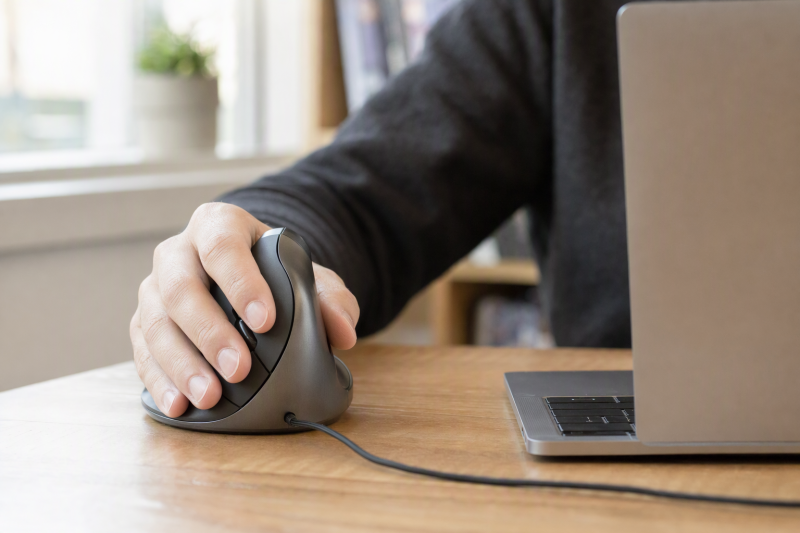
A genuinely left-handed vertical mouse is not a symmetrical mouse rotated to the other side of a laptop. Its buttons, thumb rest and shell should be shaped for the left hand. Before comparing pointer-speed claims, check hand size and connection path. A mouse that is too large or needs a USB-A receiver when no port is free is a poor desk fit.
These six exact Amazon US models identify a left-handed vertical design. Fit, click sound, battery life and health outcomes were not tested. If your desk lacks room for a comfortable pointer position, the monitor-arm and laptop-stand guide covers the broader layout decision.
Match the left-hand shell to your hand and the wireless receiver or cable to the laptop. A vertical angle alone does not prove comfort.Left-Handed Vertical Mice Compared
| Image | Product | Details | Check Price |
|---|---|---|---|
 | Logitech Lift Left | Connection: Bluetooth LE or Logi Bolt receiver Hand fit: Small to medium, per Logitech Power: Replaceable battery Best fit: Wireless multi-host laptop desk | Check Price on Amazon |
 | Perixx Perimice-719L | Connection: 2.4 GHz USB receiver Hand fit: Small, per listing Power: Not verified Best fit: Compact receiver-based setup | Check Price on Amazon |
 | Evoluent VM4L | Connection: Wired USB Hand fit: Left-hand sculpted shell Power: USB bus power Best fit: Wired customizable Windows desk | Check Price on Amazon |
 | Perixx Perimice-513L | Connection: Wired USB Hand fit: Left-hand vertical shell Power: USB bus power Best fit: Basic wired laptop station | Check Price on Amazon |
| MEETION BTM008 Left | Connection: 2.4 GHz and two Bluetooth channels, per listing Hand fit: Left-hand shell Power: USB-C rechargeable, per listing Best fit: Rechargeable mixed-device desk | Check Price on Amazon |
| Lekvey LS-020 Left | Connection: 2.4 GHz USB receiver; no Bluetooth Hand fit: Medium to large, per listing Power: Two AAA batteries, not included Best fit: Larger-hand receiver setup | Check Price on Amazon |
1. Logitech Lift Left — Best Small-to-Medium Wireless Fit
Logitech specifically makes a left-hand Lift and describes its size as a fit for small to medium hands. Its vertical shell has a thumb rest and buttons on the left-hand side, not a generic ambidextrous shape. The exact Amazon listing names Bluetooth Low Energy and a Logi Bolt USB receiver, so a laptop user has a choice between preserving a port and using a dedicated receiver. Check which host and OS version you actually use before choosing the path.
The listing also names customizable buttons and a replaceable battery with a maker-stated long-life claim. Runtime and quiet-click claims were not validated. Compared with the receiver-only Perixx 719L, Lift is the clearer fit when you want Bluetooth instead of a USB-A dongle. The USB-C hub guide covers other port needs.
Our Take Choose Lift Left if the stated hand-size range suits you and the laptop needs flexible wireless pairing. Skip it if you need a guaranteed wired mouse or if the shell feels too small for your grip. No mouse here can promise medical relief.
- The exact left-hand version is intended for small-to-medium hands.
- Bluetooth or Logi Bolt lets a laptop user choose a host connection.
- A textured grip and thumb rest are documented physical features.
- It has no wired operating mode in this listing.
- Large hands may find the maker’s small-to-medium fit unsuitable.
2. Perixx Perimice-719L — Best Compact Receiver Mouse
Perixx calls the 719L a portable left-hand vertical mouse for smaller hands and gives dimensions of 105 by 67 by 58 millimeters. Its six-button body uses a 2.4 GHz USB nano receiver rather than Bluetooth. The receiver can simplify pairing at a fixed laptop station, but it also takes up a compatible USB port and leaves a tiny receiver to track when traveling. Compare the shape with Lift as well as their shared small-hand positioning.
The listing names three pointer-speed settings and calls its buttons silent. Those claims are not independent sound or pointer tests. Windows 7, 8 and 10 are explicitly listed. Newer Windows or Mac support should be checked with Perixx rather than inferred. The USB-C docking guide explains a larger port plan.
A receiver needs a USB data port. Confirm the laptop or dock has one before choosing this over Bluetooth Lift.Our Take Pick 719L for a compact left-hand receiver mouse when a USB port is available and the stated OS support fits. Lift offers a Bluetooth route. Evoluent and the 513L need no batteries and no wireless setup.
- The listed compact body is aimed at smaller left hands and laptop use.
- A nano receiver avoids Bluetooth pairing steps.
- Three DPI settings let the user change pointer speed on the mouse.
- The receiver occupies a USB port and can be misplaced during travel.
- The saved OS list does not establish Mac support.
3. Evoluent VM4L — Best Wired Button Control
At a fixed laptop desk, a wire removes charging, battery and pairing from the decision. Evoluent’s VM4L is the exact left-hand wired USB model, with a sculpted thumb area and a lower edge that supports the little finger. The maker’s product page says basic pointing works on operating systems that support USB mice. Its Mouse Manager customization is a Windows-specific software path. The Windows software path is important if the extra buttons are why you want it.
The listing describes six buttons and four on-mouse pointer-speed settings. Button reach and comfort were not tested; seller claims about wrist strain are not clinical results. Compare VM4L with the simpler wired Perixx 513L. Evoluent has more button controls if its larger shell fits your hand and Windows software is available. A home-office monitor guide can help keep the mouse within reach.
Basic pointing and custom button mapping are different promises. Evoluent documents Mouse Manager customization for Windows.Our Take Choose VM4L when a wired left-hand shell and configurable Windows buttons solve a daily desk task. Skip it if the laptop moves constantly or you need the same custom-button setup on macOS without verifying support first.
- The exact VM4L is shaped for the left hand, with a little-finger support lip.
- Wired USB avoids a battery and receiver-pairing workflow.
- Windows Mouse Manager enables deeper button customization than basic pointing.
- A cable is less convenient for a frequently packed laptop.
- Custom button software is documented for Windows, not every host OS.
4. Perixx Perimice-513L — Best Basic Wired Setup
The 513L is Perixx’s wired left-hand vertical choice. Its listing names six buttons, a USB connection and two pointer-speed settings at 1000 and 1600 DPI. The wired connection is the practical distinction from the wireless 719L. You get no receiver to keep track of and no radio setup, but a cable that must follow the mouse across the desk. Check the actual cable route before assuming the wire will be harmless beside a laptop stand.
The seller says it fits different hand sizes, but provides no palm or button-reach test. Windows 7, 8 and 10 are named. Support beyond those versions is not established by this listing. The office hot-desk dock guide covers multiple USB peripherals.
Our Take Buy 513L if a plain wired left-hand vertical mouse is the job and two speed choices suffice. Evoluent offers a more developed button-customization route on Windows. Perixx 719L removes the wire if its receiver fits the laptop.
- Wired USB removes receiver storage and battery management.
- Two listed pointer-speed settings can be changed without an app.
- Six buttons cover more than basic left and right clicks.
- A cable can crowd a portable desk or a raised laptop setup.
- Fit across all hand sizes is a seller claim, not independent evidence.
5. MEETION BTM008 Left — Best Rechargeable Multi-Device Setup
MEETION’s BTM008 listing identifies a left-hand rechargeable vertical mouse with a 2.4 GHz wireless channel and two Bluetooth channels. Those channels make it a plausible fit for a laptop desk shared with a tablet or second computer. The seller also lists four DPI settings from 800 through 2400. These values describe options, not measured precision. Pointer feel still depends on the surface, display scaling and your hand.
USB-C charging differs from the replaceable-battery Lift and AAA-powered Lekvey. The listed two-to-three-month runtime is a maker estimate, not a measured result, so keep a charging plan. Marketing-heavy bullets do not establish exact device switching. Verify controls before buying for a multi-host sequence. A USB-C hub may serve other devices; Bluetooth does not require one.
Our Take Choose MEETION if you value rechargeability and several wireless host modes more than a documented hand-size recommendation. Logitech gives a clearer small-to-medium fit claim. Lekvey is the receiver-only alternative for larger hands. Do not rely on untested battery or medical promises.
- The listing names 2.4 GHz and two Bluetooth channels.
- USB-C rechargeable power avoids disposable mouse batteries.
- Four stated DPI settings offer on-device pointer-speed choices.
- Exact switching behavior between hosts is not established by the saved bullets.
- The maker’s battery-runtime figure is not independently verified.
6. Lekvey LS-020 Left — Best Receiver Mouse for Larger Hands
Lekvey describes its LS-020 as a left-hand vertical mouse recommended for medium and large hands. The size recommendation is the strongest reason to compare it with the smaller Lift and Perixx 719L. It uses a 2.4 GHz USB receiver, not Bluetooth or USB-C, and its saved listing says two AAA batteries are needed but not included. Check that a USB-A data port is available or a suitable adapter is already part of the laptop setup.
Three pointer-speed settings and forward/back buttons are listed. Seller claims about rapid wrist relief, connection reliability and quiet clicks are untested here and should not drive a medical purchase decision. For a laptop with few ports, compare a Bluetooth model before adding a receiver to the USB-C docking setup.
The listing explicitly says no Bluetooth and no USB-C. Make the receiver and battery plan before ordering.Our Take Pick Lekvey when its stated medium-to-large left-hand fit is promising and a receiver port is available. Choose Lift for a smaller hand or a Bluetooth path. Size claims are a screening tool, not a substitute for checking your own grip.
- The seller explicitly positions the shell for medium-to-large left hands.
- A USB receiver offers a straightforward non-Bluetooth connection.
- Three DPI settings and navigation buttons are named in the listing.
- It has no Bluetooth or USB-C connection in this exact listing.
- Two AAA batteries are required and not included.
Buying Guide
1. Check Handedness and Shell Size Before Features
Every product here is a left-hand variant, but the shells differ. Logitech says Lift Left targets small-to-medium hands. Perixx calls 719L a small-hand mouse. Lekvey says medium-to-large. Measure your hand and review the maker’s size guide before choosing from photos. Higher DPI cannot fix hard-to-reach buttons.
Grip also changes with desk height, chair position and the gap between laptop and mouse. Leave enough space to move the mouse without reaching sideways. On a cramped desk, the monitor-arm and laptop-stand guide covers separate screen and pointer placement. Ergonomic marketing is not a medical guarantee.
2. Choose Bluetooth, Receiver or Wire for the Actual Laptop
Bluetooth can preserve a scarce USB port. Lift and MEETION list it. Receiver models such as Perixx 719L and Lekvey need an available USB data path, while Evoluent VM4L and Perixx 513L need a wired route. Check the laptop’s actual ports and workplace wireless policy before buying. A receiver can be convenient on a fixed desk but a nuisance in a travel bag.
For a shared workstation, list every host, then verify pairing and reconnection. Multiple wireless modes do not prove easy switching without a test. If other devices need ports, the USB-C docking-station roundup covers the full desk.
3. Separate Basic Pointing From Software Customization
A standard mouse may move the cursor on many systems while optional software controls remap buttons on fewer. Evoluent explicitly documents Mouse Manager customization for Windows. Read software support separately from basic USB operation if you need an app-specific button command. Logitech’s configurable controls likewise need a supported software path for the intended host.
DPI settings mostly change cursor travel per physical movement. Start with the setting that lets you hit small controls reliably on your actual screen, then adjust. Higher numbers are not automatically better for office work. A larger home-office monitor can also change how much pointer travel feels comfortable.
FAQ
Are left-handed vertical mice clinically proven to stop wrist pain?
No such conclusion follows from these listings. A vertical shell changes hand position, but individual comfort and health outcomes were not tested here. Seller claims about preventing injury or quick relief are not a substitute for medical advice if pain persists.
Use the advertised hand-size range as a starting point, then check return terms and fit in your own workspace. Desk position and grip affect comfort alongside mouse shape. Do not buy a specific mouse on an unverified clinical promise.
Can I use a wireless mouse without a USB-A port?
Yes, if the exact mouse and host support Bluetooth. Lift Left and MEETION list Bluetooth connections. Receiver-only models still need a USB data port or compatible adapter. Lekvey explicitly says Bluetooth is not supported.
Check your laptop’s Bluetooth support and workplace pairing restrictions. A hub may supply a receiver port, but it cannot turn a receiver-only mouse into a Bluetooth mouse. The portable USB-C hub guide covers port expansion.
Will all extra buttons work on a Mac?
Not necessarily. Basic cursor, click and scroll may work while advanced remapping depends on software. Evoluent documents its Mouse Manager for Windows. Confirm the exact mouse utility and macOS version before buying for an app-specific button command.
If you mainly need basic pointing, test that separately from customization. If button mapping is crucial to an app, verify its shortcut and the maker’s software support. Do not infer full Mac support from a general USB compatibility line.
Bottom Line
Start with a true left-hand shell that fits your hand, then choose the connection that fits your laptop. Lift Left covers small-to-medium hands with Bluetooth or receiver options. Evoluent VM4L favors a wired Windows button workflow. Perixx 719L is the compact receiver choice. Larger-hand shoppers should compare Lekvey’s stated fit and verify its receiver and battery needs.