For a supported Lenovo workstation, our top pick is the Lenovo ThinkPad Thunderbolt 4 Workstation Dock 40B00300US, because its Lenovo-rated 230W peak charging path is the only option here built around that class of laptop. It requires Lenovo’s workstation split-cable path and is not a universal 230W USB Power Delivery dock. For an ordinary 100W USB PD desk, start with the HP G4, Sonnet Echo 20, or Lenovo Universal Dock instead.
Every product below is rated by its manufacturer to deliver at least 100W to the host on a documented path. That is not the same as every connected laptop receiving the headline figure. The dock and laptop negotiate power, vendor-specific paths apply only to supported systems, and a power-hungry laptop may still need its normal adapter under load. The CalDigit TS4, which CalDigit rates at 98W, and the Kensington SD5760T, which Kensington rates at 96W, are both excluded from this ranking. Our broader Thunderbolt 4 dock guide includes strong options below this hard charging threshold.
Quick picks
- Lenovo Workstation Dock 40B00300US: Best supported Lenovo workstation path.
- Dell SD25TB4: Best supported Dell 130W path.
- HP Thunderbolt Dock 120W G4: Best broad 100W fleet choice.
- Anker 778 A83A9: Best flexible 100W desk with a shared-power caveat.
- Sonnet Echo 20: Best 100W creative expansion choice.
- Lenovo Universal TB4 Dock: Best standard Lenovo 100W option.
- Lenovo Smart Dock Gen 2 7500: Best Lenovo-managed 100W-rated path.
| Image | Product | Details | Check Price |
|---|---|---|---|
 | Lenovo ThinkPad Thunderbolt 4 Workstation Dock 40B00300US | Host charging: 230W peak on the supported Lenovo workstation split-cable path; not universal USB Power Delivery Required host path: Supported Lenovo workstation using the required split-cable connection Display outputs: HDMI 2.1 plus two DisplayPort 1.4; up to four 4K60 displays on the qualified path Ethernet: Not specified in the frozen record Best for: A supported Lenovo workstation that needs the vendor-specific 230W path | Check Price on Amazon |
 | Dell Pro Thunderbolt 4 Smart Dock SD25TB4 | Host charging: 130W on supported Dell systems; 96W on non-Dell systems Required host path: Supported Dell system for the qualifying 130W branch; non-Dell branch does not meet the 100W floor Display outputs: Two DisplayPort 1.4, HDMI 2.1, and two downstream Thunderbolt 4; up to four external displays Ethernet: 2.5GbE Best for: A supported Dell laptop that can use the 130W branch | Check Price on Amazon |
 | HP Thunderbolt Dock 120W G4 | Host charging: Up to 100W USB-C Power Delivery Required host path: Laptop must negotiate and accept the supported 100W USB-C PD profile Display outputs: HDMI 2.0 plus two DisplayPort 1.4; triple 4K60 requires a qualifying DP 1.4 DSC Windows host Ethernet: 2.5GbE Best for: A broad 100W HP or Windows fleet | Check Price on Amazon |
 | Anker 778 Thunderbolt Docking Station A83A9 | Host charging: Up to 100W, falling to 65W when both 30W USB-C charging ports are used Required host path: Qualified host without the documented dual-30W-port power reduction; incompatible with base M1 and M2 MacBooks according to Anker Display outputs: One HDMI 2.1, two DisplayPort outputs, and downstream Thunderbolt 4 Ethernet: 1GbE Best for: A flexible 100W Windows desk with a planned accessory power budget | Check Price on Amazon |
 | Sonnet Echo 20 Thunderbolt 4 SuperDock | Host charging: Up to 100W host charging Required host path: Laptop must negotiate and accept the supported 100W profile Display outputs: HDMI 2.1 plus two downstream Thunderbolt 4 ports; dual-display ceiling is host-controlled Ethernet: 2.5GbE Best for: A 100W creative desk that also needs internal M.2 NVMe storage | Check Price on Amazon |
 | Lenovo ThinkPad Universal Thunderbolt 4 Dock 40B00135US | Host charging: Up to 100W Power Delivery Required host path: Qualified host that accepts the supported 100W profile; use exact model 40B00135US Display outputs: HDMI 2.1 plus two DisplayPort 1.4; up to four 4K60 displays on qualified Windows hosts Ethernet: 1GbE Best for: A standard Lenovo-branded 100W desk | Check Price on Amazon |
 | Lenovo ThinkPad Thunderbolt 4 Smart Dock Gen 2 7500 | Host charging: 100W PD 3.1 Required host path: Exact Lenovo host controls charging and fleet features; use exact model 40BE0135US Display outputs: Two DisplayPort 1.4, HDMI 2.1, and one downstream Thunderbolt 4; multiple-display path is Windows-specific Ethernet: 2.5GbE Best for: A managed Lenovo 100W environment | Check Price on Amazon |
1. Lenovo ThinkPad Thunderbolt 4 Workstation Dock 40B00300US – Best supported Lenovo workstation path
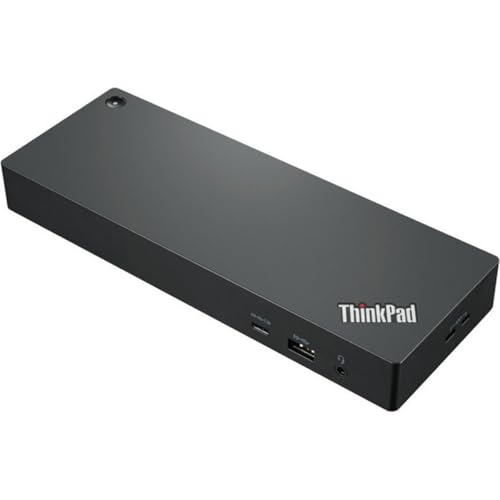
The exact 40B00300US Workstation Dock is built for one situation: a supported Lenovo workstation designed for its split-cable path. Lenovo documents a 230W peak on that named branch. An ordinary USB-C or Thunderbolt 4 host does not receive a universal 230W result, so matching the laptop and cable path is the first buying check.
Lenovo also documents up to four 4K60 displays, with HDMI 2.1 and two DisplayPort 1.4 outputs, though that remains a manufacturer ceiling tied to the host and output topology. Lenovo does not specify the dock’s Ethernet speed in the cited record, so we make no networking claim for it here.
Our Take
For a supported Lenovo workstation that can use its 230W split-cable path, the 40B00300US is the clear first choice. It is the wrong product if you expect 230W over an ordinary one-cable USB PD connection.
- 230W peak on the supported Lenovo workstation split-cable path
- HDMI 2.1 plus two DisplayPort 1.4 outputs
- Lenovo documents up to four 4K60 displays
- 230W result is not universal USB Power Delivery
- Requires a supported Lenovo workstation and split-cable path
- Lenovo does not specify Ethernet speed in the cited record
2. Dell Pro Thunderbolt 4 Smart Dock SD25TB4 – Best supported Dell 130W path
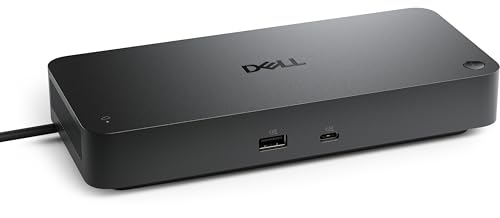
The SD25TB4 belongs here for one reason: a supported Dell laptop can use Dell’s documented 130W charging branch. That branch is what qualifies the dock for the ranking. Dell limits non-Dell systems to 96W, so a buyer on another laptop brand should not treat the SD25TB4 as a 100W dock.
The dock includes 2.5GbE, two DisplayPort 1.4 outputs, one HDMI 2.1 port, and two downstream Thunderbolt 4 ports. Dell lists up to four external displays, but the exact host and chosen output combination control the result. The charging and fleet benefits land hardest inside a matched Dell environment.
Our Take
On a supported Dell system, the SD25TB4 is the best 130W choice. On the 96W non-Dell branch, it falls outside this page’s charging threshold.
- 130W charging on supported Dell systems
- 2.5GbE
- Two DisplayPort 1.4, HDMI 2.1, and two downstream Thunderbolt 4 paths
- Non-Dell charging ceiling is only 96W
- 130W is a Dell-specific branch
- Display ceiling depends on the exact host and topology
3. HP Thunderbolt Dock 120W G4 – Best broad 100W fleet choice

Need a manufacturer-documented 100W USB-C Power Delivery ceiling without leaning on a 130W or 230W vendor-specific branch? That is the HP G4, the clearest general fleet choice in the ranking. The dock also includes 2.5GbE, HDMI 2.0, and two DisplayPort 1.4 outputs.
HP documents up to four external displays and triple 4K60 on qualifying DP 1.4 DSC Windows hosts. Both are conditional display ceilings, not results promised for every laptop. Before you retire the original adapter, confirm that the laptop accepts the required charging profile and that 100W is sufficient for its workload.
Our Take
When you do not need proprietary charging above 100W, the HP G4 is the best broad 100W fleet choice. Its highest display mode remains tied to a qualifying Windows host.
- Up to 100W USB-C Power Delivery
- 2.5GbE
- HDMI 2.0 plus two DisplayPort 1.4 outputs
- 100W may not replace a higher-output workstation adapter
- Triple 4K60 requires a qualifying DP 1.4 DSC Windows host
- Manufacturer ceiling does not prove the laptop accepts the full charging rate
4. Anker 778 Thunderbolt Docking Station A83A9 – Best flexible 100W desk

The Anker 778 is rated to combine up to 100W host Power Delivery with several conventional display outputs. Anker includes one HDMI 2.1, two DisplayPort outputs, and a downstream Thunderbolt 4 route, and lists up to four displays on a qualified Windows host.
Anker documents that this ceiling changes as soon as other devices draw from the dock: host power falls to 65W when both 30W USB-C charging ports are used. Anker also states that this model is incompatible with base M1 and M2 MacBooks. Ethernet is 1GbE. Treat it as a 100W choice only when your connected-device plan avoids the documented reduction.
Our Take
Understand its shared-power budget and the Anker 778 is a useful 100W Windows desk dock. Choose another model if both 30W USB-C ports will stay occupied, or if you use a base M1 or M2 MacBook.
- Up to 100W host Power Delivery on the qualifying power path
- One HDMI 2.1 plus two DisplayPort outputs
- Downstream Thunderbolt 4 route
- Host power falls to 65W when both 30W USB-C charging ports are used
- Anker states incompatibility with base M1 and M2 MacBooks
- 1GbE rather than 2.5GbE
5. Sonnet Echo 20 Thunderbolt 4 SuperDock – Best 100W creative expansion choice
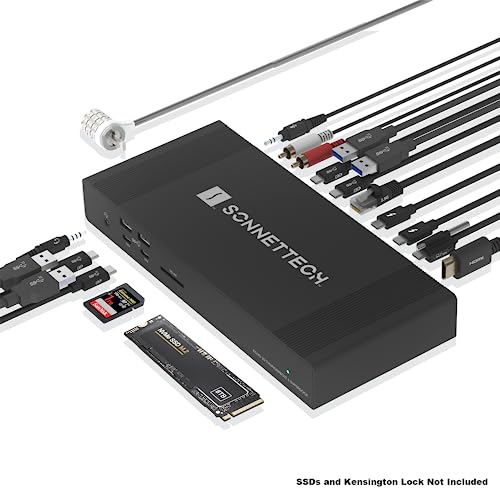
The Echo 20 suits a 100W host ceiling that must arrive with storage and network expansion. Sonnet includes an internal M.2 NVMe slot, 2.5GbE, HDMI 2.1, and two downstream Thunderbolt 4 ports. That mix can replace a separate storage enclosure and Ethernet adapter on a creative desk.
Sonnet rates host charging up to 100W. The dual-display ceiling is controlled by the host, and port count establishes nothing about how many extended screens a laptop can drive. Confirm that your laptop negotiates the required power and that a 100W ceiling covers its sustained workload.
Our Take
When internal NVMe storage and 2.5GbE have real value to you, the Echo 20 is the best 100W choice. A simpler dock is the better buy if charging is the only deciding feature.
- Up to 100W host charging
- Internal M.2 NVMe slot and 2.5GbE
- HDMI 2.1 plus two downstream Thunderbolt 4 ports
- Host controls the dual-display ceiling
- 100W may not replace every workstation adapter
- Expansion features add little if charging is the only priority
6. Lenovo ThinkPad Universal Thunderbolt 4 Dock 40B00135US – Best standard Lenovo 100W choice

For a standard Lenovo Thunderbolt 4 desk with up to 100W Power Delivery, match the exact 40B00135US Universal Dock. It sidesteps the Workstation Dock’s specialized 230W split-cable buying condition while still clearing this page’s 100W floor on its named path.
Lenovo lists HDMI 2.1, two DisplayPort 1.4 outputs, and 1GbE, and documents support for up to four 4K60 displays on qualified Windows hosts. That Windows ceiling is not a Mac promise, and the exact laptop still controls both charging negotiation and display support.
Our Take
For buyers who need neither workstation-specific power nor newer fleet management, the 40B00135US is the best standard Lenovo 100W choice. Its 1GbE port trails the 2.5GbE options here.
- Up to 100W Power Delivery
- HDMI 2.1 plus two DisplayPort 1.4 outputs
- Up to four 4K60 displays on qualified Windows hosts
- 1GbE rather than 2.5GbE
- Four-display ceiling is Windows-host dependent
- Exact model 40B00135US must be matched
7. Lenovo ThinkPad Thunderbolt 4 Smart Dock Gen 2 7500 – Best Lenovo managed 100W path
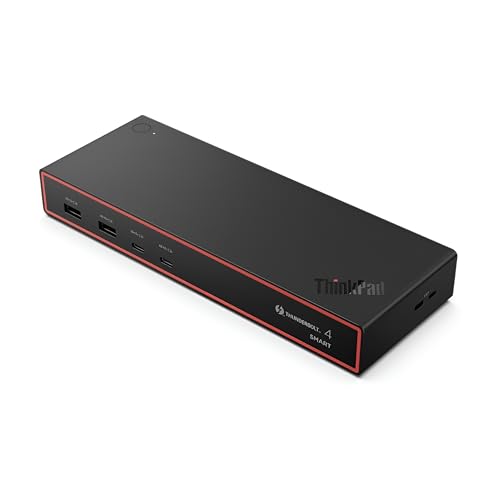
Buyers who need 100W PD 3.1 and a Lenovo management path want the exact 40BE0135US Smart Dock Gen 2 7500. Lenovo specifies 2.5GbE, two DisplayPort 1.4 outputs, HDMI 2.1, and one downstream Thunderbolt 4 port.
Lenovo’s multiple-display path is a Windows route, and the exact host controls which fleet features appear. The 100W figure is a manufacturer-delivered host-power ceiling, not a guarantee that any laptop will accept the full amount. Match the laptop model before counting on the management or the charging.
Our Take
As a managed Lenovo 100W option, the 40BE0135US is the best here. Choose it for a matched fleet, not as a generic upgrade over the Universal Dock.
- 100W PD 3.1
- 2.5GbE
- Two DisplayPort 1.4, HDMI 2.1, and one downstream Thunderbolt 4 port
- Exact host controls fleet features
- Multiple-display path is Windows-specific
- 100W remains a negotiated ceiling
How to choose a 100W-or-more Thunderbolt 4 dock
Start with the charging path your exact laptop supports. Lenovo’s 230W and Dell’s 130W figures are proprietary, host-specific branches, and they are worth something only when the laptop is on the supported list and uses the required connection. For an ordinary USB PD setup, compare the products whose named path reaches 100W without leaning on those higher vendor-specific figures.
Then ask whether 100W can replace the laptop’s original adapter under your actual workload. A dock may negotiate its maximum only with a compatible host, and a mobile workstation designed around a higher-output charger can discharge or reduce performance under sustained load. Our guide to checking USB-C charging wattage explains how negotiated power differs from the number printed beside a dock.
Account for shared power. Anker’s host ceiling falls from 100W to 65W when both 30W USB-C charging ports are used, which makes your connected accessories part of the laptop-charging decision. Other docks may avoid that exact documented reduction, but their listed figure remains a ceiling the host has to accept rather than a constant measurement.
Finally, keep gaming and workstation requirements separate from ordinary office charging. A high-performance laptop may still need its original adapter even when the dock handles displays, data, and Ethernet. Our gaming-laptop docking station guide covers that wider power and performance decision.
That floor also keeps near-matches out of the list. CalDigit rates the TS4 at a 98W maximum and Kensington lists the SD5760T K34110NA at 96W, so neither qualifies. Dell stays in only because supported Dell systems have a documented 130W branch; its 96W non-Dell branch does not qualify.
100W dock FAQ
Does a 100W dock always deliver 100W to the laptop?
No. The dock states a manufacturer ceiling, and the laptop and dock negotiate the power actually accepted. Host support, cable path, dock power sharing, and the laptop’s own charging design can each reduce the result.
Can a 100W Thunderbolt 4 dock replace a gaming-laptop charger?
Only if the laptop manufacturer supports that charging path and 100W covers the workload. Many performance laptops use higher-output adapters, so the dock may handle expansion while the normal charger stays connected.
Why are 96W and 98W docks excluded?
This page uses a strict manufacturer-documented floor: at least 100W to the host on a named path. A strong 96W or 98W dock can still be a good product, but it does not meet this exact decision boundary.