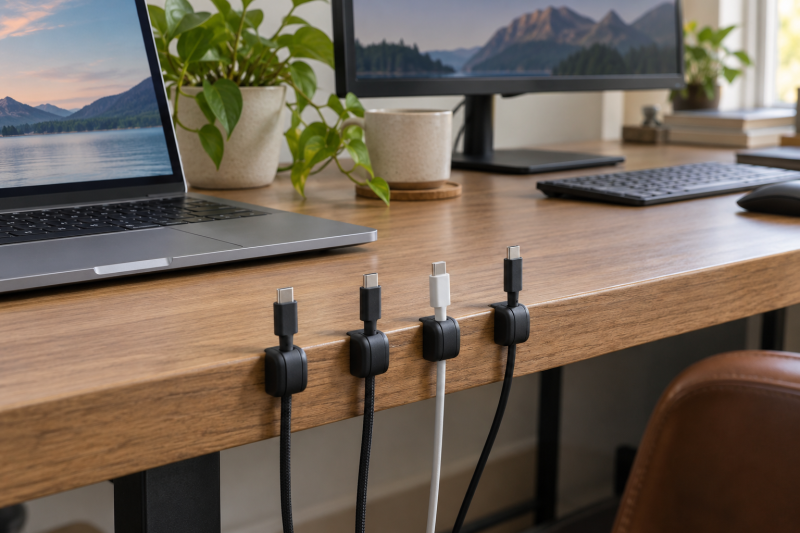
A cable clip solves one small desk problem. The USB-C lead slips behind the monitor or down the back of the table every time you unplug it. The useful clip keeps the cable end within reach at the desk edge without pinching the wire or taking more surface than the setup needs.
These six Amazon US options include silicone slot organizers and magnetic clips, with different limits on cable diameter, pack sizes, adhesives, and opening mechanisms. Measure the cable jacket, clean the mounting surface, and give adhesive time to set before relying on a clip for a frequently unplugged charging lead. See our under-desk cable-management guide and USB-C charging-station guide for larger desk-routing decisions.
Choose the clip by cable diameter and daily access first. A holder that fits a braided USB-C cable and opens quickly is more useful than a large pack of clips that never gets mounted.Desktop Cable Clips Compared
| Image | Product | Details | Check Price |
|---|---|---|---|
 | TviewSmart Cord Organizer | Best fit: Five-piece multi-slot set Pack: 5 holders listed Slots: 7, 5, 3, and 1 listed Cable fit: Up to 6mm listed | Check Price on Amazon |
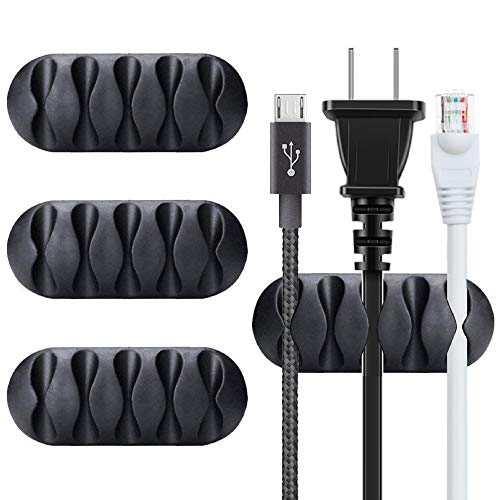 | BEADNOVA Cord Organizer | Best fit: Four wide adhesive holders Pack: 4 holders listed Size: 2.6 by 1.06in listed Mount: Smooth surfaces listed | Check Price on Amazon |
 | UGREEN Magnetic Cable Organizer | Best fit: Six magnetic clips Pack: 6 clips listed Slot: 0.3in listed Closure: Magnetic safety clasp | Check Price on Amazon |
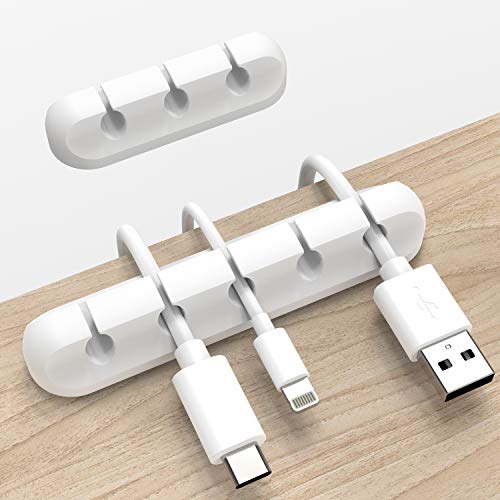 | INCHOR Cord Organizer | Best fit: Two silicone cable clips Pack: 2 clips listed Cable fit: Up to 6mm listed Material: Silicone listed | Check Price on Amazon |
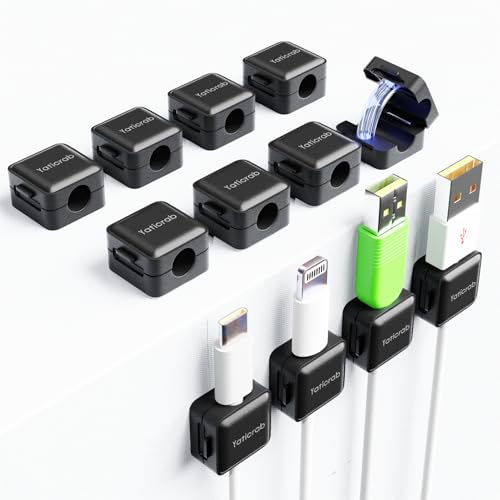 | Yaticrab Magnetic Cable Clips | Best fit: Twelve-pack with 7.5mm slots Pack: 12 clips listed Slot: 7.5mm listed Adhesive: Removable listed | Check Price on Amazon |
 | Sinjimoru Magnetic Cable Clips | Best fit: Thick braided cables Pack: 6 clips listed Cable fit: Up to 7.5mm listed Extras: 3 EVA pads and 2 tapes | Check Price on Amazon |
1. TviewSmart Cord Organizer — Five-Piece Multi-Slot Set
TviewSmart suits a desk with a charging cable, monitor lead, audio cable, and smaller runs to keep visible. The listing gives one seven-slot, one five-slot, one three-slot, and two one-slot holders, which lets you place a larger organizer behind the monitor and smaller clips at the desk edge.
Its silicone holders are listed for cables up to six millimeters in diameter, which covers many USB-C charging leads but needs checking for thick braided cables. The listing says to clean and dry the surface, press the adhesive, and wait 24 hours before loading the clips, so plan the mounting before the cables go in.
Five pieces with seven, five, three, and one-slot layouts make TviewSmart a good fit for a desk with several cable routes.Our Take Buy the TviewSmart if one set needs to organize several cable paths instead of anchoring only one charging lead. Its mixed slot counts make a cluttered desk easier to break into smaller routes.
- Five holders with seven, five, three, and single slots let one pack cover several desk routes.
- Six-millimeter cable support suits many USB-C leads while leaving smaller audio and charging cables separated.
- Soft silicone is listed to hold cables without pinching them, useful for frequently unplugged desk-edge leads.
- Cables thicker than six millimeters need measuring first, especially heavily braided USB-C charging leads.
- The listing asks for a 24-hour adhesive set time, so it is not an immediate cable-routing fix.
2. BEADNOVA Cord Organizer — Four Wide Adhesive Holders
BEADNOVA is a four-piece adhesive set for a simple desk with a monitor and a laptop. The listing states that each holder measures 2.6 by 1.06 inches and the pack includes four clips, so the pack suits a few individual charging or computer cables rather than a dense channel with many slots.
The clips are listed for smooth glass, wood, metal, plastic, and rubber surfaces, provided the mounting area is clean and dry. The broad surface list is useful, but an uneven edge, dusty laminate, or cable under tension still needs a small placement test before you reorganize the desk.
Our Take Buy the BEADNOVA if four separate adhesive holders are enough for a tidy desk with a laptop and a monitor. Its wider individual bodies suit simple cable access points instead of a large grouped organizer.
- Four separate 2.6-inch holders let you place charging leads exactly where the desk needs them.
- The listing names glass, wood, metal, plastic, and rubber as smooth mounting surface options.
- Individual clips keep a laptop charger and monitor cable apart instead of forcing both through one slot.
- Only four holders are included, so a multi-device desk may outgrow the pack quickly.
- No cable-diameter figure is listed, making a thick braided cable a fit check rather than an assumption.
3. UGREEN Magnetic Cable Organizer — Six Magnetic Clips
UGREEN suits a charging cable that is removed and returned repeatedly through a workday. Its listing describes six magnetic clips with a safety clasp and a 0.3-inch slot, designed to open, release a cable, and close again rather than asking you to flex a fixed silicone channel.
The same listing says the clips support USB-C, Lightning, headphone, HDMI, and appliance cables, and claims 10,000-plus open-and-close cycles. The magnetic action is helpful for a desk edge, but place the clip where a cable end can lift out cleanly without tugging the adhesive pad.
Our Take Buy the UGREEN if you reach for the same USB-C cable several times each day. The magnetic clasp is easier for daily access than a passive fixed slot.
- Six magnetic clips let a desk keep several charging and data cables within easy reach.
- A 0.3-inch slot is listed for USB-C, HDMI, headphone, and other common desk cables.
- The safety clasp opens and closes around the cable, avoiding repeated stretching of a fixed channel.
- A magnetic release needs clear upward access, so placement under a thick desk lip can be awkward.
- The 0.3-inch slot needs checking before use with unusually thick braided or sleeved cables.
4. INCHOR Cord Organizer — Two Silicone Cable Clips
INCHOR suits a simple desk or a second work surface. Its listing names two silicone organizers with a six-millimeter wire-diameter limit and a 3M adhesive pad for smooth glass, plastic, metal, and wood surfaces. The small pack is useful when only the laptop charger and phone cable keep disappearing.
The listing asks for a clean, smooth, oil-free, dust-free, and dry mounting surface, with several hours of waiting and 24 hours preferred. Treat the preparation as part of the product. No adhesive clip can compensate for a dirty surface or a cable that pulls sharply sideways.
Our Take Buy the INCHOR if two simple silicone clips solve the whole problem for a laptop desk or bedside charging point. It is the smallest pack here, for two cables in constant use.
- Two clips keep a laptop charger and phone cable visible without adding a large organizer strip.
- The six-millimeter cable limit gives a concrete fit check for common USB-C charging leads.
- Flexible silicone construction is listed to make cable insertion smoother than a rigid plastic channel.
- Only two clips are included, so monitor, audio, and charging cables can require another pack.
- The adhesive needs a clean surface and extended set time before the clips take regular cable tension.
5. Yaticrab Magnetic Cable Clips — Twelve-Pack with 7.5mm Slots
Yaticrab suits a desk, nightstand, car, or shared studio that needs cable anchors in several places. The listing provides 12 magnetic clips with 7.5-millimeter slots, a wider stated opening than the six-millimeter silicone options, and adhesive pads it says can be removed without residue from smooth dry surfaces.
The larger quantity counts for more than any one clip when several devices are charged at different points. The listing asks you to press the adhesive for 30 seconds and leave it 12 to 24 hours, so a measured installation works better than scattering the whole pack at once.
Our Take Buy the Yaticrab if 12 clips and a 7.5-millimeter slot can organize a larger collection of USB-C, HDMI, and charger cables. It has more clips than any other pack here.
- Twelve magnetic clips cover a desk, nightstand, and equipment shelf without buying several small packs.
- A 7.5-millimeter slot accommodates thicker cables than the six-millimeter silicone holders listed above.
- The listing describes removable adhesive, useful for a desk setup that may be rearranged later.
- Twelve clips can be excessive for one laptop desk that only needs two or three cable anchors.
- The listing requires 12 to 24 hours of adhesive setting, delaying the final cable arrangement.
6. Sinjimoru Magnetic Cable Clips — Thick Braided Cables
Sinjimoru suits thicker braided USB-C, HDMI, or charging leads that do not fit a narrow cable channel. Its listing states six magnetic clips with compatibility up to 7.5 millimeters, plus three spare EVA foam pads and two extra adhesive tapes, so the kit has some room for maintenance or a later desk rearrangement.
The listing also names a low-profile housing intended for tight corners and monitor edges, which suits a cable end that must stay visible near a charger. A thick connector still needs room above the clip so it does not scrape the desktop on every use.
Our Take Buy the Sinjimoru if a thick braided cable needs a magnetic holder with a stated 7.5-millimeter limit. The spare pads and tapes make it practical for a desk that changes over time.
- A 7.5-millimeter cable limit supports thick braided USB-C and HDMI leads that narrow clips may reject.
- Six magnetic clips keep several charging, display, and data cables accessible around one workstation.
- Three spare EVA pads and two extra adhesive tapes support later adjustment without buying a second kit.
- A six-pack costs more desk planning than a simple two-cable setup actually needs.
- Thick connector heads still need clear space above the low-profile clip for comfortable daily removal.
Buying Guide
Measure cable diameter before choosing a slot
Cable diameter decides whether the clip fits. TviewSmart and INCHOR list six-millimeter support, while Yaticrab and Sinjimoru name 7.5-millimeter slots. A thin USB-C cable may fit all four, but a heavy braided lead should be measured instead of forced into a narrow organizer.
Connector shape changes the placement at the desk edge. The cable jacket may fit a slot while the connector still needs clearance above the clip. Place a test cable at the intended desk edge and confirm it can be inserted, removed, and bent naturally without scraping the surface.
Choose a fixed silicone slot or magnetic clasp
Silicone slots suit cables that stay in roughly one place. TviewSmart and INCHOR use listed flexible silicone channels that keep a cable from sliding away. They are simple and quiet, which can be enough for a monitor cable, speaker lead, or phone charger that is unplugged only occasionally.
Magnetic clips suit frequent cable access. UGREEN, Yaticrab, and Sinjimoru use magnetic holders, which can make daily plugging and unplugging easier. Use them where there is room to lift the cable end cleanly, rather than tucking them into a cramped underside location.
Treat adhesive preparation as part of installation
Clean, dry surfaces give adhesive clips their best chance. Every adhesive option here that gives preparation steps calls for a dry mounting surface. Remove dust and oil, then press each pad firmly where the cable naturally rests instead of placing it only for visual symmetry.
Give the adhesive time before loading cables. TviewSmart names 24 hours, Yaticrab lists 12 to 24 hours, and INCHOR also prefers a full day. Let the pad set first. Loading the clip right away turns the first pull on the cable into a test of the adhesive.
FAQ
Will these clips fit a braided USB-C cable?
Some will, but check the stated diameter. TviewSmart and INCHOR list cables up to six millimeters, while Yaticrab and Sinjimoru list 7.5-millimeter openings. The cable jacket, not the connector, is the part that needs to sit in the holder.
Measure the cable rather than relying on a generic USB-C label. Braided charging cables can be thicker than the plain lead that came with a device. If the jacket presses tightly into a slot, choose a larger stated opening instead of stretching the clip.
Do adhesive cable clips work on every desk surface?
No. The listings name smooth, clean, dry surfaces such as wood, glass, metal, and plastic, but texture, dust, oil, and a sharply pulling cable can all reduce adhesion. Test a placement that keeps the cable’s natural path close to the clip.
Avoid treating adhesive as a substitute for cable strain relief. A clip can keep the connector from falling behind a desk, but it should not hold the full weight of a power brick or a cable pulled through a tight bend. Route heavy cables separately.
Should I use one multi-slot holder or individual clips?
Use a multi-slot holder when several cables leave the same area, such as behind a monitor or charging station. TviewSmart’s seven-, five-, and three-slot pieces let one pack group several routes, while single clips put each cable exactly where you reach for it.
Individual clips make more sense when cables end at different places. UGREEN, Yaticrab, and Sinjimoru supply several magnetic anchors to spread across a desk. Choose by the cable paths you use, not by the number of clips in a pack.
Bottom Line
Choose TviewSmart for a varied set of multi-slot holders, UGREEN for daily USB-C access with six magnetic clasps, or Sinjimoru for a stated 7.5-millimeter fit for thicker braided leads. Pick the clip whose slot size, access method, and adhesive placement keep the cable end visible every day.