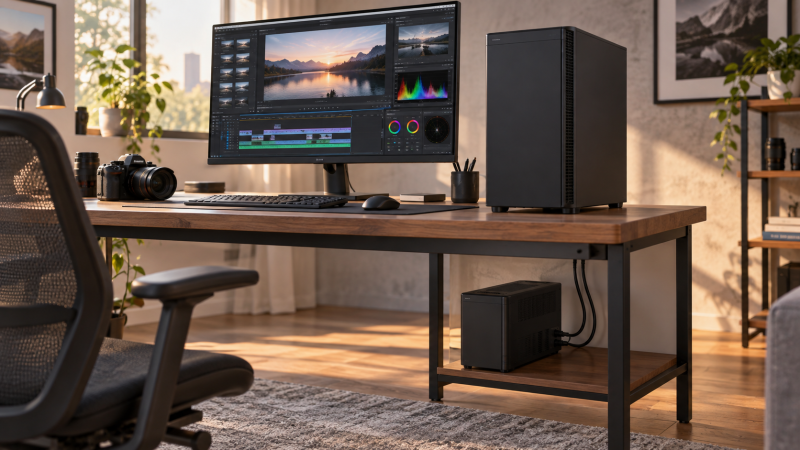
A desktop editing workstation can lose an unsaved timeline, an export and a connected storage session when mains power drops. A UPS gives you a short window to save and shut down cleanly. Buy for the measured watts of the equipment that must stay on, not the wattage printed on the PC power supply or the VA number alone. Runtime depends on the load, battery condition and settings. None of these units was runtime-tested for this guide.
These five 120V UPS models serve different US-market capacity and installation roles: a smaller tower, two ordinary 1500VA towers, an Eaton with a higher watt rating and a short-depth rack unit. Verify your local mains voltage and outlet type before buying. Keep the computer, main display and any storage you need to shut down on battery-backed outlets. Not every socket on a UPS has battery backup.
Measure the workstation and display under a demanding edit, then leave wattage headroom and test the shutdown path before trusting a UPS with a deadline.Editing Workstation UPS Backups Compared
| Image | Product | Details | Check Price |
|---|---|---|---|
 | CyberPower CP1000PFCLCD | Capacity: 1000VA / 600W Form: Tower Battery outlets: 5 of 10 Output: PFC sine wave Buyer fit: Measured lower-load desk | Check Price on Amazon |
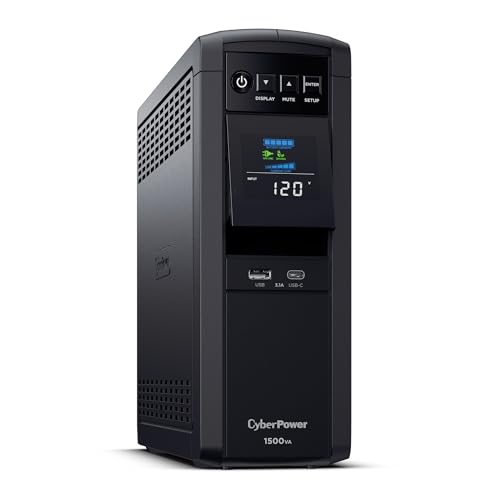 | CyberPower CP1500PFCLCD | Capacity: 1500VA / 1000W Form: Tower Battery outlets: 6 of 12 Output: PFC sine wave Buyer fit: Higher-load desk tower | Check Price on Amazon |
 | Eaton 5SC1500 | Capacity: 1440VA / 1080W Form: Tower Battery outlets: 8 battery-protected Output: Pure sine wave Buyer fit: Higher watt ceiling | Check Price on Amazon |
 | CyberPower CP1500PFCRM2U | Capacity: 1500VA / 1000W Form: 10.5-inch-depth rackmount Battery outlets: 8 battery-protected Output: PFC sine wave Buyer fit: Short-depth equipment rack | Check Price on Amazon |
 | APC Back-UPS Pro BR1500MS2 | Capacity: 1500VA / 900W Form: Tower Battery outlets: 6 of 10 Output: Pure sine wave Buyer fit: APC desk ecosystem | Check Price on Amazon |
1. CyberPower CP1000PFCLCD — Best Lower-Load Editing Desk
The CP1000PFCLCD is the 1000VA/600W choice for an editing desk whose measured load fits comfortably below that 600W continuous ceiling. The listing specifies PFC sine-wave battery output, automatic voltage regulation and ten outlets, five with battery backup and surge protection and five with surge protection only. The split between the two outlet types is important because a monitor plugged into a surge-only socket still goes dark during an outage.
The CP1000PFCLCD is the option to examine if the desk uses a moderate desktop or compact workstation, one display and selected storage, rather than a high-draw GPU tower with several displays. Measure the whole protected path during an export or another demanding task. A nominal 600W PC power supply does not tell you what the machine draws at the wall. Likewise, a 600W UPS rating is a ceiling, not a promise of any particular number of minutes.
The listing includes a color LCD, USB charging ports and CyberPower’s management software. Check which USB connection is meant for computer shutdown rather than assuming the front charging ports do that job. If your measured load leaves little room, compare the CP1500PFCLCD instead. An external SSD holding active work may need a protected power path through its host or dock too.
Our Take Choose CP1000PFCLCD only after measuring a modest desk load and deciding which five devices need battery power. It is not a safe shortcut for an unmeasured high-end tower.
- 600W ceiling suits a measured lighter setup.
- PFC sine-wave output listed.
- Five battery-backed and five surge-only sockets are clearly distinguished.
- Less wattage headroom than the 1500VA options.
- Only half the outlets remain powered by the battery.
2. CyberPower CP1500PFCLCD — Best Higher-Load Tower
The CP1500PFCLCD lists 1500VA/1000W, PFC sine-wave battery output and automatic voltage regulation. Six of its twelve AC outlets have battery backup and surge protection, and six are surge-only. It is a practical candidate for a more demanding tower and display setup, provided the measured protected load leaves margin below 1000W. Not every outlet is a battery outlet.
The listing also describes a tilting color LCD, USB-A and USB-C device-charging ports, and PowerPanel software. Make the shutdown data cable and software part of the purchase plan. If the workstation keeps editing files on an external storage device, test how that device behaves when AC disappears. A USB4 SSD may draw its power from the computer, while a powered dock or enclosure may need its own battery-backed outlet.
The CP1500PFCLCD is the straightforward tower among these five for a desk with a high load, but the Eaton model has a higher listed watt ceiling and the rack CyberPower is built for a different installation. Neither comparison gives you a runtime. CyberPower’s own runtime chart, if consulted, should be read at your measured watts and then confirmed with a controlled shutdown test. Do not plan to finish a long export just because the LCD displays a generous estimate at idle.
Our Take Choose CP1500PFCLCD for a measured, higher-load desk that needs a 1000W sine-wave tower and a clear six-socket battery plan. Test the PC’s shutdown behavior before relying on it.
- 1000W listed ceiling.
- PFC sine-wave and AVR features listed.
- Six battery-backed sockets plus six surge-only sockets.
- Half its AC outlets do not remain powered during an outage.
- Runtime still depends on measured load and battery health.
- Tower form may be awkward for a rack-based edit bay.
3. Eaton 5SC1500 — Best Higher Watt Ceiling
Eaton specifies its 5SC1500 at 1440VA/1080W, with line-interactive operation, automatic voltage regulation and sine-wave output on battery. The exact Amazon listing identifies eight battery-protected outlets. For a buyer whose measured workstation load is too close to a 900W or 1000W ceiling, the higher stated watt rating is a reason to examine this model. It is not a reason to ignore peak load or runtime charts.
Its manufacturer page and listing describe a USB management connection and a user-replaceable battery. Check the software and battery replacement path for the machine that runs the edit, especially if that machine will be unattended during exports. Do not assume the USB port is the same thing as a front-panel phone charger. A photo-editing monitor and an audio monitor controller may both sit at the desk, but decide whether each must remain on for a clean shutdown.
The 5SC1500 is a tower, not the rack solution in this list. Measure its physical location, ventilation clearance and cable route before selecting it for a cramped cabinet. If the workstation is below 600W under load, paying for the highest rated wattage may not solve the problem. A working shutdown connection and a sensible map of the battery outlets will be more useful.
Use the watt ceiling to rule a model out, not to guess how many minutes of editing remain after an outage.Our Take Pick 5SC1500 when a measured editing load calls for more watt headroom than the other towers offer. Verify software, replacement battery and space before calling it the safest fit.
- 1080W ceiling is the highest listed here.
- Eight battery-protected outlets in the exact offer.
- Manufacturer documents sine-wave battery output and replaceable battery.
- Still requires a measured-load and runtime check.
- Tower rather than short-depth rack form.
4. CyberPower CP1500PFCRM2U — Best Short-Depth Rack
CyberPower rates the CP1500PFCRM2U as a 1500VA/1000W PFC sine-wave rackmount UPS rather than another box for the floor beside a desk. The exact listing specifies a 10.5-inch chassis depth and eight battery-backed NEMA 5-15R outlets. That combination is relevant if the editor’s computer, standalone audio interface or storage already shares a compact equipment rack.
Short chassis depth is not the same as a complete installation clearance. Account for the power plug, rear cords, airflow, rails or shelf and rack load capacity. A rack on wheels may also place the UPS farther from the workstation than the included power cord permits. The listing describes automatic voltage regulation, LCD status and PowerPanel management, but confirm that your exact OS and shutdown setup work with the unit you order.
A rack plan is simpler with the eight protected outlets only if their measured load stays below the rated 1000W and the devices belong on the same shutdown schedule. Speakers and lighting can consume battery capacity reserved for files and displays. If the desktop speakers need not remain on during shutdown, keep that decision explicit. A tower UPS is simpler when the protected gear is all under one ordinary desk.
Our Take Buy CP1500PFCRM2U for a measured edit system in a rack, not merely because its 1000W label resembles the tower model. Check rear clearance, cabling and shutdown wiring before ordering.
- 10.5-inch listed chassis depth.
- Eight battery-backed AC outlets.
- 1000W PFC sine-wave rating in the exact listing.
- Requires rack installation planning beyond the chassis depth.
- Unnecessary complexity for a single desk tower.
- Power for extra rack gear reduces shutdown time.
5. APC Back-UPS Pro BR1500MS2 — Best APC Desk Tower
APC’s BR1500MS2 is a 1500VA/900W tower with pure sine-wave battery output, automatic voltage regulation, an LCD and a user-replaceable battery in the manufacturer’s product description. The manufacturer lists ten outlets: six battery-backed and four surge-only. That outlet split can cover a workstation, one or two displays and necessary network or storage gear, but map your plugs before purchasing.
Its 900W ceiling is a step above the smaller CyberPower model, not proof that it can sustain an entire editing room. Put a watt meter on the intended load, include monitor brightness and storage activity, and leave margin for brief peaks. If a docking station feeds your peripherals, work out which external drives lose power when the dock goes down. The front USB-A and USB-C charging connectors should not be confused with the protected AC sockets or the computer-shutdown data connection.
Choose this unit when APC’s physical layout, battery replacement route and software support match your maintenance plan. Check APC’s current battery part and the software support for your exact operating system before relying on automated shutdown. The CyberPower CP1500PFCLCD offers a different 1500VA tower with a 1000W stated ceiling and twelve total AC sockets, but those numbers do not remove the need for a load test.
Label the six battery-backed outlets before connecting the desk. A surge-only socket is not a backup socket.Our Take Buy BR1500MS2 for a measured workstation below its 900W ceiling when the APC battery and management ecosystem suits you. Its outlet map is as important as the VA figure.
- 900W rated ceiling and pure sine-wave output listed.
- Six battery-backed AC outlets.
- Manufacturer lists a user-replaceable battery.
- Four outlets are surge-only.
- Lower stated watt ceiling than the larger CyberPower tower or Eaton model.
Buying Guide
1. Size from a real editing load
Measure watts at the wall during a demanding task. Include the desktop, the display needed for shutdown and any powered drive enclosure that could otherwise disconnect mid-write. A 1000W power-supply label is not the same as 1000W of consumption. Do not size the UPS only from that label, and leave room below the chosen model’s stated watt ceiling for peaks.
VA and W are different ratings. Compare the model’s continuous watt limit with the measured load, then consult the manufacturer’s runtime curve at that load. The curve is an estimate, not a guarantee for an aged battery. A dock serving two laptops may need separate consideration if both hosts and their attached drives are expected to stay connected.
2. Map every battery-backed outlet
Count protected AC sockets, not total sockets. CyberPower specifies five battery-backed outlets for the smaller unit, while APC and CyberPower list six for the larger towers. Surge-only sockets do not keep a monitor or storage enclosure running when utility power fails. Draw a simple plug map before ordering, including the AC adapters that occupy adjacent space.
These exact offers are US 120V/NEMA models. Do not treat their Amazon US listings as universal-voltage replacements for a different country. Check the manufacturer’s input and output rating and local outlet standard. Follow the model’s installation instructions for ventilation, grounding and which loads may be connected. Never assume a printer, heater or chained power strip belongs on a battery outlet.
3. Prove the save-and-shutdown sequence
A UPS is time to exit, not a way to finish a long export. Connect its data cable to the computer, install compatible shutdown software where required and set a threshold that leaves enough time to close files and stop the machine. A standalone audio interface or network device may need its own power decision if it is part of the active workflow.
Test with the protected desk load under controlled conditions. Save open work, verify the system detects loss of mains, and confirm the monitor and storage stay available until shutdown completes. Follow the UPS manual’s safe test procedure rather than improvising wiring. Recheck after changing the battery, moving to a new workstation or adding high-draw equipment.
FAQ
Does 1500VA mean I can connect a 1500W workstation?
No. The 1500VA models here have different stated watt ceilings. The APC lists 900W, while the two 1500VA CyberPower models list 1000W. The Eaton has a 1080W ceiling but is rated 1440VA. The watt rating is the one to compare with your measured load.
Leave headroom and examine runtime at that load. A monitor, powered storage and a computer can draw more together than the PC alone, and a battery’s usable runtime changes with condition. None of the listed watt limits is a guaranteed number of minutes.
Should speakers and every peripheral be on battery backup?
Not automatically. Keep the equipment necessary to save files and shut down cleanly on protected sockets. A display and active storage path may be more important than speakers, lights or a second monitor. Verify the role of each device before using a limited outlet.
If your desktop speakers or monitor controller must stay on during a controlled handoff, include their measured watts in the load budget. Otherwise, surge-only power may be sufficient. Follow the UPS maker’s load restrictions.
Can a USB charging port tell the computer to shut down?
No. The front USB-A and USB-C ports described on some offers are device chargers. Automatic shutdown needs the unit’s supported management connection and suitable software or operating-system integration. Check the exact model documentation for that path.
After setup, run a controlled test that removes mains power and verify that the right computer receives a low-battery event. If an external drive uses a USB-C dock, also confirm the dock and drive do not drop out before the host finishes closing files.
Bottom Line
Start with measured load and a shutdown test. CP1000PFCLCD fits a lighter desk, CP1500PFCLCD adds a 1000W tower option, and CP1500PFCRM2U belongs in a rack plan. Eaton 5SC1500 has the highest stated watt ceiling here. APC BR1500MS2 is the APC alternative at 900W.