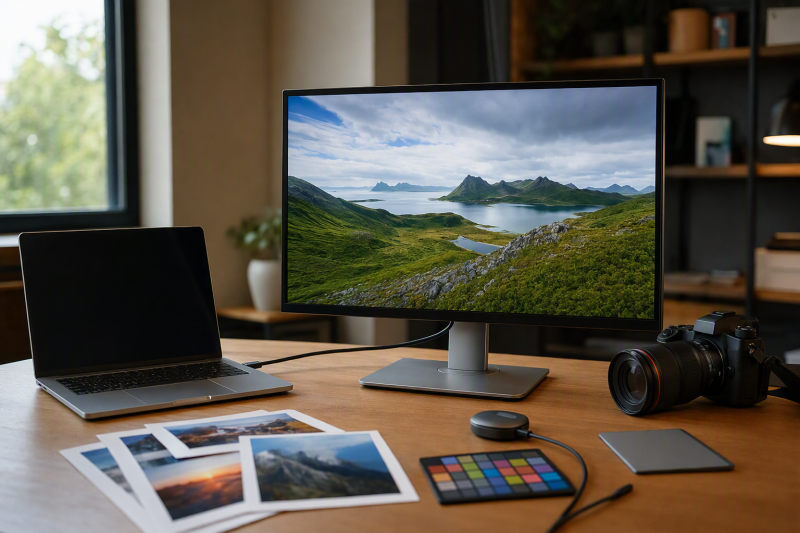
For a photo-editing desk, BenQ SW272U is the best 4K USB-C monitor in this frozen slate. BenQ documents a 27-inch PhotoVue model with wide-gamut claims, hardware calibration support, uniformity technology, 90W USB-C power, card reader, KVM, Hotkey Puck, and included hood. Each alternative answers one different need: ASUS PA32UCXR adds a built-in motorized colorimeter and mini-LED panel, BenQ PD3225U favors a larger designer workflow, EIZO CS2740 supports hardware calibration through ColorNavigator 7, and ASUS PA279CRV is the value-oriented 27-inch route.
The monitor cannot validate a photo workflow by itself. Gamut coverage, factory calibration, manufacturer validation, hardware calibration, profiling, uniformity, and an HDR badge all describe different things. None of the frozen evidence measures the retail unit you receive. USB-C display, data, and charging also depend on the computer, cable, input mode, and accepted USB Power Delivery profile. See our broader photo and video monitor guide if USB-C is not a required filter.
Quick picks
- BenQ SW272U: Best overall photo-focused 27-inch choice.
- ASUS PA32UCXR: Best built-in colorimeter and mini-LED branch.
- BenQ PD3225U: Best larger designer-workflow option.
- EIZO ColorEdge CS2740: Best ColorNavigator 7 hardware-calibration route.
- ASUS ProArt PA279CRV: Best simpler 27-inch value option.
Compare 4K USB-C photo monitors
| Image | Product | Details | Check Price |
|---|---|---|---|
 | BenQ SW272U | Format: 27-inch 4K USB-C PhotoVue Calibration route: Manufacturer-stated hardware calibration Photo tools: Card reader, KVM, Hotkey Puck, hood Laptop power: Up to 90W ceiling Buyer check: Calibration tool and color workflow | Check Price on Amazon |
 | ASUS ProArt PA32UCXR | Format: 32-inch 4K mini-LED TB4/USB-C Calibration route: Built-in motorized colorimeter Photo tools: Hardware calibration and hood Laptop power: Up to 90W ceiling Buyer check: Software, target, input, and HDR workflow | Check Price on Amazon |
 | BenQ PD3225U | Format: 31.5-inch 4K TB3/USB-C Calibration evidence: Factory report and validation language Photo tools: KVM and Hotkey Puck Laptop power: Up to 85W ceiling Buyer check: Factory evidence is not hardware calibration | Check Price on Amazon |
 | EIZO ColorEdge CS2740 | Format: 27-inch 4K USB-C photo monitor Calibration route: Hardware calibration via ColorNavigator 7 Photo evidence: Maker Adobe RGB, LUT, and uniformity claims Laptop power: Up to 60W ceiling Buyer check: No built-in sensor claim | Check Price on Amazon |
 | ASUS ProArt PA279CRV | Format: 27-inch 4K USB-C Calibration evidence: Factory calibration and validation language Connectivity: DP input/output and adjustable stand Laptop power: Up to 96W ceiling Buyer check: Delta E language is a maker claim | Check Price on Amazon |
1. BenQ SW272U — best overall

BenQ SW272U leads because its retained feature set is centered on a photo workflow rather than generic office USB-C. BenQ states wide-gamut coverage, hardware calibration support, and uniformity technology. It also documents 90W USB-C power, a card reader, KVM, Hotkey Puck, and an included hood.
Hardware calibration support is not the same as a built-in measurement sensor. The frozen gate does not establish an integrated colorimeter for SW272U, so plan the compatible measurement tool and software separately. BenQ’s gamut and uniformity statements remain manufacturer claims, and the delivered unit still needs the workflow checks appropriate to your work.
The hood, card reader, and control puck can reduce desk friction, but none of them determines color accuracy. Likewise, 90W is the monitor’s offered charging ceiling, not a guarantee that the editing laptop accepts that mode while display and data are active.
Our Take
Choose SW272U when photo-specific controls, hardware-calibration support, a hood, and a media-reader workflow matter most. Verify the supported calibration tool, laptop USB-C path, and accepted power before ordering.
- BenQ-stated 27-inch 4K format
- Manufacturer-stated hardware calibration and uniformity features
- Card reader, KVM, Hotkey Puck, and included hood
- Retained evidence does not establish a built-in colorimeter
- Manufacturer color claims are not delivered-unit measurements
2. ASUS ProArt PA32UCXR — best built-in colorimeter option

ASUS PA32UCXR is the specialized branch for buyers who want the measurement device integrated into the monitor. ASUS documents a 32-inch 4K mini-LED TB4/USB-C creator display with a built-in motorized colorimeter, hardware calibration support, HDR formats, an included hood, and a 90W power ceiling.
The built-in colorimeter changes calibration logistics, not the need for a controlled workflow. Software support, selected color mode, calibration target, application color management, ambient light, operating system, and output path all remain separate. ASUS’s color and HDR statements are not our measurements.
An HDR-format badge also does not prove a validated grading chain. Source content, application, GPU output, cable, input, monitor mode, and calibration plan each matter. For still-photo work, buy this model for its exact calibration and panel workflow, not the badge alone.
Our Take
Choose PA32UCXR when an integrated motorized colorimeter and mini-LED 4K panel justify a more specialized desk. Confirm software, workflow, input, and calibration-target support first.
- Built-in motorized colorimeter
- Hardware-calibration support and mini-LED panel
- Hood and up-to-90W USB-C power ceiling
- HDR formats do not prove a grading workflow
- Software and calibration targets still need qualification
3. BenQ PD3225U — best larger designer-workflow choice

BenQ PD3225U is the larger-screen branch. BenQ documents a 31.5-inch 4K Thunderbolt 3 and USB-C designer monitor with P3, sRGB, and Rec.709 coverage claims, a factory report, validation language, uniformity technology, 85W power, KVM, and Hotkey Puck.
Factory documentation and validation are not ongoing hardware calibration. The frozen gate does not establish a built-in sensor or hardware-calibration route for this exact model, so do not transfer those features from another BenQ family. The color-space claims likewise remain BenQ statements rather than measurements of your unit.
The KVM and control puck suit a desk shared between systems, but the correct video and USB upstream routes still have to be connected. Thunderbolt 3 is not Thunderbolt 4, and USB-C connector fit alone does not prove every display, data, or charging function.
Our Take
Choose PD3225U when a 31.5-inch 4K designer monitor, KVM, and maker-documented color modes fit the workflow. Choose SW272U or EIZO when retained hardware-calibration evidence is required.
- 31.5-inch 4K workspace
- Manufacturer P3, sRGB, and Rec.709 claims
- KVM, Hotkey Puck, and up-to-85W power
- Factory report is not ongoing hardware calibration
- Thunderbolt 3 rather than Thunderbolt 4
4. EIZO ColorEdge CS2740 — best ColorNavigator 7 route

EIZO ColorEdge CS2740 is the dedicated calibration-software branch. EIZO states Adobe RGB coverage, hardware calibration through ColorNavigator 7, LUT and uniformity features, and 60W USB-C power for this 27-inch 4K photo monitor.
The retained evidence does not claim a built-in calibration sensor. Hardware calibration through ColorNavigator 7 therefore needs the supported external measurement path defined by EIZO, which is a different buying job from the motorized built-in colorimeter on PA32UCXR.
The 60W ceiling is the lowest stated power in this slate. It may be enough for a light editing laptop, but the computer’s accepted input and workload decide whether one cable is sufficient. Keep the supplied laptop adapter when required.
Our Take
Choose CS2740 when the EIZO ColorNavigator 7 hardware-calibration workflow is the priority and 60W fits the laptop. Budget separately for the supported measurement path.
- 27-inch 4K photo-monitor role
- Hardware calibration through ColorNavigator 7
- Manufacturer Adobe RGB, LUT, and uniformity claims
- No built-in calibration sensor is established
- 60W ceiling may not replace a laptop adapter
5. ASUS ProArt PA279CRV — best simpler value branch

ASUS PA279CRV is the simpler 27-inch 4K option. ASUS states wide-gamut coverage, factory calibration, validation, under-2 Delta E language, 96W USB-C power, DisplayPort input and output, and an adjustable stand.
The under-2 Delta E statement is an ASUS claim, not a measurement of the delivered monitor. Factory calibration describes a shipped state and report; it does not establish a built-in sensor or retained hardware-calibration path for this exact product. Ongoing profiling and verification stay the buyer’s workflow decision.
DisplayPort output also does not guarantee a particular chain on every editing laptop. GPU support, operating system, cable, active inputs, resolution, refresh, and other displays all determine the result. The 96W ceiling remains offered power rather than accepted draw.
Our Take
Choose PA279CRV when you want 27-inch 4K, USB-C power, an adjustable stand, and manufacturer factory-calibration evidence without buying for a built-in sensor.
- 27-inch 4K USB-C format
- Manufacturer factory-calibration and validation language
- Up-to-96W power and DisplayPort input/output
- No retained built-in sensor or hardware-calibration claim
- Delta E wording is not our measurement
How to choose a 4K USB-C monitor for photo editing
Decide how you will calibrate
A factory report describes the maker’s shipped evidence. Profiling characterizes a display in a workflow. Hardware-calibration support is an exact-model feature with specific software and measurement-device requirements, and a built-in colorimeter is a physical sensor. Check which of those jobs the monitor actually supports and what extra hardware is required.
Keep gamut claims attributed
P3, Adobe RGB, sRGB, Rec.709, uniformity, and Delta E statements in this slate all come from manufacturers. They help narrow the shortlist, but they do not measure the unit in your room. Choose the color space your output requires, then define a verification schedule.
Trace USB-C as three paths
USB-C can carry display, data, and power, but every one of those functions has host and cable conditions. Confirm the laptop’s video output, the monitor’s intended input mode, required data rate, cable, and accepted charging profile. Our broader USB-C monitor guide covers connection roles outside photo work.
Buy the workflow, not the HDR badge
HDR support does not establish capture, editing, tone mapping, calibration, application, GPU output, and delivery as one validated chain. For still photos, put the color space, calibration route, panel size, controls, and connectivity your process actually uses ahead of the badge.
Frequently asked questions
Is factory calibration the same as hardware calibration?
No. Factory calibration is maker-provided shipped evidence, while hardware calibration is an exact monitor, software, and measurement-device workflow.
Do all hardware-calibration monitors have a built-in colorimeter?
No. PA32UCXR has a documented built-in motorized colorimeter. CS2740 uses ColorNavigator 7 with a separate supported measurement path, and the frozen SW272U evidence does not establish an integrated sensor.
Does 96W USB-C mean the laptop always receives 96W?
No. It is an offered ceiling. Host support, cable, monitor settings, active hub load, battery state, and laptop policy together control accepted power.
Final recommendation
BenQ SW272U is the best overall choice here for a photo-focused 27-inch 4K workflow with hardware-calibration support, a hood, reader, KVM, and control puck. After that, one requirement picks each alternative: PA32UCXR for its built-in motorized colorimeter, PD3225U for a larger designer desk, CS2740 for ColorNavigator 7, PA279CRV for a simpler factory-calibrated branch.