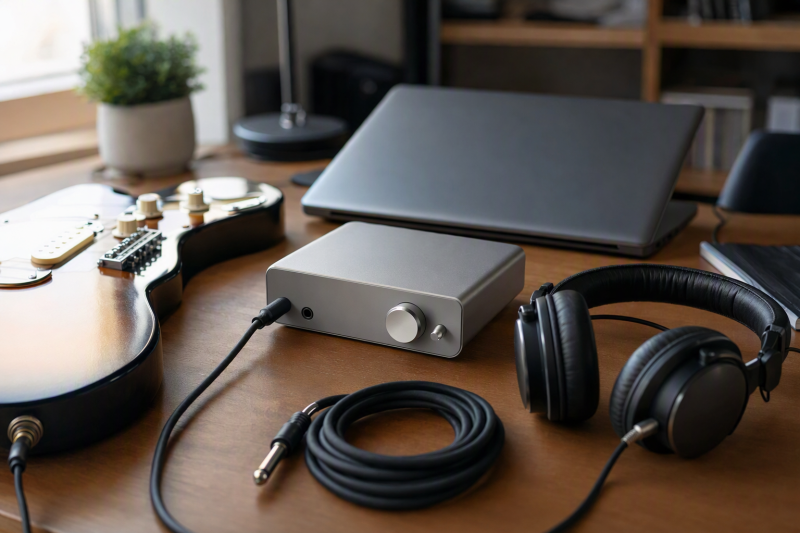
A USB-C cable is only one part of a guitar-recording path. The interface needs an instrument input that suits the guitar or bass, a monitoring route you understand, and a computer setup that can run the recording or amp-sim app you plan to use. This guide ranks five exact interfaces for those decisions, from a compact guitar-focused option to a two-source desktop setup.
Quick picks
- IK Multimedia iRig USB: Best for a portable guitar or bass path with a headphone output and dedicated amp output.
- Focusrite Scarlett Solo 4th Gen: Best for one guitar plus one microphone input when app input behavior is checked.
- PreSonus AudioBox GO: Best for a compact guitar-and-mic setup with a documented input/playback Mix control.
- Focusrite Scarlett 2i2 4th Gen: Best for a defined two-analogue-source recording setup.
- Focusrite Scarlett Solo 3rd Gen: Best only when the exact previous-generation model and its documented monitoring switch fit the setup.
| Image | Product | Details | Check Price |
|---|---|---|---|
 | IK Multimedia iRig USB | Guitar fit: Dedicated guitar or bass input with amp output Connection: USB-C socket Monitoring: Headphone output; Windows driver condition for lower latency | Check Price on Amazon |
 | Focusrite Scarlett Solo 4th Gen | Guitar fit: One Hi-Z instrument input plus one microphone preamp Connection: USB-C Monitoring: Headphone output; app input-combine setting has limits | Check Price on Amazon |
 | PreSonus AudioBox GO | Guitar fit: One TS instrument input for guitar or bass Connection: USB-C-compatible USB 2.0, bus powered Monitoring: Mix control, headphone output, and balanced main outputs | Check Price on Amazon |
 | Focusrite Scarlett 2i2 4th Gen | Guitar fit: Two analogue inputs for a defined two-source setup Connection: USB-C Monitoring: Headphone output with stated Auto Gain and Clip Safe controls | Check Price on Amazon |
 | Focusrite Scarlett Solo 3rd Gen | Guitar fit: One instrument input for a previous-generation setup Connection: USB 2.0 Type-C Monitoring: Front-panel Direct Monitor switch and headphone output | Check Price on Amazon |
1. IK Multimedia iRig USB
IK Multimedia’s iRig USB is the first choice when the job begins with one guitar or bass and a compact USB-C path. IK documents a guitar or bass input, a USB-C socket, a headphone output, and a dedicated amp output. That layout gives a player one route into the computer and separate places to connect headphones and an amplifier. IK also includes AmpliTube and TONEX software with the interface. Those two titles belong in the comparison, but they do not mean every computer will use the same driver or monitoring settings.
The monitoring condition needs care. The iRig USB runs at 24-bit/44.1 or 48 kHz according to IK. On Windows, IK says its iRig audio driver needs to be installed when lower latency is the goal. Treat the driver, app buffer, and headphone route as one setup check rather than assuming a USB-C connector settles latency. The product is device powered, which keeps the portable path simple, but it does not add a microphone preamp or a second instrument route.
Our Take
Choose the iRig USB when one guitar or bass, headphones, and an amp output are the central job. It is the clearest fit for a small guitar rig, provided the Windows driver requirement is included in the plan when that computer needs lower latency.
- IK documents a dedicated guitar or bass input, which keeps the article’s first pick tied to an instrument-recording job.
- The headphone output and separate amp output support the documented compact guitar path without requiring a second audio interface.
- IK includes AmpliTube and TONEX software with the interface for a buyer comparing the supplied software bundle.
- IK lists 24-bit/44.1 or 48 kHz operation, so it does not share the 192 kHz ceiling documented for several other picks.
- IK says Windows users seeking lower latency need the iRig audio driver, which adds a host-specific setup requirement.
2. Focusrite Scarlett Solo 4th Gen
Focusrite’s Scarlett Solo 4th Gen is for a guitarist who also needs one microphone path. Focusrite lists one Hi-Z instrument input and one microphone preamp, so it can cover a guitar plus vocal or spoken guide track without pretending to be a two-microphone interface. The manufacturer also lists Air modes, USB-C connectivity, and 24-bit/192 kHz conversion. Those features are product capabilities, not a promise that a particular amp-sim session will sound or respond a certain way.
Focusrite’s app-compatibility note is important for a computer that treats an interface as a single input. Some apps accept only the first input, and Focusrite provides a setting that combines the Solo’s microphone and line or instrument inputs for that situation. The setting is an app-compatibility option, not a way to create another microphone channel. Focusrite says to disable it for DAW recording when separate input selection is available. Buy the Solo 4th Gen for its one Hi-Z input and one microphone preamp, then verify the recording app before relying on the combine setting.
Our Take
Pick the Solo 4th Gen for a guitar-and-vocal desk where one Hi-Z input and one microphone preamp are enough. Move to the 2i2 when the recording plan genuinely needs two analogue sources under its documented input rules.
- Focusrite lists one Hi-Z instrument input for a guitar or bass connection beside one microphone preamp.
- The manufacturer lists Air modes and 24-bit/192 kHz conversion for buyers comparing documented interface capabilities.
- Focusrite provides a combine-input setting for apps that otherwise accept only one interface input.
- The combine-input setting is an app-compatibility option, not a second microphone path or a generic recording mode.
- Focusrite recommends disabling that setting for DAW recording when separate input selection is available.
3. PreSonus AudioBox GO
PreSonus positions the AudioBox GO as a compact 2×2 USB-C-compatible USB 2.0 recording interface for home and mobile work. Its exact guitar-relevant connection is one TS instrument input for guitar or bass. It also has one mic or line combo input, so a player can connect one guitar and one microphone or line source under the product’s stated layout. The AudioBox GO is bus powered by the connected USB-C device, which is useful for a small laptop rig with no separate interface power supply.
The AudioBox GO earns its place for its documented monitoring layout. PreSonus lists a Mix control for blending the inputs and playback, a headphone output, and two balanced TRS main outputs. PreSonus calls the Mix-control path zero-latency monitoring. That description applies to the interface’s input/playback blend, not to an amp sim running inside the computer. If the goal is to hear a processed amp sound, confirm that the app returns through the selected output and accept the app’s own latency settings.
Our Take
Choose the AudioBox GO when a compact guitar input, a second mic or line input, and a physical input/playback Mix control fit the recording plan. It is a more flexible small setup than a guitar-only interface, while its two input channels still need to match the sources you intend to record.
- PreSonus documents one TS instrument input for guitar or bass in a compact 2×2 interface.
- The mic or line combo input gives the stated layout a separate source connection beside the guitar input.
- PreSonus lists a Mix control, headphone output, and two balanced TRS main outputs for the documented monitoring and speaker path.
- PreSonus calls the Mix-control path zero-latency monitoring, but that label does not establish zero-latency software amp processing.
- The USB-C-compatible connection is USB 2.0, so the port shape should not be used to infer a newer USB data mode.
4. Focusrite Scarlett 2i2 4th Gen
The Scarlett 2i2 4th Gen is for a guitar setup that needs two defined analogue inputs, not simply a longer feature list. Focusrite lists two microphone preamps and two front-panel line or instrument inputs, with Auto Gain, Clip Safe, loopback, USB-C connectivity, and 24-bit/192 kHz conversion. This input layout can suit two guitars, a guitar plus microphone, or another two-source plan after the input assignment is understood. It is not a four-input analogue recorder.
Focusrite’s support documentation sets the critical boundary. The 2i2 records two analogue inputs simultaneously, and plugging into a front-panel jack disables its corresponding XLR input. This limit prevents a buyer from counting the front and rear connectors as four simultaneous analogue paths. Clip Safe is also unavailable above 96 kHz according to Focusrite. Choose the 2i2 for a two-source plan you can name before purchase, not for every connector being visible at once.
Our Take
Pick the 2i2 when two analogue sources are part of the guitar session and its published input configuration has been checked. It is the right step up from the Solo models when a second source is needed rather than speculative.
- Focusrite documents two analogue inputs for a guitar session that has two defined sources.
- Auto Gain and Clip Safe provide stated level-management controls for supported settings.
- Focusrite lists loopback inputs for a plan that includes a documented computer-audio route.
- Focusrite says the 2i2 records two analogue inputs simultaneously, so the visible front and XLR connectors do not establish four analogue paths.
- Clip Safe is unavailable above 96 kHz according to Focusrite, so it is not a control for every sample-rate choice.
5. Focusrite Scarlett Solo 3rd Gen
The Scarlett Solo 3rd Gen is the previous-generation option for a basic one-guitar recording route. Focusrite’s specifications list one instrument input, one microphone input, USB 2.0 Type-C connectivity, a front-panel Direct Monitor switch, a headphone output, and two balanced outputs. Those connections are enough for one guitar plus the relevant monitoring and speaker paths when the exact older model is what you are comparing.
The generation label carries a practical evidence boundary. The Solo 3rd Gen support page, not the Solo 4th Gen documentation, is the source for this pick. Focusrite lists supported sample rates up to 24-bit/192 kHz and up to 56 dB of gain, but the older model does not inherit the newer model’s app-combine documentation. Confirm the listing title, included items, and generation before using a newer Solo feature as a buying reason.
Our Take
Choose the Solo 3rd Gen only when the exact previous-generation interface and its Direct Monitor switch match the path you need. The Solo 4th Gen is the clearer option when its own documented app-compatibility setting is important.
- Focusrite documents one instrument input for a straightforward guitar connection.
- The front-panel Direct Monitor switch provides a stated hardware monitoring control.
- Focusrite lists a headphone output and two balanced outputs for headphone and speaker connections.
- The older generation needs careful listing and support-page matching before purchase.
- The Solo 3rd Gen support page does not establish the Solo 4th Gen app-combine behavior.
How to choose a USB-C audio interface for guitar recording
Start with the guitar input, not the connector label
For an electric guitar or bass, identify the product’s documented instrument or Hi-Z input before selecting an interface. The iRig USB, Scarlett Solo 4th Gen, AudioBox GO, Scarlett 2i2 4th Gen, and Solo 3rd Gen all have product-specific instrument-input language, but their remaining inputs and monitoring controls are not interchangeable. A USB-C port may connect the interface to a computer while the actual guitar connection remains a TS or front-panel instrument jack.
Check this before you order:
- Instrument route: Confirm the exact product lists an instrument or Hi-Z input for the guitar or bass.
- Second source: Decide whether the session needs only the guitar, a guitar plus one microphone, or two analogue sources.
- Computer path: Confirm the cable, operating system, driver, recording app, and selected interface input for the computer you will use.
Choose the monitoring sound you actually need
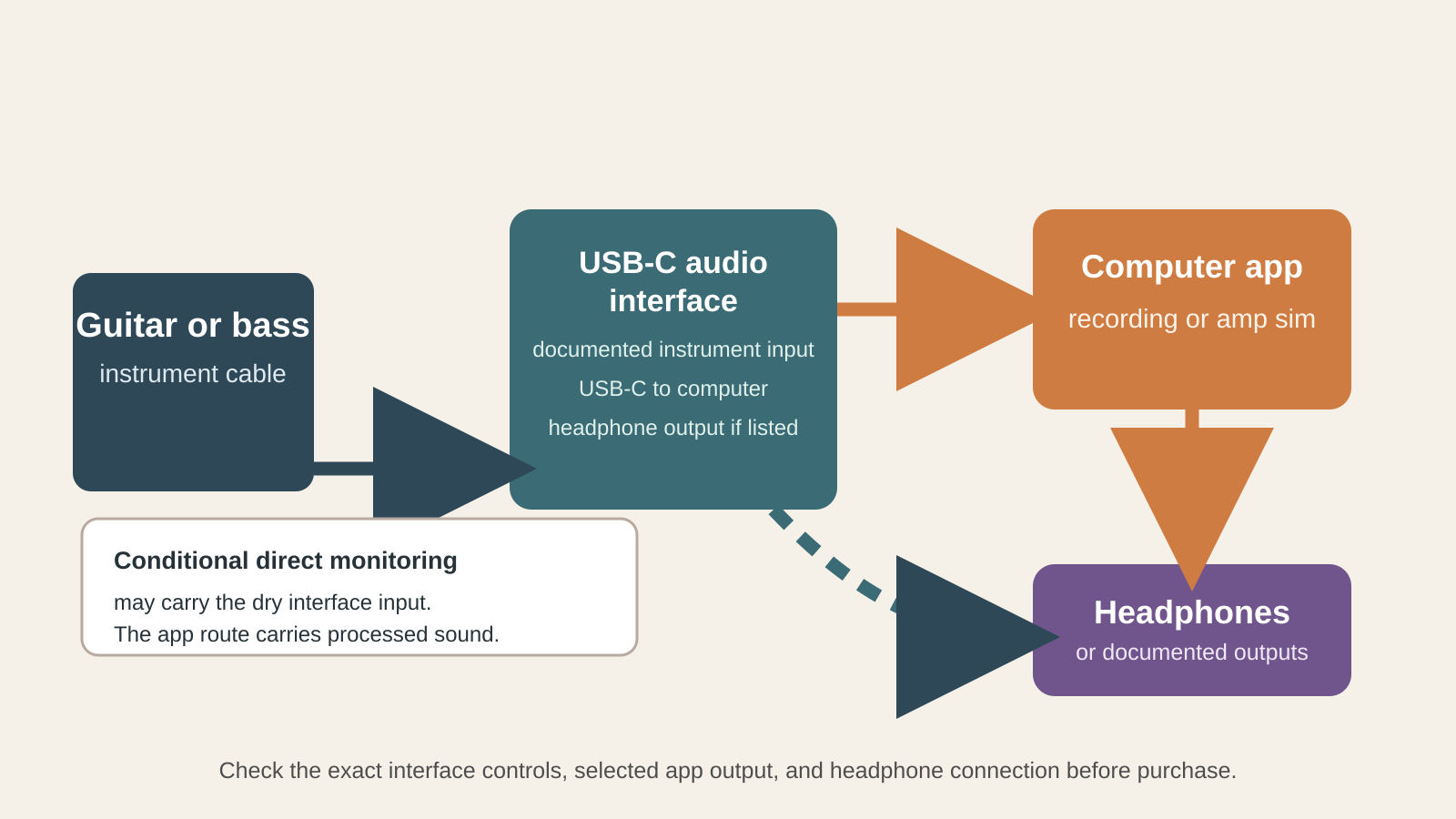
Direct monitoring and processed monitoring solve different jobs. A hardware control can blend the interface input with computer playback, as PreSonus documents for the AudioBox GO, or route an input through a stated Direct Monitor control, as Focusrite documents for the Solo 3rd Gen. That route can help you hear the instrument without waiting for a computer return. It may be a dry input path.
An amp sim, effects plug-in, or other computer processing belongs to the app return path. The computer must receive the input, process it, and send it back to the output selected for headphones or speakers. The iRig USB’s Windows guidance makes the host condition explicit. IK says to install its iRig audio driver when lower latency is the goal. Do not assume that a direct-monitoring switch makes a processed sound latency-free.
Count sources under the product’s actual input rules
Two inputs can be useful without meaning that every connector works at the same time. The Scarlett Solo 4th Gen fits a session with one guitar and one microphone. The AudioBox GO documents one TS instrument input and one mic or line combo input. The Scarlett 2i2 4th Gen adds a two-source path, but Focusrite says it records two analogue inputs simultaneously and a front-panel jack disables the corresponding XLR input. Plan the exact guitar, microphone, or second-instrument combination before choosing it.
The broader Thunderbolt audio interface guide covers a different, wider interface decision. For a microphone-led recording setup, see our USB-C audio interfaces for podcasting guide. A portable USB-C DAC is for playback rather than a guitar input, and our desktop USB-C headphone amp guide addresses another listening-focused decision.
Frequently asked questions
Can I record guitar and a microphone at the same time?
Yes, when the exact interface documents both an instrument input and a microphone path. Focusrite lists one Hi-Z instrument input and one microphone preamp for the Scarlett Solo 4th Gen. PreSonus lists one TS instrument input and one mic or line combo input for the AudioBox GO. Check the recording app’s input selection before starting.
Does direct monitoring let me hear my amp sim?
Not automatically. Direct monitoring can route the dry interface input to the headphones or outputs. Hearing an amp sim requires the computer app to process the input and return that processed signal to the chosen output. Check both routes during a short sound check.
Do I need a driver for a USB-C guitar interface on Windows?
It depends on the exact interface and workflow. IK says Windows users seeking lower latency with the iRig USB need its iRig audio driver. Do not apply that instruction to the other interfaces unless their own documentation gives the same requirement.
Is a USB-C guitar interface the same as a USB-C DAC?
No. A guitar interface is selected for its instrument input, recording route, and monitoring controls. A portable DAC is selected for playback to headphones or speakers. Both can use USB-C while serving separate audio jobs.