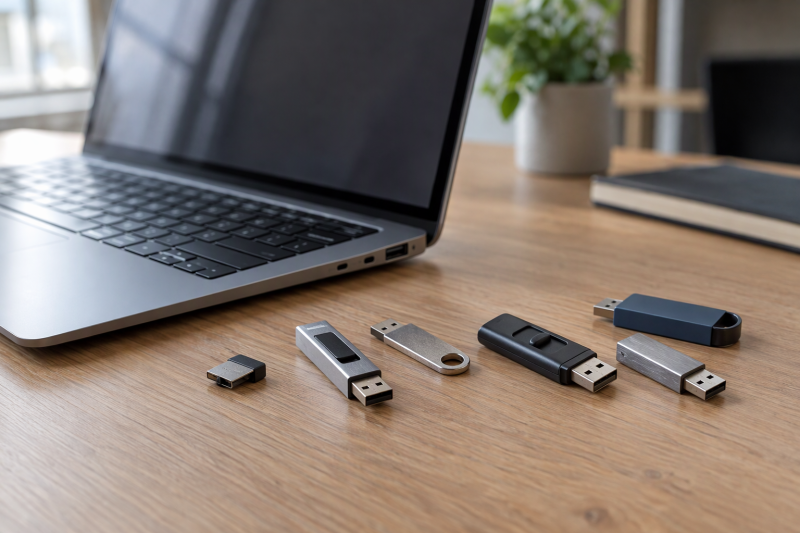
A flash drive for a laptop is a USB-A decision before it is a capacity decision. The six drives below, from Lexar, PNY, SanDisk, Kingston and Samsung, all use a USB-A connector according to Amazon, and they differ in body shape (key ring, sliding collar, retractable connector or a body made to stay plugged in), in capacity from 64GB to 512GB, and in the warranty term where the maker states one. If you want a USB-C plug instead, see the USB-C flash-drive guide or the 1TB USB flash-drive comparison.
A laptop with only USB-C ports needs an adapter for every drive below. Each speed is a read ceiling that a maker or Amazon lists, not a promise for copying files onto the drive. Choose the body shape and capacity first, then compare the warranty terms.
USB Flash Drives for Laptops Compared
| Image | Product | Details | Check Price |
|---|---|---|---|
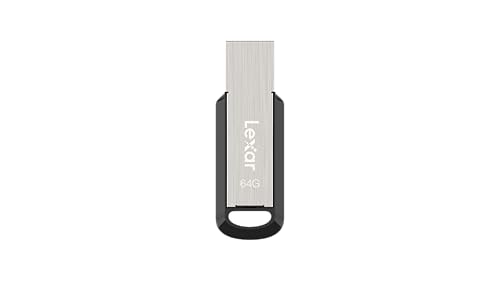 | Lexar JumpDrive M400 64GB | Best fit: Small metal 64GB USB-A key-ring drive Capacity: 64GB Connection: USB-A, USB 3.2 Gen 1 Listed ceiling: Up to 150MB/s read Design: Metal body with key ring Check first: Amazon lists 64GB; Lexar's page names 128GB and 256GB | Check Price on Amazon |
 | PNY Attaché X 256GB | Best fit: 256GB USB-A drive with a sliding collar Capacity: 256GB Connection: USB-A, USB 3.2 Gen 1 Listed ceiling: Up to 130MB/s read Design: Sliding collar Check first: PNY states a one-year limited warranty | Check Price on Amazon |
 | SanDisk Ultra Fit 128GB | Best fit: 128GB drive that stays plugged in Capacity: 128GB Connection: USB-A, USB 3.2 Gen 1 Listed ceiling: Up to 400MB/s read Design: Compact plug-and-stay form Check first: SanDisk states 0 to 35 degrees C operating range | Check Price on Amazon |
 | Kingston DataTraveler Micro 256GB | Best fit: 256GB in a tiny metal USB-A body Capacity: 256GB Connection: USB-A, USB 3.2 Gen 1 Listed ceiling: Up to 200MB/s read Design: Ultra-small metal body Check first: Kingston gives write only as a USB 2.0 multiple | Check Price on Amazon |
 | Lexar JumpDrive S80 128GB | Best fit: 128GB drive with a retractable connector and stated write speed Capacity: 128GB Connection: USB-A, USB 3.2 Gen 1 Listed ceiling: Up to 150MB/s read Design: Retractable connector Check first: Lexar's 256-bit AES protection is downloadable software | Check Price on Amazon |
 | Samsung BAR Plus 512GB | Best fit: 512GB metal USB-A drive Capacity: 512GB Connection: USB-A, USB 3.2 Listed ceiling: Up to 400MB/s read Design: Metal casing Check first: Amazon gives no write speed or warranty term | Check Price on Amazon |
1. Lexar JumpDrive M400 64GB — Best for a Metal Key-Ring Drive
Lexar describes the JumpDrive M400 as a metal drive with an included key ring, USB 3.2 Gen 1 and up to 150MB/s read, with write speeds lower than that. Amazon lists this model at 64GB, with PC and Mac compatibility and backward compatibility with USB 3.1, 3.0 and 2.0 ports.
Lexar’s M400 page names 128GB and 256GB sizes, so Amazon’s listing is the source for the 64GB capacity. The page gives a body of 47.2mm x 16.3mm x 6.2mm at 4.82g and states a five-year limited warranty. Lexar also describes DataShield password protection with 256-bit AES encryption, and its footnote says the encryption software works only on Windows and Mac systems.
Lexar states a metal body, an included key ring, up to 150MB/s read and a five-year limited warranty for the M400.Our Take Choose the M400 if you want a small metal drive on a key ring and a five-year warranty stated by Lexar. At 64GB, it holds less than every other drive on this page.
- If you want a drive for a key ring, Lexar states that the M400 has a metal body and includes the key ring.
- For buyers who compare warranty terms, Lexar states a five-year limited warranty for the M400.
- For files you want to protect, Lexar describes DataShield password protection with 256-bit AES encryption, and its footnote limits the software to Windows and Mac.
- Anyone copying large files onto the M400 has no write number to plan with, because Lexar says only that write speeds are lower than the 150MB/s read figure.
- At 64GB on Amazon’s listing, the M400 holds less than the 128GB, 256GB and 512GB drives on this page.
2. PNY Attaché X 256GB — Best for 256GB USB-A Storage
PNY’s Attaché X swaps the cap for a sliding collar, which PNY says protects the data when the drive is not in use, and its spec table calls the collar plastic. Amazon lists the 256GB model with USB 3.2 Gen 1, a Type-A connector and up to 130MB/s read. PNY’s page names USB 3.2 Gen 1 and USB 3.0 laptops and desktops as hosts and adds backward compatibility with USB 2.0.
PNY states write speed only as up to 10x faster than a USB 2.0 drive at 3MB/s, and adds that write speed may be lower. The page also states a one-year limited warranty and an operating range of 0 to 70 degrees C. PNY’s page opens on the 2-pack of this drive, while Amazon’s listing is for the single 256GB drive.
PNY states a sliding collar with no cap, a Type-A connector and up to 130MB/s read for the Attaché X.Our Take Pick the Attaché X for 256GB with no loose cap to lose, and accept PNY’s one-year warranty. The Lexar, SanDisk and Kingston drives state longer terms.
- PNY gives the Attaché X a sliding collar in place of a cap, and says the collar protects the data when the drive is not in use.
- At 256GB on Amazon’s listing, the Attaché X holds more than the 64GB and 128GB drives on this page.
- If your laptop has a Type-A port, PNY states USB 3.2 Gen 1 compatibility with laptops and desktops and adds backward compatibility with USB 2.0.
- The one-year limited warranty PNY states for the Attaché X is shorter than the five years stated on the Lexar M400, SanDisk Ultra Fit and Kingston DataTraveler Micro pages.
- PNY lists up to 130MB/s read for the Attaché X, the lowest read ceiling on this page.
3. SanDisk Ultra Fit 128GB — Best for Plug-and-Stay Storage
SanDisk’s page for the 128GB Ultra Fit (SDCZ430-128G) states USB 3.2 Gen 1, up to 400MB/s read, a five-year limited warranty, and a compact body you plug in and leave in. SanDisk gives the size as 1.17 x 0.56 x 0.2 inches and the weight as 1.28g. Amazon’s listing matches the 128GB capacity and the 400MB/s figure.
Password protection on the Ultra Fit is downloadable software. SanDisk’s page lists it as a feature, and Amazon’s listing describes 128-bit AES encryption supported on Windows 10 and later and macOS 10.9 and later. SanDisk also states an operating temperature of 0 to 35 degrees C, a narrower band than the 0 to 60 degrees C that Kingston states for the DataTraveler Micro.
Our Take Choose the Ultra Fit when the drive will stay in a USB-A port and you want a 400MB/s read ceiling, which only Samsung’s BAR Plus matches here. Check SanDisk’s 0 to 35 degrees C operating range against the spot where your laptop runs warm.
- For the 128GB Ultra Fit, SanDisk states USB 3.2 Gen 1 and up to 400MB/s read, a ceiling that only Samsung’s BAR Plus matches on this page.
- SanDisk’s page states a five-year limited warranty for the Ultra Fit.
- If you want a drive that stays in the port, SanDisk states that you can plug the Ultra Fit in and leave it in.
- SanDisk states an operating temperature of 0 to 35 degrees C, a narrower range than the one Kingston states for the DataTraveler Micro.
- Amazon’s listing says the Ultra Fit’s 128-bit AES password protection needs a software download.
4. Kingston DataTraveler Micro 256GB — Best for a Tiny 256GB Metal Drive
Kingston’s DataTraveler Micro datasheet describes a premium metal casing with a built-in key loop, made to stay in a USB port. Kingston states USB 3.2 Gen 1, up to 200MB/s read, sizes of 64GB, 128GB and 256GB, and a body of 24.95mm x 12.2mm x 4.5mm. Amazon lists the DTMC3G2/256GB at 256GB.
Kingston also states a five-year warranty with free technical support, an operating range of 0 to 60 degrees C, and support for Windows 11 and 10, macOS 12.7.6 and later, Linux 4.4.x and later, and Chrome OS. It gives write speed only as up to 15x faster than a standard USB 2.0 drive at 4MB/s.
Our Take Pick the DataTraveler Micro for 256GB in a metal body about 25mm long, with a five-year warranty and free technical support from Kingston.
- If you want help after buying, Kingston states free technical support along with a five-year warranty for the DataTraveler Micro.
- A buyer who uses Linux or Chrome OS finds both on Kingston’s list of supported systems, next to Windows and macOS.
- Kingston describes a premium metal casing with a built-in key loop, made for plug-and-stay use.
- Kingston lists up to 200MB/s read for the DataTraveler Micro, half the 400MB/s that SanDisk and Samsung list.
- Kingston’s datasheet does not mention password protection software, while the Lexar and SanDisk pages describe it.
5. Lexar JumpDrive S80 128GB — Best for a Retractable USB-A Connector
The JumpDrive S80 slides its connector out of the body instead of using a cap. Amazon’s listing says the slide-out connector shields against dust, drops and everyday wear, and Lexar’s page lists USB 3.2 Gen 1, a retractable connector, up to 150MB/s read and 60MB/s write. Amazon lists this model at 128GB.
Security is downloadable software with 256-bit AES encryption, which Lexar’s page describes as an advanced security software solution. Lexar states a three-year limited warranty, and Amazon lists the body at 2.22 x 0.81 x 0.41 inches.
Lexar states a retractable connector, up to 150MB/s read, 60MB/s write and a three-year limited warranty for the JumpDrive S80.Our Take Pick the S80 for a 128GB drive with a retractable connector and a stated write speed. The M400, Attaché X and DataTraveler Micro pages give no write figure like Lexar’s 60MB/s.
- Lexar states a retractable connector that slides out of the S80 body, with no cap to manage.
- Lexar gives the S80 a stated write speed, 60MB/s, next to its 150MB/s read figure.
- Lexar’s page states a three-year limited warranty for the S80.
- Lexar’s 256-bit AES protection for the S80 is software that requires a download.
- Amazon lists the S80 at 2.22 x 0.81 x 0.41 inches, longer than the 1.17 inches SanDisk states for the Ultra Fit.
6. Samsung BAR Plus 512GB — Best for 512GB USB-A Capacity
Samsung’s page for the 512GB BAR Plus (MUF-512BE4/AM) states USB 3.2, up to 400MB/s read, a metal design and water resistance, and its feature icon reads Waterproof. Amazon’s listing adds an integrated key ring and a standard Type-A connector, and gives the size as 1.58 x 0.61 x 0.1 inches.
Amazon’s bullets say Samsung’s protection covers water and extreme temperatures. Neither Amazon’s listing nor Samsung’s page gives a write speed. No warranty term was located on Samsung’s page, so confirm the term with Samsung before buying.
Our Take Choose the BAR Plus for the largest capacity on this page, 512GB, in a metal body with a key ring that Samsung calls water resistant. Keep a second copy of anything you cannot replace.
- Samsung states a metal design and water resistance for the BAR Plus, and its feature icon reads Waterproof.
- Amazon’s listing describes an integrated key ring built into the BAR Plus body.
- Samsung states up to 400MB/s read for the BAR Plus, the same top figure SanDisk states for the Ultra Fit.
- Samsung’s page gives the BAR Plus a read ceiling and no write speed.
- No depth or time rating for Samsung’s waterproof claim was located in its page text.
Buying Guide
Start with the laptop connector
Amazon lists a USB-A connector on all six drives, so each plugs into a Type-A port and needs an adapter on a laptop that has USB-C ports only. Lexar, PNY, SanDisk and Kingston state USB 3.2 Gen 1 for their drives, and Samsung states USB 3.2. PNY notes that speed may be lower on earlier hosts, and Lexar’s Amazon listing for the M400 says it works with USB 3.1, 3.0 and 2.0 ports.
Operating system support differs. Kingston lists Windows 11 and 10, macOS 12.7.6 and later, Linux 4.4.x and later and Chrome OS. Lexar states PC and Mac compatibility for the M400. SanDisk’s Amazon listing ties its password software to Windows 10 and later and macOS 10.9 and later. Check the operating system before you rely on a password feature.
Check before you order:
- Check which ports the laptop has, since a USB-C-only laptop needs an adapter for every drive here.
- Check the operating system against the password software the maker or Amazon describes.
- Check that the laptop port supports the USB standard the maker states for its read figure.
Pick capacity and body shape for the job
Amazon lists 64GB for the Lexar M400, 128GB for the SanDisk Ultra Fit and Lexar S80, 256GB for the PNY Attaché X and Kingston DataTraveler Micro, and 512GB for the Samsung BAR Plus. Documents and small media handoffs fit the smaller sizes, while larger working sets point to 256GB or 512GB.
Body shape separates drives of the same capacity. SanDisk and Kingston state that the Ultra Fit and DataTraveler Micro are made to stay plugged in, the M400, DataTraveler Micro and BAR Plus carry a key ring or loop, the Attaché X uses a sliding collar, and the S80 has a retractable connector. Keep a separate backup for files you cannot replace.
Read speed is a ceiling, and write speed is rarely stated
SanDisk and Samsung state up to 400MB/s read, Kingston states 200MB/s, Lexar states 150MB/s for both of its drives, and PNY states 130MB/s. Each figure is a ceiling that needs a USB 3.2 Gen 1 or USB 3.0 port, and none describes a copy to the drive.
Lexar’s S80 page gives a write speed of 60MB/s. PNY and Kingston state write only as a multiple of USB 2.0 speed, and Lexar’s M400 page says write speeds are lower than read. Use the read ceilings to compare drives for reading files, and check write behavior before choosing one for large backups.
FAQ
Can these USB-A drives work with a USB-C-only laptop?
Yes, with an adapter, because Amazon lists a USB-A connector on every drive here. The laptop port and the adapter both affect speed, and the makers state their read figures for USB 3.2 Gen 1 or USB 3.0 hosts, not for an adapter setup.
For a drive that plugs into USB-C directly, see the USB-C flash-drive guide. The 1TB comparison also covers dual-connector models.
Is plug-and-stay storage safe to leave in a laptop?
SanDisk states that you can plug the Ultra Fit in and leave it in, and Kingston describes the DataTraveler Micro as made for plug-and-stay use with a built-in key loop. SanDisk states an operating range of 0 to 35 degrees C and Kingston states 0 to 60 degrees C.
Check where the port sits on the laptop before choosing between a short plug-and-stay drive and a longer one.
Are the listed read speeds guaranteed file-copy speeds?
No. SanDisk and Samsung state up to 400MB/s read, and the other makers state lower ceilings. A read ceiling does not describe a copy onto the drive, and PNY says write speed may be lower than its stated figures.
The size and number of files, the laptop port and the filesystem all change how long a copy takes. Use the figures to compare drives, not to predict a transfer time.
Which drives state the longest warranty?
Lexar states a five-year limited warranty for the M400, SanDisk states five years for the Ultra Fit, and Kingston states five years with free technical support. Lexar states three years for the S80 and PNY states one year for the Attaché X.
No warranty term was located on Samsung’s BAR Plus page, so confirm it with Samsung before you buy. Warranty terms can differ by capacity or region, so check the term for the exact model you order.