Cable Matters sells cables that look alike and do different laptop jobs. A USB-C plug does not show the data rate, the video support or the charging power, so each listing has to name them. Cable Matters sells all seven products below itself on Amazon, and the figures come from that product’s own Amazon listing.
The seven products are a USB4 cable at 80Gbps, a Thunderbolt 4 cable, a 40Gbps USB4 cable, a screw-locked USB4 cable, a cable for DisplayPort monitors, an HDMI adapter with charging, and a 10ft charging cable with no video. Start with the port on your laptop or dock. For cross-brand options, see the best USB-C cables, certified Thunderbolt 4 cables and DisplayPort cables for high-refresh monitors.
Cable Matters lists 240W on both its 80Gbps and its 20Gbps USB4 cables, so check the data rate before the wattage.Cable Matters Cables and Adapters Compared
| Image | Product | Details | Check Price |
|---|---|---|---|
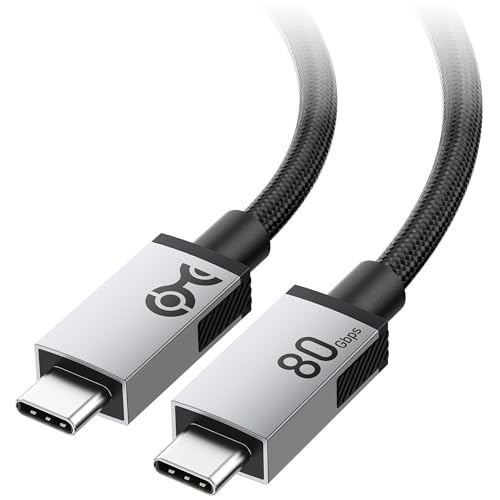 | Cable Matters 80Gbps USB4 Cable | Best fit: 80Gbps USB4 laptop and dock path Connection: USB-C to USB-C, USB4 V2.0 Listed ceiling: 80Gbps, 240W, 8K at 120Hz Length: 6.6 ft / 2m Check first: Host and display must support the requested mode | Check Price on Amazon |
 | Cable Matters Thunderbolt 4 Cable | Best fit: Certified 1m Thunderbolt 4 connection Connection: Thunderbolt 4 / USB4, USB-C Listed ceiling: 40Gbps, 240W, 8K at 60Hz Length: 3.3 ft / 1m Check first: Cable Matters lists bandwidth for one 8K or two 4K displays; the dock and monitors set the result | Check Price on Amazon |
 | Cable Matters 40Gbps USB4 Cable | Best fit: Longer 40Gbps USB4 run Connection: USB4, Thunderbolt 4/5 compatible Listed ceiling: 40Gbps, 240W, 8K at 60Hz Length: 6.6 ft / 2m Check first: Laptop, dock and display determine the actual mode | Check Price on Amazon |
 | Cable Matters USB4 Top Screw-Lock Cable | Best fit: USB-C equipment with a top screw-lock port Connection: USB4 USB-C with top screw lock Listed ceiling: 20Gbps, 240W, 4K at 120Hz Length: 6.6 ft / 2m Check first: Port must use this top screw-lock arrangement | Check Price on Amazon |
 | Cable Matters USB-C to DisplayPort 1.4 Cable | Best fit: USB-C laptop to a DisplayPort monitor Connection: USB-C source to DisplayPort monitor Listed ceiling: 8K at 60Hz or 4K at 240Hz Length: 6 ft / 1.8m Check first: It is one-way and not for USB-C monitors | Check Price on Amazon |
 | Cable Matters USB-C to HDMI 2.1 Adapter with 140W Charging | Best fit: HDMI display or TV with laptop charging Connection: USB-C with DP Alt Mode to HDMI 2.1 Listed ceiling: 48Gbps, 8K at 60Hz or 4K at 240Hz, 140W charging Length: Not listed Check first: Title says No VRR; Mac refresh rates depend on the chip | Check Price on Amazon |
 | Cable Matters 240W USB-C Charging Cable | Best fit: Long 240W USB-C laptop charging run Connection: USB-C to USB-C, USB 2.0 data Listed ceiling: 240W charging, 480Mbps data Length: 10 ft / 3m Check first: This cable has no video support | Check Price on Amazon |
1. Cable Matters 80Gbps USB4 Cable — Best for 80Gbps USB4 V2.0 Devices
Cable Matters lists this 2m cable as USB4 V2.0 at 80Gbps, with 240W USB PD 3.1 charging and DisplayPort Alt Mode video up to 8K at 120Hz or 4K at 480Hz when the host device and display support it. The listing also names Thunderbolt 5, Thunderbolt 4 and Thunderbolt 3 compatibility, plus USB 3.2 down to USB 2.0.
The jacket is braided, and Cable Matters says the aluminum connector housings improve heat dissipation. Cable Matters also lists compatibility with 140W USB-C power adapters and earlier PD standards.
Cable Matters lists the USB4 V2.0 rate of 80Gbps for this 2m cable, the highest rate on this page.Our Take Choose this for a Thunderbolt 5 or USB4 V2.0 dock, SSD or high-refresh monitor that sits 2m away. A laptop with Thunderbolt 4 ports can use the 40Gbps cables below instead.
- Cable Matters lists USB4 V2.0 at 80Gbps and names Thunderbolt 5 compatibility for this cable.
- Cable Matters says DisplayPort Alt Mode reaches 8K at 120Hz or 4K at 480Hz when the host and display support those modes.
- Cable Matters lists up to 240W USB PD 3.1 EPR charging and compatibility with 140W adapters.
- Cable Matters says the aluminum connector housings on the braided 2m cable improve heat dissipation.
- Cable Matters states the 8K at 120Hz and 4K at 480Hz video figures for a host device and display that support them.
- Cable Matters’ listing names Thunderbolt 4 and Thunderbolt 3 compatibility and does not state an 80Gbps rate for those ports.
2. Cable Matters Thunderbolt 4 Cable — Best for a Certified 1m Thunderbolt Connection
Cable Matters leads this 1m listing with Intel certification and lists the cable as Thunderbolt 4 at 40Gbps, with USB PD 3.1 charging up to 240W and enough bandwidth for one 8K display or two 4K displays. The listing names Thunderbolt 4 monitors it works with, the Dell UltraSharp U3224KB and U4025QW and the BenQ PD3225U, and computers including the MacBook Pro M4, Mac mini M4, Dell XPS 13 Plus (9320) and HP Spectre x360 14.
The listing says the cable also works as a USB4 cable, with 40Gbps data, DisplayPort Alt Mode and USB-C Power Delivery. Cable Matters also lists backward compatibility with Thunderbolt 3 and with USB-C 3.2, 3.1 and 2.0 devices.
Cable Matters lists Intel certification and 40Gbps Thunderbolt 4 for this 1m cable.Our Take The 1m Thunderbolt 4 cable suits a short link between a laptop and a dock or monitor on the same desk. The listing describes the cable’s bandwidth, so check what the dock and monitors you connect can display.
- Cable Matters’ listing leads with Intel certification for this Thunderbolt 4 cable.
- Cable Matters states 40Gbps data and charging up to 240W over USB PD 3.1.
- Cable Matters says this cable provides bandwidth for one 8K display or two 4K displays.
- Cable Matters names the Dell UltraSharp U4025QW monitor and the MacBook Pro M4 among the devices it works with.
- At 1m, this is the shortest cable length listed on this page.
- Cable Matters lists 8K at 60Hz and 4K at 240Hz as this cable’s video ceilings.
3. Cable Matters 40Gbps USB4 Cable — Best for a Longer 40Gbps USB4 Run
Cable Matters lists this 2m USB4 cable at up to 40Gbps, with 8K video, DisplayPort Alt Mode and USB PD 3.1 EPR power steps of 28V/140W, 36V/180W and 48V/240W. The title adds Thunderbolt 4 and Thunderbolt 5 compatibility and names MacBook, XPS and Surface Pro laptops.
The listing says the cable is backward compatible with 20Gbps USB4 devices and with USB 3.2, 3.1, 3.0 and 2.0. Cable Matters also lists compatibility with Apple’s 140W USB-C power adapter, the iPad Pro and the iPad Air, and describes the video use as connecting USB-C devices to USB-C monitors or docking stations.
Our Take A USB4 or Thunderbolt 4 laptop that needs 2m to a USB-C monitor or dock fits this cable. Cable Matters lists the same 40Gbps rate here as for the 1m Thunderbolt 4 cable, on a longer cable.
- Cable Matters lists USB4 at up to 40Gbps on a 2m cable.
- The USB PD 3.1 EPR steps in Cable Matters’ listing are 28V/140W, 36V/180W and 48V/240W.
- Cable Matters lists DisplayPort Alt Mode for connecting USB-C devices to USB-C monitors or docking stations.
- Cable Matters says the cable works with Apple’s 140W USB-C power adapter.
- Cable Matters’ listing for this cable names no USB-IF or Intel certification.
- Cable Matters lists 40Gbps for this cable, below the 80Gbps it lists for the USB4 V2.0 cable.
4. Cable Matters USB4 Top Screw-Lock Cable — Best for a Screw-Locked USB-C Connection
A top screw lock sets this 2m USB4 cable apart, and Cable Matters says it prevents accidental disconnections and suits professional and gaming setups. The listing names USB-IF certification, 20Gbps data, 240W USB PD 3.1 EPR charging and DisplayPort Alt Mode video, and the title gives 8K at 30Hz or 4K at 120Hz.
The listing says the cable works with Thunderbolt 4 and USB-C devices and connects them to monitors and docking stations. It does not say which devices have a port that takes the top screw, so check whether your dock, monitor or laptop has a place for the screw before ordering.
Our Take Use this when the cable has to stay locked into a USB-C port that takes the screw. A laptop link with no screw position can use the other cables here.
- Cable Matters says the top screw lock prevents accidental disconnections.
- Cable Matters names USB-IF certification for this USB4 cable.
- Cable Matters lists charging for laptops, tablets and smartphones at up to 240W with USB PD 3.1 EPR.
- The listing title gives the DisplayPort Alt Mode video modes as 4K at 120Hz or 8K at 30Hz.
- The data rate Cable Matters lists for this USB4 cable is 20Gbps.
- Cable Matters’ listing does not say which devices have a port that takes the top screw.
5. Cable Matters USB-C to DisplayPort 1.4 Cable — Best for a DisplayPort Monitor
Cable Matters lists this 6ft cable as one-way. A USB-C or Thunderbolt 4 or 5 computer sends video to a DisplayPort monitor, up to 8K at 60Hz or 4K at 240Hz. The listing says either mode needs a USB-C port with DisplayPort 1.4 HBR3 and DSC output, which it calls common on Thunderbolt 4 and USB4 laptops with 11th Gen Intel CPUs or newer.
The listing says the cable supports Multi-Stream Transport for daisy-chaining monitors and 7.1 surround audio. Cable Matters also describes a low-profile USB-C connector and a locking DisplayPort latch that you press to release. Cable Matters names the Dell UltraSharp U3223QE, LG 27GP950-B, ASUS ROG Swift PG32UQX and Samsung Odyssey G7 and G9 as monitors it works with, and tells buyers to check computer and monitor specs first.
Cable Matters says this cable works from a USB-C or Thunderbolt source to a DisplayPort monitor only, and not with HDMI, Mini DisplayPort or USB-C monitors.Our Take Buy this when the monitor has a DisplayPort input and the laptop outputs DisplayPort over USB-C or Thunderbolt. An HDMI display needs the HDMI adapter below.
- Cable Matters lists up to 8K at 60Hz or 4K at 240Hz for a USB-C port with DisplayPort 1.4 HBR3 and DSC output.
- Cable Matters lists Multi-Stream Transport for daisy-chaining monitors and 7.1 surround audio.
- Cable Matters describes a low-profile USB-C connector and a locking DisplayPort latch that you press to release.
- Cable Matters names Dell, LG, ASUS and Samsung monitors, including the LG 27GP950-B, as ones it works with.
- Cable Matters says this unidirectional cable does not work in reverse, from a DisplayPort source to a USB-C display.
- Cable Matters lists HDMI, Mini DisplayPort, Thunderbolt 1 and 2, and USB-C monitors as incompatible.
6. Cable Matters USB-C to HDMI 2.1 Adapter with 140W Charging — Best for HDMI With Charging on One Port
Cable Matters lists this adapter at HDMI 2.1 and 48Gbps, with up to 8K at 60Hz in RGB 4:4:4 and 4K at 240Hz, 120Hz or 60Hz, plus HDR and ALLM (Auto Low Latency Mode). Cable Matters also lists 140W Power Delivery via USB-C, which the listing says lets a Mac or any USB-C device with DP Alt Mode connect to an external display while charging. Cable Matters names Thunderbolt 4 and Thunderbolt 5 devices including the MacBook, MacBook Air, MacBook Pro, iMac and iPad Pro.
For Macs, Cable Matters says the adapter has custom firmware, with 4K at 120Hz on M1, M1 Pro/Max, M2, M2 Pro/Max and M3 chips and 4K at 240Hz on M3 Pro/Max, M4 and M4 Pro/Max chips. For Windows, the listing names Lenovo and Dell XPS laptops, NVIDIA RTX 3000 and AMD Radeon RX 6000 graphics, and USB4 or Thunderbolt 4 ports on laptops with 11th Gen Intel Tiger Lake CPUs and Intel Iris Xe graphics or later. The title says No VRR, which means no variable refresh rate.
Cable Matters lists 140W charging and 4K at 240Hz on M3 Pro/Max, M4 and M4 Pro/Max Macs for this HDMI 2.1 adapter.Our Take Pick this for an HDMI display or TV when the laptop should charge through the adapter too. The Mac refresh rates depend on the chip, so check the chip list in the listing before ordering.
- Cable Matters lists HDMI 2.1 at 48Gbps with 8K at 60Hz or 4K at 240Hz.
- Cable Matters lists 140W Power Delivery via USB-C for charging the connected device while the display is in use.
- Cable Matters lists custom Mac firmware with 4K at 240Hz on M3 Pro/Max, M4 and M4 Pro/Max chips.
- Cable Matters describes a braided cable, metal connectors and an aluminum housing for this adapter.
- Cable Matters’ title says No VRR, meaning the adapter has no variable refresh rate.
- On Macs, Cable Matters lists 4K at 120Hz for M1, M1 Pro/Max, M2, M2 Pro/Max and M3 chips, below the 4K at 240Hz it lists for M3 Pro/Max, M4 and M4 Pro/Max chips.
7. Cable Matters 240W USB-C Charging Cable — Best for Long 240W Charging
Cable Matters lists this braided USB-C to USB-C cable at 10ft and up to 240W (48V/5A), with USB PD 3.1 EPR and a built-in E-Marker IC. The listing says it works with USB PD, Thunderbolt 4, USB4, USB 3.2 and USB 2.0 devices, and names MacBook Pro, Dell XPS, Surface, iPad Pro and Chromebook devices, docking stations and power banks.
The listing says the cable does not support video. The data rate is USB 2.0 at 480Mbps, which Cable Matters describes as basic file syncing, so a monitor or a fast SSD needs one of the data cables above. The connectors are reinforced aluminum with gold plating, and a silicone cable tie is built in.
Our Take Pick this for a long run from the wall adapter to a laptop that accepts the power. Keep a data cable for the dock, monitor or SSD.
- Cable Matters lists 10ft of cable with up to 240W USB PD 3.1 EPR charging for a long run to the laptop.
- Cable Matters states a built-in E-Marker IC in the cable.
- Cable Matters describes a braided jacket with reinforced aluminum, gold-plated connectors.
- Cable Matters says the integrated silicone cable tie keeps the cable neat.
- The listing says this cable does not support video.
- Cable Matters gives USB 2.0 data at 480Mbps and describes it as basic file syncing.
Buying Guide
Match the cable to the job
A USB-C plug can carry charging, data, video or all three, and the listing says which. Cable Matters says its 10ft 240W cable has no video support. It lists 80Gbps for the USB4 V2.0 cable, 40Gbps for the Thunderbolt 4 and standard USB4 cables, and 20Gbps for the screw-lock cable. Name the job first: charging, a dock or SSD, a DisplayPort monitor, an HDMI display or a locked connection.
Each speed is a ceiling for the cable, and the laptop port, dock, SSD or display sets what you get. Cable Matters lists 240W for five of these cables, from the 80Gbps USB4 cable to the 10ft charger, so wattage does not tell them apart.
Check the video direction and the port
Cable Matters lists its DisplayPort cable as one-way, from a USB-C or Thunderbolt computer to the monitor, and says it does not work with USB-C monitors. Cable Matters says the HDMI adapter works with a USB-C device that has DisplayPort Alt Mode, so confirm that on the laptop first.
For the highest modes, Cable Matters lists 8K at 60Hz or 4K at 240Hz for both the DisplayPort cable and the HDMI adapter, and says the DisplayPort cable needs a port with DisplayPort 1.4 HBR3 and DSC output. It lists 8K at 120Hz for the 80Gbps USB4 cable, which its listing calls a USB-C monitor cable. Check the laptop, dock, monitor input and mode together.
Treat charging wattage as a path limit
Cable Matters lists up to 240W USB PD 3.1 on several of these cables, but a cable does not make a laptop accept 240W. The charger, the laptop and the cable all have to support the power level. Cable Matters lists 140W for the HDMI adapter’s charging, below the 240W it lists for its cables.
The 240W charging cable is for reach. Cable Matters lists 10ft, USB 2.0 data and no video. A dock, monitor or SSD connection needs one of the data cables, and the 80Gbps cable suits hardware that supports USB4 V2.0.
FAQ
Does every USB-C cable carry video?
No. Cable Matters says its 10ft 240W cable has no video support and gives it USB 2.0 data at 480Mbps. Cable Matters lists DisplayPort Alt Mode or display ceilings for its USB4 and Thunderbolt 4 cables, and the laptop port, dock and display decide the result.
Cable Matters lists the DisplayPort cable as one-way. It carries video from a USB-C or Thunderbolt computer to a DisplayPort monitor, and Cable Matters excludes reverse use and USB-C monitors. The HDMI adapter’s listing says it connects a USB-C device with DP Alt Mode support to an external display.
Is the 80Gbps USB4 cable faster than the Thunderbolt 4 cable?
Yes, by the rates Cable Matters lists. It lists 80Gbps for the USB4 V2.0 cable and 40Gbps for the 1m Thunderbolt 4 cable. The extra rate helps when the laptop and the connected device both support the faster USB4 V2.0 path, and a port that does not support it runs at its own rate.
The Thunderbolt 4 listing names Intel certification and a 1m length, and the USB4 V2.0 listing names Thunderbolt 5, 4 and 3 compatibility. Choose by the ports you have and the length you need.
When should I choose the screw-lock cable?
Choose it when the connection has to stay locked and your device has a place for the top screw. Cable Matters lists USB-IF certification, a 2m length, 20Gbps data, 240W charging and 4K at 120Hz video, and says the screw prevents accidental disconnections.
The listing does not name devices that have a port for the screw. For a laptop port without a screw position, Cable Matters lists 40Gbps for its 2m USB4 cable and 40Gbps for the Thunderbolt 4 cable, against 20Gbps here.
Does the HDMI adapter work on a Mac?
Cable Matters says the adapter has custom firmware for Mac users, with 4K at 120Hz on M1, M1 Pro/Max, M2, M2 Pro/Max and M3 chips and 4K at 240Hz on M3 Pro/Max, M4 and M4 Pro/Max chips.
Cable Matters also names the MacBook, MacBook Air, MacBook Pro, iMac and iPad Pro among the Thunderbolt 4 and Thunderbolt 5 devices it works with, and lists 140W Power Delivery so the Mac can charge while it drives the display.