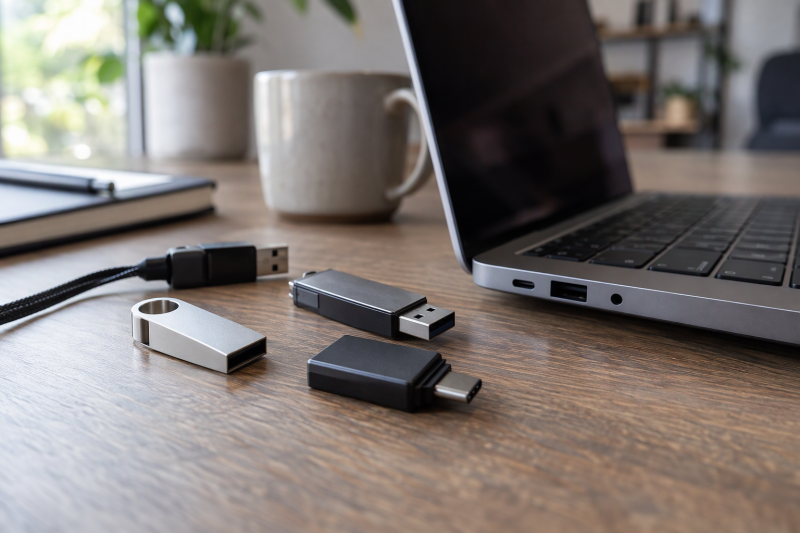
A 1TB flash drive adds removable capacity in a small body. Amazon.com sells all five drives below as new. Every speed is an up-to figure that PNY or SanDisk states, and none is a measurement. Before you buy, check the laptop’s port, the device that will receive the files, and whether the drive will stay plugged in or move between devices.
| Image | Product | Details | Check Price |
|---|---|---|---|
 | PNY Duo Link V3 1TB | Best fit: Fast USB-C and USB-A transfer Capacity: 1TB Connection: Type-C and Type-A, USB 3.2 Gen 2 Listed ceiling: Up to 1000MB/s read, 800MB/s write Check first: Older ports: PNY gives no speed figure | Check Price on Amazon |
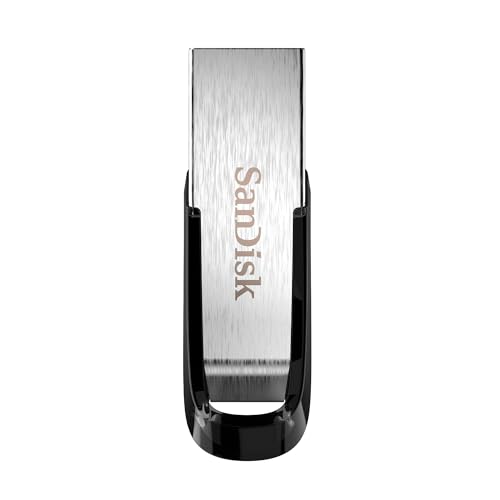 | SanDisk Ultra Flair 1TB | Best fit: Straightforward USB-A laptop storage Capacity: 1TB Connection: USB-A, USB 3.0 Listed ceiling: Up to 150MB/s read Check first: USB-A port; password protection and metal casing | Check Price on Amazon |
 | SanDisk Ultra Fit 1TB | Best fit: Plug-and-stay USB-A storage Capacity: 1TB Connection: USB-A, USB 3.2 Gen 1 Listed ceiling: Up to 400MB/s read Check first: 1TB in product details; password software download | Check Price on Amazon |
 | SanDisk Ultra Dual Drive Go 1TB | Best fit: Simple USB-C and USB-A swaps Capacity: 1TB Connection: Reversible USB-C and Type-A, USB 3.2 Gen 1 Listed ceiling: Up to 400MB/s read Check first: Phone or tablet needs USB-C and OTG support | Check Price on Amazon |
 | PNY PRO Elite V3 Type-C 1TB | Best fit: Fast USB-C-only laptop storage Capacity: 1TB Connection: Type-C, USB 3.2 Gen 2 Listed ceiling: Up to 1000MB/s read, 800MB/s write Check first: Laptop port supports USB 3.2 Gen 2 | Check Price on Amazon |
1. PNY Duo Link V3 1TB — Best for fast USB-C and USB-A file transfer
PNY’s Amazon listing gives the Duo Link V3 a Type-C connector and a Type-A connector on one metal swivel body. PNY lists USB 3.2 Gen 2, up to 1000MB/s read, up to 800MB/s write and a 2-year limited warranty. PNY names Type-C phones and tablets (iPhone 15, 3rd Gen iPad and newer, and Android) as the devices to copy from, and laptops and desktops as the devices to copy to.
PNY lists compatibility with USB 3.2 Gen 2 laptops and desktops and with most USB 3.2 Gen 1, USB 3.0 and USB 2.0 hosts. PNY gives no speed figure for those older ports, so treat 1000MB/s as the best case on a Gen 2 port. PNY also says a case on a phone or tablet should leave clear access to the Type-C port.
Our Take Pick the Duo Link V3 if you move project files between a newer USB-C laptop and older USB-A equipment, or between a Type-C phone and a laptop. PNY lists a higher speed ceiling for the Duo Link V3 than SanDisk lists for the Ultra Dual Drive Go.
- The Duo Link V3 suits files that move between a newer USB-C laptop and older USB-A equipment, and PNY’s Amazon listing gives it both Type-C and Type-A connectors on one metal swivel body.
- On a USB 3.2 Gen 2 host, PNY lists the Duo Link V3 at up to 1000MB/s read and up to 800MB/s write, a higher ceiling than the other dual-connector drive here.
- The Duo Link V3 carries a 2-year limited warranty, according to PNY’s Amazon listing.
- An older laptop has no listed speed, because PNY gives no figure for the USB 3.2 Gen 1, USB 3.0 and USB 2.0 hosts it lists as compatible.
- Anyone copying from a phone or tablet should check the case, because PNY says it should leave clear access to the Type-C port.
2. SanDisk Ultra Flair 1TB — Best for a straightforward USB-A metal drive
SanDisk’s Amazon listing describes the Ultra Flair as a USB-A drive on USB 3.0 with up to 150MB/s read. SanDisk puts that speed at up to 15 times faster than standard USB 2.0 drives. The listing also gives the drive a metal casing and password protection. It adds the SanDisk Memory Zone app for backing up and organizing files and a 5-year limited warranty.
The Ultra Flair has one USB-A connector, and SanDisk lists no Type-C end. A laptop with only USB-C ports needs an adapter to use it. Choose it for a laptop or desktop with a USB-A port that needs plain 1TB storage.
SanDisk’s 150MB/s read figure is the lowest of the five drives here, so expect a lower ceiling than on the other four.Our Take Choose the Ultra Flair for a laptop or desktop with a USB-A port when plain 1TB storage and password protection are the goals. Skip it when speed is the priority, since SanDisk lists the lowest read ceiling of the five here.
- A laptop or desktop with a USB-A port gets a metal casing and password protection with the Ultra Flair, according to SanDisk’s Amazon listing.
- SanDisk’s listing gives the Ultra Flair a 5-year limited warranty.
- SanDisk lists USB 3.0 with up to 150MB/s read for the Ultra Flair, and an up-to figure is a ceiling, not a promise.
- A laptop with only USB-C ports needs an adapter, because SanDisk lists only a USB-A connector for the Ultra Flair.
- The Ultra Flair has the lowest read ceiling of the five drives here, at SanDisk’s listed 150MB/s.
3. SanDisk Ultra Fit 1TB — Best for plug-and-stay USB-A storage
SanDisk’s Amazon listing describes the Ultra Fit as a compact plug-and-stay USB Type-A drive for laptops, tablets, TVs and game consoles. The listing gives up to 400MB/s read on USB 3.2 Gen 1. SanDisk bases that figure on internal testing and says it requires a USB 3.0 port. The listing adds a 5-year limited warranty.
SanDisk adds 128-bit AES password protection through downloadable software that supports Windows 10 and later and macOS 10.9 and later. The password feature needs that software download, so check that your laptop’s operating system is on the list.
One bullet on the Amazon listing says up to 512GB, while the title, the size field and the model number SDCZ430-1T00-G46 all say 1TB. Confirm 1TB in the product details before you order this drive.
SanDisk’s listing uses the plug-and-stay wording for the Ultra Fit only, and none of the other four listings use it.Our Take Pick the Ultra Fit for a USB-A laptop that keeps a 1TB drive plugged in. It is a weak fit for a workflow that moves files directly to USB-C devices.
- The Ultra Fit suits a USB-A laptop that keeps the drive plugged in, and SanDisk’s Amazon listing describes it as compact and plug-and-stay for laptops, tablets, TVs and game consoles.
- SanDisk lists the Ultra Fit at up to 400MB/s read on USB 3.2 Gen 1, and SanDisk bases that figure on internal testing.
- The Ultra Fit’s 128-bit AES password protection needs a software download, according to SanDisk’s listing.
- SanDisk’s listing gives the Ultra Fit a 5-year limited warranty.
- Moving files directly to USB-C devices is a weak fit for the Ultra Fit, because SanDisk lists only a USB Type-A connector.
- One bullet on the Ultra Fit’s Amazon listing says up to 512GB while its title and size field say 1TB, so confirm the capacity in the product details before ordering.
4. SanDisk Ultra Dual Drive Go 1TB — Best for a simple USB-C and USB-A swap drive
SanDisk’s Amazon listing gives the Ultra Dual Drive Go a reversible USB Type-C connector and a traditional Type-A connector, with USB 3.2 Gen 1 and up to 400MB/s read. SanDisk bases that speed on internal testing and says it requires a USB Type-C port with USB 3.2 Gen 1 support. SanDisk describes the drive as a way to move content between USB Type-C smartphones, tablets and Macs and USB Type-A computers. The listing adds a 5-year limited warranty.
SanDisk says a phone or tablet needs a USB Type-C port and OTG support, and it lists photo backup through the downloadable Memory Zone app. A single flash drive holds one copy, so keep important files somewhere else as well.
Our Take Choose the Ultra Dual Drive Go for regular handoffs between a USB Type-C phone or Mac and a USB-A computer when PNY’s higher listed speed is not needed.
- The Ultra Dual Drive Go covers handoffs between a USB Type-C phone or Mac and a USB-A computer, because SanDisk’s Amazon listing gives it a reversible USB Type-C connector and a Type-A connector.
- SanDisk lists the Ultra Dual Drive Go at USB 3.2 Gen 1 with up to 400MB/s read, a ceiling it bases on internal testing.
- SanDisk lists photo backup for the Ultra Dual Drive Go through the downloadable Memory Zone app.
- The Ultra Dual Drive Go carries a 5-year limited warranty on SanDisk’s Amazon listing.
- Check a phone or tablet for a USB Type-C port and OTG support before buying, because SanDisk states the Ultra Dual Drive Go needs both.
- Anyone who wants PNY’s higher listed speed gives it up with the Ultra Dual Drive Go, because SanDisk lists up to 400MB/s read against the up to 1000MB/s PNY lists for the Duo Link V3.
5. PNY PRO Elite V3 Type-C 1TB — Best for a fast USB-C-only laptop drive
PNY’s product page and Amazon listing for the PRO Elite V3 Type-C both give USB 3.2 Gen 2, a Type-C connector, up to 1000MB/s read and up to 800MB/s write. The PNY page describes a metal design with a sliding cap and lists a 2-year limited warranty. The PNY page also says the noted speeds require USB 3.2 Gen 2 devices and may be lower with earlier hosts. The 1TB size comes from the Amazon listing, because PNY sells the model in several capacities.
PNY names iPhone 15, 3rd Gen iPad and newer, and Android phones and tablets as the Type-C devices the drive connects to, and newer PC and Mac laptops and desktops as the full-size devices. PNY lists only a Type-C connector. Choose it for a laptop whose Type-C port supports USB 3.2 Gen 2.
Our Take Pick the PRO Elite V3 Type-C for a laptop with a USB 3.2 Gen 2 Type-C port that needs a 1TB drive and no USB-A end. The Duo Link V3 is the PNY choice when a USB-A computer is also involved.
- PNY’s page lists up to 1000MB/s read and up to 800MB/s write for the PRO Elite V3 Type-C on USB 3.2 Gen 2, a Type-C drive for a laptop.
- PNY’s page describes the PRO Elite V3 Type-C as a metal design with a sliding cap.
- The PRO Elite V3 Type-C carries a 2-year limited warranty, according to PNY’s page.
- A USB-A computer in the workflow has no matching connector on the PRO Elite V3 Type-C, because PNY lists only a Type-C connector.
- Check the laptop’s port specification for its data speed, because PNY says the listed speeds require USB 3.2 Gen 2 devices and may be lower with earlier hosts.
Buying Guide
Start with the laptop port and the other device
Per their Amazon listings, the Ultra Flair and Ultra Fit have USB-A connectors and the PRO Elite V3 Type-C has a Type-C connector. The PNY Duo Link V3 and SanDisk Ultra Dual Drive Go have both. A USB-A laptop reads the Ultra Flair and Ultra Fit directly, and a laptop with USB-C ports only reads the PRO Elite V3 Type-C directly. The dual-connector drives cover a workflow that crosses both port types.
Check these before ordering:
- Whether the laptop has USB-A ports, USB-C ports or both.
- Whether the device receiving the files is a phone, a tablet, a Mac or a USB-A computer.
- Whether a phone or tablet has a USB Type-C port and OTG support, which SanDisk lists for the Ultra Dual Drive Go.
- Whether the drive will stay plugged in or move between devices.
The USB-C flash-drive guide covers the wider connector category. Do not buy a single-connector drive until you know the ports on the laptop and on the device receiving files.
Treat speed figures as ceiling claims
PNY lists up to 1000MB/s read and up to 800MB/s write for its two USB 3.2 Gen 2 drives. SanDisk lists up to 150MB/s read for the Ultra Flair and up to 400MB/s read for the Ultra Fit and Ultra Dual Drive Go. SanDisk says the 400MB/s figures come from internal testing and may vary with the host device and usage. The figures are up-to ceilings, not a promise for every port, file set or computer.
PNY’s page for the PRO Elite V3 Type-C says its speeds require USB 3.2 Gen 2 devices. Pick the connector that fits your devices first, then compare ceilings. A dual-connector drive can be the better fit even when a Type-C-only drive lists a higher figure.
Choose plug-and-stay storage with transport in mind
SanDisk lists the Ultra Fit as a plug-and-stay USB Type-A drive for laptops, tablets, TVs and game consoles. A drive left in a port keeps 1TB available for routine storage, but a small drive can be knocked when the laptop goes into a bag.
The portable SSD guide covers larger external storage. Take a flash drive out before packing the laptop unless its port is protected.
Keep one flash drive from becoming the only copy
SanDisk lists photo backup through its Memory Zone app on the Ultra Dual Drive Go, and password protection on the Ultra Flair and Ultra Fit. App backup and a password are conveniences, and a 1TB flash drive is one device holding one copy of the files.
Keep important work in a second location. A second independent copy protects irreplaceable files better than any connector choice.
Use a flash drive for removable capacity, not as an internal upgrade
Each drive here adds 1TB of external removable storage per its Amazon listing, and none adds 1TB to the laptop’s built-in SSD. A portable transfer or carry drive is the best fit, while a different device may suit storage that is always connected or larger file archives.
Choose the form by how you will use the drive. A compact flash drive suits handoffs and small carry space, while a portable SSD is a different kind of product.
FAQ
Which 1TB drive works with USB-C and USB-A laptops?
PNY’s Amazon listing gives the Duo Link V3 Type-C and Type-A connectors, and SanDisk’s listing gives the Ultra Dual Drive Go a reversible USB Type-C connector and a Type-A connector. Either drive plugs directly into both port types.
PNY lists up to 1000MB/s read and up to 800MB/s write, while SanDisk lists up to 400MB/s read, so the listed speed ceiling separates the two. A single-connector drive is simpler when the workflow never crosses port types.
Is a 1TB flash drive the same as a portable SSD?
No. A flash drive has a small direct connector and 1TB of removable storage. A portable SSD is a different kind of product, usually connected by a cable.
The 1TB portable SSD guide covers that category. Choose the flash-drive form when compact direct connection is the priority.
Does a USB-C connector guarantee PNY’s up-to 1000MB/s speed?
No. PNY’s page for the PRO Elite V3 Type-C says the noted speeds require USB 3.2 Gen 2 devices and may be lower with earlier hosts. PNY’s listing for the Duo Link V3 names compatibility with USB 3.2 Gen 2 laptops and with older USB hosts, and gives no speed for the older ports.
A USB-C connector alone does not say which data mode a port supports. Check the laptop specification before treating up to 1000MB/s as an expected result.
Which drive is best left plugged into a USB-A laptop?
SanDisk’s listing calls the Ultra Fit a plug-and-stay USB Type-A drive, and none of the other four listings use that wording. It is the drive here aimed at staying in a port rather than moving between USB-C and USB-A devices.
Take care when transporting the laptop with any connected flash drive. A small attached device can be knocked if the laptop is packed without room around its port.
Do dual-connector drives replace a backup routine?
No. Two connectors make it easier to move files between device types, and SanDisk lists photo backup through the Memory Zone app on the Ultra Dual Drive Go. Neither feature is a second independent copy of your files.
Keep important files in another location as well. The connector choice affects convenience, while an independent copy protects against loss of the drive.
Bottom Line
Choose the PNY Duo Link V3 when one drive must plug into both USB-C and USB-A hardware and PNY’s higher listed speed helps, and the SanDisk Ultra Dual Drive Go for the same two connectors at SanDisk’s lower listed speed. Take the SanDisk Ultra Flair for a USB-A metal drive, the SanDisk Ultra Fit for plug-and-stay USB-A storage, and the PNY PRO Elite V3 Type-C for a laptop with a Type-C port that supports USB 3.2 Gen 2.