Good editing-desk speakers let you hear a clipped interview, a soft cue and noisy room tone without turning every review into a headphone session. Choose a stereo pair that fits, connects and gives you useful controls.
The five powered pairs below were listed as New stereo pairs in our budget price check on September 26, 2026. Offers and prices can change, so confirm the pair price before buying. None was independently measured for response or latency. If the screen is also part of your upgrade, our video-editing monitor guide covers the visual half of the desk.
Choose the input path and speaker placement first. A bigger claimed wattage figure will not fix a mismatched connection or a speaker pressed against the wall.Budget Desktop Speakers Compared
| Image | Product | Details | Check Price |
|---|---|---|---|
 | PreSonus Eris 3.5 | Pair: Powered stereo pair Driver: 3.5-inch woofer Inputs: TRS, RCA, front aux Desk control: High/low tuning Headphone jack: Front panel | Check Price on Amazon |
 | Mackie CR3.5 | Pair: Powered stereo pair Driver: 3.5-inch woofer Inputs: Not verified in saved listing Desk control: Tone knob, location switch Headphone jack: Not verified in saved listing | Check Price on Amazon |
 | JBL 104-BT | Pair: Powered stereo pair Driver: 4.5-inch coaxial Inputs: TRS, RCA, aux, Bluetooth Desk control: Front input/volume Headphone jack: Front panel, speaker mute | Check Price on Amazon |
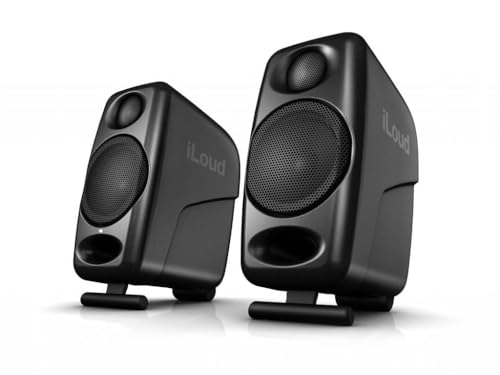 | IK Multimedia iLoud Micro Monitor | Pair: Powered stereo pair Driver: 3-inch woofer Inputs: RCA, aux, Bluetooth Desk control: Desktop/free-field DSP EQ Headphone jack: Not verified in saved listing | Check Price on Amazon |
 | M-Audio BX3 | Pair: Powered stereo pair Driver: 3.5-inch woofer Inputs: TRS, RCA, 3.5 mm Desk control: High/low EQ, active-side switch Headphone jack: Not verified in saved listing | Check Price on Amazon |
1. PreSonus Eris 3.5 — Best for Front-Panel Access
An editor who alternates speakers and headphones may touch the front panel dozens of times in a day. The Eris 3.5 pair puts an aux input and a headphone jack there, while balanced TRS and RCA inputs handle equipment that stays connected behind the desk. The Amazon listing describes a complete powered stereo pair with 3.5-inch woofers and high/low acoustic tuning controls.
You can leave an interface connected to the rear input and use the front jack for a private pass, although the behavior of simultaneous sources needs checking. Compared with the JBL 104-BT, this pair is simpler when Bluetooth is not part of the job. The listing does not establish superior accuracy or settle the speaker revision.
Our Take Choose the Eris 3.5 if you edit at one desk and switch between a wired speaker feed and headphones. The input mix and front controls are its clear advantages here. Choose the JBL instead if several source types need one speaker pair.
- The front headphone jack puts a private listening option within reach during a dialogue pass.
- Rear TRS and RCA plus front aux give a wired desk several connection choices.
- High/low tuning lets you adjust placement without opening software.
- There is no Bluetooth input in this exact listing, unlike the JBL and iLoud pairs.
- The 3.5-inch pair is for a near desk, not a substitute for auditioning bass on larger playback systems.
2. Mackie CR3.5 — Best for Quick Desk Voicing
Speakers squeezed beside a display or close to a wall do not sit in an ideal listening position. The CR3.5 gives you two physical ways to react: a tone knob for a quick change and a location switch that the listing says adjusts bass for a wall-adjacent or more open position. The pair comes with isolation pads and starting cables, useful if this is the first speaker setup on the desk.
These controls are not a room calibration system. Do not make a mix sound flattering with the tone knob and call that an objective reference. Compared with the PreSonus, the Mackie pair emphasizes placement, and the PreSonus has the documented front headphone jack. For a room-noise comparison, make a separate headphone pass. Our desktop headphone-amplifier guide covers that setup.
Start with the location switch that matches where the speakers sit, then keep the tone setting stable while editing one project.Our Take Pick the CR3.5 when the desk position is compromised and a physical placement switch is useful. The included pads and cables simplify a first setup, but do not mistake its tone control for proof of a flat response.
- The location switch gives a wall-adjacent desk a documented setup choice.
- A physical tone knob is easier to reach than software EQ during an edit.
- Isolation pads and starter cables are included with the pair.
- A quick tone setting is easy to change between sessions, so repeatable decisions require a deliberate reference position.
- The saved title and bullets do not identify a headphone jack, so choose the PreSonus or JBL if that control is essential.
3. JBL 104-BT — Best for Multiple Sources
A laptop, an audio interface, and a phone can all end up on the same editing desk. The 104-BT offers balanced TRS, RCA, front aux, and Bluetooth input choices, and its front input control can select or combine sources according to the listing. This model is a powered stereo pair built around coaxial 4.5-inch drivers, so its layout and controls differ plainly from the two 3.5-inch pairs above.
For editing dialogue and checking picture sync, use the wired path from the laptop or interface. Bluetooth is convenient for casual playback from a phone, but the listing’s Bluetooth version alone does not establish a safe video-sync latency. The front headphone jack automatically mutes the speakers, a useful handoff when a cut needs a closer listen. If the audio feed comes through a dock, our dock audio-interference guide can help isolate a noisy connection before you blame the speakers.
Use TRS, RCA or aux for timeline review, and keep Bluetooth for a separate casual playback check.Our Take Choose the 104-BT when one pair must serve several desk sources and a quick headphone handoff. The added input options are useful, but Bluetooth should not be the timing reference for an edit.
- TRS, RCA, aux and Bluetooth cover more source types than the wired-only PreSonus or M-Audio pairs.
- Front input and volume controls stay within reach on a crowded desk.
- The front headphone jack mutes the speakers for a quick private check.
- Bluetooth gives no documented video-sync latency here, so a wired connection is still the editing path.
- The 4.5-inch driver is larger than the iLoud’s 3-inch driver, so check cabinet dimensions before ordering for a shallow desk.
4. IK Multimedia iLoud Micro Monitor — Best for a Small Desk
On a shallow desk, the speaker position may be set by the display before you can think about acoustics. The Amazon listing describes the iLoud Micro Monitor as a compact powered pair with 3-inch woofers and built-in DSP settings for desktop or free-field placement. It also names bass and treble adjustments, so there is a documented way to adapt the setup when the speakers cannot move farther from the work surface.
The Amazon listing names wired RCA and 3.5 mm aux input plus Bluetooth. Use the wire for timeline work. Bluetooth is a convenience for another device, not a verified low-latency monitoring mode. Check the pair price before buying. Compared with the M-Audio BX3, the iLoud is a smaller option chosen for placement, but it is not evidence of better measured sound at your desk.
Our Take Choose the iLoud Micro Monitor for a shallow editing desk where a compact pair and a desktop-placement setting are the deciding features. If the budget is firm and the total price crosses it, the wired BX3 is a simpler alternative on this page.
- Compact cabinets suit a laptop and display sharing one shallow desk.
- Desktop/free-field DSP settings address the actual placement choice on a small desk.
- RCA and aux inputs keep wired editing available alongside Bluetooth playback.
- The complete pair price may exceed a tight budget after tax and shipping.
- Its Bluetooth path is not documented as a video-sync reference, so timeline work still needs a wire.
5. M-Audio BX3 — Best Wired Starter Pair
If the editing desk already uses a wired output, paying for wireless playback may add nothing. The Amazon listing describes the BX3 as a complete active/passive stereo pair with manufacturer-stated 3.5-inch woofers and TRS, RCA and 3.5 mm input choices. Rear high and low EQ controls let you keep a consistent setting once you have placed the speakers.
The active-speaker side can be switched left or right. The switch helps when power and signal cables arrive from only one side of a narrow desk. Unlike the JBL and iLoud, this pair does not offer Bluetooth in the exact listing. Check the current pair price before ordering. If your interface has balanced outputs, verify the connector path rather than assuming every 3.5 mm laptop jack sends the same signal. Our Thunderbolt audio-interface overview explains that wider setup category.
Our Take Buy the BX3 when you want a straightforward wired pair and control over which cabinet carries the power connection. The active-side switch is its distinctive advantage for desk fit. Choose the PreSonus if front headphone access is a daily need.
- The active-side switch lets you route power and signal from the side that fits the desk.
- TRS, RCA and 3.5 mm inputs cover common wired editing outputs.
- High/low EQ controls give a repeatable adjustment once the speakers are placed.
- No Bluetooth input appears in this exact listing, unlike the JBL and iLoud pairs.
- The rear EQ controls are less convenient to reach than the Mackie’s tone knob.
Buying Guide
1. Check whether the budget price buys a pair
Some studio monitors are sold one cabinet at a time, and a tempting single-speaker price can double at checkout. Check that the offer is for two powered speakers or a powered-and-passive pair, not one monitor. All five exact listings in this guide identify a stereo pair, but the final cart still needs a current price check.
The five New pairs met our budget criterion in a September 26 Amazon US check, with the iLoud pair near that limit. Leave room for tax and shipping if your budget covers the full order rather than the pre-tax product price. Broader budget-monitor lists may mix per-speaker and per-pair pricing, so this shortlist stays at five distinct pairs rather than copying a competitor count.
2. Trace the wired signal from the editor to the speakers
A laptop headphone jack, a USB audio interface and a dock’s analog output are different starting points. Match the actual output connector to an input on the chosen pair before ordering cables. The PreSonus, JBL and M-Audio listings explicitly name TRS and RCA paths, while the iLoud names RCA and 3.5 mm aux. Our USB-C podcast interface guide covers interfaces when the speaker feed is only one part of a recording desk.
For timing-critical picture review, use a wired connection. Bluetooth support on the JBL and iLoud is useful for a phone or casual playback, but their listing data does not prove a video-sync latency. If a dock feed crackles, use the steps in our USB-C dock audio-crackling guide before replacing the speakers.
3. Place the pair before adjusting its sound
Both cabinets need a stable location near the listener rather than one hidden behind a display. Keep the left and right speakers at roughly similar distances from the chair as a starting arrangement, then listen from the position where you actually edit. A reflective desk and a nearby wall affect what reaches your ears, and the product bullets do not measure your room.
If the cabinets have to sit near a wall, use a documented placement control without assuming it is calibration. The Mackie has a location switch, the iLoud offers desktop/free-field DSP settings, and the PreSonus and M-Audio expose high/low adjustments. Set one repeatable position and compare a familiar clip before changing it again.
4. Keep a second listening path for dialogue and low bass
Compact desk speakers make it easier to catch level jumps, voice balance and rough edits, but a small woofer cannot tell the whole story about low bass or noise buried in a recording. Review the final cut on headphones as well as speakers, and check it on a modest consumer playback device when the audience will watch on one. Our USB-C studio microphone guide helps with the recording side of the same workflow.
If a screen’s built-in speakers go silent while the desktop pair works, check the computer’s selected audio output first. A display audio endpoint and the analog speaker output can both be present. Our USB-C monitor speaker troubleshooting guide covers that separate problem. Do not use a speaker purchase to solve a routing mistake.
FAQ
Are Bluetooth speakers suitable for editing video?
Use a wired input for timeline editing. The JBL 104-BT and iLoud Micro Monitor both offer Bluetooth for convenient playback, but neither listing provides a tested picture-to-sound latency for this use.
Bluetooth is still useful for a phone preview away from the editing application. Keep the wired path as your timing reference, and check the final export on the devices viewers actually use.
Do these prices buy one speaker or a pair?
Each exact product listing here describes a stereo pair. Some other studio-monitor listings are priced per cabinet, so confirm the product title and cart quantity whenever you compare this guide with another model.
The budget qualification came from a dated New-pair price check, not a promise about today’s total. Recheck tax, shipping and the current offer, especially for the iLoud pair near the price ceiling.
Do I need an audio interface for these speakers?
No. Each pair has at least one analog input that can be fed by a suitable computer output or cable, though the cable and level control you need depend on the device at your desk.
An interface becomes useful when you also record microphones, need a convenient monitor control or want a particular output connection. It does not make an unsupported claim about a speaker’s sound quality true, so keep the speaker choice tied to fit and connectivity.
Bottom Line
The PreSonus Eris 3.5 is the most direct pick for front-panel access on one compact desk. Choose the JBL 104-BT when several inputs and a speaker-muting headphone jack are the job, or the iLoud Micro Monitor when the physical desk space is the constraint. The Mackie CR3.5 gives you a placement switch, and the M-Audio BX3 gives a wired desk a selectable active side. Check today’s New pair price before you buy any of them.