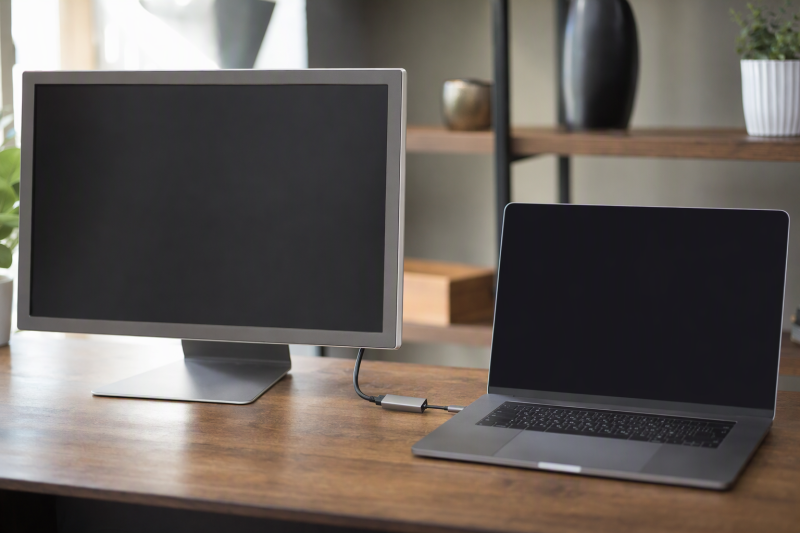
A USB-C to Mini DisplayPort adapter connects a laptop’s USB-C port to a monitor that has a Mini DisplayPort input. All five Amazon listings below state 4K at 60Hz, and each describes the same direction, a USB-C source feeding a Mini DisplayPort display. Three of them, the Answin, uptab and Cyberguys listings, name DisplayPort Alt Mode as a condition.
Every listing also rules out at least one Thunderbolt display, so look up the monitor’s model name as well as its connector. For a full-size DisplayPort monitor, see the USB-C to DisplayPort guide and the DisplayPort cable guide. For an HDMI display, see the USB-C to HDMI adapter guide, and for a new screen with a USB-C input, see the USB-C monitor guide.
Match the USB-C source and the monitor model before choosing an adapter, because every listing excludes at least one Thunderbolt display.USB-C to Mini DisplayPort Adapters Compared
| Image | Product | Details | Check Price |
|---|---|---|---|
 | Answin USB-C to Mini DisplayPort Adapter | Best fit: Thunderbolt 3 or DP Alt Mode laptop Stated video: 4K@60Hz DP Alt Mode: Stated as the condition for 4K@60Hz Thunderbolt displays: Not for Thunderbolt 1 or 2 Warranty: 1 year | Check Price on Amazon |
 | uptab USB-C to Mini DisplayPort Adapter | Best fit: Charging through the adapter Stated video: Up to 4096 x 2160 at 60Hz DP Alt Mode: Stated as a requirement Thunderbolt displays: Not for Apple Thunderbolt Cinema Display Warranty: 1 Year Limited Warranty | Check Price on Amazon |
 | USBCele USB-C to Mini DisplayPort Adapter | Best fit: Apple LED Cinema Display and a long warranty Stated video: 4k@60Hz DP Alt Mode: Not mentioned Thunderbolt displays: Not for Apple Thunderbolt Display (27 inch) Warranty: 24 months | Check Price on Amazon |
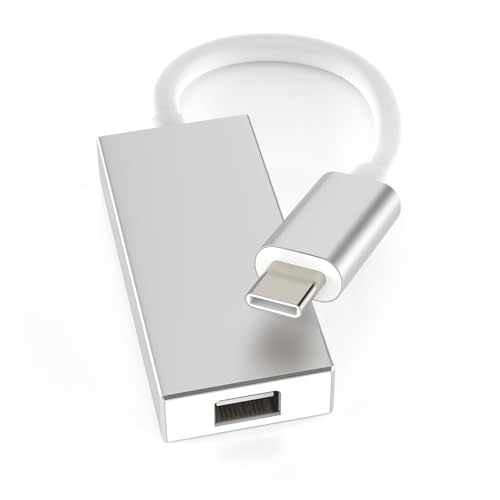 | Cyberguys USB-C to Mini DisplayPort Adapter | Best fit: Mirror or extended setups Stated video: Up to 4K@60Hz DP Alt Mode: Named in the compatibility list Thunderbolt displays: Not for Apple Thunderbolt Display (27 inch) Warranty: Not listed | Check Price on Amazon |
 | NFHK USB-C to Mini DisplayPort Adapter | Best fit: Mirroring to a TV or display Stated video: 4k and 1080p at 60hz DP Alt Mode: Not mentioned Thunderbolt displays: Not for Thunderbolt or Type-C displays Warranty: Not listed | Check Price on Amazon |
1. Answin USB-C to Mini DisplayPort Adapter — Best for Thunderbolt 3 Laptops
The Amazon listing for the Answin adapter states 4K@60Hz when the device’s USB-C port supports DP Alt Mode or Thunderbolt 3 and the original cable is used. The title names Thunderbolt 3 to Mini DP, and the listing says the adapter transmits video and audio. Amazon’s warranty field reads 1 year.
The listing says some low-end devices or non-standard interfaces may be reduced to 1080p@30Hz and that actual performance may vary with the device configuration. It also says the adapter does not support a Thunderbolt 3 to Thunderbolt 2 monitor or Thunderbolt 1 and Thunderbolt 2 ports.Our Take Choose the Answin adapter for a Thunderbolt 3 or DP Alt Mode laptop and a Mini DisplayPort monitor. Its listing is the only one of the five that states a 1080p@30Hz fallback.
- Answin states 4K@60Hz when the laptop’s USB-C port supports DP Alt Mode or Thunderbolt 3, a port condition a buyer can check before ordering.
- Answin names Thunderbolt 3 to Mini DP in its title and says the adapter transmits video and audio, the direction a laptop needs to feed a Mini DisplayPort monitor.
- Amazon’s warranty field gives the Answin adapter a stated term of 1 year.
- Answin says some low-end devices or non-standard interfaces may be reduced to 1080p@30Hz, and that performance may vary with the device configuration.
- Answin says it does not support Thunderbolt 1 or Thunderbolt 2 ports, or a Thunderbolt 3 to Thunderbolt 2 monitor, and those connections fall outside what the listing describes.
2. uptab USB-C to Mini DisplayPort Adapter — Best With USB-C Power Pass-Through
The Amazon listing for the uptab adapter (model UP-USBC1009) states up to 4096 x 2160 at 60Hz with 24-bit color and a USB-C Power Port with Power Delivery pass-through. The title says 4K 60Hz and Thunderbolt 3 compatible. The listing says the adapter transmits video and audio to Mini DisplayPort displays, monitors and projectors, and that no drivers or external power are needed.
The listing tells buyers to confirm that the device supports DisplayPort Alt Mode over USB-C before ordering. It says the adapter is not compatible with the Apple Thunderbolt Cinema Display and cannot be used in combination with other adapters. It also says a Mini DisplayPort cable is required for the USB-C Power Port. It gives no wattage for the Power Delivery pass-through, so compare a laptop’s charger rating with uptab’s own documentation. Amazon’s warranty field reads 1 Year Limited Warranty.Our Take Choose the uptab adapter for a laptop that needs to charge while it drives a monitor. Its listing is the only one of the five that states USB-C Power Delivery pass-through.
- uptab states a USB-C Power Port with Power Delivery pass-through, the feature a laptop needs to charge while it drives a monitor, and none of the other four listings mentions one.
- uptab states up to 4096 x 2160 at 60Hz with 24-bit color, and the listing asks buyers to confirm DisplayPort Alt Mode support before ordering.
- uptab says no drivers or external power are needed for an adapter that sends video and audio to Mini DisplayPort displays, monitors and projectors.
- uptab gives no wattage for the Power Delivery pass-through, so a buyer has to compare the laptop’s charger rating with uptab’s own documentation.
- uptab says the adapter is not compatible with the Apple Thunderbolt Cinema Display and cannot be used in combination with other adapters, and it requires a Mini DisplayPort cable for the USB-C Power Port.
3. USBCele USB-C to Mini DisplayPort Adapter — Best for a 24-Month Warranty
The Amazon listing for the USBCele adapter states 4k@60Hz, 1080p, 1080i and 720p with Extend and Mirror modes, and says no extra power or drivers are needed. The listing says the adapter sends audio and video from a USB-C laptop or computer to a monitor or projector with Mini DisplayPort or DisplayPort. The title names Thunderbolt 3 and the LED Cinema Display. A bullet states a 24-month free warranty, and Amazon’s warranty field reads 24 months, the longest term of the five listings.
For displays, the listing names the Apple LED Cinema Display in 24-inch (MB382LL/A) and 27-inch (MC007LL/A) sizes, and says the 30-inch model needs an official Apple Mini DisplayPort to Dual-Link DVI adapter. It warns that Mini DisplayPort is quite different from Thunderbolt, and that the adapter is not compatible with the Apple Thunderbolt Display (27 inch) or with Thunderbolt hard drives, displays, cables or connectors. It also says the adapter cannot be used with a Mini DP to HDMI cable or a Mini DP to DVI cable. Unlike the Answin, uptab and Cyberguys listings, it does not mention DP Alt Mode.
Our Take Choose the USBCele adapter for an Apple LED Cinema Display or another Mini DisplayPort monitor, and for the longest warranty term of the five listings.
- USBCele states 4k@60Hz with Extend and Mirror modes, covering both extending and mirroring the laptop’s screen.
- Amazon’s warranty field for the USBCele adapter reads 24 months, the longest term of the five listings.
- USBCele names the 24-inch (MB382LL/A) and 27-inch (MC007LL/A) Apple LED Cinema Display models, giving owners of those displays a model number to match.
- USBCele says the adapter is not compatible with the Apple Thunderbolt Display (27 inch), Thunderbolt hard drives, displays, cables or connectors, or Mini DP to HDMI and DVI cables.
- USBCele does not mention DP Alt Mode, the condition the Answin, uptab and Cyberguys listings state.
4. Cyberguys USB-C to Mini DisplayPort Adapter — Best for Mirror or Extended Setups
The Amazon listing for the Cyberguys adapter (brand Cyberguys!, manufacturer E-filliate, Inc.) states resolutions up to 4K@60Hz and both mirror and extended display modes. It says no drivers or software are needed and that video and audio stream once the adapter is connected. The title names USB-C (Thunderbolt 3) and the Apple LED Cinema Display.
The listing says a Mini DP cable is required, and its compatibility list covers devices that comply with the DisplayPort Alternate Mode. It warns that Mini DisplayPort is quite different from Thunderbolt, and that the adapter is not compatible with the Apple Thunderbolt Display (27 inch) or with Thunderbolt hard drives, displays, cables or connectors. It also says the adapter cannot be used with a Mini DP to HDMI cable or a Mini DP to DVI cable. Amazon’s warranty field is empty.
Our Take Choose the Cyberguys adapter for mirroring or extending a USB-C laptop’s screen on a Mini DisplayPort monitor, and plan for a Mini DP cable, which the listing says is required.
- Cyberguys states up to 4K@60Hz with mirror and extended display modes, so a USB-C laptop’s screen can be mirrored or extended.
- Cyberguys says no drivers or software are needed and that video and audio stream once the adapter is connected.
- Cyberguys ties its compatibility list to devices that comply with the DisplayPort Alternate Mode, giving buyers a stated standard to check on the laptop.
- Cyberguys says a Mini DP cable is required, so a buyer needs to plan for that cable.
- Cyberguys says the adapter is not compatible with the Apple Thunderbolt Display (27 inch), Thunderbolt hard drives, displays, cables or connectors, or Mini DP to HDMI and DVI cables.
5. NFHK USB-C to Mini DisplayPort Adapter — Best for Mirroring to a TV or Display
The Amazon listing for the NFHK adapter (model NF-UC-012-MDP) states 4k and 1080p at 60hz and says it lets a laptop with a USB-C port connect to any mini Displayport display. A bullet says it mirrors the laptop display to a Mini DisplayPort TV or display. The title lists tablet, phone and laptop use, and a bullet names Surface Pro and Go.
The listing says it does not work for Thunderbolt and Type-C displays. The title says Female Source, while a bullet says C Male Connector, so read the product photos before ordering. The listing does not mention DP Alt Mode, extended mode or drivers, and Amazon’s warranty field is empty.
Our Take Choose the NFHK adapter for mirroring a USB-C laptop’s screen to a Mini DisplayPort TV or display, the use its listing describes.
- NFHK states 4k and 1080p at 60hz, giving the buyer two stated resolutions at that refresh rate.
- NFHK states that it connects a laptop with a USB-C port to any mini Displayport display, and its title lists tablet, phone and laptop use.
- NFHK states that it mirrors the laptop display to a Mini DisplayPort TV or display, the use the listing describes for a TV.
- NFHK says it does not work for Thunderbolt and Type-C displays, so those display types are outside what it describes.
- The NFHK title says Female Source, while a bullet says C Male Connector, so a buyer should read the product photos before ordering.
Buying Guide
1. Check DP Alt Mode before anything else
Answin, uptab and Cyberguys name DisplayPort Alt Mode in their listings. The Answin listing states 4K@60Hz when the port supports DP Alt Mode or Thunderbolt 3, the uptab listing says to confirm DisplayPort Alt Mode over USB-C before ordering, and the Cyberguys listing ties its compatibility list to devices that comply with the DisplayPort Alternate Mode.
The USBCele and NFHK listings do not mention DP Alt Mode. The USBCele title names Thunderbolt 3, and the NFHK listing says only that the laptop has a USB-C port. A USB-C connector alone does not show that a port sends video, so the laptop maker’s documentation is the place to confirm video output.
2. Match the monitor, not just the connector
All five listings exclude at least one Thunderbolt display. The Answin listing excludes Thunderbolt 1 and Thunderbolt 2 ports and a Thunderbolt 3 to Thunderbolt 2 monitor, and the uptab listing names the Apple Thunderbolt Cinema Display. The USBCele and Cyberguys listings name the Apple Thunderbolt Display (27 inch), and the NFHK listing names Thunderbolt and Type-C displays.
Read the model name on the monitor, because USBCele and Cyberguys both say Mini DisplayPort is quite different from Thunderbolt. The Apple LED Cinema Display is the Mini DisplayPort model those two listings name in their titles, and the uptab listing names the Apple Thunderbolt Cinema Display as not compatible. The USBCele listing adds that it is compatible with more brands of monitors with Mini DisplayPort or DisplayPort.
3. Read the 4K 60Hz statement for what it covers
Every listing states 4K at 60Hz, and only Answin states a fallback. The uptab and Cyberguys listings say up to, the USBCele listing adds 1080p, 1080i and 720p, and the NFHK listing says 4k and 1080p at 60hz. The Answin listing says some low-end devices or non-standard interfaces may be reduced to 1080p@30Hz.
The monitor and the laptop set the limit as well. The Answin listing says its 4K@60Hz applies when the port supports DP Alt Mode or Thunderbolt 3 and the original cable is used, and that actual performance may vary with the device configuration. Check the monitor’s own specification too, because the 4K figure is the adapter’s ceiling and says nothing about the monitor.
4. Decide on power pass-through, a cable and a warranty
Only the uptab listing states power pass-through. It names a USB-C Power Port with Power Delivery and gives no wattage, so confirm the laptop’s charger needs with uptab. The other four listings state no charging port, and the USBCele listing says only that no extra power is needed.
Cyberguys says a Mini DP cable is required, and uptab says one is required for its USB-C Power Port. The Answin, USBCele and NFHK listings do not say whether a cable is needed. USBCele and Cyberguys also say not to use a Mini DP to HDMI or DVI cable with the adapter, and uptab says it cannot be used in combination with other adapters.
USBCele states the longest warranty, 24 months. Amazon’s warranty field reads 1 year for the Answin adapter and 1 Year Limited Warranty for the uptab adapter. It is empty for the Cyberguys and NFHK listings.
FAQ
Will these adapters work with an Apple Thunderbolt Display?
No listing says they will. USBCele and Cyberguys name the Apple Thunderbolt Display (27 inch) as not compatible, uptab names the Apple Thunderbolt Cinema Display, Answin excludes Thunderbolt 1 and Thunderbolt 2 ports, and NFHK excludes Thunderbolt displays.
The Apple LED Cinema Display is the Mini DisplayPort model the USBCele and Cyberguys titles name, so check which of the two Apple models you own.
Do these adapters work from a Mini DisplayPort source to a USB-C display?
No listing describes that direction. Each one describes a USB-C source feeding a Mini DisplayPort display, and the NFHK listing says it does not work for Type-C displays.
A Mini DisplayPort computer connected to a USB-C monitor needs a product whose listing states that direction.
Do I need drivers?
The uptab and USBCele listings say no drivers are needed, and the Cyberguys listing says no drivers or software are needed. The Answin bullet is headed Plug & Play, and the NFHK listing does not mention drivers.
If the monitor stays blank, check the laptop’s display settings and whether the USB-C port supports video output.
Can I charge the laptop through the adapter?
Only the uptab listing states it, through a USB-C Power Port with Power Delivery pass-through. It gives no wattage, so check the charger your laptop needs against uptab’s documentation.
The Answin, USBCele, Cyberguys and NFHK listings state no charging port.
Why would the monitor show 1080p instead of 4K?
The Answin listing says some low-end devices or non-standard interfaces may be reduced to 1080p@30Hz. The other four listings do not state a cause.
Check that the laptop’s USB-C port supports DP Alt Mode or Thunderbolt 3, the condition Answin states, and that the monitor itself is a 4K model.
Can I add a Mini DP to HDMI cable after the adapter?
Not according to the listings that address it. The USBCele and Cyberguys listings say the adapter cannot be used with a Mini DP to HDMI cable or a Mini DP to DVI cable, and the uptab listing says it cannot be used in combination with other adapters.
The Answin and NFHK listings do not address it.
Bottom Line
Choose the Answin adapter for a Thunderbolt 3 or DP Alt Mode laptop. Choose the uptab adapter to charge through it. Choose the USBCele adapter for the 24-month warranty and a named Apple LED Cinema Display. Choose the Cyberguys adapter for mirror or extended setups with a Mini DP cable. Choose the NFHK adapter for mirroring to a TV or display.
Confirm the laptop’s video output and the monitor’s model name before ordering any of them.