A USB-C port lock is a small physical blocker that discourages people from plugging unknown cables, drives, chargers, or peripherals into an unused port. For a shared laptop fleet, the choice comes down to blocker count, key count, stated material, and whether the plug sits correctly in the exact laptop housing.
Port locks are only one layer of control. A port lock does not secure an active port, inspect data, stop wireless transfers, replace endpoint management, or make a laptop theft-resistant. Use them where unused physical ports should remain visibly unavailable, then support that choice with software policy and an authorized key-handling process.
Choose a USB-C port lock by fleet coverage, spare-key needs, and a verified fit on one representative laptop before deploying it across every shared device.Best USB-C Port Locks for Shared Laptop Fleets Compared
| Image | Product | Details | Check Price |
|---|---|---|---|
 | PortPlugs 25-Pack Stainless Steel | Blockers: 25 Keys: 2 Material: SUS304 stainless steel, nickel plated Fit: Standard USB-C; Thunderbolt 3 and 4 stated | Check Price on Amazon |
 | PortPlugs 25-Pack Black | Blockers: 25 Keys: 2 metal keys Design: Low-profile black Fit: Standard USB-C; housings may affect fit | Check Price on Amazon |
 | PortPlugs 5-Pack Stainless Steel | Blockers: 5 Keys: 1 steel key Material: SUS304 stainless steel, nickel plated Fit: USB-C; Thunderbolt 3 and 4 stated | Check Price on Amazon |
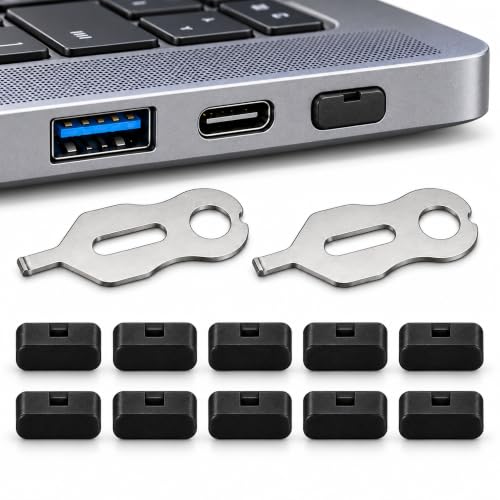 | PortPlugs 10-Pack Black | Blockers: 10 Keys: 2 metal keys Design: Low-profile black Fit: Standard USB-C; housings may affect fit | Check Price on Amazon |
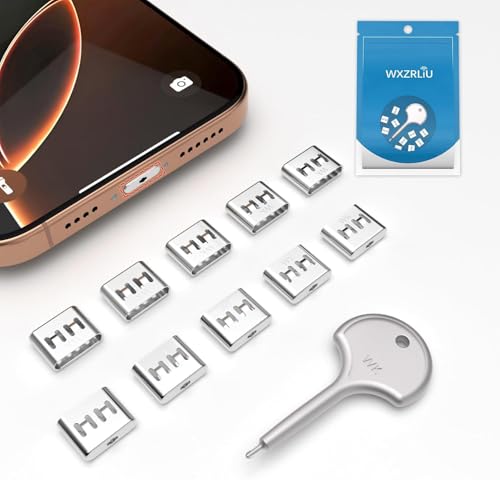 | WXZRLIU 10-Piece Stainless Steel Set | Blockers: 10 Keys: 1 Material: Stainless steel Fit: USB-C devices stated | Check Price on Amazon |
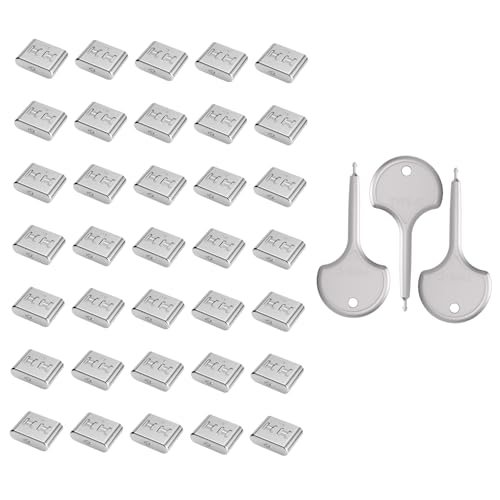 | PoParttg 35-Piece Set | Blockers: 35 Keys: 3 anti-break metal keys Material: Stainless steel and reinforced J-metal Fit: Type-C devices stated | Check Price on Amazon |
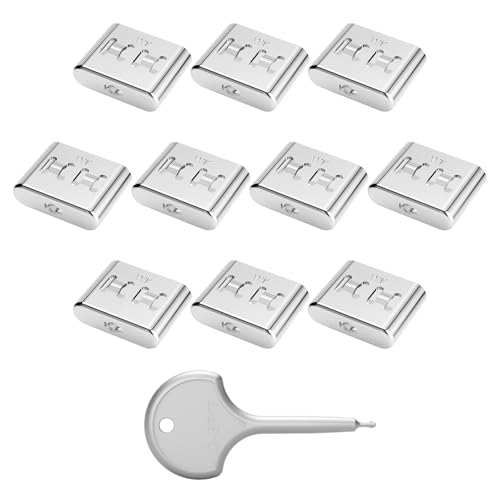 | UNTERING Detachable USB-C Blocker | Blockers: Not stated Keys: Steel key included; count not stated Material: Stainless steel Fit: Most USB-C laptops and tablets stated | Check Price on Amazon |
1. PortPlugs 25-Pack Stainless Steel — Best Overall for Small Fleets
The stainless PortPlugs set is the most complete starting point for a small shared fleet because it combines 25 blockers with two keys. The listing describes press-to-lock installation and key removal without software, tools, or IT configuration. One key can remain with the deployment technician while the second stays in a documented backup location.
The blockers are stated to use SUS304 stainless steel with nickel plating for resistance to corrosion and heat. PortPlugs says they fit standard USB-C connections on MacBooks, Windows laptops, Chromebooks, desktops, workstations, tablets, and Thunderbolt 3 and 4 devices. That broad claim still needs a local fit test, especially when a laptop has a recessed port or tight protective case.
A 25-blocker count, two keys, and stated SUS304 stainless steel make this the most balanced kit for a controlled small-fleet rollout. Our TakeBuy this PortPlugs 25-pack when an office, school, or lab needs one consistent blocker type across a modest number of unused USB-C ports. The two keys support a primary and backup custodian, while the stated stainless steel construction suits repeated use. Test one blocker on each laptop chassis before wider installation.
- Includes 25 blockers and two keys.
- States SUS304 stainless steel with nickel plating.
- Press-to-lock installation requires no software.
- Fit still needs verification on each laptop housing.
- Does not control ports that remain active and uncovered.
2. PortPlugs 25-Pack Black — Best Low-Profile Fleet Blocker
The black PortPlugs set also comes with 25 blockers and two metal removal keys, and its listing describes a low-profile fit in standard USB-C ports. It is aimed at classrooms, reception areas, kiosks, point-of-sale systems, training rooms, and other managed environments where unused connections should not be freely available.
PortPlugs explicitly notes that recessed ports, tight cases, and nonstandard housings can affect fit. That caveat is useful for fleet managers because USB-C defines the connector, not the space around it. The supplied record does not state the blocker material, so choose this set for its count, key arrangement, black finish, and stated low-profile form rather than assuming it matches the stainless specification of the first set.
Do not assume every standard USB-C opening has the same surrounding clearance, because recessed ports and tight cases may block installation or key access. Our TakeBuy the black PortPlugs 25-pack when a low-profile appearance and two-key administration suit public-facing devices. The set gives you coverage for 25 unused ports, and PortPlugs clearly warns about housing-related fit limits. Choose the stainless 25-pack above when a stated metal grade is important.
- Includes 25 blockers and two metal keys.
- Low-profile black design for standard USB-C ports.
- Listing directly addresses managed and public-facing systems.
- Blocker material is not stated in the supplied record.
- Recessed ports and tight cases may affect fit.
3. PortPlugs 5-Pack Stainless Steel — Best for One or Two Laptops
The smaller PortPlugs pouch comes with five stainless steel blockers and one matching steel key. Five blockers are enough for a primary laptop with spare blockers, a two-device home office, or a reception computer with several unused USB-C connections. It is also a small first purchase for checking the mechanism before you select a larger pack for a fleet.
The listing states SUS304 stainless steel with nickel plating and describes an internal latch released by the included key. It also names RoHS-compliant construction and compatibility with USB-C and Thunderbolt 3 or 4 devices. Because only one key is included, an organization should decide whether the key remains with IT or the local site owner before installation.
Buy the PortPlugs 5-pack for a single shared laptop, a tiny device pool, or a fit trial before bulk deployment. It has the same stated SUS304 stainless steel and nickel-plated construction as the larger steel set. The one-key bundle is less resilient for a fleet unless key custody is tightly controlled.
- Five blockers suit a small trial or a few devices.
- States SUS304 stainless steel with nickel plating.
- One matching steel removal key is included.
- One lost key can interrupt authorized port access.
- Five blockers do not stretch far in a multi-port fleet.
4. PortPlugs 10-Pack Black — Best for a Pilot Deployment
The PortPlugs 10-pack is a good size for a pilot, between a single-device trial and a 25-piece rollout. It includes two metal keys, which is practical at this count. One can support the test site while the other remains with central IT, security, or facilities. The listing names laptops, phones, kiosks, point-of-sale systems, and shared workstations.
The black blockers are described for standard USB-C ports and as sitting close to the device. As with the black 25-pack, PortPlugs warns that recessed openings, tight cases, and nonstandard housings can change fit. The supplied record does not state the blocker material, though it does state metal keys. The set is therefore a choice for deployment logistics rather than for a specified construction grade.
Ten blockers and two metal keys create a useful pilot size for testing fit, user impact, key custody, and support procedures before a broader rollout. Our TakeBuy the PortPlugs 10-pack when you want a controlled pilot across a few laptops or one public workstation area. Two keys make the test easier to administer than the five-pack, while the smaller blocker count limits waste if the chassis fit is poor. Record which ports are intentionally blocked before deployment.
- Ten blockers fit a small deployment pilot.
- Two metal keys support primary and backup custody.
- Low-profile black design for standard USB-C ports.
- Blocker material is not stated in the supplied record.
- Cases and recessed ports can interfere with fit.
5. WXZRLIU 10-Piece Stainless Steel Set — Best Alternative 10-Pack
WXZRLIU supplies 10 stainless steel USB-C blockers with one key. Its listing is written mainly for phones and travel, naming recent iPhone and Samsung models, but the physical blocker format can also fit the shared-device use case when the target USB-C housing accepts it. The supplied record gives no dimensions, so a sample fit remains essential.
The stated stainless steel construction is a point in its favor over listings that do not name a blocker material. However, the single key is a weaker administrative arrangement than the two-key PortPlugs 10-pack. An organization using this set should create a backup-access plan rather than distributing the only key informally.
Choose WXZRLIU for a stated stainless steel 10-pack only after accepting its single-key limitation and confirming the exact fleet fit. Our TakeBuy the WXZRLIU set when you need 10 stated stainless steel blockers and can keep one key under reliable control. It is a plausible alternative for a limited device group, but its listing is written for phones and gives less detail about fleet deployment than the PortPlugs sets. Test removal as well as insertion on a representative laptop.
- Includes 10 blockers for a small device group.
- Stainless steel construction is stated.
- Compact physical control requires no software.
- Only one key is included.
- The supplied record gives no blocker dimensions.
6. PoParttg 35-Piece Set — Best High-Count Kit
PoParttg offers the largest stated bundle in this group, 35 USB Type-C locks with three anti-break metal keys. The lock count makes it the obvious capacity option for offices, labs, cafes, and other environments with many shared devices. Three keys also allow central IT, local support, and a controlled backup to each hold access.
The listing describes high-grade stainless steel and reinforced J-metal components with an anti-slip design. The listing claims universal Type-C compatibility, but that language should not replace a chassis test. Cases, recessed ports, and manufacturing tolerances can still affect fit even when the connector itself is standard.
Buy the PoParttg 35-piece set when blocker count and three-key administration are the main priorities. The stated stainless steel and reinforced metal construction is a reasonable match for bulk use. Validate the universal-fit claim locally before committing all 35 pieces to production laptops.
- Largest stated set at 35 pieces.
- Includes three anti-break metal keys.
- Stainless steel and reinforced metal construction stated.
- Universal-fit language still requires local verification.
- The listing repeats a data-protection bullet without adding detail.
7. UNTERING Detachable USB-C Blocker — Best Single-Device Option
The UNTERING listing describes a detachable stainless steel USB-C blocker for laptops and tablets, installed with a snap-on mechanism and removed with an included steel key. It is presented for travel, workspaces, airports, and other high-traffic environments where a single device needs a physical barrier over an unused port.
The supplied record does not state how many blockers or keys are in the package. The missing count makes fleet budgeting difficult, so this blocker ranks behind the clearly counted sets. Consider it only when the live offer confirms the quantity and when the goal is one device or a replacement piece rather than a planned multi-laptop deployment.
Confirm the package quantity before ordering because the supplied record states stainless steel and an included key but does not give an item count. Our TakeBuy the UNTERING blocker only after confirming the live package count and testing the snap-on mechanism on the target device. Its stated stainless steel construction and detachable design can suit one travel or shared laptop. The missing quantity makes it a poor basis for fleet planning compared with the counted kits above.
- Stainless steel construction is stated.
- Detachable snap-on mechanism with steel key.
- Listing names laptops and tablets.
- Package quantity is not stated in the supplied record.
- No dimensions are provided for fit evaluation.
Buying Guide
1. Count unused ports, not just laptops
A shared laptop may have one USB-C port or several, and some must remain available for charging, docking, or displays. Inventory the unused ports that should be blocked on each device model before converting laptop count into order quantity. A 25-piece kit could cover 25 one-port devices or far fewer multi-port systems.
Record the intended active connections at the same time. Blocking the only charging or docking port can make a laptop unusable for its assigned workflow. Our guides to USB-C docking stations and Thunderbolt docks can help identify ports that the workstation still needs.
2. Pilot the physical fit
USB-C is a standard connector interface, but laptop housings, cases, recesses, and nearby contours differ. Test insertion, retention, and key removal on every chassis family before ordering a bulk pack. The black PortPlugs listings explicitly warn that recessed ports and tight cases may affect fit.
Use a noncritical representative laptop and inspect the port afterward. A blocker should install and release without forcing the connector or scratching the housing. The five-pack is useful for a small test, while the 10-pack with two keys is the better choice for a broader pilot.
3. Build a key-custody process
The blocker is useful only when authorized staff can restore a port without searching for a missing key. Assign a primary custodian and a documented backup location before installing anything. Two-key and three-key sets make that arrangement easier than single-key bundles.
Do not leave a removal key beside the public workstation it protects. Key access should follow the same support boundary as other physical IT controls. A simple asset record can note blocked ports, blocker type, key owner, installation date, and approved exceptions.
4. Keep software controls in place
A port blocker covers only the physical opening where it is installed. It does not disable an uncovered port, manage user accounts, scan devices, or protect wireless interfaces. Endpoint configuration and organizational policy are the larger part of the security work.
Use blockers to reinforce a defined port policy, not to invent one. Device encryption, least-privilege access, patching, and managed peripheral rules are separate controls. A USB data blocker serves another narrow use case by allowing power while interrupting data lines on a connection that remains in use.
5. Separate port blocking from laptop tethering
USB-C blockers discourage unwanted use of unused ports. They do not physically anchor the laptop to a desk or cart. A person can still move the computer unless another device or fixture addresses theft.
For a public counter or shared classroom, assess both risks independently. Use a laptop cable lock for physical restraint when the chassis and furniture support it. Our guides to laptop security cable locks and portable laptop safes cover equipment designed for physical device retention.
6. Choose pack size with spares
A deployment needs replacements for lost blockers, damaged pieces, and newly added laptops. Order a small spare pool after the verified port count is known, but avoid buying a large untested kit merely because its per-piece count looks efficient.
Five pieces are enough for one or two devices, 10 for a pilot, 25 for a small fleet, and 35 for a larger rollout. Look at key count as well as blocker count because operational access must survive one misplaced key. Store unused pieces and keys in labeled inventory rather than mixing mechanisms from different sets.
FAQ
What does a USB-C port lock actually do?
A port lock is a physical blocker you place in an unused USB-C opening to discourage cable or peripheral insertion. It is a visible access barrier rather than a software security control, and an authorized user removes it with the matching key.
The blocker does not monitor traffic or protect another active port. Its job is limited to keeping a covered physical connector unavailable until an authorized person removes it.
Will one USB-C blocker fit every laptop?
No, a standard USB-C connector does not guarantee identical clearance around every laptop port. Recessed openings, protective cases, and nonstandard housings can affect fit, as the PortPlugs listings acknowledge.
Test one device from every laptop model in the fleet. Confirm both safe insertion and clean removal before treating a kit as compatible.
Can a port lock stop data theft?
It can discourage an unauthorized wired connection through the specific covered port, but it cannot stop every path for data loss. Active ports, wireless connections, user accounts, and software behavior remain outside its control.
Use it as one physical layer in a broader program. Encryption, endpoint management, access policy, and monitoring address risks the blocker cannot reach.
How many removal keys should a fleet keep?
A fleet should keep at least a controlled primary key and a documented backup when the chosen kit permits it. Two-key and three-key bundles simplify continuity if one custodian is absent or one key is lost.
Single-key kits can still work for a tiny deployment. The organization should decide how it will regain authorized access before installing those blockers.
Can I block a Thunderbolt port with a USB-C blocker?
Yes, when the Thunderbolt port uses the USB-C connector shape and the blocker fits its physical housing. Two supplied PortPlugs listings explicitly name Thunderbolt 3 and 4 devices, but fit still needs verification.
Blocking that port also removes access to its charging, display, docking, and data functions. Confirm the workstation does not depend on the port before covering it. See our Thunderbolt 4 guide and USB-C versus Thunderbolt comparison for those functional differences.
Should every unused USB-C port be blocked?
No, ports should be blocked according to a documented device-use policy and support plan. Some apparently unused ports may be needed for charging, recovery, displays, or temporary service work.
Map the laptop workflow before installation. Block only the connections that the assigned users do not need, and keep authorized removal available for maintenance.
Bottom Line
The PortPlugs 25-pack in stated SUS304 stainless steel is the strongest all-around starting point for a small shared fleet. Choose the black 25-pack for a low-profile public-facing deployment, and the stainless five-pack for one or two laptops.
Choose the black 10-pack for a pilot, and WXZRLIU as an alternative stated stainless 10-pack. Choose PoParttg for the largest 35-piece count. Choose UNTERING only after confirming its package quantity.