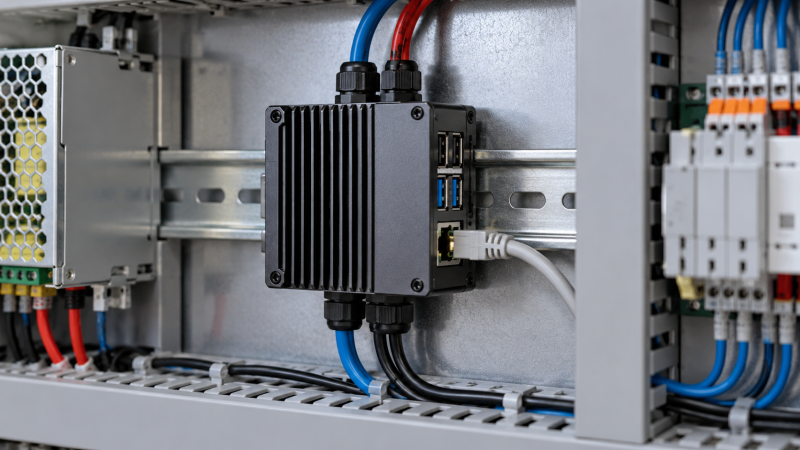
A DIN-rail case lets you fix a Raspberry Pi to the same rail as the rest of an electrical panel or equipment cabinet, instead of leaving it loose on a desk. The cases differ in Pi generation, integrated rail mount or separate clip, active-cooler support, HAT clearance, wall or VESA alternatives, metal construction, and whether the case ships with the parts needed for an immediate panel build.
All five cases explicitly support Raspberry Pi 5 and rail mounting or rail-mount support. A box made only for the Pi 4, a generic bracket, or a separate clip does not solve the same Pi 5 enclosure decision. Start with the physical mounting method and cooling clearance. Then decide whether NVMe, AI, wall mounting, or VESA support belongs in the finished installation.
Choose an integrated rail mount and Pi 5 cooling clearance first, then select the enclosure space and alternative mounting options the panel actually needs.Best Industrial DIN-Rail Mount Cases for Raspberry Pi Compared
| Image | Product | Details | Check Price |
|---|---|---|---|
 | GeeekPi Armor Lite V5 | Best fit: Complete Pi 5 panel enclosure Mount: DIN rail Cooling: Pi 5 active cooler Board support: Pi 5 2 GB to 16 GB | Check Price on Amazon |
 | GeeekPi DIN Rail Case | Best fit: Simple Pi 5 active-cooled rail mount Mount: DIN rail Cooling: Active cooler Board support: Pi 5 2 GB to 16 GB | Check Price on Amazon |
 | Waveshare Case D | Best fit: HAT-friendly industrial metal case Mount: Rail or wall Cooling: Official fan support Expansion: Various HATs and modules | Check Price on Amazon |
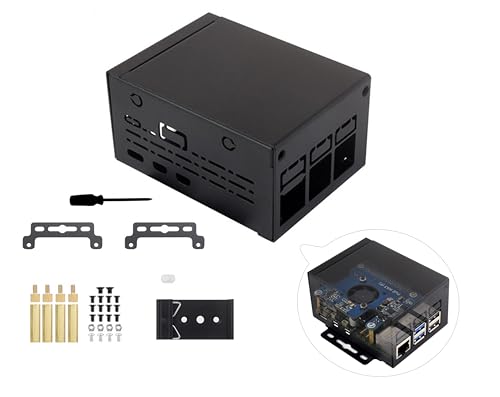 | Wonrabai Industrial Metal Case | Best fit: NVMe HAT industrial rail installation Mount: Rail or wall Cooling: Official fan support Expansion: Pi 5 NVMe HAT space | Check Price on Amazon |
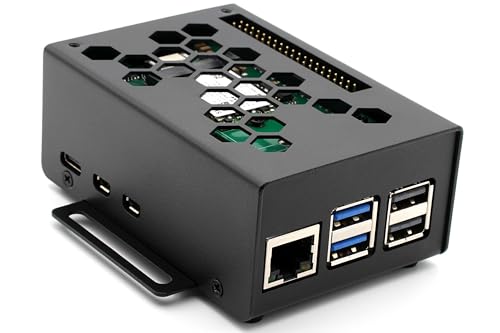 | KKSB Industrial Case | Best fit: Steel Pi 5 industrial enclosure Mount: DIN rail support, clip separately sold Build: Powder-coated steel Extras: M.2 or AI HAT room, VESA 75 | Check Price on Amazon |
An industrial Pi installation can also use a DC mini UPS, managed network switch, power meter, NVMe enclosure, USB-C cable tester, thermal camera, fume extractor, and precision tweezers during installation and maintenance.
1. GeeekPi Armor Lite V5 — Best Complete Pi 5 Panel Enclosure
A Raspberry Pi that has to sit on the same rail as low-voltage control or network equipment needs a case that mounts on that rail and includes cooling. GeeekPi lists the Armor Lite V5 as a DIN-rail case with an active cooler for Raspberry Pi 5 boards from 2 GB through 16 GB. GeeekPi describes the unit as a modular box for electrical panels. The included active cooler is the main reason to select it over a bare mounting bracket.
The case is built around Pi 5 panel placement, not around broad HAT expansion claims. It suits a straightforward control or appliance build that needs a stated rail mount and cooling without a larger industrial metal enclosure. Skip it if the build needs HAT or NVMe room. Otherwise, confirm the Pi board capacity and the panel space around the active cooler before ordering.
Decision point: Pi 5 support from 2 GB to 16 GB, DIN-rail mounting, an active cooler, and modular electrical-panel placement suit a complete basic installation. Our TakeChoose Armor Lite V5 when a Pi 5 needs a direct DIN-rail enclosure with active cooling and no elaborate storage or display expansion. It is the clean choice for a conventional panel-mounted appliance that should be contained and cooled from the start.
- DIN-rail support gives a Pi 5 a stated mounting path in electrical panels and modular control cabinets.
- An included Pi 5 active cooler makes thermal management part of the listed enclosure package.
- Support for 2 GB, 4 GB, 8 GB, and 16 GB boards covers the stated Pi 5 memory configurations.
- The modular-box design is directly aimed at panel installation instead of a loose desktop placement.
- The listing focuses on panel mounting rather than the NVMe HAT clearance offered by Wonrabai’s industrial metal case.
- No rail-or-wall alternative is stated, unlike the dual mounting options on Waveshare Case D.
2. GeeekPi DIN Rail Case — Best Simple Active-Cooled Rail Mount
GeeekPi DIN Rail Case pairs Pi 5 support from 2 GB through 16 GB with an active cooler and an explicitly stated DIN-rail mount. It is a simpler panel case, for a buyer whose main requirement is a Pi fixed to a rail and cooled, not a steel enclosure with additional wall mounting or HAT space.
The direct Pi 5 scope helps because many generic rail brackets in this category target older boards. It does not claim NVMe, AI HAT, display, or VESA capability. The narrow scope suits a panel build that only needs a Pi, its cooling solution, and a secure rail position.
Decision point: Pi 5 2-to-16-GB support, a DIN rail, and active cooling favor a compact uncomplicated panel mount. Our TakeChoose GeeekPi DIN Rail Case when the installation calls for an uncomplicated active-cooled Pi 5 mount. It is the direct alternative to Armor Lite V5 when the buyer wants the same core rail and cooling requirements without seeking extra case features.
- DIN-rail support fixes the Pi 5 into a stated modular electrical-panel installation pattern.
- An active cooler is included for a known Pi 5 thermal component in the compact enclosure.
- Support for four Pi 5 memory capacities from 2 GB to 16 GB gives clear board compatibility.
- The simple case specification avoids adding displays, drives, or desktop extras to a panel appliance build.
- The listing does not state rail-or-wall flexibility, unlike the industrial metal cases from Waveshare and Wonrabai.
- It does not list space for NVMe or AI HATs required by a more expansion-heavy Pi 5 installation.
3. Waveshare Case D — Best HAT-Friendly Industrial Metal Case
Waveshare Case D is an industrial metal Pi 5 enclosure with rail-mount and wall-mount support, larger internal space, official fan support, and room for HATs. It fits a cabinet build that may later need a different physical position or added module.
The listing says it supports most Pi 5 HATs, modules, and accessories. It does not state that a fan is included, so treat fan support as clearance information and add the cooling part to the installation plan.
Choose Waveshare Case D when an industrial Pi 5 needs flexible rail or wall placement and room for HATs. It suits a cabinet build that may change modules, provided the fan is separately selected.
- Rail-mount and wall-mount support give a Pi 5 two stated placement choices in one metal case.
- Larger internal space is listed for official cooling hardware and varied Pi 5 HAT or expansion boards.
- Compatibility with most HATs and modules supports installations that will add function beyond a bare Pi.
- Official fan support gives buyers a named thermal-clearance path for an expanded Pi 5 enclosure.
- Fan support does not state an included fan, so cooling remains a separate parts decision.
- The broad HAT clearance can be unnecessary for a basic rail-mounted Pi needing only active cooling.
4. Wonrabai Industrial Metal Case — Best NVMe HAT Industrial Rail Installation
Wonrabai Industrial Metal Case supports rail or wall mounting, an official cooling fan, and various Pi 5 NVMe HATs. It is a storage-oriented industrial case, for builds where fast Pi storage belongs inside the mounted enclosure.
The case does not state an included NVMe HAT, SSD, or fan. Confirm those components and their physical clearance before installing it in the cabinet. The extra planning pays off when the Pi needs internal NVMe storage.
Decision point: Metal construction, rail or wall mounting, official-fan space, and Pi 5 NVMe HAT clearance suit industrial storage appliances. Our TakeChoose Wonrabai Industrial Metal Case when a rail-mounted Pi 5 needs NVMe HAT room and selected cooling hardware. It is the industrial storage option, not a complete drive-and-fan kit.
- Pi 5 NVMe HAT space makes this metal case a stated fit for industrial storage-equipped installations.
- Rail-mount and wall-mount support gives one enclosure two installation paths for cabinets or surfaces.
- Larger internal space is stated for an official cooling fan and additional Pi 5 HAT hardware.
- The industrial metal design keeps a storage Pi more protected than an open board or generic case.
- The case provides NVMe HAT space, but it does not state that an NVMe HAT or SSD is included.
- Official fan support requires the buyer to select and add that cooling component separately.
- A storage-focused HAT enclosure adds more planning than the simple GeeekPi active-cooled cases.
5. KKSB Industrial Case — Best Steel Pi 5 Industrial Enclosure
KKSB Industrial Case is a powder-coated steel Pi 5 enclosure with M.2 NVMe and AI HAT room, VESA 75 and DIN-rail support, a power button, ventilation, and official active-cooler clearance. Its feature set suits installations that may use either a panel rail or display mount.
The DIN-rail clip is sold separately. Budget for it and add it to the order, because it is a required purchase for rail mounting and not a small optional accessory. The case offers steel construction and HAT room, but an immediate rail installation needs the extra mounting part.
Decision point: Steel construction, M.2 or AI HAT room, VESA 75, DIN rail support with a separate clip, and active-cooler clearance suit flexible deployments. Our TakeChoose KKSB Industrial Case when a Pi 5 needs steel construction, HAT room, VESA placement, and an optional rail path. Add the separately sold clip when DIN rail installation is a requirement.
- Powder-coated steel gives the Pi 5 a stated industrial enclosure material for durable installations.
- Space for M.2 NVMe HATs and the official AI HAT supports storage or accelerator expansion.
- VESA 75 and DIN-rail support give the case two stated installation approaches beyond a desk.
- Honeycomb ventilation and spacer clearance preserve airflow space for the official Pi 5 active cooler.
- The DIN-rail clip is sold separately, so rail installation needs one more confirmed accessory purchase.
- Its VESA, HAT, and steel-case features are more than a simple active-cooled panel appliance requires.
Buying Guide: Choosing an Industrial DIN-Rail Raspberry Pi Case
Confirm the mount is integrated and matches the Pi generation
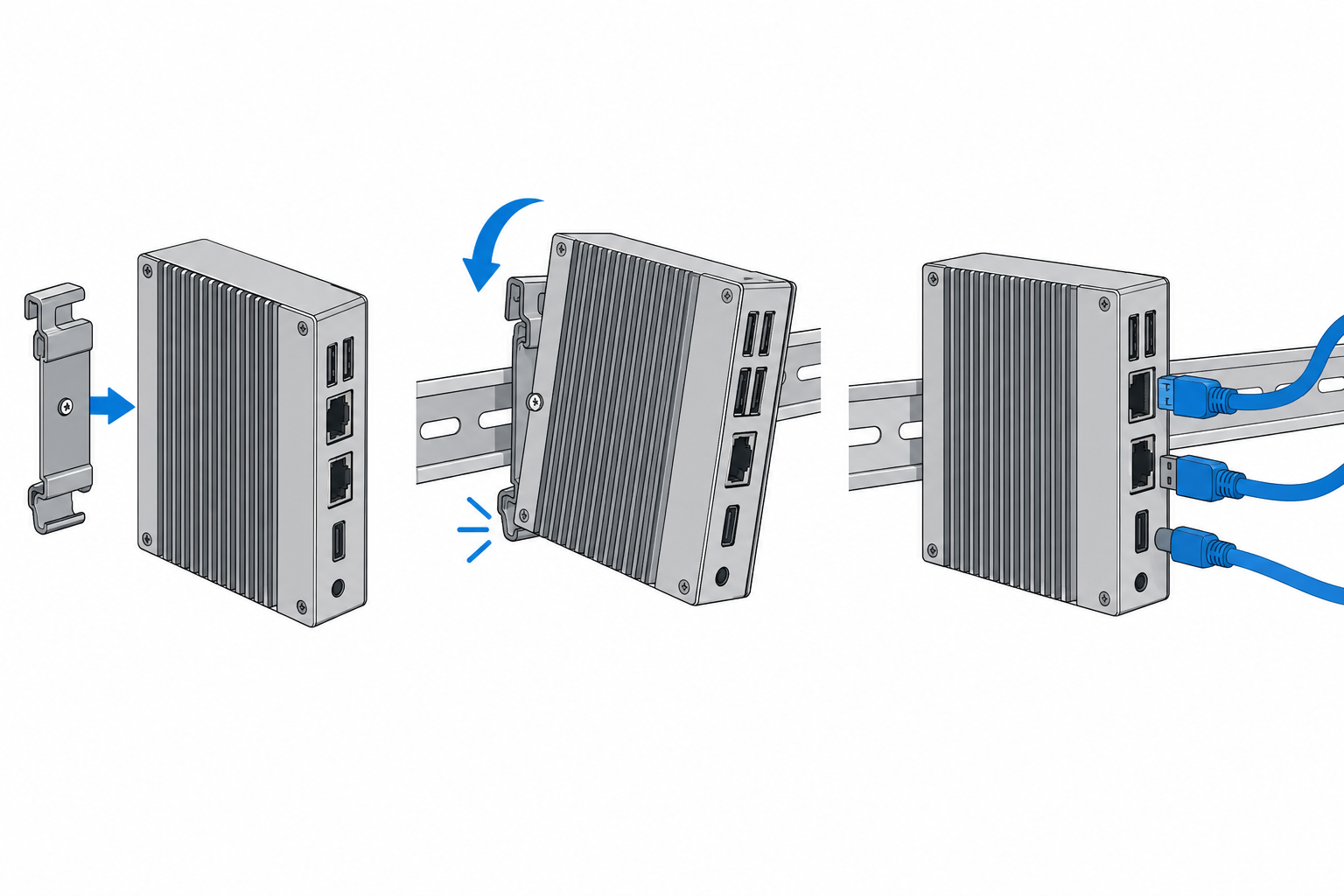
Start by confirming the case itself supports the intended rail installation. GeeekPi Armor Lite V5 and GeeekPi DIN Rail Case explicitly mount a Pi 5 on DIN rail and list support from 2 GB through 16 GB. Either case is more useful than a generic bracket made for older boards when a panel needs a defined Pi 5 enclosure.
Some industrial cases broaden placement options. Waveshare Case D and Wonrabai list rail and wall mounting, while KKSB lists DIN support with a separately sold clip. Select an integrated rail case when the installation should need the fewest parts. Before choosing a flexible option, account for every mounting accessory.
Treat cooling clearance as an enclosure requirement
Pi 5 cooling has to fit the case, not just the board. The GeeekPi cases include active coolers, so the package states a cooling solution from the start. The GeeekPi approach suits a basic panel appliance that does not need extra HAT room.
Industrial metal cases take a different approach. Waveshare and Wonrabai support the official cooling fan, while KKSB provides ventilation and active-cooler airflow clearance. Fan support is not the same as an included fan, so add cooling hardware to the build list.
Reserve HAT space only for hardware the installation needs
HAT clearance helps when a Pi will do more than control and networking. Wonrabai explicitly leaves room for Pi 5 NVMe HATs, so it suits a rail-mounted storage appliance. Waveshare Case D describes broader HAT and module space for cabinet projects that change over time.
KKSB accommodates M.2 NVMe and official AI HATs, so it suits storage or accelerator designs. A basic control appliance can use the smaller GeeekPi cases instead, because unused clearance does not improve panel density or simplify wiring.
Plan wall and VESA alternatives before committing to rail hardware
DIN rail is not the only useful industrial placement. Waveshare Case D and Wonrabai both state wall-mount support, which can help with a cabinet sidewall or machine frame installation. Select that flexibility only when the build has a plausible need to move away from the rail.
KKSB adds VESA 75 support alongside its rail support. VESA mounting suits a Pi behind a display or on equipment that uses that standard. If the installation will use DIN rail, order the case’s separately sold rail clip as well.
Keep the bill of materials visible
What comes in the box decides whether you can mount the case right away. GeeekPi Armor Lite V5 and GeeekPi DIN Rail Case include active coolers, while Waveshare and Wonrabai only state support for official fans. Your first order needs the Pi, correct power hardware, and a fan wherever the listing does not include one.
The KKSB case has one part that is easy to miss. Its DIN-rail clip is sold separately, even though the case supports rail mounting. Put the clip on the same list as the Pi, HAT, fan, and mounting hardware, so the case doesn’t arrive without its rail attachment.
Frequently Asked Questions
Do these cases work with Raspberry Pi 5?
Yes, all five cases state Pi 5 compatibility. GeeekPi’s two cases list Pi 5 boards from 2 GB through 16 GB, so their board range is explicit for panel builds.
The other three cases state Pi 5 support with expansion clearance. Waveshare Case D and Wonrabai Industrial Metal Case support Pi 5 HAT arrangements, while KKSB names Pi 5 M.2 and AI HAT room. Match the enclosure to the board and planned HAT.
Is an active cooler included with every DIN-rail case?
No. GeeekPi Armor Lite V5 and GeeekPi DIN Rail Case include an active cooler, so cooling comes with those two listed packages.
Waveshare and Wonrabai state official fan support, while KKSB states airflow clearance. Fan support and airflow clearance mean a cooler fits, not that one is included, so plan the cooler separately.
Can I mount these cases on a wall instead of DIN rail?
Some can. Waveshare Case D and Wonrabai Industrial Metal Case both list rail and wall mounting, so you can choose rail or wall placement.
KKSB adds VESA 75 support for display-related placements. GeeekPi’s entries emphasize DIN rail, so select a wall-capable case only if you need that alternative.
Which case supports an NVMe HAT?
Choose an enclosure that specifically lists that clearance. Wonrabai Industrial Metal Case names Pi 5 NVMe HAT space, while KKSB lists room for M.2 NVMe HATs.
The HAT and SSD remain separate components. Waveshare Case D supports various HATs, but confirm the exact HAT dimensions, fan clearance, and storage hardware before closing the cabinet.
Why does the KKSB case need a separate DIN-rail clip?
The KKSB case supports DIN rail, but the clip is sold separately according to its listing, so the case alone does not complete the rail attachment.
Selling the clip separately can be useful when the same steel case uses VESA 75 mounting instead. For a rail build, add the clip to the order along with the Pi, power, HAT, and active cooler.
Bottom Line
Choose GeeekPi Armor Lite V5 for an active-cooled Pi 5 rail enclosure. Choose Waveshare Case D for metal construction with HAT clearance and rail or wall mounting. Choose Wonrabai Industrial Metal Case when a rail-mounted Pi needs room for an NVMe HAT.