WAVLINK sells both small USB-C hubs and larger docks, but the number of video sockets does not tell you how many independent screens a laptop can drive. DisplayLink models need software, a Thunderbolt dock needs a compatible host, and pass-through power depends on the charger and laptop.
Match the host connection and display method first, then check power and the ports you need.| Image | Product | Best fit | Host | Displays | Ports | Power and limit | Check Price |
|---|---|---|---|---|---|---|---|
 | WAVLINK UG69PD2 Pro | Two DisplayLink displays with charging | USB-C; DisplayLink | 2 up to 4K60; HDMI/DP choices | 6 USB, Gigabit Ethernet, audio | Up to 100W host; no HDCP | Check Price on Amazon |
 | WAVLINK UG69DK1 | Dual displays without laptop charging | USB-A or USB-C; DisplayLink | 2 up to 4K60; HDMI/DP choices | 6 USB-A, Gigabit Ethernet, audio | No laptop charging; driver required | Check Price on Amazon |
 | WAVLINK UG63PD25 4K | Three-display work desk | USB-C video and charging; DisplayLink | 1 x 4K60 + 2 x 2K60 | 6 x 10Gbps USB, Gigabit Ethernet, audio | 130W adapter; up to 100W host | Check Price on Amazon |
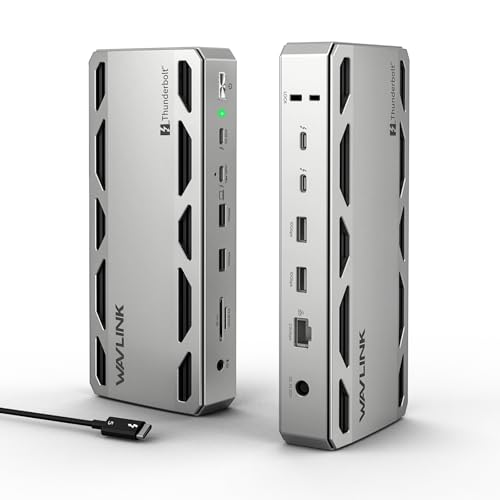 | WAVLINK UTD58 | Thunderbolt 5 expansion | Thunderbolt 4 or 5 | Up to 3 on TB5 Windows; Mac up to 2 | 3 downstream TB5, 4 USB-A, 2.5GbE | Up to 140W host; video adapters separate | Check Price on Amazon |
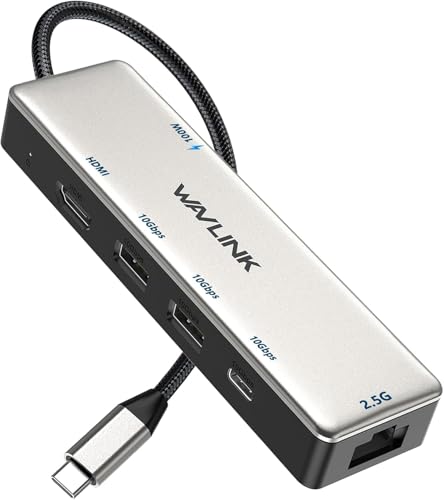 | WAVLINK UHP3414PRO | Single display and 2.5GbE | USB-C with video output | HDMI 4K120 per listing | 2 USB-A, 1 USB-C data, 2.5GbE | 100W input, up to 85W host; charger separate | Check Price on Amazon |
 | WAVLINK UHP3413 | Basic HDMI and Gigabit Ethernet | USB-C with video output | HDMI 4K30 | 3 USB-A, Gigabit Ethernet | 100W input, up to 85W host; charger separate | Check Price on Amazon |
1. WAVLINK UG69PD2 Pro — Best Dual DisplayLink Dock With Charging
The Amazon listing for the UG69PD2 Pro describes two displays up to 4K at 60Hz, with dual HDMI, HDMI plus DisplayPort, or dual DisplayPort connections. The four video sockets make two display paths, not four screens. Amazon and WAVLINK both say macOS needs the DisplayLink Manager app, and both say the dock does not play HDCP-protected content such as Netflix or Hulu.
WAVLINK’s page states USB Power Delivery of up to 100W to the connected laptop for the Pro version, with a 130W adapter. WAVLINK lists four USB-A and two USB-C ports at 5Gbps, plus Gigabit Ethernet and separate audio input and output jacks.
Display limit: Two HDMI and two DisplayPort sockets give a choice of connectors for two screens, not four.Our Take Choose the UG69PD2 Pro for a dual-monitor desk when DisplayLink software and its HDCP limitation fit the work.
- The UG69PD2 Pro suits a dual-monitor desk, because the Amazon listing describes two displays up to 4K at 60Hz.
- Amazon lists dual HDMI, HDMI plus DisplayPort, or dual DisplayPort connections, a choice of connectors for the two screens.
- WAVLINK specifies up to 100W charging to the connected laptop for the Pro version, with a 130W adapter.
- WAVLINK lists four USB-A and two USB-C ports at 5Gbps, plus Gigabit Ethernet and separate audio input and output jacks.
- Amazon and WAVLINK both say macOS needs the DisplayLink Manager app, so a Mac needs that app installed.
- Amazon and WAVLINK say the dock does not play HDCP-protected content, such as Netflix or Hulu.
- Amazon lists four video sockets, but they make two display paths, not four screens.
2. WAVLINK UG69DK1 — Best Dual Displays Without Laptop Charging
Amazon says the UG69DK1 uses DisplayLink to connect up to two external monitors at 4K@60Hz through one USB connection. It lists dual HDMI, HDMI plus DisplayPort, or dual DisplayPort, and says DisplayLink driver installation is required for video output. WAVLINK’s page shows the same two HDMI and two DisplayPort sockets and names Windows and Mac OS X as supported systems.
Unlike the UG69PD2 Pro, the UG69DK1 does not provide laptop charging, according to the Amazon listing. Amazon says it works with USB-A, USB-C, USB4 and Thunderbolt laptops and lists six USB-A ports, Gigabit Ethernet and a 3.5mm audio jack. WAVLINK’s page rates the six USB ports at 5Gbps. Amazon says the dock is not compatible with Linux and is not designed for gaming, high-frame-rate video editing or DRM-protected streaming.
Our Take Pick the UG69DK1 for a two-screen office setup when USB-A host flexibility is useful and separate laptop power is acceptable.
- Amazon says the UG69DK1 supports up to two external monitors at 4K@60Hz through one USB connection.
- Amazon says the dock works with USB-A, USB-C, USB4 and Thunderbolt laptops, so a USB-A laptop is a supported host.
- Amazon lists six USB-A ports, Gigabit Ethernet and an audio jack.
- Amazon lists dual HDMI, HDMI plus DisplayPort, or dual DisplayPort connections, and WAVLINK’s page shows the same two HDMI and two DisplayPort sockets.
- Amazon says the dock does not provide laptop charging, so the laptop keeps its own power adapter.
- Amazon says DisplayLink driver installation is required for video output on the UG69DK1.
- Amazon says the dock is not compatible with Linux and is not designed for gaming or DRM-protected streaming.
3. WAVLINK UG63PD25 4K — Best Three-Display Workstation
The Amazon listing for the UG63PD25 describes one 4K 60Hz screen plus two 2K 60Hz screens, and WAVLINK’s page gives the other two displays as 2560×1600 at 60Hz. Amazon and WAVLINK list three HDMI and two DisplayPort sockets. WAVLINK describes a dedicated HDMI All-Mode port for 4K output and says the DisplayPort and HDMI ports for displays 1 and 2 cannot be used at the same time.
WAVLINK says to check that the host USB-C port supports both video output and charging, and to install the DisplayLink driver to activate multi-display output. Amazon says the dock does not support USB-A laptops. Both sources give a 130W adapter and 100W charging to the laptop, and WAVLINK lists four USB-A and two USB-C ports at 10Gbps, Gigabit Ethernet and a four-pole audio jack.
Our Take Choose the UG63PD25 for a three-screen work desk when the host supports video and charging and DisplayLink software is acceptable.
- The UG63PD25 suits a three-screen work desk, because the Amazon listing describes one 4K screen and two 2K screens at 60Hz.
- Amazon and WAVLINK list three HDMI and two DisplayPort sockets, which serve three screens.
- WAVLINK lists a 130W adapter and 100W charging to the laptop, and Amazon gives the same two figures.
- WAVLINK lists four USB-A and two USB-C ports at 10Gbps.
- WAVLINK lists Gigabit Ethernet and a four-pole audio jack.
- WAVLINK says the DisplayLink driver is needed to activate multi-display output.
- WAVLINK says to check that the host USB-C port supports both video output and charging.
- WAVLINK says the DisplayPort and HDMI ports for displays 1 and 2 cannot be used at the same time, so five sockets serve three screens.
- Amazon says the dock does not support USB-A laptops.
4. WAVLINK UTD58 — Best Thunderbolt 5 Expansion
The Amazon listing for the UTD58 describes one upstream and three downstream Thunderbolt 5 ports, four USB-A ports, 2.5Gb Ethernet, an SD 4.0 reader and a combined audio jack. Amazon gives the upstream port up to 140W for the laptop and 15W and 30W for devices on the downstream ports, and WAVLINK’s page says one downstream port supplies 30W. WAVLINK’s Q&A says the 2.5Gb Ethernet port reaches about 1300 to 2000Mbps because of Thunderbolt bandwidth limits.
Amazon and WAVLINK both say three external displays need a Windows 11 or later computer with a Thunderbolt 5 port. Amazon says macOS supports two external displays through the dock, and WAVLINK adds that M1, M2 and M3 base Macs support a single display. Both name a single display up to 8K at 144Hz, and WAVLINK says 6K and 8K modes or refresh rates above 60Hz often need DSC support on both the graphics hardware and the monitor. Amazon points buyers to a compatibility list and says USB-C to HDMI or DisplayPort cables are not included.
Host limit: Amazon says the computer’s USB-C port needs to support Thunderbolt 4 or 5, and Amazon and WAVLINK reserve three displays for Thunderbolt 5 Windows hosts.Our Take Choose the UTD58 for a compatible Thunderbolt workstation when downstream ports and the host’s documented display support fit the setup.
- Amazon lists three downstream Thunderbolt 5 ports at 80Gbps.
- Amazon lists up to 140W from the upstream port to the laptop.
- Amazon lists four USB-A ports, 2.5Gb Ethernet, an SD 4.0 reader and a combined audio jack.
- Amazon and WAVLINK describe a single display up to 8K at 144Hz, though WAVLINK says the highest resolution and refresh modes often need DSC support on both the graphics hardware and the monitor.
- Amazon and WAVLINK say three external displays need a Thunderbolt 5 Windows 11 or later host.
- Amazon limits macOS to two external displays through the dock, and WAVLINK says base M1, M2 and M3 Macs support one.
- WAVLINK’s Q&A says the 2.5Gb Ethernet port reaches about 1300 to 2000Mbps because of Thunderbolt bandwidth limits.
- Amazon says USB-C to HDMI or DisplayPort cables are not included.
5. WAVLINK UHP3414PRO — Best Compact 2.5Gb Ethernet Hub
The UHP3414PRO is a USB-C hub with 2.5Gb Ethernet, HDMI and three 10Gbps data ports, two USB-A and one USB-C. Amazon and WAVLINK both say the USB-C data port does not support video output. WAVLINK lists a 25cm attached cable and calls the hub driver-free, while the Amazon listing points to a Realtek driver on WAVLINK’s site for the 2.5Gb port and says full 2.5Gbps needs a 2.5G router or modem and Cat6A or better cable.
On the HDMI port, the Amazon listing states 4K at 120Hz and requires a host with DP 1.4 and DSC 1.2, while WAVLINK’s page states 4K at 144Hz under the same DP 1.4 and DSC 1.2 condition. WAVLINK’s Q&A says the maximum resolution depends on the DisplayPort version of the host’s USB-C port. Both sources state 100W input and up to 85W to the laptop, and both say the charger and cable are not included.
Our Take Pick the UHP3414PRO for a single-display desk needing 2.5Gb Ethernet and 10Gbps data, after checking the HDMI mode your host supports.
- WAVLINK and Amazon list a 2.5Gb Ethernet port.
- WAVLINK lists two USB-A ports and one USB-C data port at 10Gbps.
- WAVLINK states up to 85W to the laptop from a 100W input.
- WAVLINK states HDMI up to 4K at 144Hz with DP 1.4 and DSC 1.2, and says the hub supports HDCP.
- Amazon and WAVLINK disagree on the HDMI refresh rate, with Amazon stating 4K at 120Hz and WAVLINK stating 4K at 144Hz.
- Amazon and WAVLINK say the USB-C data port does not support video output, so the HDMI connector is the display path.
- Amazon and WAVLINK say the charger and charging cable are not included.
6. WAVLINK UHP3413 — Best Basic HDMI and Ethernet Hub
The Amazon listing for the UHP3413 describes a single HDMI output at 4K 30Hz, three USB-A ports at up to 5Gbps and Gigabit Ethernet at up to 1000Mbps, and says no driver or software is required. With one video output, it is a one-screen hub rather than a multi-display dock.
Amazon’s power bullet says to connect a power adapter of up to 100W to the PD input, with up to 85W for the laptop. The listing says the adapter and cable are not included and asks buyers to confirm that the host USB-C port supports charging. Amazon says the hub works with full-featured USB-C ports, so check that the laptop’s port carries video for the HDMI connection.
Our Take Choose the UHP3413 for one HDMI display and Gigabit Ethernet when 4K at 30Hz and a separate charger are sufficient.
- Amazon lists one HDMI connection for a 4K 30Hz display.
- Amazon lists three USB-A ports at up to 5Gbps and Gigabit Ethernet.
- Amazon describes up to 85W for the laptop from an adapter of up to 100W.
- Amazon says no driver or software is required.
- Amazon lists the HDMI output at 4K 30Hz, and the hub has one video output rather than a multi-display setup.
- Amazon says the power adapter and charging cable are not included.
- Amazon says the laptop’s USB-C port must support charging for the pass-through power.
Buying Guide: Choosing a WAVLINK Dock or Hub
Start with the host connection
The UTD58 listing says the computer’s USB-C port needs to support Thunderbolt 4 or 5, while Amazon says the UG69DK1 works with USB-A or USB-C hosts for its DisplayLink connection. The two docks need different hosts, although both expand a laptop desk.
WAVLINK says the UG63PD25 needs a USB-C port with video output and charging for full functionality, and Amazon says it does not support USB-A laptops. WAVLINK’s Q&A says the UHP3414PRO needs a native USB-C port with video output, and Amazon says the UHP3413 works with full-featured USB-C ports.
Count display paths, not video sockets
Amazon lists two HDMI and two DisplayPort sockets on the UG69PD2 Pro for two displays. Amazon and WAVLINK list three HDMI and two DisplayPort sockets on the UG63PD25 for three displays, and WAVLINK says the DisplayPort and HDMI ports for displays 1 and 2 cannot be used at the same time.
The UG63PD25 Amazon listing specifies one 4K and two 2K screens at 60Hz. The UHP3413 and UHP3414PRO each have one HDMI output, so they are single-screen hubs next to the DisplayLink docks.
Check drivers and protected video
The UG69PD2 Pro, UG69DK1 and UG63PD25 use DisplayLink software for their stated multi-display functions. Amazon and WAVLINK both say macOS needs the DisplayLink Manager app for the UG69PD2 Pro, and WAVLINK says the UG63PD25 needs the DisplayLink driver for multi-display output. WAVLINK’s page calls the UHP3414PRO driver-free, while its Amazon listing points to a Realtek driver for the 2.5Gb port.
Amazon and WAVLINK both say the UG69PD2 Pro does not support HDCP-protected playback, and Amazon advises against DRM-protected streaming on the UG69DK1 and HDCP-protected 4K streaming on the UG63PD25. WAVLINK says the UHP3414PRO supports HDCP, so check each dock’s own statement before buying for protected video.
Separate input power from laptop output
WAVLINK states up to 100W charging for the UG69PD2 Pro and UG63PD25, each with a 130W adapter, while Amazon lists up to 140W from the UTD58 upstream port. Amazon says the UG69DK1 does not provide laptop charging.
WAVLINK states 100W input and up to 85W to the laptop for the UHP3414PRO, and the Amazon listing for the UHP3413 describes an adapter of up to 100W and up to 85W for the laptop. Amazon says neither hub includes a charger or charging cable.
Compare the network and data ports
Amazon lists 2.5Gb Ethernet on the UTD58 and UHP3414PRO, and Gigabit Ethernet on the UG69PD2 Pro, UG69DK1, UG63PD25 and UHP3413. WAVLINK’s Q&A says the UTD58 port reaches about 1300 to 2000Mbps over Thunderbolt, and Amazon says the UHP3414PRO needs a 2.5G router or modem and Cat6A or better cable for full 2.5Gbps.
WAVLINK lists the UG63PD25 with four USB-A and two USB-C ports at 10Gbps, and the UHP3414PRO with two USB-A plus one USB-C data port at that speed. WAVLINK lists the UG69PD2 Pro and UG69DK1 USB ports at 5Gbps. The UHP3414PRO USB-C data port does not carry video, so its HDMI connector is the display path.
FAQ
Do four video sockets mean four monitors?
No. Amazon lists two HDMI and two DisplayPort sockets on the UG69PD2 Pro for two displays. You choose the connector for each screen instead of using all four.
The UG63PD25 has five video sockets for three screens, because WAVLINK says the DisplayPort and HDMI ports for displays 1 and 2 cannot be used at the same time. Check WAVLINK’s port layout before connecting the monitors.
Which dock needs a DisplayLink driver?
Amazon describes DisplayLink-based display functions for the UG69PD2 Pro, UG69DK1 and UG63PD25, and WAVLINK’s page for the UG63PD25 says to install the driver for multi-display output. Amazon and WAVLINK name DisplayLink Manager for macOS on the UG69PD2 Pro.
The UTD58 uses Thunderbolt connections instead, and Amazon says its host port needs to support Thunderbolt 4 or 5. Check the laptop’s operating system and port before choosing the display method.
Can the Thunderbolt 5 dock run three external screens on a Mac?
Amazon says macOS supports two external displays through the UTD58, and WAVLINK says there is no triple display on macOS. WAVLINK adds that M1, M2 and M3 base Macs support a single display. The Amazon listing says three external displays need a Windows 11 or later PC with a Thunderbolt 5 port.
WAVLINK’s page says the resolution and refresh rate depend on the computer’s graphics capability, and Amazon says USB-C to HDMI or DisplayPort cables are not included.
Does a 100W hub deliver 100W to the laptop?
Not necessarily. WAVLINK states 100W input and up to 85W to the laptop for the UHP3414PRO, and Amazon describes the UHP3413 with up to 85W for the laptop. Amazon says neither includes the adapter, and the host’s USB-C port must support charging.
WAVLINK states up to 100W charging for the UG69PD2 Pro and UG63PD25, each with a 130W adapter. Compare the stated laptop output with the laptop’s own charger rating rather than the largest wattage.
Which hub supports the faster listed 4K mode?
The UHP3413 Amazon listing states 4K at 30Hz. The UHP3414PRO Amazon listing states 4K at 120Hz with DP 1.4 and DSC 1.2, while WAVLINK’s page states 4K at 144Hz under the same condition.
The two figures for the UHP3414PRO disagree, and WAVLINK’s Q&A says the maximum resolution depends on the DisplayPort version of the host’s USB-C port. The laptop, cable and display all need to support the video mode.
Bottom Line
Choose the UG69PD2 Pro for two DisplayLink screens with laptop charging, or the UG69DK1 if a USB-A host and separate laptop power fit the desk. The UG63PD25 adds a third display path, the UTD58 serves Thunderbolt hosts, and the two UHP hubs each drive one HDMI screen with different Ethernet and refresh figures.
For related connection choices, see our USB-C docking station guide, Thunderbolt docking station guide and DisplayLink docking station guide. Verify the laptop’s supported display outputs and charging before choosing a dock.