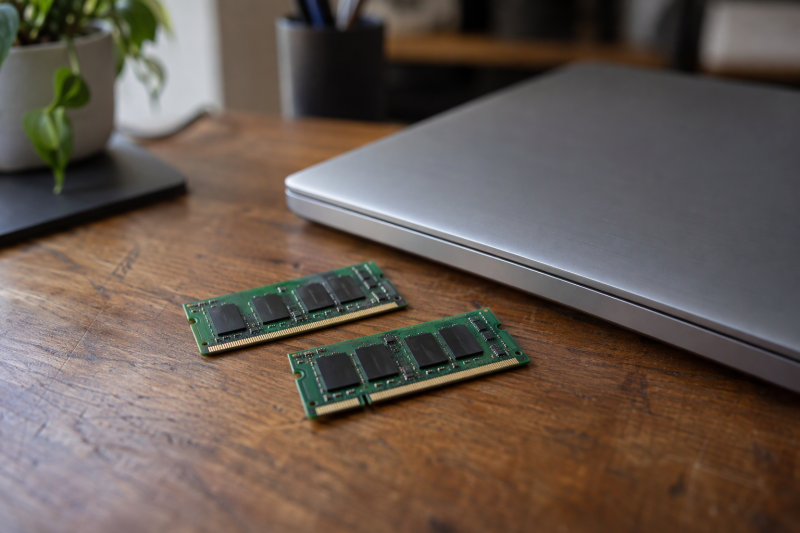
A laptop memory upgrade starts with the laptop, not the largest capacity on the package. Check whether the laptop has accessible SO-DIMM slots, which DDR generation it accepts, how much memory it supports and what speed its firmware can use.
DDR4 and DDR5 modules are different choices. Match the exact laptop specification before buying.| Image | Product | Best fit | Capacity | Type | Rated speed | Limit | Check Price |
|---|---|---|---|---|---|---|---|
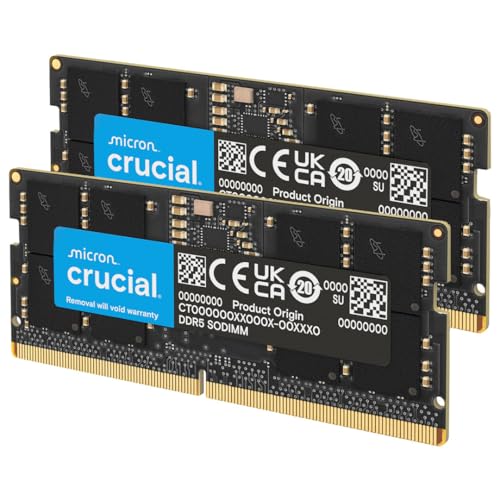 | Crucial 32GB DDR5 Kit | Matched DDR5 pair | 32GB (2 x 16GB) | DDR5, 262-pin SO-DIMM | 5600; 5200/4800 alternatives | Requires two compatible slots | Check Price on Amazon |
 | Kingston FURY Impact 16GB DDR5 5600 | Single DDR5 module | 16GB (1 module) | DDR5, 262-pin SO-DIMM | 5600 MT/s CL40 default | BIOS determines usable speed | Check Price on Amazon |
 | Kingston FURY Impact 32GB DDR5 6400 | XMP-capable DDR5 system | 32GB (2 x 16GB) | DDR5, 262-pin SO-DIMM | 6400 CL38 XMP; 4800 default | 6400 needs supported XMP profile | Check Price on Amazon |
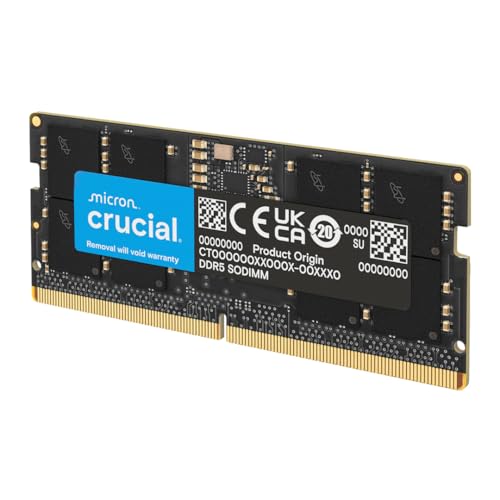 | Crucial 64GB DDR5 Single Module | High-capacity single slot | 64GB (1 module) | DDR5, 262-pin SO-DIMM | 5600; 5200/4800 alternatives | Needs 64GB per-slot support | Check Price on Amazon |
| Crucial 96GB DDR5 Kit | Supported high-capacity laptop | 96GB (2 x 48GB) | DDR5, 262-pin SO-DIMM | 5600; 5200/4800 alternatives | Needs 48GB per slot and 96GB total | Check Price on Amazon |
 | Kingston FURY Impact 16GB DDR4 3200 | DDR4 laptop upgrade | 16GB (1 module) | DDR4, 260-pin SO-DIMM | 3200 MT/s CL20 default | Not for DDR5 slots | Check Price on Amazon |
1. Crucial 32GB DDR5 Kit — Best Matched 2x16GB Upgrade
Crucial’s CT2K16G56C46S5 is a 32GB kit of two 16GB DDR5 SO-DIMMs. Crucial’s product page lists DDR5-5600 with CL46-45-45 JEDEC timings, 1.1V and a 1Rx8 layout. The Amazon listing says the kit operates at 5600MHz, 5200MHz or 4800MHz, lists a 262-pin form factor and gives the ECC type as non-ECC.
The Amazon listing calls the kit best for 12th Gen Intel Core and AMD Ryzen 7000 Series processors and says Intel XMP 3.0 and AMD EXPO are both supported on the same module. Crucial’s page states a limited lifetime warranty. The warranty is valid everywhere except Germany and France, where it runs 10 years from the date of purchase. A processor name does not settle slot count or capacity, so check the laptop maker’s memory specification for two removable DDR5 SO-DIMM slots and a 32GB total.
Slots: The kit contains two modules and needs two compatible SO-DIMM slots for the full 32GB.Our Take Choose the Crucial 32GB kit when a laptop supports two DDR5 SO-DIMMs and a matched pair fits its capacity limit.
- A laptop with two supported slots gets a matched pair, since Crucial’s product page lists the kit as two 16GB modules, 32GB in total, in a 1Rx8 layout.
- The Amazon listing for Crucial’s kit names three operating speeds, 5600MHz, 5200MHz and 4800MHz.
- The Amazon listing for Crucial’s kit says the same module supports both Intel XMP 3.0 and AMD EXPO.
- Crucial’s product page states a limited lifetime warranty for the kit.
- Crucial’s kit needs two compatible DDR5 SO-DIMM slots before a laptop can use all 32GB.
- Crucial’s product page lists CL46-45-45 timings at DDR5-5600, a higher CL number than the CL40 in Kingston’s data sheet for its 16GB DDR5-5600 module.
2. Kingston FURY Impact 16GB DDR5 5600 — Best Single DDR5 Module
Kingston’s KF556S40IB-16 is one 16GB DDR5 SO-DIMM rated DDR5-5600 CL40 in Kingston’s data sheet. The data sheet describes a 1Rx8 module built from eight 2G x 8-bit components at 1.1V, with a Plug N Play default of 40-40-40 and a height of 1.18 inches (30mm).
The Amazon listing says the module is Intel XMP 3.0 certified, and both the listing and the data sheet name on-die ECC. On-die error correction is a feature of the memory chip. It does not by itself establish system-level ECC support. Kingston says the BIOS determines the maximum speed, so check the laptop’s supported memory configurations and any memory already installed before ordering a single module.
Our Take Pick the 16GB Impact module for a compatible DDR5 laptop when a single module is the capacity and slot arrangement you need.
- Kingston’s data sheet lists DDR5-5600 CL40-40-40 at 1.1V as the Plug N Play default.
- Kingston’s data sheet describes one 16GB module for one SO-DIMM slot, built from eight 2G x 8-bit components.
- The Amazon listing says the Kingston module is Intel XMP 3.0 certified.
- Kingston says the laptop BIOS determines the maximum usable speed of the module.
- Kingston’s on-die ECC is a chip-level feature and does not establish system-level ECC in a laptop.
3. Kingston FURY Impact 32GB DDR5 6400 — Best for an XMP-Capable Laptop
Kingston’s KF564S38IBK2-32 is a kit of two 16GB DDR5 SO-DIMMs, 32GB in total. Kingston’s data sheet specifies a DDR5-6400 CL38-40-40 XMP profile at 1.35V and states that each module has been tested to run at that setting. The Amazon listing gives 6400MT/s CL38 and Intel XMP 3.0 certification.
The same data sheet sets the module’s SPD, its stored default settings, to a JEDEC default of DDR5-4800 CL40-39-39 at 1.1V and adds XMP profiles at DDR5-6000 CL38-38-38 (1.35V) and DDR5-5600 CL40-40-40 (1.1V). The 6400 headline is an XMP profile rather than the default, so check that the laptop’s firmware supports XMP profiles and two-slot capacity before counting on it.
Our Take Choose this Impact kit when a two-slot DDR5 laptop explicitly supports the desired XMP profile and capacity.
- Kingston’s data sheet specifies a DDR5-6400 CL38-40-40 XMP profile for the two-module kit.
- Kingston’s data sheet adds two more XMP profiles, at DDR5-6000 and DDR5-5600.
- Kingston’s data sheet states the JEDEC default as DDR5-4800 CL40-39-39 at 1.1V.
- Kingston’s data sheet says the kit supports Intel XMP 3.0.
- Kingston’s 6400 XMP profile runs at 1.35V, above the 1.1V of the 4800 default.
- Kingston’s kit needs two compatible DDR5 SO-DIMM slots.
4. Crucial 64GB DDR5 Single Module — Best High Capacity for One Slot
Crucial’s CT64G56C46S5 is one 64GB DDR5 SO-DIMM. Crucial’s product page lists DDR5-5600 with CL46-45-45 JEDEC timings, 1.1V and a 2Rx8 layout built from 32Gb dies. The Amazon listing says the module can downlock, or run at a lower speed, if the system supports only 5200MHz or 4800MHz, and its title gives a 262-pin SODIMM.
The Amazon listing names Intel Core Ultra, 14th Gen Intel Core and AMD Ryzen 8000 Series and above, and says Intel XMP 3.0 and AMD EXPO are supported on the same module. A processor name does not say how much memory one slot of a given laptop accepts, so look up the laptop maker’s per-slot capacity limit before ordering 64GB in a single module.
Our Take Consider this Crucial module when a compatible laptop supports 64GB in a single DDR5 SO-DIMM slot.
- Crucial’s product page lists the module as 64GB on a single DIMM, in a 2Rx8 layout with 32Gb dies.
- According to the Amazon listing, Crucial’s module can downlock to 5200MHz or 4800MHz if the system supports only those speeds.
- The Amazon listing for Crucial’s module names Intel Core Ultra, 14th Gen Intel Core and AMD Ryzen 8000 Series and above.
- Crucial’s 64GB module needs a laptop that supports 64GB in one slot, not merely 64GB in total.
- The Amazon listing for the 64GB module does not state an ECC type.
5. Crucial 96GB DDR5 Kit — Best for Supported High-Capacity Systems
Crucial’s CT2K48G56C46S5 is a 96GB kit of two 48GB DDR5 SO-DIMMs, as Crucial’s product page and the Amazon size field both state. Crucial’s page lists DDR5-5600 with CL46-45-45 JEDEC timings, 1.1V and a 2Rx8 layout built from 24Gb dies. The Amazon listing gives 5600MHz, 5200MHz or 4800MHz operation, a 262-pin form factor and a non-ECC classification.
The Amazon listing calls the kit best for 12th Gen Intel Core and AMD Ryzen 7000 Series processors, and Crucial’s page states a limited lifetime warranty. Each module is 48GB, so confirm with the laptop maker that each slot accepts 48GB and that the system supports 96GB in total.
Capacity: The kit is two 48GB modules, so it needs two supported slots and 96GB total support.Our Take Pick the Crucial 96GB kit only for a laptop whose documented configuration supports both 48GB modules and the combined capacity.
- Crucial’s product page lists the kit as 96GB in two 48GB modules.
- The Amazon listing for Crucial’s kit gives 5600MHz, 5200MHz and 4800MHz as operating speeds.
- Crucial’s product page states a limited lifetime warranty.
- Crucial’s kit needs two compatible slots, each supporting 48GB, and support for 96GB in total.
- The Amazon listing for Crucial’s kit recommends it for 12th Gen Intel Core and AMD Ryzen 7000 Series and does not say whether those laptops accept 48GB modules.
6. Kingston FURY Impact 16GB DDR4 3200 — Best for a Compatible DDR4 Laptop
Kingston’s KF432S20IB/16 is one 16GB DDR4 SO-DIMM. Kingston’s data sheet lists a 260-pin module, a 1Rx8 layout of eight 2G x 8-bit components, and a Plug N Play default of DDR4-3200 CL20-22-22 at 1.2V. It also lists Intel XMP 2.0 support, with a second XMP profile at DDR4-2933 CL17-19-19.
The Amazon listing adds that the module is ready for AMD Ryzen and that Plug N Play automatically overclocks to the highest published frequency. DDR4 and DDR5 SO-DIMMs are different memory generations. The Kingston DDR4 module has 260 pins, while Kingston’s and Crucial’s DDR5 modules on this page have 262. Kingston says the BIOS determines the maximum usable speed.
Our Take Choose this Impact module for a compatible DDR4 laptop when one 16GB module and the supported speed meet the upgrade plan.
- Kingston’s data sheet lists a DDR4-3200 CL20-22-22 default at 1.2V.
- Kingston’s data sheet lists a second XMP profile at DDR4-2933 CL17-19-19.
- The Amazon listing says the Kingston module is ready for AMD Ryzen and has Intel XMP-ready profiles.
- Kingston’s 260-pin DDR4 module is not a replacement for a 262-pin DDR5 module.
- Kingston says BIOS support determines the maximum usable speed.
Buying Guide: Choosing Laptop Memory
Check whether the laptop can be upgraded
Start with the laptop maker’s documentation for removable SO-DIMM slots, the number of slots and the memory already installed. A laptop with soldered memory or a different module format cannot use these products merely because it has DDR5 in its specifications.
The Crucial 32GB and Crucial 96GB kits each contain two modules, while the Kingston 16GB options and the Crucial 64GB option are single modules. Decide whether the upgrade replaces the existing memory or fills a supported empty slot.
Match DDR4 or DDR5 before capacity
The Kingston Impact 16GB DDR4 module is a 260-pin DDR4 SO-DIMM in Kingston’s data sheet, while Kingston’s DDR5 data sheets and the Amazon listings for the Crucial DDR5 products give 262-pin modules. DDR4 and DDR5 are different memory generations, and neither can replace the other in the same slot.
Check the exact laptop model and generation, rather than only its processor. The Amazon listings name 12th Gen Intel Core and AMD Ryzen 7000 Series for the Crucial 32GB and 96GB kits, and a processor name does not establish the slot type or upgrade path for every laptop in it.
Check total and per-slot capacity
Crucial’s product pages list the 64GB module as 64GB in one slot and the 96GB kit as two 48GB modules. The two need different slot support, because the system must accept the individual module size as well as the total.
Crucial’s 32GB kit and Kingston’s 32GB Impact kit each use two 16GB modules, and Kingston’s two single modules are 16GB each. Confirm the laptop’s supported capacity and slot count with its manufacturer before choosing a larger module or kit.
Separate default speed from an XMP profile
Kingston’s 32GB Impact kit has a DDR5-6400 CL38 XMP profile, but its data sheet specifies a DDR5-4800 JEDEC default. Do not assume a laptop that lacks support for that XMP profile will run the kit at the headline rate.
Kingston’s data sheet for the 16GB DDR5 module lists a DDR5-5600 CL40 Plug N Play default, and that data sheet and the DDR4 data sheet both say the BIOS determines the maximum speed.
Crucial’s product pages list DDR5-5600 with CL46 timings, and the Amazon listings for Crucial’s 32GB kit and 96GB kit give 5200MHz and 4800MHz as lower operating speeds.
Read ECC and compatibility claims carefully
Kingston’s two DDR5 data sheets list on-die ECC, and Crucial’s DDR5 product pages describe on-die ECC at the component level. The Amazon listings for Crucial’s 32GB and 96GB kits give the ECC type as non-ECC, and the 64GB listing does not state an ECC type.
On-die correction is a chip-level feature and does not establish system-level ECC support in a laptop. The Crucial 64GB listing names Intel Core Ultra, 14th Gen Intel Core and AMD Ryzen 8000 Series and above, but a processor name does not establish that a particular laptop supports a 64GB module. Check the laptop’s slot, density and firmware requirements separately.
FAQ
Can I replace DDR4 with DDR5 in the same slot?
No. The Kingston DDR4 module is a 260-pin DDR4 SO-DIMM in Kingston’s data sheet, and the DDR5 products on this page are 262-pin DDR5 SO-DIMMs. DDR4 and DDR5 are different memory generations, and each requires a laptop designed for that module type.
Start with the laptop’s service or memory specification, then choose a compatible capacity and speed. A faster DDR5 module does not change a DDR4 laptop’s memory generation.
Will the 6400 Impact kit run at 6400 in any DDR5 laptop?
No. Kingston specifies DDR5-6400 as an XMP profile for the 32GB Impact kit and lists DDR5-4800 as its JEDEC default. The laptop must support the relevant profile and capacity to use the advertised setting.
Kingston also lists DDR5-6000 and DDR5-5600 XMP profiles for this kit. Check the laptop manufacturer’s memory and firmware documentation for the modes it supports.
Is 64GB in one module the same as a 64GB kit?
Crucial’s page lists the 64GB product as one 64GB module. A kit can split the same total across more than one module, which changes the per-slot capacity and the number of slots required.
The 96GB Crucial kit uses two 48GB modules on Crucial’s page, so it needs a laptop that accepts 48GB in each slot and 96GB in total. Do not infer those limits from the product’s capacity alone.
Can a 5600 module run at a lower speed?
The Amazon listings for Crucial’s 32GB and 96GB kits say they operate at 5600MHz, 5200MHz or 4800MHz, and the 64GB listing says the module can downlock if the system supports only 5200MHz or 4800MHz. The listing wording does not guarantee that every DDR5 laptop will accept each speed.
Kingston’s data sheets for the 16GB DDR5 module and the DDR4 module say the BIOS determines the maximum usable speed. Check the laptop’s supported module type, capacity and speed before relying on a particular fallback.
Does on-die ECC mean a laptop has system ECC?
No. Kingston’s DDR5 data sheets and Crucial’s DDR5 product pages name on-die ECC, a chip-level feature. The ECC wording alone does not confirm the system-level ECC path or reporting behavior of a particular laptop.
The Amazon listings for Crucial’s 32GB and 96GB kits give the ECC type as non-ECC, so keep the two terms apart. Verify the complete laptop and memory configuration with the system maker if system ECC is a requirement.
Bottom Line
Choose Crucial’s 32GB kit for a compatible two-slot DDR5 upgrade, Kingston’s 16GB DDR5 for one slot, or the 6400 Impact kit when the desired XMP profile is supported. The Crucial 64GB single module and Crucial 96GB kit need explicit high-capacity support, while the Kingston DDR4 module serves a different memory generation.
For more upgrade planning, see our DDR5 laptop comparison and DDR5 channel guide. Check the exact laptop’s service documentation before buying a module.