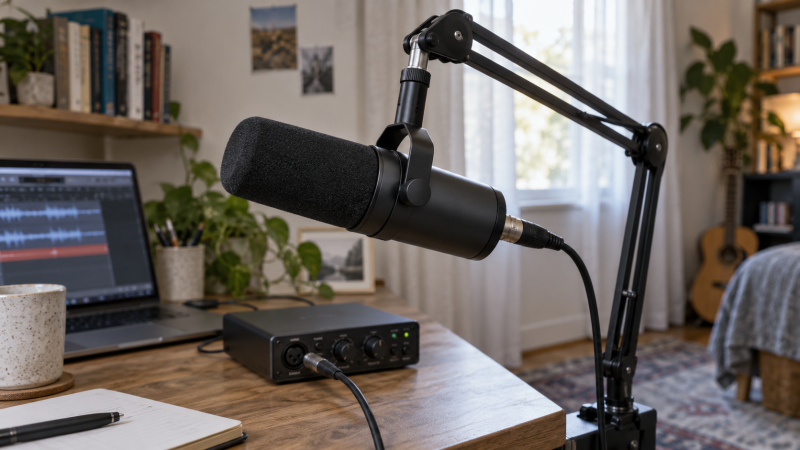
A bare home office can make a distant voice sound thin and a laptop fan sound closer than it is. A dynamic microphone is not a soundproofing device, but a close speaking position and a directional pickup pattern can make the voice stronger relative to room noise. The better purchase question is how you will mount and power the microphone, not whether its product page promises “studio sound.”
These six microphones have active New listings on Amazon US and span XLR-only speech mics, a tighter hypercardioid option and USB/XLR models that can start on a laptop before moving to an interface. Their frequency, pattern and accessory claims come from exact listings and maker information, not our own audio recordings. Keyboard thumps, hard-wall reflections and loud fans still need microphone placement and room work.
Put the mic near the mouth, turn its least-sensitive side toward the noise source, and record a ten-second test with normal typing. That tells you more about your room than a generic “noise rejection” badge.Dynamic XLR Microphones Compared
| Image | Product | Details | Check Price |
|---|---|---|---|
 | RØDE PodMic | Best fit: Simple XLR speech chain Output: XLR only Pattern: Cardioid dynamic Pop protection: Internal filter listed Interface: Required | Check Price on Amazon |
 | Shure MV7X | Best fit: Focused cardioid XLR voice Output: XLR only Pattern: Cardioid dynamic Mount: Integrated shock mount Interface: Required | Check Price on Amazon |
 | Audio-Technica AT2040 | Best fit: Side-noise control Output: XLR only Pattern: Hypercardioid dynamic Pop protection: Multistage mesh Mount: Integrated shock mount | Check Price on Amazon |
 | Shure MV7+ | Best fit: USB to XLR upgrade Output: USB-C and XLR Pattern: Dynamic USB controls: Auto Level and denoising listed Interface: For XLR path | Check Price on Amazon |
 | Samson Q2U | Best fit: Starter kit Output: USB-C and XLR stated Pattern: Dynamic Included: Desktop stand, windscreen, cables Mount: Tripod in kit | Check Price on Amazon |
 | FIFINE AM8 | Best fit: Close-voice desk setup Output: USB and XLR Pattern: Cardioid dynamic Distance: 2–6 in seller guidance XLR cable: Not included | Check Price on Amazon |
1. RØDE PodMic — Best Simple XLR Speech Mic
RØDE’s PodMic is a cardioid dynamic microphone with XLR output only. Its listing describes an internal pop filter and internal shock mounting, both useful when the mic sits close to a speaker at a desk. The pop protection can reduce bursts from consonants, but it does not mean every mouth position is safe from plosives. Aim the microphone as the maker instructs and make a short test before settling on the boom-arm angle.
You need a suitable XLR input on an audio interface or mixer and a cable to reach it. There is no direct USB connection to a laptop. If you move back to keep the mic out of a camera frame, you will hear more of the room in the recording. The built-in shock mounting helps with bumps, but a solid desk microphone boom arm and a quiet surface are still needed.
XLR-only keeps the signal path simple, but include the interface, cable and mount in the real cost of the setup.Our Take Buy the PodMic if you already own an interface and want a straightforward XLR speech mic. It works best with close, consistent placement and is a poor tool for fixing an echoing room from a distance.
- Internal pop filter listed.
- Built-in shock mounting described.
- Direct XLR interface path.
- Needs an XLR interface or mixer.
- No USB fallback for a bare laptop.
2. Shure MV7X — Best Focused Cardioid Voice
Shure’s MV7X is an XLR-only cardioid dynamic microphone for close spoken-word recording. Shure describes its voice-isolation design as picking up sound in front of the capsule while rejecting much of what arrives off-axis. The exact Amazon listing also mentions an integrated shock mount. The pattern suits a presenter with a computer, fan or window to one side, as long as the unwanted sound is not directly behind the voice.
The MV7X has no USB output, touch controls or onboard recording app in this exact model. The MV7+ below is a different product, so do not assume its USB features come with the MV7X. Connect the MV7X to an interface with enough usable gain for your normal speaking level, then test the room at the same distance you will use on camera. Shure’s cardioid pattern is a placement aid, not a promise to remove another person’s speech or a reverberant wall.
Our Take Buy the MV7X if you already have an XLR rig and a presenter who sits close to the mic. Its main limit is practical. Without an interface, cable and good placement, it is not a complete home-studio kit.
- Close-voice cardioid design.
- Integrated shock mount listed.
- Simple XLR-only path.
- No USB connection on this model.
- Interface gain and placement still matter.
3. Audio-Technica AT2040 — Best for Side-Noise Control
The AT2040 uses a hypercardioid pickup pattern, which the seller describes as reducing sounds from the sides and rear. Its listing also specifies an integrated shock mount and a multistage foam-mesh windscreen. Those details suit a speaker who can keep the mic close while a keyboard or computer sits to one side. A tighter pattern takes more deliberate placement than a broad all-around desk microphone.
Hypercardioid does not mean perfectly silent behind the microphone. Many hypercardioid patterns have a small rear pickup lobe, so test where your room’s loudest source actually sits. This model is XLR-only and needs an interface or mixer. If the presenter turns away repeatedly, a tight pattern can also change voice level and tone.
Our Take Buy the AT2040 if a keyboard or fan sits to one side and you can keep a consistent mouth-to-mic position. It is less forgiving of someone pacing, swiveling or speaking from several directions.
- Hypercardioid directional pattern.
- Integrated shock mount.
- Multistage internal pop filtering.
- Tighter aim needs consistent technique.
- Still requires an XLR interface.
4. Shure MV7+ — Best USB-to-XLR Upgrade Path
The MV7+ offers both USB-C and XLR outputs in a dynamic spoken-word microphone. Its listing describes an LED touch panel, tap-to-mute, Auto Level mode and real-time denoising. Those features are relevant when the creator starts with a laptop and wants a more convenient direct recording path. The XLR output is a separate route to a mixer or podcasting audio interface.
Do not assume the listed digital controls and processing follow the analog XLR output. Check the maker’s connection-specific feature map before building a workflow around both outputs. USB processing can make a recording easier to manage, but it is not evidence that a noisy room has become acoustically treated. Record a raw sample with the mic in the actual position, compare it with processing enabled, and watch whether noise reduction changes the voice unnaturally. The full kit still needs a suitable mount and, for XLR, an interface and cable.
Pick the connection mode first; USB software features and XLR analog output should be evaluated as separate paths.Our Take Buy the MV7+ if you are moving from direct laptop recording to an XLR rig. Its extra controls are useful only if you will use them in the selected connection mode.
- USB-C and XLR paths in one mic.
- USB-oriented Auto Level and denoising listed.
- Touch mute and level display described.
- Digital features may not apply to XLR output.
- Processing cannot replace room treatment.
5. Samson Q2U — Best Starter Kit
Samson’s Q2U pack gives a dynamic handheld microphone with USB and XLR outputs. The exact offer lists a desktop tripod, extension, mic clip, windscreen, USB-C cable and XLR cable. The pack is a useful starting package when a creator wants to record on a computer now and add a mixer or interface later without replacing the mic immediately.
The small desktop tripod is convenient for a quick recording, but a microphone sitting on the same desk as a keyboard can pick up mechanical bumps through the stand. Move the stand off the desk or use a boom arm if typing is part of the recording. The included cables make the connection options easier to try, but they do not guarantee that the laptop’s USB port or the interface gain is right for every setup.
Our Take Buy the Q2U as a first microphone if you have no mount or XLR cable yet. It works on USB now and XLR later, so the first setup stays simple.
- USB and XLR outputs listed.
- Desktop stand, windscreen and cables included.
- Handheld form can move between setups.
- Desk tripod can transmit keyboard bumps.
- Included stand may crowd a small work surface.
6. FIFINE AM8 — Best Close-Voice Desk Setup
FIFINE’s AM8 is a cardioid dynamic USB/XLR microphone with a seller-recommended speaking range of 2 to 6 inches. The close position is the AM8’s main advantage in a room with a PC fan or hard walls, because the desired voice reaches the capsule strongly before the room does. The listing gives a 50 Hz to 16 kHz frequency range, but the number alone says little about how your own voice will sound after placement and gain are set.
The listing is clear that its RGB lighting, mute, gain and headphone-monitoring controls operate in USB mode, not over the analog XLR connection. The XLR cable is also listed as not included. If you choose XLR for an interface-based podcast chain, plan to control gain and monitoring at the interface rather than on the mic. If you choose USB for a simple desk recording, test the mute and monitoring behavior before going live.
Our Take Buy the AM8 if you want USB convenience now and XLR as a later option. Its most useful buyer instruction is the seller’s short speaking distance, not the RGB lighting.
- USB and XLR outputs listed.
- Clear 2–6-inch placement guidance.
- USB monitoring and mute controls described.
- USB controls inactive on XLR path.
- XLR cable not included.
Buying Guide
Get close before buying more processing
The ratio of voice to room noise improves when the speaker gets closer to the mic at normal speaking volume. An end-address dynamic mic on a boom arm can work well in a home office for that reason, not because a dynamic capsule removes the room. Begin with a comfortable position, avoid direct plosives and make a recording while the fan and keyboard are operating as they normally would.
Then turn the mic so its least-sensitive direction faces the noisiest object, taking account of the actual polar pattern. Cardioid and hypercardioid patterns differ, and a hypercardioid mic may have a small rear lobe. A keyboard directly under the stand can send vibration through the desk even when it is off-axis acoustically. Move the support, use a shock mount if appropriate and make another recording before applying software noise reduction.
Match XLR gain and the complete signal path
An XLR-only microphone needs an audio interface or mixer with an XLR mic input. A cable alone cannot plug it into a laptop’s USB socket. Choose the interface for usable gain, monitoring and the number of speakers you may record, not just for the shape of its connector. The PodMic, MV7X and AT2040 take this path. The three dual-output mics can also connect by USB for a simpler starting setup.
Set gain while the speaker talks at a normal recording level, then repeat with the loudest expected phrase. If the signal is weak, verify distance and interface settings before concluding the mic is defective. Too much gain can raise room and electronic noise. If you expect interviews with two voices, compare audio interfaces with two headphone outputs and plan a separate microphone position for each speaker.
Check pop protection, mount and recording habit
An internal windscreen or pop filter helps with plosive bursts, but mic angle still affects the result. Speak slightly across the capsule rather than firing breath directly into it, then listen to a raw test. The PodMic and AT2040 listings describe built-in filtering. The Samson pack includes a removable windscreen. Do not infer identical protection from those different designs.
A boom arm keeps the capsule close without covering the desk. Check that the arm can support the mic’s weight and that the desk clamp fits the edge. If a desktop stand is easier, isolate it from typing and mouse impacts. Mark the usual speaking position so recordings do not alternate between a close, full voice and a distant, echoing one.
Frequently Asked Questions
Will a dynamic mic remove echo from an untreated room?
No, a dynamic mic does not absorb reflections from walls, windows or a bare floor. Close placement and a directional pattern can make the voice louder relative to the room, but the echo remains if the room is reflective enough. Software noise reduction may hide steady fan noise while leaving reflections around words.
Make a before-and-after recording at the intended mic position. If the room still sounds hollow, move the desk away from a hard wall, add soft furnishings where useful or improve the speaker’s distance and angle. Treat the microphone as one part of the recording setup, not a replacement for all room work.
Is XLR automatically cleaner than USB?
XLR is not automatically cleaner than USB, because the complete microphone, interface, cable, gain staging and computer path determine the recording. XLR provides a flexible analog connection to an interface or mixer. USB versions add their own conversion and sometimes digital processing. A poor interface or incorrect gain can make an XLR recording noisier than a well-set USB path.
For dual-output models, test both routes at matched speaking distance. Remember that USB-only mute, RGB, monitoring or DSP features may not exist on the XLR path. The FIFINE AM8 listing explicitly separates its USB controls from XLR operation.
Do I need an inline preamp or booster?
You need one only if the actual microphone and interface combination cannot reach a usable level with acceptable noise at your normal speaking distance. Do not buy a booster from a generic claim that all dynamic microphones are “gain hungry.” First verify the mic points at the mouth, the correct input is selected and the interface gain is set properly.
Record a normal phrase and a loud phrase, then inspect the waveform and listen on headphones. If the signal remains too low without excessive interface noise, consult the microphone and interface specs for compatible gain or an appropriate booster. A booster cannot repair a voice recorded from too far away in an echoing room.
Bottom Line
For an existing XLR setup, start with PodMic, MV7X or AT2040 according to preferred placement and pickup pattern. For a first kit, the Q2U includes useful basics. The MV7+ adds a richer USB/XLR path, and the AM8 is a close-voice USB/XLR desk option with clear XLR-control limits. Put the mic close, choose a stable mount and record your actual room before spending on extra processing.