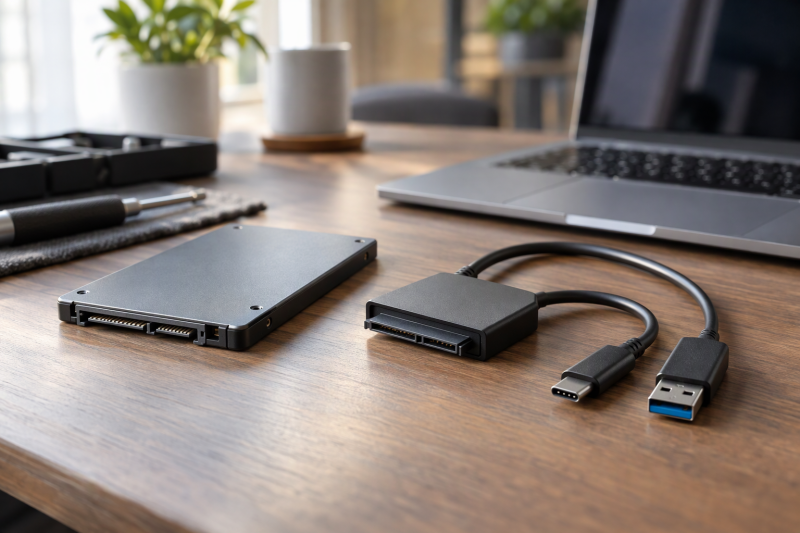
A SATA adapter cable lets you read a removed 2.5-inch SATA SSD or laptop hard drive without mounting it in an enclosure. Each of the six listings below names 2.5-inch SATA drives and a USB host, and none names an M.2 or 3.5-inch drive as supported. Several listings state the exclusion outright, and the buying guide shows which ones.
Match the drive connector and size first, then choose USB-C, USB-A, or a dual-interface cable for the computer you will use.SATA to USB Adapter Cables Compared
| Image | Product | Details | Check Price |
|---|---|---|---|
 | StarTech USB-C 10Gbps SATA Cable | Best fit: USB-C host with a 2.5-inch SATA drive Host: USB-C Transport: USB 10Gbps with UASP Drive support: 2.5-inch SATA I, II, III Listing note: Not compatible with 3.5-inch drives | Check Price on Amazon |
 | Vantec USB-C 3.1 Gen 2 SATA Adapter | Best fit: USB-C host on Windows 8.1, Windows 10 or Mac Host: USB-C Transport: USB 3.1 Gen 2 Drive support: 2.5-inch SATA 3, SATA 1 and 2 compatible Listing note: UASP on Windows 8.1 and 10; hot-swappable | Check Price on Amazon |
 | UGREEN SATA to USB-A Adapter | Best fit: USB-A host that needs SMART and TRIM Host: USB-A Transport: 5Gbps USB 3.0 with UASP Drive support: 2.5-inch SATA I, II, III Listing note: SMART, TRIM and an activity LED | Check Price on Amazon |
 | SABRENT EC-SSHD USB-A Adapter | Best fit: USB-A host with a 2.5-inch laptop HDD Host: USB-A Transport: 5Gbps USB 3.0 with UASP Drive support: 2.5-inch SATA I, II, III Listing note: Bus-powered for most drives; some older HDDs may need more power | Check Price on Amazon |
 | BENFEI Dual USB-C and USB-A SATA Cable | Best fit: Computers with USB-C and USB-A ports Host: USB-C and USB 3.0 (named in title) Transport: Up to 5Gbps USB 3.0 with UASP Drive support: 2.5-inch SATA SSD and HDD Listing note: Not for M.2, 3.5-inch or 5.25-inch drives | Check Price on Amazon |
 | StarTech USB-A 5Gbps SATA Cable | Best fit: USB-A host with a 2.5-inch SATA drive Host: USB-A Transport: USB 5Gbps with UASP Drive support: 2.5-inch SATA SSD and HDD Listing note: Bus-powered; not compatible with 3.5-inch drives | Check Price on Amazon |
1. StarTech USB-C 10Gbps SATA Cable — Best USB-C Performance
StarTech’s USB31CSAT3CB connects a 2.5-inch SATA I, II, or III SSD or HDD to a USB-C host. StarTech’s Amazon listing states support for USB 10Gbps and UASP, calls the cable bus-powered with no external power required, and says it is not compatible with 3.5-inch drives, which need a dedicated power connection.
For a laptop with a USB-C port and a SATA SSD, this listing states the highest USB speed in this guide. A faster USB link does not raise the drive’s own SATA speed. The listing names only 2.5-inch drives, so confirm that the removed drive has the full 2.5-inch SATA connector before buying.
Our Take Choose this StarTech cable when the computer has USB-C and the removed drive is a 2.5-inch SATA SSD or laptop HDD. A desktop 3.5-inch drive needs a different adapter, because StarTech says those drives require a dedicated power connection.
- StarTech’s listing states USB 10Gbps support for a USB-C host system, the highest USB speed in this guide.
- StarTech lists UASP support alongside the USB-C connection.
- StarTech describes the cable as bus-powered, with no external power required for a 2.5-inch drive.
- StarTech’s listing says the cable is not compatible with 3.5-inch drives, so a desktop drive needs a different adapter.
- StarTech’s listing names only 2.5-inch SATA drives, and an M.2 or mSATA module is not among them.
2. Vantec USB-C 3.1 Gen 2 Adapter — Best USB 3.1 Gen 2 USB-C Option
The Vantec CB-STC31-2PB is a USB-C adapter whose Amazon title names 2.5-inch SATA SSD and HDD storage. Vantec’s listing states a USB-C connector for PC or Mac computers and a USB 3.1 Gen 2 transfer rate. It also lists SATA 3 support with SATA 1 and 2 compatibility, UASP on Windows 8.1 and 10, and plug-and-play hot-swapping without rebooting. Amazon lists a 1-year parts and labor warranty.
Vantec’s listing gives a shorter feature list than StarTech’s and does not mention bus power or 3.5-inch drives, so a buyer who needs either answer should look at the StarTech USB-C cable instead. The listing does not name M.2 drives either, and the USB-C connector applies only to the host end of the cable.
Vantec’s listing names a USB-C host connection, USB 3.1 Gen 2, SATA 1 through 3 support, UASP, and hot-swap use.Our Take Pick Vantec for a USB-C laptop and a 2.5-inch SATA drive when you need UASP on Windows 8.1 or 10 and a hot-swap connection. Choose StarTech when you want a stated 10Gbps rating and a stated bus-powered design.
- Vantec’s listing states a USB 3.1 Gen 2 transfer rate through a USB-C connector.
- Vantec’s listing pairs SATA 3 support with SATA 1 and 2 compatibility.
- Vantec describes plug-and-play hot-swapping without rebooting.
- Vantec states UASP support on Windows 8.1 and 10.
- Vantec states UASP support only for Windows 8.1 and 10, and names no macOS or Linux UASP support.
- Vantec’s listing does not say whether the adapter is bus-powered, so a buyer who needs that answer should look at the StarTech USB-C cable.
3. UGREEN SATA to USB-A Adapter — Best USB-A Drive Health Tools
UGREEN’s adapter connects a 2.5-inch SATA drive to a USB-A port on a laptop or desktop. UGREEN’s listing states 5Gbps USB 3.0, UASP on compatible systems, SMART and TRIM support, and a built-in LED that shows power and drive activity. It lists SATA I, II, and III 2.5-inch SSDs and HDDs, gives 5TB as the largest capacity it names, and says no drivers are needed on Windows, macOS, or Linux. Amazon lists a 2-year manufacturer warranty.
UGREEN says SMART and TRIM availability depends on the drive, operating system, and software, so the adapter alone does not guarantee either. The listing also says third-party migration or cloning software is not included. UGREEN excludes 3.5-inch drives, M.2 and mSATA SSDs, and IDE drives.
UGREEN lists 5Gbps USB-A, UASP, SMART, TRIM, an activity LED, and a 2.5-inch SATA-only limit.Our Take Choose UGREEN when a USB-A computer needs a 2.5-inch SATA reader and you want a listing that names SMART and TRIM. A USB-C-only laptop would need a separate USB-C to USB-A adapter.
- UGREEN’s listing states SMART and TRIM support where the drive, operating system, and software allow it.
- UGREEN describes a built-in LED that shows power and drive activity.
- UGREEN lists 5Gbps USB-A with UASP on compatible systems.
- UGREEN’s adapter has a USB-A host end, so a USB-C-only laptop needs a separate USB-C to USB-A adapter.
- UGREEN says SMART and TRIM availability depends on the drive, operating system, and software, so the adapter alone does not guarantee either.
- UGREEN’s listing excludes 3.5-inch, M.2, mSATA, and IDE drives.
- UGREEN says third-party migration or cloning software is not included.
4. SABRENT EC-SSHD USB-A Adapter — Clearest Power Guidance for Laptop Hard Drives
SABRENT’s EC-SSHD is a USB-A adapter for 2.5-inch SATA storage, and its listing is the most specific in this guide about power. SABRENT states 5Gbps USB 3.0 with UASP, SATA I, II, and III support, and bus power for most 2.5-inch SSDs and laptop HDDs. It also warns that some older or high-capacity 2.5-inch mechanical hard drives may draw more power than a single USB port provides.
For a drive that does not spin up, the listing suggests a powered USB hub or a different USB 3.0 port. SABRENT also says the adapter is not intended for all configurations, such as system boot drives or certain embedded systems. SABRENT also says the adapter is not compatible with M.2 NVMe, M.2 SATA, 3.5-inch desktop, or slim SATA optical drives. The listing adds that firmware updates and Acronis True Image software are available from SABRENT’s website.
Our Take Use the SABRENT adapter when the drive is a 2.5-inch laptop HDD and you want the power limit stated up front. Pick a USB-C model instead when the computer has no USB-A port, because SABRENT says a computer with only USB-C ports needs a separate USB-C to USB-A adapter.
- SABRENT states that the adapter powers most 2.5-inch SSDs and laptop HDDs directly from USB.
- SABRENT lists USB 3.0 at 5Gbps with UASP for a compatible USB-A host.
- SABRENT says firmware updates and Acronis True Image software are available from its website.
- SABRENT suggests a powered USB hub or a different USB 3.0 port when a drive does not spin up.
- SABRENT warns that some older or high-capacity mechanical laptop drives may need a powered USB hub.
- SABRENT says the adapter is not intended for system boot drives or certain embedded systems.
- SABRENT’s USB-A host end needs a separate USB-C to USB-A adapter on a computer with only USB-C ports.
5. BENFEI Dual USB-C and USB-A SATA Cable — Best Flexible Host Connection
BENFEI’s Amazon title names a 2-in-1 USB-C/USB 3.0 cable for a 2.5-inch SATA SSD or HDD, and Amazon’s size field lists 1 meter. BENFEI’s bullets state USB 3.0 transfer of up to 5Gbps, UASP, and driver-free plug-and-play use. The bullets add that the cable works only with 2.5-inch SATA drives and does not support 3.5-inch, 5.25-inch, or M.2 drives. BENFEI lists an 18-month warranty.
The bullets describe the USB 3.0 link but not how the USB-C connection is built, so check the product photos before buying. BENFEI says UASP gives up to 70% faster reads and 40% faster writes than traditional USB 3.0. BENFEI also says data rates of up to 6Gbps apply only to SSDs and the USB 3.0 link supports up to 5Gbps, and that actual speed depends on the device.
Our Take Pick BENFEI when one 2.5-inch SATA cable has to work with both USB-C and USB-A computers. Choose StarTech’s USB-C cable when you have one USB-C host and want the 10Gbps rating that StarTech states.
- BENFEI’s title names both USB-C and USB 3.0 host connections in one cable.
- BENFEI states USB 3.0 transfer of up to 5Gbps and UASP support.
- BENFEI lists plug-and-play use with no driver installation.
- BENFEI says the cable does not support M.2, 3.5-inch, or 5.25-inch drives.
- BENFEI lists USB 3.0 at up to 5Gbps, below the 10Gbps StarTech states for its USB-C cable.
- BENFEI says actual speed depends on the capability of the connected device.
6. StarTech USB-A 5Gbps SATA Cable — Best Bus-Powered USB-A Option
StarTech’s USB3S2SAT3CB is the USB-A counterpart to the first StarTech cable. StarTech’s listing states USB 5Gbps over USB-A, UASP, bus power with no external power required, and driver-free, OS-independent use with a 2.5-inch SATA SSD or HDD. It says the cable is not compatible with 3.5-inch drives, which need a dedicated power connection. StarTech also says UASP can give up to 70% faster transfers than conventional USB 5Gbps on a computer that supports it.
The listing names uses such as backup, disk images, data recovery, and moving files to a laptop. The cable has no USB-C host end, so it lacks the 10Gbps rating of StarTech’s USB-C cable and the dual connectors of the BENFEI cable.
Our Take Choose this StarTech cable for a USB-A laptop or desktop and a 2.5-inch SATA drive. On a USB-C-only computer, StarTech’s USB-C cable fits the port directly.
- StarTech’s listing states USB 5Gbps over a USB-A host connection.
- StarTech lists UASP support and bus power for 2.5-inch SATA SSDs and HDDs.
- StarTech says no driver installation is required.
- StarTech’s USB-A cable has no USB-C host end, and StarTech’s USB-C cable is the one that states 10Gbps.
- StarTech’s listing says the cable is not compatible with 3.5-inch drives, which need a dedicated power connection.
Buying Guide
1. Identify the drive before choosing the cable
All six listings name 2.5-inch SATA drives. StarTech (both cables), UGREEN, SABRENT, and BENFEI say outright that 3.5-inch drives are not supported, and UGREEN, SABRENT, and BENFEI also exclude M.2 drives. Vantec’s listing is silent on both.
Read the drive label and connector before buying. A removed M.2 SATA or NVMe module needs an enclosure made for that interface, and the M.2 SATA enclosure guide covers that separate hardware choice.
2. Choose USB-C or USB-A from the host
The StarTech USB-C and Vantec cables are USB-C host cables, while UGREEN, SABRENT, and the StarTech USB-A cable use USB-A. BENFEI’s title names both USB-C and USB 3.0. When you move between computers with different ports, a cable that names both can save you from carrying a port adapter.
StarTech’s USB-C listing states USB 10Gbps and Vantec’s states USB 3.1 Gen 2, while the UGREEN, SABRENT, BENFEI, and StarTech USB-A listings state 5Gbps USB 3.0. The drive may be the limit, so a faster cable does not always mean a faster copy.
3. Check how each cable is powered
StarTech (both cables) and SABRENT state that their adapters are bus-powered for 2.5-inch drives. SABRENT adds that most 2.5-inch SSDs and laptop HDDs run on USB power, while some older or high-capacity mechanical drives may need a powered hub or a different USB 3.0 port. The UGREEN, Vantec, and BENFEI listings do not state a power method.
Do not try a 3.5-inch desktop disk with these cables. StarTech says 3.5-inch drives need a dedicated power connection. If a laptop HDD does not spin up, SABRENT’s powered-hub suggestion is the only advice any of the six listings gives for that problem.
4. Separate adapter support from software features
UGREEN lists SMART and TRIM support, and says availability depends on the drive, operating system, and software. The other five listings do not mention either feature, so check them before buying if you need drive-health readouts or SSD maintenance.
UGREEN also says third-party migration or cloning software is not included. The other listings do not mention cloning software either, so choose software separately when copying an operating system or recovering files.
5. Use a cable for quick access, not permanent protection
A cable lets a removed drive connect without an enclosure. StarTech’s listings name backups, disk images, data recovery, and moving files to a laptop as uses. A cable leaves the drive’s circuit board exposed, which is different from choosing an enclosure for regular portable storage.
Keep the drive on a stable surface while it is powered. Match the adapter to the port: a USB-A cable for a USB-A desk computer, StarTech’s USB-C cable for a USB-C laptop, or BENFEI’s dual connection for mixed equipment. The SSD enclosure guide covers the enclosure alternative.
FAQ
Can I use these cables with a 3.5-inch hard drive?
No. StarTech’s listings for both of its cables, UGREEN’s, SABRENT’s, and BENFEI’s say 3.5-inch drives are not supported, and StarTech adds that those drives need a dedicated power connection. Vantec’s listing does not mention 3.5-inch drives.
A desktop 3.5-inch drive needs a powered adapter or dock that the maker names for that drive size. A bus-powered cable is not a safe substitute.
Can I use one with an M.2 SSD?
No. UGREEN, SABRENT, and BENFEI exclude M.2 drives in their listings, and UGREEN also excludes mSATA. StarTech and Vantec name only 2.5-inch SATA storage.
Check whether the removed drive is SATA M.2 or NVMe before choosing its enclosure. All six listings are written for the 2.5-inch SATA connector.
Is USB-C always faster than USB-A?
No. USB-C names the connector shape, and each listing states its own rate. StarTech’s USB-C cable lists USB 10Gbps and the Vantec cable lists USB 3.1 Gen 2, while the UGREEN, SABRENT, BENFEI, and StarTech USB-A cables list 5Gbps USB 3.0.
Read the transfer rate on the listing and keep the drive’s own limit in mind. A USB-C connector alone does not state a 10Gbps rate.
What is UASP useful for?
UASP is a USB storage protocol. StarTech’s listings say it can give up to 70% faster transfers than conventional USB 5Gbps on a supporting computer, BENFEI says up to 70% faster reads and 40% faster writes than traditional USB 3.0, and Vantec says it enhances hard drive performance on Windows 8.1 and 10.
UGREEN and SABRENT also list UASP for compatible systems. UGREEN says actual speeds vary by drive and host device.
Why might a laptop hard drive fail to spin up?
SABRENT’s listing says some older or high-capacity 2.5-inch mechanical hard drives may draw more power than one USB port provides. It suggests a powered USB hub or a different USB 3.0 port.
Confirm that the drive is a 2.5-inch SATA model first. A 3.5-inch disk, an M.2 module, or a failing drive needs a different diagnosis.
Bottom Line
Choose the StarTech USB-C 10Gbps cable for a USB-C host, UGREEN when you want a USB-A adapter that lists SMART and TRIM, SABRENT when you are reading a laptop HDD and want its power limit stated, BENFEI for a cable named for both USB-C and USB-A, or the StarTech USB-A cable for bus-powered 5Gbps access. All six listings are written for a 2.5-inch SATA drive, and none names an M.2 or 3.5-inch drive as supported.