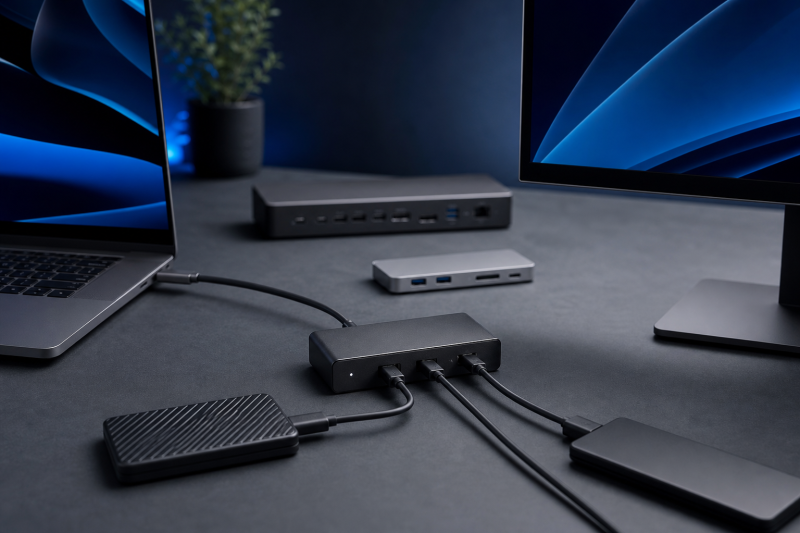
The older OWC Thunderbolt Hub is still a sensible buy, but only for one kind of desk. It fits when your computer has a compatible Thunderbolt port, you need to connect several Thunderbolt devices, your ordinary USB needs are small, and your laptop is happy charging at up to 60W. It is a branch hub, not a full dock. Its one job is to turn a single host connection into three downstream Thunderbolt 4 ports plus one USB-A port.
The narrow purpose is also the main limitation. There is no built-in HDMI, DisplayPort, Ethernet, card reader, or audio jack. If any of those are on your list, start with our hub versus dock explanation before you compare products, because a full dock will usually fit that job better.
Do not dismiss the older model just because Thunderbolt 5 products now exist. The useful question is whether its ports, host rules, display path, and 60W charging ceiling match the computer you already own. If they match, paying for a newer link standard may not fix anything for you. If they do not, the better move is a higher-charging Thunderbolt 4 hub, a qualified Thunderbolt 5 hub, or a full dock.
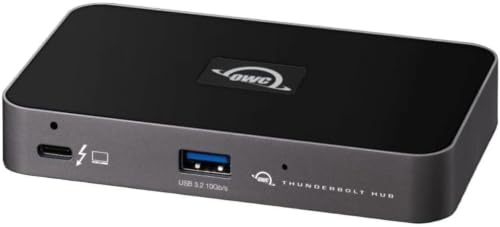
The review is source-led. It draws on current manufacturer documentation and the current Amazon catalog identity. It does not report hands-on testing, measured speed, temperature, charging, or long-term reliability.
Check the exact identity before comparing specifications
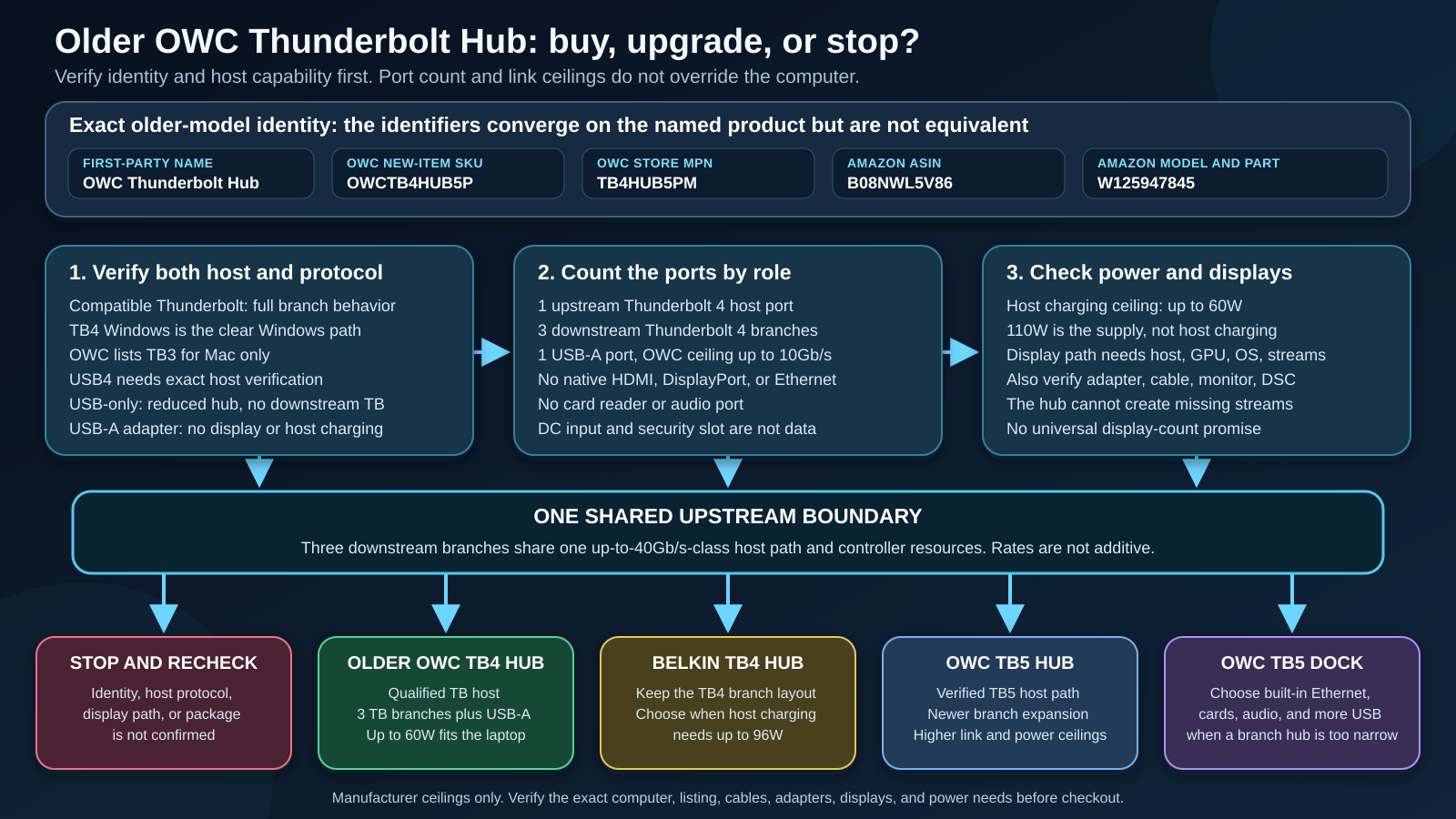
Several identifiers describe the item covered here, and they are not interchangeable:
| Identity field | Value to check |
|---|---|
| First-party product name | OWC Thunderbolt Hub |
| Generation | Older Thunderbolt 4 model |
| OWC current new-item SKU | OWCTB4HUB5P |
| OWC store manufacturer part | TB4HUB5PM |
| Current US Amazon ASIN | B08NWL5V86 |
| Amazon structured model and part | W125947845 |
The current Amazon page used for this review identifies an OWC Thunderbolt Hub under ASIN B08NWL5V86, with OWC as the brand and manufacturer. Its structured model and part fields both say W125947845. OWC’s own current product and store pages use OWCTB4HUB5P and TB4HUB5PM instead.
The matching brand, title, and generation are enough to identify the named older five-port OWC hub, but they do not prove that W125947845 is another spelling of OWC’s SKU. It also does not prove a serial number, physical hardware revision, or package suffix. At checkout, compare the product name, ASIN, brand, generation, listed ports, and included items. Stop if the page has switched to an OWC Thunderbolt 5 Hub, an OWC dock, or another bundle.
What the five ports actually are
OWC’s five-port count covers five functional data connections:
- One front Thunderbolt 4 port connects to the host.
- Three rear Thunderbolt 4 ports connect downstream devices.
- One USB-A 3.2 Gen 2 port has an OWC-rated ceiling of up to 10Gb/s.
The DC power input is separate. The Kensington Nano security slot and LED brightness control are not data ports either. A buyer who reads “five ports” as five accessory ports will overcount what remains after the computer takes one port for itself.
The three downstream Thunderbolt ports are the reason to buy this device. They let you create separate physical branches instead of putting every device in one long chain. OWC says removing a device from one branch need not break devices on the other branches. OWC also states that up to five additional Thunderbolt devices can be chained in total. That is not five devices behind every branch.
There is only one ordinary USB-A port. If you need several USB-A accessories, Ethernet, storage cards, audio, and a native monitor connector at the same time, this is the wrong port mix. The broad Thunderbolt hub guide can help compare other branch hubs, while the Thunderbolt 4 dock guide covers products built around a wider workstation port set.
Check the host implementation, not just the label
The safest buying rule is simple. Use a compatible Thunderbolt host to get full downstream Thunderbolt behavior. Do not assume that any oval USB-C connector gives the same result.
OWC’s current sources use different compatibility language:
- The product page expressly supports Thunderbolt 4 Windows PCs.
- The store lists Thunderbolt 3 for Mac only, alongside Thunderbolt 4, Thunderbolt 5, USB4, and USB-C host categories.
- The current support manual describes a broader group of computers and mobile devices, but separately explains reduced USB fallback.
Read those sources together rather than picking the broadest single sentence. A Thunderbolt 4 Windows PC is the clear Windows path. A compatible Thunderbolt Mac is the clear Mac path, with OWC placing its Thunderbolt 3 Mac floor at macOS Big Sur or newer. The differences among Thunderbolt 3, Thunderbolt 4, and Thunderbolt 5 are important because a connector shape alone does not identify the link behind it.
OWC also lists USB4, but the USB4 name does not by itself prove that every host tunnels Thunderbolt devices in the way your setup requires. Check the computer maker’s exact port documentation. Our USB4 explainer covers why USB4 capability labels can describe different feature sets.
What happens on a USB-only connection
OWC says a USB-only host can use the unit as a reduced USB hub at the host’s USB speed. On that fallback path, downstream Thunderbolt devices are not supported. USB-C display output and host charging also depend on what the exact host port exposes.
An older computer with only USB-A requires a separate adapter. That path does not provide display output or host charging through the hub. A cable or adapter can change the connector path, but it cannot add a missing protocol, video stream, or power role. Use the USB-C cable guide and the Thunderbolt 4 cable guide to check the cable class needed for the actual host path.
Do not treat the manual’s OS names as a universal promise. Linux, ChromeOS, Android, iPadOS, plain USB-C, and unspecified Windows systems all need device-level and port-level checks. The published OWC hub setup guide handles installation and OS-use questions separately from this checkout decision.
Three branches still share one upstream path
Each downstream connector is a useful physical branch, but the branches do not create three independent 40Gb/s host connections. They share one upstream Thunderbolt path and the hub’s controller resources.
OWC’s up-to-40Gb/s figure is a link ceiling, not a per-branch amount you can add together. A display, storage device, capture device, and network adapter can all compete for the same host-side resources. How they actually behave depends on the host, device, cable, driver, workload, and display traffic.
The branch layout is still valuable. It can make a desk easier to organize and can keep one device chain from depending on another. Buy it to organize your devices, not to multiply your bandwidth.
Display support requires the most careful checkout work
OWC publishes these headline display ceilings for the older hub:
- up to two 4K displays at 60Hz;
- one 8K display at 60Hz;
- one 4K display at 120Hz.
The display ceilings above are not universal layouts. The exact host, GPU, operating system, drivers, available DisplayPort streams, display adapter, cable, monitor, DisplayPort 1.4 path, and DSC support can all control the result. OWC says DSC may be required above 60Hz and is required for its 6K and 8K paths.
There is no native HDMI or DisplayPort connector on the hub. A monitor may connect over USB-C or Thunderbolt, or through an appropriate video adapter. An adapter changes the connector, not the number of display streams exposed by the host GPU.
OWC’s current pages also conflict on 5K support. The product summary discusses one 5K, 6K, or 8K display, while a current store specification row lists two 5K displays at 60Hz. The conflict is a reason not to promise dual 5K. Get written confirmation for the exact host, monitor, and connection plan if 5K is the purchase requirement.
The current OWC support manual says Apple Pro Display XDR is not supported through this hub path. Trust the current manual over older marketing that referenced a 6K XDR setup. Apple silicon display counts also vary by exact chip, Mac model, port, and sometimes lid state. “Works with Mac” is not a display-count guarantee.
For monitor shopping, start from the computer’s verified output limits and then use the Thunderbolt monitor guide to narrow the display side. The hub cannot create a stream that the host never supplies.
Charging tops out at 60W to the host, not 110W
OWC rates host Power Delivery at up to 60W. That can fit many thin-and-light laptops, but it is not automatically enough for a mobile workstation or a computer designed around a higher-power adapter. A host may also negotiate less than the ceiling.
The external power supply is rated at 110W. That number covers the hub’s broader power budget and is not a 110W laptop-charging claim. OWC separately rates each downstream Thunderbolt port up to 15W and the USB-A port up to 1.5A. The USB-A current figure should not be converted into an unstated watt promise.
Do not assume every port can deliver its published maximum at the same time. Before buying, compare the laptop’s normal adapter requirement with the hub’s 60W host ceiling, then account for bus-powered downstream devices. If the computer needs more than 60W to hold its intended operating state, plan to use its own power input or choose a higher-charging alternative.
Hub or dock? The missing ports decide
The older OWC hub does not document:
- native HDMI;
- native DisplayPort;
- Ethernet;
- SD or microSD readers;
- a 3.5mm audio port.
That absence is not a flaw if downstream Thunderbolt expansion is the actual job. You can attach compatible downstream devices or adapters, subject to the shared upstream path and host support. It is a poor fit if the goal is to replace several everyday adapters with one desktop connection.
Use a branch hub when the main need is more Thunderbolt attachment points. Use a full dock when the main need is a built-in mix of video, network, cards, audio, and ordinary USB. The current Thunderbolt 5 dock roundup is the better route for a buyer who has already decided on the full-dock class.
Package, size, software, and warranty
OWC’s current package description lists the hub, one 0.8m Thunderbolt cable, an external power supply and power cable, a digital support manual, and access to Dock Ejector downloads and documentation. Package contents can change, so compare that list with the exact product page and box before relying on a specific cable or accessory.
OWC lists manufacturer dimensions of 1.7cm high, 11.8cm long, and 7.3cm wide, with a weight of 209g. OWC publishes these as specifications, not as measurements taken for this review.
OWC’s current support pages list Dock Ejector for macOS and Windows. Dock Ejector is OWC software for safely ejecting connected drives and for the specific Apple peripheral functions OWC documents. No current public product firmware file or changelog was established, so do not buy on the assumption that a named firmware version or update fixes an undocumented issue.
OWC states a two-year limited warranty for the original purchaser, beginning at purchase. Its terms allow repair or replacement at OWC’s discretion, with exclusions and limitations. That is not a transferable, unconditional, seller-independent, or lifetime promise.
Which version should you choose?
| Choice | Best fit | Main checkout limit |
|---|---|---|
| Older OWC Thunderbolt Hub | Compatible TB host, three downstream TB4 branches, one USB-A, up to 60W host charging | No built-in dock ports; identity fields differ |
| Belkin TB4 Core Hub | Similar TB4 branch layout with up to 96W host charging | First-party and Amazon model strings differ |
| OWC Thunderbolt 5 Hub | Verified TB5 host and need for newer branch expansion | TB5 ceilings require the exact host path |
| OWC Thunderbolt 5 Dock | Need for Ethernet, cards, audio, more USB-A, and full-dock functions | Different product class and larger feature set |
Belkin Connect Thunderbolt 4 Core Hub, more host charging
The Belkin option keeps the basic branch-hub idea, with one upstream Thunderbolt 4 connection, three downstream Thunderbolt 4 ports, and one USB-A port rated up to 10Gb/s. Belkin rates host Power Delivery up to 96W, so it is the most direct alternative when the OWC unit’s 60W ceiling is the deciding problem.
Identity still needs a checkout check. Belkin’s first-party family is INC013, while the current Amazon model and part fields are INW017ttSGY. Those strings should not be merged. Belkin’s current cable-length rendering is also internally inconsistent, so no numeric cable length is assumed here.

OWC Thunderbolt 5 Hub, a newer branch path
The exact comparator is OWC model OWCTB5HUB5P, ASIN B0DPKL911T. It is the branch-hub alternative for a buyer with a host verified for the required Thunderbolt 5 path. OWC documents one host connection, three downstream Thunderbolt 5 branches, one USB-A port, up to 80Gb/s bidirectional, a conditional display-heavy allocation up to 120Gb/s, and up to 140W host charging.
The conditional 120Gb/s mode is not additive ordinary throughput. It does not mean every device gets 120Gb/s, and none of the TB5 link or 140W charging ceilings apply to the older TB4 hub. The exact host still controls the usable link, displays, and charging.

OWC Thunderbolt 5 Dock, built-in workstation ports
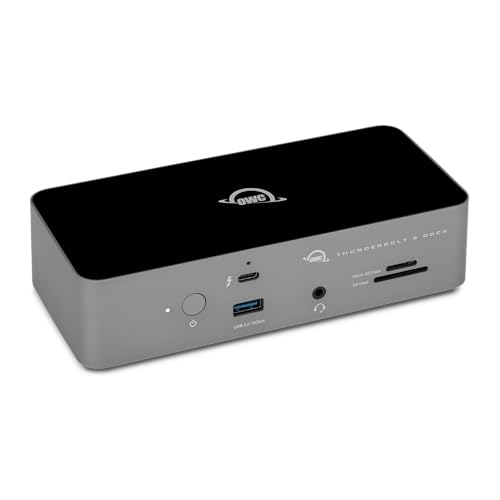
Choose the OWC Thunderbolt 5 Dock when a compact branch hub is the wrong class of product. The exact comparator is OWC model OWCTB5DOCK11P, ASIN B0FC7L89C2. OWC documents an 11-port dock with three downstream Thunderbolt 5 ports, three USB-A ports, 2.5Gb Ethernet, SD 4.0 UHS-II, microSD, 3.5mm audio, and up to 140W host charging.
That fuller port set answers a different buying problem. It should not be treated as the automatic successor to the older hub for someone who only needs more Thunderbolt branches, but it is the clearer choice when network, cards, audio, or several ordinary USB connections must be built in.
Who should buy the older OWC Thunderbolt Hub?
Buy it when:
- the exact listing matches the older five-port OWC Thunderbolt Hub;
- the computer has a compatible Thunderbolt path;
- three downstream Thunderbolt branches are more useful than built-in dock ports;
- one USB-A port is enough;
- up to 60W host charging fits the laptop;
- the intended monitors fit the host’s verified stream and display limits;
- you are comfortable checking adapters and cables separately.
Skip it when:
- the computer exposes only an unverified USB-C or USB4 path;
- downstream Thunderbolt devices must work through a USB-only fallback;
- the laptop needs more than 60W from the one-cable setup;
- native HDMI, DisplayPort, Ethernet, cards, or audio are required;
- dual 5K or Apple Pro Display XDR support is essential.
One limit belongs to this review rather than to the hardware. A source-led review cannot give you independently measured performance, thermal behavior, or long-term reliability. If your decision depends on that kind of hands-on data, look for it before you buy.
Checkout checklist
Before placing the order, verify every line:
- The name says OWC Thunderbolt Hub, not OWC Thunderbolt 5 Hub or an OWC dock.
- The product is the older Thunderbolt 4 generation.
- OWC’s current new-item SKU is
OWCTB4HUB5P. - OWC’s store manufacturer part is
TB4HUB5PM. - The US Amazon ASIN is
B08NWL5V86. - Amazon’s structured model and part are
W125947845, and you are not treating that token as proof of OWC’s SKU or a hardware revision. - The host provides the required compatible Thunderbolt path.
- Up to 60W is enough for the laptop, or the laptop has a separate power plan.
- The display plan has been checked against the exact host, GPU, OS, drivers, streams, adapter, cable, monitor, and DSC requirement.
- Three downstream TB4 ports plus one USB-A port are enough without built-in Ethernet, cards, audio, HDMI, or DisplayPort.
- The exact live listing and box show the cable, supply, power cable, and documentation you expect.
- The seller and purchase path fit OWC’s original-purchaser warranty terms.
FAQ
Is this the OWC Thunderbolt 5 Hub?
No. This review covers the older OWC Thunderbolt Hub based on Thunderbolt 4. OWC identifies the current new-item SKU as OWCTB4HUB5P. The OWC Thunderbolt 5 Hub is a separate product with model OWCTB5HUB5P, a different ASIN, higher link ceilings, and higher host charging.
Does the older hub work with ordinary USB-C?
OWC documents a reduced USB fallback, but that is not the same as full Thunderbolt operation. On a USB-only host, the device can act as a USB hub at the host’s USB speed, while downstream Thunderbolt devices are not supported. Display and charging behavior depend on the exact USB-C host port.
Can it run two external displays?
OWC publishes a ceiling of up to two 4K displays at 60Hz, but the exact host, GPU, OS, drivers, stream count, adapters, cables, monitors, DisplayPort 1.4 path, and DSC support decide whether that layout works. Exact Apple chip and Mac model matter. Do not treat the headline as a universal promise.
Does each downstream port provide its own 40Gb/s connection?
No. The three downstream branches share one upstream host path and controller resources. OWC’s up-to-40Gb/s figure is a link ceiling, not an additive per-branch result.
Is 60W enough for a laptop?
It depends on the laptop. Compare 60W with the computer’s normal adapter requirement and intended workload. The 110W external supply does not mean the laptop receives 110W. A higher-power system may need its own charger or a different hub.
Does the hub include HDMI, DisplayPort, Ethernet, cards, or audio?
No native connector for those functions is documented on the older hub. Compatible downstream devices and adapters may add functions, but they still depend on the host and shared upstream path.
Is Apple Pro Display XDR supported?
The current OWC support manual says it is not supported through this hub path. That current exclusion is the safe checkout rule.
Is there a public firmware update to install?
No current public product firmware file or changelog was established for this review. OWC’s support pages list the manual and Dock Ejector resources, but that does not prove a particular installed firmware or public update path.
Final recommendation
The older OWC Thunderbolt Hub remains useful when you need branch expansion more than dock features. Its three downstream Thunderbolt 4 ports, one USB-A port, and up to 60W host charging can be a clean match for a compatible host.
Buy only after checking the exact identifiers, host protocol, display path, charging need, and missing ports. Choose the Belkin alternative when higher TB4 host charging is the main gap, the OWC TB5 Hub when a verified TB5 branch path matters, or the OWC TB5 Dock when the desk needs full-dock functions.