USB-C audio adapters look interchangeable, but the connector direction, the DAC figure and the headset-control limits decide whether one works. The comparison covers five single adapters, including a reverse-direction option for an analog USB-C headset.
USB-C to 3.5 mm headphone jack adapters compared
| Image | Product | Best fit | Direction | DAC detail | Controls | Cable or limit | Check Price |
|---|---|---|---|---|---|---|---|
 | Apple USB-C to 3.5 mm Headphone Jack Adapter | Apple-made 3.5mm-to-USB-C adapter | USB-C host to 3.5mm | Not stated by Apple or Amazon | Not stated | Amazon: USB-C devices on iOS 10 or later | Check Price on Amazon |
 | UGREEN USB-C to 3.5mm Audio Adapter | 24-bit/96kHz DAC in its listing | USB-C host to 3.5mm | 24-bit/96kHz (listing) | Volume and calls; no wiring standard named | Braided cable; no charging stated | Check Price on Amazon |
 | JSAUX USB-C to 3.5mm AUX Audio Adapter | CTIA port named in its listing | USB-C host to 3.5mm | 16-bit/48kHz (listing) | CTIA; call, volume and pause keys | OMTP, TS and TRS mic-only not supported | Check Price on Amazon |
 | Thousover 540-degree USB-C Audio Adapter | Adjustable phone-side cable angle | USB-C host to 3.5mm | Up to 48kHz; 92dB SNR (listing) | Inline control on most headphones | 540-degree rotatable connector | Check Price on Amazon |
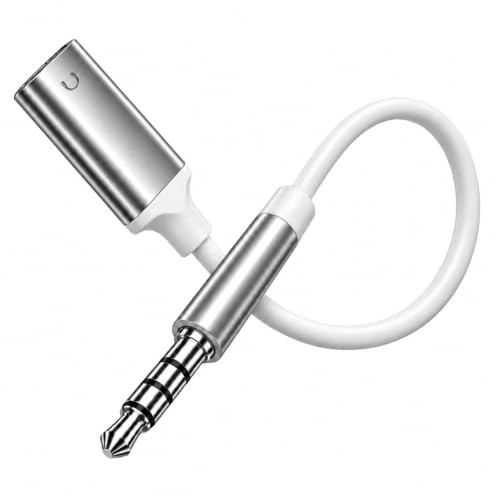 | Jeluse USB-C Female to 3.5mm Male Adapter | Analog USB-C headset to 3.5mm source | Reverse: 3.5mm source to analog USB-C headset | No DAC described | Compatible analog-headset calls and controls | 6.7in overall; digital USB-C headsets excluded | Check Price on Amazon |
1. Apple USB-C to 3.5 mm Headphone Jack Adapter — Best for an Apple-made Adapter
Apple’s product page says the USB-C to 3.5 mm Headphone Jack Adapter, part number MW2Q3AM/A, lets you connect devices that use a standard 3.5 mm audio plug to your USB-C devices. The Amazon listing carries the same model number and says the adapter works with devices that have a USB-C connector and support iOS 10 or later.
Neither Apple’s page nor the Amazon listing gives a sample rate, bit depth, microphone support or inline-control support. Of the five adapters, Apple’s sources state the fewest specifications.
Limit: the Amazon listing ties compatibility to USB-C devices that support iOS 10 or later, and Apple’s page gives no sample rate or control details.Our Take Choose Apple’s adapter when a plain 3.5 mm-to-USB-C connection made by Apple is all you need. UGREEN’s Amazon listing is the one to read when you want a stated 24bit/96kHz figure and inline controls.
- Apple’s page describes a plain connection from a standard 3.5 mm audio plug to a USB-C device, which fits a buyer who needs nothing beyond that.
- The Amazon listing for Apple’s adapter states its compatibility as devices that have a USB-C connector and support iOS 10 or later.
- Apple’s page and the Amazon listing state no sample rate, bit depth, microphone support or inline controls, and Apple’s sources state the fewest specifications of the five.
2. UGREEN USB-C to 3.5mm Audio Adapter — Best for a Stated 24-bit/96kHz DAC
UGREEN’s Amazon listing for model 80154 states support for up to 24bit/96kHz audio. It describes a nylon-braided cable and an aluminum-alloy housing, and says the adapter supports in-line controls including volume control and calling.
The listing says the adapter connects USB Type-C phones, tablets and laptops to headphones, car radios, speakers and Hi-Fi systems, and it names iPad, MacBook, Mac mini, PS5 and Switch 2 among compatible devices. It says the adapter supports all 3.5mm earphones, yet it names no headset wiring standard such as CTIA and lists no charging or data pass-through.
Limit: UGREEN’s listing says the adapter supports all 3.5mm earphones, but it names no wiring standard and no charging or data pass-through.Our Take Pick UGREEN when a listed 24bit/96kHz DAC figure and a braided cable are the priorities. JSAUX’s Amazon listing states a lower 16Bit/48kHz figure but names CTIA support.
- UGREEN’s Amazon listing states DAC support up to 24bit/96kHz, a higher figure than JSAUX’s listing states.
- UGREEN’s listing names both volume control and calling among the in-line controls the adapter supports.
- UGREEN’s listing describes a nylon-braided cable and an aluminum-alloy housing, which suits a buyer who ranks a braided cable first.
- UGREEN’s listing names no headset wiring standard such as CTIA despite stating broad earphone support, and it lists no charging or data pass-through.
3. JSAUX USB-C to 3.5mm AUX Audio Adapter — Best for Explicit CTIA Headset Limits
JSAUX’s Amazon listing, model CM0011, states a Smart DAC with a maximum 16Bit/48kHz audio sampling rate and says the 3.5mm female port is CTIA-compatible. The listing says call, volume control and pause through the headphones’ function keys are possible, and its title names CTIA mic and volume controls. It also credits a relief strain design with 15000+ bending tests and shielded enamel wire.
The listing is specific about what does not work. JSAUX lists OMTP, TS and TRS microphone-only devices as not supported, and says Apple EarPods with a 3.5mm plug do not support microphone or volume adjustment. A warning adds that a USB-C device with its own 3.5mm jack may not support calls. The warning names some Galaxy S8, S9, S10, Note 8 and Note 9 models and iPad Pro 11-inch and 12.9-inch models as examples that may not support calls or music control.
Limit: JSAUX’s listing names CTIA support and lists OMTP, TS and TRS microphone-only devices as not supported.Our Take Choose JSAUX when a listed CTIA connection and a written list of unsupported devices count for more than the highest DAC figure. UGREEN’s listing states 24bit/96kHz but names no wiring standard.
- JSAUX’s listing names a CTIA-compatible 3.5mm port and a 16Bit/48kHz Smart DAC, which gives a buyer a stated wiring standard to check a headset against.
- JSAUX’s listing says calls, volume control and pause are possible through the headphones’ function keys.
- JSAUX’s listing credits its relief strain design with 15000+ bending tests, and adds shielded enamel wire.
- JSAUX’s listing states a maximum of 16Bit/48kHz, lower than the 24bit/96kHz in UGREEN’s listing.
- JSAUX’s listing says OMTP, TS and TRS microphone-only devices are not supported, a limit for any buyer with one of those devices.
- JSAUX’s listing says Apple EarPods with a 3.5mm plug do not support microphone or volume adjustment, a limit for buyers who plan to use EarPods.
4. Thousover 540-degree USB-C Audio Adapter — Best for an Adjustable Phone-side Cable Angle
Thousover’s Amazon listing puts the 540-degree rotatable connector first. It says the connector adjusts to the angle you need and helps reduce hand blocking and cable bending when gaming with the phone held sideways or watching video. The listing also states a smart DAC chip that supports up to 48kHz sampling and a 92dB signal-to-noise ratio.
The listing describes plug-and-play use with no drivers or apps and says the adapter supports music playback, calls and inline control on most headphones. It names iPhone 17, 16 and 15, Galaxy S25 to S22, iPad and Pixel as compatible, and notes that Apple EarPods volume adjustment is not supported. It gives no bit depth, charging specification or wiring standard.
Our Take Choose Thousover when the angle of the plug against the phone is your main concern. UGREEN’s listing states a bit depth and JSAUX’s names CTIA. Thousover’s listing gives neither.
- Thousover’s listing describes a 540-degree rotatable connector that adjusts to the angle you need, and says it helps reduce hand blocking and cable bending with the phone held sideways.
- Thousover’s listing states a smart DAC chip that supports up to 48kHz sampling and a 92dB signal-to-noise ratio.
- Thousover’s listing describes plug-and-play use and says no drivers or apps are needed.
- Thousover’s listing gives no bit depth, charging specification or wiring standard, where UGREEN’s listing states a bit depth and JSAUX’s names CTIA.
- Thousover’s listing says inline control works on most headphones and notes that Apple EarPods volume adjustment is not supported.
5. Jeluse USB-C Female to 3.5mm Male Adapter — Best for Analog USB-C Headphones on a 3.5mm Source
Jeluse’s Amazon listing describes the reverse of the other four, with a USB-C female end for analog USB-C headphones and a 3.5mm male plug for a device with a 3.5mm headphone output, such as an MP3 player, portable CD player, laptop, desktop, phone or tablet. The listing says it supports microphone input, calls and inline controls including volume with compatible analog USB-C headsets and 3.5mm headset jacks, and gives a 6.7-inch overall length including connectors.
Jeluse tells buyers to confirm with the headphone seller that the headphones support analog USB-C audio, and says digital USB-C headphones with a built-in DAC will not work. The listing says available functions vary by headset and device, describes aluminum alloy housings with a white PVC cable jacket, and describes no DAC and no USB-C host role.
Our Take Choose Jeluse only for connecting analog USB-C headphones to a 3.5mm output. For a USB-C phone or laptop feeding 3.5mm headphones, the first four adapters are the ones that describe that direction.
- Jeluse’s listing describes connecting analog USB-C headphones to a device with a 3.5mm headphone output, such as an MP3 player or laptop.
- Jeluse’s listing says it supports microphone input, calls and inline controls including volume with compatible analog USB-C headsets.
- Jeluse’s listing gives an overall length of 6.7 inches including connectors.
- Jeluse’s listing says digital USB-C headphones with a built-in DAC will not work, and it tells buyers to confirm with the headphone seller that the headphones support analog USB-C audio.
- Jeluse’s listing says available functions vary by headset and device, and it ties the microphone input, calls and inline controls it lists to compatible analog USB-C headsets.
Buying Guide
1. Confirm which way audio must travel
According to Apple’s page and the other listings, the Apple, UGREEN, JSAUX and Thousover adapters carry audio from a USB-C host to a 3.5mm headset or speaker. Jeluse’s listing describes the opposite. It accepts an analog USB-C headset and plugs into a 3.5mm source.
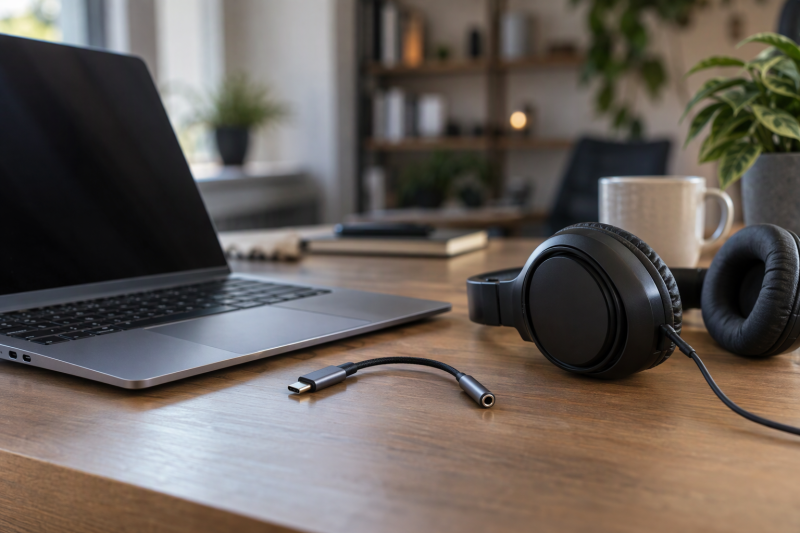
Connector shapes do not establish signal direction. Choose the adapter whose documented direction matches your devices, e.g., the ones on your desk.
2. Read DAC figures as published limits
UGREEN’s Amazon listing states 24bit/96kHz, JSAUX’s states 16Bit/48kHz, and Thousover’s states up to 48kHz plus 92dB SNR. Apple’s page gives no comparable format figure.
A listed sample-rate ceiling is a seller’s figure, not a measurement. Each number above comes from a listing or Apple’s page, not from a test.
3. Check microphone wiring before calls
JSAUX’s listing names CTIA and lists OMTP, TS and TRS microphone-only devices as not supported. UGREEN’s listing mentions in-line volume control and calling without naming a wiring standard, and Jeluse’s lists microphone support only with compatible analog USB-C headsets.
Music output and headset calling are separate requirements. Read each listing’s stated control limits before relying on a microphone during work calls.
4. Do not expect charging from an audio dongle
None of the five Amazon listings states a second USB-C port, pass-through power or data transfer. Each describes an audio adapter, not a hub that keeps the host’s USB-C port free.
Use a multiport USB-C hub when charging and wired audio must happen together. The USB-C hub guide covers hubs with ports beyond audio.
5. Pick cable shape from the listing’s own description
Thousover’s listing describes a 540-degree rotatable connector and says the rotating design helps reduce pressure on the port and cable. Jeluse’s listing gives a 6.7-inch overall length including connectors, and UGREEN’s describes a nylon-braided cable and aluminum-alloy housing.
Match the cable shape to where the port sits on the device. JSAUX’s listing describes a relief strain design with 15000+ bending tests, and Apple’s page describes no cable detail.
FAQ
Which one has the highest stated DAC format?
Among the five, only UGREEN’s Amazon listing states a bit depth above 16, 24bit/96kHz. JSAUX’s listing states 16Bit/48kHz, and Thousover’s states up to 48kHz without a bit depth.
Apple’s page and Jeluse’s listing give no DAC format. Treat each figure as the seller’s own statement.
Do these adapters charge a phone?
None of the five Amazon listings states charging or a second USB-C pass-through port. Each describes an audio connection product.
Plan charging separately when a USB-C phone has only one port. A hub is a different product from these adapters.
Will every headset microphone work?
No. JSAUX’s listing says OMTP, TS and TRS microphone-only devices are not supported, and Jeluse’s listing states microphone support only with compatible analog USB-C headsets. UGREEN’s listing says it supports all 3.5mm earphones, while Thousover’s says inline control works on most headphones and Apple’s sources state no microphone support.
Check the connector wiring and the listing’s notes before using an adapter for calls. JSAUX says Apple EarPods do not support microphone or volume adjustment, and Thousover says Apple EarPods volume adjustment is not supported.
What is the reverse-direction adapter for?
Jeluse’s listing says it connects analog USB-C headphones to a device with a 3.5mm headphone output. The adapter is relevant only when that direction is required.
The listing describes no USB-C host role, and says digital USB-C headphones with a built-in DAC will not work.
Is a rotating connector useful?
Thousover’s listing says its 540-degree connector adjusts the cable angle and helps reduce hand blocking when gaming with the phone held sideways or watching video.
The listing gives no charging specification or bit depth. Choose it for the adjustable cable angle, not for a higher stated DAC figure.
Bottom Line
Choose Apple USB-C to 3.5 mm Headphone Jack Adapter when an Apple-made 3.5 mm-to-USB-C adapter is all you need. Choose UGREEN USB-C to 3.5mm Audio Adapter for the 24bit/96kHz figure in its Amazon listing. Choose JSAUX USB-C to 3.5mm AUX Audio Adapter for the CTIA support its listing names. Choose Thousover 540-degree USB-C Audio Adapter for the rotating connector its listing describes. Choose Jeluse USB-C Female to 3.5mm Male Adapter only for analog USB-C headphones on a 3.5mm source.
The portable USB-C DAC guide covers dedicated DACs with a headphone output, and the USB-C hub guide covers ports beyond audio. Match the audio direction, headset wiring and needed port access before choosing a dongle.