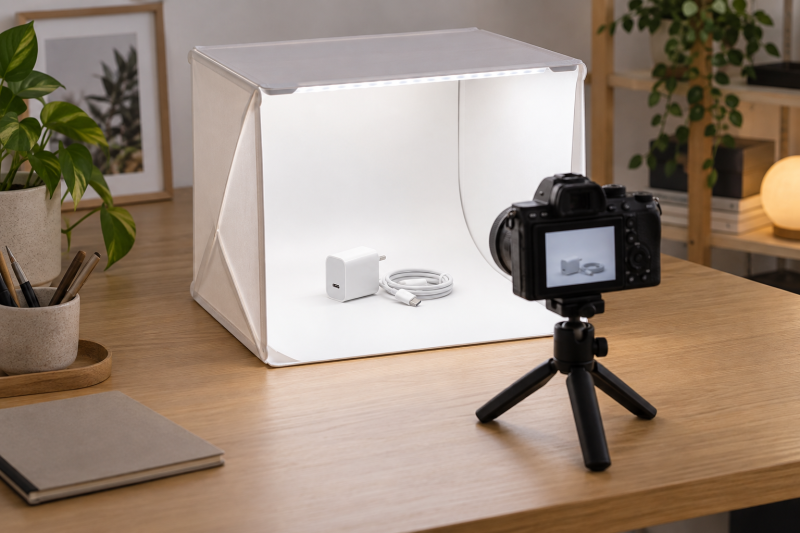
Photographing a USB-C adapter, tiny stand or cable connector on an ordinary desk often means fighting reflections and a messy background. A folding photo lightbox gives you a repeatable lit space on the tabletop. The decision starts with the largest object you shoot and the camera angles you need, not the number of LEDs printed in a marketplace title.
These five exact lightboxes had active New Amazon US offers when checked. They range from a 10-inch cube for small parts to a much larger foldable studio. The lighting, backdrop and size details below are seller-stated, not results of a color or brightness test. A box can simplify setup, but reflective metal and glossy plastic may still need careful object positioning and exposure.
Measure the product with its packaging or props, then leave clearance for the camera view and background curve. A 12-inch cube does not provide a full 12-inch usable shooting area in every direction.Tabletop Lightboxes Compared
| Image | Product | Details | Check Price |
|---|---|---|---|
 | PULUZ 10-Inch Mini Box | Best fit: Tiny adapters and jewelry Interior size: 10 x 10 in stated Lighting: 104 LEDs stated Backdrops: 6 double-sided sheets stated Access: Front and top | Check Price on Amazon |
 | DUCLUS 12-Inch Box | Best fit: Background variety Interior size: 12 x 12 in stated Lighting: 120 dimmable LEDs stated Backdrops: 8 included stated Access: Front and top | Check Price on Amazon |
 | Warm/Cool 12-Inch Box | Best fit: Adjustable light color Interior size: 12 x 12 in variant bullets Lighting: 120 LEDs, 3 color temperatures stated Backdrops: 6 PVC sheets stated Access: Multiple openings | Check Price on Amazon |
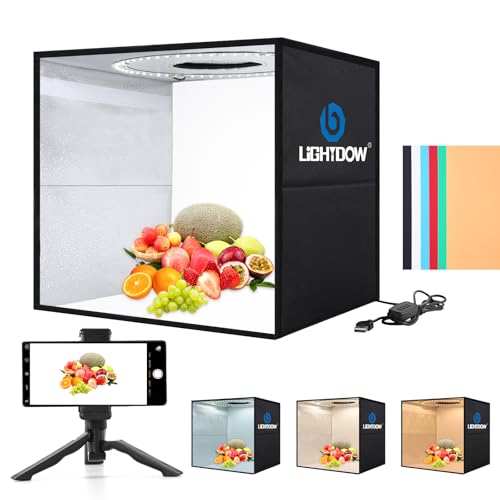 | Lightdow 12-Inch Kit | Best fit: Box with desktop tripod Interior size: 12 x 12 x 12 in stated Lighting: 120 LEDs, 10 levels stated Backdrops: 6 PVC sheets stated Accessory: Desktop tripod listed | Check Price on Amazon |
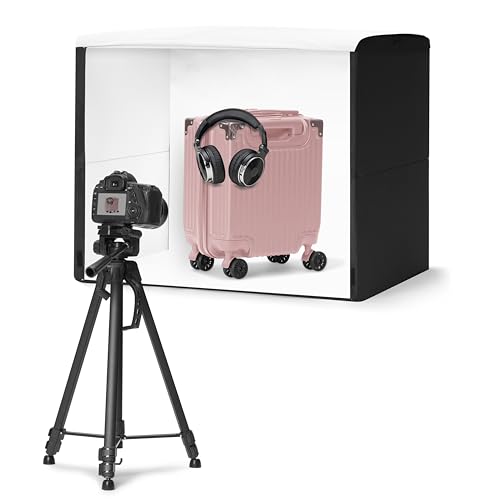 | Amazon Basics Foldable Studio | Best fit: Larger tabletop hardware Dimensions: 25 x 30 x 25 in stated Lighting: Built-in daylight LEDs stated Backdrop: White included Access: Front doors and top | Check Price on Amazon |
1. PULUZ 10-Inch Mini Box — Best for Tiny Products
PULUZ advertises a 10-by-10-inch folding box with 104 LED beads and six double-sided color backgrounds. The listing describes both a front window and a top opening, useful when photographing a small adapter from the side and then its ports from above. Its compact size is the reason to consider it. A small box can stay on a crowded desk without pushing the laptop or keyboard away.
The small size limits composition. A hub with several cables attached may be longer than the item itself, and a top-down shot needs space for the camera above the opening. The seller claims a CRI above 95, but that figure alone does not establish color accuracy in your camera files. Check the current offer’s included backdrop colors and power arrangement. For a larger accessory or packaging shot, start with a 12-inch or larger box instead of crowding the frame.
Choose the 10-inch footprint for genuinely tiny objects, not because it is easy to store.Our Take Pick PULUZ for small connectors, jewelry or a single compact device when desk space is scarce. Choose a bigger tent if you regularly include cables, boxes or props in the shot.
- Compact 10-inch listed format.
- Front and top shooting access.
- Six double-sided backgrounds stated.
- Limited room for cables or packaging.
- Color performance is not independently verified.
2. DUCLUS 12-Inch Box — Best for Background Variety
DUCLUS lists a 12-by-12-inch tent, 120 dimmable LEDs and eight included backdrops. That background assortment is its clearest reason to choose it over a similar-sized box. You can photograph a dark gadget against a lighter surface, then switch to a darker tone when the object is pale. The seller describes front and top access with a cover that changes how much of the opening is exposed to the room.
The count of eight backdrops is a claim about what is included, not evidence that every color suits every product. Dimmer output and camera exposure interact, so a low setting may require a steadier camera or longer shutter time. The listing advertises a CRI above 95 and color similar to daylight, but this guide does not verify those values. If your typical subject is wider than a small charger or watch, check its dimensions against the actual opening and background curve before buying.
Our Take Choose DUCLUS when you shoot many small products and want different background colors in one folding kit. A bigger studio is safer for product boxes or multiple items together.
- Eight backdrops listed.
- Dimmable 120-LED lighting stated.
- Front and top access described.
- 12-inch box limits larger objects.
- Seller lighting claims are untested here.
3. Warm/Cool 12-Inch Box — Best for Light Color Control
This listing’s 12-inch variant bullets describe 120 LED beads, ten brightness steps and three color-temperature choices: approximately 3200 K, 4200 K and 5600 K. It includes six detachable PVC backgrounds and openings at more than one side and the top. The attraction is adjusting the lighting color inside the box without bringing another lamp to the desk. Adjustable color can help match a product’s appearance to a warmer or cooler intended scene.
The marketplace title lists many box sizes, so confirm that the option you buy matches the 12-inch configuration described here. Do not assume a different size inherits the same LED count or accessories. A color-temperature label is not proof that colors will match another light source or the camera’s white balance. Shoot a test frame, set white balance consistently and compare the output before photographing a whole batch of products.
Our Take Pick this box when selectable warm and cool light is more useful than extra backgrounds. If you need a simpler repeatable daylight look, a single-color box may be easier to standardize.
- Three seller-stated color-temperature modes.
- Ten brightness levels described.
- Six PVC backgrounds listed.
- Multi-size title makes variant checking important.
- Actual color accuracy is not established here.
4. Lightdow 12-Inch Kit — Best with a Desktop Tripod
Lightdow’s exact listing describes a 12-by-12-by-12-inch box, 120 LEDs, ten brightness settings, three light-color modes and six PVC backdrops. It also lists a desktop tripod in the kit. That accessory may help a creator put a phone or light camera at a repeatable height for a run of product photos. Front and top openings support side profiles and overhead views without rebuilding the whole studio.
The seller lists USB power and cautions against charging current over 3 A. Check the current offer for the cable and tripod details before assuming the stand will support your particular camera. A small tripod is not automatically suitable for a heavy mirrorless body, and a 12-inch box still limits wider hardware. The multi-color lighting offers choices, but consistent white balance and exposure across a batch are more important than switching modes on every item.
Our Take Consider Lightdow when a small box plus a basic desktop camera support is convenient. Buy the lightbox alone if you already have a better camera mount.
- Desktop tripod listed in the package.
- Ten brightness settings and three light modes stated.
- Front and top shooting access.
- Tripod capacity needs verification.
- USB power source must suit the stated limit.
5. Amazon Basics Foldable Studio — Best for Larger Tabletop Items
Amazon Basics lists a foldable studio measuring 25 by 30 by 25 inches, far roomier than the mini boxes above. It includes a removable white backdrop, built-in daylight-balanced LEDs and a power supply, according to the listing. The front has multiple access doors and there is a top opening. The larger format is the practical choice for a router, monitor arm component or boxed accessory that would be cramped in a 12-inch tent.
The larger footprint is not free. Measure the table and storage location before buying. Its listing describes a thin folded case, but the open box still occupies substantial working area. The only included background is white, which gives fewer styling options than the small kits with several backdrops. The seller describes high-CRI lighting but does not publish an independently verified color result here. Plan a stable camera position and check whether the front doors allow the angle needed for the product’s most important details.
A bigger box buys composition room, but it must fit the actual desk and storage spot.Our Take Choose Amazon Basics for larger tabletop hardware, packaging or several accessories in one frame. For a single connector, its size may be more burden than benefit.
- Much larger stated interior dimensions.
- White backdrop and power supply listed.
- Front-door and top shooting access.
- Substantial open desk footprint.
- Only a white included backdrop is stated.
Buying Guide
1. Size the box to the whole composition
Measure the largest product plus its cables, packaging or props, not the bare device alone. A 10-inch lightbox can work for a compact adapter but leaves little space for a connected cable to curve naturally. A 12-inch tent gives more room for a small hub or charger, while a much larger studio can accommodate boxed gear. Leave space between the object and the background so the backdrop’s bend does not crowd the image.
Check the camera opening and working distance. A box can be wide enough internally but still constrain a low camera angle or a close lens. Top-down shots need clear space above the lid. If you photograph longer cables or multiple products together, a backdrop support kit may offer more open composition space than a cube, though it requires separate lighting and material.
2. Compare light control rather than LED counts
Dimming and color temperature affect repeatability more directly than a headline bead count. Dimming can reduce harsh highlights on glossy devices, and selectable warm/cool modes can match a room’s intended look. Keep the chosen setting fixed during a product batch, and record camera exposure and white balance. A CRI claim in a seller listing is useful context but not a measured guarantee of accurate colors in the final photo.
Reflective surfaces remain challenging inside any tent. A metal connector can reflect the camera opening or a dark object may disappear against a dark backdrop. Rotate the product, change the shooting window or reposition the background before buying more lights. If a camera needs stable repeatable framing, a suitable desk camera mount may be as important as the box’s LEDs.
3. Plan the backdrop and power path
Included background sheets vary by offer. PULUZ and DUCLUS list multiple colors, Lightdow lists PVC sheets and Amazon Basics includes a white backdrop. Confirm which colors and materials come with the exact seller option. Wipeable PVC may simplify repeated product work, while a plain white sweep can keep a catalog visually consistent. Avoid creasing a sheet where it curves behind the subject.
Check power-source and cable placement before opening the box on a cramped desk. A USB-powered tent needs a suitable supply within reach. The Amazon Basics studio lists its own power supply. Keep the power lead out of the camera view and away from the edge of the table. Fold the box and store its backgrounds flat or as instructed, so setup next time starts with a usable surface.
Frequently Asked Questions
Will a lightbox remove all reflections from a USB-C hub?
No. A lightbox can soften and spread light, but a glossy hub or metal port still reflects what surrounds it, including the camera opening. Turn the product and inspect the preview. A darker or lighter background may change the edge contrast without changing the product itself.
For catalog work, make one test frame before shooting an entire batch. Keep the box lighting, camera angle and white balance consistent, then compare the product’s finish to the physical item. The box simplifies the scene but does not replace careful positioning.
Is a 12-inch box enough for boxed accessories?
It depends on the full package size and the angle. A small charger box may fit, while a monitor arm or docking-station package can crowd the opening. Measure the package diagonally if you plan a three-quarter view, and leave margin around it for the camera crop.
If the object fills almost the entire enclosure, the background curve and lights may show awkwardly. A larger foldable studio or open backdrop setup gives more room. Do not buy solely from the object’s footprint on the desk.
Does a CRI above 95 guarantee accurate product color?
No. The CRI figure is a seller-stated light-source specification, not a guarantee of the final image. Camera white balance, exposure, backdrop color, mixed room light and editing can shift the look. The product itself may also reflect colored surroundings.
Use a consistent camera setup and compare a test image with the item under neutral viewing light. If exact catalog color is commercially important, use a proper color-reference workflow rather than relying on one listing number.
Should I use the top opening or front opening?
Use the top opening for flat lays, labels and connector layouts when you can place the camera securely above the box. Use a front opening for side profiles, height and front-panel details. Some products need both views to tell a buyer what they are getting.
The opening can appear as a reflection on glossy surfaces. Adjust the angle and background rather than forcing every item into one view. Check the size and shape of each opening on the current listing, especially if a phone or lens must get close.
Bottom Line
For tiny desk accessories, PULUZ uses the least space. DUCLUS adds backdrop variety. The warm/cool box and Lightdow offer more lighting choices, with Lightdow also listing a desktop tripod. Amazon Basics makes more sense when the object or package needs a substantially larger frame. Match the box to your largest actual composition, then standardize lighting and camera settings for the batch.