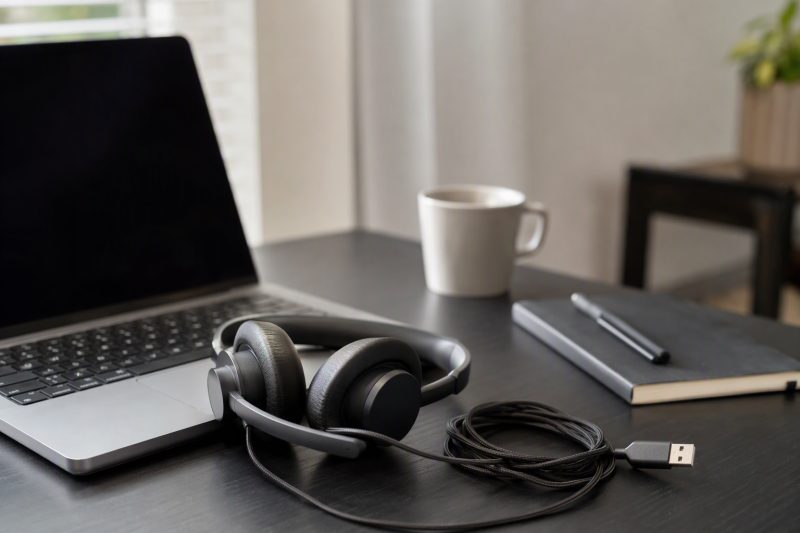
A dedicated USB headset solves several problems that laptop speakers and microphones create during a long call. The microphone stays close to the mouth, incoming speech remains private, and coworkers or family members hear less of the remote conversation. A wired connection also avoids battery charging, Bluetooth pairing, and radio dropouts.
Comfort is personal, but useful specifications still narrow the choice. Compare ear-cushion style, headset weight, headband adjustment, microphone directionality, cable length, USB connector, and 3.5mm support, and check for physical mute controls. Noise-cancelling microphones reduce the sound sent to the call. They do not provide active noise cancellation for the wearer unless explicitly stated.
[blueblock]For hearing comfort, begin at a low laptop and headset volume, take regular breaks, and keep the microphone near the corner of the mouth rather than directly in front of it. Test mute and playback controls with a second participant before discussing confidential information.[/blueblock]Quick Picks
- Best overall proven USB-A value: Logitech H390 combines plug-and-play USB-A, a rotating noise-reducing microphone, inline controls, padded earcups, and a 6.23-foot cable.
- Best USB and 3.5mm flexibility: JIAMQISHI EH01 adds a detachable USB control path, 40mm drivers, a reversible boom, memory-foam pads, and long combined cabling.
- Best basic option with minimal documentation: Acpanore A-R06S is a USB call-center headset with an active new offer, but its fit, controls, connector, and audio details are not supplied.
- Best lightweight business pick: Jabra Evolve 10 offers USB-A plug-and-play, inline call controls, an ambidextrous boom, noise-reducing microphone, and TCO certification.
- Best traditional call-center headset: Arama A800USB uses wideband audio, DSP, a noise-reducing microphone, inline mute and volume, and a 5.3-foot cable.
- Best adjustable comfort design: Wantek A600F combines a larger padded headband, memory foam, rotating earcups, a 330-degree boom, and USB plus 3.5mm connections.
- Best long-cable dual-connection value: FEABASK EH07 provides USB and 3.5mm use, 40mm drivers, memory foam, and roughly nine feet of combined cable.
- Best simple status-light headset: LEVN LE-HS010 Basic offers USB plug-and-play, a rotating microphone, inline mute controls, status indicators, soft leatherette pads, and an extra-long cable.
USB Headset Comparison
| Image | Product | Details | Check Price |
|---|---|---|---|
 | Logitech H390 | Connection: USB-A Microphone: Rotating noise-reducing boom Controls: Inline volume and mute Cable: 6.23 feet / 1.9 meters Comfort: Adjustable padded headband; leatherette cushions | Check Price on Amazon |
 | JIAMQISHI EH01 | Connection: USB and 3.5mm Microphone: 270-degree reversible unidirectional boom Controls: Volume, microphone mute, speaker mute Cable: Approximately 5+4 feet stated Drivers: 40mm | Check Price on Amazon |
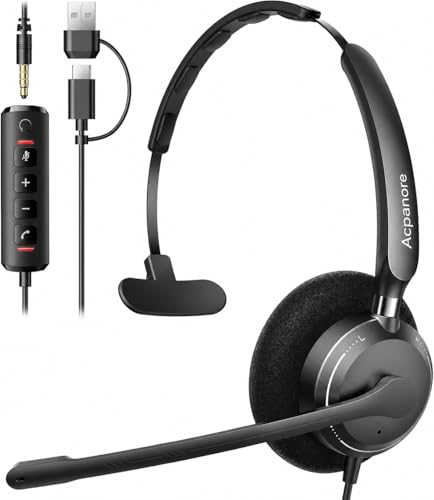 | Acpanore A-R06S | Connection: USB; connector type not stated Microphone: Included; type not stated Use: PC and call-center use stated Controls: Not stated Comfort: Not stated | Check Price on Amazon |
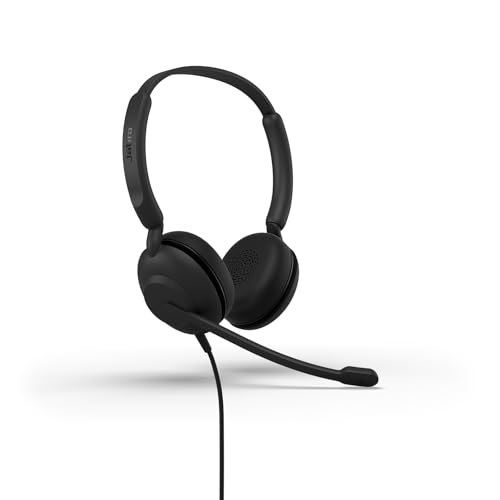 | Jabra Evolve 10 | Connection: USB-A Microphone: Noise-reducing adjustable boom Controls: Inline call and volume controls Comfort: Lightweight design stated Materials: More than 50% recycled plastic; TCO certified | Check Price on Amazon |
 | Arama A800USB | Connection: USB Microphone: Noise-reducing boom Audio: Wideband audio and DSP Controls: Inline volume and microphone mute Cable: 5.3 feet | Check Price on Amazon |
 | Wantek A600F | Connection: USB and 3.5mm Microphone: 330-degree unidirectional boom Controls: Volume, microphone mute, speaker mute Comfort: Memory foam; 180-degree rotating earcups Warranty: 12 months stated | Check Price on Amazon |
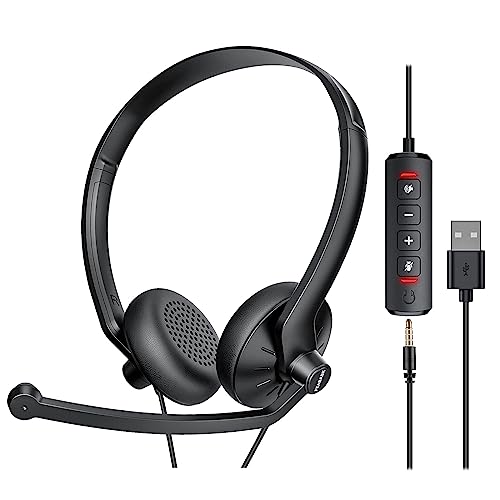 | FEABASK EH07 | Connection: USB and 3.5mm Microphone: Noise-reducing voice-pickup processing Controls: Volume, microphone mute, speaker mute Cable: Approximately 5+4 feet stated Drivers: 40mm | Check Price on Amazon |
 | LEVN LE-HS010 Basic | Connection: USB; connector type not stated Microphone: Rotating noise-reducing boom Controls: Mute buttons and status indicators Comfort: Soft leatherette ear pads Warranty: 18 months stated | Check Price on Amazon |
1. Logitech H390 — Best Overall Proven USB-A Value
The Logitech H390 is the safest default for a straightforward laptop calling setup. It connects through USB-A with no software installation and appears to the computer as a digital microphone and stereo playback device. Chromebook certification is stated, and its general PC and laptop positioning suits common conferencing applications.
The rotating boom microphone is designed to reduce unwanted background sound and can move out of the way when not in use. It is noise reducing on the outgoing voice path, not active noise cancellation for the earcups. In a busy room, the on-ear cushions still allow some surrounding sound to reach the wearer.
Inline controls provide volume adjustment and call mute. Logitech specifies a 6.23-foot or 1.9-meter cable, which is long enough to stand and stretch beside a desk without pulling the laptop. Route the control module where it remains visible and does not repeatedly strike the desk.
Swivel-mounted leatherette ear cushions and an adjustable padded headband are intended for hours of use and wipe-clean maintenance. Leatherette can trap heat during very long sessions, so short breaks remain useful. The H390 is the balanced choice when predictable setup and simple controls are more important than 3.5mm or USB-C flexibility.
- Plug-and-play USB-A
- Rotating noise-reducing microphone
- Inline volume and mute
- 6.23-foot cable
- Chromebook certified
- No USB-C or 3.5mm connection
- Leatherette may feel warm
- No active noise cancellation stated
2. JIAMQISHI EH01 — Best USB and 3.5mm Flexibility
The EH01 supports both 3.5mm analog and USB audio. The analog cable can serve phones, tablets, and computers with a compatible combined headset jack, while the USB inline module adds digital audio controls for a laptop. The manufacturer description totals the supplied cable at roughly five plus four feet, enough for substantial movement around a desk.
JIAMQISHI specifies a unidirectional microphone boom that rotates through 270 degrees and can be worn on either side. Directionality helps reject sound arriving away from the mouth, though keyboard placement, room noise, and microphone distance still affect results. The inline controls include microphone mute with indicators and speaker mute.
The headset features forty-millimeter drivers and a built-in USB sound card as specified by the manufacturer to handle calls, music, movies, and other desktop audio. Memory-foam pads use breathable protein leather, and the adjustable headband is described for adults and children. The larger drivers do not guarantee better voice quality, but they can provide fuller playback than very small call-center earpieces.
The product is sold under JIAMQISHI, while several supplied details repeatedly refer to Eaglend. Confirm the branding, exact accessories, and warranty provider on the received item. A 24-month warranty is claimed, but the naming mismatch is a reason to save the documentation.
- USB and 3.5mm operation
- Long combined cable
- Reversible unidirectional boom
- Mic and speaker mute controls
- JIAMQISHI and Eaglend names conflict
- 3.5mm jack must support a headset microphone
- No weight stated
3. Acpanore A-R06S — Best Basic Option with Minimal Documentation
The Acpanore A-R06S is described only as a USB headset with microphone for PC and call-center use. It had an active new offer in the supplied record, but no meaningful details are provided about earcup design, connector type, cable length, microphone directionality, inline controls, operating systems, driver size, materials, or weight.
The sparse documentation makes it impossible to compare long-call comfort or control layout with confidence. “USB” does not establish whether the plug is Type-A or Type-C, and “with microphone” does not establish noise reduction, boom adjustment, mute behavior, or monitoring features.
Choose this model only when the product page, packaging, and return terms answer the open questions about connector, controls, and fit before the headset becomes essential to your work. On arrival, inspect connector type, cable strain relief, headband range, ear pressure, boom position, and whether a visible indicator confirms microphone mute.
Run a recorded test call from a quiet room and with normal background noise. Wear it for the length of a typical meeting while it is still returnable. A low purchase price cannot compensate for pressure points, unclear mute state, or a microphone that fails to isolate speech.
- USB headset format stated
- Positioned for PC and call-center use
- Active new offer confirmed
- Connector type not specified
- No comfort or cable specifications
- No mute or audio controls stated
- No OS compatibility stated
4. Jabra Evolve 10 — Best Lightweight Business Pick
The Jabra Evolve 10 is the strongest business-focused lightweight model. Its USB-A plug-and-play connection avoids software setup, while inline controls handle calls and volume. The minimalist wired design removes battery and wireless concerns for a permanent laptop workstation.
A noise-reducing microphone targets clear conversation in busy workplaces. The adjustable boom can be worn on the left or right, which helps users position the cable and microphone around their desk habits. No active noise cancellation for incoming room sound is stated.
Jabra emphasizes a light feel for all-day calls, but the supplied details do not state ear-cushion material, cable length, speaker size, or a supported operating-system list. Fit is individual, so a long wear test is important. A light headset can still create pressure if the headband shape or on-ear contact does not suit the wearer.
The Evolve 10 is TCO certified and uses more than 50 percent recycled plastic. The TCO certification and recycled plastic do not determine call quality, but they can be a factor in organizational purchasing. Select it for a simple business headset from an established communications brand rather than for a long feature list.
- USB-A plug-and-play
- Noise-reducing microphone
- Ambidextrous adjustable boom
- Inline call and volume controls
- TCO certified
- No cable length stated
- No 3.5mm or USB-C option stated
5. Arama A800USB — Best Traditional Call-Center Headset
The Arama A800USB follows the classic call-center formula of a light wired headset, a boom microphone, and accessible inline controls. It uses wideband audio, DSP, and a noise-reducing microphone to improve speech clarity. The combination is intended for calls rather than isolation from the surrounding room.
Inline volume and microphone mute are available with one press. Arama specifies a 5.3-foot cable, which offers enough reach for a seated desk and modest movement without leaving excessive cable on the floor. USB is the only connection described, so phones and tablets without compatible USB host support are outside its intended use.
Skin-friendly ear pads and a light structure are described as comfort-tested across different ear shapes. Pad material, earcup size, and clamping force are not supplied. The missing details make a wear trial more useful than relying on the “ultra comfort” label.
Compatibility includes Windows 2000, XP, Vista, 7, 8, and 10, macOS, softphones, and major unified-communications platforms. Windows 11 and Chrome OS are not specified. Arama states a two-year support promise. The A800USB is the practical choice for traditional call work and older computer fleets.
- Wideband audio and DSP
- Noise-reducing microphone
- Inline volume and mute
- 5.3-foot cable
- Broad legacy Windows support
- No 3.5mm connection
- Windows 11 and Chrome OS not stated
- No pad material stated
6. Wantek A600F — Best Adjustable Comfort Design
The Wantek A600F has the most adjustable physical design in the group. A larger padded headband, memory-foam cushions, breathable protein leather, 180-degree rotating earcups, and a 330-degree boom are included by Wantek to accommodate different heads and left- or right-side microphone placement.
The headset supports USB and 3.5mm connections. The analog path can serve phones, tablets, game systems, and laptops with a compatible headset jack, while the USB path supplies inline control and digital laptop connection. Confirm whether the intended 3.5mm port uses the standard combined headphone-and-microphone wiring.
Its unidirectional microphone uses noise and audio processing intended to reject unwanted sound. Inline controls adjust volume and mute the microphone or speaker, with indicator lights. Rotating the boom upward is described as another mute action, so test whether boom mute works on both USB and analog paths.
The stated application list includes Skype, Zoom, WhatsApp, webinars, online courses, consoles, and recording. Exact operating systems, cable length, and driver size are not supplied. Wantek states a 12-month service period. The A600F is the fit-first pick for users who want more physical adjustment than a basic headset.
- Memory foam and padded headband
- 180-degree earcups and 330-degree boom
- USB and 3.5mm connections
- Mic and speaker mute controls
- Cable length not stated
- OS support not detailed
- Boom-mute behavior needs verification
7. FEABASK EH07 — Best Long-Cable Dual-Connection Value
The FEABASK EH07 combines USB and 3.5mm connection paths with approximately five plus four feet of cable. The manufacturer description totals the supplied cable at roughly five plus four feet, enough for substantial movement around a desk. The microphone requires USB when connected to a PC according to the supplied note, so analog behavior should be checked on each device.
Memory-foam earcups, an adjustable headband, and a light design are intended to reduce pressure during extended wear. The earcups are also described as blocking external noise, but no active noise cancellation is stated. Passive isolation depends on pad seal and fit.
Forty-millimeter dynamic drivers handle playback, while voice-pickup and signal processing support the microphone. The inline module provides volume, microphone mute with indicators, and speaker mute. As with any dual-path headset, controls on the USB module may not operate when the 3.5mm plug is used alone.
Compatibility includes PC, tablet, Mac, iOS, laptop, and Android devices with suitable USB or 3.5mm connections. No exact operating-system versions or warranty duration are supplied. The EH07 is a strong value option when cable reach and device choice are more important than enterprise certification.
- USB and 3.5mm options
- Roughly nine feet of combined cable
- Memory-foam earcups
- 40mm drivers
- Mic and speaker mute
- PC microphone note requires USB
- USB controls may not work in analog mode
- No exact OS versions stated
8. LEVN LE-HS010 Basic — Best Simple Status-Light Headset
The LEVN LE-HS010 Basic is a simple USB headset with visible call controls. It connects by USB, is described as quickly recognized, and includes mute buttons plus status indicators. A visible work state can help in a shared office when colleagues need to know that the wearer is occupied.
The microphone rotates for positioning and uses noise-reduction claims aimed at busy offices. No pickup pattern, boom range, DSP specification, or certification is supplied. Treat the microphone as a conventional close-talk design and keep it consistently near the mouth for the cleanest level.
Soft leatherette ear pads and an ergonomic headband are intended for long meetings. An extra-long cable avoids battery and wireless concerns, but its exact length is not stated. Leatherette can retain heat, and no exact weight or clamping measurement is supplied, so a multi-hour wear test is important.
Skype, Zoom, Teams, online classes, and meetings are listed. Exact supported operating systems and USB connector type are not specified. An 18-month warranty is stated. This model suits a fixed desk where clear hardware mute status is more important than analog-device flexibility.
- USB plug-and-play stated
- Mute controls and status indicators
- Rotating microphone
- Soft leatherette ear pads
- 18-month warranty stated
- USB connector type not stated
- Cable length and weight not stated
- OS compatibility not detailed
Buying Guide: Choosing a USB Headset for Long Calls
Treat comfort as a fit test, not a marketing label
Long-call comfort depends on clamping force, earcup size, cushion material, headset weight, glasses, and head shape. Memory foam can spread pressure, while leatherette is easy to clean but may trap heat. No one pad material is best for every user.
Wear the headset for the length of a normal call while it remains returnable. Notice hot spots on the ears, pressure at the crown, jaw fatigue, and whether glasses break the seal. Take short breaks even when the headset initially feels comfortable.
Understand microphone noise reduction
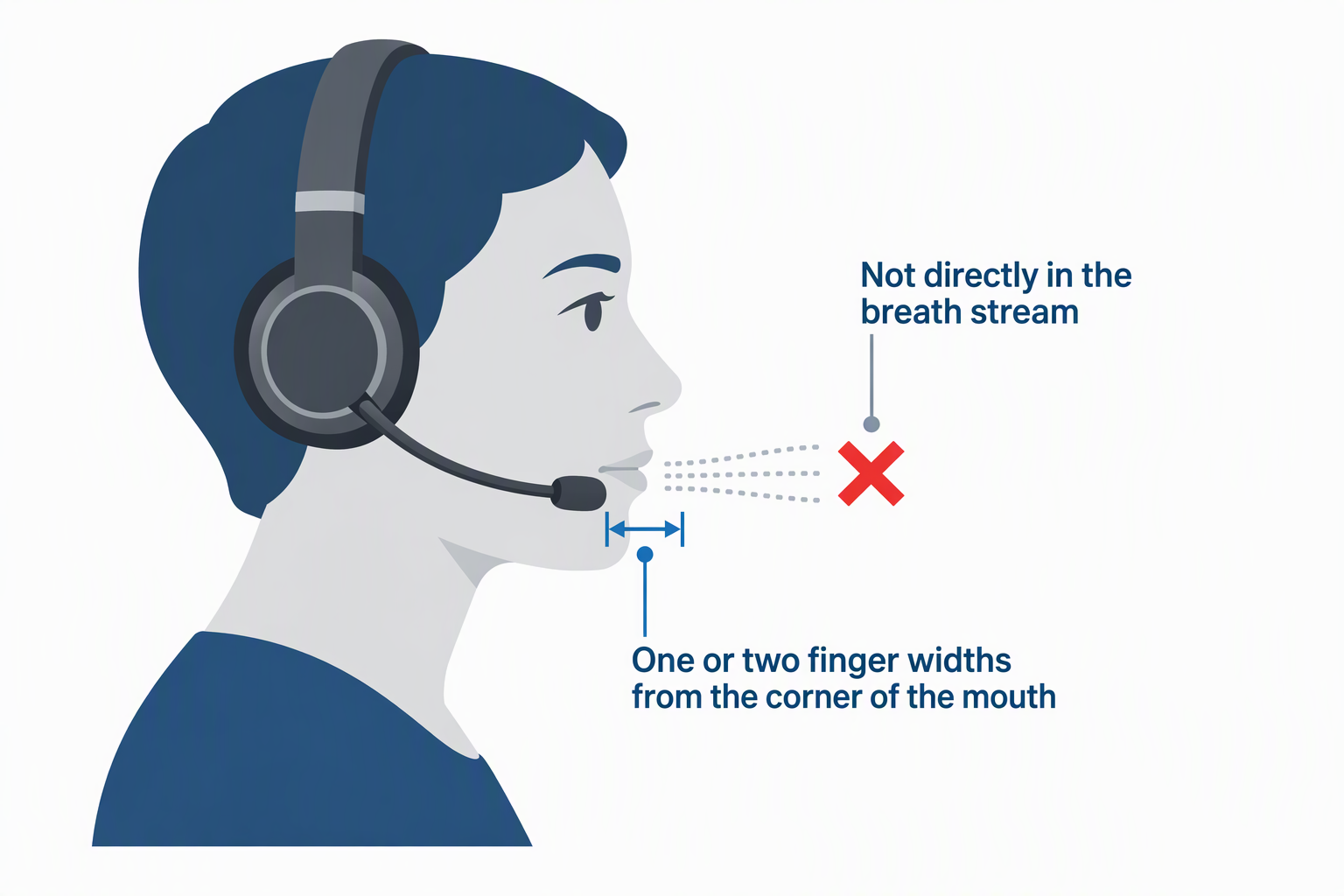
A noise-reducing or unidirectional microphone aims to send less room sound to remote participants. It does not necessarily reduce noise heard through the earcups. None of these products explicitly states active noise cancellation for the listener.
Place the boom one or two finger widths from the corner of the mouth, not directly in the breath stream. Record a test with normal keyboard and room noise. Good positioning can be more important than aggressive processing that makes speech sound clipped.
Choose USB-A, USB-C, or 3.5mm deliberately
Logitech and Jabra explicitly use USB-A. JIAMQISHI, Wantek, and FEABASK provide USB plus 3.5mm paths, while several other products say USB without naming the connector. Thin laptops with only USB-C may need a data-capable adapter.
A 3.5mm plug needs a compatible combined headphone-and-microphone jack. Inline USB controls and indicators may not function in analog mode. Match the connection to every device used during the workweek, not only the main laptop.
Check cable length and control placement
A long cable lets the wearer stand and stretch but can snag chair arms or roll under wheels. Logitech provides 6.23 feet, Arama 5.3 feet, and JIAMQISHI and FEABASK describe roughly nine feet across their analog and USB sections.
Place the inline control where mute is reachable and its indicator remains visible. Secure excess cable loosely to the desk rather than winding it tightly around the headset. Repeated sharp bends near the USB plug or control module can shorten cable life.
Verify microphone and speaker mute separately
Some inline modules mute only the microphone, while JIAMQISHI, Wantek, and FEABASK describe both microphone and speaker mute. Boom-up mute is claimed for Wantek. These controls may behave differently through USB and 3.5mm paths.
Test mute with another participant and check the hardware indicator rather than relying only on the meeting application’s icon. For confidential speech, remove or physically disconnect the headset if the mute state is uncertain.
Match on-ear isolation to the workspace
These headsets use compact on-ear or call-center-style designs rather than large studio earcups. The compact design keeps weight down and lets users hear some surrounding activity, but it provides limited passive isolation in an open office. Microphone noise reduction does not create silence for the wearer.
If concentration is the main problem, consider a quieter room or a headset that explicitly includes listener-side active noise cancellation. For a home office where hearing a doorbell or child is important, the lighter isolation here may be preferable.
Check platform and application support
USB audio is often driver-free, but exact OS support lists vary. Logitech states Chromebook certification. Arama lists many older Windows versions and macOS. Other models mention common conferencing applications without defining the underlying operating systems.
Before a critical call, select the headset as both input and output in system settings and inside the meeting app. Record speech, play it back, test volume, and confirm mute. App compatibility language does not guarantee that every inline call button controls every program.
Separate call quality from music claims
A larger 40mm driver can provide fuller playback, but driver diameter alone does not determine clarity. Call headsets prioritize speech, low weight, and microphone placement. They are not automatically replacements for high-quality music or studio headphones.
Choose around the primary job. For hours of meetings, clear speech, predictable controls, and comfortable fit are more important than bass claims. A separate music headset can be the better answer if both uses have very different requirements.
Frequently Asked Questions
Is a wired USB headset better than Bluetooth for long calls?
Wired USB avoids battery charging, pairing, and wireless interference. It is often the more predictable choice for a fixed laptop desk and back-to-back meetings.
Bluetooth offers mobility beyond the cable but introduces battery and radio variables. None of the eight products here depends on Bluetooth.
Does a noise-cancelling microphone block office noise for the wearer?
No. It aims to reduce background noise sent to other people on the call. Listener-side isolation depends on earcup fit and whether the headset has active noise cancellation.
These products do not explicitly state active noise cancellation for incoming sound. A quieter room or different headset category may be needed for concentration.
Can a USB-A headset work with a USB-C laptop?
Usually yes with a data-capable USB-C-to-A adapter or hub. The adapter must support USB data, not charging alone.
Test recognition, microphone, playback, and inline controls. A physical adapter adds strain at the port, so avoid leaving a rigid dongle under side pressure.
Why does the microphone work over USB but not 3.5mm?
The analog jack may be headphone-only, use incompatible wiring, or require a separate microphone input. Some dual-connection headsets also route their microphone through the USB control module for PC use.
Check the laptop or phone jack specification and the headset instructions. A combined TRRS headset jack is different from a stereo headphone jack.
How often should a headset wearer take breaks?
There is no single interval that suits everyone. Lower listening volume, short pauses between meetings, and removing the headset when it is not needed can reduce heat and pressure.
Stop and adjust if there is pain, numbness, ringing, or persistent discomfort. Fit and safe volume are more important than a product’s all-day-comfort label.
Related Laptop Meeting and Audio Guides
- USB conference speakerphones for small laptop meetings
- USB document cameras for remote teaching
- XLR-to-USB adapters for dynamic microphones
- Standalone microphone preamps for laptop recording
- XLR microphone cable snakes for podcast desks
- Laptop briefcases for daily office commutes
- USB-C port locks for shared laptop fleets
- Encrypted USB drives for client transfers
Bottom Line
The Logitech H390 is the most dependable general-purpose USB-A pick, while the Jabra Evolve 10 is the stronger lightweight business choice. Select the Wantek A600F when physical adjustment is the top priority, or the FEABASK EH07 when a long cable and both USB and 3.5mm use are priorities.