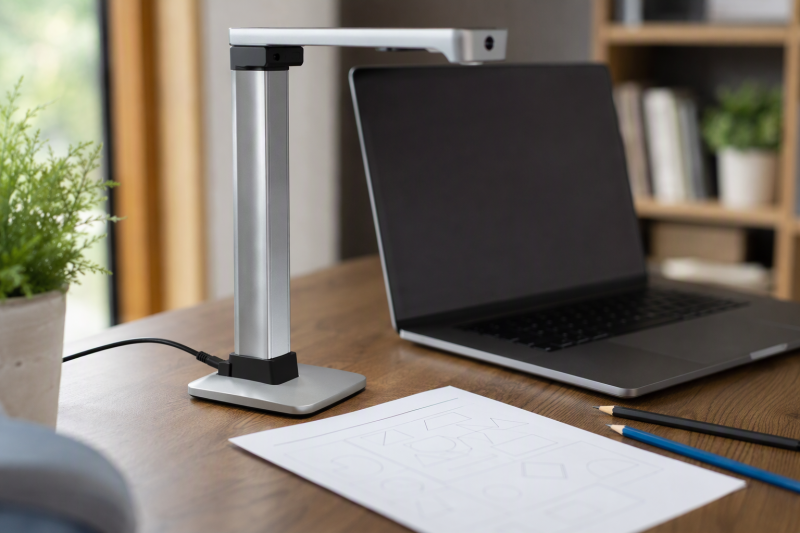
A document camera lets a remote teacher show handwriting, worksheets, books, manipulatives, artwork, and demonstrations without holding them awkwardly in front of a laptop webcam. The camera points down at a desk, sends video through USB, and appears as a selectable camera in Zoom, Google Meet, Microsoft Teams, or a teaching application.
The most useful model is not always the one with the largest megapixel number. Working area, focus behavior, frame rate, lighting, stand stability, software compatibility, and host connection determine whether a lesson feels smooth. A 4K image can help with fine text, while 1080p at 30fps may be clearer when hands and objects move.
[blueblock]Test the complete lesson workflow before class: connect the camera, select it inside the meeting app, frame the full page, check focus and exposure, confirm whether text is mirrored, and verify microphone selection. Keep sensitive student or client documents outside the camera area.[/blueblock]Quick Picks
- Best overall for dependable remote teaching: IPEVO V4K combines an 8MP Sony sensor, fast focus, a sturdy multi-joint stand, and broad Mac, Windows, and Chromebook support.
- Best 8MP feature value: kitchbai KB-700 adds one-touch focus, image reversal, dual microphones, adjustable brightness, and a three-level light.
- Best manual-focus budget pick: BexonRuihe BR-200 provides 1080p at 30fps, a tall flexible stand, and stable manual focus for stationary pages.
- Best alternate 8MP A3 visualizer: THUSTAND KB-700 offers image inversion, one-touch focus, dual microphones, and a ring light.
- Best lightweight manual-focus choice: AIKOR BR-200 pairs a 1.1-pound weighted base with 1080p capture and a 20.4-inch adjustable height.
- Best 5MP exposure-control pick: PAKOTOO PA-800 includes five-level exposure, three-level illumination, mirroring, and one-touch autofocus.
- Best premium 4K teaching system: INSWAN INS-2 provides a 13MP Sony sensor, 4K at 30fps, A3 capture, anti-glare help, and annotation and OCR software.
- Best large-area USB-A value: ZSEEWCAM L503 combines 5MP capture, manual focus, an LED, anti-glare sheet, and a wide stated shooting area.
USB Document Camera Comparison
| Image | Product | Details | Check Price |
|---|---|---|---|
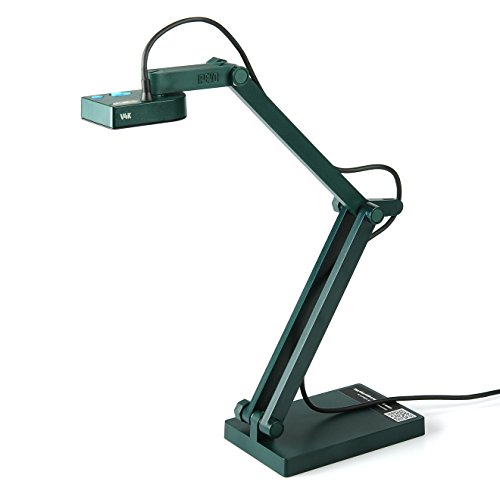 | IPEVO V4K | Sensor: 8MP Sony CMOS Video: 1080p at 30fps; 3264x2448 at 15fps Focus: Fast autofocus Working area: 13.46 x 10.04 inches Hosts: Windows, macOS, Chromebook | Check Price on Amazon |
 | kitchbai KB-700 | Sensor: 8MP Video: Up to 2448p at 30fps stated Focus: One-touch autofocus; 3.94-inch macro Lighting: 3-level LED and brightness controls Audio: Dual microphones | Check Price on Amazon |
 | BexonRuihe BR-200 | Sensor: 2MP CMOS Video: 1080p at up to 30fps Focus: Manual focus Stand: Folding; up to 20.4 inches high Hosts: Windows, macOS, Chromebook; no phones/tablets | Check Price on Amazon |
 | THUSTAND KB-700 | Sensor: 8MP Video: Up to 2448p at 30fps stated Focus: One-touch autofocus; 3.94-inch macro Lighting: 14-LED ring light with 3 levels Audio: Dual microphones | Check Price on Amazon |
 | AIKOR BR-200 | Sensor: 2MP CMOS Video: 1080p at up to 30fps Focus: Manual focus Stand: 20.4-inch height; 1.1-pound weighted base Hosts: Windows, macOS, Chromebook; no phones/tablets | Check Price on Amazon |
 | PAKOTOO PA-800 | Sensor: 5MP CMOS Video: Up to 2592x1944 at 30fps stated Focus: One-touch autofocus; 3.94-inch macro Lighting: 3-level LED; 5-level exposure Audio: Dual microphones | Check Price on Amazon |
 | INSWAN INS-2 | Sensor: 13MP Sony Video: 3840x2160 at 30fps Focus: Dual-mode autofocus; 3.9-inch macro Working area: Up to A3 Features: LED, anti-glare sheet, mic, annotation and OCR software | Check Price on Amazon |
 | ZSEEWCAM L503 | Sensor: 5MP CMOS Video: 1080p at 30fps; 2592x1944 at 15fps Focus: Manual focus; 10cm macro Working area: 16.9 x 16.53 inches stated Connection: USB-A, USB 2.0 | Check Price on Amazon |
1. IPEVO V4K — Best Overall for Dependable Remote Teaching
The IPEVO V4K is the strongest all-around teaching choice because its specifications suit the core job. Its 8MP Sony CMOS sensor is rated to capture up to 3264 by 2448 pixels, with 1080p streams at up to 30fps. At the maximum resolution the frame rate is specified to drop to 15fps, so teachers choose between fine stationary text and smoother hand movement depending on the lesson.
Fast focusing helps when switching from a worksheet to a three-dimensional object. The Sony sensor is also described as reducing noise and preserving color in dimmer rooms. The sensor does not eliminate the need for good lighting, but it can produce a cleaner image than simply raising software brightness and amplifying noise.
The multi-jointed stand covers a stated 13.46 by 10.04-inch area, enough for common letter and A4 pages. Loose joints can be tightened after heavy use, which is useful for a camera adjusted several times each school day. The model does not list an integrated lamp or microphone in the supplied details, so plan separate desk lighting and use the laptop or headset microphone.
Compatibility includes Mac, Windows, and Chromebook applications. The stated computer requirements become more demanding for lag-free 1080p video, including Core i5-class processors and dedicated video memory in the examples. Older laptops should be tested at lower resolution before class rather than assumed to handle maximum capture smoothly.
- 8MP Sony CMOS sensor
- 1080p at up to 30fps
- Fast focus for changing materials
- Tightenable multi-joint stand
- Maximum resolution drops to 15fps
- No built-in light stated
- No built-in microphone stated
2. kitchbai KB-700 — Best 8MP Feature Value
The kitchbai KB-700 combines an 8MP sensor and up to 2448p output with controls teachers often need during a live lesson. A focus button triggers autofocus once, so the camera does not keep hunting for focus when a hand crosses the page. Macro focus is stated down to 3.94 inches for small objects and detailed demonstrations.
Image reversal can be adjusted horizontally and vertically, which is useful when handwriting appears mirrored in a conferencing application or when the arm must approach the desk from an unusual side. Brightness controls and a three-level LED light help balance white paper, glossy pages, or a dim home office.
The foldable multi-joint stand is described for A3-size material, but the supplied maximum-area figure includes an implausible 116-inch dimension. Treat A3 compatibility as the intended class and measure the actual field of view after arrival before building a lesson around an exact capture width.
A USB-C cable provides plug-and-play connection for Windows 7 through 11, macOS 10.11 or later, and Chrome OS 38 or later. Dual built-in microphones can simplify a minimal setup, although a headset normally keeps voice level more consistent when the camera is positioned above a desk.
- 8MP, 2448p capture stated
- One-touch autofocus
- Image reversal and brightness controls
- Three-level light and dual microphones
- Capture-area dimensions are inconsistent
- Built-in microphones may pick up desk noise
- USB-C host compatibility should be confirmed
3. BexonRuihe BR-200 — Best Manual-Focus Budget Pick
The BexonRuihe BR-200 trades resolution for a stable manual-focus workflow. BexonRuihe rates the 2MP sensor to output 1080p at up to 30fps, which is enough for handwriting, standard worksheets, and object demonstrations when lighting and framing are good. Rotating the lens sets focus and prevents the camera from changing focus every time a hand enters the frame.
Manual focus takes more preparation than one-touch autofocus. The teacher should set the stand height, place a representative page, focus at the intended plane, and avoid changing the camera-to-desk distance during class. Once set, it can deliver a steady image for extended writing or reading sessions.
The folding design reaches a manufacturer-stated 20.4-inch height, with 360-degree camera rotation and a flexible structure for different object sizes. According to BexonRuihe, a built-in sealed silicon microphone is intended to reduce noise. The camera must remain connected to a computer and is explicitly incompatible with iPads, phones, and other portable devices.
Windows, macOS, Chromebook, Zoom, and Google Meet compatibility is stated. It ships with a USB-C cable, and Windows users may need to choose “USB Camera” in the Camera app. Mac users are directed to QuickTime Player or Photo Booth. It is a practical low-cost option when 1080p is sufficient and predictable focus is a higher priority than 4K detail.
- 1080p at up to 30fps
- Manual focus avoids hunting
- Tall folding stand
- Built-in microphone
- Only 2MP
- Focus must be reset after height changes
- No phone or tablet support
4. THUSTAND KB-700 — Best Alternate 8MP A3 Visualizer
THUSTAND’s KB-700 has a feature set very similar to the kitchbai model. It states 8MP capture at up to 2448p and 30fps, one-touch autofocus, and a 3.94-inch macro distance. The single-focus action is useful for holding a page steady without repeated automatic changes.
Horizontal and vertical image reversal can correct mirrored or inverted text. Fourteen ring-light LEDs offer three brightness levels, while separate brightness controls are described in ten steps. The LEDs and brightness controls give more on-device adjustment than cameras that rely entirely on meeting software exposure.
The foldable multi-joint arm is intended for A3 material and three-dimensional objects. Its supplied capture-area figure repeats the same implausible 116-inch dimension seen on another KB-700 description, so do not treat that measurement as reliable. Frame the largest textbook or worksheet during the return period and confirm that corners remain legible.
Windows, macOS, Chromebook, Zoom, Google Meet, Teams, and other applications are listed, with automatic driver installation. Dual silicon microphones can reduce the number of devices on a mobile teaching desk. A dedicated headset remains better when room echo or arm movement transmits mechanical noise.
- 8MP and 2448p output stated
- One-touch autofocus
- Three-level ring light
- Image reversal and dual microphones
- Capture-area figure is unreliable
- Similar hardware to competing KB-700 model
- Desk audio may be less clean than a headset
5. AIKOR BR-200 — Best Lightweight Manual-Focus Choice
The AIKOR BR-200 uses the same manual-focus teaching approach as the BexonRuihe model. AIKOR specifies a 2MP camera that supplies 1080p at up to 30fps, while the rotating lens fixes focus at the chosen desk plane. Fixed focus makes it suitable for handwriting, flash cards, tutoring, and demonstrations that stay at a consistent height.
Manufacturer documents list a flexible 0.47-inch hose that extends to 20.4 inches and rotates through 360 degrees. The unit is rated at 1.1 pounds and uses a weighted base to balance portability with stability. A flexible arm can still transmit movement, so adjust it before class and avoid touching the stand during fine-detail work.
A CMOS sensor and sealed silicon microphone are described, with use cases ranging from remote teaching to instructional recording. The camera includes a USB-C cable and supports Windows, macOS, Chromebook, Zoom, Google Meet, Skype, and other common applications.
It must connect to a computer and does not support iPads, phones, or other portable devices. Windows users may need to switch to “USB Camera,” while Mac users are directed to QuickTime Player or Photo Booth. Select this model for portability and manual focus, not for maximum text resolution.
- 1080p at up to 30fps
- Manual focus for stable pages
- 1.1-pound portable design
- Weighted base and tall flexible arm
- Only 2MP
- No tablet or phone support
- Flexible arm can move if touched
6. PAKOTOO PA-800 — Best 5MP Exposure-Control Pick
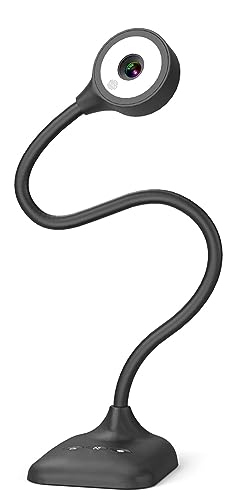
The PA-800 balances image detail and classroom controls. Its 5MP sensor captures up to 2592 by 1944 at 30fps according to the supplied details, with macro focus down to 3.94 inches. One-touch autofocus lets the teacher choose when the camera refocuses rather than allowing continual hunting.
Five levels of exposure adjustment and a three-level LED fill light help with white pages, glossy photos, and dim rooms. Horizontal mirroring can correct reversed writing during remote instruction. Those physical controls reduce time spent opening software menus while students wait.
The flexible hose structure is intended for A3 pages and can flip between document-camera and webcam angles. Built-in dual microphones are stated. Although the description says the device is not plug-and-play, the practical instruction is to select “USB Camera” in the operating system or meeting application, so setup should be completed before class.
Windows, macOS, Chromebooks, Zoom, Teams, Google Meet, and other apps are listed. A USB-C cable connects directly to compatible laptops. It is the middle-resolution choice for teachers who care more about lighting and exposure control than maximum 8MP or 13MP detail.
- 5MP, 1944p capture stated
- Five-level exposure control
- Three-level LED light
- One-touch focus and mirroring
- Requires manual camera selection
- Flexible arm can transmit movement
- Built-in microphones may capture desk noise
7. INSWAN INS-2 — Best Premium 4K Teaching System
The INSWAN INS-2 is the highest-specification teaching system in this group. INSWAN states the 13MP Sony sensor outputs 3840 by 2160 at 30fps, so it combines 4K detail with smooth motion. That combination is useful for art instruction, large diagrams, fine print, two-page spreads, and projection onto a large classroom display.
The manufacturer specifies the multi-joint arm covers A3 material. INSWAN includes dual-mode autofocus, manual brightness, macro capture to 3.9 inches, a built-in LED, microphone, and an anti-glare sheet. The anti-glare sheet is particularly useful for glossy textbooks and laminated worksheets, though lamps still need careful placement.
INSWAN’s Documate software adds zoom, annotation, recording, scanning, whiteboard tools, and OCR. Software features require downloading and maintaining the application, so schools with locked-down laptops should confirm installation permission. The camera also follows UVC plug-and-play behavior for use with standard conferencing software.
Compatibility includes Windows 7 through 11, macOS 13.5 or later, Chrome OS 38 or later, and USB-C iPads running iPadOS 17 or later. It is the only selection here with explicit iPad support. Verify cable and port compatibility, because not every USB-C cable carries data and older Lightning iPads are excluded.
- 13MP Sony sensor
- 4K at 30fps
- LED, anti-glare sheet, and dual-mode focus
- Annotation, recording, and OCR software
- Explicit USB-C iPad support
- Software installation may be restricted
- Recent macOS version requirement stated
- Higher resolution demands more from the host
8. ZSEEWCAM L503 — Best Large-Area USB-A Value
The ZSEEWCAM L503 uses a 5MP CMOS sensor with two useful modes, 1920 by 1080 at 30fps for smoother teaching and 2592 by 1944 at 15fps for more stationary detail. Teachers can select the mode that fits handwriting, object movement, or fine text instead of assuming maximum resolution is always best.
Its stated maximum shooting area is 16.9 by 16.53 inches, larger than common letter and A4 pages. The bendable arm folds for storage and travel. Manual focus works down to 10cm and prevents autofocus changes, but the hose should not be over-rotated because the supplied guidance warns that excessive rotation can damage the USB cable.
An LED light and bundled anti-glare sheet help with uneven lighting and reflective pages. A built-in microphone supports a compact setup. The attached connection is USB-A using USB 2.0, with USB 3.0 backward compatibility. The video modes remain within that interface’s intended use.
Windows 7 through 10 and Chrome OS 38 or later are listed, along with common webinar software and a bundled application. macOS appears in the product title but not the detailed compatibility bullet, and Windows 11 is not stated. Confirm the intended host before purchase if you use either platform.
- 5MP sensor with 30fps and high-detail modes
- Large stated shooting area
- LED and anti-glare sheet
- Manual focus and built-in microphone
- Maximum resolution is limited to 15fps
- USB 2.0 connection
- macOS and Windows 11 details are unclear
Buying Guide: Choosing a USB Document Camera
Balance resolution against frame rate
Higher resolution helps students read fine print and inspect detail, but it can reduce frame rate or burden an older laptop. Manufacturer specifications for the IPEVO and ZSEEWCAM models indicate a drop from 30fps at 1080p to 15fps at maximum resolution, so 1080p is the better setting for moving hands and live demonstrations.
The INSWAN INS-2 states 4K at 30fps, while several 8MP models state 2448p at 30fps. Meeting platforms may compress or cap incoming video, so test the actual class application. A clean, well-lit 1080p feed can look better to students than noisy 4K on a congested connection.
Match working area to the materials
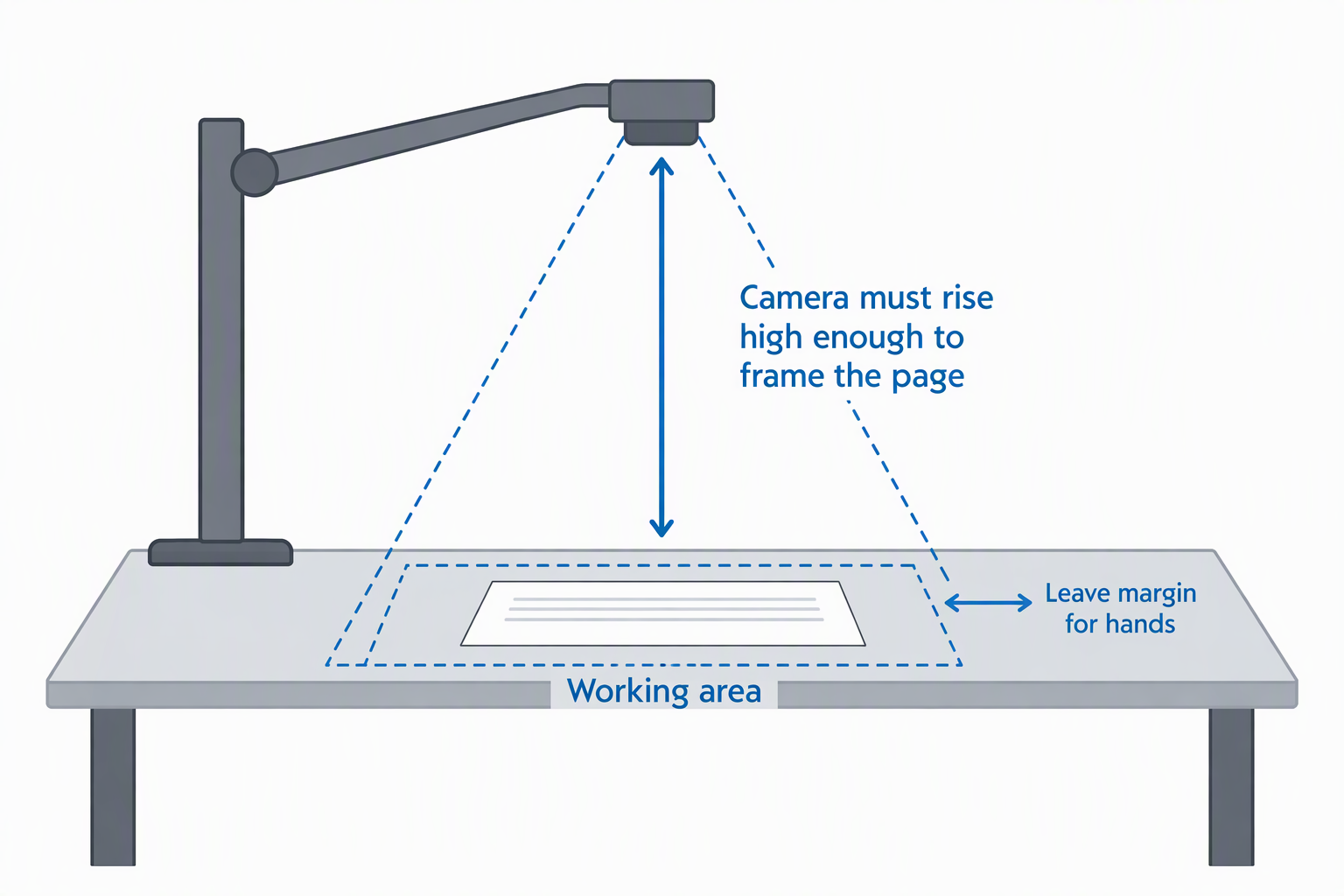
Letter and A4 worksheets need less reach than A3 art, maps, or two-page books. The camera must rise high enough to frame the page without pushing the stand off the desk. A stated A3 working area is useful for broad materials, but exact dimensions should be credible.
The two KB-700 descriptions include an implausible 116-inch measurement, so do not plan around it. INSWAN explicitly targets A3, IPEVO states 13.46 by 10.04 inches, and ZSEEWCAM states 16.9 by 16.53 inches. Measure the largest teaching material and leave margin for hands.
Choose autofocus or manual focus for the lesson style
One-touch autofocus is useful when moving between pages and objects. kitchbai, THUSTAND, and PAKOTOO let the teacher trigger focus once, reducing the visible pulsing caused by continuous autofocus. IPEVO emphasizes fast focusing for frequent changes.
Manual focus on BexonRuihe, AIKOR, and ZSEEWCAM is stable when the page height stays fixed. It becomes slower when switching among flat paper, a thick book, and tall objects. Choose manual focus for a fixed plane and controlled autofocus for varied live demonstrations.
Plan lighting and glare control
White paper can fool automatic exposure, while glossy pages reflect overhead lights. A built-in multi-level LED provides convenient fill, but a light close to the lens can create a bright hotspot. Adjust camera angle, lamp position, and exposure together.
INSWAN and ZSEEWCAM include anti-glare sheets, while kitchbai, THUSTAND, PAKOTOO, INSWAN, and ZSEEWCAM include lighting. IPEVO relies on ambient or separate light. Keep illumination diffuse and verify that pencil marks, colored media, and glossy photos remain visible.
Check stand stability and adjustment range
A tall flexible arm can capture larger objects but may wobble when touched. Weighted bases help, while jointed stands can hold repeatable angles. IPEVO allows loose joints to be tightened, and AIKOR states a 1.1-pound weighted base.
Set the camera before students join. Keep USB cables slack so they do not pull the stand, and place keyboards or writing tools where they will not strike the base. For fine writing, stand stability is as important as sensor resolution because motion blur can erase the benefit of extra pixels.
Confirm host, cable, and application compatibility
Most products support Windows, macOS, and Chromebooks, but exact version requirements differ. INSWAN states macOS 13.5 or later and is the only choice with explicit USB-C iPadOS 17 support. BexonRuihe and AIKOR explicitly reject tablets and phones.
USB-C describes the connector, not the complete host requirement. Some packages include a USB-C cable, while ZSEEWCAM uses USB-A. Confirm that the cable carries data, select the document camera inside the meeting app, and test whether the school laptop permits companion software.
Decide whether to use the built-in microphone
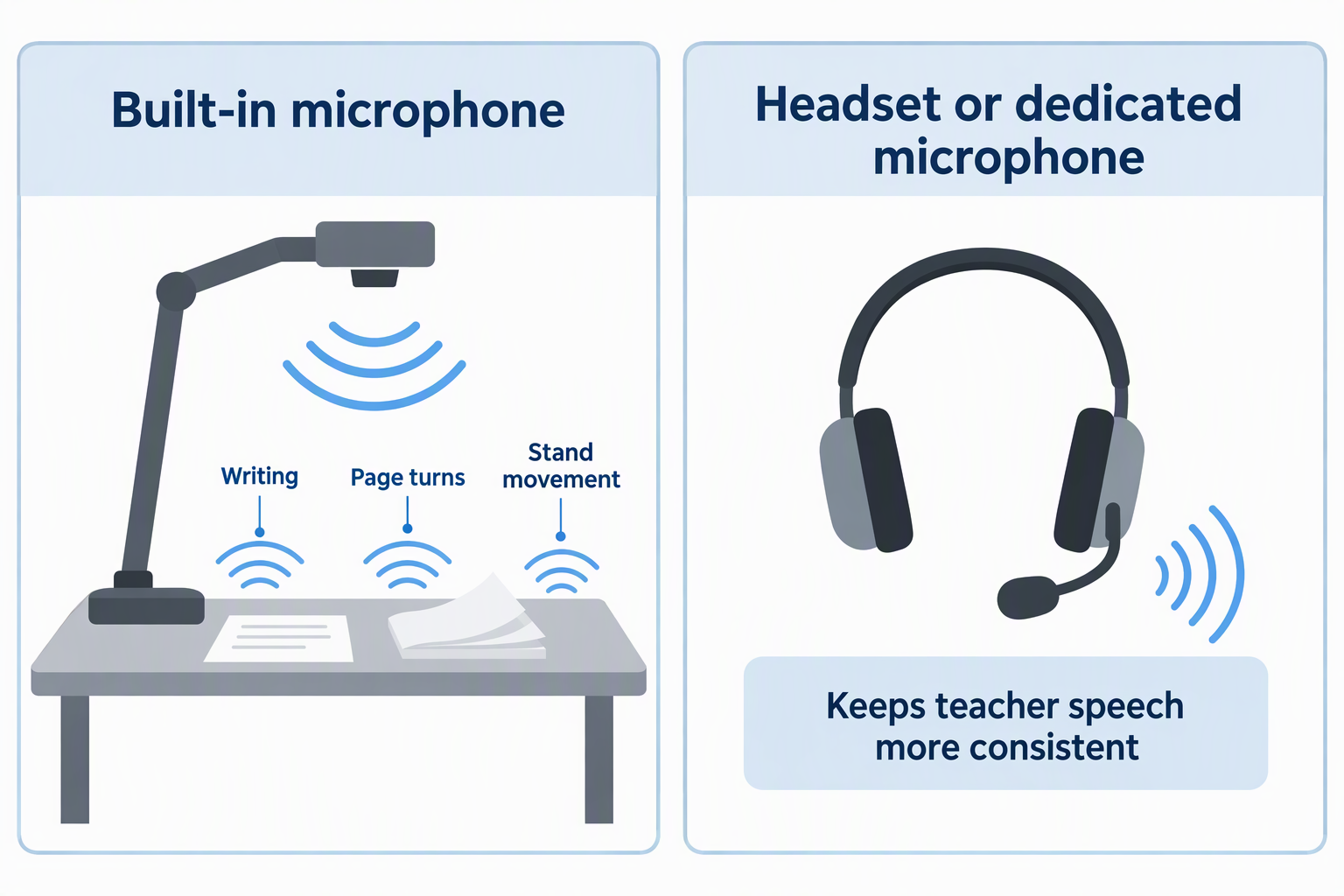
An integrated microphone makes a one-cable setup possible, but its position near the desk can capture writing, page turns, stand movement, and room echo. BexonRuihe, AIKOR, PAKOTOO, INSWAN, and ZSEEWCAM state built-in microphones, and kitchbai and THUSTAND specify dual microphones.
A headset or dedicated microphone usually keeps teacher speech more consistent. Select the document camera for video and a separate device for audio in the meeting settings. Run a recording and listen back, since a live level meter does not reveal echo or mechanical noise.
Protect privacy during remote instruction
The camera can reveal more of the desk than expected, especially at wide A3 framing. Remove student names, addresses, grades, private messages, and unrelated papers before sharing. Use a defined presentation area and preview the feed before enabling it in the call.
Stop video or switch cameras before rearranging confidential material. If recording lessons, follow school consent and retention rules. A document camera is a live video source, not a scanner with an automatic privacy boundary.
Frequently Asked Questions
Can a document camera replace a webcam?
A document camera can only partly replace a webcam. Many models can rotate toward the teacher and operate as a webcam, but their stands and lenses are optimized for desk capture. Eye contact, background framing, and face exposure may be less natural than with a dedicated webcam.
Use the laptop webcam for conversation and switch to the document camera for materials. Meeting apps normally let the teacher change cameras during a call.
Is 4K necessary for showing worksheets?
Usually not. Well-lit 1080p at 30fps is sufficient for ordinary handwriting and worksheets, especially after conferencing software compresses the feed.
4K helps with fine print, detailed artwork, large pages, recording, and projection. The host computer and network must also handle the higher-resolution workflow smoothly.
Why does text appear mirrored or upside down?
The camera orientation or meeting application’s self-view mirroring can reverse the image. Some applications mirror only the teacher’s preview while students see the correct direction.
kitchbai, THUSTAND, and PAKOTOO include image reversal or mirroring controls. Test with a printed word from a second participant’s view before class.
Is autofocus better than manual focus?
Neither is better for every lesson. Autofocus is faster when switching between a page and objects of different heights. One-touch autofocus is especially useful because it updates focus without continuously hunting.
Manual focus is predictable for a fixed desk plane and will not react whenever a hand enters. It requires the teacher to refocus after changing stand height or object distance.
Can these cameras work without a computer?
Not on their own. The products here are USB cameras intended to connect to a host. BexonRuihe and AIKOR explicitly require a computer and reject phones or tablets.
INSWAN adds explicit support for a USB-C iPad running iPadOS 17 or later. That setup still uses the tablet as the host, and the camera does not operate as a standalone display.
Related Remote Work and Creator Guides
- Overhead camera mounts for desk tutorials
- LED video light panels for small creator studios
- Light stands for portable creator video kits
- Reflector holder arms for one-person product shoots
- USB-C port locks for shared laptop fleets
- Laptop briefcases for daily office commutes
- PCIe USB-A expansion cards for legacy desk gear
- Encrypted USB drives for client transfers
Bottom Line
The IPEVO V4K is the best balanced choice for most remote teachers, while the kitchbai KB-700 adds lighting, microphones, and image reversal at the value end. For detailed art, large pages, 4K motion, annotation, or iPad use, the INSWAN INS-2 is the premium pick.