Photo editing needs a laptop with a screen that covers a wide color gamut and fast ports for card readers, drives and a dock. The five laptops below each list a wide-gamut screen and Thunderbolt 4, with screens from 14.2 to 18 inches.
The gamut figures are maker or Amazon listing claims, not measurements. How accurate any of these screens looks depends on a calibrator and your editing software’s color settings.
Check the gamut figure and the Thunderbolt 4 port count first, then screen size and weight.Photo Editing Laptops Compared
| Image | Product | Details | Check Price |
|---|---|---|---|
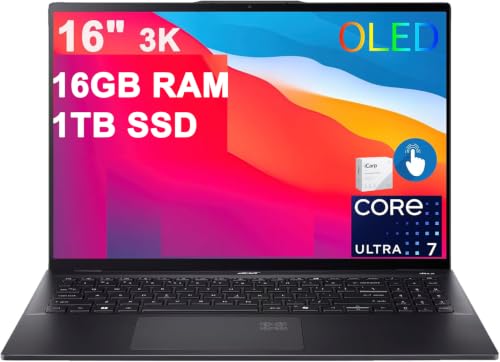 | Acer Swift 16 AI | Best fit: 16-inch 3K OLED with two Thunderbolt 4 ports Screen: 16-inch 3K OLED touch, 100% DCI-P3 (listing) Graphics: Integrated Intel Arc 140V (listing) Thunderbolt 4 ports: 2 (listing) Memory and storage: 16GB, 1TB (listing) | Check Price on Amazon |
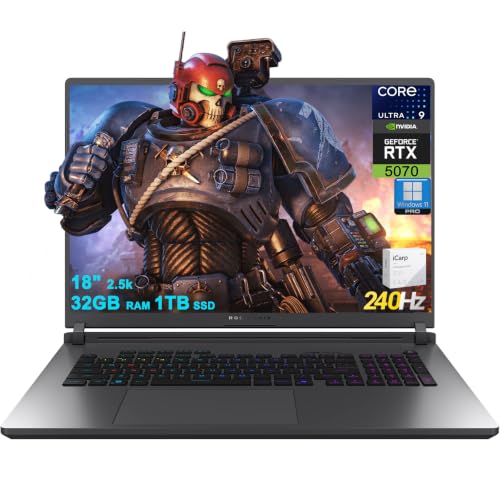 | ASUS ROG Strix G18 G815 | Best fit: 18-inch screen with 100% DCI-P3 Screen: 18-inch 2560x1600 IPS, 100% DCI-P3 (listing and ASUS) Graphics: NVIDIA RTX 5070, 8GB (listing) Thunderbolt 4 ports: 1 (listing and ASUS) Memory and storage: 32GB, 1TB (listing) | Check Price on Amazon |
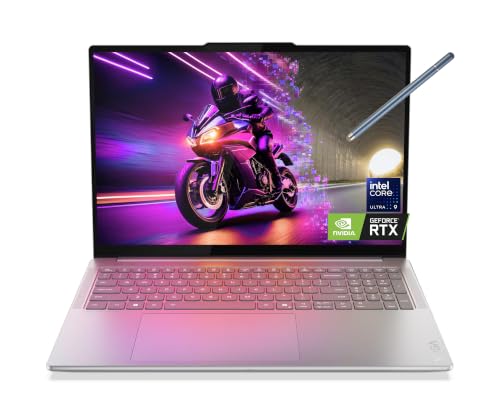 | Lenovo Yoga Pro 9i Aura Edition | Best fit: 100% Adobe RGB and factory-calibrated OLED Screen: 16-inch 3.2K Tandem OLED touch, 100% Adobe RGB (Lenovo) Graphics: NVIDIA RTX 5060, 8GB (listing) Thunderbolt 4 ports: 2 (Lenovo) Memory and storage: 32GB, 1TB (listing) | Check Price on Amazon |
 | Apple MacBook Pro 14-inch with M5 | Best fit: 14.2-inch display with three Thunderbolt 4 ports Screen: 14.2-inch Liquid Retina XDR, P3 wide color (Apple) Graphics: Apple M5 10-core GPU (listing) Thunderbolt 4 ports: 3 (listing and Apple) Memory and storage: 16GB, 1TB (listing) | Check Price on Amazon |
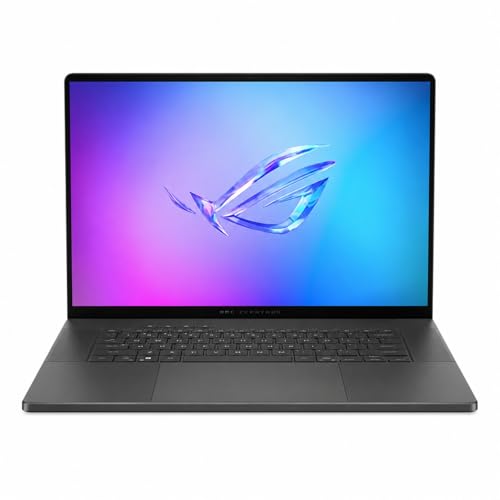 | ASUS ROG Zephyrus G16 GU605 | Best fit: 16-inch OLED with RTX 5070 Screen: 16-inch 2.5K OLED, 100% DCI-P3 (listing and ASUS) Graphics: NVIDIA RTX 5070 (listing) Thunderbolt 4 ports: 1 (listing and ASUS) Memory and storage: 16GB, 1TB (listing) | Check Price on Amazon |
1. Acer Swift 16 AI — Best 16-Inch 3K OLED With Two Thunderbolt 4 Ports
The Amazon listing for the Acer Swift 16 AI gives a 16-inch 3K (2880×1800) OLED touchscreen at 120Hz with 100% DCI-P3. It lists an Intel Core Ultra 7 256V, integrated Intel Arc Graphics 140V, 16GB of RAM and a 1TB SSD. It is the Windows pick for a 16-inch OLED workspace without moving up to the 18-inch ROG Strix.
The listing names two Thunderbolt 4 ports, two USB-A 3.2 ports and one HDMI 2.1 port, and it does not name a card slot, so check how you will import memory cards. Two Thunderbolt 4 ports let a dock and a fast drive connect at the same time. Every Acer figure on this page comes from the Amazon listing.
Our Take A Windows photo editor who wants a large OLED screen and two Thunderbolt 4 ports gets both here, with integrated graphics in place of a dedicated GPU. Pick it when the screen and ports come before graphics power.
- Amazon’s Acer Swift 16 AI listing states a 16-inch 3K OLED touchscreen with 100% DCI-P3, a large wide-gamut screen for a Windows photo editor.
- The Acer listing names two Thunderbolt 4 ports and HDMI 2.1, and two ports let a dock and a fast drive connect at the same time.
- The Acer listing states 16GB of RAM and a 1TB SSD, the memory and storage figures to compare with the other four laptops.
- The Acer listing gives integrated Intel Arc Graphics 140V instead of a dedicated GPU, so pick it only when the screen and ports come before graphics power.
- The Acer listing gives 16GB of RAM, half the 32GB in the Strix and Yoga listings.
- The Acer listing does not name a card slot, so check how you will import memory cards.
2. ASUS ROG Strix G18 G815 — Best 18-Inch Screen With 100% DCI-P3
The Amazon listing gives the ROG Strix G18 G815 an 18-inch 2560×1600 IPS display at 240Hz with 100% DCI-P3, and ASUS’s G18 page lists a 2.5K IPS panel with 100% DCI-P3 and Pantone validation. The listing adds a Core Ultra 9 275HX, a GeForce RTX 5070 with 8GB of GDDR7, 32GB of RAM and a 1TB SSD. The 18-inch screen is the largest built-in workspace of the five.
The listing names one Thunderbolt 4 port, three USB-A ports, one USB-C 3.2 port, HDMI 2.1 and RJ-45 Ethernet. ASUS lists a G18 configuration with the same ports and a single Thunderbolt 4 port at up to 40Gbps, and other G18 configurations with two Thunderbolt 5 ports, so match the model on the listing. ASUS lists 7.05 pounds for the G18.
Our Take A Windows photo editor who wants the biggest built-in screen and a dedicated RTX 5070 gets both here, at 7.05 pounds and with a single Thunderbolt 4 port.
- The Strix G18 listing states an 18-inch 2560×1600 IPS display with 100% DCI-P3, the largest built-in screen of the five.
- Amazon’s Strix G18 listing gives RTX 5070 8GB graphics and 32GB of RAM, for a Windows editor who wants a dedicated GPU.
- The Strix G18 listing names HDMI 2.1, RJ-45 Ethernet and three USB-A ports for wired networking and USB-A accessories.
- ASUS lists the Strix G18 at 7.05 pounds, against 4.08 for the Zephyrus G16 and 3.4 for the MacBook Pro.
- The Strix G18 listing names one Thunderbolt 4 port, and ASUS lists other G18 configurations with different ports, so check the model before ordering.
3. Lenovo Yoga Pro 9i Aura Edition — Best 100% Adobe RGB and Factory-Calibrated OLED
The Amazon listing describes the Yoga Pro 9i Aura Edition as a 16-inch 3.2K Tandem OLED touchscreen with a Core Ultra 9 285H, GeForce RTX 5060 8GB, 32GB of soldered LPDDR5X and a 1TB SSD. The listing gives no port list and no gamut figure, so those come from Lenovo’s specification sheet for the Yoga Pro 9 16IAH10, which lists the same processor and graphics.
For its 3.2K Tandem OLED touch panel, Lenovo lists 100% DCI-P3, 100% sRGB and 100% Adobe RGB, 1,000 nits SDR typical and 1,600 nits HDR peak brightness, a Delta E under 1 average, and X-Rite factory color calibration. Amazon’s bullets give 1000 nits peak, which differs from Lenovo’s HDR peak figure. Lenovo also lists two Thunderbolt 4 ports, HDMI 2.1 and an SD card reader. Lenovo lists a starting weight of 4.56 pounds for touch models, heavier than the 4.08 pounds listed for the Zephyrus G16.
Our Take A photo editor who works in Adobe RGB gets the most color spaces listed here, with factory calibration, an SD card reader and two Thunderbolt 4 ports. Check that the listing’s 3.2K Tandem OLED touchscreen matches the sheet’s 3.2K touch panel.
- Lenovo lists 100% DCI-P3, 100% sRGB and 100% Adobe RGB for the Yoga Pro 9’s 3.2K Tandem OLED touch panel, the most color spaces listed here.
- Lenovo lists X-Rite factory color calibration for the Yoga Pro 9 16IAH10.
- Lenovo lists two Thunderbolt 4 ports, HDMI 2.1 and an SD card reader for the Yoga Pro 9 16IAH10.
- Amazon’s Yoga Pro 9i listing names no ports and no gamut, so Thunderbolt 4 and the color figures come from Lenovo’s sheet.
- Lenovo lists a starting weight of 4.56 pounds for touch models, against 4.08 for the Zephyrus G16.
4. Apple MacBook Pro 14-inch with M5 — Best 14.2-Inch Display With Three Thunderbolt 4 Ports
The Amazon listing identifies a 14.2-inch Liquid Retina XDR MacBook Pro with an M5 chip, a 10-core CPU and 10-core GPU, 16GB of unified memory and a 1TB SSD. Apple’s specifications list P3 wide color, 1,000 nits sustained and 1,600 nits peak brightness for HDR content, a 3024×1964 display and a weight of 3.4 pounds.
Apple and the listing both give three Thunderbolt 4 ports. Apple also lists an SDXC card slot, an HDMI port and MagSafe 3, and says the laptop supports up to two external displays. The MacBook Pro runs macOS, so a buyer with Windows-only editing software or plug-ins should check compatibility before choosing it for its display or ports.
Apple lists three Thunderbolt 4 ports, an SDXC card slot and HDMI on a 3.4-pound laptop.Our Take A Mac-based photo editor who wants a compact laptop with a card slot and three Thunderbolt 4 ports gets both here. Check that your editing software and plug-ins run on macOS.
- Apple lists three Thunderbolt 4 ports, an SDXC card slot and HDMI for the MacBook Pro 14-inch with M5, the most Thunderbolt ports on this list.
- Apple lists P3 wide color and 1,000 nits sustained brightness for the display.
- Apple lists a weight of 3.4 pounds.
- Apple lists a 14.2-inch display, smaller than the 16-inch and 18-inch Windows screens here.
- The MacBook Pro runs macOS, so Windows-only editing software and plug-ins need a compatibility check.
5. ASUS ROG Zephyrus G16 GU605 — Best 16-Inch OLED With RTX 5070
The Amazon listing gives the ROG Zephyrus G16 GU605 a 16-inch 2.5K OLED at 240Hz with 100% DCI-P3 and Delta E under 1, and ASUS’s GU605 page lists 100% DCI-P3 with Pantone validation for its 2560×1600 OLED. The listing adds a Core Ultra 9 285H, an RTX 5070, 16GB of memory and a 1TB PCIe 4.0 SSD, and it gives a weight of 4.08 pounds.
ASUS lists one Thunderbolt 4 port with DisplayPort and power delivery at up to 40Gbps, plus an SD card reader (UHS-II), and the listing also names HDMI 2.1, USB-A and USB-C. One Thunderbolt 4 port is fewer than the two on the Acer and Yoga or the three on the MacBook Pro.
Plan the dock first, because ASUS lists a single Thunderbolt 4 port for the GU605.Our Take A Windows photo editor who wants a 16-inch OLED, an RTX 5070 and an SD card reader at 4.08 pounds gets all three here. Pick it when one Thunderbolt 4 port is enough for the desk.
- The Zephyrus GU605 listing states a 16-inch 2.5K OLED with 100% DCI-P3 and Delta E under 1.
- ASUS lists an SD card reader (UHS-II) and one Thunderbolt 4 port at up to 40Gbps for the GU605.
- The Zephyrus GU605 listing gives an RTX 5070 and a weight of 4.08 pounds.
- ASUS lists one Thunderbolt 4 port for the GU605, against two or three on the Acer, Yoga and MacBook Pro.
- The Zephyrus GU605 listing gives 16GB of memory, half the 32GB in the Strix and Yoga listings.
Buying Guide
1. Check the color figure and who states it
The Acer, Strix and Zephyrus listings state 100% DCI-P3, and ASUS’s pages repeat it for the Strix and Zephyrus. Lenovo’s sheet lists it for the Yoga, and Apple lists P3 wide color for the MacBook Pro.
Lenovo’s sheet is the only source here that lists 100% Adobe RGB, along with 100% sRGB. The Zephyrus listing adds Delta E under 1, and Lenovo lists a Delta E under 1 average and X-Rite factory calibration. Every figure is a maker or listing claim, not a measurement, and how accurate the screen looks depends on a calibrator and your editing software’s color settings.
2. Choose the screen size and weight together
The Strix G18 has an 18-inch screen, the Acer, Yoga and Zephyrus have 16-inch screens, and the MacBook Pro has a 14.2-inch display. ASUS lists 7.05 pounds for the Strix and 4.08 for the Zephyrus, Lenovo lists a starting weight of 4.56 for the Yoga touch models, and Apple lists 3.4 for the MacBook Pro.
Resolutions differ as well. The Acer lists 2880×1800, the Strix and Zephyrus list 2560×1600, Lenovo lists 3200×2000 for the Yoga’s 3.2K panel, and Apple lists 3024×1964. Pick the physical size first, then compare the resolution.
3. Count the Thunderbolt 4 ports and the card slot
The Acer and Yoga list two Thunderbolt 4 ports, the MacBook Pro lists three, and the Strix and Zephyrus list one each. A laptop with one port needs the dock plan settled first.
Card slots differ too. Apple lists an SDXC card slot, Lenovo lists an SD card reader for the Yoga and ASUS lists one for the Zephyrus, while the Acer and Strix listings do not name a card slot. Our Thunderbolt 4 docking station guide covers the desk side once the laptop is chosen.
4. Settle the operating system, memory and storage
The MacBook Pro runs macOS, so a Windows-only program, plug-in or driver needs a check before you buy. The Acer, Strix and Yoga listings state Windows 11.
The listings give 32GB of memory for the Strix and Yoga and 16GB for the Acer, MacBook Pro and Zephyrus, with a 1TB SSD on all five. Match those figures to the size of your photo catalog, and see our Thunderbolt laptops list for more models.
FAQ
Is 100% DCI-P3 enough for photo editing?
It is a useful starting figure, not the whole answer. The Acer, Strix and Zephyrus listings state 100% DCI-P3, Lenovo’s sheet lists it for the Yoga, and Apple lists P3 wide color.
Whether it covers your work depends on where the photos end up, on screen or in print. How accurate the screen looks depends on a calibrator and your editing software’s color settings.
Which laptop has the most Thunderbolt 4 ports?
The MacBook Pro 14-inch with M5 has the most, with three Thunderbolt 4 ports listed by Apple and the Amazon listing. The Acer listing and Lenovo’s sheet each list two, and the Strix and Zephyrus list one each.
More ports mean fewer cable swaps when a dock and a drive are both connected. Check the dock’s own documentation for the displays and power it supports.
Which laptop has the largest screen?
The ROG Strix G18 has the largest screen at 18 inches. The Acer, Yoga and Zephyrus each have 16-inch screens, and the MacBook Pro has a 14.2-inch display.
ASUS lists the Strix at 7.05 pounds, against 3.4 for the MacBook Pro. Choose the screen size together with the weight you are willing to carry.
Do the ASUS laptops have the same Thunderbolt setup?
Yes for these two models, which list one Thunderbolt 4 port each. ASUS lists up to 40Gbps for that port on both the Strix and the Zephyrus.
ASUS’s Strix page also lists other G18 configurations with two Thunderbolt 5 ports, so match the model on the listing. HDMI, USB-A and the other ports on both laptops do not add a second Thunderbolt 4 port.
Which laptop lists Adobe RGB coverage?
The Lenovo Yoga Pro 9i does, through Lenovo’s sheet for the Yoga Pro 9 16IAH10. It lists 100% Adobe RGB, 100% sRGB and 100% DCI-P3 for the 3.2K Tandem OLED touch panel.
The Amazon listing gives no gamut figure, so the Lenovo figures apply when the listing’s 3.2K Tandem OLED touchscreen matches the sheet’s 3.2K touch panel. The other four sources list DCI-P3 or P3 only.
Bottom Line
Choose the Acer Swift 16 AI for a 16-inch 3K OLED with 100% DCI-P3 and two Thunderbolt 4 ports, the Yoga Pro 9i for 100% Adobe RGB and X-Rite factory calibration, or the MacBook Pro 14-inch with M5 for three Thunderbolt 4 ports and an SDXC card slot at 3.4 pounds. The Strix G18 has the 18-inch screen, and the Zephyrus G16 pairs a 16-inch OLED with an RTX 5070, each with one Thunderbolt 4 port.
Before you buy, confirm that your editing software runs on the operating system and that the dock, drive and card reader you use fit the port count. Our USB4 laptops list covers more models.