The best USB4 laptop for most people on this list is the ASUS Zenbook S 16 UM5606WA. ASUS documents two USB4 ports at up to 40Gbps with display and Power Delivery support, while the selected configuration combines a 16-inch 3K OLED touch display with an AMD Ryzen AI 9 365 processor. Choose the Microsoft Surface Laptop (7th Edition) ZGP-00001 if you want an exact Microsoft-to-Amazon SKU match, a 13.8-inch touch system, and two explicitly documented USB4 ports after verifying your required Windows on Arm apps and drivers.
Those recommendations are not based on a USB-C socket, processor feature list, or retailer filter. Every entry below passed two gates: a current first-party source explicitly says USB4 for the exact model or a tightly scoped configuration matrix, and the exact US Amazon ASIN had at least one active New listing when checked on July 23, 2026.
Four selected laptops have USB4 with no speed attached to the maker’s cited wording. Four have maker-stated 40Gbps ports. None is promoted as Thunderbolt-certified because none of the cited exact manufacturer records states that certification. That distinction is deliberate.
This post includes affiliate links, for which we may earn a commission at no extra cost to you should you make a purchase using our links. As an Amazon Associate, we can earn from qualifying purchases. Learn more.Updated July 23, 2026
This is a maintained Windows USB4 list, not a renamed Thunderbolt roundup. The eight configurations stay in a fixed evidence-backed order. Each section exposes suffix differences, seller-configured offers, Windows on Arm limits, and speed-unknown cases instead of smoothing them over.
Amazon controls the listing match and dated offer state. Acer, ASUS, Microsoft, and Samsung control the port claims. Stock can change after the cutoff, and a marketplace title does not override a manufacturer specification.
Quick picks
- Best overall: ASUS Zenbook S 16
UM5606WAfor two maker-stated 40Gbps USB4 ports, a 16-inch 3K OLED touch display, and a thin AMD design. - Best large-screen portability case: Acer Swift Edge 16
SFE16-43-R6FNwhen two explicit USB4 ports matter more than a published speed tier. - Best compact touch case: Acer Swift Go 14
SFG14-63T-R1F4for a 14-inch Ryzen 7 8845HS configuration with two explicit USB4 ports. - Best creator configuration: ASUS ProArt P16
H7606WP-PB99T-HID1for RTX 5070 work and one documented 40Gbps USB4 port. - Best maximum-GPU creator configuration: ASUS ProArt P16
H7606WX-XH99T-HID1for an RTX 5090 seller configuration and the same carefully scoped one-port USB4 path. - Best compact gaming case: ASUS ROG Zephyrus G14
GA403UM-G14.R9HX4for RTX 5060 graphics and one named 40Gbps USB4 side. - Best exact SKU trace: Microsoft Surface Laptop (7th Edition)
ZGP-00001for an exact first-party configuration match and two explicit USB4 ports, if Windows on Arm fits your software and devices. - Best 15.6-inch Windows on Arm alternative: Samsung Galaxy Book4 Edge
NP754XQA-KB2USwhen explicit USB4 matters but a maker-stated port speed does not.
USB4 laptop comparison
| Image | Product | Details | Check Price |
|---|---|---|---|
 | Acer Swift Edge 16 SFE16-43-R6FN | Exact configuration: SFE16-43-R6FN CPU: AMD Ryzen 7 7840U Display: 16-inch 3200 x 2000 Documented USB4: Two USB 4 Type-C ports; speed unspecified Charging and display: Acer states 65W PD, fast charging, and display capability Thunderbolt certification: Not stated on cited Acer source Best fit: A thin 16-inch AMD system with two explicitly documented USB4 ports | Check Price on Amazon |
 | Acer Swift Go 14 SFG14-63T-R1F4 | Exact configuration: SFG14-63T-R1F4 CPU: AMD Ryzen 7 8845HS Display: 14-inch touch Documented USB4: Two USB-C ports support USB4; speed unspecified Charging and display: Acer states USB charging and DisplayPort support Thunderbolt certification: Not stated on cited Acer source Best fit: A compact touch AMD laptop with two explicit USB4 ports | Check Price on Amazon |
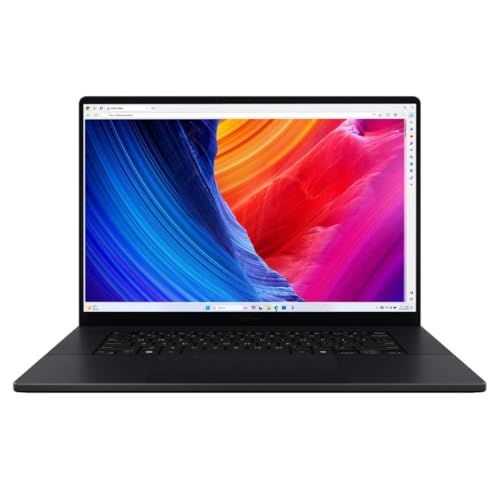 | ASUS ProArt P16 H7606WP-PB99T-HID1 | Exact configuration: H7606WP-PB99T-HID1 seller configuration; ASUS base H7606WP CPU: AMD Ryzen AI 9 HX 370 Display: 16-inch 4K OLED touch Documented USB4: One USB 4.0 Gen 3 Type-C port, up to 40Gbps Charging and display: ASUS states Power Delivery and display support Thunderbolt certification: Not stated on cited ASUS source Best fit: Creator work with RTX 5070 and a documented 40Gbps USB4 port | Check Price on Amazon |
| ASUS ProArt P16 H7606WX-XH99T-HID1 | Exact configuration: H7606WX-XH99T-HID1 seller configuration; ASUS base H7606WX CPU: AMD Ryzen AI 9 HX 370 Display: 16-inch 4K 120Hz OLED touch Documented USB4: One USB 4.0 Gen 3 Type-C port, up to 40Gbps Charging and display: ASUS states Power Delivery and display support Thunderbolt certification: Not stated on cited ASUS source Best fit: RTX 5090 creator work needing one explicit 40Gbps USB4 path | Check Price on Amazon |
 | ASUS ROG Zephyrus G14 GA403UM-G14.R9HX4 | Exact configuration: GA403UM-G14.R9HX4 CPU: AMD Ryzen 9 270 Display: 14-inch 3K OLED 120Hz Documented USB4: One Type-C USB 4 port, up to 40Gbps Charging and display: ASUS states Power Delivery and DisplayPort support Thunderbolt certification: Not stated on cited ASUS source Best fit: A compact RTX 5060 gaming laptop with one named USB4 side | Check Price on Amazon |
 | ASUS Zenbook S 16 UM5606WA | Exact configuration: ASUS UM5606WA; Amazon title shortens it to UM5606 CPU: AMD Ryzen AI 9 365 Display: 16-inch 3K OLED touch Documented USB4: Two USB 4.0 Gen 3 Type-C ports, up to 40Gbps Charging and display: ASUS states Power Delivery and display support Thunderbolt certification: Not stated on cited ASUS source Best fit: A thin 16-inch OLED system with two documented 40Gbps ports | Check Price on Amazon |
 | Microsoft Surface Laptop (7th Edition) ZGP-00001 | Exact configuration: ZGP-00001 CPU: Qualcomm Snapdragon X Elite, 12 core Display: 13.8-inch touchscreen Documented USB4: Two USB-C / USB4 ports; speed unspecified Charging and display: Not stated for the USB4 ports on cited Microsoft pages Thunderbolt certification: Not stated on cited Microsoft sources Best fit: An exact first-party SKU match with two explicitly documented USB4 ports | Check Price on Amazon |
 | Samsung Galaxy Book4 Edge NP754XQA-KB2US | Exact configuration: NP754XQA-KB2US CPU: Qualcomm Snapdragon X Plus Display: 15.6-inch FHD anti-glare Documented USB4: Two USB 4.0 ports; speed unspecified Charging and display: Not stated for the ports on cited Samsung pages Thunderbolt certification: Not stated on cited Samsung pages Best fit: A 15.6-inch Windows on Arm system with explicit USB4 naming | Check Price on Amazon |
The table says speed unspecified when the cited maker page says USB4 but does not attach 20Gbps, 40Gbps, or 80Gbps to the selected model. That is not a hidden estimate. It is the honest result of the documentation check.
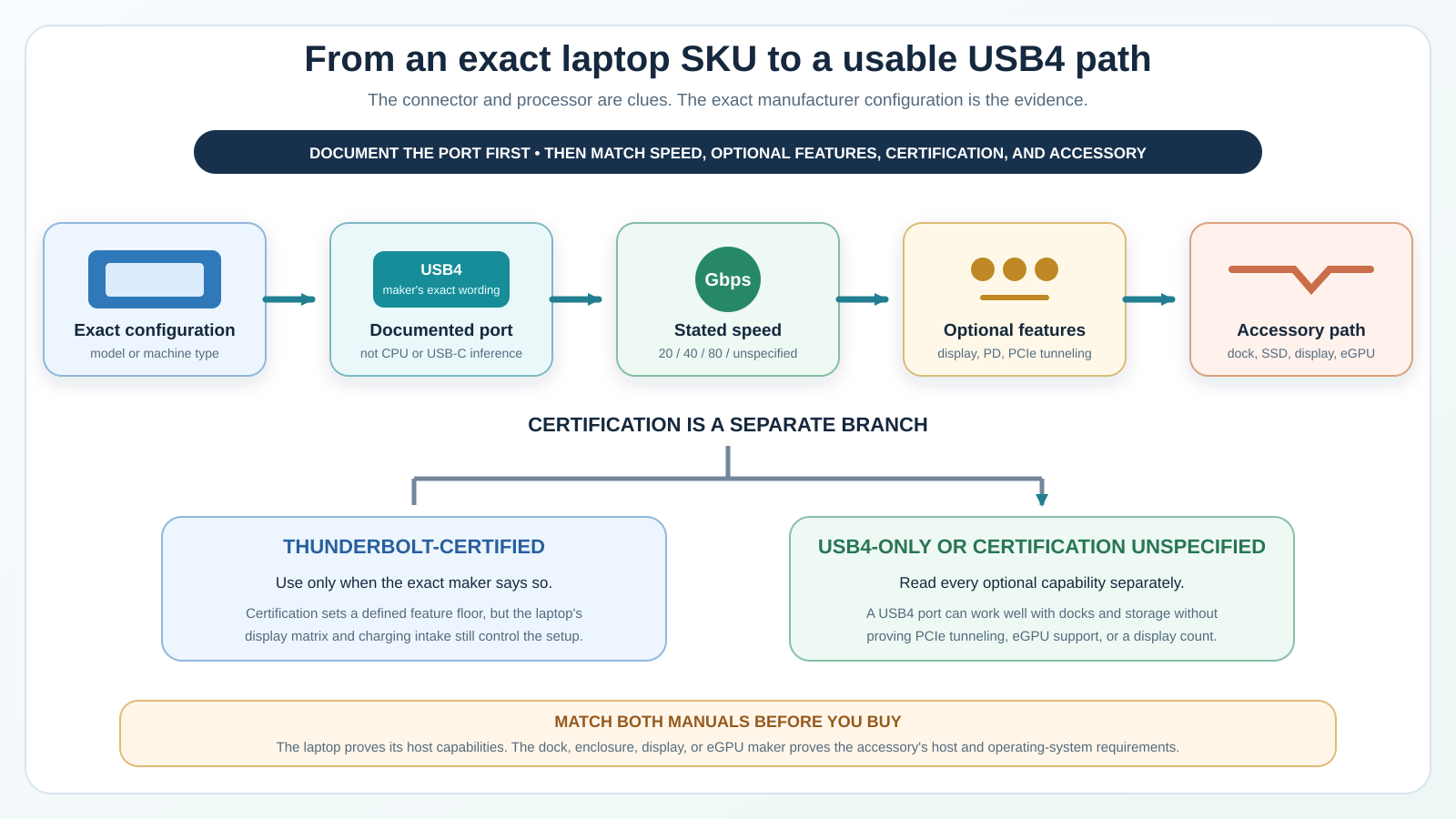
Read the table in two passes. First match the full configuration, processor, and display to the machine you can actually order. Then match the documented port count, speed wording, display or charging statement, and certification status to the accessory you plan to connect. A laptop can be the right computer and still be the wrong host for one specialized enclosure. The accessory manual must accept the exact operating system, architecture, port capability, and cable path too.
What USB4 proves, and what it does not
USB4 is a transport architecture that can share a high-speed USB-C link among different traffic types. The current USB-IF overview describes dynamic bandwidth allocation for data and display traffic and a top architecture tier reaching 80Gbps over the required certified cable. That specification ceiling does not mean every laptop on the market, or every machine on this list, has an 80Gbps port.
The site’s USB4 explainer covers the protocol family in more detail. For this list, the buying rule is simpler: use the rate the exact laptop maker publishes. If it says only USB4, record only USB4.
USB4 20Gbps, 40Gbps, and 80Gbps wording
A speed label is a link-rate ceiling for the named port. It is not a file-copy benchmark. Controller design, protocol overhead, the attached device, storage, cable, thermals, encryption, and the workload can all reduce useful application throughput.
This slate has no maker-documented 20Gbps or 80Gbps configuration. It has four 40Gbps cases and four cases whose cited pages leave speed unspecified. A future update can add a different tier only after an exact current configuration clears both gates.
The cable also matters. Microsoft recommends the device maker’s cable or a certified USB4 cable when Windows reports limited USB4 functionality. A cable chosen only for charging wattage may not carry the required data rate. Use the USB-C cable guide to separate power, data, display, length, and certification claims.
Display support is not a display-count promise
Acer and ASUS state display support for the named ports in this list. That proves a display-capable path for those exact entries. The cited Microsoft and Samsung port wording does not establish display capability, so this guide does not add it. None of these statements proves that every dock can drive every pair of monitors at every resolution and refresh rate.
The GPU, laptop routing, active internal panel, dock, cable, and displays all participate. Start with the exact laptop’s display specification and the accessory maker’s host requirements. If you are building a one-cable desk, compare the port evidence here with the inputs and power needs in the USB-C monitor guide.
Power Delivery wording is not a full-wattage promise
Power Delivery can describe power entering the laptop, power leaving a port, or both, depending on the manufacturer row. Acer and ASUS document charging or PD capability for selected entries, but that wording alone does not establish the maximum laptop input or downstream accessory output.
A high-performance ProArt or ROG workload can need more power than a small USB-C dock supplies. Keep the laptop’s own adapter when the maker requires it, and verify the exact dock’s upstream power budget.
PCIe tunneling and eGPU support need separate proof
USB4 can carry several protocol types, but a USB4 label by itself is not a promise that the exact laptop exposes the PCIe path, firmware behavior, operating-system support, or resource allocation required by an external GPU.
That is especially important on Windows on Arm. An enclosure, GPU driver, game, creative application, and anti-cheat component can each have a different architecture boundary. Read the exact host and enclosure support before spending money. The USB4 external GPU guide explains the additional checks.
USB4 is not the same claim as Thunderbolt certification
Thunderbolt and USB4 share important technology, but their labels are not interchangeable. Intel describes Thunderbolt certification as a mandatory capability and performance baseline for shipping Thunderbolt products. A manufacturer that says only USB4 has not made that same exact certification claim.
The USB4 versus Thunderbolt comparison explains the practical overlap and differences. If certification is the deciding requirement, use the maintained Thunderbolt configuration ledger instead of inferring a logo from this page.
1. Acer Swift Edge 16 SFE16-43-R6FN – Best large-screen portability case

The exact Amazon configuration is SFE16-43-R6FN: AMD Ryzen 7 7840U, 16GB memory, 1TB SSD, and a 16-inch 3200 x 2000 display. The model field matches the full selected suffix.
Acer’s first-party Swift Edge 16 documentation names the SFE16-43 family and two USB 4 Type-C ports. Acer also states 65W Power Delivery, fast charging, and display capability for those ports. That is unusually useful detail for a thin AMD laptop, because it proves more than connector shape.
Acer does not attach 20Gbps or 40Gbps to the selected SFE16-43 wording in the cited page. The table therefore says speed unspecified. Do not promote it to 40Gbps because a different Acer generation, CPU platform, or online database uses that number.
Two USB4 ports give you more placement flexibility than a one-port design, but they do not automatically mean two independent full-bandwidth controllers. Acer’s public statement does not establish controller topology, PCIe tunneling, an external-display count, or external-GPU support. Check the exact dock or storage device against the complete host path.
The 65W PD statement is also a capability, not a promise that every charger or dock will sustain the laptop under every workload. Cable rating and power negotiation still apply.
Our Take
Choose the Swift Edge 16 when you want a large high-resolution AMD laptop and two ports that Acer explicitly calls USB4. Skip it if a published USB4 speed tier or proved PCIe tunneling is a purchase requirement.
- Two explicit USB4 Type-C ports
- Acer states 65W PD and display support
- Exact full Amazon model match
- Large 3200 x 2000 display
- USB4 speed is not stated on the cited source
- No Thunderbolt certification statement
- No inferred eGPU support
2. Acer Swift Go 14 SFG14-63T-R1F4 – Best compact touch case

This is the exact SFG14-63T-R1F4 touch configuration with an AMD Ryzen 7 8845HS, 16GB LPDDR5X memory, 1TB SSD, and a 14-inch display. The complete model appears in the Amazon title and model field.
Acer’s current launch material scopes the port statement to Swift Go 14 models SFG14-63 and SFG14-63T. It says the two USB-C ports support USB4, DisplayPort, and USB charging. That tightly scoped matrix clears the first-party gate for this 63T configuration.
The Swift Go sentence does not publish a USB4 link speed. Another product on the same manufacturer page cannot lend its rate to this one. The honest table entry is speed unspecified.
The two ports are useful for a compact travel setup because a charger can occupy one while a dock or SSD uses the other. Still, the source does not prove that both can maintain every feature simultaneously, that either exposes PCIe tunneling, or that the laptop supports a particular number of external screens.
The Ryzen 7 8845HS is part of the exact offer, but it is not why the laptop qualifies. The first-party USB4 sentence is. That difference protects you from buying a sibling configuration whose port row changed.
Our Take
Choose the Swift Go 14 when you want a compact touch laptop with two explicitly named USB4 ports. Pick a maker-stated 40Gbps entry if storage rate or dock bandwidth is central to the purchase.
- Two USB4 ports in Acer’s scoped matrix
- DisplayPort and charging stated
- Exact SFG14-63T-R1F4 match
- Compact 14-inch touch format
- No published USB4 speed on cited wording
- No Thunderbolt certification statement
- Display count and tunneling remain unproved
3. ASUS ProArt P16 H7606WP-PB99T-HID1 – Best RTX 5070 creator configuration

The selected offer is a HIDevolution-configured ProArt P16 with model field H7606WP-PB99T-HID1. Its listed hardware includes an AMD Ryzen AI 9 HX 370, NVIDIA GeForce RTX 5070, 64GB LPDDR5X memory, 2TB SSD, and 16-inch 4K OLED touch display.
ASUS controls the USB4 evidence for the base H7606WP. Its exact technical matrix lists one USB 4.0 Gen 3 Type-C port with data speed up to 40Gbps, display support, and Power Delivery. It also lists a second Type-C port at up to 10Gbps with display and Power Delivery.
That second connector is not another USB4 port. Check the port position in the ASUS diagram before attaching a bandwidth-sensitive dock or enclosure. A device can fit both Type-C receptacles and behave very differently on them.
The HID1 suffix describes the seller-configured offer. This guide does not present it as an ASUS factory SKU. ASUS proves the base-model port; the Amazon record proves the selected installed memory, storage, GPU, and offer identity. Keeping those authorities separate is the only safe way to describe upgraded marketplace configurations.
The discrete RTX 5070 already handles the laptop’s local graphics work. Do not read the USB4 rate as proof of external-GPU support. For docks, displays, and storage, start with the one ASUS-labeled 40Gbps port and the accessory’s exact Windows requirements.
Our Take
Choose this ProArt when the RTX 5070, large memory configuration, and 4K OLED creator display matter more than having USB4 on both sides. Skip it if you want a factory-only SKU or two documented USB4 ports.
- One explicit USB4 port up to 40Gbps
- Display and Power Delivery stated
- RTX 5070 and 64GB configured offer
- 16-inch 4K OLED touch display
- Only one Type-C port is USB4
- HID1 is a seller suffix
- No Thunderbolt certification statement
4. ASUS ProArt P16 H7606WX-XH99T-HID1 – Best RTX 5090 creator configuration
This selected HIDevolution offer uses model field H7606WX-XH99T-HID1: AMD Ryzen AI 9 HX 370, NVIDIA GeForce RTX 5090, 64GB LPDDR5X memory, 4TB SSD, and a 16-inch 4K 120Hz OLED touch display.
ASUS’s exact H7606WX row documents the same port division that matters on the WP configuration: one USB 4.0 Gen 3 Type-C port up to 40Gbps with display and Power Delivery, plus one separate Type-C port up to 10Gbps with display and Power Delivery.
The RTX 5090 and larger installed SSD do not raise the USB4 rate or add a second USB4 controller. Choose this offer for the local GPU and configured storage, not because it improves the external port over the RTX 5070 H7606WP.
Again, HID1 is kept visible as a configured-offer suffix. The ASUS matrix proves the base H7606WX I/O. The Amazon listing identifies the seller configuration. Warranty, service, and upgrade terms can differ from a factory-sealed base model, so read the exact seller record before ordering.
One 40Gbps port can serve a capable dock or fast storage path, but all traffic through an attached dock shares the host connection. A high-resolution display, SSD, Ethernet, and other devices do not each receive a private 40Gbps lane.
Our Take
Choose the H7606WX offer when the RTX 5090 and 4TB configured storage justify the step up. It is not the better USB4 choice on port count or speed because the documented external path remains one 40Gbps USB4 port.
- One explicit 40Gbps USB4 port
- RTX 5090 configured offer
- 4TB listed storage
- 4K 120Hz OLED touch display
- USB4 path is not broader than the WP model
- Seller configuration needs warranty review
- Second Type-C port is 10Gbps, not USB4
5. ASUS ROG Zephyrus G14 GA403UM-G14.R9HX4 – Best compact gaming case
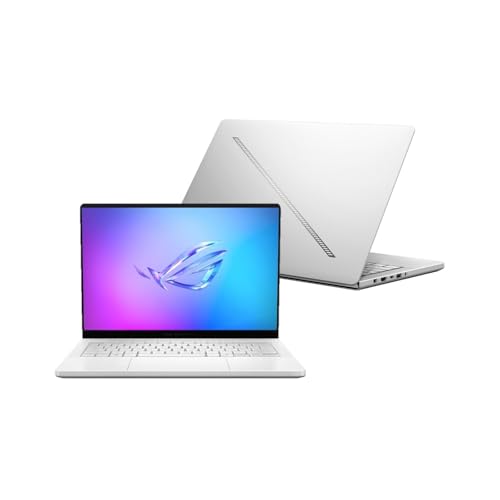
The exact configured offer is GA403UM-G14.R9HX4 with an AMD Ryzen 9 270 processor, NVIDIA GeForce RTX 5060, 16GB LPDDR5X memory, 1TB SSD, and a 14-inch 3K OLED 120Hz display.
ASUS’s 2025 G14 matrix includes the base GA403UM and lists one Type-C USB 4 port up to 40Gbps with DisplayPort and Power Delivery. A different Type-C connector is documented as USB 3.2 Gen 2 with display, Power Delivery, and G-SYNC support.
The practical warning is the same as on the ProArt: use the correct side. The two Type-C ports have different data labels even though both can carry display and power functions. Connect a high-speed USB4 enclosure or dock to the port ASUS names as USB4.
The Amazon title is seller-configured, so the full G14.R9HX4 identity remains in the heading and card. ASUS controls the base-model port claim. The listing controls the selected RTX 5060, memory, storage, and display combination.
For gaming, the built-in RTX 5060 is the known graphics path. An external GPU would add enclosure, driver, firmware, and resource questions without being proved by the one USB4 line. A fast USB4 SSD or dock is the more straightforward accessory case, subject to the correct port and cable.
Our Take
Choose this G14 when you want a compact high-refresh OLED gaming laptop with one explicit 40Gbps USB4 port. Look at a two-port model if left-right docking flexibility matters more than the built-in RTX GPU.
- One maker-stated USB4 port up to 40Gbps
- DisplayPort and Power Delivery stated
- Compact 14-inch 120Hz OLED format
- RTX 5060 in selected offer
- Only one side is documented as USB4
- Seller-configured listing
- USB4 does not prove eGPU support
6. ASUS Zenbook S 16 UM5606WA – Best overall
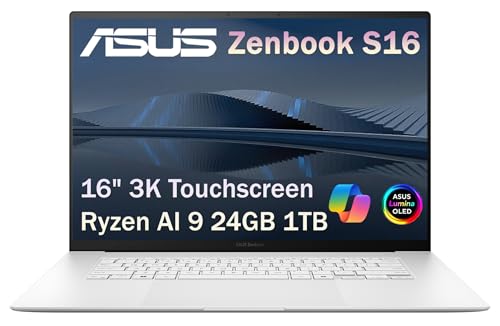
ASUS’s exact manufacturer suffix is UM5606WA. The Amazon title shortens it to UM5606 and pairs an AMD Ryzen AI 9 365 with 24GB memory, 1TB SSD, and a 16-inch 3K OLED touch display. That suffix difference is visible because it matters.
The reason this is the best overall USB4 balance is ASUS’s exact port row: two USB 4.0 Gen 3 Type-C ports, each listed up to 40Gbps with display and Power Delivery support. Unlike the Acer entries, the rate is explicit. Unlike the ProArt and G14 configurations, USB4 is not limited to one named Type-C side.
Two matching port descriptions make desk and travel placement easier, but they do not prove two independent controllers or 80Gbps of combined application bandwidth. If both ports are busy, use the exact manual to understand shared resources and display limits.
The Amazon offer’s title and model field are not a perfect suffix match. Its Ryzen AI 9 365, 24GB memory, 1TB SSD, 16-inch 3K display, and UM5606 family identify the selected offer, while the ASUS UM5606WA matrix controls the I/O. A buyer who needs a region-specific keyboard, warranty, color, or adapter should confirm those fields with the seller before ordering.
For a dock, this laptop gives you two documented 40Gbps choices. For portable storage, pair the correct port with a compatible enclosure and cable. The current USB4 NVMe enclosure list keeps controller, cooling, drive, and host limits visible.
Our Take
Choose the Zenbook S 16 for the strongest mix of two explicit 40Gbps ports, a large OLED display, and thin-laptop portability. Verify the shortened Amazon model text and seller details before treating it as a perfect factory-suffix match.
- Two USB4 ports up to 40Gbps
- Display and Power Delivery on both listed ports
- 16-inch 3K OLED touch display
- Strong docking flexibility
- Amazon title shortens UM5606WA to UM5606
- No Thunderbolt certification statement
- Controller topology is not established
7. Microsoft Surface Laptop (7th Edition) ZGP-00001 – Best exact SKU trace

The selected identifier is ZGP-00001. Microsoft’s live US Store maps that exact inventoryControlSku to a Platinum Surface Laptop (7th Edition) with a Snapdragon X Elite 12-core processor, 16GB RAM, 512GB SSD, and 13.8-inch touchscreen.
The Amazon model field is also ZGP-00001, and its title repeats the same processor class, memory, storage, color, and display size. This is the cleanest first-party-to-Amazon configuration trace in the list. The exact maker SKU survives on both sides, with no removed region suffix and no seller-added configuration suffix.
Microsoft’s tightly scoped Surface Laptop (7th Edition) support page covers the 13.8-inch and 15-inch models and states that they have two USB-C / USB4 ports. Microsoft does not attach a 20Gbps or 40Gbps rate to those ports on the cited pages, so the table says speed unspecified.
The same source set does not assign those USB4 ports a charging wattage, display capability, PCIe-tunneling promise, external-GPU path, or Thunderbolt certification. This guide does not infer any of them from the Snapdragon processor or USB-C shape.
Windows on Arm remains the main compatibility decision. Verify every required application, device driver, VPN client, security product, game component, and peripheral utility for the exact environment before choosing this configuration. A matching USB4 port cannot make an unsupported driver compatible.
Our Take
Choose ZGP-00001 when exact SKU traceability, a 13.8-inch touchscreen, and two explicit USB4 ports matter more than a published USB4 speed. Pick a maker-stated 40Gbps entry when that rate is a hard requirement.
- Exact Microsoft and Amazon SKU match
- Two explicitly documented USB4 ports
- 13.8-inch touchscreen configuration
- Microsoft Store confirms processor, memory, storage, and color
- USB4 speed is not stated
- Charging and display scope is not stated for the ports
- Windows on Arm apps and drivers need exact checks
8. Samsung Galaxy Book4 Edge NP754XQA-KB2US – Best 15.6-inch Arm alternative

Samsung and Amazon both expose the full US identifier NP754XQA-KB2US. The selected Galaxy Book4 Edge uses a Qualcomm Snapdragon X Plus processor, 512GB storage, and a 15.6-inch FHD anti-glare display.
Samsung’s current US family matrix assigns two USB 4.0 ports to the 15.6-inch model. That explicit statement clears the protocol gate for the exact product page. Samsung does not attach a 20Gbps or 40Gbps rate to those ports in the cited US pages, so the table records speed unspecified.
The same source set does not give those ports a charging wattage, display count, PCIe-tunneling promise, or Thunderbolt certification. None is inferred. If one of those features decides the purchase, obtain a Samsung statement for the exact KB2US configuration before ordering.
This is the second Windows on Arm system in the list. Its Snapdragon X Plus platform does not make an unsupported peripheral driver appear. Check business VPN, security, printer, audio, capture, dock management, and specialist application requirements before choosing it as a primary work computer.
Two USB4-named ports make the Samsung a valid candidate for ordinary docks and storage that explicitly support the environment. Start with a direct connection and the device maker’s cable if Windows reports limited functionality.
Our Take
Choose the Galaxy Book4 Edge when you want an exact 15.6-inch Windows on Arm configuration with two explicit USB4 ports and can accept an unpublished USB4 speed. Pick the Microsoft Surface if an exact maker-to-Amazon SKU match and smaller 13.8-inch touchscreen fit your work better.
- Exact Samsung and Amazon suffix match
- Two explicit USB 4.0 ports
- 15.6-inch anti-glare display
- Clear Windows on Arm alternative
- USB4 speed is not stated
- Charging and display scope is not stated for the ports
- Arm driver compatibility needs checking
How to choose among these USB4 laptops
Choose the exact configuration before the brand
Start with the full model or machine type, not the marketing family. H7606WP, H7606WX, and UM5606WA each have their own ASUS rows. ZGP-00001 is a precise Microsoft Store configuration. An omitted region suffix or seller-added suffix is a reason to compare fields, not permission to assume.
The existing Thunderbolt laptop buying guide serves a broader certified and use-case-driven audience. This page stays narrower: explicit USB4 wording on exact Windows configurations.
Choose speed by the accessory you will actually use
For a keyboard, mouse, audio interface, or ordinary office dock, the difference between unspecified USB4 and a published 40Gbps ceiling may not decide the experience. For fast external NVMe storage, multiple displays, or 10GbE networking, the exact host path and shared-bandwidth design matter more.
If you plan a fast network, the adapter still terminates at its Ethernet rate and needs the correct switch, cable, server, and storage. Compare the host requirements in the Thunderbolt and USB4 10GbE adapter list before treating 40Gbps USB4 as the last compatibility check.
Choose port count by desk layout, not multiplication
Two USB4 ports improve placement and let you avoid unplugging a charger to attach another device. They do not necessarily multiply total platform bandwidth. A laptop can route ports through shared controllers or resources.
For a one-cable desk, check the dock’s host protocol, display topology, power delivery, operating-system support, and cable. The USB4 dock list is the next handoff after you have proved the laptop configuration.
Choose x86 or Arm with your must-have list in hand
The Acer and ASUS selections use AMD x86 processors. The Microsoft and Samsung selections use Qualcomm Arm processors. List the applications, drivers, VPN, security tools, peripherals, games, and plugins you cannot replace, then verify each one for the exact operating-system architecture.
Do not use processor architecture as a shortcut for USB4 capability either. Both groups appear here because their exact maker records name USB4.
Setup checklist for a new USB4 laptop
- Photograph or record the full model label and compare it with the order.
- Open the maker’s exact port diagram and identify which Type-C port is USB4.
- Install current Windows and exact laptop support updates.
- Start with the accessory connected directly, not through another dock.
- Use the accessory maker’s cable or a certified cable for the required rate.
- Confirm one function at a time: device detection, power direction, data rate, display, then downstream devices.
- If Windows reports limited USB4 functionality, check the PC port, intermediary dock, device, and cable against Microsoft’s stated causes.
- Add displays, Ethernet, and storage one at a time so shared-bandwidth trouble has a visible starting point.
If you need to compare Thunderbolt generations around a mixed accessory fleet, use the Thunderbolt 3, 4, and 5 comparison. Do not assign a Thunderbolt generation to these eight laptops unless the exact manufacturer documentation does.
Frequently asked questions
Is every USB4 laptop a Thunderbolt laptop?
No. The technologies overlap, but Thunderbolt certification is a separate manufacturer claim with a defined certification baseline. This list says certification is not stated when the cited exact source says only USB4.
Does USB4 always run at 40Gbps?
No. Products can publish different USB4 data-performance tiers, and some maker pages say only USB4. Four configurations here state 40Gbps. Four leave speed unspecified. The list does not guess.
Can I identify USB4 from the processor?
No. A processor platform can make a feature possible without proving that the laptop maker routed, enabled, or documented it on the exact SKU. Use the laptop’s exact technical record.
Will a USB4 dock charge any laptop on this list?
Not automatically. The laptop, dock, cable, and power supply must negotiate a compatible direction and wattage. A maker’s generic Power Delivery statement does not prove that a small dock replaces the laptop’s full-power adapter under load.
Can all eight laptops use an external GPU?
This guide does not make that claim. USB4 wording alone does not prove the complete PCIe path, firmware support, driver support, operating-system architecture, enclosure compatibility, and resource behavior an eGPU needs.
Can all eight drive two external monitors?
Not from the evidence used here. Several makers state display capability, but the exact GPU, port routing, dock, cable, internal display, resolution, refresh rate, and operating system determine the active-display result.
Why are two ProArt P16 configurations included?
They are two exact active offers with different base model identifiers and GPUs: H7606WP with RTX 5070 and H7606WX with RTX 5090. Each passed the gate. Their USB4 path is similar, so the RTX 5090 configuration should be chosen for its GPU and storage, not a better port.
Why is Amazon not the specification authority?
Marketplace records are useful for matching an ASIN to an offer and checking dated availability. Port specs can be copied across siblings, shortened, or omitted. The laptop maker’s exact matrix controls USB4.
Sources and methodology
The eight-port ledger was checked against current Acer model announcements, ASUS US technical matrices, Microsoft’s exact Store configuration and 7th Edition support page, and Samsung’s exact US product and family pages on July 23, 2026. USB-IF, Microsoft, and Intel documentation controls the general USB4, cable, limited-functionality, and certification explanations.
One ordered Amazon Creators request returned all eight ASINs in the table order with at least one active listing after a New-offer request. That dated result controls identity and availability only. No personal benchmark, invented stock promise, or inferred specification is used.
The list is maintained by exact configuration. An update must preserve the full identifier, current first-party USB4 wording, stated speed or explicit unspecified result, optional-feature boundaries, and a current exact offer. A family sibling does not inherit a place.