Logitech’s six mice here suit different laptop setups. Start with how the mouse connects, meaning Bluetooth only or Bluetooth plus an included USB receiver, then compare power, weight, and the controls each model lists.
Each section below says what Logitech’s product page and the Amazon listing state for that model. For related gear, see our quiet wireless mouse guide and USB-C hub guide.
Pick the connection and the body size first, then treat extra buttons and scroll modes as tie-breakers.Logitech Mice for Laptops Compared
| Image | Product | Details | Check Price |
|---|---|---|---|
 | Logitech MX Master 3S Bluetooth Edition | Best fit: Feature-rich desk mouse Connection: Bluetooth, up to 3 devices Control: 8,000 DPI, MagSpeed, programmable buttons Power: Rechargeable; cable not included Limit: No receiver or adapter included | Check Price on Amazon |
 | Logitech MX Anywhere 3S | Best fit: Rechargeable travel mouse Connection: Bluetooth, up to 3 devices Control: 8,000 DPI, MagSpeed, Quiet Clicks Power: USB-C; cable included Limit: No receiver or dongle included | Check Price on Amazon |
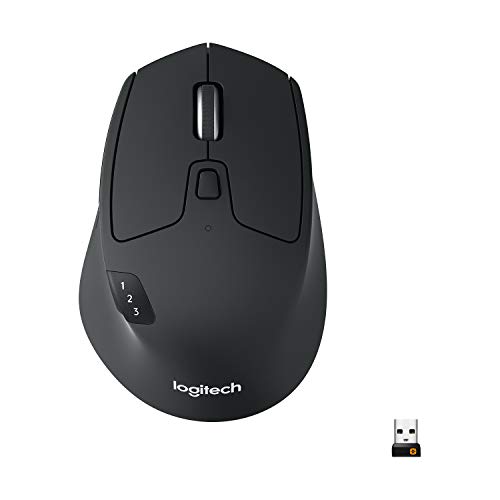 | Logitech M720 Triathlon | Best fit: Multi-device mouse with a receiver Connection: Bluetooth or included USB-A Unifying receiver Control: 6 customizable buttons; Hyper-Fast scroll Power: AA battery included; up to 24 months listed Limit: Included receiver is USB-A | Check Price on Amazon |
 | Logitech Pebble 2 M350s | Best fit: Slim Bluetooth pick Connection: Bluetooth Easy-Switch, up to 3 devices Control: Silent Touch; customizable middle button Power: AA battery; up to 24 months listed Limit: Logi Bolt receiver is not included | Check Price on Amazon |
 | Logitech ERGO M575S | Best fit: Stationary trackball option Connection: Bluetooth or included Logi Bolt receiver Control: Thumb trackball; 3 customizable buttons Power: AA battery included; up to 18 months listed Limit: Right-handed thumb trackball only | Check Price on Amazon |
 | Logitech M240 | Best fit: Simple Bluetooth mouse Connection: Bluetooth; no dongle required Control: SilentTouch clicks; 3 buttons Power: AA battery included; up to 18 months listed Limit: No multi-device switch listed | Check Price on Amazon |
1. Logitech MX Master 3S — Best Feature-Rich Desk Mouse
The MX Master 3S Bluetooth Edition is the feature-heavy mouse of the six. Logitech’s page lists an 8,000 DPI sensor adjustable from 200 DPI in 50 DPI steps, a MagSpeed wheel that scrolls 1,000 lines per second, a thumb wheel, and seven buttons. It also says Quiet Clicks cut click noise by 90 percent compared with the MX Master 3. The Amazon listing adds a silhouette shaped for wrist posture with thumb controls, Bluetooth for up to three devices, and Logi Options+ profiles per app.
The Amazon listing says this edition is Bluetooth only, with no USB receiver, adapter, or charging cable, and Logitech lists its Logi Bolt receiver only for the Standard Edition. Logitech names a rechargeable 500 mAh battery, says one minute of charging gives three hours of use, and lists Bluetooth Low Energy for Windows, macOS, Linux, ChromeOS, iPadOS, and Android. Logitech also lists 141 g and says Logi Options+ is available on Windows and macOS.
Our Take Choose the MX Master 3S Bluetooth Edition for a fixed laptop desk where a larger mouse with thumb controls and Bluetooth switching counts for more than an included receiver.
- Logitech lists a sensor that adjusts from 200 to 8,000 DPI and tracks on glass 4 mm or thicker.
- Logitech lists a thumb wheel and seven buttons, and Amazon adds Logi Options+ profiles per app, with the software available on Windows and macOS.
- Amazon lists Bluetooth for up to three devices, and the Bluetooth Edition has no receiver to take up a laptop port.
- Logitech lists a rechargeable 500 mAh battery and says one minute of charging gives three hours of use.
- Amazon says the Bluetooth Edition ships without a receiver, adapter, or charging cable, and Logitech lists the Logi Bolt receiver only for the Standard Edition.
- Logitech lists the Bluetooth Edition at 141 g and 4.92 inches long, heavier and longer than MX Anywhere 3S, M720, Pebble 2, and M240.
2. Logitech MX Anywhere 3S — Best Rechargeable Travel Mouse
MX Anywhere 3S is the compact USB-C mouse in the group. Logitech lists 99 g, 3.96 by 2.56 by 1.35 inches, an 8K DPI sensor, and a MagSpeed wheel with ratchet and hyper-fast modes. Logitech says its quiet clicks are quieter than those of the MX Anywhere 3. Logitech and Amazon both give Bluetooth for up to three devices.
Logitech says the mouse charges over USB-C and includes a USB-A-to-USB-C cable. Logitech lists up to 70 days on a full charge and up to three hours from a one-minute charge. Amazon says no receiver or dongle is included, and Logitech adds that it works only with the Logi Bolt receiver, sold separately. Battery life depends on use.
USB-C charging and Bluetooth switching are the reasons to pick this model, and a receiver is a separate purchase.Our Take Choose the MX Anywhere 3S for a compact mouse you charge over USB-C and switch among up to three Bluetooth devices, provided your laptops have Bluetooth.
- Logitech says the mouse charges over USB-C and lists a USB-A-to-USB-C cable in the box.
- At 99 g by Logitech’s listing, the mouse is lighter than MX Master 3S, M720, and ERGO M575S.
- Logitech says a full charge lasts up to 70 days and one minute of charging gives up to three hours.
- Logitech lists a 200 to 8,000 DPI sensor and a wheel with ratchet and hyper-fast modes.
- Amazon says no receiver or dongle is included, and Logitech names only the Logi Bolt receiver as an add-on.
- Logitech’s 70-day figure is a maximum that varies with use.
- At 99 g, the mouse is heavier than Pebble 2 and M240, by Logitech’s listing.
3. Logitech M720 Triathlon — Best Multi-Device Mouse With a Receiver
M720 Triathlon is the only mouse here that combines three-device switching with an included receiver. Logitech says it connects over Bluetooth or the Logitech Unifying receiver, which links up to six compatible Logitech devices through one receiver, and that Easy-Switch moves it among three computers, with Flow moving files between them. Logitech lists eight buttons, and the Amazon listing says six are customizable.
Logitech describes a right-handed, full-size body with a rubber coating and lists it at 4.53 by 2.91 by 1.77 inches and 135 g with its battery. The Amazon listing describes a hyper-fast wheel with instant stop and a click-to-click mode, and Logitech lists a tilt wheel for horizontal scrolling. Logitech lists one AA battery in the box and up to 24 months of battery life, and names Windows, macOS, ChromeOS, Linux, and iPadOS.
M720’s pairing is three-device switching with a receiver in the box, powered by one AA battery rather than a charging cable.Our Take Choose M720 Triathlon for a full-size mouse that works over Bluetooth on some machines and through an included receiver on others, with AA power instead of USB-C charging.
- The M720 connects over Bluetooth or an included Unifying receiver, according to Logitech, and the Amazon listing names that receiver USB-A.
- Logitech lists Easy-Switch for three devices and Flow for moving files between computers.
- Logitech lists a tilt wheel for horizontal scrolling alongside dual-mode scrolling.
- Logitech lists one AA battery in the box and up to 24 months of battery life.
- The included receiver is USB-A, and a laptop with only USB-C ports needs a hub or adapter to use it.
- Logitech lists the M720 as a right-handed body at 135 g, heavier than MX Anywhere 3S, Pebble 2, and M240.
4. Logitech Pebble 2 M350s — Best Slim Bluetooth Pick
Logitech describes Pebble 2 M350s as a slim, round Bluetooth mouse. Logitech lists 4.17 by 2.31 by 1.05 inches and 76 g, with a user-replaceable AA battery for up to 24 months and a sensor adjustable from 400 to 4,000 DPI. Logitech says Silent Touch Technology removes 90 percent of click noise.
Easy-Switch moves it among three Bluetooth devices. Of its three buttons, Logi Options+ can reassign only the middle one. Logitech’s page names Windows, macOS, iPadOS, Android, ChromeOS, and Linux. No receiver is in the box. Logitech says Pebble 2 works with a Logi Bolt receiver sold separately and does not work with the older Unifying receiver.
Pebble 2 gives up a receiver and extra buttons for a 76 g body and Easy-Switch pairing across three Bluetooth devices.Our Take Choose Pebble 2 M350s for a slim Bluetooth mouse with three-device switching and quieter clicks, provided your devices have Bluetooth and a small body outranks a receiver.
- Logitech lists a 76 g body that is 1.05 inches thick.
- Logitech and Amazon both list Easy-Switch for three Bluetooth devices.
- Logitech says Silent Touch Technology removes 90 percent of click noise.
- Logitech lists a 400 to 4,000 DPI sensor and a middle button that Logi Options+ can customize.
- Logitech says the mouse ships without a receiver, and the Logi Bolt receiver is sold separately.
- By Logitech’s listing the mouse has three buttons, and only the middle one is customizable in Logi Options+.
5. Logitech ERGO M575S — Best Stationary Trackball Option
ERGO M575S changes the pointing method. Logitech says thumb control lets the cursor move while the hand stays put, which it describes as ideal for small or busy setups. Logitech lists 5.28 by 3.94 by 1.89 inches and 145 g, the heaviest of the six, and says in its FAQ that the model is exclusively for right-handed users. The Amazon listing adds that the ball ejects from its cage for cleaning.
Logitech lists Bluetooth Low Energy or the included Logi Bolt receiver, which needs a USB-A port. It lists one included AA battery, up to 18 months of battery life, and three customizable buttons through Logi Options+ on Windows and macOS. Logitech names Windows, macOS, Linux, ChromeOS, iPadOS, and Android for Bluetooth, and says clicks are 80 percent quieter than on the original ERGO M575.
Our Take Choose ERGO M575S for thumb-controlled pointing at a compact desk, if you are right-handed and can use Bluetooth or a USB-A port.
- Logitech says thumb control moves the cursor without moving the hand.
- Logitech lists Bluetooth Low Energy or an included Logi Bolt receiver.
- Logitech lists one AA battery in the box and up to 18 months of battery life.
- Logitech lists three customizable buttons for Back, Forward, and middle click.
- Logitech says the ERGO M575S is exclusively designed for right-handed users.
- At 145 g, Logitech’s ERGO M575S is heavier than any other mouse in this comparison.
- Logitech lists a maximum of 2,000 DPI, below the 4,000 DPI Logitech lists for Pebble 2 and the 8,000 DPI it lists for MX Master 3S.
6. Logitech M240 — Best Simple Bluetooth Mouse
M240 is the lightest of the six. Logitech, which calls it M240 Silent, lists 73.8 g and 3.9 by 2.36 by 1.54 inches, just under the 76 g Logitech lists for Pebble 2. It says SilentTouch Technology reduces click noise by 90 percent compared with the Logitech M185, and that the body is equally comfortable for left-handed and right-handed users.
Logitech says it connects over Bluetooth with no dongle or port required, and lists a pre-installed AA battery with 18 months of battery life and auto sleep. Logitech names Windows, macOS, iPadOS, ChromeOS, Linux, and Android, and lists Logi Bolt compatibility with the receiver not included. The Amazon title calls its three buttons non-customizable, while Logitech’s page lists Logi Options+ support, so confirm what can be remapped.
Our Take Choose M240 for a simple Bluetooth laptop mouse when a light body that suits either hand outranks advanced controls.
- Logitech lists the M240 at 73.8 g, the lowest weight of the six.
- Logitech says the body is equally comfortable for left-handed and right-handed users.
- Logitech lists Bluetooth with no dongle or port required, plus 18 months from a pre-installed AA battery.
- Logitech says SilentTouch Technology reduces click noise by 90 percent compared with the Logitech M185.
- The Amazon title calls its three buttons non-customizable, but Logitech’s page lists Logi Options+ support, so the sources disagree.
- Neither Logitech nor Amazon lists three-device switching for M240.
Buying Guide
Pick Bluetooth or a receiver before comparing extra controls
Bluetooth keeps a laptop port free when the laptop has reliable Bluetooth. Amazon says MX Master 3S Bluetooth Edition and MX Anywhere 3S include no receiver, and Logitech says Pebble 2 and M240 ship without one. Logitech and Amazon list pairing with up to three devices for MX Master 3S, MX Anywhere 3S, and Pebble 2.
An included receiver gives a second path when Bluetooth is not the plan. Logitech says M720 Triathlon includes a Unifying receiver and ERGO M575S includes a Logi Bolt receiver that needs a USB-A port. A laptop with USB-C ports only needs a hub or adapter for either. Logitech lists three-device switching for M720 but not for ERGO M575S.
Match the body to the desk time and the bag space
Weight separates the bag mice from the desk mice. Logitech lists 73.8 g for M240, 76 g for Pebble 2, and 99 g for MX Anywhere 3S, against 135 g for M720, 141 g for MX Master 3S, and 145 g for ERGO M575S.
Hand fit comes down to your grip and how long you work. Logitech describes M720 as right-handed and ERGO M575S as exclusively for right-handed users, and says M240 suits either hand. Pick by session length and grip, not by portability alone.
Decide whether rechargeable or AA power fits your routine
Logitech lists a rechargeable 500 mAh battery for both MX models. For MX Anywhere 3S it lists up to 70 days on a full charge and a USB-A-to-USB-C cable in the box. For MX Master 3S Bluetooth Edition, Amazon says no charging cable is included.
AA mice trade a charging cable for a spare cell. Logitech lists one AA battery in the box and up to 24 months for M720 and Pebble 2, and up to 18 months for ERGO M575S and M240. Logitech says these figures vary with use.
Use the scroll and button controls that the task needs
MX Master 3S and MX Anywhere 3S use a MagSpeed wheel, while M720 has a hyper-fast wheel with instant stop and a click-to-click mode. Logitech describes the MagSpeed wheel and Amazon describes the hyper-fast wheel, and no common test compares them, so read them as different designs. If you mostly handle email, you may not need either wheel.
Button counts differ by source. Amazon lists programmable buttons for MX Master 3S, six customizable buttons for M720, and three for ERGO M575S, which Logitech’s page also lists. Logitech says Pebble 2 customizes only its middle button, and the Amazon title gives M240 three non-customizable buttons, though Logitech lists Logi Options+ support for it.
Treat trackball control as a separate category
ERGO M575S moves the cursor with the thumb while the body stays in place. Logitech says that suits small or busy setups and that the design is exclusively for right-handed users. It lists a maximum of 2,000 DPI, below the 4,000 DPI Logitech lists for Pebble 2 and M240.
A conventional mouse is the more familiar choice. The other five mice here move across the desk, so the trackball is a different pointing habit, not an upgrade. Choose ERGO M575S for stationary pointing.
FAQ
Does every Logitech mouse here include a USB receiver?
No. Logitech says M720 Triathlon includes a Unifying receiver and ERGO M575S includes a Logi Bolt receiver. Amazon says MX Master 3S Bluetooth Edition and MX Anywhere 3S include none, and Logitech says Pebble 2 includes none.
Check the box before you plan around a receiver. Logitech says M240 needs no dongle or port, and lists Logi Bolt compatibility with the receiver not included. A receiver uses a port, and Bluetooth models need Bluetooth on every device.
Which model is best for moving among several devices?
MX Master 3S, MX Anywhere 3S, M720 Triathlon, and Pebble 2 each list pairing with up to three devices, according to Logitech or Amazon. M720 adds an included Unifying receiver beside Bluetooth, while neither source lists three-device switching for ERGO M575S.
Match the connection to the devices you switch between. MX Anywhere 3S suits a compact USB-C charged setup, Pebble 2 suits a small bag at the 76 g Logitech lists, and MX Master 3S suits a desk where a receiver is not needed.
Are these mice rechargeable?
Logitech lists a rechargeable 500 mAh battery for MX Master 3S and MX Anywhere 3S, and USB-C charging for MX Anywhere 3S. Amazon says the MX Master 3S Bluetooth Edition has no charging cable. Logitech lists AA batteries for M720 Triathlon, Pebble 2 M350s, ERGO M575S, and M240.
Runtime figures are Logitech’s maximums. Logitech says battery life varies with use, so treat the 70-day, 24-month, and 18-month figures as planning guidance, not a guarantee.
Is a trackball better for a small laptop desk?
ERGO M575S is the trackball here, and Logitech says its thumb control lets the cursor move without moving the hand, which it calls ideal for small or busy setups. Logitech also says it is exclusively for right-handed users.
Better depends on whether thumb control suits you. A compact regular mouse such as Pebble 2 at 76 g or M240 at 73.8 g, per Logitech, keeps the familiar motion on a small desk.
What is the simplest Logitech mouse in this comparison?
M240 is the simplest by its listed features. Logitech lists Bluetooth with no dongle, a 90 percent click-noise reduction compared with the Logitech M185, a body that suits either hand, and 18 months from an AA battery, while the Amazon title calls its three buttons non-customizable.
Simplicity helps when a laptop needs only a basic pointer. Pebble 2 M350s adds Easy-Switch for three devices and a customizable middle button, and MX Anywhere 3S adds USB-C charging and an 8,000 DPI sensor, both per Logitech.
Bottom Line
Choose MX Master 3S Bluetooth Edition for a Bluetooth-only desk mouse with the fullest controls, MX Anywhere 3S for USB-C charging in a compact body, or M720 Triathlon for three-device switching with an included receiver. Pebble 2 M350s and M240 are the light Bluetooth options, with M240 at Logitech’s listed 73.8 g the lightest, and ERGO M575S is the thumb-trackball choice. The deciding details are connection method, power, weight, and listed controls.