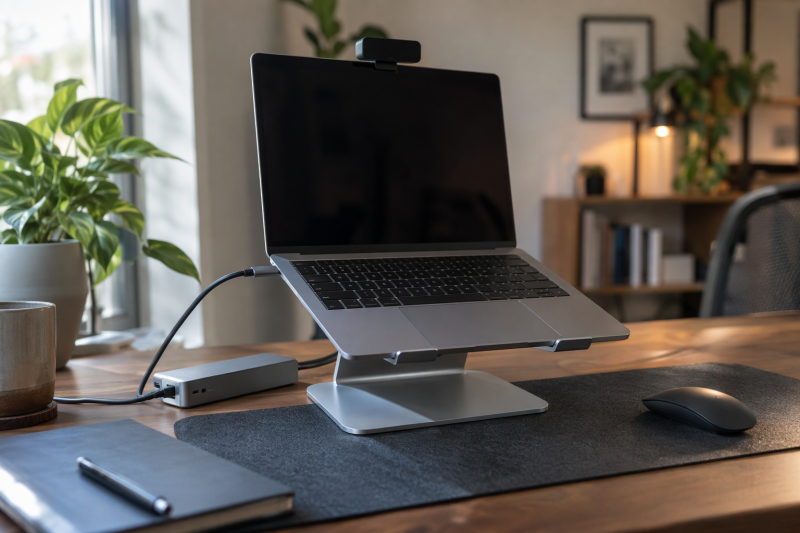
Start a desk upgrade with the job that annoys you most. A stand fixes screen height, a webcam fixes the picture people see on a call, a hub adds ports, and a mouse replaces the trackpad. Each job has its own pick below, so you can buy for one problem instead of a bundle. Black Friday is only the shopping season in this guide. It makes no promise about a deal, a discount or a date.
For screen height, the Amazon Basics Adjustable Laptop Stand is built for laptops up to 15.6 inches, according to its Amazon listing. For calls, the Amazon Basics Full HD Webcam suits one person and the EMEET C960 suits a wider frame. The Anker 7-in-1 USB-C Hub adds HDMI, USB-A and card slots, and the Logitech G305 and Apple Magic Mouse cover the mouse decision, which depends on the laptop and your habits.
Desk setup products compared
| Image | Product | Details | Check Price |
|---|---|---|---|
 | Amazon Basics Adjustable Laptop Stand | Best fit: Raising a laptop screen Desk job: Screen height Main figures: Up to 7 inches of adjustment, 11 lb load, folds to 10 x 8.7 x 1.8 inches (Amazon listing) Works with: Laptops and tablets from 10 to 15.6 inches Check first: Larger or heavier devices may affect balance | Check Price on Amazon |
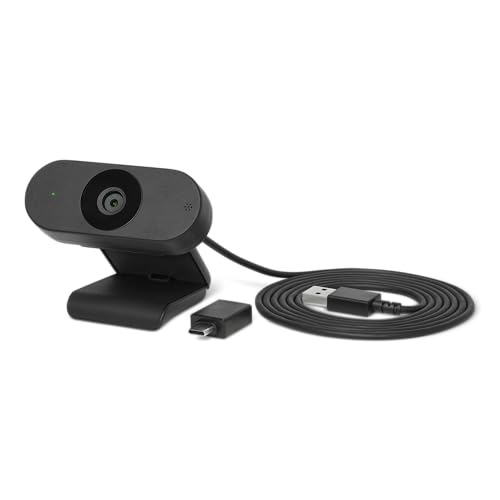 | Amazon Basics Full HD Webcam | Best fit: One person on a call Desk job: Webcam Main figures: 1080p, automatic light correction, built-in microphone (Amazon listing) Works with: Amazon's listing names no operating systems Check first: No field of view stated | Check Price on Amazon |
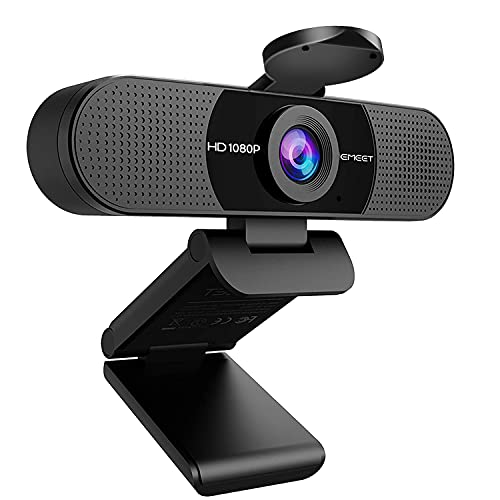 | EMEET C960 Webcam | Best fit: A wider frame for group calls Desk job: Webcam Main figures: 90-degree lens, 1920 x 1080p, two microphones (EMEET listing) Works with: Windows 10/11, macOS 10.14+, Linux, Android TV 7.0+ Check first: Fixed focus and no Windows Hello | Check Price on Amazon |
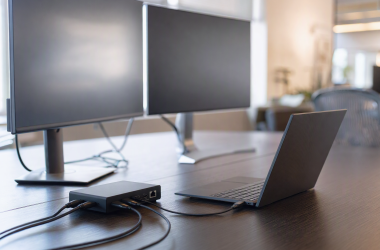
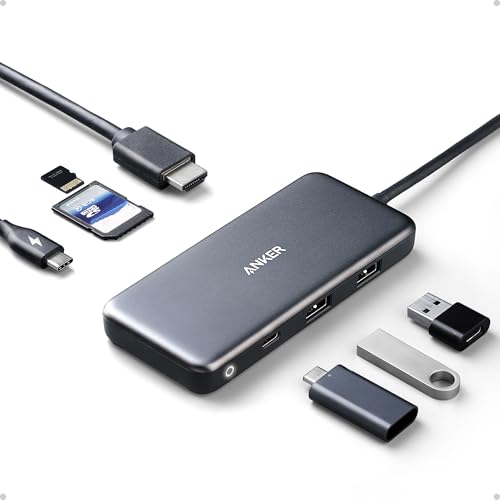 | Anker 7-in-1 USB-C Hub | Best fit: One-cable desk expansion Desk job: USB-C hub Main figures: HDMI 4K at 30Hz, two USB-A at 5Gbps, USB-C data 480Mbps, SD and microSD (Anker) Works with: Anker names MacBook Pro, MacBook Air and Pixelbook Check first: No charger in the box; display only through HDMI | Check Price on Amazon |
 | Logitech G305 LIGHTSPEED | Best fit: Receiver mouse for a laptop with a USB port Desk job: Mouse Main figures: 1ms report rate, up to 12,000 DPI, one AA battery (Logitech) Works with: Windows 7, macOS 10.13+, ChromeOS and a USB port (Logitech) Check first: One AA battery; no Bluetooth mentioned | Check Price on Amazon |
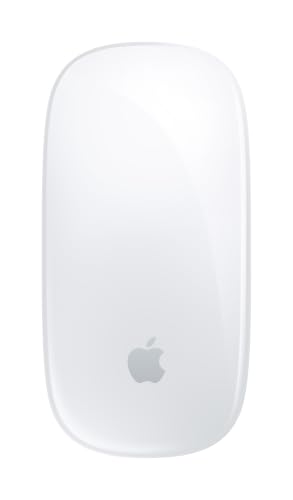 | Apple Magic Mouse USB-C | Best fit: Gestures on a recent Mac Desk job: Mouse Main figures: Multi-Touch surface, rechargeable, woven USB-C cable (Apple) Works with: Mac with macOS 15.1+ or iPad with iPadOS 18.1+ (Apple) Check first: No DPI range or button count stated | Check Price on Amazon |
1. Amazon Basics Adjustable Laptop Stand — Best for Adjustable Screen Height
Amazon’s listing for the Amazon Basics stand (model DS-ALS011, sold by Amazon.com) describes a foldable aluminum riser with up to 7 inches of height adjustment for laptops and tablets from 10 to 15.6 inches. It lists a load capacity of 11 lb (5 kg), non-slip silicone pads and protective hooks that hold the laptop in place.
The listing says the stand folds flat to 10 x 8.7 x 1.8 inches at 1.7 lb and fits most laptop bags. Amazon describes the open hollow frame as promoting airflow and gives no temperature figure. The title says it fits all laptops up to 15.6 inches, while the bullet text adds that larger or heavier devices may affect balance and stability. Amazon’s size field reads 10 x 8.7 x 6 inches, shorter than the 7 inches of adjustment in the bullets. Check the product images before relying on the full height.
Limit: 10 to 15.6-inch devices and 11 lb.Our Take Pick this stand when the laptop screen sits too low and the laptop falls inside the listed size and weight range. Skip it for a large or heavy laptop, because Amazon’s own listing warns about balance.
- Amazon’s listing states up to 7 inches of height adjustment for laptops and tablets from 10 to 15.6 inches, a fit for a screen that sits too low.
- The Amazon Basics listing gives an 11 lb load capacity with non-slip silicone pads and protective hooks that hold the laptop in place.
- Amazon lists a folded size of 10 x 8.7 x 1.8 inches and a weight of 1.7 lb, and the listing says the stand fits most laptop bags.
- Amazon’s listing warns that larger or heavier devices may affect the stand’s balance and stability.
- Amazon’s size field gives 6 inches of height, shorter than the up to 7 inches of adjustment in the bullet text.
2. Amazon Basics Full HD Webcam — Best for Simple 1080p Calls
The Amazon Basics webcam (model LAWC001) is the plain external camera in this guide. Its Amazon listing states Full HD 1080p video for calls and meetings, automatic light correction that adjusts brightness and color balance, and a built-in microphone for meetings and streaming.
Amazon lists it at 3.03 x 2.98 x 1.26 inches and about 0.23 lb, and the bullets call it compact enough for mobile workspaces. The listing gives no field of view, no focus type and no list of supported operating systems, so a buyer with a particular computer or a crowded room has less to go on than the C960 listing gives.
Limit: one person in frame is the safe use.Our Take Choose this webcam to upgrade a laptop’s built-in camera for solo calls. Choose the C960 when several people share the frame or when you need a stated list of supported systems.
- Amazon’s listing states Full HD 1080p video for calls and meetings.
- The Amazon Basics listing says automatic light correction adjusts brightness and color balance.
- Amazon lists a built-in microphone, and the bullets call the 3.03 x 2.98 x 1.26-inch body compact enough for mobile workspaces.
- Amazon’s listing gives no field of view, no focus type and no supported operating systems for the Amazon Basics webcam.
3. EMEET C960 Webcam — Best for Wider Group Calls
EMEET’s Amazon listing for the C960 states a 90-degree wide-angle lens that it says can fit more participants in a call, 1920 x 1080p video and a 5-layer anti-glare lens. It lists a fixed focal range of 11.8 to 118.1 inches, a cover, a foldable body and two built-in omnidirectional noise-reduction microphones.
The listing says it needs no driver and works on Windows 10 or 11, macOS 10.14 or later, Linux and Android TV 7.0 or later. The same listing tells you to select the C960 as the default microphone device after installing it, and it states that the camera is incompatible with Windows Hello.
Limit: fixed focus and no Windows Hello.Our Take Pick the C960 when several people share one frame, or when you want a camera whose listing names its operating systems and call apps, such as Zoom and Teams. Skip it if you sign in to Windows with face recognition.
- EMEET’s listing states a 90-degree wide-angle lens that it says can accommodate more participants.
- The EMEET listing names two built-in omnidirectional noise-reduction microphones and a 5-layer anti-glare lens.
- EMEET states plug-and-play use without a driver on Windows 10 or 11, macOS 10.14 or later, Linux and Android TV 7.0 or later.
- EMEET lists a fixed focal range of 11.8 to 118.1 inches.
- EMEET’s listing says the C960 is incompatible with Windows Hello.
4. Anker 7-in-1 USB-C Hub — Best for One-Cable Desk Expansion
Anker’s product page is headed Anker 341 USB-C Hub (7-in-1) and gives model number A8346. It lists a USB-C power input, a USB-C data port, two USB-A ports, HDMI, an SD slot and a microSD slot. Anker’s spec table rates the two USB-A ports at 5Gbps and the HDMI output at 4K at 30Hz. The same table lists the USB-C data port at USB 2.0 and 480Mbps, even though Anker’s feature text and the Amazon title say 5Gbps for the USB-C and USB-A data ports.
Anker states that pass-through charging reaches 85W for the laptop and that 15W goes to the hub, and says a 100W Power Delivery charger and cable are required for 85W charging. Anker’s page says no charger comes in the box, that display output works only through the HDMI port, not through the USB-C ports, and that only the USB-C power port supplies charge. Anker’s page names MacBook Pro, MacBook Air and Pixelbook models as compatible and lists several laptops that do not support USB-C display output.
Our Take Choose the A8346 when one USB-C port must carry HDMI at 4K30, two USB-A ports and card slots. Pick a different hub when the monitor needs 60Hz or the USB-C data port must run faster than Anker’s spec table rates it.
- Anker’s spec table rates the two USB-A ports at 5Gbps and lists SD and microSD slots.
- Anker states HDMI output at 4K at 30Hz and 85W of laptop pass-through from the same hub.
- Anker’s page and the Amazon listing both identify model A8346.
- Anker’s spec table lists the USB-C data port at 480Mbps, below the 5Gbps in Anker’s feature text.
- Anker says display output works only through HDMI and that a charger is not included.
- Anker states that only the USB-C power port supports charging, and the USB-A ports and USB-C data port do not.
5. Logitech G305 LIGHTSPEED — Best for a Travel-Friendly Receiver Mouse
Logitech’s page for the G305, a gaming mouse, lists LIGHTSPEED wireless at a 1000Hz (1ms) report rate, a HERO sensor from 200 to 12,000 DPI, accuracy over 400 IPS and a USB nano receiver that stores inside the mouse. Amazon’s listing (model 910-005280, sold by Amazon.com) counts six programmable buttons, while Logitech’s page names a middle click, a DPI button and two side buttons that G HUB can program.
The mouse runs on one AA battery. Logitech states up to 250 hours of continuous use, and up to 9 months of typical use in Endurance mode chosen in G HUB, with an indicator warning at 15% battery. Logitech’s page gives its weight as 3.49 oz (99 g) and lists Windows 7, macOS 10.13 or later, ChromeOS and a USB port as requirements.
Our Take Pick the G305 for a laptop that has a free USB port and for a buyer who wants button remapping through G HUB. Skip it for a laptop with only USB-C ports unless you carry an adapter, because the receiver is USB.
- Logitech’s page lists a 1000Hz (1ms) wireless report rate and a HERO sensor up to 12,000 DPI.
- Logitech states up to 250 hours on one AA battery and up to 9 months of typical use in Endurance mode.
- Logitech’s page describes a USB nano receiver that stores inside the mouse.
- Logitech’s page names a LIGHTSPEED USB receiver and a USB port requirement, and the page does not mention Bluetooth.
- Amazon’s listing counts six programmable buttons while Logitech’s page names four buttons that G HUB can program.
6. Apple Magic Mouse USB-C — Best for Mac Gestures
Apple’s page for the Magic Mouse (USB-C), model MXK53AM/A, lists a Multi-Touch surface, Bluetooth, a USB-C port and a woven USB-C charge cable that lets you pair and charge by connecting to a Mac. Apple says the rechargeable battery lasts about a month or more between charges, based on its own preproduction testing. The Amazon listing names the gestures as swiping between web pages and scrolling through documents.
Apple’s system requirements list a Mac with macOS 15.1 or later, or an iPad with iPadOS 18.1 or later. Apple lists its weight as 0.22 lb (0.099 kg) and its size as 4.47 x 2.25 x 0.85 inches. Neither Apple nor the Amazon listing gives a DPI figure, a button count or a Windows requirement.
Our Take Pick the Magic Mouse for a Mac that runs a recent macOS when you like swiping through pages. Pick the G305 for a Windows laptop or when you want a stated DPI range and remappable buttons.
- Apple’s page lists a Multi-Touch surface for swipe and scroll gestures.
- Apple states that the included woven USB-C charge cable pairs and charges the mouse through a Mac’s USB-C port.
- Apple says the battery lasts about a month or more between charges.
- Apple’s system requirements list only macOS 15.1 or later and iPadOS 18.1 or later.
- Apple’s page and the Amazon listing give no DPI range and no programmable-button count.
Buying Guide
1. Fix the laptop screen position before adding desk accessories
A stand is the only product in this guide that changes viewing height. Amazon’s listing for the Amazon Basics stand gives up to 7 inches of adjustment for 10 to 15.6-inch laptops, an 11 lb load capacity and a warning about larger or heavier devices. Weigh your laptop and check its screen size before ordering. The laptop-stand guide compares stands with built-in cooling fans if airflow is your main concern.
When the screen is too low and you also want a better camera, raise the screen first and then choose between the two webcams. Height, camera view and connectivity are three separate purchases.
2. Choose the camera from frame width and operating system
The Amazon Basics listing gives 1080p video, automatic light correction and a built-in microphone and names no field of view or operating system. The Amazon Basics webcam suits one person in front of a laptop who wants a better picture than the built-in camera gives.
The C960 is the pick when several people share a frame. EMEET’s listing states a 90-degree lens, a fixed focal range of 11.8 to 118.1 inches and two microphones, and it names its supported systems. A Windows Hello user should read EMEET’s incompatibility note first.
3. Map every hub port to a device you own
Anker’s spec table lists two USB-A ports at 5Gbps, one USB-C data port at 480Mbps, HDMI at 4K at 30Hz and SD and microSD slots. Write down the monitor, the drive or receiver in each USB-A port, and the card media you plan to read before buying. Where Anker’s feature text says 5Gbps for the USB-C data port, its own spec table says 480Mbps, so do not plan a fast drive around that port.
Anker says pass-through charging reaches 85W only with a 100W Power Delivery charger and cable, and the hub does not include one. Anker also says display output comes from the HDMI port alone. Check that your laptop’s USB-C port outputs video and carries charge before you buy. Anker’s page lists laptops that do not support USB-C display output. The USB-C hub guide compares more hubs if this one does not fit.
4. Select a mouse by laptop and habit, not by shape
The G305 uses a USB receiver. Logitech’s page lists a 1000Hz (1ms) report rate, a HERO sensor up to 12,000 DPI and receiver storage inside the mouse, and one AA battery gives up to 250 hours of continuous use. Choose it when the laptop has a free USB port and you want to remap buttons in G HUB. Logitech’s requirements list Windows 7, macOS 10.13 or later and ChromeOS.
The Magic Mouse is the gesture option. Apple lists a Multi-Touch surface, Bluetooth and a USB-C charge cable, and its system requirements start at macOS 15.1 or iPadOS 18.1. Apple’s page states no Windows support, so a Windows laptop points to the G305.
5. Build the desk in the order that removes the actual constraint
Start with position, because a stand fixes a low screen without adding a cable. Next solve call framing, with the C960 for a group or the Amazon Basics webcam for one person. Add the hub only when the desk has an HDMI, card-reader or USB-A job to do.
Pick the mouse last, because it depends on the laptop. A Mac on a recent macOS suits the Magic Mouse and a Windows laptop suits the G305. Do not buy a category that has no job to do.
FAQ
Do I need a laptop stand and an external webcam together?
Not always. The stand changes screen height and the two webcams add an external camera and microphone. If the built-in camera view is acceptable, the stand can solve the position problem alone.
When both problems exist, raise the screen first and then choose the camera from its stated framing. EMEET states a 90-degree lens for the C960, while the Amazon listing for the Amazon Basics webcam gives no field of view. Pick the webcam for the people in the frame, not because the laptop sits on a stand.
Can the Anker hub run a 4K monitor at 60Hz?
Anker rates the hub’s HDMI output at 4K at 30Hz, and nothing on Anker’s page or the Amazon listing gives 60Hz. The hub is not the stated choice for a 4K60 monitor. Anker also says display output works only through the HDMI port, so a USB-C to HDMI or DisplayPort cable on the hub’s USB-C ports will not show video.
The hub suits a lower refresh rate and has two USB-A ports and card slots beside the HDMI port. Treat 4K at 30Hz as the ceiling when you compare it with another hub.
Does the C960 work with Windows Hello?
No. EMEET’s listing says the C960 is incompatible with Windows Hello. The listing’s supported-system list does not override that note.
For a buyer who signs in with face recognition, that note outweighs the 90-degree lens. Amazon’s listing for the Amazon Basics webcam says nothing about Windows Hello either way, so do not assume it works.
Which mouse is better for a Mac laptop desk?
The Magic Mouse is the Apple-made option. Apple’s page lists a Multi-Touch surface for swiping and scrolling, a USB-C charge cable for pairing and charging, and a system requirement of macOS 15.1 or later. Check your Mac’s macOS version first.
Logitech’s page lists macOS 10.13 or later for the G305, so it covers older Macs that the Magic Mouse’s requirement leaves out. The G305 needs a USB port for its receiver.
Does the Anker hub come with a charger, and does it charge phones?
No charger comes with it. Anker’s page says a 100W Power Delivery charger and cable are needed for 85W laptop charging, and says 15W goes to powering the hub itself. Amazon’s listing for the hub repeats that a charger is not included.
Anker also states that only the USB-C power port supplies charge, and that the hub is not suitable for pass-through charging of tablets or phones with the wall charger that came with them. Treat 85W as the hub’s stated pass-through ceiling for a laptop, not as a promise for every device.
Bottom Line
The Amazon Basics Adjustable Laptop Stand is the pick for screen height, as long as the laptop fits Amazon’s listed 10 to 15.6-inch range. For calls, the Amazon Basics Full HD Webcam suits one person and the EMEET C960 suits a group, provided you do not need Windows Hello. The Anker 7-in-1 USB-C Hub is the pick for one-cable ports when 4K at 30Hz and an HDMI-only display output are enough.
For the mouse, choose the Logitech G305 when the laptop has a USB port, and the Apple Magic Mouse when the Mac runs macOS 15.1 or later.