Compact mechanical keyboards suit a desk that has to hold a laptop, a mouse, and perhaps a dock or display. They differ in key count, connection modes, and the controls left on the board.
A 60% board has the smallest footprint. A 65% layout adds dedicated arrow keys. A 75% layout keeps more everyday keys and stays smaller than a full-size keyboard. The six boards here cover those three layouts.
Choose the layout for the keys you use every day, then check the connection modes and switch type in the maker’s page or Amazon listing.Mechanical Keyboards for Desks and Laptops Compared
| Image | Product | Details | Check Price |
|---|---|---|---|
 | Logitech G PRO X 60 | Best fit: Wireless 60% gaming setup Layout: 60%, optical switches Connection: LIGHTSPEED, Bluetooth or USB Controls: KEYCONTROL and five layers Listing limit: Windows PC focus | Check Price on Amazon |
 | AULA WIN60 HE | Best fit: Wired Hall-effect 60% board Layout: 60%, magnetic switches Connection: Wired, per the Amazon title Controls: Web driver and macros Listing limit: No wireless mode stated | Check Price on Amazon |
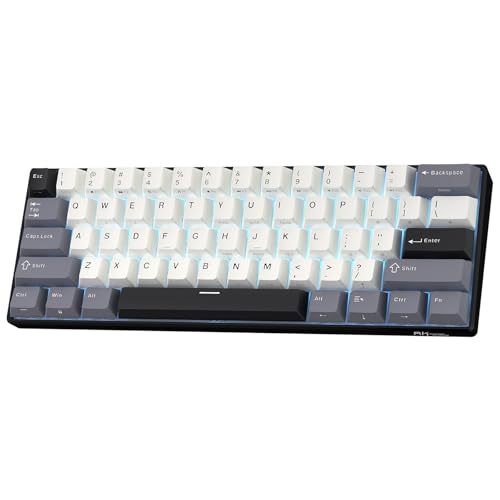 | RK Royal Kludge RK61 | Best fit: Portable tri-mode 60% board Layout: 61 keys, 60% Connection: Bluetooth, 2.4GHz or USB-C Controls: Hot-swap PCB and software Listing limit: No dedicated arrow keys | Check Price on Amazon |
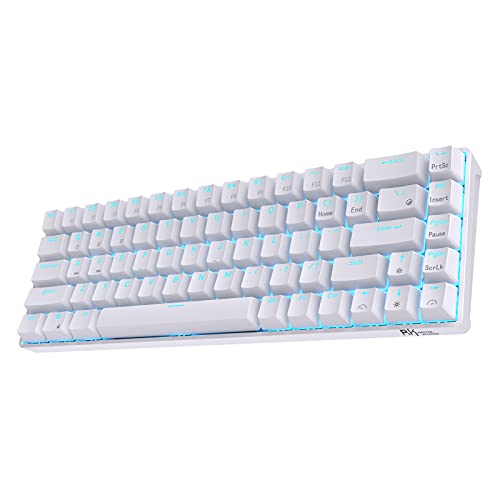 | RK Royal Kludge RK68 | Best fit: 65% board with arrow keys Layout: 68 keys, 65% Connection: Bluetooth or wired Controls: Hot-swap PCB and software Listing limit: Single blue backlight | Check Price on Amazon |
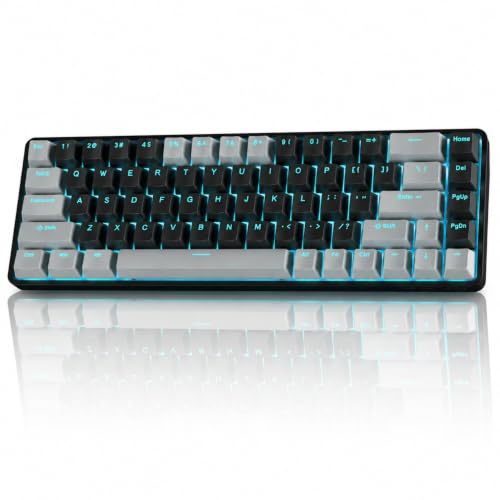 | TMKB T68 | Best fit: 68-key wireless compact layout Layout: 68 keys, listed as 60% Connection: Bluetooth, 2.4GHz or USB-C Controls: Per-key RGB and N-key rollover Listing limit: Listing does not name hot-swap support | Check Price on Amazon |
 | EPOMAKER x AULA F75 MAX | Best fit: 75% board with screen and knob Layout: 80 keys, 75% Connection: Bluetooth, 2.4GHz or USB Controls: TFT screen, knob and hot-swap Listing limit: Larger than the 60% choices | Check Price on Amazon |
1. Logitech G PRO X 60 — Best Wireless 60% for Competitive Play
Logitech’s Amazon listing describes the PRO X 60 as a 60% wireless mechanical gaming keyboard with GX optical switches, offered in tactile or linear versions. Logitech’s own product page also calls it a wireless 60% gaming keyboard with optical switches, KEYCONTROL and LIGHTSYNC RGB, and says the compact design leaves room for mouse movement.
The Amazon listing names LIGHTSPEED wireless through a USB adapter with a 1 ms response rate, Bluetooth, and optional USB connection, plus five KEYCONTROL layers set up in G HUB. It lists a volume roller and media controls, and says the box holds the keyboard, the LIGHTSPEED adapter, a 6 ft USB-A to USB-C cable, a Logitech G keycap, and a carrying case. The listing names no dedicated arrow keys. The Amazon title says the keyboard is for Windows PC, and the listing names no Mac or Linux support, so a buyer on another operating system should ask Logitech about support first.
Logitech’s Amazon listing names LIGHTSPEED, Bluetooth, and a carrying case for this 60% board. Our Take Pick the PRO X 60 for a wireless 60% board that travels between desks and leaves the mouse room to move.- Logitech’s Amazon listing names three ways to connect, LIGHTSPEED wireless, Bluetooth, and optional USB connection.
- Logitech’s Amazon listing offers GX optical switches in tactile or linear versions.
- Logitech’s Amazon listing says the box includes a carrying case and a 6 ft USB-A to USB-C cable.
- Logitech’s Amazon listing names a volume roller and media controls.
- Logitech’s Amazon listing does not name dedicated arrow keys, which the RK68 and TMKB T68 listings do.
- Logitech’s Amazon title says the keyboard is for Windows PC, and the listing names no Mac or Linux support.
2. AULA WIN60 HE — Best Wired Hall-Effect 60% Board
AULA’s WIN60 HE is the one board here built around Hall-effect magnetic switches. Its Amazon listing names adjustable actuation, rapid trigger with a 0.02mm step, and polling up to 8000Hz, and says the board is designed for FPS games such as Valorant and CS2. The figures above are AULA’s Amazon listing statements, not results from this guide.
The Amazon title says Wired and Hot Swappable, and the listing’s bullets name a web-based driver for remapping and macros, PBT keycaps lit from a lower light position, and 16.8 million RGB colors. The listing names no Bluetooth or 2.4GHz mode, so the board connects through a single cable, with no battery to charge and no receiver to carry.
Our Take Choose the WIN60 HE when adjustable actuation and rapid trigger are the reason to buy and a wired connection suits the desk. A buyer who wants Bluetooth or a receiver should look at the RK61, TMKB T68, or F75 MAX instead.
- AULA’s Amazon listing names Hall-effect magnetic switches with adjustable actuation, the design the WIN60 HE is built around.
- AULA’s Amazon listing names a 0.02mm rapid-trigger step and polling up to 8000Hz.
- AULA’s Amazon listing describes a web-based driver for remapping and macros, with no bulky software download.
- AULA’s Amazon title says the board is wired and hot swappable.
- AULA’s Amazon title says Wired, and the listing names no Bluetooth or 2.4GHz mode.
- AULA’s Amazon listing describes a 60% layout and does not name dedicated arrow keys.
- AULA’s Amazon listing states the 8000Hz and 0.02mm figures.
3. RK Royal Kludge RK61 — Best Portable Tri-Mode 60% Board
Royal Kludge’s Amazon listing describes the RK61 as a 61-key 60% board with Bluetooth 5.0, 2.4GHz wireless, and USB-C wired modes, and says it connects up to three devices at once. The listing says the hot-swap PCB takes 3-pin and 5-pin switches and names RK Linear Creamy, Tactile Snowfall, and Linear Silent switch options.
For typing feel, the listing names dual-layer silencing foam, spacebar foam, factory-lubricated stabilizers, and double-shot PBT keycaps in a Cherry profile. It also names RK’s driver for remapping, macro recording, and blue lighting, and gives a 1450mAh battery rated up to 200 hours with the lights off. RK’s page lists 68 keys for the RK68 against 61 for the RK61. RK’s page also says the RK68 keeps separate arrow keys, and the RK61 listing does not name any.
Royal Kludge’s Amazon listing names a 61-key 60% layout with Bluetooth, 2.4GHz, USB-C, hot-swap support, and PBT keycaps.Our Take The RK61 fits a buyer who wants three connection modes in a small board and can work without dedicated arrow keys. Move to the RK68 when cursor keys are part of the daily routine.
- Royal Kludge’s Amazon listing names Bluetooth 5.0, 2.4GHz, and USB-C modes, and says the board connects up to three devices at once.
- Royal Kludge’s Amazon listing says the hot-swap PCB takes 3-pin and 5-pin switches, and names three switch options.
- Royal Kludge names double-shot PBT keycaps in a Cherry profile, along with spacebar foam, in its Amazon listing.
- Royal Kludge’s Amazon listing gives a 1450mAh battery rated up to 200 hours with the lights off.
- Royal Kludge’s Amazon listing describes a 60% layout and does not name dedicated arrow keys.
- The 200-hour figure in Royal Kludge’s Amazon listing applies only with the lights off.
4. RK Royal Kludge RK68 — Best 65% With Dedicated Arrow Keys
Royal Kludge’s Amazon listing calls the RK68 a 65% board with 68 keys and says it keeps stand-alone arrow keys and frequently used control keys. RK’s own product page agrees, describing a 65% layout with individual arrow and control keys and hot-swappable switches.
The Amazon listing says the hot-swap PCB takes 3-pin or 5-pin switches and names a quiet red linear switch in the listed option. It also says three devices switch with FN plus Q, W, or E in wireless mode. The listing gives a 1450mAh battery rated for about 13 hours with the lightest backlight and names single blue backlighting with 20 dynamic modes. RK’s page adds a removable USB-C cable for wired use and lists the board at 309 by 103 mm and 0.60 kg. Neither source names 2.4GHz for the RK68.
Royal Kludge’s Amazon listing and RK’s page both describe the RK68 as a 65% board with separate arrow and control keys.Our Take Choose the RK68 when cursor keys and a small footprint both have to fit. A buyer who wants a 2.4GHz receiver should look at the RK61, TMKB T68, or F75 MAX, since RK’s sources name only Bluetooth and a cable for the RK68.
- Royal Kludge’s Amazon listing and RK’s page both describe a 68-key layout with stand-alone arrow and control keys.
- RK’s page lists hot-swappable switches, and the Amazon listing says the PCB takes 3-pin or 5-pin switches.
- Royal Kludge’s Amazon listing names Bluetooth 5.0 with three-device switching, and RK’s page adds a removable USB-C cable.
- Royal Kludge’s Amazon listing gives a 1450mAh battery rated about 13 hours at the lightest backlight.
- Royal Kludge’s Amazon listing names single blue backlighting rather than per-key RGB.
- Neither Royal Kludge’s Amazon listing nor RK’s page names 2.4GHz wireless for the RK68, so a buyer who wants a receiver should look at another board.
5. TMKB T68 — Best 68-Key Tri-Mode Compact Board
TMKB’s Amazon listing describes the T68 as a 68-key board it calls 60%, with arrow keys kept, red linear switches, per-key RGB, and full N-key rollover. The title names Bluetooth 5.0, 2.4GHz, and USB-C modes.
The listing gives a 3000mAh battery rated up to 12 hours with RGB on and 333 hours without backlight, and says auto-sleep starts after three minutes of inactivity. It names Windows and Mac compatibility and says the board is plug-and-play with no drivers needed. The listing never mentions hot swapping, while the RK61, RK68, and F75 MAX listings all name it.
Our Take The T68 suits a buyer who wants a 68-key tri-mode board with a large listed battery and per-key RGB. It is the wrong choice when hot-swappable switches are a requirement.
- TMKB’s Amazon listing names Bluetooth 5.0, 2.4GHz, and USB-C wired modes.
- TMKB’s Amazon listing says the 68-key layout retains arrow keys.
- TMKB’s Amazon listing gives a 3000mAh battery rated up to 12 hours with RGB on and 333 hours without backlight.
- TMKB’s Amazon listing names full N-key rollover and plug-and-play use with Windows and Mac.
- TMKB’s Amazon listing does not name hot-swap support, so a buyer who plans a switch change should confirm it with the seller first.
- TMKB’s Amazon listing calls the board both 60% and 68 keys, while Royal Kludge calls its 68-key RK68 a 65% board.
- TMKB’s Amazon listing says auto-sleep starts after three minutes of inactivity.
6. EPOMAKER x AULA F75 MAX — Best 75% With Screen and Knob
EPOMAKER’s page and the Amazon listing both describe the F75 MAX as a 75% board with 80 keys, a TFT screen, a volume knob, a gasket-mount structure, and a hot-swappable PCB. EPOMAKER’s page says the screen shows time, battery, connection, and status, and that the knob tunes volume, RGB, and backlight.
EPOMAKER’s page lists Bluetooth 5.0, 2.4GHz, and wired modes, with 1000Hz polling on USB and 2.4GHz and 125Hz on Bluetooth. It lists a 4000mAh battery rated for 30.5 hours with the backlight on and 80 hours with it off. The Amazon listing says the PCB takes 3-pin and 5-pin switches and names Android, Windows, Mac, and Linux compatibility. EPOMAKER’s page lists the board at 32.8 by 14.3 cm and 0.96 kg, larger than the 289 by 103 mm and 0.50 kg RK lists for the RK61.
Our Take Pick the F75 MAX when the extra keys, the screen, and the knob are controls you will use. Choose one of the 60% boards when leaving the most room beside the laptop is the goal.
- EPOMAKER’s page and Amazon listing both describe 80 keys, a TFT screen, and a knob in a 75% layout.
- EPOMAKER’s page says the TFT screen shows time, battery, connection, and status.
- EPOMAKER’s page lists Bluetooth 5.0, 2.4GHz, and wired modes, the same three that the RK61 and TMKB T68 name.
- EPOMAKER’s page lists a 4000mAh battery rated for 30.5 hours with the backlight on and 80 hours with it off.
- EPOMAKER’s page lists 125Hz polling on Bluetooth, against 1000Hz on USB and 2.4GHz.
- EPOMAKER’s page lists 32.8 by 14.3 cm and 0.96 kg, larger and heavier than the RK61 and RK68 figures in RK’s page.
Buying Guide: Picking a Compact Mechanical Keyboard
Start with the keys you will miss
A 60% layout is the smallest in this comparison. Amazon’s listings for the Logitech G PRO X 60, AULA WIN60 HE, and RK61 describe 60% boards, and none of the three names dedicated arrow keys. Royal Kludge’s Amazon listing for the RK68 and TMKB’s listing for the T68 both name arrow keys, and RK’s page describes the RK68 as a 65% layout with individual arrow and control keys.
TMKB’s listing calls the 68-key T68 a 60% board, while Royal Kludge calls its 68-key RK68 a 65% board, so compare key counts and named arrow keys rather than the percentage. EPOMAKER’s page lists the F75 MAX as a 75% layout with 80 keys, the largest key count here for a buyer who wants more keys without a full-size board.
Match the connection to the desk routine
The RK61, TMKB T68, and F75 MAX each name Bluetooth 5.0, 2.4GHz, and a USB-C or cable mode in their Amazon listings or, for the F75 MAX, EPOMAKER’s page. Logitech’s Amazon listing names LIGHTSPEED through a USB adapter, Bluetooth, and optional USB. For keyboards larger than these compact layouts, see our best backlit wireless keyboards.
Royal Kludge’s Amazon listing and RK’s page describe the RK68 with Bluetooth and a USB-C cable and name no 2.4GHz mode. Amazon’s title calls the WIN60 HE wired, and its listing names no Bluetooth or 2.4GHz mode.
Read switch language as a product-specific fact
The WIN60 HE magnetic switches have the most specialized listing language here. AULA’s Amazon listing names adjustable actuation, a 0.02mm rapid-trigger step, and polling up to 8000Hz, while Logitech’s Amazon listing names GX optical switches in tactile or linear versions. Readers who want the Hall-effect category rather than a compact-layout comparison can read our magnetic rapid-trigger keyboard guide.
Hot-swap support is named in the Amazon listings for the RK61, RK68, F75 MAX, and WIN60 HE, and the first three add 3-pin and 5-pin switch compatibility. The Logitech and TMKB T68 listings do not name hot swapping, so a buyer who wants to change switches should choose from the boards that do.
Check the controls that stay visible
The F75 MAX screen and volume knob are named in both EPOMAKER’s page and the Amazon listing. Logitech’s Amazon listing names a volume roller and media controls, and Royal Kludge’s listing says the RK68 keeps arrow and frequently used control keys.
Software differs too. Royal Kludge’s Amazon listing names RK’s driver for remapping and macro recording on the RK61. AULA’s Amazon listing names a web-based driver for the WIN60 HE, Logitech’s names KEYCONTROL through G HUB, and TMKB’s says no drivers are needed. Decide first whether you want a hardware knob, arrow keys, or software remapping.
Keep claimed battery figures in context
Royal Kludge’s Amazon listing gives the RK61 a 1450mAh battery rated up to 200 hours with the lights off and the RK68 a 1450mAh battery rated about 13 hours at the lightest backlight. TMKB’s listing gives the T68 a 3000mAh battery rated up to 12 hours with RGB on or 333 hours without backlight. EPOMAKER’s page gives the F75 MAX 4000mAh, rated 30.5 hours with the backlight on and 80 hours with it off.
Each figure applies only under the lighting condition its seller states, so compare RGB-on figures with RGB-on figures. The Amazon title calls the WIN60 HE wired, and Logitech’s Amazon listing names no battery figure, so neither gives a runtime to compare.
FAQ
Is a 60% keyboard good for a laptop desk?
It can be when you want room for a mouse beside the laptop. Logitech’s Amazon listing says the PRO X 60 leaves more room for mouse movement, and Royal Kludge’s listing says the same of the 61-key RK61.
The trade is key count. The Amazon listings for the PRO X 60, WIN60 HE, and RK61 name no dedicated arrow keys, while the RK68 and T68 listings do, so those two suit work that leans on cursor keys.
What is the practical difference between 60%, 65%, and 75%?
RK’s page describes the 65% RK68 as 68 keys with individual arrow and control keys, and calls that layout an optimization of the 60% and 70% layouts. EPOMAKER’s page lists the 75% F75 MAX at 80 keys with a screen and a knob. TMKB’s Amazon listing calls a 68-key board 60%, so the percentage alone does not sort the boards.
RK’s page lists the RK68 at 309 by 103 mm and 0.60 kg, and EPOMAKER’s page lists the F75 MAX at 328 by 143 mm and 0.96 kg. The F75 MAX, with more keys, is the larger and heavier of the two. Pick the size whose keys match your daily work.
Do all of these keyboards work wirelessly?
No. Amazon’s title calls the WIN60 HE wired and its listing names no Bluetooth or 2.4GHz mode. The Logitech, RK61, RK68, TMKB T68, and F75 MAX sources each name at least one wireless connection method.
The RK61, T68, and F75 MAX name Bluetooth, 2.4GHz, and a cable mode. Royal Kludge’s Amazon listing and RK’s page describe the RK68 with Bluetooth and a USB-C cable only.
Which models let me change switches?
Royal Kludge’s Amazon listings for the RK61 and RK68 and the F75 MAX listing name hot-swap PCBs for 3-pin and 5-pin switches, and EPOMAKER’s page confirms the F75 MAX PCB is hot swappable. The RK61, RK68, and F75 MAX are the explicit switch-changing choices among the mechanical boards here.
AULA’s Amazon title calls the WIN60 HE hot swappable, but its Hall-effect magnetic switches are a different switch type, so the buying decision differs. The Logitech and TMKB T68 listings do not name hot swapping, so a buyer who needs it should not assume it.
Does a higher polling figure decide which keyboard to buy?
No single number settles layout, connection, or switch preference. AULA’s Amazon listing names polling up to 8000Hz for the WIN60 HE, and EPOMAKER’s page lists 1000Hz for the F75 MAX on USB and 2.4GHz and 125Hz on Bluetooth.
Fit the keys and connection mode to the desk first, then read polling as one more figure the seller states.
Bottom Line
The Logitech G PRO X 60 is the wireless 60% pick for a buyer whose plan fits what Logitech’s Amazon listing names: LIGHTSPEED, Bluetooth, optical switches, and a carrying case. Choose the RK68 for the arrow and control keys Royal Kludge and RK describe, or the F75 MAX for EPOMAKER’s 75% layout with a screen and knob. The WIN60 HE suits wired Hall-effect use. The RK61 suits 61-key tri-mode use. The T68 suits tri-mode use with a 3000mAh listed battery, though its listing names no hot-swap support.