A gaming mouse for a laptop can be a six-button wired model or a wireless MMO mouse with a dozen thumb buttons. The six Corsair and SteelSeries models here differ in button layout, connection, weight and the grip styles their makers name.
Choose the button layout and connection first, then check weight, software and how the mouse fits your hand.| Image | Product | Best fit | Connection | Buttons | Sensor maximum | Limit or detail | Check Price |
|---|---|---|---|---|---|---|---|
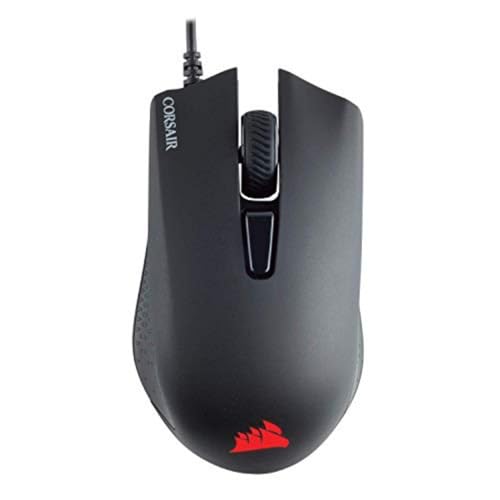 | Corsair Harpoon RGB Pro | Simple wired gaming | USB wired | 6 | 12,000 DPI | 85g | Check Price on Amazon |
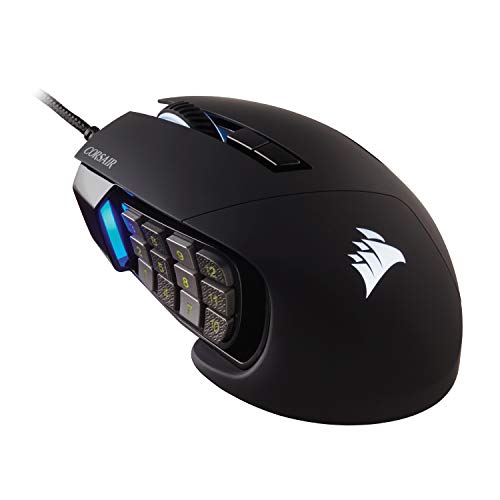 | Corsair Scimitar RGB Elite | Wired MMO commands | USB wired | 17; 12 on Key Slider | 18,000 DPI | Adjustable side panel | Check Price on Amazon |
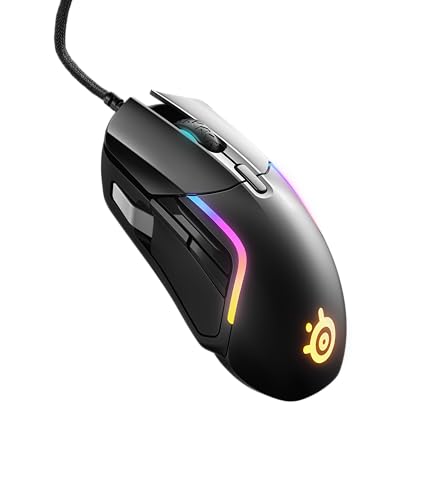 | SteelSeries Rival 5 | Multi-genre side buttons | USB wired | 9; 5 side | 18,000 CPI | 85g; IP54 switches | Check Price on Amazon |
 | SteelSeries Rival 3 Wireless | Dual-wireless travel | 2.4GHz, Bluetooth 5.0 | 6 | 18,000 CPI | 106g with two AAA batteries | Check Price on Amazon |
 | SteelSeries Aerox 9 Wireless | Light wireless MMO | 2.4GHz, Bluetooth 5.0 | 18; 12 side | 18,000 CPI | Up to 80h in default 2.4GHz | Check Price on Amazon |
 | SteelSeries Aerox 5 | Light wired gaming | USB wired | 9; side flick switch | 18,000 CPI | USB-A port required | Check Price on Amazon |
1. Corsair Harpoon RGB Pro — Best Simple Wired Mouse
Corsair gives the Harpoon RGB Pro six programmable buttons, a 12,000 DPI optical sensor and an 85g weight, and the Amazon listing states the same figures. Corsair describes it as ready to use once you plug it into a USB port.
Corsair’s specification table names claw grip and small hands for the contoured body, which has rubber side grips. Corsair rates the Omron switches for more than 20 million clicks and lists two-zone RGB lighting. You remap buttons and set macros in Corsair’s iCUE software. The Amazon title names PC, Mac, PlayStation and Xbox compatibility.
Fit: Corsair names claw grip and small hands for the Harpoon RGB Pro.Our Take Choose the Harpoon for a small-hand, claw-grip mouse when a cable and six buttons cover your games.
- Corsair gives you six programmable buttons on the Harpoon, with remaps and custom macros handled in its iCUE software.
- Corsair states an 85g weight, a 12,000 DPI optical sensor and rubber side grips, and names claw grip and small hands for the body.
- Corsair describes the Harpoon RGB Pro as ready to use once you plug it into a USB port.
- Corsair’s wired Harpoon RGB Pro takes up one of the USB ports on your laptop.
- Corsair gives the Harpoon six buttons, without the 12-button side panel of its Scimitar. Check that six cover your games.
2. Corsair Scimitar RGB Elite — Best Wired MMO Controls
Corsair’s Scimitar RGB Elite has 17 programmable buttons, 12 of them on a side panel that you move with the Key Slider to suit your thumb. Corsair names palm grip and medium hands in its specification table, and the shape adds a right-side finger rest.
A custom PixArt PMW3391 sensor reaches 18,000 DPI in 1 DPI steps, according to Corsair and the Amazon listing. The mouse connects over a braided cable that Corsair gives as 1.8m and the listing as 6 ft. Corsair rates the Omron switches for 50 million clicks, and the mouse stores three onboard profiles. You set macros, remaps and four-zone RGB lighting in Corsair’s iCUE software.
Check the model code when you order. The Amazon listing gives CH-9304211-AS, while Corsair’s US product page is for CH-9304211-NA. Corsair’s spec table shows a weight of 0.14833 without a unit, and the Amazon listing gives 0.27 pounds.
Thumb reach: Corsair’s Key Slider lets you reposition the 12-button side panel.Our Take Pick the wired Scimitar for many mapped abilities and a thumb grid you can move to fit a palm grip.
- Corsair provides 17 programmable buttons, with a 12-button side panel that you can reposition to suit your thumb.
- Corsair says the mouse stores three profiles onboard, and its shape adds a right-side finger rest.
- Corsair fits the Scimitar with a braided cable and Omron switches rated for 50 million clicks.
- Corsair’s wired Scimitar RGB Elite keeps a braided cable on your desk.
- Check the code before ordering Corsair’s mouse. The Amazon model code ends in AS, while Corsair’s US page shows the NA code.
3. SteelSeries Rival 5 — Best Wired Multi-Genre Buttons
SteelSeries gives the Rival 5 nine programmable buttons, with a five-button side panel that includes a toggle switch. SteelSeries and the Amazon listing both name FPS, MOBA, MMO and battle royale games, and both give an 85g weight.
The TrueMove Air sensor covers 100 to 18,000 CPI, and SteelSeries lists a 1,000Hz polling rate. SteelSeries also names claw, palm or fingertip grip and lists a 2m Super Mesh cable and 10 zones of RGB lighting.
SteelSeries and the listing give the IP54 rating to the Golden Micro switches, which SteelSeries rates for 80 million clicks. SteelSeries lists Windows, Mac, Xbox and Linux support with a USB port. For software, SteelSeries gives Windows 7 or newer and Mac OSX 10.12 or newer.
Our Take The Rival 5 is a wired choice for mixed games when a five-button side panel is enough.
- For mixed games, SteelSeries provides nine programmable buttons, including a five-button side panel with a toggle.
- SteelSeries states an 85g weight for this mouse and names claw, palm and fingertip grip styles.
- SteelSeries lists a 2m Super Mesh cable for the mouse, along with 10 zones of RGB lighting.
- SteelSeries rates only the switches as IP54 on the Rival 5, not the whole mouse.
- SteelSeries gives the Rival 5 fewer side buttons than the 12 on the Aerox 9. Make sure five are enough for your games.
4. SteelSeries Rival 3 Wireless — Best Dual-Wireless Travel Mouse
SteelSeries powers the Rival 3 Wireless with two included AAA batteries instead of a charging cable. It connects over 2.4GHz or Bluetooth 5.0, and you carry the receiver inside the mouse during travel.
SteelSeries and the Amazon listing claim more than 400 hours of battery life. SteelSeries ties that figure to high efficiency mode, which turns off all lighting and drops the polling rate to 125Hz. You set the mode through SteelSeries Engine while the mouse is in 2.4GHz mode. SteelSeries lists a standard polling rate of 1,000Hz.
SteelSeries gives a weight of 106g with two batteries or 96g with one. The company lists six buttons, a 120.6mm length and claw or fingertip grip. Its TrueMove Air sensor reaches 18,000 CPI. The Amazon listing names Windows 7, macOS 10.13 and iOS 13.7 or later among its system requirements, while SteelSeries gives Mac OSX 10.12 or newer for its software.
Travel: SteelSeries lets you carry the receiver inside the Rival 3 Wireless.Our Take Choose the Rival 3 Wireless for a laptop that travels, if AAA power and receiver storage suit you better than recharging.
- SteelSeries offers both 2.4GHz and Bluetooth 5.0, with receiver storage inside the mouse for travel.
- SteelSeries claims over 400 hours of battery life, a figure it ties to high efficiency mode.
- SteelSeries lets you remove one AAA battery to bring the weight down to 96g.
- SteelSeries turns off lighting and lowers polling to 125Hz for the longest battery life.
- SteelSeries gives this mouse 106g with two batteries, above the 85g it states for the Rival 5.
5. SteelSeries Aerox 9 Wireless — Best Light MMO Wireless Mouse
SteelSeries builds 18 programmable buttons, including a 12-button side panel, into the Aerox 9 Wireless. SteelSeries and the Amazon listing give the mouse, with its perforated shell, an 89g weight. SteelSeries names palm grip, a right-handed shape and a 128.8mm length.
Battery life depends on mode. The Amazon listing gives 180 hours, but SteelSeries says up to 80 hours in default 2.4GHz mode and up to 180 hours over Bluetooth or in low-power 2.4GHz mode. The box includes a USB-C receiver, a USB-C to USB-A cable for charging and data, and an extension adapter.
The AquaBarrier protection is rated IP54, and the listing says it shields the interior from water splashes, dust and dirt. SteelSeries lists a TrueMove Air sensor up to 18,000 CPI and a 1,000Hz polling rate. SteelSeries GG software needs Windows 8.1 or newer, or macOS 10.13 or newer.
Battery: SteelSeries gives up to 80 hours in default 2.4GHz mode.Our Take Consider the Aerox 9 for a wireless MMO layout when palm grip suits you and up to 80 hours at the default settings SteelSeries lists is enough.
- For a wireless MMO layout, SteelSeries provides 18 programmable buttons with a 12-button side panel in an 89g mouse.
- SteelSeries offers 2.4GHz and Bluetooth 5.0 connections, and the box includes a USB-C receiver.
- SteelSeries rates the AquaBarrier protection for the Aerox 9 interior at IP54, and the Amazon listing says it shields against water splashes, dust and dirt.
- SteelSeries gives up to 80 hours in default 2.4GHz mode, well below the 180-hour figure on the Amazon listing.
- SteelSeries names only palm grip for the Aerox 9 Wireless in its specifications. Buy it with a palm hold in mind.
6. SteelSeries Aerox 5 — Best Light Wired Side Controls
The wired Aerox 5 is model 62401, and SteelSeries Japan’s launch announcement gives it a 66g weight against 74g for the Aerox 5 Wireless. The Amazon listing also states 66g. Check that you are ordering the wired model rather than the Wireless.
The listing describes nine programmable buttons, with a side panel and an up/down flick switch, in a perforated shell. SteelSeries Japan names palm or claw grip and lists a TrueMove Air sensor up to 18,000 CPI, 1,000Hz polling and a 128.8mm length.
The listing describes IP54 AquaBarrier protection for the interior and three-zone RGB lighting. SteelSeries Japan includes a USB-C to USB-A mesh cable and says a USB-A port is required. A laptop with only USB-C ports does not have one.
Our Take Choose the Aerox 5 for a light wired mouse with side controls if your laptop has a USB-A port.
- SteelSeries Japan gives the wired Aerox 5 a 66g weight, and the Amazon listing states the same figure.
- The Amazon listing gives this mouse nine programmable buttons, including a side panel and an up/down flick switch.
- The Amazon listing rates the AquaBarrier protection inside the Aerox 5 at IP54.
- SteelSeries Japan says the wired Aerox 5 requires a USB-A port on the computer. Look for one on your laptop before ordering.
- SteelSeries Japan lists the similarly named Aerox 5 Wireless as a separate model with a different weight. Confirm that your order is for the wired model.
Buying Guide
Decide how many buttons you will use
Corsair gives the Harpoon six buttons, and SteelSeries lists six for the Rival 3 Wireless. Count the keyboard actions you want under your fingers before paying for a larger side panel.
You get a 12-button thumb grid on the Scimitar RGB Elite from Corsair and the Aerox 9 Wireless from SteelSeries. Corsair’s Key Slider lets you move the Scimitar grid to suit your grip.
Choose a connection for your laptop
A wired USB mouse needs a free port or an adapter, but no charging. SteelSeries Japan says the Aerox 5 requires USB-A, so check the connectors on your laptop first.
SteelSeries offers 2.4GHz and Bluetooth on both wireless models here. The Rival 3 Wireless runs on AAA batteries, while the Aerox 9 Wireless comes with a USB-C to USB-A charging cable, according to SteelSeries.
Compare shape and weight together
The makers’ gram figures run from 66g to 106g. SteelSeries Japan gives 66g for the Aerox 5, and Corsair gives 85g for the Harpoon. SteelSeries gives 85g for the Rival 5, 89g for the Aerox 9 and 106g for the two-battery Rival 3 Wireless. Corsair’s spec table gives no unit for the Scimitar’s weight figure.
Grip guidance differs too. Corsair names claw grip for the Harpoon and palm grip for the Scimitar, while SteelSeries names claw or fingertip for the Rival 3 Wireless. Use the grip names as a starting point and try a shape locally if you can.
Treat DPI and polling as specifications
Corsair gives the Harpoon a 12,000 DPI maximum, below the 18,000 DPI it gives the Scimitar. A higher ceiling does not by itself improve aim, so choose a setting you can control.
SteelSeries lists 1,000Hz polling for the Rival 5 and Aerox 9 Wireless. On the Rival 3 Wireless, SteelSeries lowers polling to 125Hz in high efficiency mode.
Check software and maintenance
You set up programmable buttons with Corsair iCUE or SteelSeries software. SteelSeries gives Mac OSX 10.12 or newer for the Rival 5 software and macOS 10.13 or newer for the Aerox 9 Wireless.
An IP54 claim concerns dust and splashes, not immersion. SteelSeries applies it to the Rival 5 switches, and the Amazon listings apply it to the interiors of both Aerox models.
Frequently Asked Questions
Is a wireless mouse suitable for laptop gaming?
SteelSeries offers a 2.4GHz receiver and Bluetooth 5.0 on both wireless models here. It describes 2.4GHz as the gaming-grade connection on the Rival 3 Wireless.
Battery upkeep differs. SteelSeries uses AAA cells in the Rival 3 Wireless and a rechargeable battery with a cable for the Aerox 9 Wireless.
Do I need a 12-button side panel?
Not for every game. With a 12-button panel from Corsair or SteelSeries, you get separate thumb keys for MMO abilities and shortcuts, but you have to learn the positions.
The five-button side panel that SteelSeries gives the Rival 5 is a smaller layout for mixed games. Choose the layout that matches the actions you use.
Does a higher DPI guarantee better aim?
No. DPI describes sensor sensitivity, and the largest number does not determine how accurately you can aim. Grip, settings, surface and practice all affect control.
Compare the adjustment range and shape together. Corsair gives its Scimitar 1 DPI steps, while SteelSeries lists 100 CPI increments for the Rival 5.
Is an IP54 mouse waterproof?
No. IP54 describes limited dust and splash protection, and it does not mean a mouse can be submerged or washed under a tap.
Check what the rating covers. SteelSeries rates the switches on the Rival 5, while the Amazon listing for the Aerox 5 describes protection for the interior.
Will mouse profiles work on every computer?
Corsair says the Scimitar stores three onboard profiles. Software and system support differ between models, so check the requirements for your laptop.
For related laptop setups, see our guides to USB-C hubs and USB-C cables.