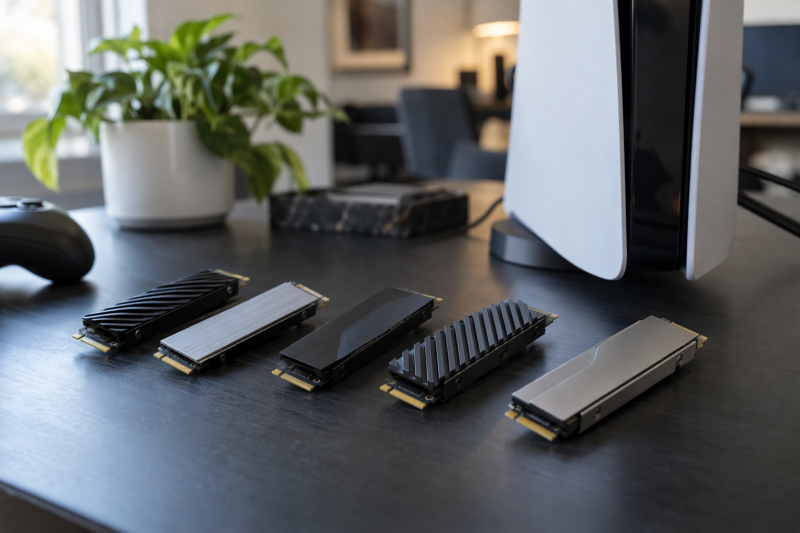
A PS5 expansion SSD has to meet Sony’s interface, cooling and size rules, and the cooling parts count toward the size limit. According to its Amazon listing, each of the five drives below comes with a heatsink or a heatsink kit. Each listing or maker page names PS5. Sony says it cannot guarantee that every drive meeting its specifications will work, so check the complete assembly before installing.
| Image | Product | Best fit | Capacity | Interface | Heatsink | Watch-outs | Check Price |
|---|---|---|---|---|---|---|---|
 | Samsung 990 PRO with Heatsink 1TB | Samsung-listed PS5 heatsink drive | 1TB | PCIe 4.0 x4 NVMe | Included | Confirm fit against Sony's size limits | Check Price on Amazon |
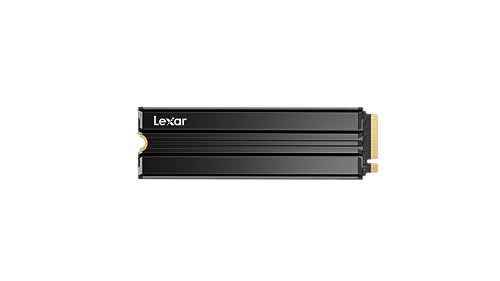 | Lexar NM790 with Heatsink 4TB | More installed storage | 4TB | PCIe 4.0 x4 NVMe | Included | Lists HMB, which Sony says the PS5 does not support | Check Price on Amazon |
 | fanxiang S880ER with Heatsink 2TB | 2TB gaming expansion | 2TB | PCIe 4.0 x4 NVMe | Included | Confirm complete dimensions; no macOS per listing | Check Price on Amazon |
 | MOVE SPEED HB7450 2TB | Separate heatsink kit | 2TB | PCIe 4.0 x4 NVMe | Included, uninstalled | Built-in and separate heatsink; confirm which to use | Check Price on Amazon |
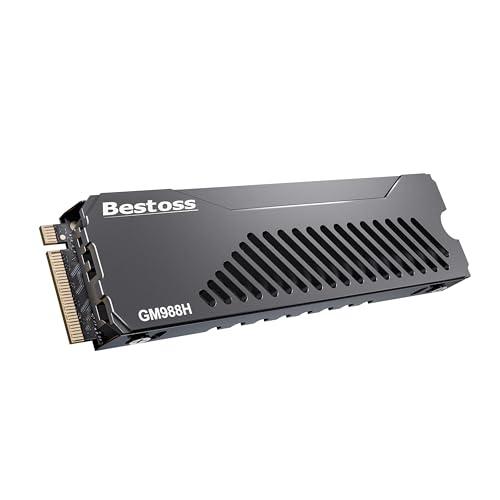 | Bestoss GM988H 2TB | Metal heatsink shell | 2TB | PCIe 4.0 NVMe | Included | Confirm complete dimensions; read claims differ | Check Price on Amazon |
1. Samsung 990 PRO with Heatsink 1TB — Best for a Heatsink Drive Samsung Lists for PS5
The 990 PRO with Heatsink (model MZ-V9P1T0CW) has the smallest capacity of the five at 1TB. Samsung’s US page lists up to 7,450 MB/s read and 6,900 MB/s write and marks it PS5 compatible. Samsung’s datasheet names PlayStation 5 among the drive’s uses. For the 1TB size, the datasheet gives 1GB of LPDDR4 DRAM cache, 600TB of rated writes and a five-year limited warranty. The Amazon listing adds that Samsung’s nickel-coated controller provides thermal control and that the heatsink has RGB lighting.
The heatsink is pre-installed. Samsung’s datasheet gives a maximum size of 80.15 x 25 x 8.88 mm with the heatsink fitted and says removing the heatsink voids the warranty. The 25 mm width is the same as the width limit Sony gives. Sony splits its thickness limit into 8.0 mm above the board and 2.45 mm below it, so ask Samsung how the 8.88 mm height divides before you rely on the fit.
Limit: Samsung’s datasheet gives one overall height of 8.88 mm, while Sony splits its limit above and below the board.Our Take Choose the Samsung when you want a 1TB drive whose maker lists PS5 compatibility and publishes maximum dimensions for the heatsink version.
- If you want the maker’s own word on console support, Samsung’s US page lists the 990 PRO with Heatsink as PS5 compatible.
- Samsung’s datasheet lists 1GB of LPDDR4 DRAM cache for the 1TB drive, along with a five-year limited warranty.
- Maximum dimensions with the heatsink fitted are in Samsung’s datasheet, a starting point for your fit check.
- Buyers after more room have to look past the Samsung, whose 1TB capacity is the smallest of the five Amazon listings.
- Samsung’s datasheet says removing the heatsink voids the warranty. Plan on installing the drive with the heatsink in place.
2. Lexar NM790 with Heatsink 4TB — Best for More Storage
The NM790 with Heatsink (model LNM790X004T-RN9NU) has the largest capacity of the five. Lexar’s product sheet lists up to 7,400 MB/s read and 6,500 MB/s write, along with M.2 2280, PCIe Gen 4×4, an integrated heatsink and PS5 compatibility. The same sheet gives a size of 80 x 24 x 9.7 mm, 3000TBW for the 4TB size and a five-year limited warranty. It also says usable capacity may vary from the label.
Lexar’s sheet lists Host Memory Buffer (HMB) 3.0, a feature that uses DRAM memory on the host device. Sony’s support page says the PS5 does not support HMB and that drives which use it may perform slower than expected. Lexar bases its speed figures on internal testing and says actual performance may vary.
Limit: Sony says the PS5 does not support HMB, which Lexar’s sheet lists for this drive.Our Take Choose the Lexar for 4TB of space, and read Sony’s note on HMB first.
- On Lexar’s sheet, the 4TB size gets both a 3000TBW rating and a five-year limited warranty.
- Before you open the console, check the 80 x 24 x 9.7 mm size that Lexar’s sheet gives for the heatsink model.
- Lexar’s sheet answers two console questions at once, listing PS5 compatibility and an integrated heatsink.
- Lexar’s sheet lists HMB 3.0, but Sony says the PS5 does not support HMB and that drives which use it may perform slower than expected.
- When you plan your space, note that Lexar’s sheet says usable capacity may vary from the 4TB label.
3. fanxiang S880ER with Heatsink 2TB — Best for a 2TB Gaming Upgrade
The S880ER is a 2TB PCIe Gen 4 x4 drive with a heatsink, sold on Amazon by LDCEMS. The Amazon listing gives up to 7,100/5,300 MB/s sequential read/write, NVMe 2.0, 3D NAND, and compatibility with PS5 and DirectStorage. On its own page, fanxiang names the S880ER with Heatsink as compatible with PS5 and offers 500GB, 1TB, 2TB and 4TB sizes. The description text on that page covers the 1TB size at up to 7,000/3,900 MB/s, so the 2TB speeds here come from the Amazon listing.
The listing says the heatsink design can help reduce temperature, and it ends with the note “Not for Mac OS”. The listing’s bullets give no heatsink measurements, so ask LDCEMS for the assembled dimensions. Compare them with Sony’s 25 mm width and 11.25 mm thickness limits before ordering.
Limit: The Amazon listing says “Not for Mac OS” and gives no heatsink measurements.Our Take Consider the S880ER as a 2TB PS5 drive once LDCEMS confirms the assembled dimensions.
- Beyond the Amazon listing, fanxiang’s page names the S880ER with Heatsink as compatible with PS5.
- Shoppers comparing speeds on the 2TB fanxiang have the Amazon listing’s figure of up to 7,100/5,300 MB/s to go on.
- For your interface check on the fanxiang, the Amazon listing states PCIe Gen 4 x4 and NVMe 2.0.
- The Amazon listing’s bullets give no heatsink measurements for the S880ER. Ask LDCEMS for the assembled size before you order.
- If you also want the fanxiang for a Mac, note that the Amazon listing says “Not for Mac OS”.
4. MOVE SPEED HB7450 2TB — Best for a Separate Heatsink Kit
According to the MOVE SPEED listing on Amazon, the HB7450 is a 2TB M.2 2280 drive with PCIe Gen 4 x4 and a Maxio MAP1602 controller. The listing gives up to 7,450/6,500 MB/s sequential read/write and says the drive is compatible with PS5.
The listing describes a built-in 1mm graphene composite heat sink, and the box also holds a separate uninstalled heatsink, screws, a screwdriver and a manual. Sony’s support page recommends against adding another heatsink to a drive that already has a built-in one, so ask MOVE SPEED which of the two to use in the console. The listing’s capacity line reads 1TB/2TB, while its title and box contents say 2TB.
Limit: The listing describes both a built-in heat sink and a separate uninstalled heatsink, and Sony advises against adding a second heatsink.Our Take Choose the HB7450 only if MOVE SPEED confirms which heatsink to use and its assembled dimensions meet Sony’s limits.
- Besides the drive, the MOVE SPEED listing puts a heatsink, screws, a screwdriver and a manual in the box.
- The MOVE SPEED listing names the Maxio MAP1602 controller, a detail for buyers who compare parts.
- Interface and form factor appear on the MOVE SPEED listing as PCIe Gen 4 x4 and M.2 2280.
- The MOVE SPEED listing describes both a built-in heat sink and an uninstalled heatsink, but Sony recommends against adding a second heatsink to a drive with one built in.
- Capacity reads two ways on the MOVE SPEED listing, as 1TB/2TB in its capacity line and 2TB in its title.
5. Bestoss GM988H 2TB — Best for a Metal Heatsink Shell
The GM988H is a 2TB M.2 2280 PCIe 4.0 drive. The seller on Amazon is flashnoble, and the listing gives up to 7,350/6,600 MB/s sequential read/write, HMB with dynamic SLC cache and a metal heat dissipation shell, and says the drive is compatible with PS5. Bestoss’s page says up to 7,300/6,600 MB/s in one passage and gives reads of 6,900 to 7,350 MB/s across capacities in its spec list, so the page and the listing differ on the peak read figure.
Bestoss’s page describes a double-surface heatsink and a bonus graphene copper sticker for tight spaces. The page also names the PlayStation 5 as a compatible console and gives a three-year limited warranty. The only height Bestoss lists there is 2.1 mm, so ask Bestoss or flashnoble for the assembled dimensions. Both the Bestoss listing and Lexar’s sheet list HMB, which Sony says the PS5 does not support.
Limit: Bestoss’s page and the Amazon listing give different peak reads, and the only height Bestoss gives is 2.1 mm.Our Take Consider the GM988H for its metal shell after Bestoss or flashnoble confirms the assembled dimensions.
- Buyers who want metal in the cooling get a metal heat dissipation shell on the Bestoss, as its Amazon listing describes.
- Bestoss’s page covers cooling and warranty, describing a double-surface heatsink and a three-year limited warranty.
- Bestoss’s page names the PlayStation 5 as a compatible console, in line with the PS5 claim on Amazon.
- Don’t treat the peak read speed as settled. Bestoss’s page says up to 7,300 MB/s read, while the Amazon listing says up to 7,350 MB/s.
- HMB counts against the Bestoss on a console. The Amazon listing states the feature, and Sony says the PS5 does not support it.
Buying Guide: Choosing a PS5 SSD with a Heatsink
Check the interface and capacity
Sony specifies a PCIe Gen 4 x4 M.2 NVMe SSD (Key M) for the PS5 expansion slot and says M.2 SATA SSDs are not supported. An M.2 connector alone does not show the right interface, so confirm the listing says NVMe and PCIe 4.0 before ordering.
Sony lists capacities from 250GB to 8TB. The five Amazon listings here cover 1TB (Samsung), 2TB (fanxiang, MOVE SPEED and Bestoss) and 4TB (Lexar). Lexar’s sheet says usable capacity may vary from the label. Sony says the console asks you to format a newly installed drive.
Measure the whole heatsink assembly
Sony limits the complete SSD and cooling structure to 25 mm wide and 11.25 mm thick, split into up to 8.0 mm above the board and 2.45 mm below it. Sony lists supported lengths of 30, 42, 60, 80 and 110 mm and says heatsink sizes vary greatly.
Two makers give overall sizes. Samsung’s datasheet gives a maximum of 80.15 x 25 x 8.88 mm for the 990 PRO with Heatsink, and Lexar’s sheet gives 80 x 24 x 9.7 mm for the NM790 with Heatsink. Neither maker says how its height divides above and below the board. For the fanxiang, MOVE SPEED and Bestoss drives, ask the seller for the assembled dimensions. Sony’s steps for the original PS5 model group say that if the slot cover does not close properly, the cooling structure likely exceeds size requirements.
Understand read-speed claims
Sony recommends 5,500 MB/s or faster sequential read speed. The Amazon listings give maximum reads of 7,100 MB/s for the fanxiang, 7,350 MB/s for the Bestoss, 7,400 MB/s for the Lexar and 7,450 MB/s for the Samsung and the MOVE SPEED. Each is a peak figure, and for Samsung and Lexar it comes from the maker’s own testing. Sony says a drive above 5,500 MB/s is not necessarily going to play every game at the performance of the console’s internal SSD.
Read and write are different measures. The fanxiang listing gives up to 7,100/5,300 MB/s read/write for its 2TB S880ER, and Sony’s 5,500 MB/s recommendation refers to read speed. Compare the same measure across drives.
Host Memory Buffer is the other point to check. Sony’s support page says the PS5 does not support HMB and that drives which use it may perform slower than expected. Lexar’s sheet lists HMB 3.0 for the NM790, and the Bestoss listing lists HMB with dynamic SLC cache. Samsung’s datasheet lists 1GB of LPDDR4 DRAM cache for the 1TB drive. The fanxiang and MOVE SPEED listings do not name HMB.
Decide whether to assemble a heatsink
Sony says an M.2 SSD needs effective heat dissipation, such as a heatsink or heat transfer sheet, and that some SSDs come with one built in. The Samsung, Lexar, fanxiang and Bestoss listings each describe a heatsink as part of the drive. Samsung’s page lists the bare 990 PRO and the 990 PRO w/ Heatsink as separate models, so match the model code MZ-V9P1T0CW.
The MOVE SPEED listing describes a built-in 1mm graphene heat sink plus a separate, uninstalled heatsink, screws and a screwdriver. Sony recommends against adding another heatsink to a drive with a built-in one, so ask MOVE SPEED which to use, follow its instructions, and do not force the console cover.
Plan installation and file management
Sony’s steps for the original PS5 model group say to turn off the console, remove all cables and devices, and wait for it to cool down before removing the cover. Next in the same steps, move the spacer to the groove for the SSD’s size, seat the drive so the cooling structure does not block the screw, then refit the expansion slot cover and console panels.
Sony says the console asks you to format an M.2 SSD the first time you use it, which erases any data on that drive. Sony adds that formatting is not required when moving an SSD between two PS5 consoles. Back up anything on a reused SSD first. For other storage, see our guides to 2230 NVMe SSDs for handheld PCs and microSD cards for handheld gaming PCs. A portable USB drive uses a different type of connection from this internal slot.
Frequently Asked Questions
Does any M.2 SSD work in a PS5?
No. Sony specifies a PCIe Gen 4 x4 M.2 NVMe SSD and says M.2 SATA SSDs are not supported. M.2 is a form factor and does not by itself show the interface.
The complete assembly, drive plus cooling structure, must fit Sony’s 25 mm width and 11.25 mm thickness limits. Sony says it cannot guarantee that every drive meeting its specifications will work with the console.
Is a heatsink necessary?
Sony says the PS5 needs effective heat dissipation and gives a heatsink or heat transfer sheet as examples. Sony also says not to use an M.2 SSD without such a part, and that these parts might come with the drive or need to be bought separately.
The MOVE SPEED listing puts a separate heatsink kit in the box and also describes a built-in graphene heat sink. Compare the assembled measurements with Sony’s limits before using any kit in the expansion bay.
Is 5,500 MB/s a required minimum?
Sony recommends 5,500 MB/s or faster sequential read speed and does not call it a requirement. All five Amazon listings give a maximum read above that figure, from 7,100 MB/s to 7,450 MB/s.
Samsung’s and Lexar’s up-to figures come from their own testing. Lexar’s sheet says its speeds come from internal testing and may vary, and Samsung’s datasheet says performance may vary with firmware and system configuration.
Will a 4TB SSD show exactly 4TB of usable space?
Not necessarily. Lexar’s sheet says actual usable memory capacity may vary and counts 1GB as 1 billion bytes. Samsung’s datasheet says part of the capacity may be used for system file and maintenance use. The console may show less than the labeled size.
Compare how many games you want installed at once with the size options: Samsung at 1TB, Lexar at 4TB, and fanxiang, MOVE SPEED and Bestoss at 2TB. A larger drive provides room, but it does not remove the need to check its interface and cooling.
Can I move an SSD from a PC into a PS5 without erasing it?
Not in general. Sony says you need to format an M.2 SSD the first time you use it with a PS5, and formatting erases the data on it. Sony says formatting is not required when moving a drive between two PS5 consoles.
Back up the files from a PC drive elsewhere first. Sony also says the whole M.2 SSD must be formatted for the console, not part of it. Sony’s installation steps differ by console model group.