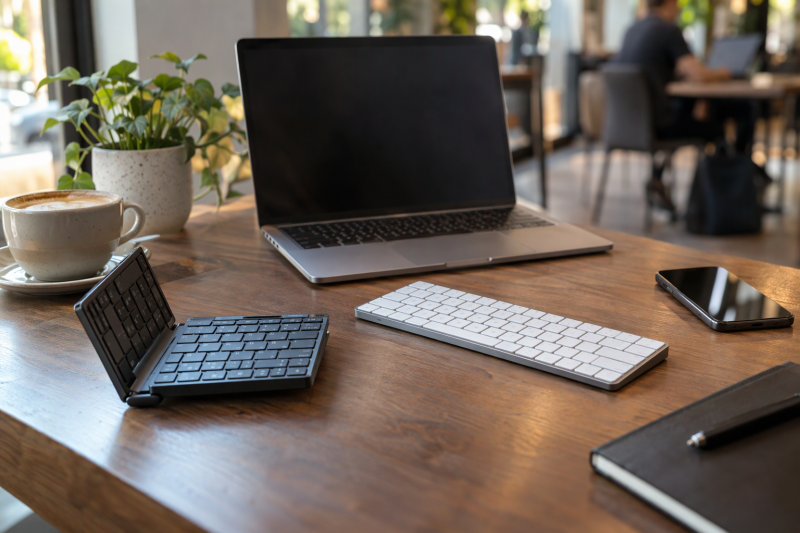
A travel keyboard can fold into a small package or add a touchpad for a tablet. Some designs stay rigid with a thin protective cover. The best shape depends on the space in your bag and on the keys and pointing controls you want when you arrive.
Compare the packed shape, connection and included pointing device before choosing a travel keyboard.| Image | Product | Best fit | Shape and layout | Connection | Power | Limit | Check Price |
|---|---|---|---|---|---|---|---|
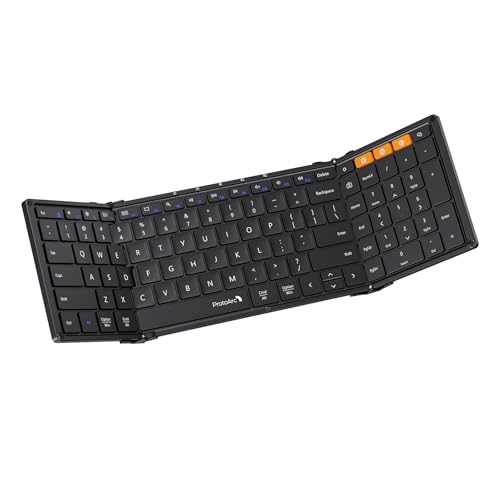 | ProtoArc XK01 | Folding number pad | Tri-fold; 105 keys | Bluetooth 5.1; 3 devices | USB-C; 150 days standby | No touchpad listed | Check Price on Amazon |
 | ProtoArc XK01 TP | Folding built-in pointer | Tri-fold; 88 keys | Bluetooth 5.1; 3 devices | USB-C; 120 days standby | Check gesture support | Check Price on Amazon |
 | iClever BK08 | Pocket folding touchpad | Tri-fold; 65 keys | Bluetooth; 3 devices | USB-C rechargeable | Touchpad not for Samsung DeX | Check Price on Amazon |
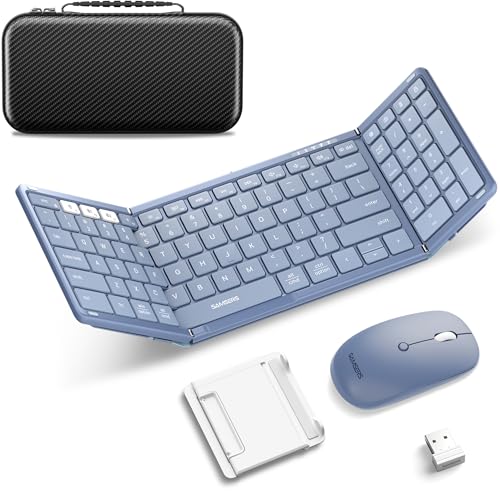 | Samsers KM01 Keyboard and Mouse Combo | Folding keyboard and mouse kit | Full-size folding keyboard | 2 Bluetooth plus 2.4GHz | USB-C rechargeable | Mouse switches separately | Check Price on Amazon |
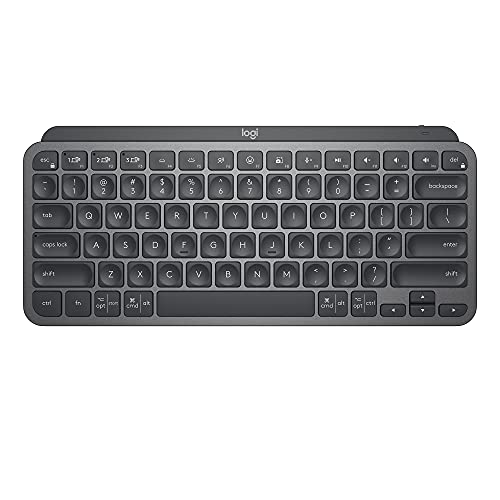 | Logitech MX Keys Mini | Backlit compact board | Rigid compact | Bluetooth; 3 devices | USB-C; up to 5 months lights off | Does not fold | Check Price on Amazon |
 | Logitech Keys-To-Go 2 | Slim board with cover | Rigid compact with cover | Bluetooth; 3 devices | Coin cells; up to 3 years | Does not fold | Check Price on Amazon |
1. ProtoArc XK01 — Best Foldable Number Pad
The ProtoArc XK01 is a 105-key tri-fold Bluetooth keyboard with a number pad, function row and navigation keys, according to its Amazon listing. ProtoArc’s page confirms the 105-key layout with a numeric keypad and 0.65-inch keycaps. The Amazon listing and ProtoArc’s page differ slightly on folded size. The Amazon listing says 8.46 x 4.68 x 0.78 inches, while ProtoArc’s page gives 8.48 x 4.71 x 0.82 inches and a weight of 10.5 ounces. A folding board that keeps a number pad suits frequent number entry on the road.
The Amazon listing and ProtoArc’s page both describe three-device Bluetooth 5.1 switching and USB-C recharging with the included cable. ProtoArc’s highlights and the Amazon listing give up to 150 days of standby. ProtoArc’s specification table separately says up to 6 months on a full charge from a 210 mAh battery. The Amazon listing calls its 150 days auto-sleep standby, and none of these figures states typing hours.
Battery figure: ProtoArc gives 150 days of standby in its highlights and up to 6 months in its specifications, and neither is a typing runtime.Our Take Choose the XK01 when a folding keyboard with a number pad and three Bluetooth channels is more useful than an integrated touchpad.
- The Amazon listing and ProtoArc both give the XK01 a 105-key layout, with a number pad for entering figures away from a desk.
- ProtoArc gives a folded size of 8.48 x 4.71 x 0.82 inches and a weight of 10.5 ounces. Check the size against your bag space.
- ProtoArc and the Amazon listing describe Bluetooth 5.1 switching among three devices, handy when a trip involves more than one screen.
- ProtoArc includes a USB-C cable for recharging the XK01.
- The Amazon listing does not list an integrated touchpad, a gap for anyone who wants a built-in pointer on the XK01.
- ProtoArc’s 150-day and 6-month battery figures differ. Neither states typing hours, leaving working runtime unconfirmed.
2. ProtoArc XK01 TP — Best Folding Keyboard With Touchpad
The XK01 TP combines an 88-key folding layout and an integrated multi-touch trackpad. The Amazon listing describes 0.65-inch keycaps, a full shortcut row, a phone stand and a PU leather carrying pouch. ProtoArc’s launch announcement names the same 88-key layout with a row of multimedia shortcut keys and the trackpad. The announcement also gives a folded size of 8.46 x 4.68 x 0.78 inches.
ProtoArc’s announcement and the Amazon listing both give three Bluetooth 5.1 channels, a 300mAh battery with USB-C charging and up to 120 days of standby. The announcement names Android, Windows, iPad OS, Mac OS and iOS, while the listing’s connection bullet names Windows and Android. The listing also says the keyboard sleeps after 60 minutes of inactivity. Check the host’s pointer and gesture support before relying on the touchpad with a particular device.
Our Take Pick the XK01 TP for a folding keyboard and pointing surface in one package when its 88-key layout fits your work.
- The Amazon listing and ProtoArc both describe an integrated multi-touch trackpad, putting a pointing surface on the XK01 TP itself.
- ProtoArc names an 88-key layout with a row of multimedia shortcut keys for reaching media controls.
- The Amazon listing describes a phone stand and a PU leather carrying pouch with the XK01 TP.
- ProtoArc lists Bluetooth 5.1 connection to up to three devices, giving one keyboard room for more than one host.
- ProtoArc’s 120-day figure is standby time, not typing time. Do not read the figure as a runtime for work.
- The Amazon listing’s connection bullet names only Windows and Android, leaving Apple support for the XK01 TP to ProtoArc’s announcement.
3. iClever BK08 — Best Pocket Folding Touchpad Keyboard
The iClever BK08 is a 65-key folding Bluetooth keyboard with a touchpad, according to its Amazon listing. The listing also describes an aluminum build, three-device switching and USB-C charging. iClever’s product page lists the model as IC-BK08 and calls it a tri-folding keyboard with a touchpad. The page says the keys are only 90% of standard size. It gives product dimensions of 7.6 x 1 x 5.2 inches and a weight of 7 ounces, while the Amazon listing gives 7.05 ounces.
The Amazon listing says the touchpad is not compatible with Samsung DeX mode. According to the same listing, the keyboard supports Bluetooth only, with no USB receiver or wired mode, and the keys are not backlit or spill-proof. The listing names Windows, macOS, iOS, Android and Chrome OS. It gives up to 60 days of use from a 2-hour charge without saying whether that is standby or typing time. The iClever page does not give a battery figure.
Our Take Consider the BK08 for a folding pocket keyboard with a pointer when Bluetooth-only use and smaller keys suit the trip.
- The Amazon listing describes a touchpad in a 65-key folding layout, adding a pointer to the BK08 keyboard.
- The Amazon listing gives Bluetooth switching among three devices. One BK08 then covers several hosts.
- The Amazon listing describes USB-C charging and an aluminum build for the BK08.
- iClever gives the BK08 a weight of 7 ounces and product dimensions of 7.6 x 1 x 5.2 inches.
- If you work in Samsung DeX mode, the Amazon listing says the touchpad is not compatible with it.
- Bluetooth is the only way to connect, as the Amazon listing says the keyboard has no wired mode or USB receiver.
- iClever says its keys are only 90% of standard size, and the Amazon listing says they are not backlit or spill-proof. Weigh those limits against the trip.
4. Samsers KM01 Keyboard and Mouse Combo — Best Folding Kit With Mouse
The Samsers KM01 combines a full-size folding keyboard and a separate wireless mouse. Samsers’ page and the Amazon listing both describe a full-size layout. Samsers gives an open size of 13.5 x 4.5 x 0.35 inches, shorter than the 15.21 inches ProtoArc gives for the expanded XK01. The kit includes a carry case, phone stand and USB-C cable, and the mouse has 800, 1200 and 1600 DPI settings. Samsers gives 21 ounces with the case, while the item weight on the Amazon listing is about 1.9 pounds.
Samsers’ page and the Amazon listing describe three-device connection through a 2.4GHz receiver and two Bluetooth 5.0 channels. Samsers says the receiver is a standard USB-A plug stored in a slot on the back of the mouse. Samsers also says the mouse cannot switch devices together with the keyboard and must be set to the matching channel on its back. Samsers and the Amazon listing both give 90 to 120 days of standby, while the highlights on Samsers’ page say 200 days, so the two figures are different claims.
Switching: Samsers says the mouse must be switched to the matching channel separately from the keyboard.Our Take Choose the KM01 when a folding keyboard, mouse, stand and case are useful together and separate channel switching is acceptable.
- Samsers and the Amazon listing include a folding keyboard, mouse, phone stand and carry case for travelers who want the KM01 pieces together.
- Samsers states a full-size layout with a 13.5-inch open width, shorter than ProtoArc’s figure for the expanded XK01.
- Samsers lists a 2.4GHz receiver plus two Bluetooth 5.0 channels for a three-device setup.
- The Amazon listing gives the mouse three DPI settings for cursor adjustment: 800, 1200 and 1600.
- Changing devices takes a second step. Samsers says the mouse must be switched to the matching channel separately from the keyboard.
- Samsers’ 200-day highlight differs from its 90 to 120 days in the detailed specifications. Plan KM01 charging with both in view.
- Samsers gives 21 ounces with the case, against the 10.5 ounces ProtoArc gives for the XK01 alone. Budget bag weight for the whole kit.
5. Logitech MX Keys Mini — Best Backlit Compact Keyboard
The Logitech MX Keys Mini is a compact non-folding Bluetooth keyboard, according to the Amazon listing and Logitech’s page. Both describe backlit keys that light up as hands approach and adjust to the lighting. Logitech’s page for model 920-010388 gives dimensions of 11.65 inches wide, 5.19 inches tall and 0.83 inches deep and a weight of 17.86 ounces, against the 10.5 ounces ProtoArc gives for the XK01. It pairs with up to three devices over Bluetooth Low Energy.
Logitech lists a 1500 mAh rechargeable battery that charges over USB-C, with up to 10 days per charge or up to 5 months with backlighting off. Logitech also says battery life varies with user and computing conditions. The page lists Windows 10 or 11, macOS 10.15 or later, iOS 14 or later, iPadOS 14 or later, Linux, ChromeOS and Android 8.0 or later. Because the board is rigid, carrying it takes its full 11.65-inch width.
Our Take Pick MX Keys Mini for a compact illuminated keyboard when you prefer a rigid layout to folding hinges.
- For typing in changing light, the Amazon listing and Logitech describe backlit keys that light up as hands approach.
- Logitech lists a 1500 mAh rechargeable battery for the MX Keys Mini that charges over USB-C.
- Logitech and the Amazon listing give pairing with up to three devices for people who type on several machines.
- Logitech lists support for Windows, macOS, iOS, iPadOS, Linux, ChromeOS and Android. Compare your system version with the list on its page.
- Logitech lists 17.86 ounces for the MX Keys Mini, more than the 10.5 ounces ProtoArc lists for the XK01. Count the extra weight in your bag.
- Logitech’s 5-month figure applies only with backlighting off. Typing with lit keys falls outside that figure.
6. Logitech Keys-To-Go 2 — Best Slim Keyboard With Built-In Cover
The Logitech Keys-To-Go 2 is a slim non-folding Bluetooth keyboard with a built-in cover. Logitech’s page for model 920-012867 says the cover keeps the keys protected in a bag and flips over for typing. The page also gives a size of 9.84 x 4.13 inches and a weight of 7.83 ounces. The Amazon listing describes scissor keys, a full row of shortcut keys and pairing with three devices.
Logitech’s page and the Amazon listing both describe pre-installed coin cell batteries that last up to 3 years, and neither describes USB-C charging. Logitech lists Android 12 or later, ChromeOS and Googlebook, Windows 10 or later, iPadOS 17 or later, iOS 17 or later and macOS 14 or later. The Amazon title opens with Windows and Android but also names iPad, iPhone and Mac, and the listing’s bullets name Windows, Android, ChromeOS and Googlebook. The listing puts the Logi Options+ app on Windows, macOS and Googlebook only.
Our Take Consider Keys-To-Go 2 when a very slim covered board and coin cell power fit the trip better than a folding layout.
- Logitech says the built-in cover keeps the keys protected in a bag, then flips over for typing.
- Logitech and the Amazon listing describe pairing with three devices, useful for sharing one keyboard across them.
- You start with power in place, as Logitech lists pre-installed coin cell batteries rated up to 3 years.
- For bag weight, Logitech lists 7.83 ounces for its slim covered keyboard.
- Logitech lists a length of 9.84 inches, longer than 8.48 inches, the largest folded measurement ProtoArc lists for the XK01. Check that your bag has room.
- The Amazon listing does not list USB-C charging for Logitech’s keyboard. Plan around its coin cells.
Buying Guide: Choosing a Travel Keyboard
Compare folded and rigid shapes
ProtoArc gives the ProtoArc XK01 a folded size of 8.48 x 4.71 x 0.82 inches and an expanded length of 15.21 inches. Its 105-key layout keeps a number pad when opened. Measure the available bag space and the surface where the hinged board will be used.
Logitech Keys-To-Go 2 stays non-folding at the 9.84 x 4.13 inches Logitech lists, with a built-in cover. MX Keys Mini is a rigid board that Logitech lists at 11.65 inches wide. A rigid board keeps its full size in the bag.
Decide whether to carry a pointer
The XK01 TP and iClever BK08 include touchpads, according to their Amazon listings and maker pages. The listings describe one device in place of a keyboard plus mouse, but the BK08 listing says its touchpad is not compatible with Samsung DeX mode.
The Samsers KM01 includes a separate wireless mouse with 800, 1200 and 1600 DPI settings instead. Samsers says the mouse must be switched to the matching channel separately from the keyboard.
Check the connection and switching
ProtoArc gives the XK01 and XK01 TP three-device Bluetooth 5.1 switching, and the BK08 Amazon listing gives three-device Bluetooth with no USB receiver or wired mode. Switching can help when a laptop, tablet and phone all need a keyboard during the day.
Samsers adds two Bluetooth 5.0 channels and a 2.4GHz receiver, which its FAQ describes as a standard USB-A plug. Check that plug against the laptop’s ports.
Read the battery condition
ProtoArc gives the XK01 150 days of standby in its highlights and up to 6 months in its specifications, and the XK01 TP 120 days of standby. Samsers gives 90 to 120 days of standby for the KM01. None of these figures states typing hours, so compare them only with other standby claims.
Logitech gives MX Keys Mini up to 10 days per charge or up to 5 months with the backlight off, and says battery life varies with conditions. Keys-To-Go 2 uses coin cell batteries that Logitech rates at up to 3 years, so the choice is between USB-C recharging and coin cells.
Check key size and host support
iClever says the BK08 keys are only 90% of standard size. ProtoArc gives the XK01 0.65-inch keycaps, and Samsers’ page gives the KM01 0.62-inch keys.
The BK08 Amazon listing excludes Samsung DeX touchpad use and says the keys are not spill-proof. Logitech lists macOS 14 or later for Keys-To-Go 2 and macOS 10.15 or later for MX Keys Mini. Check the phone or tablet’s operating system against each maker’s list.
Frequently Asked Questions
Is a folding keyboard always smaller in a bag?
Not always. A folding board shortens its length, but its folded thickness and any included accessories also take space. ProtoArc gives the ProtoArc XK01 a folded size of 8.48 x 4.71 x 0.82 inches, and Samsers gives 21 ounces for the KM01 with its case.
A rigid board such as Keys-To-Go 2 can be thin, and Logitech lists it at 9.84 x 4.13 inches with a built-in cover, but it does not fold. Compare all three dimensions where a maker gives them.
Can a touchpad replace a separate mouse?
A touchpad can provide a pointer on supported devices. ProtoArc and the Amazon listing describe an integrated multi-touch trackpad on the ProtoArc XK01 TP, and the Amazon listing and iClever describe a touchpad on the iClever BK08.
The BK08 listing says its touchpad is not compatible with Samsung DeX mode, so check the intended device before relying on it.
Can these keyboards switch between a laptop and a phone?
Several give multi-device switching over Bluetooth. ProtoArc gives both of its models up to three devices, and the Amazon listings for the BK08 and both Logitech keyboards say the same.
The Samsers combo also offers two Bluetooth channels and a receiver, but Samsers says the mouse must be switched separately. Check the host’s Bluetooth compatibility and pairing instructions.
Is standby time the same as typing time?
No. Standby describes a keyboard waiting asleep, while typing time describes use. The XK01‘s 150 days and the XK01 TP‘s 120 days are standby claims, and the BK08 Amazon listing gives up to 60 days of use without saying which.
Logitech separates the MX Keys Mini‘s up to 10 days per charge from its up to 5 months with backlighting off. Compare the conditions before choosing a keyboard for a long trip.
Does a travel keyboard need a number pad?
No. A number pad helps with repeated numeric entry. ProtoArc gives the XK01 a 105-key layout with a numeric keypad, while the XK01 TP has 88 keys. Samsers’ page mentions numeric input for the KM01 without describing a number pad.
Logitech’s page says the MX Keys Mini is also available in a full-size version with an integrated numpad. Check the key arrangement before replacing a laptop keyboard for work that relies on shortcuts.
How We Compared
For other laptop accessories, see our guides to USB-C hubs and USB-C cables.