StarTech sells docks that reach several monitors in three different ways: a driverless Thunderbolt or USB4 connection, USB-C DisplayPort Alt Mode, and DisplayLink. StarTech lists the Thunderbolt 4 dock as driverless, states driver rules for two of the DisplayLink models, and states none for the other two.
The page compares five StarTech models: one Thunderbolt 4 dock, three DisplayLink docks and one DisplayLink workstation adapter that charges the laptop by pass-through. The right choice depends on the laptop’s port, operating system, driver policy, monitor count, and whether the dock must charge the laptop.
StarTech Docks Compared
| Image | Product | Details | Check Price |
|---|---|---|---|
 | StarTech Thunderbolt 4 Dock | Best fit: Driverless quad-4K Windows dock Displays: Up to four 4K 60Hz on Windows with DP 1.4 and DSC; dual 4K 60Hz on M3, M4 or M5 MacBooks Host and drivers: USB4 or Thunderbolt, driverless Ports and network: 16 ports, 40Gbps Power: 98W laptop charging, adapter included | Check Price on Amazon |
 | StarTech USB-C Quad 4K Dock | Best fit: Four DisplayLink displays Displays: Up to four 4K 60Hz, or dual 5K 60Hz Host and drivers: USB-C; driver needed on Windows and macOS Ports and network: 3 USB-A 5Gbps, USB-C 10Gbps, Gigabit Ethernet, headset jack Power: 100W power delivery | Check Price on Amazon |
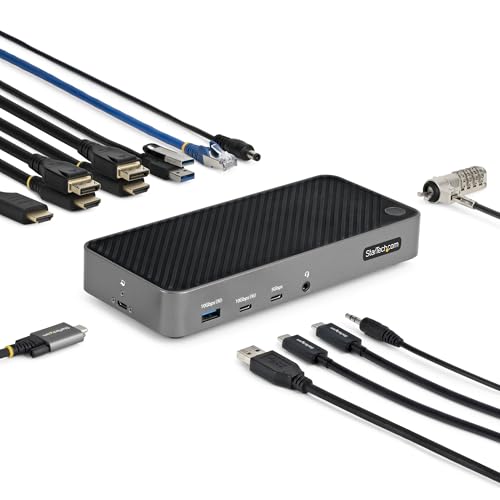 | StarTech Universal USB-C Triple 4K Dock | Best fit: Mixed DisplayLink and native triple display Displays: Two 4K 60Hz through DisplayLink plus one 4K 30Hz through DP Alt Mode Host and drivers: USB-C with DP 1.2 Alt Mode for the third display; driver rule not stated Ports and network: USB and USB-C downstream ports at 7.5W; port count not stated Power: 100W laptop charging, adapter included | Check Price on Amazon |
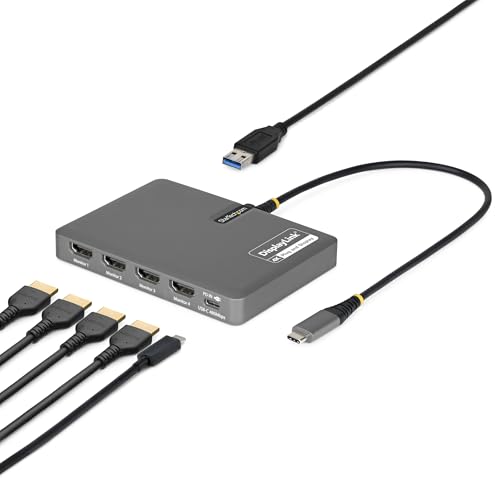 | StarTech USB-C to Quad HDMI Workstation Dock | Best fit: Compact four-HDMI workstation adapter Displays: Four HDMI at up to 4K 60Hz Host and drivers: USB-C; driver automatic on most Windows and ChromeOS, manual on macOS Ports and network: One USB-A 2.0 passthrough; no Ethernet listed Power: 140W passthrough; charger not stated | Check Price on Amazon |
 | StarTech Triple 4K 60Hz USB-C DisplayLink Dock | Best fit: Triple-display dock with 2.5GbE Displays: Three 4K 60Hz from a USB-C host; two from the USB-A adapter Host and drivers: USB-C host; driver rule not stated Ports and network: 2.5GbE, lock slots, surface or VESA mounting Power: Up to 140W over USB-C; adapter not stated | Check Price on Amazon |
1. StarTech Thunderbolt 4 Dock — Best driverless quad-4K Windows dock
StarTech lists this 16-port dock as a driverless USB4 and Thunderbolt dock for Windows and macOS, and says it works with Intel, AMD, Apple silicon and Snapdragon X laptops. For Windows, the listing says it can run up to four 4K 60Hz monitors from a laptop with an Intel 12th Gen CPU or later and DP 1.4 with DSC, and triple or dual displays on older systems without DSC. It includes a power adapter and lists 98W laptop charging, although the listing title says 100W. StarTech also lists 7.5W from a downstream USB 2.0 port for charging small devices.
The Mac claim is smaller. StarTech’s product page for the 132N-TB4USB4DOCK lists dual extended 4K 60Hz displays on MacBook Air and MacBook Pro models with M3, M4 or M5 chips, with clamshell mode required on M3. The Amazon bullet names M3 or M4. For M1 and M2 MacBook Pro, StarTech says dual extended display needs a Pro or Max chip.
StarTech assigns the four-screen claim to Windows with DP 1.4 and DSC. Mac support is a separate dual 4K condition.Our Take Choose it for a Thunderbolt or USB4 Windows laptop with DP 1.4 and DSC that needs one cable to drive up to four monitors. Do not choose it for four monitors on a MacBook.
- StarTech says the driverless dock works with Intel, AMD, Apple silicon and Snapdragon X laptops.
- For a Windows laptop with an Intel 12th Gen CPU or later, DP 1.4 and DSC, StarTech lists up to four 4K 60Hz displays from this dock.
- The listing says the dock includes a power adapter and charges the laptop at 98W.
- Mac buyers get a dual extended 4K 60Hz display claim from StarTech for MacBook Air and MacBook Pro models with M3, M4 or M5 chips.
- StarTech ties four 4K displays to Windows, DP 1.4 and DSC, and lists triple or dual displays on older systems without DSC.
- Mac display support depends on the chip, with clamshell mode required on M3 and a Pro or Max chip needed on M1 and M2 MacBook Pro, according to StarTech.
2. StarTech USB-C Quad 4K Dock — Best for four DisplayLink displays
StarTech lists this DisplayLink Certified dock for up to four 4K 60Hz monitors and for dual 5K 60Hz with two DisplayPort connections per display. The listing describes the outputs as any combination of 4x DisplayPort and 4x HDMI 2.0, and says the dock enables four external displays even on laptops that natively support only one. It lists three USB-A 5Gbps ports and one USB-C port at up to 10Gbps with 15W charging. It also lists Gigabit Ethernet with PXE boot and Wake-on-LAN, a 3.5mm headset jack and 100W power delivery.
For setup, StarTech lists a 1-meter USB-C host cable, a front power button, a K-slot and mounting holes. The listing says Windows and macOS need driver installation, and names Windows, macOS, ChromeOS and Linux as supported systems. StarTech’s product page for the DK31C4DPPD carries the same port list and driver note.
Our Take Pick this dock when you want four external displays more than a driverless video path and the laptop is allowed to run DisplayLink software. Check the company driver policy before making it a shared-office standard.
- For display count, StarTech lists up to four 4K 60Hz monitors and dual 5K 60Hz with two DisplayPort connections per display.
- StarTech lists three USB-A 5Gbps ports and a 10Gbps USB-C port for peripherals, plus Gigabit Ethernet with PXE boot and a headset jack.
- Amazon’s listing says the dock enables four external displays even on laptops that natively support only one.
- StarTech lists 100W power delivery and names Windows, macOS, ChromeOS and Linux as supported systems.
- A Windows or Mac laptop needs DisplayLink driver installation, according to StarTech.
- The listing describes the outputs as 4x DisplayPort and 4x HDMI 2.0 in any combination and gives no exact connector count.
3. StarTech Universal USB-C Triple 4K Dock — Best mixed native and DisplayLink triple-display dock
StarTech splits this dock’s video between two methods. The listing says two 4K 60Hz monitors run through DisplayLink on HDMI 2.0 or DisplayPort 1.2, while a third 4K 30Hz HDMI display uses DP 1.2 Alt Mode. It lists 100W power delivery with an included power adapter, and says the downstream USB and USB-C ports deliver up to 7.5W for mobile devices.
StarTech lists Windows, macOS, ChromeOS and Ubuntu support and calls the dock GPU agnostic across Intel, Apple silicon, AMD and Snapdragon X laptops. The laptop must supply DP 1.2 Alt Mode for the third display. The listing does not state a driver requirement for the two DisplayLink displays. StarTech’s product page for the 116N-USBC-DOCK repeats the display split and the 100W figure.
StarTech lists two screens at 4K 60Hz through DisplayLink. The third is 4K 30Hz through DP Alt Mode.Our Take Choose this dock for three monitors when the laptop has DP 1.2 Alt Mode and you can accept one slower screen. StarTech lists the three displays at different refresh rates, so expect them to differ.
- Three 4K displays run from one USB-C connection to the laptop, according to StarTech.
- Two of the three displays run at 4K 60Hz through DisplayLink, according to StarTech.
- StarTech names Windows, macOS, ChromeOS and Ubuntu as supported systems.
- The listing says the dock includes a power adapter and delivers 100W to the laptop.
- StarTech lists the third display at 4K 30Hz, below the 4K 60Hz of the other two.
- The third display needs the laptop to supply DP 1.2 Alt Mode, according to StarTech, while the other two use DisplayLink.
4. StarTech USB-C to Quad HDMI Workstation Dock — Best compact four-HDMI workstation adapter
StarTech lists this adapter for four 4K 60Hz HDMI monitors from one USB-C host connection, with 140W power delivery passthrough and one USB-A 2.0 passthrough port for a keyboard, mouse or wireless dongle. The Amazon title names the DisplayLink DL7400 chip. The listing names no Ethernet, audio jack or fast USB ports. It is a display adapter rather than a desk dock.
StarTech describes the adapter as compact and travel-ready, and Amazon lists it at 4.7 by 3.4 by 0.6 inches and 0.32 pounds. StarTech says DisplayLink drivers install automatically on most Windows and ChromeOS systems and need manual installation on macOS. The listing does not say a charger is included, so bring one sized for the laptop.
Our Take Pick this adapter for a portable four-HDMI workstation where monitor count is the priority and the DisplayLink driver is acceptable. Choose a larger dock for Ethernet, storage and several high-speed peripherals.
- Four HDMI monitors at 4K 60Hz run from one USB-C connection, according to StarTech.
- StarTech lists 140W power delivery passthrough for charging the laptop through the adapter.
- Amazon lists the adapter at 0.32 pounds, and StarTech describes it as compact and travel-ready.
- On most Windows and ChromeOS systems, StarTech says DisplayLink drivers install automatically.
- A Mac needs manual DisplayLink driver installation, according to StarTech.
- The listing names one USB-A 2.0 passthrough port and no Ethernet or audio connection.
5. StarTech Triple 4K 60Hz USB-C DisplayLink Dock — Best triple-display dock with 2.5GbE
StarTech lists this dock for three 4K 60Hz displays and up to 140W power delivery over USB-C. The network side lists 2.5GbE, jumbo frames, PXE boot and Wake-on-LAN. The listing also names built-in lock slots and surface or VESA mounting, with the mounting accessories sold separately. It does not say whether a power adapter is included.
The listing separates the video paths. Its DisplayLink-based HDMI and DisplayPort outputs work with macOS, Windows and ChromeOS, while the USB-C video output uses the laptop’s GPU. A USB-A adapter gives older hosts dual-display support. The listing does not state a driver requirement. StarTech’s product page for the DK30C2DPEPRN repeats these points.
Our Take Choose this one for a fixed triple-display desk that needs 2.5GbE and up to 140W charging. Use a USB-C host for the three-display plan, and treat the USB-A adapter as the two-display fallback.
- A USB-C host gets three 4K 60Hz displays from this dock, according to StarTech.
- The network side is 2.5GbE with jumbo frames, PXE boot and Wake-on-LAN, according to StarTech’s listing.
- StarTech lists up to 140W power delivery over USB-C.
- StarTech lists built-in lock slots and surface or VESA mounting, and the mounting accessories are sold separately.
- A laptop connected through the USB-A adapter gets dual-display support only, according to StarTech.
- According to StarTech, the USB-C video output uses the laptop’s GPU.
Buying Guide
Choose driverless or DisplayLink on purpose
StarTech lists the Thunderbolt 4 dock as driverless, and the other four models use DisplayLink for some or all video. The USB-C Quad 4K Dock needs drivers on Windows and macOS, according to StarTech. StarTech says DisplayLink drivers for the Quad HDMI Workstation Dock install automatically on most Windows and ChromeOS systems but need manual installation on macOS. The listings for the Universal USB-C Triple 4K Dock and the Triple 4K 60Hz USB-C DisplayLink Dock state no driver rules.
Check the organization’s driver policy and the laptop’s operating system before standardizing on a DisplayLink model. Use the Thunderbolt port guide to identify the physical connection, and see the best Thunderbolt 4 docking stations page for docks from several brands.
Read each multi-monitor claim as a configuration
StarTech’s listing says four 4K 60Hz displays on the Thunderbolt 4 dock need Windows, DP 1.4 and DSC. Its Mac condition is dual extended 4K 60Hz on MacBook Air and MacBook Pro models with M3, M4 or M5 chips, not the same four-display claim.
According to StarTech’s listing, the Universal USB-C Triple 4K Dock splits its three displays into two at 4K 60Hz through DisplayLink and a third at 4K 30Hz through DP Alt Mode. The Triple 4K 60Hz USB-C DisplayLink Dock lists three 4K 60Hz displays from a USB-C host but only two from its USB-A adapter. Write down the monitor count, connector and refresh goal, then pick the dock whose stated condition matches it.
Check the host’s native video path
StarTech’s listing says the Universal USB-C Triple 4K Dock needs DP 1.2 Alt Mode for its third HDMI display. A USB-C port that supplies data and charging but no DisplayPort Alt Mode cannot supply that display.
The Triple 4K 60Hz USB-C DisplayLink Dock says its USB-C video output uses the laptop’s GPU, so the laptop’s own video capability applies to that output. Check the laptop manual for Thunderbolt, USB4 or DisplayPort Alt Mode, and see best USB-C docking stations for cross-brand options.
Distinguish a full dock from a display adapter
The Quad HDMI Workstation Dock lists four HDMI outputs, 140W passthrough and one USB-A 2.0 port. Its listing names no Ethernet, audio jack or fast USB ports.
The USB-C Quad 4K Dock lists three USB-A 5Gbps ports, a 10Gbps USB-C port, Gigabit Ethernet and a headset jack, and the Triple 4K 60Hz dock lists 2.5GbE. A buyer who needs storage, wired networking, headset support or several USB accessories should not choose the compact adapter only because it has four video outputs.
Treat power delivery and pass-through separately
The Thunderbolt 4 dock includes a power adapter and lists 98W laptop charging. The Universal USB-C Triple 4K Dock includes an adapter and lists 100W, and the USB-C Quad 4K Dock lists 100W. The Triple 4K 60Hz USB-C DisplayLink Dock lists up to 140W, and the Quad HDMI adapter lists 140W pass-through.
Match the laptop’s accepted USB-C input, the charger and the cable. A higher figure helps only when the laptop and the whole charging path support that power level.
FAQ
Does every StarTech multi-monitor dock need DisplayLink?
No. StarTech lists the Thunderbolt 4 dock as driverless. Its display limits depend on the host, including DP 1.4 with DSC for four 4K Windows displays.
The USB-C Quad 4K Dock, the Quad HDMI Workstation Dock and the Triple 4K 60Hz dock use DisplayLink for their listed display paths, and the Universal USB-C Triple 4K Dock mixes DisplayLink with native DP Alt Mode. Read each listing, because one dock can mix video methods.
Can the Thunderbolt 4 dock run four 4K monitors on a MacBook?
Not according to StarTech’s listing. It lists dual extended 4K 60Hz on MacBook Air and MacBook Pro models with M3, M4 or M5 chips, with clamshell mode required on M3.
StarTech assigns the four-screen claim to Windows laptops with an Intel 12th Gen CPU or later, DP 1.4 and DSC. Choose by the exact laptop, not by the dock name alone.
Which models list four monitors on HDMI?
Two listings do. The Quad HDMI Workstation Dock lists four HDMI monitors at up to 4K 60Hz, with one USB-A 2.0 pass-through port and 140W power pass-through.
The USB-C Quad 4K Dock lists up to four 4K 60Hz monitors using 4x DisplayPort and 4x HDMI 2.0 in any combination, and adds Ethernet, three USB-A ports and audio. Both use DisplayLink, and both list driver steps for macOS.
Can a USB-A laptop use the Triple 4K 60Hz dock?
It can use the USB-A adapter the listing names, in the reduced configuration that StarTech calls dual-display support. The three 4K 60Hz displays belong to the USB-C host connection.
The USB-A path gives an older laptop a fallback. Plan the monitor count around the connection the laptop actually has.
Do all five models charge a laptop at 140W?
No. The Triple 4K 60Hz dock lists up to 140W over USB-C and the Quad HDMI adapter lists 140W pass-through. The Thunderbolt 4 dock lists 98W, and the other two list 100W.
Check the package contents, the laptop’s input and the cable. Only the Thunderbolt 4 dock and the Universal USB-C Triple 4K Dock are listed with an included power adapter.
Bottom Line
The StarTech Thunderbolt 4 Dock is the driverless desk choice for a Windows laptop with DP 1.4 and DSC. The USB-C Quad 4K Dock and the Triple 4K 60Hz USB-C DisplayLink Dock are DisplayLink docks for higher monitor counts, and the Quad HDMI Workstation Dock is the compact four-screen adapter. The Universal USB-C Triple 4K Dock mixes DisplayLink and native DP Alt Mode. Pick the video method first, then the monitor count and port mix.