A Core i9 or Core Ultra 9 name gives the processor tier, not the rest of the laptop. The five laptops below each list a Core i9 or Core Ultra 9 with Thunderbolt 4 or Thunderbolt 5, and they include a 17-inch gaming laptop with an RTX 4080, a 16-inch touchscreen with integrated graphics and a workstation with RTX 2000 Ada graphics. Four list Thunderbolt 4, and the MSI Vector 16 HX AI lists two Thunderbolt 5 ports.
Choose by the work the laptop has to do. A high-refresh QHD+ screen and a discrete GPU do not replace Ethernet, an SD Express reader, a touchscreen or a Windows edition. Our Thunderbolt laptops list and Thunderbolt 4 docking station guide cover more models and the desk side.
Check the Thunderbolt generation and port count first, then graphics, screen and memory.Core i9 and Core Ultra 9 Laptops Compared
| Image | Product | Details | Check Price |
|---|---|---|---|
 | MSI Vector 17 HX | Best fit: 17-inch Core i9 with RTX 4080 Processor: Core i9-14900HX (listing) Graphics: RTX 4080 (listing) Screen: 17-inch QHD+ 240Hz (listing) Thunderbolt: 1 Thunderbolt 4 (MSI) | Check Price on Amazon |
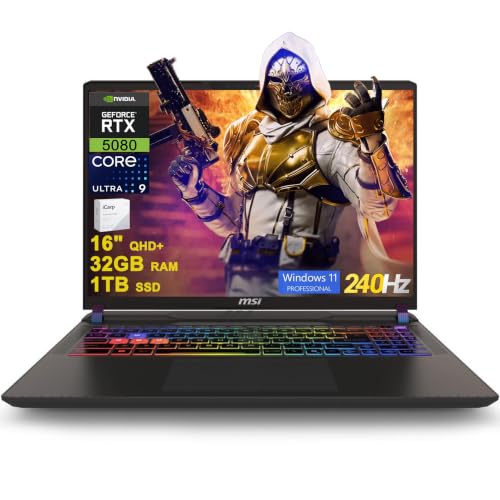 | MSI Vector 16 HX AI | Best fit: Core Ultra 9 with two Thunderbolt 5 ports Processor: Core Ultra 9 275HX (listing) Graphics: RTX 5080 16GB (listing) Screen: 16-inch QHD+ 240Hz (listing) Thunderbolt: 2 Thunderbolt 5 (listing and MSI) | Check Price on Amazon |
 | Dell 16 Plus | Best fit: Core Ultra 9 with a touchscreen Processor: Core Ultra 9 288V (listing) Graphics: Intel Arc 140V (listing) Screen: 16-inch WUXGA touch (listing) Thunderbolt: 1 Thunderbolt 4 (listing) | Check Price on Amazon |
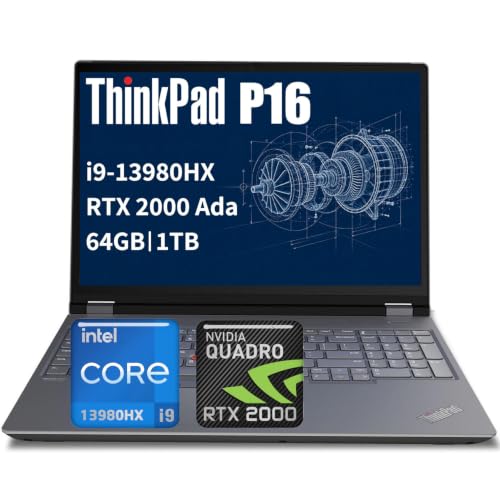 | Lenovo ThinkPad P16 Gen 2 | Best fit: Core i9 workstation with 64GB of memory Processor: Core i9-13980HX (listing) Graphics: RTX 2000 Ada (listing) Screen: 16-inch FHD+ (listing) Thunderbolt: 2 Thunderbolt 4 (listing) | Check Price on Amazon |
 | HP OMEN 16 | Best fit: Core i9 with a QHD 165Hz screen Processor: Core i9-12900H (listing) Graphics: RTX 3060 (listing) Screen: 16.1-inch QHD 165Hz (listing) Thunderbolt: Thunderbolt 4, count not stated (listing) | Check Price on Amazon |
1. MSI Vector 17 HX — Best 17-Inch Core i9 With RTX 4080
The Amazon listing for the MSI Vector 17 HX A14VHG-649US gives a Core i9-14900HX, an RTX 4080, 32GB of DDR5 memory and a 1TB NVMe SSD. It also states a 17-inch QHD+ screen at 240Hz with 100% DCI-P3, Windows 11 Pro and Wi-Fi 7. It is the only laptop here with a 17-inch screen.
The listing names Thunderbolt 4 without a port count. MSI’s A14VHG page lists one Thunderbolt 4 port, two USB-C 3.2 ports, two USB-A ports, HDMI 2.1, an SD Express card reader and RJ45 Ethernet up to 2.5G, and it lists 3 kg with the battery.
Our Take A buyer who wants the largest screen with a Core i9 and an RTX 4080 gets both here, with one Thunderbolt 4 port and 3 kg to carry. Pick it when a single Thunderbolt 4 port is enough for the desk.
- Amazon’s Vector 17 HX listing states a Core i9-14900HX and an RTX 4080 with 32GB of DDR5 memory and a 1TB NVMe SSD, a full configuration to compare against the other four.
- The Vector 17 HX listing states a 17-inch QHD+ screen at 240Hz with 100% DCI-P3, the largest screen of the five for a buyer who wants more display.
- MSI lists RJ45 Ethernet up to 2.5G and an SD Express card reader for the A14VHG, two ports the Dell listing does not name.
- A desk that needs more than one Thunderbolt port has less room on the A14VHG, where MSI lists one Thunderbolt 4 port against two Thunderbolt 5 ports on the Vector 16 HX AI.
- MSI lists the A14VHG at 3 kg with the battery, heavier to carry than the 2.7 kg it lists for the Vector 16 HX AI.
2. MSI Vector 16 HX AI — Best Core Ultra 9 With Two Thunderbolt 5 Ports
The Amazon listing for the MSI Vector 16 HX AI gives a Core Ultra 9 275HX, an RTX 5080 with 16GB of graphics memory, 32GB of DDR5 memory and a 1TB SSD. It states a 16-inch QHD+ (2560×1600) IPS screen at 240Hz, Windows 11 Pro, Wi-Fi 7, a 24-zone RGB keyboard and an FHD IR camera. Its model field gives no MSI model number, so match the RTX 5080 against the A2XWIG on MSI’s page.
Amazon lists two Thunderbolt 5 ports, two USB-A 3.2 ports, HDMI 2.1, RJ45 Ethernet and an SD Express card reader. MSI’s page lists the same ports for the A2XWIG, with Power Delivery 3.1 on both Thunderbolt 5 ports and Ethernet up to 2.5G, and it lists 2.7 kg with the battery. MSI’s port list shows no USB-C port besides the two Thunderbolt 5 ports.
Our Take A buyer who wants Thunderbolt 5 gets two ports here, with an RTX 5080, Ethernet and an SD Express reader. Pick it when you want Thunderbolt 5 ports for a new dock or drive.
- Amazon’s Vector 16 HX AI listing states two Thunderbolt 5 ports along with HDMI 2.1, RJ45 Ethernet and an SD Express card reader, a fit for a buyer with a new dock or drive.
- A buyer who wants a Core Ultra 9 275HX with an RTX 5080 finds both in the Vector 16 HX AI listing, along with 16GB of graphics memory and 32GB of DDR5 memory.
- MSI lists the A2XWIG at 2.7 kg with the battery, lighter to carry than the 3 kg it lists for the Vector 17 HX.
- USB-C devices share the two Thunderbolt 5 ports on the A2XWIG, because MSI’s port list shows no other USB-C port.
- A buyer who wants the most memory gets 32GB on the Vector 16 HX AI listing, half the 64GB on the ThinkPad P16 Gen 2 listing.
3. Dell 16 Plus — Best Core Ultra 9 With a Touchscreen
The Amazon listing for the Dell 16 Plus gives a Core Ultra 9 288V, 32GB of RAM and a 1TB SSD with integrated Intel Arc 140V graphics. Its 16-inch WUXGA (1920×1200) touchscreen is the only touchscreen any of the five listings states. The listing also states Windows 11 Pro, a backlit keyboard, a fingerprint reader, Wi-Fi 7 and an FHD camera.
Amazon lists one Thunderbolt 4 port, one USB-C 3.2 port, one USB-A 3.2 port and one HDMI 2.1 port, and it names no Ethernet port or card reader. The listing’s model field gives no Dell model number, so check the configuration on Dell’s product page before ordering.
Our Take A buyer who wants a touchscreen with a Core Ultra 9 and 32GB of RAM gets them here, with integrated graphics. Pick it when the one listed Thunderbolt 4 port is enough for the desk.
- A buyer shopping for a Core Ultra 9 finds a 288V with 32GB of RAM and a 1TB SSD on Amazon’s listing for the Dell 16 Plus.
- The Dell 16 Plus listing states a 16-inch WUXGA touchscreen, the only touchscreen stated among the five, for a buyer who wants touch input.
- Amazon lists Wi-Fi 7 and Windows 11 Pro for the Dell 16 Plus.
- The Dell 16 Plus listing names one Thunderbolt 4 port, enough for a desk that needs one Thunderbolt connection.
- The Dell 16 Plus listing names integrated Intel Arc 140V graphics and no RTX GPU, where the other four listings name an RTX GPU.
- The Dell 16 Plus listing gives no Dell model number, and a buyer should check the configuration on Dell’s product page before ordering.
4. Lenovo ThinkPad P16 Gen 2 — Best Core i9 Workstation With 64GB of Memory
The Amazon listing for the Lenovo ThinkPad P16 Gen 2 gives a Core i9-13980HX, RTX 2000 Ada graphics, 64GB of DDR5 memory and a 1TB SSD with a 16-inch FHD+ screen and Windows 11 Pro. It also lists a backlit keyboard, a fingerprint reader, an FHD plus IR camera with a privacy shutter and human presence detection, and testing to MIL-STD-810H.
Amazon names two Thunderbolt 4 USB-C ports, one USB-C port with USB PD 3.0, two USB-A 3.2 ports, an SD Express 7.0 card reader, Ethernet, HDMI 2.1 and a headphone and microphone jack. It lists Wi-Fi 6E, Bluetooth 5.3, vPro support, a 94Wh battery and a 170W USB-C adapter.
Amazon lists 64GB of memory, two Thunderbolt 4 ports and an SD Express 7.0 card reader on this workstation.Our Take A buyer who wants workstation graphics and the most memory of the five gets 64GB and an RTX 2000 Ada here, with two Thunderbolt 4 ports and Ethernet. Pick it when memory and ports come before screen resolution.
- A buyer who wants workstation graphics and the most memory finds a Core i9-13980HX, RTX 2000 Ada graphics and 64GB of DDR5 memory in Amazon’s ThinkPad P16 Gen 2 listing.
- A desk with several connections has two Thunderbolt 4 ports, Ethernet, HDMI 2.1 and an SD Express 7.0 card reader to use, all named in the ThinkPad P16 Gen 2 listing.
- The ThinkPad P16 Gen 2 listing states a 94Wh battery and a 170W USB-C adapter, along with testing to MIL-STD-810H.
- A buyer who puts screen resolution first gets less from the ThinkPad P16 Gen 2, whose listing states a 16-inch FHD+ screen, a lower resolution than the QHD+ and QHD screens on the MSI Vector 17 HX, Vector 16 HX AI and HP OMEN 16 listings.
- The ThinkPad P16 Gen 2 listing states Wi-Fi 6E, where the MSI and Dell listings state Wi-Fi 7.
5. HP OMEN 16 — Best Core i9 With a QHD 165Hz Screen
The Amazon listing for the HP OMEN 16 gives a Core i9-12900H with 14 cores, an RTX 3060 with 6GB of graphics memory, 16GB of DDR5 memory and a 1TB SSD. It states a 16.1-inch QHD (2560×1440) IPS anti-glare screen at 165Hz, a four-zone RGB keyboard, Wi-Fi 6, Bluetooth 5.3 and Windows 11 Home.
Amazon states Thunderbolt 4 with USB4 Type-C, which it says can power a device or connect up to two 4K displays, along with HDMI 2.1 and RJ45 Ethernet. The listing gives no Thunderbolt port count, and its model field says only OMEN, so check the configuration on HP’s product page before ordering.
Amazon lists a QHD 165Hz screen, Ethernet and Thunderbolt 4 with USB4 Type-C on a Core i9-12900H.Our Take A buyer who wants a QHD 165Hz screen, Ethernet and a Core i9 with an RTX 3060 gets them here, with 16GB of memory. Pick it when the screen comes before memory.
- A buyer who wants a QHD screen at 165Hz finds a 16.1-inch IPS anti-glare panel in Amazon’s OMEN 16 listing.
- The OMEN 16 listing pairs a Core i9-12900H with an RTX 3060 that has 6GB of graphics memory, along with 16GB of DDR5 memory and a 1TB SSD.
- Amazon states Thunderbolt 4 with USB4 Type-C, HDMI 2.1 and Ethernet for the OMEN 16.
- A buyer who puts memory first gets less from the OMEN 16, whose listing states 16GB of memory against 32GB on the MSI and Dell listings and 64GB on the ThinkPad listing.
- The OMEN 16 listing states Windows 11 Home, where the other four listings state Windows 11 Pro.
Buying Guide
1. Decide between Thunderbolt 4 and Thunderbolt 5
The MSI Vector 16 HX AI is the only laptop here with Thunderbolt 5, and both Amazon and MSI list two ports. The Vector 17 HX, Dell 16 Plus, ThinkPad P16 Gen 2 and OMEN 16 list Thunderbolt 4. A dock or drive that supports Thunderbolt 5 is the reason to choose the Vector 16.
Port counts differ. The ThinkPad lists two Thunderbolt 4 ports, MSI lists one for the Vector 17 HX and Amazon lists one for the Dell, while the OMEN listing gives no count. Count the Thunderbolt ports and the HDMI, Ethernet and USB ports around them before choosing a dock, and see our Thunderbolt 4 docking station guide for the desk side.
2. Choose the graphics separately from the processor
The MSI laptops list an RTX 4080 or an RTX 5080, the ThinkPad lists an RTX 2000 Ada and the OMEN lists an RTX 3060. The Dell lists integrated Intel Arc 140V graphics. A Core i9 or Core Ultra 9 name does not say which of these a laptop has.
Compare the graphics line in each listing and use the processor name only for the processor. The ThinkPad listing describes its RTX 2000 Ada as professional graphics for CAD, engineering and content creation. Our Thunderbolt laptops list has more models to compare.
3. Match the screen to the desk and workload
The Vector 17 HX has the largest screen at 17 inches, the OMEN has 16.1 inches and the other three have 16 inches. The MSI listings state 240Hz QHD+ screens, the OMEN states a 165Hz QHD screen, the Dell states a WUXGA touchscreen and the ThinkPad states FHD+.
The Dell is the only listing that states a touchscreen. Resolution and refresh rate come from each listing, not from the processor name. MSI lists 3 kg with the battery for the Vector 17 HX and 2.7 kg for the Vector 16 HX AI.
4. Compare memory, ports and Windows edition
The ThinkPad lists 64GB of DDR5 memory, the Vector 17 HX, Vector 16 HX AI and Dell list 32GB, and the OMEN lists 16GB. All five listings state a 1TB SSD. Choose the memory before accessories, since a dock does not add laptop memory.
Four of the five name Ethernet. MSI lists it for the Vector 17 HX, and Amazon lists it for the Vector 16 HX AI, ThinkPad and OMEN, while the Dell listing names none. The Vector 17 HX, Vector 16 HX AI and ThinkPad also list SD Express card readers. Amazon lists Windows 11 Pro for four of the five and Windows 11 Home for the OMEN.
FAQ
Which pick has Thunderbolt 5?
The MSI Vector 16 HX AI lists two Thunderbolt 5 ports, on Amazon and on MSI’s page. MSI’s page lists Power Delivery 3.1 on both, along with two USB-A ports, HDMI 2.1, Ethernet and an SD Express card reader.
The other four laptops list Thunderbolt 4, and the OMEN listing does not give a port count.
Which laptop lists the most memory?
The ThinkPad P16 Gen 2 lists 64GB of DDR5 memory. The Vector 17 HX, Vector 16 HX AI and Dell 16 Plus list 32GB each, and the OMEN 16 lists 16GB.
All five list a 1TB SSD. MSI’s pages list up to 96GB for both Vector models, so the 32GB figures come from the Amazon listings.
Which laptop has the largest screen?
The Vector 17 HX has the largest screen, a 17-inch QHD+ panel at 240Hz. The OMEN lists 16.1 inches at QHD and 165Hz, and the Vector 16 HX AI lists 16 inches at QHD+ and 240Hz.
The Dell lists a 16-inch WUXGA touchscreen and the ThinkPad lists a 16-inch FHD+ screen. MSI lists 3 kg with the battery for the Vector 17 HX.
Which laptops list both Ethernet and an SD Express reader?
The Vector 17 HX, Vector 16 HX AI and ThinkPad P16 Gen 2 list both, with the Vector 17 HX’s coming from MSI’s page. The ThinkPad lists SD Express 7.0, and MSI lists SD Express for both Vector models.
The OMEN lists Ethernet and names no card reader, and the Dell listing names neither.
Which laptop lists a touchscreen?
The Dell 16 Plus is the only listing that states one, a 16-inch WUXGA touchscreen. It also lists a Core Ultra 9 288V, 32GB of RAM, a 1TB SSD and Intel Arc 140V graphics.
The other four listings do not state a touchscreen. A touchscreen does not follow from a 16-inch size or a Core Ultra 9 processor.
Bottom Line
Choose the Vector 17 HX for a 17-inch Core i9 with an RTX 4080, the Vector 16 HX AI for two Thunderbolt 5 ports and an RTX 5080, the Dell 16 Plus for a Core Ultra 9 touchscreen, the ThinkPad P16 Gen 2 for 64GB of memory and two Thunderbolt 4 ports, or the OMEN 16 for a QHD 165Hz screen with Thunderbolt 4.
Before you order, check the Thunderbolt port count and the memory on the listing you open, since the Dell listing gives no model number and the OMEN listing gives no Thunderbolt port count.