The Satechi USB4 NVMe SSD Pro Enclosure reviewed here is model ST-EU4NPM, Amazon ASIN B0BYPVNBTQ. It is an empty enclosure, so you supply the SSD. The buying decision therefore starts with the drive you plan to install, not with the largest speed number on the product page.
This exact review has a narrower job than our best USB4 NVMe enclosures guide. The roundup compares a larger field. Here, the question is whether this Satechi enclosure fits your SSD, host port, filesystem, and drive-changing workflow.
Quick verdict
The Satechi ST-EU4NPM is a sensible choice when you already have, or plan to buy, a single-sided M.2 PCIe NVMe drive in 2242, 2260, or 2280 length without a preinstalled heatsink. Its tool-free enclosure design, included thermal pad, included USB-C cable, and USB4 connection make the setup straightforward once those fit checks pass.
Do not buy it for M.2 SATA, a double-sided SSD, or a drive that must keep its own heatsink. A 2230 drive also needs a pause: Satechi’s current product information says 2230, while its exact compatibility article omits 2230 from the supported-length list even though tested-drive examples still include 2230 models. Get written confirmation from Satechi for your exact SSD and the current enclosure revision before ordering.
Satechi states a 40Gbps USB4 link ceiling and up to 3,840MB/s. Neither figure is a speed measured for this review. Your host controller, negotiated connection, SSD, cable, filesystem, workload, and thermal conditions all remain part of the result.

The pre-checkout decision in one table
| Check | Satechi ST-EU4NPM requirement |
Decision |
|---|---|---|
| Drive type | M.2 PCIe NVMe | Skip it for M.2 SATA |
| Drive length | 2242, 2260, or 2280 in current exact support | Ask Satechi in writing before using 2230 |
| Drive sides | Single-sided | Skip it for a double-sided SSD |
| Existing SSD heatsink | None | Do not assume a drive with its own heatsink fits |
| Capacity | Up to 16TB after every other fit check passes | Capacity alone does not prove fit |
| Host path | USB4 or a supported Thunderbolt path for the top link mode | Older USB modes connect at lower stated ceilings |
| Filesystem | Choose for the systems that need to read and write the drive | Format before relying on cross-platform access |
| Drive changes | Eject and disconnect first | Hot swap is not supported |
The table is intentionally strict. A nominal 16TB capacity or a USB-C shaped port cannot override a failed protocol, physical-fit, or host-capability check.
What the Satechi enclosure is, and what it is not
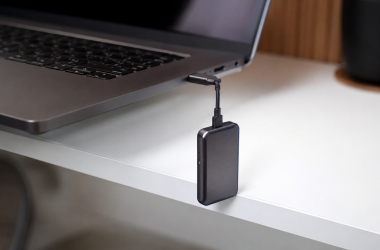
This is an aluminum enclosure for one compatible M.2 PCIe NVMe SSD. The SSD is not included. Satechi identifies the internal interface as M.2 PCIe NVMe Gen 4×4 and the external connection as USB4 with a 40Gbps link ceiling.
It is not a prebuilt portable SSD, a multi-drive storage system, a dock, or a way to turn an M.2 SATA drive into USB4 storage. If you would rather buy a complete drive with its storage already installed, start with Thunderbolt 5 external SSDs or a broader list of portable SSDs instead. You give up the freedom to choose and replace the internal SSD, but you also avoid matching an enclosure to a bare drive.
The distinction from a hard drive is equally important. An NVMe enclosure is suited to a small solid-state module. Buyers building a large archive around other drive types should compare Thunderbolt external hard-drive options before assuming this is the right storage format.
SSD fit comes first
The enclosure can be a good match only after the SSD passes four separate checks: protocol, length, sidedness, and heatsink status.
It must be M.2 PCIe NVMe, not M.2 SATA
M.2 describes a physical module family, not one universal storage protocol. Satechi specifies M.2 PCIe NVMe Gen 4×4 and expressly excludes M.2 SATA. Two drives can look similar while using incompatible electrical interfaces.
Check the drive label, manufacturer page, and exact model number. If the drive is SATA, choose an enclosure designed for that protocol. Our USB-C SATA enclosure guide explains that separate path. Do not use connector shape or an M.2 label alone as proof.
The Gen 4×4 description is the internal interface supported by the enclosure. It does not mean your file transfers will reproduce an SSD’s internal desktop benchmark. The external link and the rest of the system still sit between the drive and your files.
Use the narrow current length list
Satechi’s current exact compatibility article lists 2242, 2260, and 2280. Those four-digit names encode the module’s approximate width and length. A 2280 drive is the common 22mm by 80mm format, while 2242 and 2260 are shorter.
Match the full SSD model to one of those supported lengths before checkout. Do not rely on a photo, a capacity label, or a product family name. Different capacities within one family can sometimes use different component layouts, so exact model verification is the safer approach.
Single-sided means components on one side
Satechi says double-sided SSDs are unsupported. A double-sided module has components on both faces of the board. That can create a physical-clearance problem even when the length is correct.
This is easy to miss when an online SSD listing shows only the label side. Consult the SSD maker’s exact specification or obtain a clear view of both sides. If the SSD is double-sided, choose an enclosure that explicitly documents that layout.
A preinstalled heatsink is another stop
Satechi also excludes drives with preinstalled heatsinks. The enclosure already has its own thermal-pad and aluminum-body arrangement, and an SSD’s factory heatsink changes the required clearance.
Do not plan to remove a factory heatsink merely to force a drive into the enclosure. Some heatsinks are integral to the product, and removal may affect the drive or its warranty. Follow the SSD maker’s instructions or select an enclosure that expressly accommodates your exact drive configuration.
The 16TB ceiling is conditional
Satechi states support for capacities up to 16TB. Read that as a capacity ceiling inside the other compatibility rules, not as permission to install any 16TB M.2 product.
A candidate still needs to be M.2 PCIe NVMe, one of the supported lengths, single-sided, and free of a preinstalled heatsink. If any one of those checks fails, the capacity number does not rescue the match.
The 2230 conflict needs written confirmation
This is the most important ambiguity in the current Satechi record. The product information block includes 2230. The current exact compatibility article lists 2242, 2260, and 2280 instead. That support material also names tested 2230 drive examples, so the conflict cannot be reduced to a clean yes or no from the published pages.
Our recommendation is deliberately conservative:
- Do not treat 2230 as approved for this enclosure based on the product block alone.
- Do not assume every 2230 drive behaves the same.
- Ask Satechi for written confirmation covering your exact SSD model and the current
ST-EU4NPMenclosure revision. - Keep that response with your order record.
- If you cannot get a clear answer, choose an alternative that explicitly documents 2230 support.
This does not prove that a 2230 drive will fail. It means the available first-party instructions do not support a confident checkout recommendation. The ACASIS, StarTech, and ASUS alternatives below all have clearer 2230 statements.
Tool-free installation still requires care
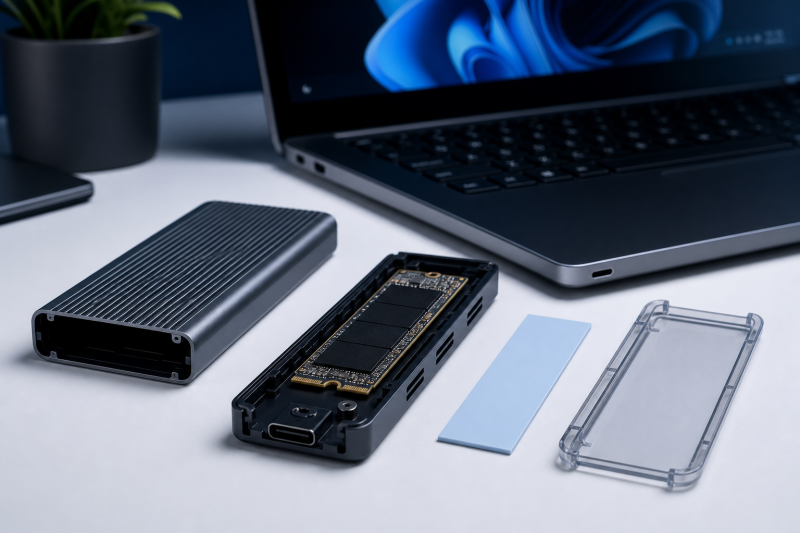
Satechi’s current Quick Start Guide describes a sliding latch, a removable cover, a silicone retaining pin, thermal-pad placement, and a click-to-close sequence. You do not need to treat the enclosure itself like a screw-secured case, but tool-free does not mean careless.
Before installation:
- Confirm the exact SSD protocol, size, sides, and heatsink status.
- Work with the enclosure disconnected.
- Avoid touching the SSD contacts.
- Align the connector before applying pressure.
- Use the retaining pin at the correct length position.
- Apply the included thermal pad as shown in Satechi’s current guide.
- Make sure the cover closes without being forced.
The package includes a USB-C cable, thermal pad, and clear polycarbonate case. Satechi states the enclosure measures 113 x 68 x 22mm and weighs 163g, which helps you plan desk space or a travel kit. Satechi does not publish the cable length, so plan that layout without assuming a particular reach.
Satechi describes the clear case as optional and recommends it for distributing heat during heavy transfers. That is manufacturer guidance about an included part. It is not a temperature measurement and does not establish how the enclosure behaves with every SSD or workload.
Your host determines the connection mode
The USB-C connector is only the visible shape. The port behind it determines which protocol and link mode can be negotiated. If the naming is unfamiliar, our explanation of what USB4 is separates the connector from the data standard.
Satechi lists USB4 and Thunderbolt 3, 4, and 5 host paths. That broad list does not make every USB-C port equivalent, and it does not guarantee identical behavior on every Thunderbolt 3 system. Check the exact computer or motherboard manual for the port’s data capability.
Our USB4 versus Thunderbolt 4 comparison explains why two 40Gbps-labeled ports can still differ in required features. For this enclosure, the practical rule is simple: verify the exact host port, then treat the negotiated mode as the ceiling for that connection.
Older USB fallback works at lower stated ceilings
Satechi’s current support material lists these fallback paths:
- USB 3.2 Gen 2 at 10Gbps;
- USB 3.2 Gen 1, USB 3.1 Gen 1, and USB 3.0 at 5Gbps;
- USB 2.0 at 480Mbps.
Those are link-rate labels, not expected file-copy results. An older mode can be useful for access or migration, but it is not the same buying proposition as a working USB4 path.
Satechi says a USB-C to USB-A adapter can be used and that the adapter is not included. An adapter does not upgrade the USB-A port behind it. If you need a different lead or adapter, consult a current USB-C cable buying guide and verify the data mode, not only charging or connector fit. For a high-speed host path, a Thunderbolt 5 cable guide can help separate certified high-rate cables from look-alike USB-C leads.
The included cable is the safest first choice because Satechi supplies it for the enclosure.
What the speed claims do and do not mean
Satechi states a 40Gbps USB4 link ceiling and up to 3,840MB/s. These figures describe two different layers:
- 40Gbps is the signaling ceiling of the named USB4 link;
- 3,840MB/s is Satechi’s enclosure speed ceiling.
Neither number is an observed result from this review. The public product record does not provide a complete setup for the 3,840MB/s claim. It does not identify every relevant host, SSD, filesystem, workload, file size, cache state, queue depth, software version, cable, ambient condition, or run duration.
The gap between link signaling and file throughput is normal. Protocol overhead and every component in the path shape the result. An SSD that posts a higher result when installed directly in a computer cannot carry that number through an external enclosure unchanged. Satechi’s own support material warns about that distinction.
Use the stated ceilings to identify the product class, not to predict your copy time. Buyers who require a specific sustained result need a trustworthy independent test using a closely matched host, SSD, workload, and thermal duration. That evidence is not part of this review.
The exact controller model is also undisclosed. Satechi calls it a high-performance controller, but that description does not identify a chipset. Do not infer controller-specific firmware, features, or behavior from another enclosure.
Thermal parts are not a thermal test
Satechi’s product material lists an aluminum enclosure, an included thermal pad, and an included clear polycarbonate case. Those are physical facts. They do not establish a temperature, sustained speed, or throttling result.
Install the thermal pad according to the current guide. Satechi says the clear case is optional and recommends it for heat distribution during heavy transfers. Follow that product-specific instruction, while recognizing that SSD power, workload duration, room conditions, airflow, and host behavior can change the outcome.
This review does not label the enclosure cool, hot, quiet, stable, or throttle-free. There is no approved independent measurement for any of those conclusions.
Choose the filesystem before relying on the drive
Installing the SSD is only half of the setup. The computer also needs a filesystem it can read and write.
Satechi’s current guidance assigns the common choices this way:
- exFAT for read and write access on Windows and Mac;
- NTFS for Windows;
- APFS or Mac OS Extended for macOS.
Choose based on the systems that need access, the software they run, and your backup plan. Formatting can erase existing data, so copy anything important elsewhere before changing the filesystem. A compatible filesystem does not prove that the host port negotiated the fastest mode.
Satechi’s product material names several operating-system families, but that is not a promise that every device with one of those systems has a suitable port. Verify the exact computer, port, filesystem, and connection path.
Do not hot swap the SSD
Satechi expressly says the enclosure does not support hot swapping the internal drive. Changing media requires more than closing a file window.
Use this sequence:
- Finish all reads and writes.
- Eject or safely remove the volume in the operating system.
- Disconnect the enclosure from the host.
- Open the enclosure only after it is disconnected.
- Replace the SSD and repeat the fit checks.
- Reconnect, then confirm the expected volume and filesystem.
This restriction is a factor if you want to rotate several bare SSDs throughout the day. In that workflow, repeated disconnecting and reassembly may be less convenient than separate enclosures or complete portable drives.
Warranty and seller checks
Satechi’s current policy states a two-year limited warranty for products purchased through Satechi and authorized sellers. Proof, exclusions, channel, condition, region, and the current claim route still apply.
Before checkout, verify the seller and whether the item is new, used, or otherwise conditioned. Save the proof of purchase. Do not assume that every marketplace seller or condition receives the same handling.
Satechi’s support section does not provide a current exact firmware release or updater for this enclosure. This review therefore makes no firmware-version or firmware-fix promise.
Who should buy the Satechi enclosure
Choose the exact Satechi ST-EU4NPM when all of these statements are true:
- you want an empty enclosure and will supply the SSD;
- the drive is M.2 PCIe NVMe;
- it is single-sided;
- it has no preinstalled heatsink;
- it is 2242, 2260, or 2280;
- any up-to-16TB plan still passes every physical check;
- your host has a verified USB4 or supported Thunderbolt path, or you accept an older USB fallback;
- the intended filesystem fits your systems;
- you are comfortable ejecting and disconnecting before changing the drive;
- you accept manufacturer ceilings without an independent performance result here.
The tool-free layout is useful when the drive already fits those rules. It does not compensate for a wrong SSD or an uncertain host.
Who should skip it
Skip this enclosure if you have M.2 SATA, a double-sided module, or an SSD that must keep its preinstalled heatsink. Pause rather than buy if your drive is 2230 and Satechi has not confirmed the exact combination in writing.
Also skip it if you need several ordinary USB ports, Ethernet, display outputs, audio, or card readers. Those are dock functions, not storage-enclosure functions. Compare USB4 hubs and docks instead of asking one storage device to replace a desktop expansion system.
Buyers who need a published sustained benchmark, measured temperatures, or a reliability record should wait for independent evidence that matches their host and SSD. Buyers who rotate drives constantly should account for the required eject, disconnect, and reassembly procedure.
Three alternatives when a check fails
These are not a second roundup. Each alternative solves a specific reason to reject or pause the Satechi purchase.
ACASIS TBU405 Pro: for 2230 NVMe
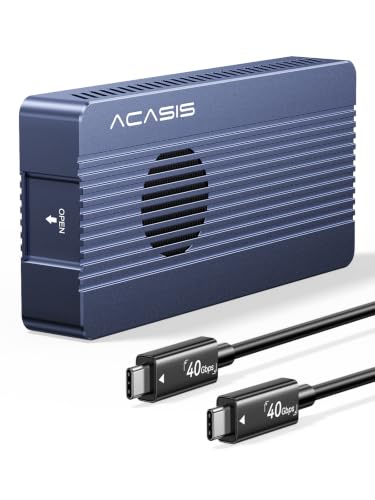
ACASIS lists the TBU405Pro for 2230, 2242, 2260, and 2280 M.2 NVMe SSDs up to 8TB. The TBU405Pro is a documented 2230 alternative when Satechi’s conflicting 2230 guidance does not support a confident checkout recommendation.
The TBU405Pro combines a built-in silent cooling fan with an aluminum-alloy shell and thermal pad. ACASIS lists 40Gbps, a JHL7440 controller, and Thunderbolt 5/4/3 plus USB4 and older USB paths. Confirm the exact SSD and host before ordering.
StarTech: for the most explicit technical record
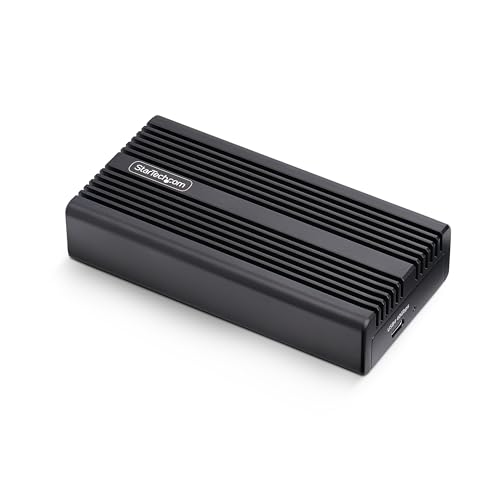
StarTech’s exact 1USB4-NVME-ENCLOSURE datasheet documents 2230, 2242, 2260, and 2280, and excludes M.2 SATA. It also names the ASMedia ASM2464PD controller and documents UASP, TRIM, and 4Kn for this exact StarTech model.
Choose it when explicit controller and storage-feature documentation is more important than Satechi’s latch design. StarTech also documents a fanless aluminum heatsink, preinstalled thermal pad, 0.3m USB4 cable, screwdriver, and a two-year warranty. None of those StarTech-specific controller or storage claims should be assumed for Satechi.
ASUS ProArt PA40SU: for active cooling and two listed lengths
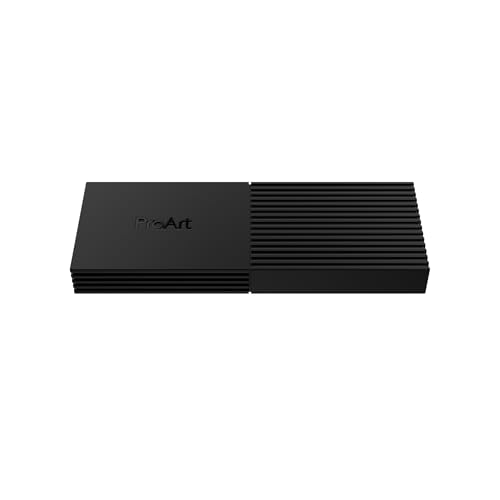
ASUS documents M-key M.2 NVMe drives in 2230 and 2280, up to 4TB. The PA40SU uses a push-to-open tool-free design and a four-level smart fan, making it an alternative for a supported 2230 or a buyer who wants an active-cooling design.
ASUS lists an included USB-C to USB-C cable and a current OS table covering Windows 10, Windows 11, and macOS 14.4 or later. Those statements still need an exact host-port check. This review does not adopt ASUS’s performance, acoustic, or thermal marketing as measured evidence.
Exact checkout checklist
Before ordering, verify every line:
- Product name: Satechi USB4 NVMe SSD Pro Enclosure.
- Satechi model and part:
ST-EU4NPM. - Amazon ASIN:
B0BYPVNBTQ. - Product type: empty enclosure, with SSD purchased separately.
- SSD protocol: M.2 PCIe NVMe, not M.2 SATA.
- SSD length: 2242, 2260, or 2280.
- 2230: written Satechi confirmation for the exact SSD and current enclosure revision, or choose another enclosure.
- SSD sides: single-sided.
- SSD heatsink: no preinstalled heatsink.
- Capacity: up to 16TB only after every other fit check passes.
- Host: exact USB4, Thunderbolt, or accepted older-USB mode verified.
- Cable: included USB-C cable, with no published length assumed.
- Filesystem: chosen for the Windows and Mac access you actually need.
- Drive changes: eject and disconnect before opening the enclosure.
- Warranty: seller, condition, region, proof, and current claim route checked.
If any answer is uncertain, stop before checkout. The risk of buying the wrong enclosure is greater than the convenience of skipping a model-number or physical-fit check.
Frequently asked questions
Does the Satechi USB4 NVMe SSD Pro Enclosure include an SSD?
No. ST-EU4NPM is an empty enclosure. You supply a compatible M.2 PCIe NVMe SSD.
Can I install an M.2 SATA SSD?
No. Satechi specifies M.2 PCIe NVMe Gen 4×4 and expressly excludes M.2 SATA. The shared M.2 shape does not make the protocols interchangeable.
Does a 2230 SSD fit?
Do not rely on a simple yes. Satechi’s product information says 2230, but the current exact compatibility article omits it from the supported-length list while still naming tested 2230 examples. Obtain written confirmation for your exact SSD and current ST-EU4NPM revision, or choose an alternative that clearly documents 2230.
Can I install a double-sided SSD?
No according to Satechi’s current exact compatibility guidance. Choose an enclosure that explicitly documents support for double-sided modules after checking your exact drive.
Can I leave the SSD’s preinstalled heatsink attached?
Satechi says drives with preinstalled heatsinks are unsupported. Do not remove a factory heatsink without following the SSD maker’s guidance. Select a different enclosure if the drive must retain it.
Will I get 3,840MB/s?
That is Satechi’s up-to ceiling, not a result measured for this review. The public product record does not provide a complete test setup, and the host, SSD, cable, filesystem, workload, and thermal conditions all affect results.
Is 40Gbps the same as 5,000MB/s file speed?
No. The 40Gbps label describes link signaling. It does not translate directly into usable file throughput after protocol overhead and system limits.
Can I use it with an ordinary USB-C port?
Only after verifying what that exact port supports. Satechi documents several older USB fallback modes, but a USB-C connector alone does not prove USB4 capability. An optional USB-C to USB-A adapter is not included and cannot upgrade the host port.
Can I swap SSDs while the enclosure remains connected?
No. Satechi says hot swap is unsupported. Eject the volume, disconnect the enclosure, and only then replace the SSD.
Which filesystem should I choose?
Satechi points to exFAT for Windows and Mac read/write, NTFS for Windows, and APFS or Mac OS Extended for macOS. Choose for the systems and software that need the drive, and back up data before formatting.
Final recommendation
Buy the Satechi USB4 NVMe SSD Pro Enclosure only after the SSD itself clears the checkout list. The strongest match is a single-sided 2242, 2260, or 2280 M.2 PCIe NVMe drive without a preinstalled heatsink, paired with a verified USB4 or supported Thunderbolt host path.
The tool-free enclosure and included installation pieces make sense once that match is established. They do not fix a SATA drive, double-sided module, factory heatsink, uncertain 2230 fit, or under-specified host port.
For 2230, obtain written Satechi confirmation or choose an enclosure with an unambiguous current statement. Treat 40Gbps and up to 3,840MB/s as Satechi ceilings, not promised file speed. That cautious reading turns this from a spec-sheet purchase into a defensible checkout decision.
This review does not contain hands-on testing, independent benchmarks, temperature measurements, acoustic readings, or reliability findings. It does not predict the speed of your host and SSD combination.