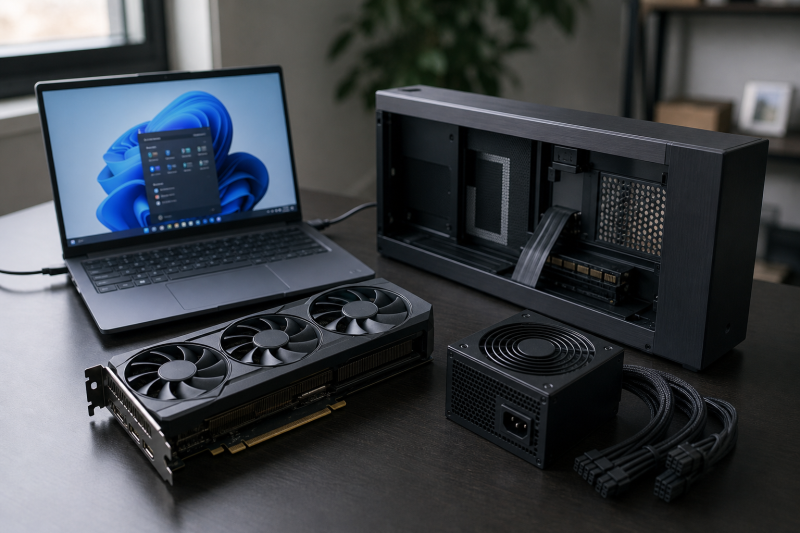
The Razer Core X V2 is a focused external graphics enclosure, not a graphics card, power supply, or docking station. The exact product reviewed here is Razer family model RC21-0227, Amazon model and part RC21-02270200-R3U1, ASIN B0FFQFDZWX. You supply the desktop GPU and a compatible standard ATX power supply.
That distinction decides whether this enclosure makes sense. The Core X V2 can be a clean way to add a replaceable desktop GPU to the right Windows 11 laptop, but only after four checks: the host must support external graphics, the exact card must fit, the PSU must fit and cover Razer’s power rule, and you must be comfortable with no downstream dock ports.
For a broader comparison, see our guide to the best Thunderbolt 5 eGPU enclosures. This review has a narrower job. It helps you decide whether this exact Razer enclosure belongs in your checkout.
Quick verdict
Buy the Razer Core X V2 if you have a Windows 11 computer whose manufacturer explicitly supports external graphics over Thunderbolt 5, Thunderbolt 4, or USB4. Your exact board-partner GPU must fit within the manual’s 360 x 82 x 170 mm maximum, and you must be willing to choose and install a standard ATX PSU no larger than 150 x 160 x 86 mm.
The attraction is control. You choose the GPU and PSU, the enclosure connects them through a PCIe 4.0 x4 path, and Razer states that the host connection can return up to 140W to a compatible laptop. The compromise is equally clear: there is no Ethernet, USB hub, card reader, audio jack, or downstream Thunderbolt port.
Skip it if you use a Mac, if the host maker cannot confirm external graphics support, if your card exceeds the manual fit envelope, or if you want a supplied PSU. Also skip it if you expect the words “80Gbps” to guarantee desktop GPU performance. That number describes a Thunderbolt link ceiling, not measured graphics throughput.

The decision in one table
| Buyer check | Core X V2 answer | What you must verify |
|---|---|---|
| Operating system | Windows 11 is the safe checkout floor | Use the dedicated support page, not the broader storefront wording |
| Host connection | Thunderbolt 5, Thunderbolt 4, or USB4 | The exact host must explicitly support external graphics |
| GPU | Sold separately | Exact card within 360 x 82 x 170 mm, plus bracket, cooler, connector, and cable clearance |
| PSU | Sold separately | Standard ATX, no larger than 150 x 160 x 86 mm |
| PSU capacity | Buyer selected | GPU requirement plus Razer’s additional 230W, with the correct connectors |
| PCIe path | PCIe 4.0 x4 | Do not assume desktop x16 electrical bandwidth |
| Host charging | Up to 140W | The laptop must accept the negotiated input under its actual load |
| Expansion ports | No downstream dock ports | Add a separate dock or choose a port-rich alternative |
| Mac support | No | Choose another platform or graphics strategy |
If the first three checks fail, the enclosure’s other features do not rescue the purchase.
Start with the host, not the graphics card
Razer’s current support material gives Windows 11 as the product requirement. The storefront is broader and mentions Windows 10 RS5 or Windows 11 and later. For a new purchase, use Windows 11 as the checkout floor because it comes from the dedicated current support page and avoids building a costly setup around the looser storefront line.
The port label is only the next step. Razer qualifies Thunderbolt 5, Thunderbolt 4, and USB4 by a more important condition: the exact computer must support external graphics. A USB-C-shaped connector cannot prove that capability. Our Thunderbolt 3, 4, and 5 comparison explains why the generations differ, while the USB4 explainer covers why the logo alone does not describe every optional feature.
USB4 is the path most likely to cause an expensive mistake. Some USB4 hosts expose the PCIe tunneling needed for an eGPU and some do not. Read the laptop maker’s documentation for external graphics, not just for USB4. Our guide to using USB4 with external GPUs gives the protocol background, but the final answer still belongs to the exact host manufacturer.
Razer also recommends current BIOS, firmware, graphics drivers, and other required updates. Treat those as preparation, not as a guarantee. An update cannot add an external-graphics path that the hardware and firmware never supported.
Mac support is a firm stop. Razer says the Core X V2 is not compatible with Mac. Do not buy it on the theory that a Thunderbolt connector will make the operating system and GPU support appear. If you are choosing a computer specifically for this setup, start with our laptops for eGPU use and then confirm the exact configuration with the computer maker.
The manual’s GPU dimensions control
Razer’s current surfaces do not describe GPU fit with one perfectly consistent number. The store markets support for cards up to four slots. The support page contains a 3.5-slot statement, later repeats four-slot language, and gives inner dimensions of 362.7 x 82 x 185.1 mm. The current 26-page manual gives the tightest maximum: 360 x 82 x 170 mm.
Use 360 x 82 x 170 mm as the checkout limit. It is the most conservative current first-party boundary and the one presented as the maximum GPU dimensions in the complete manual. A card that fits a broader support-page dimension but exceeds the manual maximum is not a safe assumption.
Slot labels are helpful for browsing but poor final measurements. Board partners can use thick coolers, unusual shrouds, extended backplates, and recessed or projecting power sockets. Two cards described with the same GPU chip can have different length, height, thickness, bracket geometry, and cable requirements. Our guide to graphics card specifications can help you decode the exact board listing.
Before ordering, compare the card maker’s mechanical drawing against all three manual dimensions:
- Length must be no more than 360 mm.
- The relevant thickness dimension must be no more than 82 mm.
- The remaining height dimension must be no more than 170 mm.
- The bracket and cooler must clear the enclosure and retention hardware.
- The power plug and cable bend must fit after the card is secured.
- The card must appear on Razer’s compatibility list or have an explicit basis for support.
Razer’s list currently names selected GeForce RTX 50 products, the RTX 40, 30, and 20 families, GTX 10, and Radeon RX 9000, 7000, 6000, and 5000 families. That is a chipset or family starting point, not a promise for every card. Razer warns that unlisted GPUs may cause compatibility problems, and a listed family still does not settle board dimensions or power connectors.
The safest practice is to save the exact card model number and its dimensional drawing before you choose the enclosure. “RTX 5080” or “Radeon RX 9070” is not a complete fit identity.
The PSU is part of the product decision
The Core X V2 does not include a power supply. That gives you freedom to match the PSU to the GPU, but it also moves fit, capacity, connector, and cable responsibility to you.
Razer specifies a standard ATX PSU with a maximum size of 150 x 160 x 86 mm. Check the exact chassis dimensions on the PSU maker’s page. “ATX” describes a family of requirements, but high-capacity units can be longer than the enclosure allows.
Capacity follows one Razer rule. Keep at least 230W of headroom available for the Core X V2, on top of whatever the exact graphics card itself draws. Be careful which number you start from. A GPU maker’s recommended whole-system power supply already assumes a full desktop, so it is not a clean figure to add 230W to. Confirm the card’s own power need, and do not let one wattage label stand in for the connector and transient checks below.
Wattage is not the only check. Verify:
- the exact GPU connector type and quantity;
- whether the PSU supplies those connectors without an unsupported cable combination;
- connector seating and the bend room available inside the enclosure;
- the GPU maker’s transient or peak-power guidance;
- the PSU’s physical dimensions;
- the PSU’s 24-pin ATX connection and 8-pin or 4+4-pin EPS connection used by the enclosure;
- the correct regional AC power cord, which follows the PSU you choose.
The manual includes four spare PSU-mount thumbscrews, but the PSU and its region-specific AC lead are not part of the enclosure package. The GPU is also separate. Budget and plan for all three components as one system even though only one appears in the Razer product box.
When installing or replacing the internal parts, follow the manual’s instruction to turn the enclosure off and unplug it first. This review does not make a universal hot-plug claim.
What 80Gbps and PCIe 4.0 x4 actually tell you
Razer markets the Thunderbolt 5 connection at up to 80Gbps. That is a ceiling for the shared Thunderbolt link, not a benchmark for the installed GPU and not an amount you can add to the PCIe label.
Inside the enclosure, Razer specifies PCIe 4.0 x4. A desktop graphics card may use a mechanical connector associated with a full-size slot, but this enclosure does not provide a desktop PCIe x16 electrical path. The practical result depends on the exact host, controller, GPU, workload, driver, display route, and other traffic sharing the link. No frame-rate or compute measurement was collected for this review, so there is no percentage claim to apply to your workload.
If you use an external monitor, the manual shows it connected directly to the installed GPU. That is the clean checkout topology to plan. It does not establish a universal performance result, but it prevents the mistaken idea that the enclosure contains a video output of its own.
The included host cable is a 0.7m Thunderbolt 5 cable. If your desk requires another cable, do not replace it based only on the USB-C connector shape. Compare certified options in our Thunderbolt 5 cable guide, and use the USB-C cable guide to understand why identical connectors can carry very different capabilities.
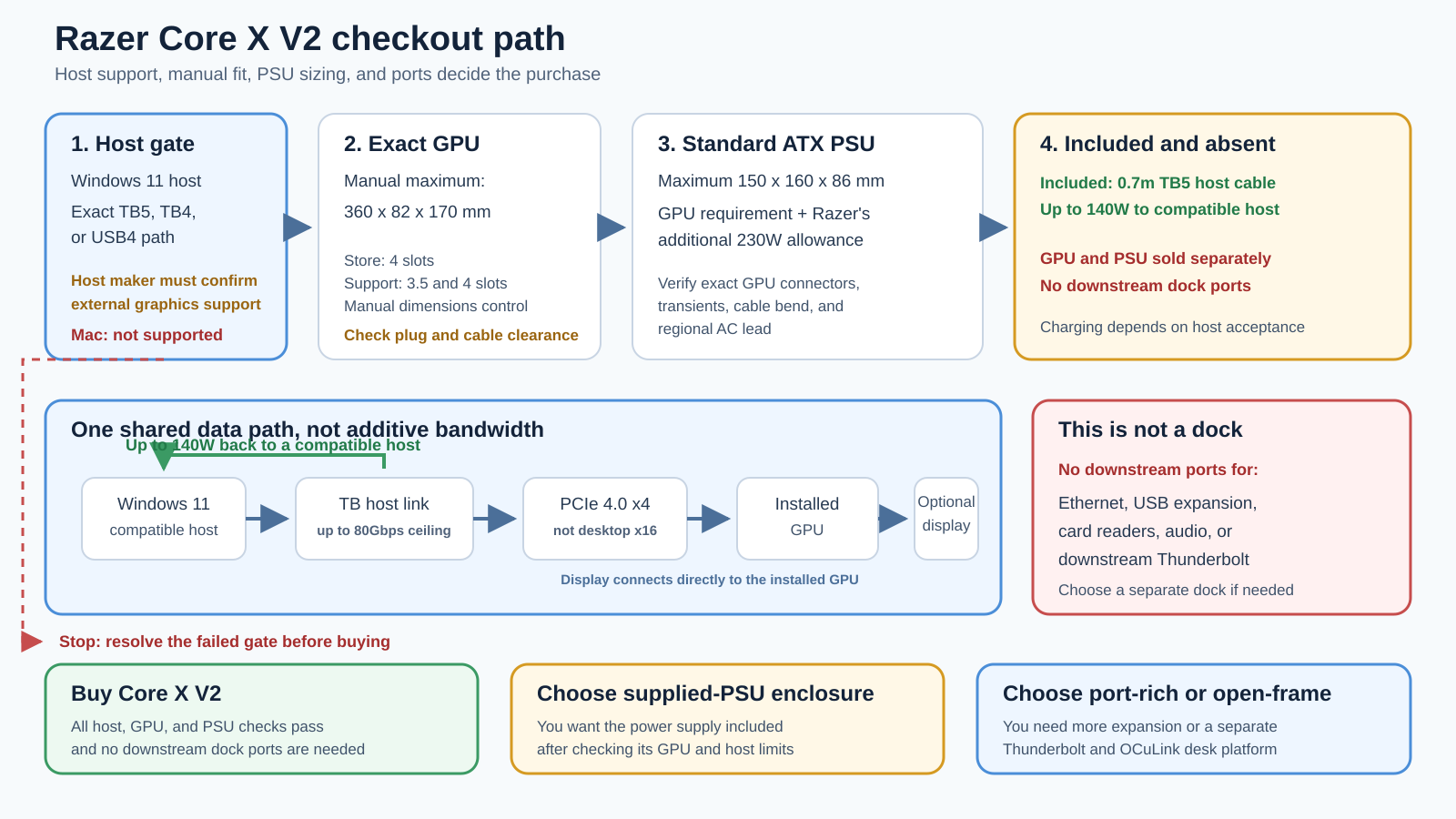
The diagram keeps the topology honest: one shared host link reaches the PCIe 4.0 x4 path, the optional display connects to the installed GPU, and charging returns over the same host connection. None of those arrows creates extra bandwidth.
Up to 140W charging does not replace the host check
Razer states that the host connection supports up to 140W Power Delivery 3.1. That can reduce cable clutter when the laptop accepts the offered power and its workload stays within the negotiated charging behavior.
“Up to” is a ceiling, not a promise. A laptop may accept less than 140W, may require a proprietary charger for full performance, or may draw more under combined CPU and GPU load than the connection replaces. Check the laptop maker’s accepted USB-C or Thunderbolt input and whether it requires its original charger for maximum operation. The enclosure rating alone cannot answer that.
Charging also does not make the Core X V2 a dock. Razer’s support page says there are no connection ports other than the Thunderbolt 5 host port. There is no downstream Thunderbolt branch, ordinary USB-A or USB-C expansion, Ethernet, card reader, or audio interface.
If those functions are central, a separate Thunderbolt 4 docking station or one of the USB4 hubs and docks may be a better foundation. You can also choose an eGPU alternative that includes more expansion, but its host, GPU, PSU, and power limits still apply.
Who should buy the Razer Core X V2
Buy it for a focused, enclosed eGPU path
The strongest buyer is someone who already knows the exact Windows 11 host supports external graphics and wants an enclosed desktop GPU installation without paying for another set of dock ports. The single-purpose layout is an advantage when Ethernet, storage, audio, and peripherals already live elsewhere on the desk.
Buy it when you want to choose the PSU
A supplied PSU is convenient, but it may not match the card, upgrade path, connector preference, or replacement plan you want. Core X V2 lets you select a standard ATX unit, provided it stays within 150 x 160 x 86 mm and satisfies the exact GPU requirement plus Razer’s additional 230W rule.
Buy it when the manual fit is comfortably clear
A card well inside 360 x 82 x 170 mm is a better candidate than one touching every boundary. Leave practical room for the bracket, retention, power plug, and cable bend. The value of a replaceable GPU disappears if the exact board cannot be installed safely.
Buy it when compatible host charging is useful
Up to 140W can be useful for a laptop designed to accept that input. Confirm the accepted wattage and full-load behavior first. Treat one-cable charging as a qualified benefit, not the reason to overlook a marginal host or card fit.
Who should skip it
Skip it for Mac
Razer states no Mac support. The connector does not override the operating-system and GPU stack.
Skip it when the host specification is vague
If the computer maker documents Thunderbolt or USB4 but says nothing about external graphics, pause the purchase. Protocol capability and eGPU support are not interchangeable.
Skip it when the exact card only fits a broader support number
The official surfaces disagree. Use the manual’s 360 x 82 x 170 mm maximum. Do not rely on the storefront’s four-slot line or the larger support-page depth as permission to exceed it.
Skip it if you want a complete desk dock
The Core X V2 has no downstream dock ports. Buyers who need Ethernet, several USB ports, storage expansion, or a downstream Thunderbolt device should plan a separate dock or choose a different enclosure.
Skip it if you want measured performance certainty
Thunderbolt 5 and PCIe 4.0 x4 describe interfaces. They do not tell you the frame rate, compute throughput, or desktop comparison for your exact host, GPU, driver, display route, and workload. This review does not supply those measurements.
Three verified alternatives
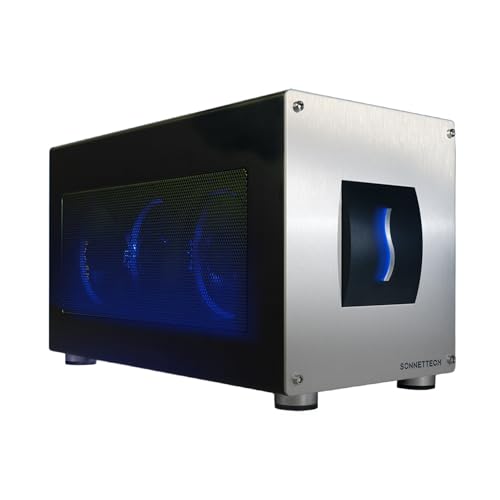
Sonnet Breakaway Box 850 T5: supplied PSU and conventional enclosure
Sonnet’s GPU-850T5 is the clearest alternative when you want an enclosed eGPU with its PSU already supplied. Sonnet states that it includes an 850W supply, supports GPUs up to 345 x 155 x 70 mm, returns 100W to the host, and adds downstream Thunderbolt, three USB-A ports, and 5GbE.
Its host floor is narrower than a casual connector check: Windows 11 2024H2 or newer, plus a Thunderbolt 5, Thunderbolt 4, or GPU-compatible USB4 computer. Confirm the exact card dimensions and power needs. Manufacturer performance and quietness claims are not independent measurements.
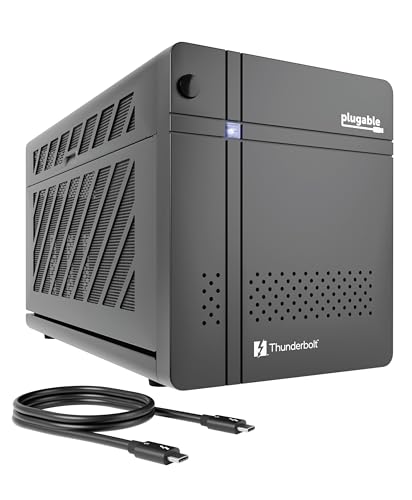
Plugable TBT5-AI: supplied PSU and more ports
Plugable’s TBT5-AI combines an included 850W PSU with up to 600W allocated to the GPU. It adds downstream Thunderbolt 5, one USB-C, three USB-A, and 2.5GbE, and Plugable rates host charging at 96W. Maximum GPU dimensions are 346 x 170 x 77 mm and up to 3.5 slots.
The host requirements are strict. Plugable specifies Windows 11 and an 11th-generation Intel or newer processor, or AMD Zen 4 or newer, with external-graphics-capable Thunderbolt 5, Thunderbolt 4, or USB4. Plugable excludes Thunderbolt 3, ordinary USB-C, macOS, Linux, and ChromeOS. The supplied PSU does not remove the need to check the exact card, connectors, and 600W GPU allocation.
MINISFORUM DEG2: open frame with separate Thunderbolt and OCuLink paths
The MINISFORUM DEG2 suits a different buyer. It is an open-frame platform with Thunderbolt 5 and a separate OCuLink path, an interface switch, M.2 2280, two USB-A ports, and 2.5GbE. MINISFORUM specifies OCuLink as PCIe 4.0 x4 and supports a buyer-supplied ATX or SFX PSU.
Do not merge the two host paths. Thunderbolt and OCuLink have different connections and requirements. The current first-party page also lacks a complete operating-system and exact GPU-fit matrix, so resolve those omissions for your system before checkout. When we checked the Amazon listing on July 28, 2026, it matched ASIN B0GDY4HZBH, the MINISFORUM brand and maker, the DEG2 model, and an active offer. The listing left its optional part-number field blank, so confirm the model and seller details at checkout instead of relying on that field.
Razer Core X V2 checkout checklist
Confirm every line before ordering:
- Product identity is Razer Core X V2.
- First-party family model is
RC21-0227. - Amazon model and part are
RC21-02270200-R3U1. - ASIN is
B0FFQFDZWX. - The computer runs Windows 11.
- The exact host maker explicitly supports external graphics over its TB5, TB4, or USB4 connection.
- The exact board-partner GPU is supported and fits within 360 x 82 x 170 mm.
- The bracket, cooler, retention, power plug, and cable bend also fit.
- The standard ATX PSU is no larger than 150 x 160 x 86 mm.
- PSU capacity covers the exact GPU requirement plus Razer’s additional 230W.
- The PSU has the correct GPU connectors and meets transient guidance.
- You have the appropriate PSU-specific regional AC lead.
- You understand that the GPU and PSU are sold separately.
- The included 0.7m Thunderbolt 5 cable reaches without strain.
- The laptop can use the offered charging level, up to 140W.
- You do not expect downstream dock ports from the enclosure.
If one identity, host, fit, or power line remains uncertain, resolve it with the exact manufacturer before checkout. Do not average conflicting dimensions or infer support from a connector.
Frequently asked questions
Does the Razer Core X V2 include a graphics card?
No. Razer sells the enclosure without a GPU. You select a compatible desktop graphics card and verify its exact board dimensions, bracket, connectors, and support.
Does it include a power supply?
No. You supply a standard ATX PSU no larger than 150 x 160 x 86 mm. Razer’s capacity rule is the exact GPU requirement plus at least 230W for the enclosure, followed by checks for the correct connectors and transient needs.
Is the Razer Core X V2 compatible with Mac?
No. Razer’s current support material says it is not compatible with Mac.
Does every Thunderbolt 5 laptop support it?
No. Razer requires a host with external-graphics support. Confirm that capability for the exact laptop model and configuration, even when it has Thunderbolt 5.
Can it work over Thunderbolt 4 or USB4?
Razer lists Thunderbolt 4 and USB4 as possible paths when the exact host supports external graphics. USB4 by itself does not prove that capability.
What is the maximum GPU size?
Use the manual’s 360 x 82 x 170 mm maximum. Razer’s store and support pages contain broader or conflicting four-slot, 3.5-slot, and dimension language, so the tightest complete-manual figure is the safer checkout boundary.
Is 80Gbps the graphics-card speed?
No. It is Razer’s stated ceiling for the Thunderbolt 5 link. The enclosure uses PCIe 4.0 x4 internally, and neither label is a measured frame-rate or compute result.
Is PCIe 4.0 x4 the same as desktop PCIe x16?
No. PCIe 4.0 x4 describes four PCIe lanes. Do not infer desktop x16 electrical bandwidth from the physical card format.
Can it charge the laptop?
Razer states up to 140W Power Delivery 3.1 over the host connection. The actual result depends on what the exact laptop accepts and how much power it needs under load.
Does it work as a docking station?
No. Razer says it has no connection ports other than the upstream Thunderbolt 5 port. It does not add ordinary USB, Ethernet, audio, storage readers, or downstream Thunderbolt.
Where does an external monitor connect?
The manual shows an optional external monitor connected directly to the installed GPU, not to a video port on the enclosure.
Evidence boundary
This review uses Razer’s current product page, support page, GPU list, and complete user manual for the Core X V2, plus the manufacturers’ current pages for the three alternatives. Amazon identity and offer presence were checked for the exact four ASINs on July 28, 2026. Those sources establish identities, stated dimensions, compatibility boundaries, topology, power rules, charging ceilings, and port sets. They do not establish independent performance, temperature, noise, wake, reliability, universal hot-plug behavior, current price, stock quantity, or delivery.
Final recommendation
The Razer Core X V2 is worth buying when you want a focused, enclosed, bring-your-own-parts eGPU and have already cleared the host, GPU, and PSU gates. Its best case is a Windows 11 computer with explicit external-graphics support, a card comfortably inside 360 x 82 x 170 mm, a compatible ATX PSU inside 150 x 160 x 86 mm, and no need for downstream dock ports.
Do not buy it because Thunderbolt 5 sounds fast or because the card family appears on a compatibility list. Buy it only after the exact board and power system fit. If you want the PSU supplied, Sonnet is the cleaner conventional alternative. If you also need more ports and meet a stricter host floor, consider Plugable. If you specifically want an open-frame platform with separate Thunderbolt and OCuLink paths, evaluate the DEG2’s missing compatibility details before checkout.