The Short Version
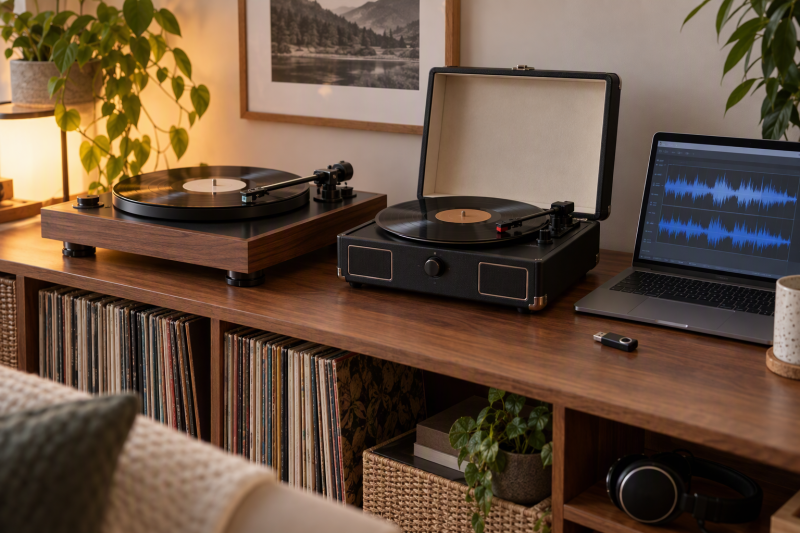
A USB turntable or record player has a stated digital-recording or encoding path for transferring vinyl. Compare where the recording goes, whether the deck is manual or automatic, its drive system, its available speeds, its preamp, and whether all-in-one extras help or distract.
Choose the Gemini TT-5000 for direct drive, built-in preamp, and listed 48 kHz/16-bit USB archiving with Audacity. Choose the Audio-Technica AT-LP60XBT-USB for fully automatic belt drive and USB conversion. The DIGITNOW M504 is an all-in-one choice for vinyl-to-MP3 recording to USB or SD.
Every pick here lists a USB recording, USB encoding, or vinyl-to-digital transfer path. A digital archive needs sensible file organization, enough storage, and a recording session that lets each record side play through without unnecessary interruption.
Quick Picks
- Best direct-drive archive path: Gemini TT-5000 for USB, Audacity, and 48 kHz/16-bit listed capture.
- Best automatic option: Audio-Technica AT-LP60XBT-USB for fully automatic belt-drive playback with USB.
- Best three-speed manual deck: Audio-Technica AT-LP120XBT-USB for direct drive, 33/45/78 RPM, and switchable preamp.
- Best USB/SD recorder: FEKTIK M36-FEK for stated USB/SD/MMC encoding and built-in extras.
How We Picked
Each turntable here identifies USB recording, conversion, or encoding in its listing. We separate a computer USB path from self-contained USB/SD encoding, then check drive type, speeds, operation, phono preamp, and the recording controls. We don’t treat Bluetooth or speakers as proof that a deck can digitize.
The picks here are not analog-only turntables or a generic USB audio interface. A USB recording turntable has its own stated source path. A phono preamp is a different purchase for an analog setup that needs a separate signal chain.
USB Turntables Compared
| Image | Product | Details | Check Price |
|---|---|---|---|
 | Pioneer DJ PLX-500 | Best fit: Direct-drive laptop digitizing Drive: Direct drive USB: Records to computer Output: Phono/line Layout: DJ-style | Check Price on Amazon |
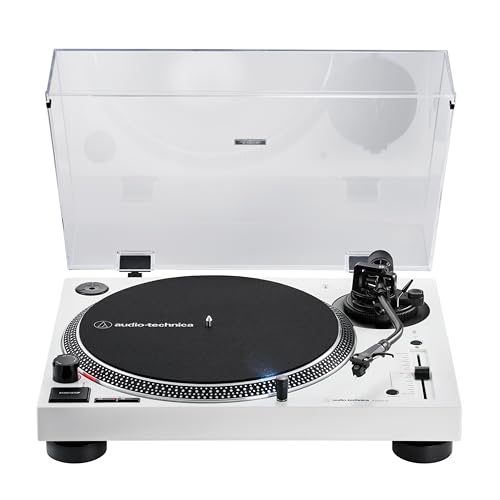 | Audio-Technica AT-LP120XBT-USB | Best fit: Manual three-speed conversion Drive: Direct drive Speeds: 33, 45, 78 RPM USB: Computer connection Preamp: Switchable | Check Price on Amazon |
 | DIGITNOW M504 | Best fit: All-in-one USB/SD encoding Encoding: Vinyl to USB/SD MP3 Speeds: 33, 45, 78 RPM Extras: CD, cassette, radio Speakers: Twin detachable | Check Price on Amazon |
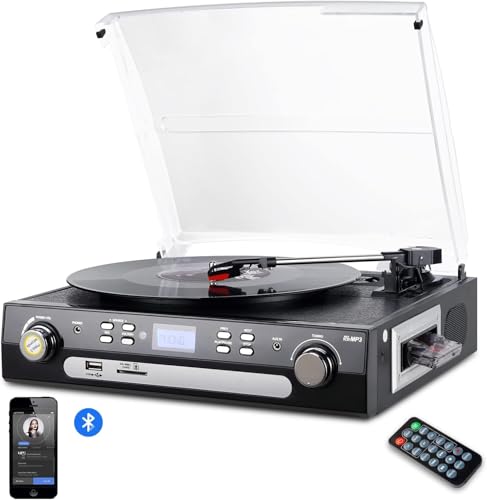 | FEKTIK M36-FEK | Best fit: USB/SD all-in-one recorder Encoding: Vinyl to USB/SD/MMC Drive: Belt drive Speeds: 33, 45, 78 RPM Extras: Cassette and radio | Check Price on Amazon |
 | Gemini TT-5000 | Best fit: Computer archiving with Audacity Drive: Direct drive USB: Up to 48 kHz/16-bit listed Preamp: Built-in phono Controls: Anti-skate and pitch | Check Price on Amazon |
 | Audio-Technica AT-LP60XBT-USB | Best fit: Automatic USB digitizing Drive: Belt drive Operation: Fully automatic Speeds: 33-1/3 and 45 RPM Wireless: Bluetooth | Check Price on Amazon |
1. Pioneer DJ PLX-500 — Best for Direct-Drive Laptop Digitizing
For a buyer who wants to digitize records and keep a deck-style home listening setup, Pioneer DJ lists the PLX-500 as a direct-drive turntable with USB output that records vinyl straight to a computer. It also has phono/line output, a DJ-style layout, and a dust-cover sleeve stand.
Pros
- USB output records vinyl straight to a computer through a stated direct digitizing path.
- Direct drive and a DJ-style layout suit buyers who also want deck-like manual controls.
- Phono/line output offers a stated connection choice for speakers or a stereo system.
Cons
- The listing does not state a fully automatic operation mode for unattended side playback.
- Pioneer does not list USB/SD standalone encoding like DIGITNOW and FEKTIK.
2. Audio-Technica AT-LP120XBT-USB — Best for Manual Three-Speed Digitizing
For a buyer who needs 78 RPM and wants to decide the recording workflow on the laptop, Audio-Technica lists a fully manual direct-drive turntable with USB computer connection, Bluetooth, 33/45/78 RPM, adjustable anti-skate, variable pitch, and a switchable phono preamp. Next to the automatic AT-LP60XBT-USB, it adds the third speed, anti-skate, and pitch control.
Pros
- Listed 33, 45, and 78 RPM cover more record-speed needs than the automatic LP60XBT-USB.
- A switchable preamp and USB cable provide stated line/phono and computer connection flexibility.
- Adjustable anti-skate and variable pitch are named manual deck controls for a hands-on workflow.
Cons
- Fully manual operation requires the user to start and stop each record side.
- Bluetooth is a playback feature, not a replacement for the stated USB conversion path.
3. DIGITNOW M504 — Best for All-in-One USB and SD Encoding
For a buyer who wants records digitized to removable storage and also played through one all-in-one entertainment unit, DIGITNOW lists vinyl-to-MP3 recording directly to USB or SD, three speeds, twin detachable speakers, CD, cassette, radio, Bluetooth, and a built-in amplifier.
Pros
- Vinyl-to-MP3 recording to USB or SD gives a stated standalone encoding route.
- Three speeds and a 45-RPM adapter support 33, 45, and 78 RPM records.
- Speakers, cassette, CD, and radio put several playback functions in one unit.
Cons
- The all-in-one layout adds components that a laptop-only archive workflow may not need.
- The listing describes USB/SD encoding rather than a specified computer capture resolution.
4. FEKTIK M36-FEK — Best for USB and SD All-in-One Encoding
For a buyer who values recording straight to removable media plus household playback extras, FEKTIK lists a belt-drive three-speed turntable that encodes vinyl to USB, SD, or MMC storage. It includes speakers, cassette playback, AM/FM radio, a remote, RCA output, headphone jack, and Bluetooth. Next to DIGITNOW, it also lists MMC storage as a recording destination.
Pros
- USB, SD, and MMC encoding provides several stated removable-storage destinations for vinyl files.
- Belt drive and 33/45/78 RPM give a clear three-speed playback specification.
- RCA output and headphone jack offer listed wired listening connections beyond the integrated speakers.
Cons
- The all-in-one format is less focused than a direct-drive computer-archive deck.
- Its listing does not state a computer USB capture figure like Gemini’s 48 kHz/16-bit path.
5. Gemini TT-5000 — Best for Computer Archiving with Audacity
Gemini lists a direct-drive TT-5000 with USB connection to Mac or PC, included Audacity software, and archive capture up to 48 kHz/16-bit. It also lists a built-in phono preamp, switchable RCA phono/line output, anti-skate, hydraulic cueing, pitch control, and 33/45/78 RPM.
The Gemini deck is the clearest laptop-archive choice because its listing names both the computer path and the capture figure. It works for a buyer who wants a manual turntable with recording controls and does not need automatic operation or USB/SD standalone storage.
Pros
- USB to Mac or PC with 48 kHz/16-bit listed capture directly serves laptop archiving.
- Included Audacity software gives the buyer a named starting application for recording sessions.
- Built-in phono preamp and switchable phono/line output simplify stated connection choices.
- Anti-skate, hydraulic cueing, and pitch controls support a detailed manual deck workflow.
Cons
- Manual direct-drive operation needs attention at the beginning and end of each record side.
- It does not offer the all-in-one CD, cassette, radio, and speaker features of DIGITNOW.
6. Audio-Technica AT-LP60XBT-USB — Best for Automatic USB Digitizing
The AT-LP60XBT-USB is a fully automatic belt-drive turntable with USB, Bluetooth, analog output, and a listed 33-1/3 and 45 RPM speed range. Its integral Dual Moving Magnet cartridge and included USB cable suit a laptop owner who values automatic record playback and a stated digital conversion path.
It does not list 78 RPM or the manual controls of the LP120XBT-USB. Choose it when your records and routine fit its two listed speeds and you value full automation more than pitch, anti-skate, or three-speed capability.
Pros
- Fully automatic operation reduces manual start and stop steps during ordinary record playback.
- USB and analog outputs provide two stated routes into a laptop or existing audio setup.
- Bluetooth adds a listed wireless listening option without changing the USB digitizing path.
Cons
- Its listed 33-1/3 and 45 RPM support excludes 78 RPM records.
- It lacks the manual pitch and anti-skate controls listed on direct-drive alternatives.
Buying Guide: Choosing a USB Turntable for Digital Encoding
Pick computer capture or standalone removable-media encoding
Pioneer, both Audio-Technica models, and Gemini identify a USB computer connection or conversion path. DIGITNOW and FEKTIK specifically list vinyl encoding to USB and SD storage, with FEKTIK also naming MMC. Which path you pick decides whether the laptop is central to each recording session.
Choose computer capture when files will be recorded and organized on the laptop as they are made. Choose removable-media encoding when the turntable should create files independently, then move them later. Do not assume a USB playback port alone means the product records vinyl.
Choose manual or automatic operation deliberately
AT-LP120XBT-USB and Gemini are manual direct-drive turntables, while AT-LP60XBT-USB is fully automatic belt drive. The manual decks list controls such as anti-skate, pitch, or cueing. The automatic model has a simpler start-and-stop routine.
The operation style you pick changes the digitizing session. A manual deck suits a user willing to manage each side and control, while automatic play may be more convenient for a straightforward laptop archive. Neither mode replaces monitoring the recording file and its storage location.
Check speeds against the actual record collection
AT-LP120XBT-USB, DIGITNOW, FEKTIK, and Gemini list 33, 45, and 78 RPM. AT-LP60XBT-USB lists 33-1/3 and 45 RPM. Record speed is a hard compatibility criterion, because a deck can be otherwise feature-rich yet unsuitable for a collection that includes 78 RPM discs.
Make the speed check before comparing speakers, Bluetooth, or styling. A collection made up of only LPs and 45s can use the automatic Audio-Technica model, but a three-speed collection needs one of the models whose listing actually includes 78 RPM.
Treat a built-in preamp as a connection decision
Pioneer lists phono/line output, AT-LP120XBT-USB lists a switchable preamp, and Gemini lists a built-in phono preamp with switchable RCA phono/line output. Those options affect how the turntable connects to powered speakers, a receiver, or an existing phono-input system.
Phono/line output is separate from USB digitizing. Confirm the destination device before selecting the output mode. A laptop recording path may be USB while casual playback uses a different analog connection. The turntable’s listed connection choices should match both uses.
Keep all-in-one extras in proportion to the archive job
DIGITNOW and FEKTIK combine speakers and encoding with radio, cassette, and other playback functions. Those extras suit a buyer who wants one living-room unit, but they add complexity compared with a direct-drive deck focused on USB conversion and a laptop workflow.
Use all-in-one features only when they solve a playback need you have. A laptop digitizing station may be cleaner with Gemini or Pioneer plus separate speakers, while removable-media encoding and integrated speakers can be useful where a computer is not always present.
Frequently Asked Questions
Can a USB turntable digitize records directly to a laptop?
Yes, when the listing names a computer USB path. Pioneer says its USB output records vinyl to a computer, Gemini names Mac or PC USB and Audacity, and both Audio-Technica models list USB conversion or computer connection.
Check the stated recording destination. DIGITNOW and FEKTIK instead emphasize USB/SD encoding, which can create files without the laptop handling the initial capture. Select the route that matches where the archive work will happen.
Do I need a phono preamp for a USB turntable?
The answer depends on the playback connection. Gemini lists a built-in phono preamp, Pioneer lists phono/line output, and AT-LP120XBT-USB lists a switchable preamp. Those features can simplify connecting to speakers or a receiver.
For laptop digitizing, the USB path is the relevant listed route. A phono preamp is relevant to analog playback connections, so check the speakers or receiver as well as the computer before choosing a turntable.
Is direct drive better for digitizing vinyl?
Direct drive is a stated feature on Pioneer, AT-LP120XBT-USB, and Gemini. Belt drive is listed on FEKTIK and AT-LP60XBT-USB. The right choice also depends on automation, speeds, output, and whether the recording workflow uses a laptop or removable media.
Use digitizing features as the primary filter. Gemini’s listed 48 kHz/16-bit computer capture and Audacity workflow may be more important to an archive project than drive type alone, while automatic operation can be more useful for a simple two-speed collection.
Which models support 78 RPM records?
AT-LP120XBT-USB, DIGITNOW, FEKTIK, and Gemini list 33, 45, and 78 RPM. AT-LP60XBT-USB lists only 33-1/3 and 45 RPM, so it is not the choice for a collection that requires 78 RPM playback.
The record-speed listing is a direct eligibility check. Review the collection before choosing the turntable, because conversion features cannot compensate for a missing playback speed.
Is Bluetooth useful for digitizing vinyl?
Bluetooth is a stated listening feature on both Audio-Technica models and on the all-in-one models. It can be useful for playback to compatible speakers, but the listings identify USB or encoding as the digital-recording path.
Keep Bluetooth and USB recording separate in the buying decision. The laptop archive should use the turntable’s stated conversion path, while Bluetooth can be evaluated as an additional convenience for listening outside the recording session.
Bottom Line
Choose the Gemini TT-5000 for a named Mac/PC USB path with Audacity and 48 kHz/16-bit listed capture, the Audio-Technica AT-LP60XBT-USB for fully automatic USB conversion, or the FEKTIK M36-FEK for USB/SD/MMC removable-media encoding.